2012 SKODA SUPERB air conditioning
[x] Cancel search: air conditioningPage 98 of 235

Setting the air conditioning system
Recommended basic settings of the control elements of the air conditioning sys-
tem for the respective operating modes:
Set-up Setting of the control dial
Button
Air outlet vents 2 A B C 1 4
Defrost/defog windscreen and
side windows
a) Desired tempera-
ture 3 or 4
Automatically
switched on Do not switch on Open and align with the side
window
The fastest heating To the right up to
the stop 3
Switched off Briefly switch on
Opening
Comfortable heating Desired tempera-
ture 2 or 3
Switched off Do not switch on
Opening
The fastest cooling To the left up to
the stop briefly 4, then
2 or 3 Activated Briefly switch on
Opening
Optimal cooling Desired tempera-
ture 1, 2 or 3
Activated Do not switch on Open and align to the roof
Fresh air mode - ventilation To the left up to
the stop Desired position
Switched off Do not switch on
Openinga)
We recommend that you do not use this setting in countries with high humidity levels. This can result in heavy cooling of the window glass and the following fogging from outside. Note
■ Controls A
, B
, C
and the button 1
and 4
» Fig. 108 on page 95
.
■ Air outlet vents 2 » Fig. 106 on page 94 .
■ We recommend that you leave the air outlet vents 3 » Fig. 106 on page 94 in the
opened position. ÐRecirculated air mode
Recirculated air mode prevents polluted air outside the vehicle from getting into
the vehicle, for example when driving through a tunnel or when standing in a
traffic jam.
Switching on
› Press the button
4
» Fig. 108
on page
95 and the indicator light in the but-
ton illuminates. Switching off
› Press the button
again - the indicator light in the button goes out.
Recirculated air mode is switched off automatically if the air distribution control C
» Fig. 108
on page
95 is turned to position . Recirculated air mode can be
switched on again from this setting by repeatedly pressing the button .
WARNING
Do not leave recirculated air mode on over a longer period of time, as “stale”
air can cause fatigue of the driver and passengers, reduce attention levels and
also cause the windows to mist up. The risk of having an accident increases.
Switch off recirculated air mode as soon as the windows start to mist up. Ð
96 Using the system
Page 99 of 235
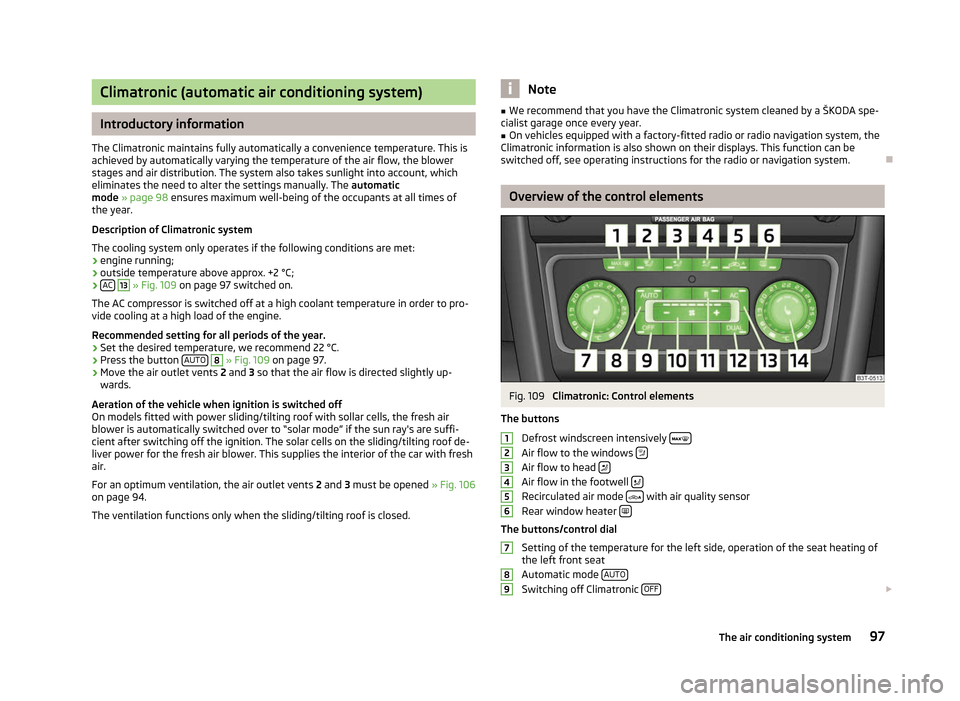
Climatronic (automatic air conditioning system)
Introductory information
The Climatronic maintains fully automatically a convenience temperature. This is
achieved by automatically varying the temperature of the air flow, the blower
stages and air distribution. The system also takes sunlight into account, which
eliminates the need to alter the settings manually. The automatic
mode » page 98 ensures maximum well-being of the occupants at all times of
the year.
Description of Climatronic system
The cooling system only operates if the following conditions are met:
› engine running;
› outside temperature above approx. +2 °C;
› AC 13
» Fig. 109 on page 97 switched on.
The AC compressor is switched off at a high coolant temperature in order to pro-
vide cooling at a high load of the engine.
Recommended setting for all periods of the year.
› Set the desired temperature, we recommend 22 °C.
› Press the button
AUTO 8
» Fig. 109
on page 97.
› Move the air outlet vents
2 and 3 so that the air flow is directed slightly up-
wards.
Aeration of the vehicle when ignition is switched off
On models fitted with power sliding/tilting roof with sollar cells, the fresh air
blower is automatically switched over to
“solar mode” if the sun ray's are suffi-
cient after switching off the ignition. The solar cells on the sliding/tilting roof de-
liver power for the fresh air blower. This supplies the interior of the car with fresh
air.
For an optimum ventilation, the air outlet vents 2 and 3 must be opened » Fig. 106
on page 94.
The ventilation functions only when the sliding/tilting roof is closed. Note
■ We recommend that you have the Climatronic system cleaned by a
ŠKODA spe-
cialist garage once every year. ■ On vehicles equipped with a factory-fitted radio or radio navigation system, the
Climatronic information is also shown on their displays. This function can be
switched off, see operating instructions for the radio or navigation system. Ð Overview of the control elements
Fig. 109
Climatronic: Control elements
The buttons Defrost windscreen intensively Air flow to the windows
Air flow to head
Air flow in the footwell
Recirculated air mode
with air quality sensor
Rear window heater The buttons/control dial
Setting of the temperature for the left side, operation of the seat heating of
the left front seat
Automatic mode AUTO Switching off Climatronic
OFF £1
2
3
4
5
6
7
8
9
97
The air conditioning system
Page 100 of 235

Setting the blower speed
Depending upon vehicle equipment: Button for direct switching on/off of
auxiliary heating » Fig. 110 on page 101, or switching on/off of windscreen
heater » Fig. 43 on page 58.
Switching on/off of the temperature setting in dual mode DUALSwitching the cooling system on and off
ACSetting of the temperature for the right side, operation of the seat heating of
the right front seat Note
Below the top row of buttons is located the interior temperature sensor. Do not
stick anything on or cover the sensor, otherwise it could have an unfavourable ef-
fect on the Climatronic. ÐAutomatic mode
The automatic mode is used in order to maintain a constant temperature and to
demist the windows in the interior of the car.
Switching on
› Set a temperature between +18 °C and +26
℃.
› Move the air outlet vents
2 and 3 » Fig. 106 on page 94 so that the air flow is
directed slightly upwards.
› Press the button
AUTO 8
» Fig. 109
on page
97. The indicator light in the top
right or left corner lights up, depending on which mode was last selected.
If the indicator light in the top right corner of the button AUTO lights up, the Cli-
matronic operates in
“HIGH” mode. The “HIGH” mode is the standard setting of
the Climatronic.
When pressing again the button AUTO , the Climatronic changes into the “LOW”
mode and the indicator light in the top left corner lights up. The Climatronic uses
only in this mode the lower blower speed. However taking into account the noise
level, this is more comfortable, yet be aware that the effectiveness of the air con-
ditioning system is reduced particularly if the vehicle is fully occupied.
By pressing the button AUTO again, it is changed to “HIGH” mode.
Automatic mode is switched off by pressing one of the buttons for the air distri-
bution or by increasing/decreasing the blower speed. The temperature is never-
theless regulated. Ð10
11
12
13
14 Switching the cooling system on and off
Switching the cooling system on and off › Press the button
AC » Fig. 109
on page
97. The indicator light in the button
lights up.
› When you again press the button
AC , the air conditioning system is switched
off. The indicator light in the button goes out. Only the function of the ventila-
tion remains active when no lower temperature than the outside temperature
can be reached. Ð Setting temperature
The interior temperature for the left and right side can be set separately.
› The temperature for both sides can be set with the control dial 7
» Fig. 109 on
page 97 after switching on the ignition.
› If you wish to set the temperature for the right side, turn the control dial 14
.
The indicator light in the button DUAL lights up, this indicates that differing
temperatures for the left and right side can be set.
If the indicator light in the button DUAL 12
» Fig. 109
on page 97 is illuminated,
the temperature for both sides cannot be set with the control dial 7
. You can re-
activate this function by pressing the button DUAL . The indicator light in the but-
ton goes out.
The interior temperature can be set between +18 °C and +26 ℃. The interior tem-
perature is regulated automatically within this range. If a temperature lower than
+18 °C is selected, a blue symbol lights up at the start of the numerical scale. If a
temperature higher than +26 °C is selected, a red symbol lights up at the start of
the numerical scale. In both limit positions the Climatronic operates at maximum
cooling or heating capacity, respectively. The temperature is not controlled in this
case.
Lengthy and uneven distribution of the air flow out of the vents (especially
around the feet) and large differences in temperature, for example, when getting
out of the vehicle, can cause susceptible individuals to catch a cold. Ð Recirculated air mode
Recirculated air mode largely prevents polluted air from outside the vehicle get-
ting into the vehicle, for example, when driving through a tunnel or when stand-
ing in a traffic jam. If a considerable increase in concentration of pollutants is rec-
ognized by the air quality sensor, when the automatic air distribution control is £
98 Using the system
Page 101 of 235

switched on, the air distribution control will temporarily be switched off. If the
concentration of pollutants decreases to the normal level, the air distribution con-
trol is automatically switched off so that fresh air can be guided into the vehicle
interior. In recirculated air mode air is sucked out of the interior of the vehicle and
then fed back into the interior. When the automatic air distribution control is
switched on, an air quality sensor measures the concentration of pollutants in the
drawn in air.
Switching recirculated air mode on
› Repeatedly press the button
5
» Fig. 109
on page 97 until the indicator
light on the left side of the button is illuminated.
Switch on automatic air distribution control
› Repeatedly press the button
until the indicator light on the right side of
the button is illuminated.
Switch off automatic air distribution control temporarily › If the air quality sensor does not automatically switch on the air distribution
control in the event of an unpleasant odour, you can switch it on yourself by
pressing the button . The indicator light lights up in the button on the left
side.
Switching recirculated air mode off › Press the button
AUTO or repeatedly press the button
until the indicator
lights in the button go out. WARNING
Do not leave recirculated air mode on over a longer period of time, as “stale”
air can cause fatigue of the driver and passengers, reduce attention levels and
also cause the windows to mist up. The risk of having an accident increases.
Switch off recirculated air mode as soon as the windows start to mist up. Note
■ If the windscreen mists up, press the button 1
» Fig. 109 on page 97.
Press the button AUTO when the windscreen is demisted.
■ The automatic air distribution control operates only if the outside temperature
is higher than approx. 2 °C. Ð Controlling blower
The Climatronic system controls the blower stages automatically in line with the
interior temperature. However, the blower stages can be manually adapted to
suit your particular needs.
› Repeatedly press the button
10
» Fig. 109
on page 97 on the left side (re-
duce blower speed) or on the right side (increase blower speed).
If the blower is switched off, the Climatronic system is switched off.
The set blower speed is displayed above the button when the respective num-
ber of indicator lights come on. WARNING
■ “Stale air”
may result in fatigue in the driver and occupants, reduce attention
levels and also cause the windows to mist up. The risk of having an accident
increases.
■ Do not switch off the Climatronic system for longer than necessary.
■ Switch on the Climatronic system as soon as the windows mist up. Ð Defrosting windscreen
Switching on › Press the button
1
» Fig. 109
on page 97.
› Press the button
11
» Fig. 109
on page 97.
Switching off
› Once again press the button
or the button
AUTO .
› Once again press the button
.
The temperature control is controlled automatically. More air flows out of the air
outlet vents 1 » page 94. Ð
99
The air conditioning system
Page 103 of 235

Direct switching on/off
Fig. 110
Button for direct switching on/
off of the auxiliary heating (aux-
iliary heating and ventilation) on
the operating part of the air con-
ditioning system
First read and observe the introductory information and safety warn-
ings on page 100.
The auxiliary heating (auxiliary heating and ventilation) can be
directly switched
on or off at any time using the button » Fig. 110 on the operating part of the
air-conditioning system, on the operating part of the Climatronic system or via the
radio remote control » page 101.
If the auxiliary heating and ventilation is not switched off earlier, it switches off
automatically after the set operating period, in the menu Running time has ex-
pired. ÐSystem settings
First read and observe the introductory information and safety warn-
ings on page 100.
The following menu items can be selected in the menu
Aux. heating in the infor-
mation display (depending on the equipment fitted in the vehicle):
■ Weekday - Set the current weekday.
■ Time - Set the desired running time in 5
minute increments. The running time
can be 10 to 60 minutes.
■ Mode - Set the desired heating/ventilation mode.
■ Start time 1-3 - In each pre-set time, the day and the time (hour and minute) can
be set for switching on the auxiliary heating and/or ventilation. An empty posi-
tion can be found between Sunday and Monday when selecting the day. If this
empty position is selected, the activation is performed without taking into ac-
count the day.
■ Activate - Enable pre-set mode.
ä
ä ■
Dectivate - Disable pre-set mode.
■ Factory setting - Restore factory setting.
■ Back - Return to main menu.
Only one programmed pre-set time can be active.
The last programmed pre-set time remains active.
After the auxiliary heating activates at the set time, it is necessary to pre-set a
time again.
If the pre-set menu is closed by selecting the menu item Back or if no changes
are made on the display for more than 10
seconds, the set values are stored, but
the pre-set time is not activated.
An indicator light on the button » Fig. 110 on page 101 is illuminated when the
system is running.
The running system deactivates after expiration of the operating period or can be
deactivated earlier by pressing the button to directly switch on/off the auxiliary
heating or by using the radio remote control.
Ð Radio remote control
Fig. 111
Auxiliary heating: Radio remote control
First read and observe the introductory information and safety warn-
ings on page 100.
›
For switching on, press the button
ON » Fig. 111.
› For switching off, press the button
OFF .
The transmitter and the battery are housed in the housing of the remote control.
The receiver is located in the interior of the vehicle. £
ä
101
The air conditioning system
Page 163 of 235

Avoid short distances
Fig. 153
Principle sketch: Fuel consump-
tion in l/100 km at different tem-
peratures
Short distances result in an above-average high fuel consumption. We therefore
recommend avoiding distances of less than 4 km if the engine is cold.
A cold engine consumes the most fuel immediately after the start. Fuel consump-
tion drops to 10 litres/100 km after just 1 kilometre. The consumption stabilises
once the engine and catalytic converter have reached their operating tempera-
ture.
An important factor in this connection is also the ambient temperature. The im-
age » Fig. 153 shows the different levels of fuel consumption after driving a cer-
tain distance at a temperature of +20 °C and a temperature of -10 °C. Your vehicle
has a higher fuel consumption in the winter than in the summer. ÐChecking tyre inflation pressures
Tyres which are correctly inflated save fuel.
Always ensure the tyre inflation pressure is correct. The rolling resistance will be
increased if the tyre filling pressure is too low. This will not only increase fuel con-
sumption but also tyre wear and the driving behaviour will worsen.
Always check the tyre inflation pressure when the tyres are cold. ÐAvoid unnecessary ballast
Transporting ballast costs fuel.
Each kilogramme of weight increases the fuel consumption. It is worth checking
the boot to avoid transporting any unnecessary ballast. It is particularly in town traffic, when one is accelerating quite often, that the ve-
hicle weight will have a significant effect upon the fuel consumption. A rule of
thumb here is that an increase in weight of 100 kilograms will cause an increase
in fuel consumption of about 1 litre/100 kilometres.
At a speed of 100 - 120 km/h, your vehicle that is fitted with a roof rack cross
member without a load will use use about 10 % more fuel than normal due to the
increased aerodynamic drag.
Ð Saving electricity
When the engine is running, the alternator generates and supplies electrical pow-
er. If more electrical components of the electrical system are switched on, more
fuel is needed to operate the alternator. We therefore recommend switching off
electrical components if these are no longer required. Ð Environmental compatibility
Environmental protection has played a major role in the design, selection of mate-
rials and manufacture of your new
ŠKODA. Particular emphasis has been placed
on the following points:
Design measures
› Joints designed to be easily detached.
› Simplified disassembly due to the modular structure system.
› Improved purity of different classes of materials.
› Identification of all plastic parts in accordance with VDA Recommendation 260.
› Reduced fuel consumption and exhaust emission CO
2.
› Minimum fuel leakage during accidents.
› Reduced noise.
Choice of materials › Extensive use of recyclable material.
› Air conditioning filled with CFC-free refrigerant.
› No cadmium.
› No asbestos.
› Reduction in the “vaporisation” of plastics.
Manufacture › Solvent-free cavity protection.
› Solvent-free protection of the vehicle for transportation from the production
plant to the customer. £
161
Driving and the Environment
Page 210 of 235

Fuses in the dash panel
Fig. 183
Fuse box cover/Schematic diagram of the fuse box
First read and observe the introductory information and safety warn-
ings on page 207.
The fuses are located on the left side of the dash panel behind a cover.
›
Remove the cover for the fuse box using a screwdriver
» Fig. 183.
› Replace the cover once the fuse has been changed.
Fuse assignment in the dash panel No. Power consumer
1 Diagnostic socket, engine control unit, fuel pump relay, fuel pump
control unit
2 Control unit for ABS, ESC, switch for the tyre control display, brake
sensor
3 Switch and airbag control unit
4 WIV, tail lights, dimming mirrors, pressure sensor, telephone preinstal-
lation
5 Control unit for headlight beam adjustment and headlight swivel, con-
trol unit for parking aid, control unit for park assist
6 Instrument cluster, control unit for electromechanical power steering,
Haldex, selector lever lock, power supply for data bus, AG
7 Valve heating, air mass meter
8 Control unit for trailer detection 9 Relay for auxiliary heating and ventilation
10 Adaptive left main headlight ä
No. Power consumer
11 Adaptive right main headlight
12 Not assigned
13 Diagnostic socket, light switch, rain sensor, clock
14 Central locking system and bonnet lid 15 Central control unit - interior lights
16 The air conditioning system 17 Not assigned
18 Phone 19 Instrument cluster, windscreen wiper lever, and turn signal lever
20 KESSY 21 KESSY ELV
22 Air blower for Climatronic
23 Front power window, central locking of the front doors
24 Selector lever lock, AG 25 Rear window heater, relay for auxiliary heating and ventilation
26 Power socket in the boot 27 Fuel pump relay, control unit for fuel pump, injection valves
28 Electric boot lid 29 AG, Haldex
30 Ventilated front seats 31 DVD pre-installation
32 Front power window, central locking system of the rear doors
33 Electric sliding/tilting roof
34 Alarm, spare horn 35 front and rear lighter
36 Headlight cleaning system 37 Heated front seats
38 Heated rear seats 39 Rear window wiper
40 Fan air-conditioning system, relay for auxiliary heating and ventilation 41 Not assigned
42 Light switch £208
Do-it-yourself
Page 218 of 235

Technical data
Technical data
Introductory information
The details given in the vehicle's technical documentation always take prece-
dence over the details in the Owner's Manual. Please refer to the official vehicle
registration documents or consult a
ŠKODA Service Partner to determine which
engine your vehicle is equipped with.
The listed performance values were determined without performance-reducing
equipment, e.g. air conditioning system.
Vehicle identification number (VIN)
The vehicle identification number - VIN (vehicle body number) is stamped into the
engine compartment on the right hand suspension strut dome. This number is al-
so located on a sign on the lower left hand edge below the windscreen (together
with a VIN bar code).
Engine number
The engine number is stamped into the engine block. ÐData on the vehicle data sticker and the type plate
Fig. 194
Vehicle data sticker/type plate Vehicle data sticker
The vehicle data sticker
» Fig. 194 is located on the floor of the boot and is also
stated in the service schedule.
The vehicle data sticker contains the following data:
Vehicle identification number (VIN)
Vehicle type
Gearbox code/paint number/interior equipment/engine output/engine code
Partial vehicle description
Operating weight (in kg)
Fuel consumption (in ltr./100
km) - intra-urban/extra-urban/combined
CO 2 emission levels - combined (in g/km)
Type plate
The type plate » Fig. 194 is located on the lower part of the column between the
front and rear doors on the driver's side.
The type plate lists the following weights:
Maximum permissible gross weight
Maximum permissible towed weight (towing vehicle and trailer)
Maximum permissible front axle load
Maximum permissible rear axle load
Operating weight
The specified operating weight is for orientation purposes only. This value repre-
sents the minimum operating weight without additional weight-increasing equip-
ment such as air conditioning system, spare wheel, or trailer hitch.
The operating weight also contains the weight of the driver (75 kg), the weight of
the operating fluids, the tool kit, and a fuel tank filled to 90 % capacity.
It is possible to calculate the approximate loading capacity from the difference
between the permissible total weight and the operating weight » .
The payload consists of the following components:
› Passengers
› All items of luggage and other loads
› Roof load including roof rack system
› Equipment not included in the operating weight
› Trailer drawbar load when towing a trailer (max. 80 kg).
£ 1
2
3
4
5
6
7
8
9
10
11
216
Technical data