2012 SKODA SUPERB air condition
[x] Cancel search: air conditionPage 97 of 235

Using the system
Fig. 108
The air conditioning system: Control elements
Setting temperature
› Turn the control dial A
» Fig. 108 to the right to increase the temperature.
› Turn the control dial A
to the left to decrease the temperature.
Controlling blower
› Turn the blower switch B
into one of the positions, 1 to 4, to switch the blower
on.
› Turn the blower switch B
into position 0 to switch the blower off.
› Press the button
4
to close the fresh air supply
» Fig. 108.
Regulating the air distribution
› The direction of the inlet air flow is controlled with air distribution regulator C
» page 94.
Switching the cooling system on and off
› Press the button
AC 1
» Fig. 108 . The indicator light lights up in the button.
› When you again press the button
AC , the air conditioning system is switched
off. The indicator light in the button goes out.
Rear window heater › Press the button
2
. Further information
» page 58.
Auxiliary heating (parking heating)
› Press the button
3
to directly switch on/off the auxiliary heating (auxiliary
heating and ventilation). Further information » page 100. Note
■ The whole heat output will be needed to defrost the windscreen and side win-
dows. No warm air will be fed to the footwell. This can lead to restriction of the
heating comfort. ■ The indicator light AC lights after activation, even if not all of the conditions for
the function of the cooling system have been met » page 94, Introductory infor-
mation . By lighting up of the indicator light in the button, the operational readi-
ness of the cooling system is signalled. Ð 95
The air conditioning system
Page 98 of 235

Setting the air conditioning system
Recommended basic settings of the control elements of the air conditioning sys-
tem for the respective operating modes:
Set-up Setting of the control dial
Button
Air outlet vents 2 A B C 1 4
Defrost/defog windscreen and
side windows
a) Desired tempera-
ture 3 or 4
Automatically
switched on Do not switch on Open and align with the side
window
The fastest heating To the right up to
the stop 3
Switched off Briefly switch on
Opening
Comfortable heating Desired tempera-
ture 2 or 3
Switched off Do not switch on
Opening
The fastest cooling To the left up to
the stop briefly 4, then
2 or 3 Activated Briefly switch on
Opening
Optimal cooling Desired tempera-
ture 1, 2 or 3
Activated Do not switch on Open and align to the roof
Fresh air mode - ventilation To the left up to
the stop Desired position
Switched off Do not switch on
Openinga)
We recommend that you do not use this setting in countries with high humidity levels. This can result in heavy cooling of the window glass and the following fogging from outside. Note
■ Controls A
, B
, C
and the button 1
and 4
» Fig. 108 on page 95
.
■ Air outlet vents 2 » Fig. 106 on page 94 .
■ We recommend that you leave the air outlet vents 3 » Fig. 106 on page 94 in the
opened position. ÐRecirculated air mode
Recirculated air mode prevents polluted air outside the vehicle from getting into
the vehicle, for example when driving through a tunnel or when standing in a
traffic jam.
Switching on
› Press the button
4
» Fig. 108
on page
95 and the indicator light in the but-
ton illuminates. Switching off
› Press the button
again - the indicator light in the button goes out.
Recirculated air mode is switched off automatically if the air distribution control C
» Fig. 108
on page
95 is turned to position . Recirculated air mode can be
switched on again from this setting by repeatedly pressing the button .
WARNING
Do not leave recirculated air mode on over a longer period of time, as “stale”
air can cause fatigue of the driver and passengers, reduce attention levels and
also cause the windows to mist up. The risk of having an accident increases.
Switch off recirculated air mode as soon as the windows start to mist up. Ð
96 Using the system
Page 99 of 235
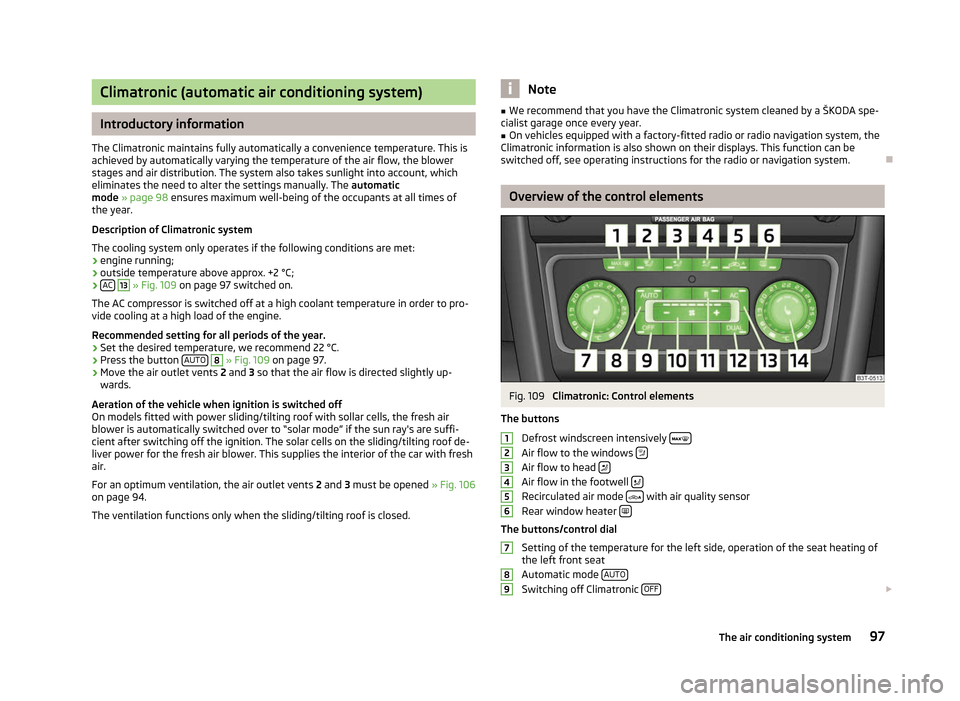
Climatronic (automatic air conditioning system)
Introductory information
The Climatronic maintains fully automatically a convenience temperature. This is
achieved by automatically varying the temperature of the air flow, the blower
stages and air distribution. The system also takes sunlight into account, which
eliminates the need to alter the settings manually. The automatic
mode » page 98 ensures maximum well-being of the occupants at all times of
the year.
Description of Climatronic system
The cooling system only operates if the following conditions are met:
› engine running;
› outside temperature above approx. +2 °C;
› AC 13
» Fig. 109 on page 97 switched on.
The AC compressor is switched off at a high coolant temperature in order to pro-
vide cooling at a high load of the engine.
Recommended setting for all periods of the year.
› Set the desired temperature, we recommend 22 °C.
› Press the button
AUTO 8
» Fig. 109
on page 97.
› Move the air outlet vents
2 and 3 so that the air flow is directed slightly up-
wards.
Aeration of the vehicle when ignition is switched off
On models fitted with power sliding/tilting roof with sollar cells, the fresh air
blower is automatically switched over to
“solar mode” if the sun ray's are suffi-
cient after switching off the ignition. The solar cells on the sliding/tilting roof de-
liver power for the fresh air blower. This supplies the interior of the car with fresh
air.
For an optimum ventilation, the air outlet vents 2 and 3 must be opened » Fig. 106
on page 94.
The ventilation functions only when the sliding/tilting roof is closed. Note
■ We recommend that you have the Climatronic system cleaned by a
ŠKODA spe-
cialist garage once every year. ■ On vehicles equipped with a factory-fitted radio or radio navigation system, the
Climatronic information is also shown on their displays. This function can be
switched off, see operating instructions for the radio or navigation system. Ð Overview of the control elements
Fig. 109
Climatronic: Control elements
The buttons Defrost windscreen intensively Air flow to the windows
Air flow to head
Air flow in the footwell
Recirculated air mode
with air quality sensor
Rear window heater The buttons/control dial
Setting of the temperature for the left side, operation of the seat heating of
the left front seat
Automatic mode AUTO Switching off Climatronic
OFF £1
2
3
4
5
6
7
8
9
97
The air conditioning system
Page 100 of 235

Setting the blower speed
Depending upon vehicle equipment: Button for direct switching on/off of
auxiliary heating » Fig. 110 on page 101, or switching on/off of windscreen
heater » Fig. 43 on page 58.
Switching on/off of the temperature setting in dual mode DUALSwitching the cooling system on and off
ACSetting of the temperature for the right side, operation of the seat heating of
the right front seat Note
Below the top row of buttons is located the interior temperature sensor. Do not
stick anything on or cover the sensor, otherwise it could have an unfavourable ef-
fect on the Climatronic. ÐAutomatic mode
The automatic mode is used in order to maintain a constant temperature and to
demist the windows in the interior of the car.
Switching on
› Set a temperature between +18 °C and +26
℃.
› Move the air outlet vents
2 and 3 » Fig. 106 on page 94 so that the air flow is
directed slightly upwards.
› Press the button
AUTO 8
» Fig. 109
on page
97. The indicator light in the top
right or left corner lights up, depending on which mode was last selected.
If the indicator light in the top right corner of the button AUTO lights up, the Cli-
matronic operates in
“HIGH” mode. The “HIGH” mode is the standard setting of
the Climatronic.
When pressing again the button AUTO , the Climatronic changes into the “LOW”
mode and the indicator light in the top left corner lights up. The Climatronic uses
only in this mode the lower blower speed. However taking into account the noise
level, this is more comfortable, yet be aware that the effectiveness of the air con-
ditioning system is reduced particularly if the vehicle is fully occupied.
By pressing the button AUTO again, it is changed to “HIGH” mode.
Automatic mode is switched off by pressing one of the buttons for the air distri-
bution or by increasing/decreasing the blower speed. The temperature is never-
theless regulated. Ð10
11
12
13
14 Switching the cooling system on and off
Switching the cooling system on and off › Press the button
AC » Fig. 109
on page
97. The indicator light in the button
lights up.
› When you again press the button
AC , the air conditioning system is switched
off. The indicator light in the button goes out. Only the function of the ventila-
tion remains active when no lower temperature than the outside temperature
can be reached. Ð Setting temperature
The interior temperature for the left and right side can be set separately.
› The temperature for both sides can be set with the control dial 7
» Fig. 109 on
page 97 after switching on the ignition.
› If you wish to set the temperature for the right side, turn the control dial 14
.
The indicator light in the button DUAL lights up, this indicates that differing
temperatures for the left and right side can be set.
If the indicator light in the button DUAL 12
» Fig. 109
on page 97 is illuminated,
the temperature for both sides cannot be set with the control dial 7
. You can re-
activate this function by pressing the button DUAL . The indicator light in the but-
ton goes out.
The interior temperature can be set between +18 °C and +26 ℃. The interior tem-
perature is regulated automatically within this range. If a temperature lower than
+18 °C is selected, a blue symbol lights up at the start of the numerical scale. If a
temperature higher than +26 °C is selected, a red symbol lights up at the start of
the numerical scale. In both limit positions the Climatronic operates at maximum
cooling or heating capacity, respectively. The temperature is not controlled in this
case.
Lengthy and uneven distribution of the air flow out of the vents (especially
around the feet) and large differences in temperature, for example, when getting
out of the vehicle, can cause susceptible individuals to catch a cold. Ð Recirculated air mode
Recirculated air mode largely prevents polluted air from outside the vehicle get-
ting into the vehicle, for example, when driving through a tunnel or when stand-
ing in a traffic jam. If a considerable increase in concentration of pollutants is rec-
ognized by the air quality sensor, when the automatic air distribution control is £
98 Using the system
Page 101 of 235

switched on, the air distribution control will temporarily be switched off. If the
concentration of pollutants decreases to the normal level, the air distribution con-
trol is automatically switched off so that fresh air can be guided into the vehicle
interior. In recirculated air mode air is sucked out of the interior of the vehicle and
then fed back into the interior. When the automatic air distribution control is
switched on, an air quality sensor measures the concentration of pollutants in the
drawn in air.
Switching recirculated air mode on
› Repeatedly press the button
5
» Fig. 109
on page 97 until the indicator
light on the left side of the button is illuminated.
Switch on automatic air distribution control
› Repeatedly press the button
until the indicator light on the right side of
the button is illuminated.
Switch off automatic air distribution control temporarily › If the air quality sensor does not automatically switch on the air distribution
control in the event of an unpleasant odour, you can switch it on yourself by
pressing the button . The indicator light lights up in the button on the left
side.
Switching recirculated air mode off › Press the button
AUTO or repeatedly press the button
until the indicator
lights in the button go out. WARNING
Do not leave recirculated air mode on over a longer period of time, as “stale”
air can cause fatigue of the driver and passengers, reduce attention levels and
also cause the windows to mist up. The risk of having an accident increases.
Switch off recirculated air mode as soon as the windows start to mist up. Note
■ If the windscreen mists up, press the button 1
» Fig. 109 on page 97.
Press the button AUTO when the windscreen is demisted.
■ The automatic air distribution control operates only if the outside temperature
is higher than approx. 2 °C. Ð Controlling blower
The Climatronic system controls the blower stages automatically in line with the
interior temperature. However, the blower stages can be manually adapted to
suit your particular needs.
› Repeatedly press the button
10
» Fig. 109
on page 97 on the left side (re-
duce blower speed) or on the right side (increase blower speed).
If the blower is switched off, the Climatronic system is switched off.
The set blower speed is displayed above the button when the respective num-
ber of indicator lights come on. WARNING
■ “Stale air”
may result in fatigue in the driver and occupants, reduce attention
levels and also cause the windows to mist up. The risk of having an accident
increases.
■ Do not switch off the Climatronic system for longer than necessary.
■ Switch on the Climatronic system as soon as the windows mist up. Ð Defrosting windscreen
Switching on › Press the button
1
» Fig. 109
on page 97.
› Press the button
11
» Fig. 109
on page 97.
Switching off
› Once again press the button
or the button
AUTO .
› Once again press the button
.
The temperature control is controlled automatically. More air flows out of the air
outlet vents 1 » page 94. Ð
99
The air conditioning system
Page 103 of 235

Direct switching on/off
Fig. 110
Button for direct switching on/
off of the auxiliary heating (aux-
iliary heating and ventilation) on
the operating part of the air con-
ditioning system
First read and observe the introductory information and safety warn-
ings on page 100.
The auxiliary heating (auxiliary heating and ventilation) can be
directly switched
on or off at any time using the button » Fig. 110 on the operating part of the
air-conditioning system, on the operating part of the Climatronic system or via the
radio remote control » page 101.
If the auxiliary heating and ventilation is not switched off earlier, it switches off
automatically after the set operating period, in the menu Running time has ex-
pired. ÐSystem settings
First read and observe the introductory information and safety warn-
ings on page 100.
The following menu items can be selected in the menu
Aux. heating in the infor-
mation display (depending on the equipment fitted in the vehicle):
■ Weekday - Set the current weekday.
■ Time - Set the desired running time in 5
minute increments. The running time
can be 10 to 60 minutes.
■ Mode - Set the desired heating/ventilation mode.
■ Start time 1-3 - In each pre-set time, the day and the time (hour and minute) can
be set for switching on the auxiliary heating and/or ventilation. An empty posi-
tion can be found between Sunday and Monday when selecting the day. If this
empty position is selected, the activation is performed without taking into ac-
count the day.
■ Activate - Enable pre-set mode.
ä
ä ■
Dectivate - Disable pre-set mode.
■ Factory setting - Restore factory setting.
■ Back - Return to main menu.
Only one programmed pre-set time can be active.
The last programmed pre-set time remains active.
After the auxiliary heating activates at the set time, it is necessary to pre-set a
time again.
If the pre-set menu is closed by selecting the menu item Back or if no changes
are made on the display for more than 10
seconds, the set values are stored, but
the pre-set time is not activated.
An indicator light on the button » Fig. 110 on page 101 is illuminated when the
system is running.
The running system deactivates after expiration of the operating period or can be
deactivated earlier by pressing the button to directly switch on/off the auxiliary
heating or by using the radio remote control.
Ð Radio remote control
Fig. 111
Auxiliary heating: Radio remote control
First read and observe the introductory information and safety warn-
ings on page 100.
›
For switching on, press the button
ON » Fig. 111.
› For switching off, press the button
OFF .
The transmitter and the battery are housed in the housing of the remote control.
The receiver is located in the interior of the vehicle. £
ä
101
The air conditioning system
Page 110 of 235

Emergency start-up of engine
Fig. 115
Emergency start-up of engine
First read and observe the introductory information and safety warn-
ings on page 105.
If the authorised key is tested unsuccessfully, the following is shown in the infor-
mation display or information display of the instrument cluster:
Key not found. or No Key
The emergency start-up must be completed.
›
Press the starter button
» Fig. 115 and then hold the key to the starter button
or
› press the starter button directly with the key. Note
During an emergency start-up of the engine, the correct orientation of the key
must be kept » Fig. 115. ÐSwitching the engine off
First read and observe the introductory information and safety warn-
ings on page 105.
›
Stop the vehicle.
› Switch off the engine by pressing the starter button
» Fig. 114 on page 106, do-
ing so switches off the ignition at the same time. Ð
ä
ä Brakes and brake assist systems
ä
Introduction
This chapter contains information on the following subjects:
Information on braking 109
Handbrake 109
Stabilisation Control (ESC) 110
Antilock brake system (ABS) 111
Traction control system (TCS) 111
Electronic differential lock (EDL) 111
WARNING
■ The brake booster only operates when the engine is running. Greater physi-
cal effort for braking is required when the engine is switched off - risk of acci-
dent!
■ Depress the clutch pedal when stopping or braking a vehicle with a petrol
engine and manual transmission in the low rev range. If you fail to do so, the
functionality of the brake booster can be impaired - risk of accident!
■ If a front spoiler, full wheel trim, etc. is mounted retrospectively, it must be
ensured that the air supply to the front wheel brakes is not reduced. Other-
wise, the functionality of the brake system could be impaired - risk of acci-
dent! ■ Please note that the handbrake must be fully released. A handbrake which
is only partially released can result in the rear brakes overheating, which can
have a negative effect on the operation of the brake system - risk of accident!
■ Never leave children unattended in the vehicle. The children might, for ex-
ample, release the handbrake or take the vehicle out of gear. The vehicle
might then move off - risk of accident!
■ A lack of fuel can cause irregular engine running or cause the engine to shut
down. The brake assist systems would then be without function - risk of acci-
dent! ■ Adjust the speed and driving style to the current visibility, weather, road and
traffic conditions. The increased safety offered by the brake assist systems
must not tempt you to take greater risks than otherwise - risk of an accident!
■ The normal braking system is still fully functional if there is an ABS fault.
Visit a ŠKODA specialist garage immediately and adjust your style of driving
according to the damage to the ABS as you will not know how great the dam-
age is and the limitation it is placing on the braking efficiency. £
108 Using the system
Page 111 of 235

CAUTION
■ Observe the recommendations on the new brake pads » page 158.
■ Never let the brakes slip with light pressure on the pedal if braking is not neces-
sary. This causes the brakes to overheat and can also result in a longer braking
distance and excessive wear. ■ All four wheels must be fitted with the same tyres approved by the manufactur-
er to ensure the brake assist systems operate correctly. Note
■ If the brakes are applied in full and the control unit for the braking system con-
siders the situation to be dangerous for the following traffic, the brake light
flashes automatically. After the speed was reduced below around 10 km/h or the
vehicle was stopped, the brake light stops flashing and the hazard warning light
system switches on. The hazard warning light system is switched off automatical-
ly after accelerating or driving off again. ■ Before negotiating a steep downhill section, reduce the speed, shift down into
the next lower gear (manual gearbox) or select a lower drive position (automatic
gearbox). As a result, the braking effect of the engine will be used, reducing the
load on the brakes. Any additional braking should be completed intermittently,
not continuously. ■ Changes to the vehicle (e.g. to the engine, brakes, chassis or another combina-
tion of tyres and wheels) can influence the functionality of the brake assist sys-
tems »
page 194 , Accessories, changes and replacement of parts .
■ If a fault occurs in the ABS system, the ESC, ASR and EDL also do not work. A
indicator light » page 23 comes on if a fault occurs in the ABS system. ÐInformation on braking
First read and observe the introductory information and safety warn-
ings on page 108.
Wear-and-tear
The wear of the brake pads is dependent on the operating conditions and driving
style. The brake pads wear more quickly if a lot of journeys are completed in
towns and over short distances or if a very sporty style of driving is adopted. If
operated under severe conditions, the thickness of the brake pads must be
checked by a ŠKODA specialist garage before the next service appointment. ä Wet roads or road salt
The performance of the brakes can be delayed as the brake discs and brake pads
may be moist or have a coating of ice or layer of salt on them in winter. The
brakes are cleaned and dried by applying the brakes several times.
Corrosion
Corrosion on the brake discs and dirt on the bake pads occur if the vehicle has
been parked for a long period and if you do not make much use of the braking
system. If the brake system is not used much or if there is corrosion on the sur-
face, we recommend cleaning the brake discs by firmly applying the brakes from a
fairly high speed.
Faults in the brake surface
If it is found that the braking distance has suddenly become longer and that the
brake pedal can be depressed further, the brake system may be faulty. Visit a
ŠKODA specialist garage immediately and adjust your style of driving appropriate-
ly as you will not know how great the damage is.
Low brake fluid level
An insufficient level of brake fluid may result in problems in the brake system. The
level of the brake fluid is monitored electronically » page 20, Brake system .
Brake booster
The brake booster increases the pressure generated with the brake pedal. The
brake booster only operates when the engine is running. Ð Handbrake
Fig. 116
Centre console: Handbrake
First read and observe the introductory information and safety warn-
ings on page 108.
Apply
›
Pull the handbrake lever firmly upwards.
£
ä
109
Starting-off and Driving