2012 SKODA ROOMSTER AC plug
[x] Cancel search: AC plugPage 171 of 194

No. Power consumer
6 Glow plugs, radiator fan7 Electrohydraulic power steering
8 ABS or TCS or ESC 9 Radiator fan
10 Automatic gearbox 11 ABS or TCS or ESC
12 Central control unit
13 Electrical auxiliary heating system Note
Fuses 1 - 7 are replaced by a specialist ŠKODA garage. ÐBulbs
ä
Introduction
This chapter contains information on the following subjects:
Headlights 170
Replacing a bulb for low beam and main beam (halogen headlights) 170
Replacing the bulb for the low beam (Halogen projector headlights) 171
Replacing the bulb for the main beam (Halogen projector headlights) 171
Changing the bulb for the front turn signal light 171
Changing the light bulb for the front parking light 171
Fog lights and daytime running lights 172
Fog lights - Roomster Scout 172
Changing the bulb for the licence plate light 173
Tail lamp assembly 173
Some manual skills are required to change a bulb. For this reason, if uncertain, we
recommend that bulbs are replaced by a ŠKODA specialist garage or other expert
help is sought. ›
Switch off the ignition and all of the lights before replacing a bulb.
› Faulty bulbs must only be replaced with the same type of bulbs. The designa-
tion is located on the light socket or the glass bulb.
› A stowage compartment for replacement bulbs is located in a plastic box in the
spare wheel or underneath the floor covering in the boot. WARNING
■ Accidents can be caused if the road in front of the vehicle is not sufficiently
illuminated and the vehicle cannot or can only be seen with difficulty by other
road users.
■ Always read and observe the warnings before completing any work in the
engine compartment » page 136, Engine compartment .
■ Bulbs H7 and H4 are pressurised and may burst when changing the bulb -
risk of injury! We therefore recommended wearing gloves and safety glasses
when changing a bulb. CAUTION
■ Do not take hold of the glass bulb with naked fingers (even the smallest
amount of dirt reduces the working life of the light bulb). Use a clean cloth, nap-
kin, or similar. ■ When removing and installing the tail light make sure that the paintwork of the
vehicle and the tail light are not damaged. Note
■ This Owner's Manual only describes the replacement of bulbs where it is possi-
ble to replace the bulbs on your own without any complications arising. Other
light bulbs should be changed by a
ŠKODA specialist garage.
■ We recommend that a box of replacement bulbs be always carried in the vehi-
cle. Replacement bulbs can be purchased from
ŠKODAOriginal Accessories.
■ We recommend that the headlight settings are checked by a ŠKODA specialist
garage after replacing a bulb in the main or low beam.
■ LED diodes should be changed by a specialist ŠKODA garage. Ð
169
Fuses and light bulbs
Page 174 of 194

Fog lights and daytime running lights
Fig. 147
Front bumper: Protective grille/removing the fog light
First read and observe the introductory information and safety warn-
ings on page 169.
Bulb arrangement
» Fig. 147.A
- Bulb for daylight driving light
B
- Light bulb for fog lights
Removing the cap
› Grasp the protective grille in the areas marked by the arrows
» Fig. 147 - and
remove the cover.
Replacing light bulbs for fog lights/daytime running lights
› Insert your hand into the opening in the protective grille and press the
catch » Fig. 147 - in the direction of the arrow.
› Remove the front fog lamp.
› Turn the connector with the bulb in
counter-clockwise up to the stop and re-
move.
› Replace the lamp, insert the connector with the new bulb and turn
clockwise
up to the stop.
› To re-install the fog light, first of all place the fog light with the lug on the side
opposite the licence plate.
› Press in the fog lamp on the side closest to the licence plate.
› Insert the cap, beginning with the lug on the side opposite the license plate.
› Press in the cap on the side facing the license plate. The cap must engage firm-
ly. Ð
ä Fog lights - Roomster Scout
Fig. 148
Front bumper: Roomster Scout Fig. 149
Front bumper: Fog lights/fog lights: Replacing the light bulb
First read and observe the introductory information and safety warn-
ings on page 169.
Removing the cap and fog light
›
Guide the wire clamp
» Fig. 148 into the opening above the fog light » page 156,
Vehicle tool kit and remove the cover.
› Use the screwdriver
» page 156, Vehicle tool kit to remove the screws » Fig. 149
- .
› Remove the front fog lamp.
Changing light bulbs and installing fog lights
› Press the locking button 1
» Fig. 149
of the plug A
and remove the plug from
the socket B
.
› Turn the socket B
with the bulb counter-clockwise
up to the stop and remove.
› Replace the bulb, insert the socket with the new bulb and turn
clockwise up to
the stop. £
ä
172 Do-it-yourself
Page 175 of 194
›
Insert the plug A
into the socket B
.
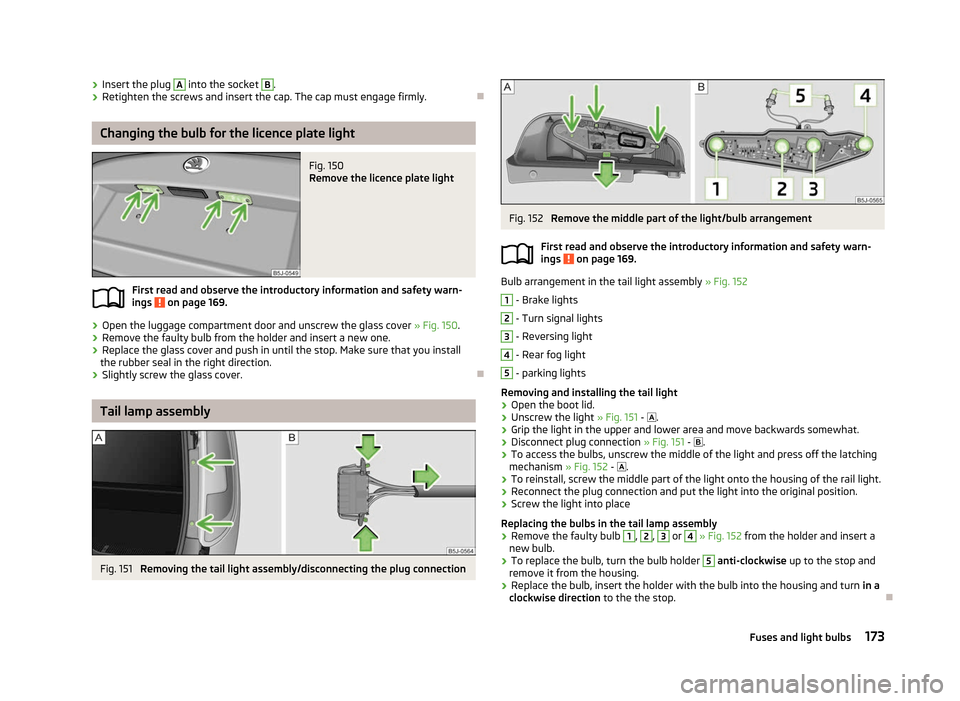
› Retighten the screws and insert the cap. The cap must engage firmly. ÐChanging the bulb for the licence plate light
Fig. 150
Remove the licence plate light
First read and observe the introductory information and safety warn-
ings on page 169.
›
Open the luggage compartment door and unscrew the glass cover
» Fig. 150.
› Remove the faulty bulb from the holder and insert a new one.
› Replace the glass cover and push in until the stop. Make sure that you install
the rubber seal in the right direction.
› Slightly screw the glass cover. ÐTail lamp assembly
Fig. 151
Removing the tail light assembly/disconnecting the plug connection
ä Fig. 152
Remove the middle part of the light/bulb arrangement
First read and observe the introductory information and safety warn-
ings on page 169.
Bulb arrangement in the tail light assembly
» Fig. 152 1
- Brake lights
2
- Turn signal lights
3
- Reversing light
4
- Rear fog light
5
- parking lights
Removing and installing the tail light
› Open the boot lid.
› Unscrew the light
» Fig. 151 - .
› Grip the light in the upper and lower area and move backwards somewhat.
› Disconnect plug connection
» Fig. 151 - .
› To access the bulbs, unscrew the middle of the light and press off the latching
mechanism » Fig. 152 - .
› To reinstall, screw the middle part of the light onto the housing of the rail light.
› Reconnect the plug connection and put the light into the original position.
› Screw the light into place
Replacing the bulbs in the tail lamp assembly
› Remove the faulty bulb 1
, 2
, 3
or 4
» Fig. 152 from the holder and insert a
new bulb.
› To replace the bulb, turn the bulb holder 5
anti-clockwise
up to the stop and
remove it from the housing.
› Replace the bulb, insert the holder with the bulb into the housing and turn
in a
clockwise direction to the the stop. Ð
ä
173
Fuses and light bulbs
Page 188 of 194

Front airbag 110
Front seats 47
Fuel 134
Diesel 136
Fuel gauge 9
gauge 9
refer to Fuel 134
Refuelling 134
Unleaded petrol 135
Fuel consumption 120
Fuses Assignment 166
Replacing 166
G
Gear Recommended gear 11
General view Cockpit 7
Glow plug system - indicator light 22
GSM 92
H
Handbrake 80
Head airbag 112
Headlight cleaning system Headlight cleaning system 44
Headlights Driving abroad 123
Headlight cleaning system 44
Head restraint 48
Heating 68
Defrosting windows 69
Exterior mirror 45
Rear window 42
Recirculated air mode 69
Seats 48
Heating rear window 42
Horn 7 I
Ignition 78
Ignition lock 78
Immobiliser 77
Information display see MAXI DOT 15
Instrument cluster 8
Interior light Praktik 174
Interior lighting Praktik 174
Interior monitor 31
ISOFIX 117
J
Jacking points Raise vehicle 159
Jump-starting 163
L
Lever Main beam 40
Turn signal 40
Light Cockpit 41
Daylight driving light 37
Fog lights 38
Fog lights with the function CORNER 38
Halogen projector headlights with cornering light function 37
Hazard warning light system 40
Headlight beam adjustment 39
Headlight flasher 40
Low beam 36
Main beam 40
Parking light 36, 37
Rear fog light 39
Replacing bulbs 169Tourist light 38
Turn signal 40
Lights switching on and off 36
Warning lights 17
Loads 176
Lock Central locking system 28
Locking Emergency locking 31
Remote control 29
without central locking 26
Locking and unlocking from the inside 28
M
MAXI DOT 15
Main menu 15
Settings 15
Maximum speed 180
MDI 99
Mirror Additional interior mirror 45
Exterior mirror 45
Manual dimming interior mirror 45
Vanity 42
Mobile phone 92
Connecting to the hands-free system 94
Multifunction display Functions 12
Memory 12
Operation 13
Multimedia 97
N
Net partition 54
186 Index