2012 SKODA OCTAVIA warning lights
[x] Cancel search: warning lightsPage 49 of 222

WARNINGIf the AFS system is defective, the headlights are automatically lowered to the
emergency position, which prevents a possible dazzling of oncoming traffic. This reduces the cone of light in front of the vehicle. Drive carefully and visit aŠKODA specialist garage as soon as possible.
Note
■ When the “tourist light” mode is active, the warning light flashes for 10 sec-
onds each time the ignition is switched on.■
If the Eco driving mode is selected, dynamic cornering lights are deactiva-
ted » page 124 .
Headlight assist
Fig. 28
Operating lever: Headlight assist
First read and observe the introductory information and safety warn-
ings on page 43.
The Headlight assist switches the headlights on/off automatically depending on
the environmental conditions.
The headlight is regulated based on data gathered by the camera attached be-
tween the windscreen and interior mirror.
The headlight can switch off automatically at speeds above 60 km/h. The head-light switches off automatically when the speed falls below 30 km/h.
When the Assistant switches on the headlight automatically, the indicator light
lights up in the dash panel insert.
Activating›Turn the light switch into position » Fig. 27 on page 45.›
Place the lever in position
A
(spring-tensioned position) » Fig. 28.
In the instrument cluster display, the indicator light appears for the activated
Headlight assist.
Deactivating
›
If the headlight is currently switched on automatically, move the lever into posi-
tion
B
(spring-tensioned position) » Fig. 28.
›
If the headlight is not currently switched on automatically, move the lever into
position
A
(the headlight switches on) followed by position
B
.
If you want to reactivate the Assist, put the lever back into position
A
.
The Assist can also be switched off when the light switch is turned from position to another position.
If the system cannot function correctly, the following message will appear in the
instrument cluster display:
Fault: Light Assist
or LIGHT ASSIST FAULT
Seek help from a ŠKODA specialist garage.
Light Assist: clean the windscreen!
or
WINDSCREEN PLEASE CLEAN
Check for any obstacles on the windscreen in the viewing area of the camera.
The function of Headlight assist can be activated/deactivated in the Infotain-
ment » operating instructions for Infotainment , chapter Setting vehicle systems
(CAR button) .
Manually switching on the headlights
If the headlight is not switched on automatically, it can be switched on manually -
put the lever into position
A
. The Assist is deactivated; the indicator light
goes out.
Manually switching off the headlights
If the headlight is switched on automatically, it can be switched off manually - put the lever into position
B
. The Assist is deactivated; the indicator light
goes
out.
47Lights and visibility
Page 50 of 222

WARNINGHeadlight assist only functions as a support and does not relieve the driver of
his responsibility to check the headlights and light beam and, if necessary, to
switch on the lights depending on the light conditions. Manual operation may be required in the following situations:■
in poor visibility conditions, e.g. fog, heavy rain, thick snowfall;
■
on A roads or motorways when oncoming traffic is partially obscured;
■
when passing poorly lit traffic, e.g. cyclists;
■
around sharp curves;
■
on sharp slopes up/down;
■
while driving through poorly-lit villages;
■
while driving over highly reflective surfaces;
■
when the windscreen around the camera is dirty, iced up, misted up, or cov-
ered up by stickers;
■
when an external navigation system is attached to the windscreen.
CAUTION
■ Do not attach any stickers or similar objects to the windscreen to avoid impair-
ing the functions of the Assist system.
Fog lights
Fig. 29
Dash panel: Light switch
First read and observe the introductory information and safety warn- ings on page 43.
Switching on/off›Turn the light switch into position or » Fig. 29 .›
Pull the light switch to position
1
.
The rear fog light is switched off in the reverse order.
The warning light lights up in the instrument cluster when the fog lights are
switched on » page 12.
Fog lights with the function CORNER
First read and observe the introductory information and safety warn-
ings
on page 43.
The fog lights with the function CORNER are designed to improve the illumination
of the surrounding area near the vehicle when turning, parking, etc.
The fog lights with the function CORNER are adjusted according to the steeringangle or after switching on the turn signal light 1)
in the following circumstances:
› the vehicle is stationary and the engine is running or it moves with a speed of
maximum 40 km/h;
› the daytime running lights are not switched on;
› the low beam is switched on or the light switch is in the position
and the
low beam is switched on;
› the fog lights are not switched on.
Note
The two fog lights are switched on when you shift into the reverse gear.
Rear fog light
First read and observe the introductory information and safety warn-
ings
on page 43.
Switching on/off
›
Turn the light switch into position
or
» Fig. 29 on page 48.
›
Pull the light switch to position
2
.
The rear fog light is switched off in the reverse order.
1)
If both switch on versions are conflicting, for example if the steering wheel is turned to the left and
the right turn signal light is switched on, the turn signal light has the higher priority.
48Using the system
Page 51 of 222

If the vehicle is not fitted with fog lights, the rear fog light is switched on by pull-
ing out the light switch directly to the position 2. This switch only has one posi-
tion.
The warning light lights up in the instrument cluster when the rear fog light is
switched on » page 12.
When the rear fig light is switched on in towing mode, only the rear fog light of the trailer will light up. This is only the case when the trailer is coupled to a facto-
ry-fitted towing device/a towing device from ŠKODA Original accessories.
COMING HOME/LEAVING HOME function
First read and observe the introductory information and safety warn-ings
on page 43.
In poor visibility conditions, this function makes it possible to automatically
switch on the lights for a short time after leaving the vehicle or when approach-
ing the vehicle.
The intensity of the surrounding light for switching on the lights is controlled
with the light sensor in the interior mirror holder.
Switching on the COMING HOME function
›
Turn the light switch into position
» Fig. 27 on page 45.
›
Switch off the ignition.
The light switches on after opening the driver's door.
Switching off the COMING HOME function
›
Close all doors and the luggage compartment lid.
The light switches off after the pre-set time has passed.
If a door or the boot lid remains open, the light goes out after 60 seconds.
Switching on the LEAVING HOME function
›
Before leaving the vehicle, turn the light switch into position
» Fig. 27 on
page 45.
The light switches on after unlocking the vehicle with the remote control.
Switching off the LEAVING HOME function
The light switches off after the pre-set time has passed or before the pre-set
time has lapsed after the ignition is switched on or the vehicle is locked.
The COMING HOME/LEAVING HOME function can be configured in the Infotain-
ment » operating instructions for Infotainment , chapter Setting vehicle systems
(CAR button) .
Depending on the equipment fitted the COMING HOME/LEAVING HOME function switches on the following lights:
› Parking lights;
› Low beam;
› Entry lighting in the exterior mirrors;
› Licence plate light.
CAUTION
Do not affix any stickers or similar objects in front of the light sensor on the wind-
screen, so as not to impair or disable the COMING HOME/LEAVING HOME function.
Note
If the COMING HOME/LEAVING HOME function is switched on continuously, the
battery will be heavily discharged particularly over short distances.
Hazard warning light system
Fig. 30
Dash panel: Button for hazard
warning light system
First read and observe the introductory information and safety warn-
ings on page 43.
Switching on/off
›
Press the button
» Fig. 30 .
49Lights and visibility
Page 52 of 222

All the turn signal lights on the vehicle flash at the same time when the hazard
warning light system is switched on. The warning light for the turn signals and
the warning light in the button also flash at the same time. The hazard warning
light system can also be operated if the ignition is switched off.
If one of the airbags is deployed, the hazard warning light system will switch on
automatically.
When the turn signal is switched on while the hazard warning light system is on
(ignition on), only the turn signal light for the selected driving direction will flash
while the turn signal is switched on.
Note
The hazard warning light system must be switched on if, for example:■you encounter a traffic congestion;■
your car breaks down.
50Using the system
Page 54 of 222

Switching the light on/off›Press the button » Fig. 33 - .
Switching the reading light on/off›
Press the button or
» Fig. 33 - .
Front door warning light
Fig. 34
Front door: Warning light
The warning light is located in the lower door trim panel » Fig. 34.
The light switches on/off when the front door is opened or closed.
Note
If the door is open and the ignition switched off, the light will extinguish auto-
matically after around 10 minutes.
Entry lighting
The lighting is positioned on the bottom edge of the exterior mirror and illumi- nates the entry area of the front door.
The light comes on after the vehicle has been unlocked or on opening the front
door. The lighting goes out within around 30 seconds after the front door is
closed or the ignition is switched on.
WARNINGIf the entry light is on, do not touch its cover - risk of burns!NoteIf the door is open and the ignition switched off, the light will extinguish auto-
matically after around 10 minutes.
Visibility
Windscreen and rear window heater
Fig. 35
Buttons for the front and rear window heater/manual air-condition-
ing system, heating
Switching the windscreen heater on/off
›
Press the button
» Fig. 35 .
The indicator light in or underneath the button lights up/goes out.
Switching the rear window heater on/off
›
Press the button
» Fig. 35 .
The indicator light in or underneath the button lights up/goes out.
The windscreen and rear window heater only operates when the engine is run- ning.
The windscreen and rear window heater automatically switches off after approxi-
mately 10 minutes.
52Using the system
Page 55 of 222

For the sake of the environmentThe heating should be switched off as soon as the window is de-iced or free from
mist. The reduced current consumption will have a favourable effect on fuel econ-
omy » page 102 , Convenience consumers .
Note
If the on-board voltage drops, the windscreen and rear window heater switches
off automatically, to provide sufficient electrical energy for the engine con-
trol » page 180 , Automatic load deactivation .
Sun visors
Fig. 36
Sun visor: left/right
The sun visor for the driver or front passenger can be pulled out of the fixture and
swivelled towards the door in the direction of the arrow
1
» Fig. 36 .
The sun visors each have a vanity mirror
B
with a cover. Push the cover in the
direction of the arrow
2
.
The purpose of the note holder
B
is to store small, light objects, such as a note-
pad, etc.
WARNINGThe sun visors must not be swivelled towards the side windows in the deploy-
ment area of the head airbags if any objects, such as ball-point pens, etc. are attached to them. These objects might result in injuries to the occupants if
the head airbag is deployed.
Sun screenFig. 37
Sun screen
The sun screen is located in a housing on the luggage compartment cover.
Pulling out
›
Grab the handle
B
» Fig. 37 .
›
Remove the sun screen and hang it from the brackets
A
.
Folding
›
Grab the handle
B
» Fig. 37 .
›
Remove the sun screen from the brackets
A
and slowly roll it up again into the
housing on the luggage compartment cover.
Windscreen wipers and washers
Introduction
This chapter contains information on the following subjects:
Windscreen wipers and washers
54
Headlight cleaning system
55
Replacing the windscreen wiper blades
56
Replacing the rear window wiper blade
56
The windscreen wipers and the wash system only operate if the ignition is
switched on and the bonnet is closed.
If the intermittent wipe is switched on, the intervals are also controlled depend-
ing on speed.
When automatic wiping in rain is active, the wiper intervals are regulated based
on the intensity of the rain.
53Lights and visibility
Page 59 of 222
WARNING■Make sure that the mirror is not covered by ice, snow, mist or other objects.■Convex (curved outward) exterior mirrors increase the field of vision. They
do, however, make objects appear smaller in the mirror. These mirrors are
therefore only of limited use for estimating distances to the following vehi-
cles.■
Whenever possible use the interior mirror for estimating the distances to
the following vehicles.
■
Automatic dimming mirrors contain an electrolytic fluid which may leak
should the mirror glass break. The leaking electrolytic fluid can irritate the skin, eyes and breath apparatus. Immediately seek out fresh air and leave thevehicle. If this is not possible, open all windows and doors.
■
If you swallow electrolytic fluid, seek medical assistance immediately.
■
If your eyes or skin come into contact with the electrolytic fluid, immediately
wash the affected area for a few minutes long with a lot of water. Then con-
sult a doctor immediately.
■
The illuminated display of an external navigation unit can lead to operation-
al faults to the automatic dimming interior mirror- risk of accident.
CAUTION
Never mechanically fold in or fold back the exterior mirrors with the fold-in func-
tion by hand as this will damage the electric drive.
Note
■
Automatic mirror dimming operates only properly if the sun screen for the rear
window in the housing on the boot cover is not in use or the light striking the in- terior rear-view mirror is not affected by other objects.■
If the automatic interior mirror dimming is switched off, the exterior mirror dim-
ming is also switched off.
■
Do not touch the surface of the exterior mirrors if the exterior mirror heater is
switched on.
■
If the the electrical exterior mirror setting fails at any time, the two mirrors can
be adjusted by hand by pressing on the edge of the mirror surface.
■
Contact your ŠKODA specialist garage if there is a fault with the power setting
of the exterior mirrors.
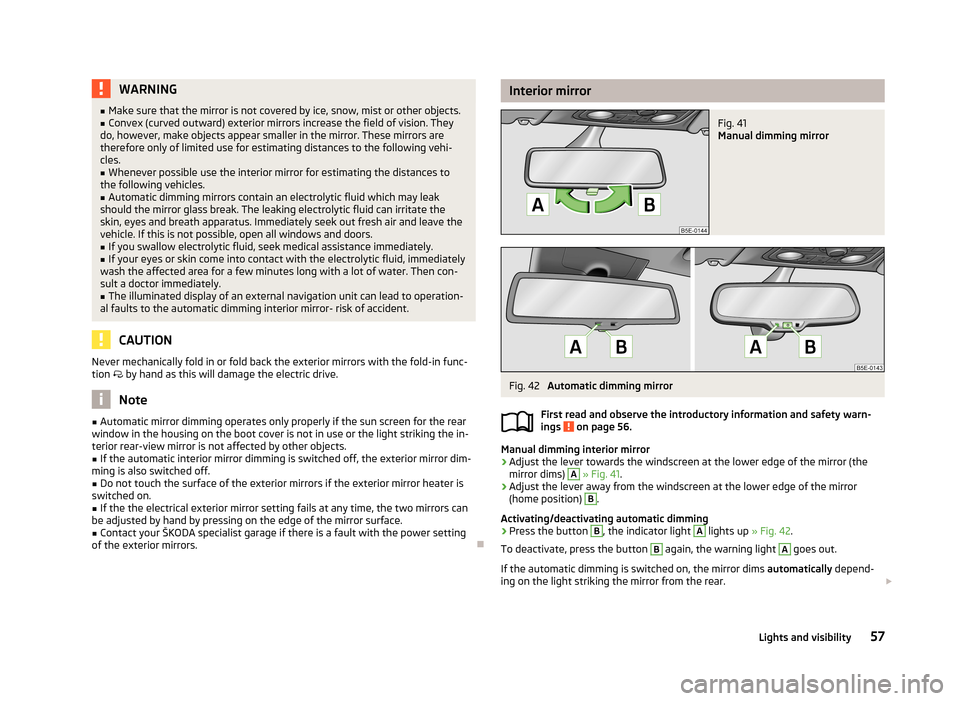
Interior mirrorFig. 41
Manual dimming mirror
Fig. 42
Automatic dimming mirror
First read and observe the introductory information and safety warn-
ings
on page 56.
Manual dimming interior mirror
›
Adjust the lever towards the windscreen at the lower edge of the mirror (the mirror dims)
A
» Fig. 41 .
›
Adjust the lever away from the windscreen at the lower edge of the mirror
(home position)
B
.
Activating/deactivating automatic dimming
›
Press the button
B
, the indicator light
A
lights up » Fig. 42.
To deactivate, press the button
B
again, the warning light
A
goes out.
If the automatic dimming is switched on, the mirror dims automatically depend-
ing on the light striking the mirror from the rear.
57Lights and visibility
Page 64 of 222

Activating the function›Unlock the vehicle with the remote control key.›
Press and hold any memory button
B
» Fig. 47 on page 61. After the seat has
assumed the position stored under this button, at the same time press the but-
ton
on the remote control key within 10 seconds.
The successful activation of the function is confirmed by an audible signal. The seat and exterior mirror settings are not saved in the memory of the key,
which is already saved in the memory button.
The seat can be adjusted to the required position if necessary » page 60.
After locking the vehicle, the current positions of the driver's seat and the exter-
nal mirrors are saved in the memory of the remote control key.
Deactivating the function
›
Unlock the vehicle with the remote control key.
›
Press and hold the SET button
A
» Fig. 47 on page 61. At the same time, press
the button on the remote control key within 10 seconds.
The successful deactivation of the function is confirmed by an audible signal.
Stopping the ongoing adjustment
›
Press any button on the driver's seat or the button on the remote control
key.
Seat heaters
Fig. 48
Heating: Front seats/ rear seats
The seat backrests and surfaces of the front seats and the two outer rear seats can be heated electrically.
The seat heating can only be switched on when the engine is running.
Switching on›
Press the button or
» Fig. 48 .
By pressing the button once, the heating is switched to the highest intensity - level 3, which is indicated by three of the warning lights underneath theswitch » Fig. 48 - or in the button » Fig. 48 - lighting up.
With repeated pressing of the switch, the level of the seat heating is down-regu- lated up to the switch-off. The level of the seat heating is indicated by the num-
ber of illuminated warning lights underneath/in the switch.
WARNINGIf, as an occupant, you have a subdued pain and/or temperature sensitivity,
e.g. through medication, paralysis or because of chronic illness (e.g. diabetes),
we recommend not to use the seat heating. This can lead to burns on the
back, the posterior and the legs which are difficult to heal. If the seat heating
is used, we recommend to make regular breaks in your journey when driving
long distances, so that the body can recuperate from the stress of the jour- ney. Please consult your doctor, who can evaluate your specific condition.
CAUTION
■ Do not kneel on the seats or otherwise apply concentrated pressure to them.■Do not use the seat heaters if the seats are not occupied by persons or if ob-
jects, such as a child seat, bag, etc., are fastened or stored on them. A fault of the
heating elements in the seat heating can occur.■
Do not clean the seats using moisture » page 164, Fabric covers on electrically
heated seats .
Note
■
If the on-board voltage drops, the seat heating is switched off automatically, in
order to provide sufficient electrical energy for the engine control » page 180,
Automatic load deactivation .■
If the heaters for the rear seats are set to the highest intensity - level 3, they
are automatically switched over to level 2 after 10 minutes.
62Using the system