2012 Seat Toledo warning lights
[x] Cancel search: warning lightsPage 142 of 249

141
Driving
The warning lamp lights up when the handbrake is applied with the ignition
on .
Stability system (ESC)
Fig. 104 ESC system:
ASR switch
The ESC system increases control of the vehicle in emergency situations,
e.g. during a sudden change in direction. Depending on the driving condi-
tions, it reduces the risk of skidding and increases driving stability.
The system uses the steering wheel angle and road speed to calculate the
changes of direction desired by the driver, and constantly compares them
with the actual behaviour of the vehicle. When irregularities occur, for exam-
ple, if the vehicle begins to skid, the ESC brakes the appropriate wheel au-
tomatically.
The warning lamp in the general instrument panel starts flashing when
the system is working.
The stability (ESC) system includes the following systems:
● Anti-lock brake system (ABS)
● Traction control system (ASR)
● Electronic differential lock (EDL) ●
Brake assist system (HBA)
● Hill hold control (HHC)
The ESC system cannot be switched on. The
⇒ Fig. 104 button can only
be used to switch off the ASR system. The warning lamp lights up on the
general instrument panel if the ASR system is switched off.
The ASR should be switched on at all times. Only under certain circumstan-
ces should the system be switched off, e.g.
● Driving with chains
● Driving in deep snow or on very soft surfaces
● During the “swinging movement” required to remove a stuck vehicle
Switch the ASR back on as soon as possible.
Brake assist system (HBA)*
The HBA system is activated when you press down on the brake pedal sud-
denly. It increases braking power, helping to reduce braking distances. To
reduce the braking distance as much as possible, keep the brake pedal
pressed down firmly until the vehicle comes to a standstill.
With the help of this system, the ABS is activated more quickly and more
efficiently.
The brake assist function is deactivated automatically when the brake pedal
is released.
Hill hold control (HHC)*
The HHC system makes it easier to start the vehicle on hills. The system
maintains the brake pressure created by pressing down on the brake pedal
for 2 seconds after it has been released. Your foot can be removed from the
brake pedal and you can use the accelerator pedal and move away on a hill
without having to use the handbrake. The brake pressure drops as the ac-
celerator pedal is pressed. If the vehicle is not started then it will start to
move backwards after two seconds.
Safety FirstOperating instructionsPractical TipsTechnical specifications
Page 144 of 249

143
Driving
Engage reverse gear only when the vehicle is stopped. On engaging reverse
gear while the engine is running, first wait a moment with the clutch pedal
pressed down fully to limit gear shift noise.
The reverse lights switch on when the reverse gear is selected and the igni-
tion is on.
WARNING
Never engage reverse gear when moving forwards. Risk of accident!
Note
Do not rest your hand on the gear lever while driving. The pressure of your
hand could lead to premature wear of the gear system.
Automatic gearbox Introduction
WARNING
● Never press the accelerator when selecting the operating mode of the
automatic gearbox when the vehicle is stationary. Risk of accident!
● Never move the selector lever to positions R or P when driving. Risk of
accident!
● If the vehicle is to be stopped with a gear selected and the engine
idling (e.g. waiting or moving slowly at traffic lights), press down on the
brake pedal because the transmission is not entirely interrupted when
the engine is idling and the vehicle will tend to start moving.
WARNING (Continued)
● Apply the handbrake firmly and put the selector lever in position P
before opening the bonnet and working on the vehicle with the engine
running. Risk of accident! Strictly follow the safety instructions
⇒ page 173, Engine compartment.
● When stopping on a slope (hill), try not to stop the vehicle from mov-
ing by pressing the “accelerator” with a gear selected. This could over-
heat the clutch. If the clutch risks being burnt due to this force, it would
switch off and the vehicle could move backwards. Risk of accident!
● If you have to stop on a hill, press down on the brake pedal to stop
the vehicle from moving.
● The drive wheels could lose traction on a slippery road surface when
the kick-down function is activated. Risk of sliding!
CAUTION
● In DSG automatic gearboxes, the double clutch is protected from over-
loads. If the hill hold control is used, the clutches are subjected to greater
force if the vehicle is at a standstill on a slope or suddenly accelerating on a
slope.
● Should the clutches overheat, the symbol is shown on the informative
display with a warning message Gear overheated. Stop! Instruction Manual!
An audible warning is also heard. Stop the vehicle in this case, stop the en-
gine and wait until the symbol has switched off. Danger of damage to the
gearbox! You can continue driving once the symbol is switched off.
Basic information
The gearbox changes up and down automatically. The gearbox can be set to
Tiptronic mode. The gears can be changed manually in this mode
⇒ page 145.
Safety FirstOperating instructionsPractical TipsTechnical specifications
Page 150 of 249

149
Driving
Switching the parking aid system on and off
Parking aid is switched on when the ignition is on and reverse gear engag-
ed. This is confirmed by a short audible warning.
Parking aid is switched off when reverse gear is released.
WARNING
● Parking aid does not free the driver from responsibility when parking
or performing similar manoeuvres. Pay special attention to small children
or animals, as the parking aid sensors may not always be able to detect
them.
● Before reversing or parking, make sure there are no small obstacles,
e.g. stones, narrow pillars, towing brackets, etc. in front and behind the
vehicle. These obstacles may not always be detected by the parking aid
device.
● The surface of certain objects may not reflect the signals of the park-
ing aid sensors. Therefore, people wearing clothing of this kind may not
be detected by the parking aid system.
● Outside noise may interfere with the parking aid system. Under cer-
tain unfavourable circumstances, certain objects or people may not be
detected.
Note
● If a constant sound at a higher frequency is emitted for 3 seconds when
the system is switched on then there is a fault in the system. Please take the
vehicle to a specialised technical service to solve this fault.
● To ensure that the parking aid system works properly, the sensors must
be kept clean (e.g. free of ice).
● If the parking aid system is switched on when the automatic gearbox se-
lector lever is in position P, the acoustic signal will be interrupted (the car
cannot be moved). Cruise control
Introduction
The cruise control system allows you to drive at a constant speed of 30 km/
h (19 mph) or higher without having to press the accelerator. However, the
speed is only maintained within the margin permitted by the engine power
and the braking effect of the engine.
The warning lamp lights up on the general instrument panel if cruise con-
trol is switched on.
WARNING
● For safety reasons the cruise control system must not be used in
dense traffic or where roads conditions are poor (e.g. due to ice, aqua-
planing, loose grit, snow). Risk of accident!
● The programmed speed can only be re-established if it is not too high
for current traffic conditions.
● Always switch the cruise control system off after using it in order to
avoid involuntary use.
CAUTION
● The cruise control cannot maintain a constant speed when the vehicle is
moving downhill. The vehicle tends to accelerate under its own weight.
Therefore, shift down or use the brake pedal in good time to slow the vehi-
cle.
Note
● In vehicles with an automatic gearbox, the cruise control system cannot
be switched on if the selector lever is in position P, N or R.
● In vehicles with a manual gearbox, the cruise control cannot be switched
on if first gear or reverse gear is engaged.
Safety FirstOperating instructionsPractical TipsTechnical specifications
Page 152 of 249

151
Driving
To recover the set speed, briefly press switch B
in RES once you have re-
leased the brake or clutch pedal.
Switching off cruise control completely
– Move knob A ⇒ Fig. 110 ⇒ page 150 to OFF.
START-STOP*
Fig. 111 Instrument
panel: Start-Stop system
button
The START-STOP system helps save fuel and reduce harmful emis-
sions and CO 2.
The system is automatically switched on every time the ignition is
switched on.
The system automatically switches off the engine when the vehicle
is stationary, e.g. waiting at traffic lights.
The current status of the START-STOP system is displayed on the
general instrument panel display. Automatic engine shut down (Stop phase)
–
Stop the vehicle (if necessary using the handbrake).
– Shift to neutral.
– Release the clutch pedal.
Automatic engine start up (Start phase)
– Release the clutch pedal.
Switching the START-STOP system on and off
The START-STOP system can be switched on and off by pressing the
⇒ Fig. 111 button.
The warning lamp in the button will light up when the system is
switched off.
If the vehicle is in Stop phase when the button is pressed, the en-
gine will start immediately.
The START-STOP system works under complex driving conditions that are dif-
ficult to detect without specialist technology. The set of necessary condi-
tions for the correct operating of the START-STOP system are indicated be-
low.
Conditions for automatic engine shut down (Stop phase)
● Selector lever in neutral
● Clutch pedal not pressed
● Driver with seat belt fastened
● Driver door closed
● Bonnet closed
● Vehicle stationary
● The factory-fitted towing bracket is not electrically connected to a trailer
Safety FirstOperating instructionsPractical TipsTechnical specifications
Page 163 of 249

162Driving the vehicle with a trailer
WARNING
● Exceeding the maximum established load per axle and the maximum
towing bracket load in addition to the maximum permitted load or the
load of the vehicle + trailer assembly can cause accidents and serious in-
juries.
● A sliding load could considerably affect the stability and safety of the
vehicle + trailer assembly, resulting in accidents and serious injuries.
Towing a trailer
Exterior mirrors
Check whether you can see enough of the road behind the trailer with the
standard rear vision mirrors. If this is not the case, you should have addi-
tional exterior mirrors fitted. Observe the relevant statutory requirements of
the country you are in.
Headlights
Before starting a journey, also check the headlight beam settings with the
trailer hitched up. Adjust the headlight range settings if necessary
⇒ page 96, Range control of main lights .
Driving speed
For your own safety do not drive faster than the maximum permitted speed
indicated on the trailer.
At all times, immediately reduce speed if you detect the slightest swaying
movement of the trailer. Never try to “return the trailer to a straight posi-
tion” by accelerating.
Brakes
Brake in due course! If the trailer has an overrun brake, apply the brakes
gently at first and then, firmly. This will prevent the jerking that can be caused by locking of trailer wheels. Change to a lower gear in good time be-
fore descending a slope in order to take advantage of the engine brake.
The trailer is incorporated into the vehicle anti-theft alarm system.
●
When the vehicle has a factory-fitted anti-theft alarm and a towing
bracket
● When the trailer is electrically connected to the vehicle via the towing
bracket socket
● When the vehicle electrical device and the towing bracket are operation-
al
● When the vehicle is locked and the vehicle anti-theft alarm device is ac-
tivated
Once the electrical connection is interrupted with the vehicle trailer locked,
the alarm sounds.
Always switch off the vehicle anti-theft alarm device before connecting or
disconnecting a trailer. The vehicle anti-theft alarm device could cause the
alarm to sound ⇒ page 88, Anti-theft alarm system.
Engine overheating
In the event that the coolant temperature gauge needle moves to the right
section of the scale or to the red area, immediately reduce speed. If the con-
trol lamp flashes on the general instrument panel, stop the vehicle and
switch off the engine. Wait several minutes and check the coolant level in
the tank ⇒ page 179.
Please observe the following indications ⇒ page 68, Coolant level and tem-
perature .
The coolant temperature can be reduced by switching on the heating.
Page 164 of 249

163
Driving the vehicle with a trailer
WARNING
● Adjust your speed to suit the road and traffic conditions.
● An electrical installation that is connected incorrectly or by non-spe-
cialised personnel can prevent the connection of the current to the trailer
and cause faults in the electrical system operation throughout the entire
vehicle, leading to accidents and serious injury.
● All electrical work must be carried out only by the specialised serv-
ices.
● Never directly connect the trailer electrical device to the electrical
sockets of the reverse driving lights or other sources of electrical current.
CAUTION
● Avoid corners, and sudden and sharp braking.
● Once the trailing arm has been removed, place the corresponding cover
on the hole of the fastening point. This prevents dirt from entering the hole
– see the trailer system assembly manual.
Note
● In the event of frequent journeys with a trailer, we recommend also hav-
ing the vehicle inspected in-between the service intervals.
● When connecting and disconnecting the trailer, the handbrake must be
applied.
● For technical reasons, trailers with LED reverse lights cannot be incorpo-
rated into the vehicle anti-theft alarm system.
Safety FirstOperating instructionsPractical TipsTechnical specifications
Page 183 of 249

182Checking and refilling levels
Windscreen washer
Fig. 121 Engine com-
partment: Windscreen
washer container
The container for the windscreen washer contains the cleaning fluid for the
windscreen or rear window and the headlight washer system. The container
is located in the engine compartment.
The container capacity is approx. 3.5 litres and, in vehicles with windscreen
washer system, approx. 5.4 litres 1)
.
Plain water on its own is not enough to clean the glass and the headlights
properly. We therefore recommend using clean water with a glass cleaning
product to eliminate any stubborn dirt (with an anti-freeze additive in win-
ter).
Although your vehicle has heated windscreen washer jets, anti-freeze
should always be added to the water in winter.
Ethanol can be used where glass cleaner with anti-freeze is unavailable. The
concentration of ethanol must be no greater than 15 %. However, remember
that anti-freeze in this proportion only protects down to -5 °C (23 °F).
CAUTION
● Never mix the windscreen washing water with anti-freeze used for the
cooling system or other additives.
● If the vehicle is equipped with a headlight washer system, only mix a de-
tergent that does not damage polycarbonates with the water.
Note
On topping up the fluid, do not move the filter on the container opening, as
this could contaminate the fluid pipes and, therefore, lead to a windscreen
washer malfunction.
Battery Introduction
Warning symbols on the battery
SymbolMeaning
Always wear safety glasses!
Battery acid is extremely corrosive. Always wear gloves and
hearing protection!
Keep open flames, sparks, uncovered lights and lit cigarettes
away when working on the battery!
A highly explosive mixture of gases is released when the bat-
tery is under charge!
Keep children away from the battery!
1)
Valid only for certain countries. 5.4 litres for both versions.
Page 193 of 249
192Wheels and tyres
Removing
–Insert the plastic clip into the cap until the inner retaining
notches on the clips touch the collar of the cap and then re-
move ⇒ Fig. 127.
Fitting
– Insert the caps as far as they will go over the wheel bolts.
The wheel bolt caps are stored in a box on the spare wheel or in the spare
wheel well.
Tyre pressure
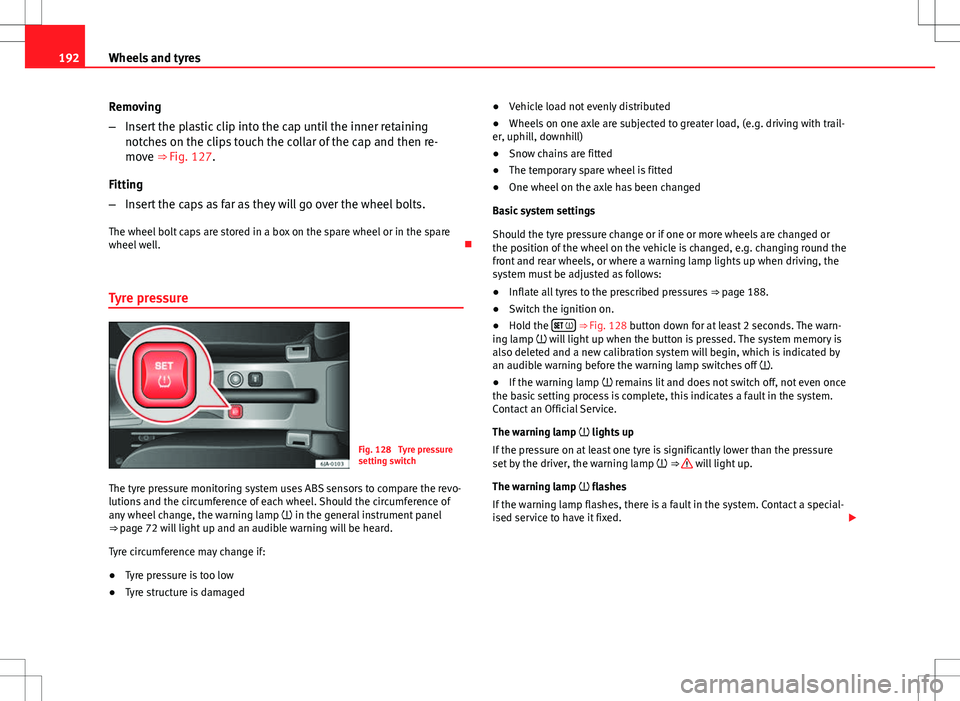
Fig. 128 Tyre pressure
setting switch
The tyre pressure monitoring system uses ABS sensors to compare the revo-
lutions and the circumference of each wheel. Should the circumference of
any wheel change, the warning lamp in the general instrument panel
⇒ page 72 will light up and an audible warning will be heard.
Tyre circumference may change if:
● Tyre pressure is too low
● Tyre structure is damaged ●
Vehicle load not evenly distributed
● Wheels on one axle are subjected to greater load, (e.g. driving with trail-
er, uphill, downhill)
● Snow chains are fitted
● The temporary spare wheel is fitted
● One wheel on the axle has been changed
Basic system settings
Should the tyre pressure change or if one or more wheels are changed or
the position of the wheel on the vehicle is changed, e.g. changing round the
front and rear wheels, or where a warning lamp lights up when driving, the
system must be adjusted as follows:
● Inflate all tyres to the prescribed pressures ⇒ page 188.
● Switch the ignition on.
● Hold the
⇒ Fig. 128 button down for at least 2 seconds. The warn-
ing lamp will light up when the button is pressed. The system memory is
also deleted and a new calibration system will begin, which is indicated by
an audible warning before the warning lamp switches off .
● If the warning lamp remains lit and does not switch off, not even once
the basic setting process is complete, this indicates a fault in the system.
Contact an Official Service.
The warning lamp lights up
If the pressure on at least one tyre is significantly lower than the pressure
set by the driver, the warning lamp ⇒
will light up.
The warning lamp flashes
If the warning lamp flashes, there is a fault in the system. Contact a special-
ised service to have it fixed.