2012 Seat Toledo ECU
[x] Cancel search: ECUPage 51 of 249
50Child safety
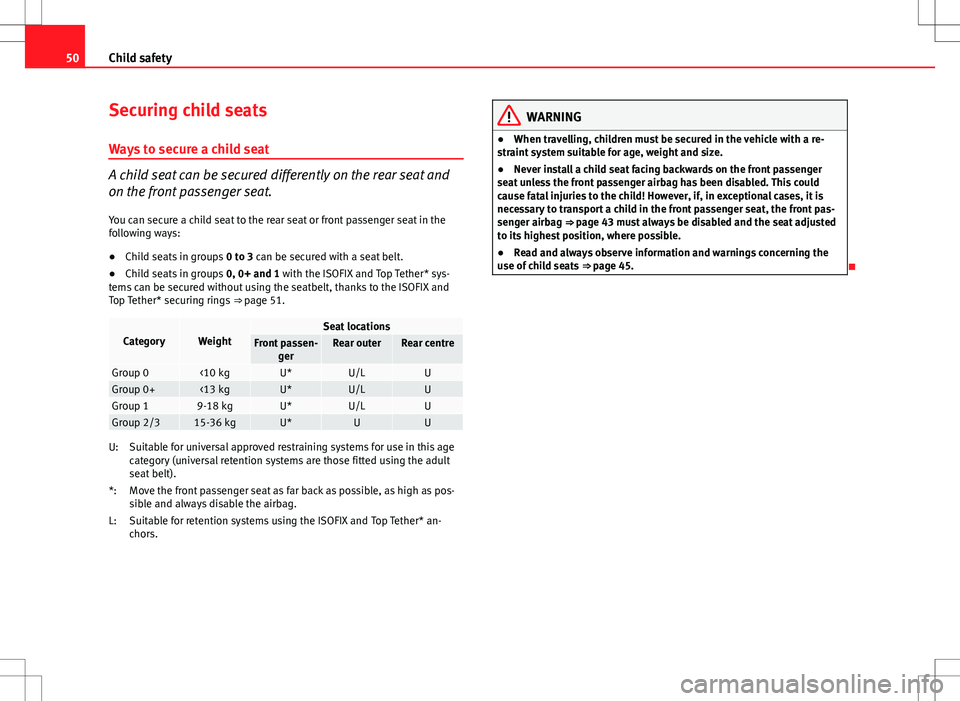
Securing child seats
Ways to secure a child seat
A child seat can be secured differently on the rear seat and
on the front passenger seat. You can secure a child seat to the rear seat or front passenger seat in the
following ways:
● Child seats in groups 0 to 3 can be secured with a seat belt.
● Child seats in groups 0, 0+ and 1 with the ISOFIX and Top Tether* sys-
tems can be secured without using the seatbelt, thanks to the ISOFIX and
Top Tether* securing rings ⇒ page 51.
CategoryWeightSeat locationsFront passen-
gerRear outerRear centre
Group 0<10 kgU*U/LUGroup 0+<13 kgU*U/LUGroup 19-18 kgU*U/LUGroup 2/315-36 kgU*UU
Suitable for universal approved restraining systems for use in this age
category (universal retention systems are those fitted using the adult
seat belt).
Move the front passenger seat as far back as possible, as high as pos-
sible and always disable the airbag.
Suitable for retention systems using the ISOFIX and Top Tether* an-
chors.
U:
*:
L:
WARNING
● When travelling, children must be secured in the vehicle with a re-
straint system suitable for age, weight and size.
● Never install a child seat facing backwards on the front passenger
seat unless the front passenger airbag has been disabled. This could
cause fatal injuries to the child! However, if, in exceptional cases, it is
necessary to transport a child in the front passenger seat, the front pas-
senger airbag ⇒ page 43 must always be disabled and the seat adjusted
to its highest position, where possible.
● Read and always observe information and warnings concerning the
use of child seats ⇒ page 45.
Page 52 of 249

51
Child safety
Child seats fastened with the “ISOFIX” and Top Tether*
system
Child seats with the ISOFIX or Top Tether* system can be se-
cured quickly, easily and safely on the rear outer seats.
Fig. 28 ISOFIX securing
rings
Fig. 29 Top Tether* se-
curing ring
When removing or fitting the child seat, please be sure to follow
the manufacturer's instructions.
– Move the rear seat as far to the rear as it will go. –
Press the child seat onto the ISOFIX retaining rings until the
child seat can be heard to engage securely. If the child seat is
equipped with Toptether* anchor points, secure it to the corre-
spondent ring. Observe the manufacturer's instructions.
– Pull on both sides of the child seat to ensure that it is secure.
Two ISOFIX retaining rings are fitted on each rear seat. In some vehicles, the
rings are secured to the seat frame and, in others, they are secured to the
rear floor. The access to the ISOFIX rings is between the rear seat backrest
and the seat cushioning. The Top Tether* anchors are located at the rear of
the rear seat backrests (behind the seat or in the luggage compartment).
Child seats with the “ISOFIX” and Top Tether* attachment system are availa-
ble from the Technical Services.
WARNING
● The securing rings are designed only for use with ISOFIX and Top
Tether* child seats.
● Never secure child seats that do not have the ISOFIX and Top Tether*
system, retaining belts or other objects to the securing rings – this could
result in potentially fatal injuries to the child!
● Ensure that the child seat is secured correctly using the “ISOFIX” and
Top Tether* securing rings.
Safety FirstOperating instructionsPractical TipsTechnical specifications
Page 61 of 249

60Controls and displays
Unlike the current journey memory, this memory is not deleted, even when
the ignition is switched off for more than two hours.
Note
After disconnecting the battery, all the values stored in the memories 1 and
2 are deleted.
Operation
Fig. 34 Multifunction
display: controls
The button to change the functions A
⇒ Fig. 34 and the button to
delete the memory B are located on the window wiper lever.
Selecting a memory
– Briefly press the station button, B
⇒ Fig. 34.
Selecting functions
– Briefly press the rocker switch A
⇒
Fig. 34 up or down. This
displays the multifunction display functions in consecutive or-
der on the screen. Resetting
–
Select the required memory.
– Keep the button B
⇒ Fig. 34 pressed.
The following values of the selected memory are reset using the B
button.
● the average fuel consumption
● journey distance covered
● average speed
● duration of the journey
Multifunction display data
Outside temperature
The display indicates the outside temperature.
At temperatures below +4 °C (+39 °F), the snowflake symbol is also dis-
played (frozen road surface warning symbol) and an audible warning is giv-
en. Pressing the rocker switch A
⇒ Fig. 34 ⇒
page 60 shows the last dis-
played function.
Journey duration
The display shows the time you have covered since the memory was last re-
set. If you wish to measure the duration of a journey from a specific mo-
ment, the memory must be deleted by pressing the button, B
⇒ Fig. 34
⇒ page 60.
The maximum time indicated by the two memories is 19 hours 59 minutes
or 99 hours and 59 minutes for vehicles fitted with an informative display.
The memory is reset if this value is exceeded.
Page 86 of 249

85
Opening and closing
Locking the vehicle with the key
– Turn the key in the driver door lock cylinder in the reverse direc-
tion to its lock position B ⇒ Fig. 46.
● The doors and the rear lid are locked.
● The courtesy lights switch off.
● The Safe lock is immediately activated.
● Warning lamp on the driver door starts to flash.
Note
The vehicle doors cannot be locked if the driver door is open.
Central lock button
Fig. 47 Central lock but-
ton
If the vehicle has not been locked from outside, it is possible to
lock and unlock the doors from inside by pressing the ⇒ Fig. 47
button, even without the key in the ignition. Locking all doors and rear lid
–
Press the button ⇒ Fig. 47. The warning lamp on the button
will light up.
Unlocking all doors and rear lid
– Press the button ⇒ Fig. 47. The warning lamp on the button
will switch off.
If the vehicle has been locked using the central lock button.
● The rear lid cannot be unlocked from outside (security measure, e.g.
when stopped at a junction).
● The doors can be unlocked individually by pulling the handle.
● The vehicle doors cannot be locked if any of the doors are open.
● In the event of an accident in which the airbags activate, doors locked
from the inside will be automatically unlocked for easier access and assis-
tance.
WARNING
The central locking system remains operative when the ignition is
switched off. Never leave children unattended in the vehicle, as locked
doors delay assistance in an emergency. Doors locked from the inside de-
lay assistance in an emergency. Risk of death!
Note
The handles and the central lock buttons will not work if the Safe lock
⇒ page 83 is activated.
Safety FirstOperating instructionsPractical TipsTechnical specifications
Page 106 of 249

105
Lights and visibility
Set the windscreen wiper arms to the service position before
changing the blades.
Service position for changing wiper blades
– Close the bonnet.
– Switch the ignition on and off.
– Press the lever to position 4
⇒ Fig. 66 ⇒ page 103, the wind-
screen wiper arms are set to the service position.
Taking off the wiper blade
– Lift the windscreen wiper arm away from the glass moving the
blade slightly in the direction of the arm – arrow A
⇒ Fig. 67.
– Hold the top of the windscreen wiper arm with one hand.
– Unlock the catch 1
with the other hand and remove the blade
in the direction of arrow B.
Fitting the wiper blade
– Slide the blade fully until it clicks into position.
– Check that the wiper is correctly secured.
– Fold the windscreen wiper arm back down onto the glass.
– Switch the ignition on and press the lever to position 4
⇒ Fig. 66 ⇒
page 103, the windscreen wiper arms are set to the
basic position. Changing the rear window wiper blade
Fig. 68 Rear window
wiper blade
Taking off the wiper blade
– Lift the rear window wiper arm away from the glass moving the
blade slightly in the direction of the arm – arrow A
⇒ Fig. 68.
– Hold the top of the rear window wiper arm with one hand.
– Unlock the catch 1
with the other hand and remove the blade
in the direction of arrow B.
Fitting the wiper blade
– Slide the blade fully until it clicks into position.
– Check that the wiper is correctly secured.
– Fold the rear window wiper arm back down onto the glass.
Safety FirstOperating instructionsPractical TipsTechnical specifications
Page 113 of 249

112Seats and storage
Luggage compartment
Introduction
Please observe the following points to ensure the vehicle handles
well at all times:
– Distribute the load as evenly as possible.
– Place heavy objects as far forward in the luggage compartment
as possible.
– Secure luggage using the fastening rings or retaining net
⇒ page 113.
During an accident, even small and light objects can have so much kinetic
energy that they can cause very severe injuries. The amount of kinetic ener-
gy depends on the speed of the vehicle and the weight of the object. How-
ever, the speed of the vehicle is the most important factor.
Example: An unsecured object weighing 4.5 kg produces energy corre-
sponding to 20 times its weight in a frontal collision at 50 km/h (31 mph).
This means that its weight “reaches” around 90 kg. You can imagine the se-
verity of the injuries that might be sustained if this “projectile” strikes an
occupant as it flies through the vehicle interior.
WARNING
● Store objects in the luggage compartment and secure to the fastening
points.
● In an accident or sudden manoeuvre, loose objects in the interior can
be flung forwards and possibly injure vehicle occupants or others. This
risk is increased if the flying objects hit and trigger an airbag. In this
case, any rebounding objects could injure vehicle occupants. Risk of fatal
injuries!
● Take into account that transporting heavy objects changes the centre
of gravity that could also cause changes in vehicle handling. Risk of acci-
dent! Therefore, always adjust your speed and driving style to suit these
circumstances.
● Securing the load to the rings using unsuitable or damage straps
could lead to injuries in the event of an accident or sudden braking ma-
noeuvre. Secure suitable straps safely to the rings to ensure this does
not happen.
● Position the load so that it cannot moved forwards during a sudden
braking manoeuvre. Risk of injuries!
● If transporting sharp or dangerous objects in the space provided
when the rear seats are folded, ensure the safety of the occupant of the
remaining rear seat ⇒ page 13.
● If the rear seat located alongside a folding seat is occupied, ensure
safety by placing the load so that it stops the seat from folding back-
wards in the event of a collision, for example.
● Never drive with the rear lid open or half-closed, as exhaust gases
can be drawn into the interior. Risk of intoxication!
● Never exceed the allowed axle loads or allowed maximum weight.
Risk of accident!
● Never transport passengers in the luggage compartment!
Page 114 of 249

113
Seats and storage
CAUTION
Make sure sharp objects stored in the luggage compartment cannot not
damage the rear window heating filaments.
Note
Tyre pressure must be adapted to suit the load ⇒ page 188, Tyre useful life.
Luggage compartment light
The light switches on automatically when the rear lid is opened. The light
switches off automatically 10 seconds after the rear lid has been opened.
Category N1 vehicles
Category N1 vehicles with no protection grille must use a retaining set com-
pliant with Standard EN 12195 (1 – 4) to secure the load. Retaining elements
Fig. 76 Luggage com-
partment: Retaining ele-
ments
The following retaining elements are fitted in the luggage compartment
⇒ Fig. 76.
Rings to secure the load and the retaining nets.
Rings used solely for the retaining nets.
CAUTION
The rings support a maximum load of 3.5 kN (350 kg).
Note
The front ring B is below the folding backrest of the rear seats
⇒ Fig. 76.
A
B
Safety FirstOperating instructionsPractical TipsTechnical specifications
Page 115 of 249

114Seats and storage
Hook
Fig. 77 Luggage com-
partment: hook
There are hooks on both sides of the luggage compartment to secure light
items of luggage such as bags, etc. ⇒ Fig. 77.
CAUTION
The side hooks support a maximum load of 7.5 kg.
Retaining nets
Fig. 78 Retaining nets
Fig. 79 Retaining nets
Example of securing retaining nets ⇒ Fig. 78 and ⇒ Fig. 79.
Sideways bag
Ground net
Lengthways bag
WARNING
Do not exceed the maximum load that the nets can support. Heavy ob-
jects cannot be safely secured. Risk of injuries!
CAUTION
● The retaining nets support a maximum load of 1.5 kg.
● Do not place any item with sharp edges in the net. Risk of damaging the
net!
A
BC