2012 Seat Ibiza ST light
[x] Cancel search: lightPage 152 of 282
150Driving
● There is enough LPG in the tank.
● The temperature of the vehicle coolant is above 30°C.
● Engine speed while driving is above 1200 rpm.
Automatic switch from LPG to petrol
When the vehicle is operating in LPG mode and one of these conditions is
met, the system automatically switches to petrol mode, the notification changed to petrol mode is displayed and the green warning lamp on the in-
strument panel goes out:
● When the engine is started.
● If the LPG tank is empty.
● If there is a fault in the LPG system.
● At very low temperatures below minus 10°C.
Manual switch from petrol to LPG
Press the button on the centre console ⇒ Fig. 108 to change mode.
The notification changed to GAS mode is displayed. When the following con-
ditions are met, the system switches to LPG mode, the green warning lamp
on the instrument panel lights up and the notification displayed changes to
changed to GAS mode .
● There is enough LPG in the tank.
● The temperature of the vehicle coolant is above 30°C.
● Engine speed while driving is above 1200 rpm.
Manual switch from LPG to petrol
Press the button on the centre console ⇒ Fig. 108 to change mode.
The green lamp on the instrument panel goes out and the notification changed to petrol mode is displayed.
Running on petrol
Run the engine with petrol for short journeys at regular intervals to avoid
problems in the petrol system.
WARNING
LPG is a highly explosive and inflammable substance. It may cause se-
vere burns and other injury.
● Due care must be taken to avoid any risk of fire or explosion.
● When parking the vehicle in a closed area (for example in a garage),
make sure that there is adequate ventilation, either natural or mechani-
cal, to neutralise the LPG in the event of a leak.
Note
● If frequent short journeys are made, especially when the outside tem-
perature is low, the vehicle will tend to run on petrol more often than on
LPG. Therefore, the petrol tank may empty before the LPG tank.
● The notification LPG mode not possible may be displayed.
Start-Stop function* Description and operation
The Start-Stop function stops the engine when the vehicle is stop-
ped and starts it automatically when required.
– When the vehicle is stopped, put it in neutral and release the
clutch pedal. The engine will stop.
– When the clutch pedal is pressed, the engine starts again.
– The instrument panel display shows information about the sta-
tus of the Start-Stop function ⇒
Fig. 110.
Page 155 of 282

153
Driving
Manual gearbox
Driving with a manual gearbox
Fig. 111 Centre Console:
gear shift pattern of a 5-
speed manual gearbox
Engaging the reverse gear
– The vehicle should be stationary with the engine idling. Press
the clutch down thoroughly.
– Place the gearbox lever into neutral and push the lever down-
wards.
– Slide the gearbox lever to the left, and then into the reverse po-
sition shown on the lever.
Certain versions of the model may include a 6-speed manual gearbox, and
its diagram is shown on the gearbox lever.
The reverse gear can only be engaged when the vehicle is stationary. When
the engine is running and before engaging this gear, wait about 6 seconds
with the clutch pressed down thoroughly in order to protect the gearbox. The reverse lights switch on when the reverse gear is selected and the igni-
tion is on.
WARNING
● When the engine is running, the vehicle will start to move as soon as
a gear is engaged and the clutch released.
● Never select the reverse gear when the vehicle is in motion. Risk of
accident.
Note
● Do not rest your hand on the gear lever while driving. The pressure of
your hand could cause premature wear on the selector forks in the gearbox.
● When changing gear, you should always depress the clutch fully to
avoid unnecessary wear and damage.
● Do not hold the vehicle “on the clutch” on hills. This causes premature
wear and damage to the clutch.
● Do not leave your foot on the clutch pedal; although the pressure may
seem insignificant, it can cause the premature wear of the clutch plate. Use
the foot rest when you do not need to change gear.
Safety FirstOperating InstructionsPractical TipsTechnical Specifications
Page 157 of 282

155
Driving
The selector lever lock is released as follows:
– Switch the ignition on.
– Hold the brake pedal pressed down and at the same time, hold
the selector lever lock on the left of the selector lever also
pressed down.
The warning lamp on the instrument panel lights up when the brake ped-
al should be applied. This is essential when the selector lever is taken from
the P or N positions.
The selector lever lock only works if the vehicle is stationary or driving at
speeds up to 5 km/h (3 mph). At higher speeds the selector lever lock is
automatically unlocked in the N position.
The selector lever lock is not engaged if the selector lever is moved quickly
through position N (e.g. when shifting from R to D). This makes it possible,
for instance, to “rock” the vehicle backwards and forwards if it is stuck in
snow or mud. The selector lever lock engages automatically if the brake
pedal is not depressed and the lever is in position N for more than about
1second. Driving a car with an automatic gearbox
The gearbox changes gear ratios automatically as the vehi-
cle moves.
Fig. 115 Automatic gear-
box
Starting
– Start the engine with the selector lever in position P or N.
Driving
– Hold the brake pedal pressed down.
– By holding the lock button (button on the left in the selector lev-
er), select R, or D.
– Release the lever and wait a little for the gearbox to engage the
gear (a slight movement can be felt).
– Release the brake and press the accelerator ⇒
.
Safety FirstOperating InstructionsPractical TipsTechnical Specifications
Page 158 of 282
156Driving
Stopping briefly
–If stopping for a short time, keep the vehicle stationary by
pressing the foot brake hard to prevent the vehicle moving
backwards on a slope or “creeping” forwards, e.g. at traffic
lights. The selector lever does not need to be put into the posi-
tions P or N.
– Do not press the accelerator.
Parking
– Press and hold the brake pedal until the vehicle comes to a
standstill ⇒
.
– Apply the handbrake.
– By pressing the lock button down, move the selector lever to P
and release the lock button.
Driving up and down hills
– Press the selector lever from position “D” to the right into the
tiptronic selector gate.
– Lightly press the selector lever back to change down.
Holding the car on a hill
– The brake must be always pressed down to prevent the vehicle
from “rolling backwards” ⇒
. Do not try to prevent the vehicle
from rolling backwards by increasing the engine speed while a
range of gears is selected.
Starting the vehicle up hills
– Apply the handbrake. –
With a selected gear, accelerate slowly and at the same time,
release the handbrake.
The steeper the slope, the lower the needed gear. This increases the brak-
ing effect of the engine. For example, when driving down a very steep slope
in third gear. If the engine brake effect is not enough, the vehicle will speed
up. The automatic gearbox automatically changes up to prevent the engine
over-revving. Use the foot brake to reduce speed and change into third gear
again using Tiptronic* ⇒
.
Your vehicle has an automatic interlock which prevents the selector lever
from being put into a position for driving forwards or in reverse from posi-
tions P or N if the brake pedal is not depressed.
The ignition key cannot be removed unless the selector lever is in position
P.
Control lamp “Pressing brake pedal”
When the warning lamp next to the selector lever lights up, press the brake
pedal. This is necessary when the automatic gearbox selector lever is
moved out of positions P or N. At the same time, a text message or the in-
structions to perform necessary operations may appear on the instrument
panel.
WARNING
● As a driver, you should never leave your vehicle if the engine is run-
ning and a gear is engaged. If you have to leave your vehicle while the
engine is running, you must apply the parking brake and put the selector
lever in position P.
● If the engine is running and D or R are engaged, you will need to hold
vehicle stopped by depressing the brake pedal. The vehicle would keep
on creeping forward as the power transmission is not fully interrupted
even when the engine is idling.
Page 160 of 282
158Driving
Changing gear in tiptronic mode
–Press the selector lever from position D to the right into the tip-
tronic selector gate.
– Lightly press the selector lever forward + to change up into high
gears.
– Lightly press the selector lever backwards - to change down into
low gears.
Changing gear with the steering wheel paddle levers*
– Press the right paddle lever +
towards the steering wheel to
change up. ⇒ Fig. 117.
– Press the left paddle lever –
towards the steering wheel to
change down. ⇒ Fig. 117.
Using the paddle levers on the steering wheel, you can access manual driv-
ing mode regardless of the pre-selected driving mode.
General information about driving in tiptronic mode
When accelerating, the automatic gearbox / DSG automatic gearbox goes
into a higher gear a little before the engine reaches its maximum permitted
revolutions.
If a lower gear is selected, the automatic gearbox / DSG automatic gearbox
will only change down when the engine cannot go over its maximum permit-
ted revolutions.
If tiptronic is selected whilst the vehicle is in motion and the automatic
gearbox / DSG automatic gearbox is in third gear and selector lever position
D, tiptronic mode will then also be in third gear. Changing gears in the normal or sport programme using the steering wheel
paddle levers
If the paddle levers
⇒ Fig. 117 are used in the normal or sport programme,
the system switches temporarily to tiptronic mode. To exit “tiptronic” mode
again, press the right paddle lever +
towards the steering wheel for approx-
imately one second. You will also leave tiptronic mode if the paddle levers
are not moved for a certain time.
Note
● The gear paddle levers on the steering wheel can be operated with the
selector lever in any position and with the vehicle in motion.
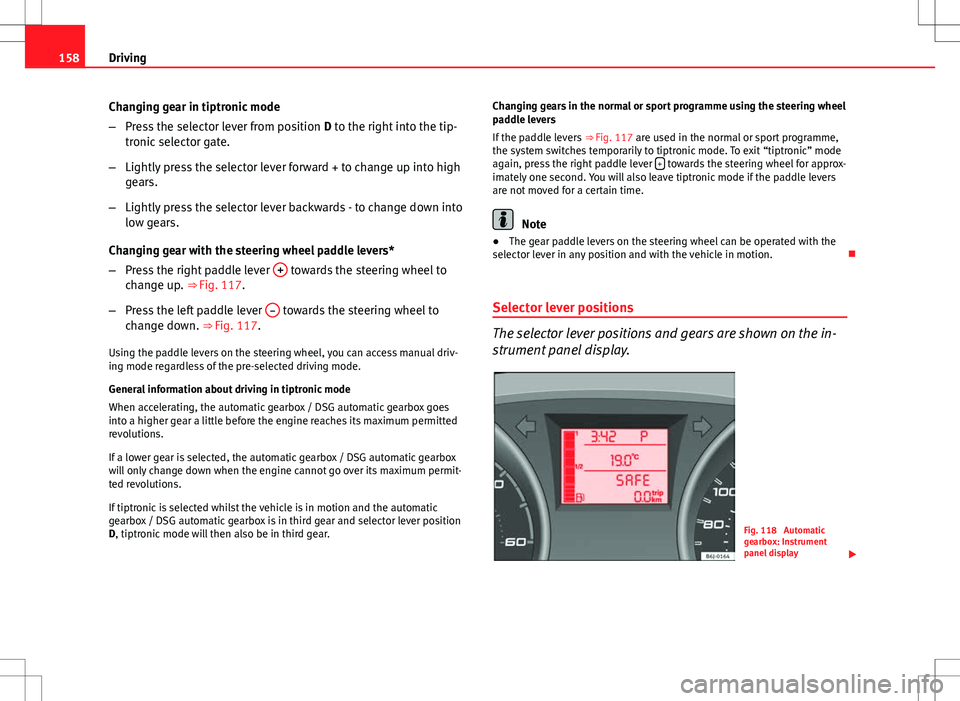
Selector lever positions
The selector lever positions and gears are shown on the in-
strument panel display.
Fig. 118 Automatic
gearbox: Instrument
panel display
Page 161 of 282

159
Driving
Selector lever positions
The selected gear is displayed on the side of the selector lever and on the
instrument panel display. The currently selected gear for the automatic
gearbox will also be shown on the display.
Tiptronic gear indicator
If the automatic gearbox is shifted manually, the selected gears are shown
on the screen.
P - parking lock
When the selector lever is in this position, the driven wheels are locked me-
chanically.
Position P on the lever must only be selected if the vehicle is stationary.
To move selector lever from position P, the locking button on the selector
lever handle must be pressed and the brake pedal depressed at the same
time while the ignition is switched on.
To put the selector lever in position P, simply press the lock button down
and, if necessary, depress the brake pedal down.
R - Reverse gear
The reverse gear is engaged in this position.
Reverse gear must be engaged only when the vehicle is stationary and the
engine is idling.
To move the selector lever to position R, press the lock button down and, at
the same time, press the brake pedal down, with the ignition switched on.
With the selector lever in position R and the ignition switched on the follow-
ing occurs:
● Reverse lights light up.
● The air conditioner automatically changes the air recirculation mode. ●
The wiper starts if the windscreen washer is on.
● The parking distance warning system switches on.*
N - Neutral (idling)
If this position is selected, the gearbox is in neutral. Power is not transmit-
ted to the wheels and the engine does not have a braking function.
Never use the N position to drive down a hill. The engine does not function
as a brake and the brakes are subjected to excessive stain.
You could damage the automatic gearbox if you drive down hills with the
gearbox lever in position N and the engine switched off.
D - Drive (forward)
In this position the gearbox automatically changes to a lower or higher gear,
according to the engine's requirements, the driving style and speed. The
braking effect of the engine when driving downhill is very limited when the
selector is in this position. The instrument panel display shows the selected
gear as well as the selector lever in position D.
If position N has been selected and you wish to select D, you must press the
foot brake if the vehicle is stationary, or travelling at under 5 km/h (3 mph).
S - Standard driving position (Sport programme)
When the selector lever is in position S, it will automatically change up into
a higher gear later, and change down into a low gear, if compared with posi-
tion D. This way, it is possible to take full advantage of the engine reserve
power, depending on the engine demand, driving style and speed. The
braking effect of the engine when driving downhill is very limited. On the
instrument panel display the selected gear is shown as well as the selector
lever to position S.
To select gear range S, press the lock button on the selector lever.
Safety FirstOperating InstructionsPractical TipsTechnical Specifications
Page 163 of 282

161
Driving
WARNING
You could lose control of the vehicle if you accelerate on slippery road
surfaces. Risk of serious injury.
● Be particularly careful when using the kickdown features on slippery
road surfaces. With a fast acceleration, the vehicle could lose traction
and skid.
● You should use the kickdown feature only when traffic and weather
conditions allow it to be used safely.
Handbrake Using the handbrake
The handbrake should be applied firmly to prevent the vehi-
cle from accidentally rolling away.
Fig. 119 Handbrake be-
tween the front seats Always apply the handbrake when you leave your vehicle and when
you park.
Applying the handbrake
–
Pull the handbrake lever up firmly ⇒ Fig. 119.
Releasing the handbrake
– Pull the lever up slightly and press the release knob in the di-
rection of the arrow ⇒ Fig. 119 and guide the handbrake lever
down fully ⇒
.
Always apply the handbrake as far as it will go in order to prevent yourself
from driving with the handbrake applied by mistake ⇒
.
The handbrake warning lamp lights up when the handbrake is applied
and the ignition switched on. The warning lamp turns off when the hand-
brake is released.
WARNING
● Never use the handbrake to stop the vehicle when it is in motion. The
braking distance is considerably longer, because braking is only applied
to the rear wheels. Risk of accident!
● If the handbrake is only partially released, this will cause the rear
brakes to overheat, which can impair the function of the brake system
and could lead to an accident. This also causes premature wear on the
rear brake pads.
CAUTION
Always apply the handbrake before you leave the vehicle. The first gear
should also be selected.
Safety FirstOperating InstructionsPractical TipsTechnical Specifications
Page 164 of 282
162Driving
Parking
The handbrake should always be firmly applied when the
vehicle is parked.
Always note the following points when parking the vehicle:
–Use the brake pedal to stop the vehicle.
– Apply the handbrake.
– Select first gear.
– Switch the engine off and remove the key from the ignition. Turn
the steering wheel slightly to engage the steering lock.
– Always take you keys with you when you leave the vehicle ⇒
.
Additional notes on parking the vehicle on gradients:
Turn the steering wheel so that the vehicle rolls against the kerb if it started
to roll.
● If the vehicle is parked facing downhill, turn the front wheels so that
they point towards the kerb .
● If the vehicle is parked facing uphill, turn the front wheels so that they
point away from the kerb .
● Secure the vehicle as normal by applying the handbrake firmly and se-
lecting first gear.
WARNING
● Take measures to reduce the risk of injury when you leave your vehi-
cle unattended.
● Never park where the hot exhaust system could ignite inflammable
materials, such as dry grass, low bushes, spilt fuel etc.
● Never allow vehicle occupants to remain in the vehicle when it is
locked. They would be unable to open the vehicle from the inside, and
could become trapped in the vehicle in an emergency. In the event of an
emergency, locked doors will delay assistance to vehicle occupants.
● Never leave children alone in the vehicle. They could set the vehicle
in motion, for example, by releasing the handbrake or the gearbox lever.
● Depending on weather conditions, it may become extremely hot or
cold inside the vehicle. This can be fatal.
Hill-start assist*
This function is only included in vehicles with ESC. This device helps when starting uphill.
These are the basic operation conditions: doors closed, brake pedal press-
ed down and vehicle in neutral. The system gets activated on engaging
gear.
After removing your foot from the brake pedal, the braking force is main-
tained for a few seconds to prevent the vehicle from moving backward when
putting into gear. This short space of time is enough to start the vehicle
with ease.
This system also works when reversing uphill.