Page 137 of 325
135
Seats and storage compartments
Seats and storage compartments Manual adjustment of the front seats
Seat adjuster controls
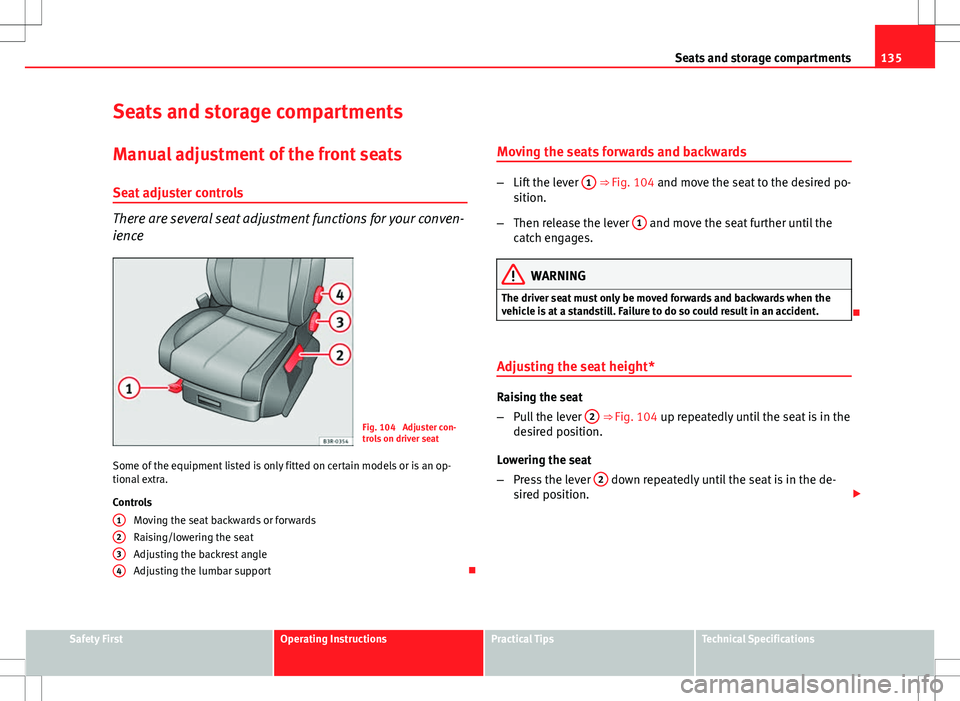
There are several seat adjustment functions for your conven-
ience
Fig. 104 Adjuster con-
trols on driver seat
Some of the equipment listed is only fitted on certain models or is an op-
tional extra.
Controls Moving the seat backwards or forwards
Raising/lowering the seat
Adjusting the backrest angle
Adjusting the lumbar support
1
234
Moving the seats forwards and backwards
–
Lift the lever 1 ⇒ Fig. 104 and move the seat to the desired po-
sition.
– Then release the lever 1
and move the seat further until the
catch engages.
WARNING
The driver seat must only be moved forwards and backwards when the
vehicle is at a standstill. Failure to do so could result in an accident.
Adjusting the seat height*
Raising the seat
– Pull the lever 2
⇒ Fig. 104 up repeatedly until the seat is in the
desired position.
Lowering the seat
– Press the lever 2
down repeatedly until the seat is in the de-
sired position.
Safety FirstOperating InstructionsPractical TipsTechnical Specifications
Page 138 of 325
136Seats and storage compartments
WARNING
● The height of the driver seat must not be adjusted while driving. Fail-
ure to do so could result in an accident.
● Be careful when adjusting the seat height. Injuries can be caused if
the seat height is adjusted without due care and attention.
Adjusting the backrest angle
– Lean forwards to take your weight off the backrest.
– Turn the adjuster wheel 3
⇒ Fig. 104 to set the angle of the
backrest as required.
WARNING
The front backrests must not be reclined for driving. Otherwise, seat
belts and the airbag system might not protect as they should, with the
subsequent danger of injury.
Adjusting lumbar support*
– Do not exert any pressure on the backrest and turn adjuster
wheel 4 ⇒ Fig. 104 to adjust lumbar support.
As you make the adjustments, the curvature of the cushioned area of the
lumbar region becomes more or less acute. In this way, it adapts to the nat-
ural curvature of the spine.
Page 140 of 325

138Seats and storage compartments
Controls
Seat adjustment
Backrest adjustment
Lumbar support*
WARNING
● The electrical seat adjustment also works when the ignition is off or
when the key is not in the ignition. To avoid accidental injuries, never
leave children unattended in the vehicle.
● For safety reasons, the seat must only be adjusted when the vehicle
is at a standstill. Failure to do so could result in an accident.
● Be careful when adjusting the seat height. Injuries can be caused if
the seat height is adjusted without due care and attention.
Adjusting the backrest angle
Fig. 107 Front seat:
Backrest adjuster switch
A
BC
–
Press the button in the appropriate direction of the arrow
⇒ Fig. 107 to adjust the backrest ⇒ .
WARNING
The front backrests must not be reclined for driving. Otherwise, seat
belts and the airbag system might not protect as they should, with the
subsequent danger of injury.
Lumbar support*
The lumbar support can be adjusted to fit the natural curve
of the spine.
Fig. 108 Front seat: Ad-
juster switch for lumbar
support
Adjusting the contour
– Press the front part of the adjuster switch ⇒
Fig. 108 to increase
the contour of the lumbar support.
Page 141 of 325

139
Seats and storage compartments
– Press the rear part of the adjuster switch to decrease the con-
tour of the lumbar support.
Adjusting the height
– Press the top part of the adjuster switch to move the contour
upwards.
– Press the bottom part of the adjuster switch to move the con-
tour down.
The lumbar support provides effective support for the natural curvature of
the spine to give a more relaxed seating position, especially on long jour-
neys. Driver seat memory*
Description
The memory buttons in the driver door can be used to store
and recall up to four different positions for the driver seat
and exterior mirrors.
Fig. 109 Driver door:
Memory system
Memory buttons
Using memory buttons 1, 2, 3 and 4 ⇒ Fig. 109, you can store and recall the
seat and exterior mirror positions for up to four different drivers.
STOP
button
The seat memory will be disabled if the STOP button is in the up position
(press and release). The word will light up next to the STOP button (only
visible when the lights are switched on).
The stored settings will all remain in the memory. However, the seat and the
exterior mirrors can now only be adjusted using the conventional electrical
adjustment. Use of the STOP
button is recommended to disable the memory
Safety FirstOperating InstructionsPractical TipsTechnical Specifications
Page 143 of 325

141
Seats and storage compartments
Assigning remote control keys
The key must be assigned to a memory button so that the
positions stored in the memory can also be recalled using
the remote control key. Assigning the remote control key to a memory button
– Using the memory button, recall the settings that are to be pro-
grammed onto the key.
– Keeping the memory button pressed down, press the unlock
button on the remote control key within 10 seconds.
– Wait for about 2 seconds before releasing the memory button.
Deleting assignment of the remote control key to the memory
button
– Press and hold the MEMO
button and press the unlock button
on the remote control key within 10 seconds.
– Wait for about 2 seconds before releasing the MEMO
button.
The previous settings are automatically cancelled when the keys are re-as-
signed to different memory buttons. Head restraints
Front head restraints
In combination with properly worn seat belts, the head re-
straints offer effective protection, provided they are properly
adjusted to suit the height of the occupant.
Fig. 110 Front seats:
Head restraints
Raising the head restraint
– Take hold of the sides of the head restraint with both hands.
– Pull up the head restraint.
Lowering the head restraint
– Press button A
and lower the head restraint.
Removing the head restraints
– Pull the head restraint up as far as it will go.
Safety FirstOperating InstructionsPractical TipsTechnical Specifications
Page 144 of 325

142Seats and storage compartments
–Press button A
and pull out the head restraint.
Fitting the head restraint
– Insert the head restraint in its guides until it clicks into place.
Press button A
and lower the head restraint.
The height of the head restraints is adjustable. They should be set to suit
the height of the occupant. In combination with the seat belts, the head re-
straints offer effective protection, provided they are properly adjusted.
For best protection, the top of the head restraint should be at least at eye
level or higher.
Head restraints on the side rear seats
Fig. 111 Outer rear
seats: Head restraints
Raising the head restraint
– Take hold of the sides of the head restraint with both hands.
– Pull the head restraint up as far as it will go. Lowering the head restraint
–
Press button A
⇒ Fig. 111 and lower the head restraint.
Removing the head restraint
– Pull the head restraint up as far as it will go.
– Press button A
⇒ Fig. 111 and pull out the head restraint.
Fitting the head restraint
– Insert the head restraint in its guides until it clicks into place.
Press button A
and lower the head restraint.
When the rear seats are not occupied, the head restraints should be moved
to the lowest position so that they do not obstruct the driver's field of vi-
sion.
Rear seat central head restraint
Fig. 112 Centre rear
seat: Head restraints
Page 151 of 325

149
Seats and storage compartments
Luggage compartment liner*
You can use the liner to protect the inside of the luggage
compartment when carrying wet or dirty items.
Fig. 122 Floor panel
raised
Fig. 123 Floor panel re-
moved for increased lug-
gage space Lifting the floor panel
–
Open the rear lid.
– Take hold of handle A
⇒ Fig. 122, lift the floor panel B and
line up the bottom corners of the floor panel with the recesses C
.
– Put the items you are transporting onto the luggage compart-
ment liner
Folding the floor panel
– Open the rear lid.
– Take hold of the handle A
⇒ Fig. 122 and fold out the floor
panel as far as the rear backrest.
Removing the floor panel
– Open the rear lid.
– Take hold of the handle A
⇒ Fig. 122 and fold out the floor
panel as far as the rear backrest.
– Pull the complete floor panel towards the rear of the vehicle so
it comes out of the retainers D
⇒ Fig. 123.
Small items can also be stored under floor panel B
⇒ Fig. 122.
The space available for carrying items in the luggage compartment liner can
be increased by folding out the floor panel or removing it completely.
CAUTION
When the luggage compartment floor panel is folded out to the upright po-
sition you should not transport items weighing more than 7.5 kg, or items
which exceed 2/3 of the height of the upright floor panel.
Safety FirstOperating InstructionsPractical TipsTechnical Specifications
Page 174 of 325
172Driving
Driving
SteeringAdjusting the steering wheel position
The height and reach of the steering wheel can be freely ad-
justed to suit the driver
Fig. 143 Lever beneath
steering column
– Push the lever ⇒ Fig. 143 down ⇒
.
– Move the steering wheel to the desired position.
– Then push the lever back up against the steering column until it
engages in position.
WARNING
● Never adjust the position of the steering wheel when the vehicle is
moving, as this could cause an accident.
● For safety reasons, the lever must always be securely engaged when
the vehicle is moving, so that the position of the steering wheel cannot
shift unexpectedly. Otherwise this could cause an accident.
Safety Electronic Stability Control (ESC)
The ESC helps make driving safer in extreme driving condi-
tions.
Fig. 144 Detailed view of
the centre console: ESC
button

