2012 Seat Exeo instrument panel
[x] Cancel search: instrument panelPage 86 of 317

84Cockpit
exceeded by about 10 km/h. A warning symbol will also appear in the dis-
play ⇒ Fig. 56.
The speed warning function has two different warning speeds, which oper-
ate independently and serve slightly different purposes:
Speed limit warning 1
With speed limit warning 1, the maximum speed can be changed while driv-
ing. The speed limit that has been set remains stored until the ignition is
switched off, or until it is changed or cleared.
The warning symbol for speed limit warning 1 ⇒ Fig. 56 will appear in the
display if you exceed the pre-set speed. It goes out again if the speed is re-
duced below the set speed limit.
The symbol also goes out if the speed is increased to more than about
40 km/h above the set speed for at least 10 seconds. However, this does
not cancel the speed limit that was originally set.
Setting speed limit warning 1 ⇒ page 84.
Speed limit warning 2
With speed limit warning 2, the speed limit can only be changed or cleared
when the ignition is switched off. You are recommended to store this speed
limit warning if you always wish to be reminded of a particular speed limit.
This could be when driving in countries with general speed limits, or if a
particular speed should not be exceeded when winter tyres are fitted etc.
The speed limit warning symbol for speed warning 2 will appear in the
display if you exceed the pre-set speed. Unlike speed limit warning 1, the
warning symbol only goes out once the road speed has dropped below the
set value again.
Setting speed limit warning 2 ⇒ page 85.
Note
Please bear in mind that, even with the speed warning function, it is still im-
portant to keep an eye on the vehicle's speed with the speedometer and to
observe the legal speed limits.
Setting speed limit warning 1
Use the CHECK button to set speed limit warning 1.
Fig. 57 Detailed view of
the instrument panel:
CHECK button
Setting the speed limit
– Drive at the desired maximum speed.
– Press the CHECK button and hold it down until the symbol
⇒ Fig. 56 appears.
Clearing the speed limit
– Drive the vehicle at a minimum of 5 km/h.
Page 87 of 317
85
Cockpit
– Press the CHECK button for at least two seconds.
The speed warning symbol lights up briefly in the display when the but-
ton is released to confirm that the selected speed has been stored. The
speed limit that has been selected remains stored until another speed is se-
lected with a brief push of the button, or until the memory is cleared with a
long push of the button.
Setting speed limit warning 2
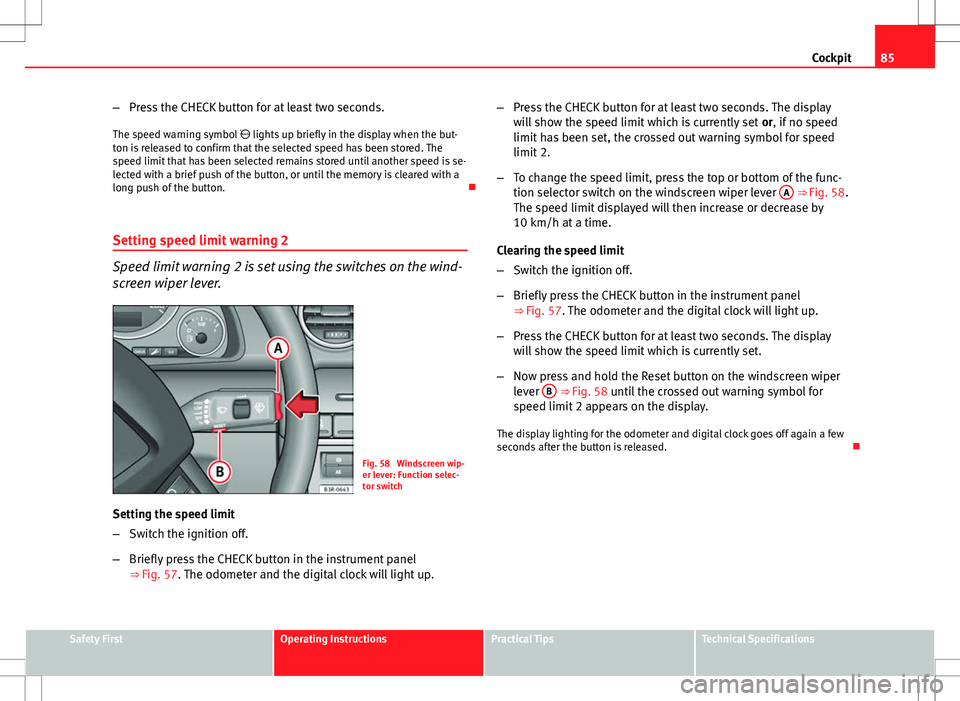
Speed limit warning 2 is set using the switches on the wind-
screen wiper lever.
Fig. 58 Windscreen wip-
er lever: Function selec-
tor switch
Setting the speed limit
– Switch the ignition off.
– Briefly press the CHECK button in the instrument panel
⇒ Fig. 57. The odometer and the digital clock will light up. –
Press the CHECK button for at least two seconds. The display
will show the speed limit which is currently set or, if no speed
limit has been set, the crossed out warning symbol for speed
limit 2.
– To change the speed limit, press the top or bottom of the func-
tion selector switch on the windscreen wiper lever A
⇒ Fig. 58.
The speed limit displayed will then increase or decrease by
10 km/h at a time.
Clearing the speed limit
– Switch the ignition off.
– Briefly press the CHECK button in the instrument panel
⇒ Fig. 57. The odometer and the digital clock will light up.
– Press the CHECK button for at least two seconds. The display
will show the speed limit which is currently set.
– Now press and hold the Reset button on the windscreen wiper
lever B
⇒ Fig. 58 until the crossed out warning symbol for
speed limit 2 appears on the display.
The display lighting for the odometer and digital clock goes off again a few
seconds after the button is released.
Safety FirstOperating InstructionsPractical TipsTechnical Specifications
Page 92 of 317

90Cockpit
Controlling the menu
The menu display is called up via the Reset button and the
rocker switch on the windscreen wiper lever. Use these con-
trols to make checks and adjust the settings.
Fig. 63 Windscreen wip-
er lever: Reset button
and rocker switch
Functions of the Reset
B ⇒
Fig. 63 and the rocker switch A:
Activating the menu
– Press the Reset
button until the menu display
⇒ Fig. 62 ap-
pears.
Selecting and setting
– Press the rocker switch to select one of the menus. Press "up"
or "down" on the switch to select the options accordingly.
Entering and confirming
– Press the Reset
button. Use the rocker switch to select the menus and adjust various values. The se-
lected values are highlighted on a red background.
By pressing the
Reset
button, you can confirm the option you have selected
or the value you have set. Selected functions are marked with a tick.
The following symbols are used:
CursorFunction selectedRed background (active
function)
TickSelected
BoxNot selected
Triangle pointing upwardsPrevious page
Triangle pointing down-
wardsNext page
Tyre pressure monitoring* Introduction
The tyre pressure monitoring system constantly checks the
pressure of the tyres.
The system warns the driver in the event of a loss of pressure by means of
symbols and messages in the instrument panel display. The system works
with the help of the ABS sensors in the wheels.
Please bear in mind that the tyre inflation pressure is also influenced by the
temperature of the tyre. Tyre pressure increases about 0.1 bar for each 10 °C
in tyre temperature increase. The tyre heats up while the vehicle is being
Page 106 of 317

104Unlocking and locking
Rear lid
Rear lid: opening and closing
Fig. 74 Driver door: Un-
locking the rear lid
Fig. 75 Luggage com-
partment: opening from
the outside Opening the rear lid
–
Press the centre button
on the
remote control key or press
the switch* on the driver door ⇒
Fig. 74. The rear lid will
open.
– Then lift up the rear lid. If your vehicle is equipped accordingly,
the rear lid will open automatically*.
Closing the rear lid
– Pull down the rear lid and let it drop into the latch ⇒
.
Use the recessed handle in the interior trim to make it easier to pull down
the rear lid.
WARNING
● After closing the rear lid, always check that the catch has engaged
properly. If not, the rear lid could open while driving, even if it has been
locked. Risk of accident!
● The rear lid must always be completely closed when the vehicle is
moving, otherwise toxic exhaust fumes may be drawn into the vehicle.
Danger of poisoning!
Note
● The door/rear lid warning symbol lights up on the instrument panel dis-
play if the rear lid is not properly closed when the ignition is switched on
⇒ page 75.
Page 119 of 317

117
Lights and visibility
● The warning symbol will appear on the instrument panel if a malfunc-
tion occurs ⇒ page 82.
● Observe all relevant legal requirements when using the signalling and
lighting systems described here.
Front fog lights
The light switch can also be used to turn on the front fog
lights.
Switching on the front fog lights
– Do ⇒ Fig. 82 not turn the light switch to the symbol .
– First turn the light switch to the position or .
– Then pull the light switch out to the first stop 1
.
The front fog light symbol next to the switch will light up when the front
fog lights are on.
Rear fog light
The light switch can also be used to turn on the rear fog
light.
– Do ⇒ Fig. 82 not turn the light switch to the symbol .
– First turn the light switch ⇒ Fig. 82 to the position or .
– Then pull out the light switch to the second stop 2
to switch
on the rear fog light. The symbols
and next to the switch will light up when the rear fog light
is switched on.
If you are towing a trailer or caravan equipped with a rear fog light on a vehi-
cle with a factory-fitted towing bracket*, only the rear fog light on the trailer
or caravan will light up.
CAUTION
To avoid dazzling the traffic behind you, the rear fog light should only be
used in accordance with legal regulations.
Coming home / leaving home function*
The coming home and leaving home functions are used to
light up the surroundings in the dark. The front fog lights,
the rear side lights and the number plate light switch on.
Fig. 84 Detailed view of
the dash panel: Coming
home and leaving home
functions
Safety FirstOperating InstructionsPractical TipsTechnical Specifications
Page 121 of 317

119
Lights and visibility
Instrument lighting
The brightness of the instrument lighting, displays and cen-
tre console lighting can be varied as required.
Fig. 85 Instrument panel
lighting
– Press the +
button to increase the brightness.
– Press the -
button to reduce the brightness.
With the ignition switched on
The lighting of the digital displays will adjust automatically, depending on
the ambient light.
With the vehicle's lights switched on
When the vehicle's lights are switched on, the brightness of the instrument
lighting, displays and centre console lighting can be varied by pressing the +
and - buttons. Headlight range control
When the dipped beam headlights are switched on, the
range of the headlights can be adjusted to suit the load of
the vehicle.
Fig. 86 Headlight range
control
– Briefly press the knob ⇒ Fig. 86 to release it from its set posi-
tion.
– Turn the knob to the required setting.
– Press the knob in again to prevent the setting from being
changed unintentionally.
Settings
The settings roughly correspond to the following load conditions: Two front occupants, luggage compartment empty
All seats occupied, luggage compartment empty
O
1
Safety FirstOperating InstructionsPractical TipsTechnical Specifications
Page 125 of 317

123
Lights and visibility
Main beam headlights
– Press the lever forward to switch on the main beams.
– Pull the lever back towards you to switch the main beam head-
lights off again.
Headlight flasher
– Pull the lever towards the steering wheel to operate the flasher.
Parking light
– Switch the ignition off.
– Move the lever up or down to turn on the right or left-hand park-
ing lights respectively.
Notes on these functions
● The turn signals only work when the ignition is switched on. The turn
signal lamp or flashes in the instrument panel when the turns signals
⇒ page 65 are working.
● The turn signals are cancelled automatically when the steering wheel is
returned to the straight-ahead position.
● The main beam headlights can only be switched on if the dipped beam
headlights are already on. The main beam headlight indicator lamp then
comes on in the instrument panel.
● The headlight flasher comes on for as long as you pull the lever, even if
no other lights are switched on. The main beam headlight indicator lamp
then comes on in the instrument panel.
● When the parking lights are switched on, the headlight and the tail light
on one side of the vehicle light up with reduced intensity. The parking lights
will only work with the ignition off.
CAUTION
Never use the main beam headlights or the headlight flasher if this would
dazzle oncoming traffic.
Interior lights
Front interior lights and glove compartment light
The front interior light also incorporates the reading lights
for the driver and passenger.
Fig. 91 Detail of headlin-
er: front interior lights
The rocker switch A
⇒
Fig. 91 for the front interior light has the
following functions:
Door light position
– Move switch A
to the centre position.
Safety FirstOperating InstructionsPractical TipsTechnical Specifications
Page 171 of 317

169
Driving
WARNING
● Never switch the engine off until the vehicle is stationary.
● The brake servo and the power steering system work only when the
engine is running. You need more strength to steer and brake the vehicle
when the engine is switched off. Given that you will be unable to steer
and brake as usual, this could lead to a risk of accidents and injuries.
CAUTION
If the engine has been running under high load for a long time, there is a
risk of heat building up in the engine compartment after the engine has
been switched off; this could cause engine damage. Therefore, you should
let the engine idle for approximately 2 minutes before you switch it off.
Note
After the engine is switched off the radiator fan may run on for up to 10 mi-
nutes, even if the ignition is switched off. It may also start running again af-
ter some time if the coolant temperature rises due to a build-up of heat un-
der the bonnet, or if the engine is already warm and the engine compart-
ment is heated up further by direct sunlight.
Start-Stop function* Description and operation
The Start-Stop function stops the engine when the vehicle is stop-
ped and starts it automatically when required.
– When the vehicle is stopped, put it in neutral and release the
clutch pedal. The engine will stop. –
When the clutch pedal is pressed, the engine starts again.
– The instrument panel screen displays information about the sta-
tus of the Start-Stop function ⇒ Fig. 137.
Start-Stop function conditions
● The driver seat belt must be buckled.
● The engine hood must be closed.
● The engine must be at operating temperature
● The steering wheel must not be turned more than 270°.
● The vehicle must not be on a steep gradient.
● The vehicle must not be in reverse.
● A trailer must not be connected.
● The temperature of the passenger compartment must be within the con-
venience limits ( ECON
button should not be selected).
● The windscreen de-mist function must be off.
● Otherwise it requires more than 50% of the airflow that the fan can sup-
ply.
● The temperature must not be set to HI or LO.
● The driver door must be closed.
● The diesel particulate filter must not be in regeneration mode, for diesel
engines.
● The battery charge must not be low for the next start.
● The battery temperature must be between -1 °C and 60 °C.
Start-Stop function interruption
In the following situations, the Start-Stop function will be interrupted and
the engine will automatically start:
● The vehicle starts moving.
● The brake pedal is pressed several times in a row.
● The battery has been discharged excessively.
Safety FirstOperating InstructionsPractical TipsTechnical Specifications