2012 Seat Exeo instrument panel
[x] Cancel search: instrument panelPage 72 of 317

70Cockpit
Alternator
The warning lamp signals a fault in the alternator or in the
vehicle's electrical system.
The warning lamp lights up when the ignition is switched on. It should
switch off after the engine has started.
If the warning lamp lights up when you are driving, you can normally
continue as far as the nearest specialised workshop. However, given that
the battery will be running down, any electrical consumption not absolutely
vital should be switched off.
CAUTION
If the coolant warning lamp in the instrument panel lights up as well as
the alternator waning lamp while driving ⇒ page 79, stop the vehicle im-
mediately and switch off the engine. In this case the coolant pump is no
longer working, and there is a risk of engine damage.
Main beam headlights
The indicator lamp lights up when the main beams are on or when the
headlight flasher is operated.
For further information on the main beam headlights, see ⇒ page 122.Handbrake
This lamp lights up when the handbrake is applied.
If you drive faster than 5 km/h with the handbrake on, the following mes-
sage will appear on the instrument panel display 1)
: HANDBRAKE ON. You will
also hear an acoustic warning signal ⇒ page 77.
Engine management
This warning lamp monitors the engine management sys-
tem for petrol engines.
The warning lamp (Electronic Power Control) lights up while the function
is being checked.
Note
If the warning lamp lights up while the vehicle is moving, this indicates a
fault in the engine management system. The vehicle must be taken immedi-
ately to a specialised workshop to have the engine serviced.
Glow plug system
The control lamp lights up while the glow plugs are preheat-
ing the diesel engine. The indicator lamp lights up while the glow plugs are preheating. When
the indicator lamp goes out the engine should be started straight away.
1)
Depending on the version of the model.
Page 74 of 317

72Cockpit
Driver information system
General notes
The driver information system in the instrument panel
shows the status of various on-board systems at a glance.
Fig. 47 Cockpit: Digital
instrument panel display
The display for the driver information system is in the centre of the instru-
ment panel.
The system runs a check on certain components and functions when the ig-
nition is switched on and while the vehicle is moving. The DIS system gives
an audible warning if a fault should occur or if servicing is required, and a
red or yellow warning symbol (in some cases with a corresponding driver
message) appears in the instrument panel display.
The driver is informed on the audio system.
The driver information system includes the following functions:
CD player, radio and telephone display*⇒ page 73Outside temperature display⇒ page 73Gear indicator*⇒ page 74Selector lever positions for the 7-speed automatic
gearbox*⇒ page 185
Selector lever positions with multitronic ®
*⇒ page 182Distance to empty⇒ page 74Door and rear lid warning⇒ page 75Service indicator⇒ page 75auto-check control⇒ page 76Driving tips⇒ page 77Handbrake warning⇒ page 77Bulb monitor*⇒ page 83Onboard computer*⇒ page 86Tyre pressure monitoring*⇒ page 90Navigation information*Separate Instruc-
tion Manual
Note
● If a fault should occur, the display will show a red or yellow warning
symbol. A red warning symbol indicates a serious malfunction ⇒ page 78.
A yellow warning symbol indicates a less serious malfunction ⇒ page 80.
Page 76 of 317
74Cockpit
Note
When the display shows route guidance instructions from the navigation
system, the outside temperature appears in the second line of the radio dis-
play.
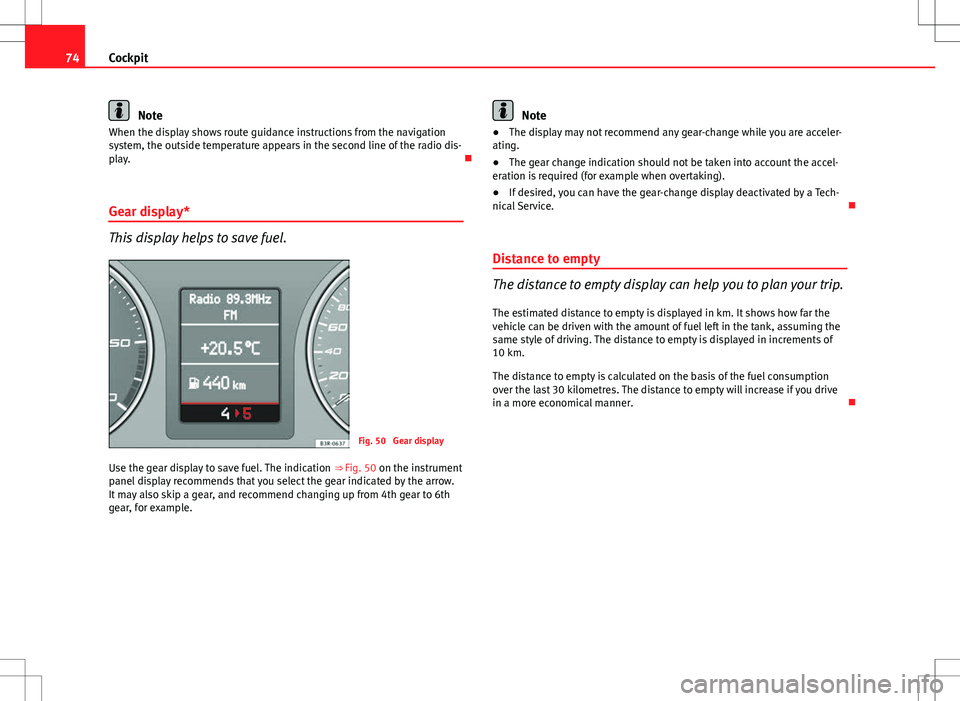
Gear display*
This display helps to save fuel.
Fig. 50 Gear display
Use the gear display to save fuel. The indication ⇒ Fig. 50 on the instrument
panel display recommends that you select the gear indicated by the arrow.
It may also skip a gear, and recommend changing up from 4th gear to 6th
gear, for example.
Note
● The display may not recommend any gear-change while you are acceler-
ating.
● The gear change indication should not be taken into account the accel-
eration is required (for example when overtaking).
● If desired, you can have the gear-change display deactivated by a Tech-
nical Service.
Distance to empty
The distance to empty display can help you to plan your trip.
The estimated distance to empty is displayed in km. It shows how far the
vehicle can be driven with the amount of fuel left in the tank, assuming the
same style of driving. The distance to empty is displayed in increments of
10 km.
The distance to empty is calculated on the basis of the fuel consumption
over the last 30 kilometres. The distance to empty will increase if you drive
in a more economical manner.
Page 77 of 317

75
Cockpit
Door and rear lid warning
Fig. 51 Display: Door
and rear lid warning
The door and rear lid warning symbol lights up if one or more of the doors,
or the bonnet or rear lid are not properly closed when the ignition is on. The
symbol also indicates which of these is not properly closed. The display in
the illustration ⇒ Fig. 51 shows that the driver door is open.
The corresponding part of the pictogram will flash if either the bonnet or
rear lid are open. The warning symbol goes out when the bonnet, rear lid
and all the doors are closed.
In vehicles with a driver information system and an onboard computer* the
door catches/rear lid warning symbol can be switched off by briefly press-
ing one of the control switches for the onboard computer ⇒ page 87. How-
ever, the warning symbol will appear again if any of the doors or the bonnet
or rear lid is opened or closed. Service indicator
This display reminds the driver when the next routine serv-
ice is due.
Fig. 52 Detailed view of
the instrument panel:
Service indicator
Displaying distance to next service
When you press the service button 1
briefly with the ignition switched on,
the display will show how far the vehicle can be driven before the next serv-
ice is due. This check can be carried out with the engine stopped or running
up to 5 km/h. Before the first 500 km and after the ignition cycle, the kilo-
metres and days before the service inspection are not displayed.
If the service button 1
is pressed before the first 500 km the following indi-
cation appears on screen:
Service in ----- km --- days
This is only valid for vehicles with “LongLife Service Intervals”*.
Safety FirstOperating InstructionsPractical TipsTechnical Specifications
Page 78 of 317

76Cockpit
Service reminder
The instrument panel controls the distance travelled every day. It calculates
the average of these distances travelled and activates the service reminder
sufficiently in advance.
The display reverts back to the standard display after about 5 seconds. The
remaining distance to the next service is updated every time the ignition is
switched on, until the service becomes due.
Service due
When a service is due, SERVICE! will appear in the display immediately after
you switch on the ignition. The display reverts back to the standard display
after about 5 seconds.
Resetting the display
The display is reset by the specialised workshop after the service has been
carried out. The service interval will be set to a LongLife Service (flexible
service interval) or Inspection Service (fixed service interval), depending on
which engine oil is used. It is only possible to reset the display via the in-
strument panel when an oil change is performed; in this case the display
can only be reset to a fixed service interval of 15 000 km. Proceed as fol-
lows:
● Switch the ignition off.
● Press the service button ⇒ Fig. 52 1
and hold while switching on the
ignition. The display will show one of these messages: Service in ----- km or
Service!
● Now press and hold the reset button 2
until the display shows
Service
in ----- km --- days or Service!
The display switches out of the reset mode if you do not press the reset but-
ton within 5 seconds.
CAUTION
The system cannot calculate the figures for the service interval display if the
battery is disconnected from the vehicle, so no service reminder can be dis-
played during this time. Please remember that it is essential to service the
vehicle within the established time limits to prevent its deterioration and to
extend its useful life (particularly that of the engine). The period between
two services must never be longer than the time specified in the Mainte-
nance Programme, even if you only cover a low mileage during this time.
Note
● Do not reset the service indicator between services, otherwise the dis-
play will be incorrect.
● The information in the service indicator remains intact if the battery is
disconnected.
● The distance to the next service cannot be called up if the system has
detected a Priority 1 fault (red symbol).
Auto-check system Introduction
The auto-check system checks important components and vehicle systems.
These background checks are run constantly, as long as the ignition is
switched on.
A message is displayed on the instrument panel if a fault should occur or if
any maintenance or repairs are urgently required. This is accompanied by
an audible warning signal. Depending on the priority of the fault, a red or
yellow warning symbol lights up on the display.
Page 79 of 317

77
Cockpit
The red symbol indicates danger, whereas the yellow one represents a
warning. Additional messages for the driver may be shown with the red or
yellow symbols.
Driver messages
Additional messages for the driver are displayed together
with the warning symbols on the instrument panel.
Fig. 53 Instrument pan-
el: CHECK button
Driver messages and red symbols
If a red warning symbol appears on the display, you can press the CHECK
button ⇒ Fig. 53 to call up an additional driver message.
For example: in the event of an oil pressure malfunction, the oil pressure
symbol
will appear in the display. If you now press the CHECK
button,
the following message will appear in the display:
Switch off engine, check oil level The message will disappear from the display after about 5 seconds. If re-
quired, the message can be called up again by briefly pressing the
CHECK
button.
Driver messages and yellow symbols
If a yellow warning symbol appears in the display, it will automatically be
accompanied by the corresponding driver message.
For example, the symbol
is displayed to indicate that the windscreen
washer fluid level is low. In addition, the following message will appear:
Top up washer fluid
The message will disappear after a few seconds. If required, the message
can be called up again by briefly pressing the CHECK
button.
Note
● The messages handbrake on and when stationary apply footbrake to se-
lect gear cannot be called up a second time. They will remain in the display
until the handbrake is released or until a gear is selected.
Handbrake warning
– Release the handbrake.
If you drive by mistake with the handbrake still applied, you will hear a
warning buzzer and the display will show the message: Handbrake on
The handbrake warning switches on after driving for 3 seconds at speeds
above 5 km/h.
Safety FirstOperating InstructionsPractical TipsTechnical Specifications
Page 83 of 317

81
Cockpit
Yellow symbols are used to indicate a Priority 2 fault (warning).
Yellow symbols are accompanied by one warning buzzer. The function indi-
cated should be checked as soon as possible. If several Priority 2 faults are
detected at the same time, the symbols are displayed one after the other for
about 2 seconds at a time.
Brake light failure
This warning light will appear on the upper part of the display if any of the
brake lights has failed. A text message in the central part of the display indi-
cates which brake light has failed (left or right).
Fuel level low
When this symbol comes on for the first time, there are about 8 to 10 li-
tres of fuel left in the tank. You should fill up as soon as possible
⇒ page 223.
Engine speed governing
Max. engine speed XXXX rpm
There is a fault in the engine management. In addition, the warning lamp
on the instrument panel will light up. The engine speed will be governed to
the speed displayed in the driver information system. Please ensure that
the engine speed does not exceed the speed shown (for example, when
changing down a gear).
Take the vehicle to a specialised workshop immediately to have the fault re-
paired. Checking the engine oil level
If the symbol lights up, please check the engine oil level as soon as pos-
sible ⇒ page 230. Top up the oil at the next opportunity ⇒ page 231.
Engine oil sensor defective*
If the symbol lights up, take the vehicle to a specialised workshop and
have the oil level sensor checked. Until then it is advisable to check the oil
level every time you fill up with fuel ⇒ page 230.
Diesel particulate filter obstructed
If the symbol lights up, you can contribute towards automatic filter
cleaning by driving in the right manner. To do this, drive about 15 minutes
in 4th or 5th gear (automatic gearbox: S gear range) at a speed of 60 km/h,
with the engine running at approximately 2000 rpm. The increase in temper-
ature will burn off any soot in the filter. When cleaning is successful, the
symbol switches off.
If the symbol does not turn off, or the three lamps turn on (particulate
filter , emission control system fault and heaters ), take the vehicle
to a specialised workshop to repair the fault.
For further information on the diesel particulate filter, see ⇒ page 196.
WARNING
It is essential that you adjust your speed to suit the weather, road, ter-
rain and traffic conditions. The recommended driving speed must never
lead to the driver disregarding the traffic regulations.
Safety FirstOperating InstructionsPractical TipsTechnical Specifications
Page 85 of 317

83
Cockpit
Bulb monitor
The bulb monitor checks whether the lights on the vehicle
are working.
If a defective bulb is detected, or if one of the lights has failed for any rea-
son, the bulb monitor symbol will appear in the display together with an
additional message (which goes out after 5 seconds). For instance, if the
rear left turn signal is not working, the display in the instrument panel will
show the following message:
Left rear turn signal
The message disappears after 5 seconds. Press the CHECK button briefly if
you wish to call up the message again.
If the display indicates that one of the lights is not working, this can have a
number of causes:
● Bulb failure ⇒ page 264.
● A blown fuse ⇒ page 262, Changing fuses.
● Faulty electrical wiring.
It is not necessary to have lamps replaced in a specialised workshop, how-
ever the use of Xenon lamps is recommended.
LED lamps
If any of the LED (Light Emitting Diode) functions fail, the complete lamp
should be replaced.
The failure of the lamp is only shown when the LED function goes out com-
pletely. Sometimes, a LED will stop working, without displaying the warning
as the function continues to operate.WARNING
● Bulbs are highly sensitive to pressure. The glass can break when you
touch the bulb, causing injury.
● The high voltage element of gas discharge bulbs* (xenon light) must
be handled correctly. Otherwise, there is a risk of death.
Speed warning* Introduction
The speed warning function can help prevent you exceeding
a particular pre-set maximum speed.
Fig. 56 Display: Speed
warning function
The speed warning function will warn the driver if a pre-set maximum speed
is exceeded. The system gives a warning buzzer signal if the set speed is
Safety FirstOperating InstructionsPractical TipsTechnical Specifications