Page 131 of 315
129
Lights and visibility
Rain sensor*
The rain sensor controls the frequency of the windscreen
wiper intervals, depending on the amount of rain.
Fig. 87 Rain sensor*
Fig. 88 Windscreen wip-
er lever Switching on the rain sensor
–
Move the windscreen wiper lever into position 1
⇒ fig. 88.
– Move the control A
to the left or right to set the sensitivity of
the rain sensor. Control to the right: highly sensitive. Control to
the left: less sensitive.
The rain sensor is part of the interval wipe function. You will have to switch
the rain sensor back on if you switch off the ignition. This is done by switch-
ing the wiper intermittent function off and back on.
Note
● Do not put stickers on the windscreen in front of the sensor. This may
cause sensor disruption or faults.
Safety FirstOperating InstructionsPractical TipsTechnical Specifications
Page 132 of 315

130Lights and visibility
Rear window wiper
The windscreen wiper lever operates the windscreen wiper
and the wash and wipe system for the rear window.
Fig. 89 Windscreen wip-
er and windscreen wash
lever: rear window wiper
Switching on the interval wipe
– Press the lever forwards to position 6
⇒ fig. 89. The wiper will
wipe the window approximately every 6 seconds.
Switching off the interval wipe function
– Pull the lever back from position 6
towards the steering wheel.
The wiper will continue to function for a short period if you
switch off whilst the wipers are in motion.
Switching on the windscreen wiper and washer system
– Press the lever fully forwards to position 7
⇒ fig. 89. The wash
function will start immediately and the wiper will start with a
slight delay. The windscreen wash system will function as long
as you hold the lever in this position. –
Release the lever. The wiper then wipes for approximately 4 sec-
onds, and then in intervals again.
– Release the lever. The washer system stops and the wipers
function.
WARNING
● A worn or dirty wiper blade will obstruct visibility and reduce safety.
● Always note the corresponding warnings on ⇒ page 240, Changing
windscreen wiper blades.
CAUTION
In icy conditions, always check that the wiper blade is not frozen to the
glass before using the wiper for the first time. If you switch on the wiper
when the wiper blade is frozen to the glass, this could damage both the
wiper blade and the wiper motor.
Note
● The windscreen wiper will only function when the ignition is switched on
and the tailgate is closed.
● In reverse gear, with the windscreen wipers switched on, the rear wind-
screen wiper will make one wipe.
Headlight washer*
The headlight washers clean the headlight lenses. The headlight washers are activated automatically when the windscreen
washer is used and the windscreen wiper lever is pulled towards the steer-
ing wheel for at least 1.5 seconds – provided the dipped beam headlights
Page 133 of 315

131
Lights and visibility
or main beams are switched on. Clean off stubborn dirt (insects, etc.) from
the headlights at regular intervals, for instance when filling the fuel tank.
Note
● To ensure that the headlight washers work properly in winter, keep the
nozzle holders in the bumper free of snow and remove any ice with a de-icer
spray.
● To remove water, the windscreen wipers will be activated from time to
time, the headlight wipers will be activated every three cycles.
Rear-view mirrors Interior mirror
It is dangerous to drive if you cannot see clearly through the
rear window.Manual anti-dazzle function for interior mirror
In the basic mirror position, the lever at the bottom edge of the mirror
should be at the front. Pull the lever to the back to select the anti-dazzle
function. Automatic anti-dazzle interior mirror*
The automatic anti-dazzle function can be switched on and
off as desired.
Fig. 90 Automatic anti-
dazzle interior mirror.
Switching off the anti-dazzle function
– Press button A
⇒ fig. 90. Indicator lamp B goes off.
Switching on the anti-dazzle function
– Press button A
⇒ fig. 90. Warning lamp is lit.
Anti-dazzle function
The anti-dazzle function is activated every time the ignition is switched on.
The green indicator lamp lights up in the mirror housing.
When the anti-dazzle function is enabled, the interior mirror will darken au-
tomatically according to the amount of light it receives. The anti-dazzle
function is cancelled if reverse gear is engaged.
Safety FirstOperating InstructionsPractical TipsTechnical Specifications
Page 134 of 315
132Lights and visibility
Note
● The automatic anti-dazzle function will only work properly if the sun
blind* for the rear window is retracted and there are no other objects pre-
venting light from reaching the rear view mirror.
● If you have to stick any type of sticker on the windscreen, do not do so in
front of the sensors. Doing so could prevent the anti-dazzle function from
working well or even from working at all.
Exterior mirrors
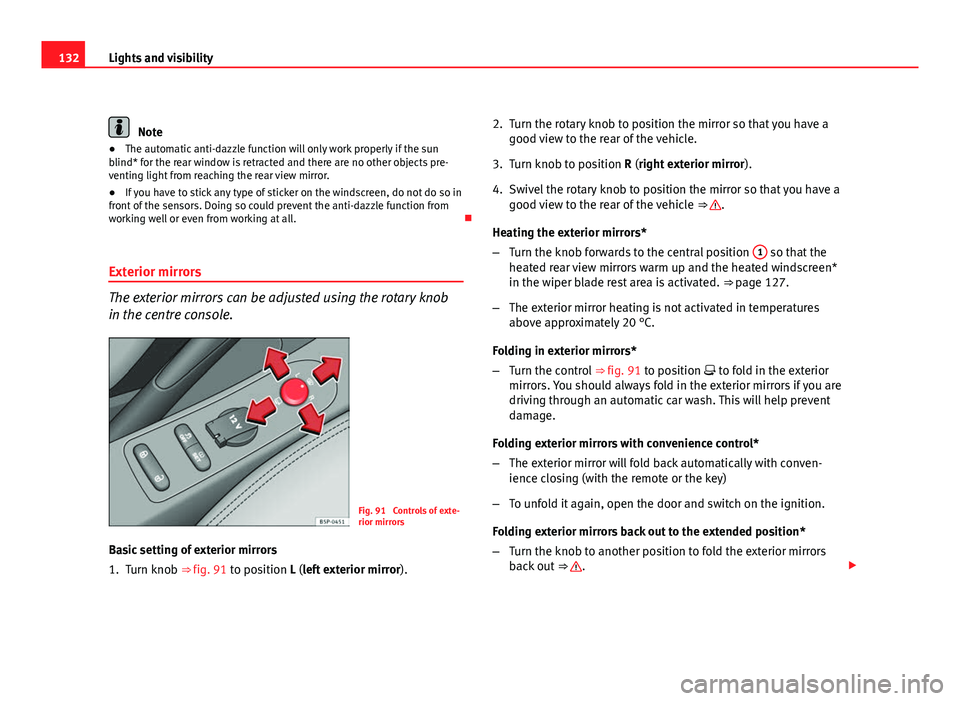
The exterior mirrors can be adjusted using the rotary knob
in the centre console.
Fig. 91 Controls of exte-
rior mirrors
Basic setting of exterior mirrors
1. Turn knob ⇒ fig. 91 to position L (left exterior mirror ).2. Turn the rotary knob to position the mirror so that you have a
good view to the rear of the vehicle.
3. Turn knob to position R (right exterior mirror ).
4. Swivel the rotary knob to position the mirror so that you have a good view to the rear of the vehicle ⇒
.
Heating the exterior mirrors*
– Turn the knob forwards to the central position 1
so that the
heated rear view mirrors warm up and the heated windscreen*
in the wiper blade rest area is activated. ⇒ page 127.
– The exterior mirror heating is not activated in temperatures
above approximately 20 °C.
Folding in exterior mirrors*
– Turn the control ⇒ fig. 91 to position to fold in the exterior
mirrors. You should always fold in the exterior mirrors if you are
driving through an automatic car wash. This will help prevent
damage.
Folding exterior mirrors with convenience control*
– The exterior mirror will fold back automatically with conven-
ience closing (with the remote or the key)
– To unfold it again, open the door and switch on the ignition.
Folding exterior mirrors back out to the extended position*
– Turn the knob to another position to fold the exterior mirrors
back out ⇒
.
Page 140 of 315
138Seats and storage compartments
Heated seats*
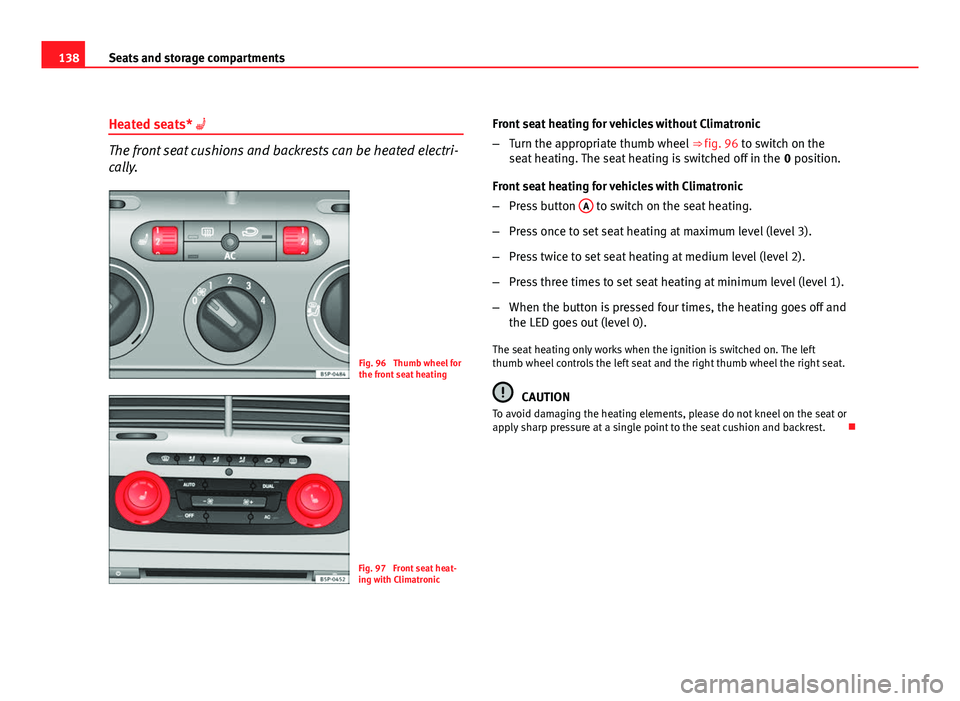
The front seat cushions and backrests can be heated electri-
cally.
Fig. 96 Thumb wheel for
the front seat heating
Fig. 97 Front seat heat-
ing with Climatronic Front seat heating for vehicles without Climatronic
–
Turn the appropriate thumb wheel ⇒ fig. 96 to switch on the
seat heating. The seat heating is switched off in the 0 position.
Front seat heating for vehicles with Climatronic
– Press button A
to switch on the seat heating.
– Press once to set seat heating at maximum level (level 3).
– Press twice to set seat heating at medium level (level 2).
– Press three times to set seat heating at minimum level (level 1).
– When the button is pressed four times, the heating goes off and
the LED goes out (level 0).
The seat heating only works when the ignition is switched on. The left
thumb wheel controls the left seat and the right thumb wheel the right seat.
CAUTION
To avoid damaging the heating elements, please do not kneel on the seat or
apply sharp pressure at a single point to the seat cushion and backrest.
Page 152 of 315
150Seats and storage compartments
Cigarette lighter*
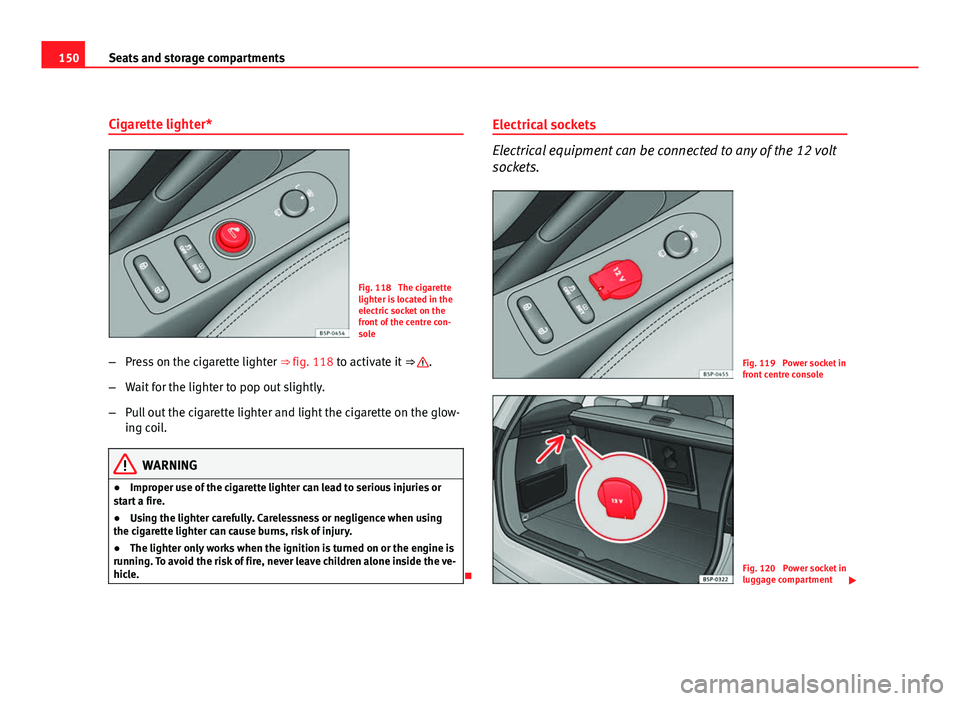
Fig. 118 The cigarette
lighter is located in the
electric socket on the
front of the centre con-
sole
– Press on the cigarette lighter ⇒ fig. 118 to activate it ⇒
.
– Wait for the lighter to pop out slightly.
– Pull out the cigarette lighter and light the cigarette on the glow-
ing coil.
WARNING
● Improper use of the cigarette lighter can lead to serious injuries or
start a fire.
● Using the lighter carefully. Carelessness or negligence when using
the cigarette lighter can cause burns, risk of injury.
● The lighter only works when the ignition is turned on or the engine is
running. To avoid the risk of fire, never leave children alone inside the ve-
hicle.
Electrical sockets
Electrical equipment can be connected to any of the 12 volt
sockets.
Fig. 119 Power socket in
front centre console
Fig. 120 Power socket in
luggage compartment
Page 153 of 315

151
Seats and storage compartments
Electrical accessories may be connected to the 12 volt socket in the front
centre console ⇒ fig. 119 and in the luggage compartment* ⇒ fig. 120. The
appliances connected to each power point must not exceed a power rating
of 120 Watt.
WARNING
The power sockets and the connected accessories will only operate when
the ignition is on or when the engine is running. Improper use of the
sockets or electrical accessories can lead to serious injuries or cause a
fire. To avoid the risk of injury, never leave children alone inside the vehi-
cle.
Note
● The use of electrical appliances with the engine switched off will cause a
battery discharge.
● Before using any electrical accessories, see the instructions in
⇒ page 221. Auxiliary audio connection (AUX-IN)*Fig. 121 Auxiliary audio
connection
– Lift the AUX cover ⇒ fig. 121.
– Insert the plug as far as possible (see Radio manual).
Safety FirstOperating InstructionsPractical TipsTechnical Specifications
Page 173 of 315

171
Driving
● When driving with snow chains.
● When driving in deep snow or on loose surfaces.
● When the vehicle is stuck, to rock it backwards and forwards.
Next, the button should be pressed to reactivate the ASR (TCS).
WARNING
● Do not forget that the Electronic Stability Control ESC (ESP) cannot
defy the laws of physics. This should be kept in mind, particularly on
slippery and wet roads and when towing a trailer.
● Always adapt your driving style to suit the condition of the roads and
the traffic situation. Do not let the extra safety afforded by ESC (ESP)
tempt you into taking any risks when driving.
● Please refer to the corresponding warning notes on ESC (ESP)
⇒ page 194, Intelligent technology.
Ignition lock
Position of the ignition key
Fig. 139 Ignition key po-
sitions
Ignition switched off, steering lock 0
In this position
⇒ fig. 139 the ignition and the engine are OFF and the steer-
ing may get locked.
For the Steering lock to operate without the ignition key, turn the steering
wheel until it locks with an audible sound. You should always lock the steer-
ing wheel when you leave your vehicle. This will help prevent vehicle theft
⇒
.
Switching the ignition or the glow plug system on 1
Turn the ignition key to this position and release it. If the ignition key can-
not be turned or it is difficult to turn from position 0 to position 1, move
the steering wheel from one side to the other until it is released.
Safety FirstOperating InstructionsPractical TipsTechnical Specifications