2012 RENAULT LAGUNA COUPE turn light
[x] Cancel search: turn lightPage 23 of 221

heated seats .......................................................... (current page)
JauneNoirNoir texte
1.17
ENG_UD22179_4
Sièges avant à commandes manuelles (X91 - D91 - Renault)
ENG_NU_939-3_D91_Renault_1
8
Lumbar adjustmentLower handle 8 to increase the support
and lift it to decrease it.
Heated seatsWith the engine running, turn control 5
to either position 1, 2 or 3 (depending
on the temperature required). An in -
dicator light on the instrument panel
lights up once the front seat heating
system is operating.
The system, which has a thermostat,
decides whether or not the heating is
needed, according to the position se -
lected.
Electric controls (continued)
Adjusting the seatback:
To tilt the seatback , move the top of
switch 7 forwards or backwards.
storage of the seat position
On equipped vehicles, buttons 6 are
used to store the driving positions (refer
to the following page).
fRONT sEATs (2/2)
57
6
force limiter
If an object is obstructing the seat, an
integrated force limiter stops the seat’s
travel. In this case, reverse the seat’s
travel, remove the object and move the
seat again.
Ensure that nothing is ob -
structing the movement of
the front seats.
Page 27 of 221

JauneNoirNoir texte
1.21
ENG_UD25429_7
Ceintures de sécurité (X91 - D91 - Renault)
ENG_NU_939-3_D91_Renault_1
sEAT BELTs (2/3)
LockingUnwind the belt slowly and smoothly
and ensure that buckle 3 locks into
catch 5 (check that it is locked by pull -
ing on buckle 3). If the belt jams, allow
it to return slightly before attempting to
unwind it again.
If your seat belt is completely jammed,
pull slowly, but firmly so that just over
3 cm unwinds. Allow it to return slightly
before attempting to unwind it again.
If there is still a problem, contact an ap-
proved dealer.
Unfastening
Press button 4 and the seat belt will be
rewound by the inertia reel. Guide the
belt.
5
34
5
ßf ront seat belt reminder
warning light
This comes on when the engine is
started, then, if the driver ’s or front
passenger’s seat belt is not fastened
(if this seat is occupied) and the vehi -
cle has reached approximately 12 mph
(20 km/h), it flashes and a bleep sounds
for around 2 minutes.
Note: an object placed on the passen-
ger seat base may activate the warning
light in some cases.
Rear seat belt reminder
(depending on vehicle)
The number of rear seat belts fastened
will appear on the instrument panel for
approximately 30 seconds each time:
– the vehicle is started;
– a rear seat belt is fastened or unfas-
tened.
Check that the rear passengers are
wearing seat belts and that the number
of seat belt shown as fastened corre -
sponds to the number of rear bench
seats occupied.
Page 35 of 221

air bag................................................... (up to the end of the DU)
methods of restraint in addition to the seat belts
(up to the end of the DU)
additional methods of restraint ............. (up to the end of the DU)
1.29
ENG_UD10723_2
Dispositifs de retenue complémentaire (X91 - D91 - Renault)
ENG_NU_939-3_D91_Renault_1
AddITIONAL mETHOds Of REsTRAINT
The air bag is designed to complement the action of the seat belt. Both
the air bags and seat belts are integral parts of the same protection
system. It is therefore essential to wear seat belts at all times. If seat belts
are not worn, the occupants are exposed to the risk of serious injury in
the event of an accident. It may also increase the risk of minor superficial injuries
occurring when the air bag is deployed, although such minor injuries are always
possible with air bags.
If the vehicle should overturn or suffer a rear impact, however severe, the pre-
tensioners and air bags are not always triggered. Shocks to the underbody of the
vehicle, e.g. from pavements, potholes or stones, can all trigger these \
systems.
– No work or modification whatsoever may be carried out on any part of the air
bag system (air bags, pretensioners, computer, wiring harness, etc.), except
by qualified personnel from an approved dealer.
– To ensure that the system is in good working order and to avoid accidental trig-
gering of the system which may cause injury, only qualified Network personnel
may work on the air bag system.
– As a safety precaution, have the air bag system checked if your vehicle has
been involved in an accident, or is stolen or broken into.
– When selling or lending the vehicle, inform the user of these points and hand
over this driver’s handbook with the vehicle.
– When scrapping your vehicle, contact your approved dealer for disposal of the
gas generator(s).
Operating faults
Warning light 1 will light up on the in -
strument panel when the ignition is
turned on and then go out after a few
seconds.
If it does not come on when the ignition
is switched on, or if it comes on when
the engine is running, there is a fault
with the system (air bags, pretension -
ers, etc.) in the front and/or rear seats.
Contact your approved dealer as soon
as possible. Your protection will be re-
duced until this fault is rectified.
1
All of the warnings below are given so that the air bag is not obstructed in any
way when it is inflated and also to prevent the risk of serious injuries caused
by items which may be dislodged when the air bag inflates.
Page 44 of 221

air bagdeactivating the front passenger air bags ........ (current page)
front passenger air bag deactivation ..................... (current page)
1.38
ENG_UD28945_7
Sécurité enfants : désactivation, activation airbag passager av\
ant (X91 - B91 - K91 - D91 - Renault)
ENG_NU_939-3_D91_Renault_1
Jaune NoirNoir texte
deactivating, activating the front passenger airbag
2
deactivating the front
passenger air bag
(on equipped vehicles)
You must deactivate the front passen-
ger air bag before fitting a child seat on
the front passenger seat. To deactivate the air bag: when the
vehicle is stationary
, push and turn
lock 1 to the Off position.
With the ignition on, you must check
that the warning light 2
] is lit
on the central display and, depend -
ing on the vehicle, that the message
“Passenger airbag off” is displayed.
This indicator light remains con -
stantly lit while the air bag is deac -
tivated.
cHILd sAfETY : deactivating/activating the front passenger air bag (1/3)
1
The passenger air bag must
only be deactivated or acti-
vated with the ignition off.
If it is interfered with when
the vehicle is being driven, indicator
lights
å and © will come
on.
Switch the ignition off then on again
to reset the air bag in accordance
with the lock.
Page 46 of 221

1.40
ENG_UD28945_7
Sécurité enfants : désactivation, activation airbag passager av\
ant (X91 - B91 - K91 - D91 - Renault)")
air bagactivating the front passenger air bags ............ (current page)
1.40
ENG_UD28945_7
Sécurité enfants : désactivation, activation airbag passager av\
ant (X91 - B91 - K91 - D91 - Renault)
ENG_NU_939-3_D91_Renault_1
Activating the front
passenger air bag
Reactivate the front passenger air bag
as soon as you remove the child seat
from the front passenger seat to ensure
the protection of the front passenger in
the event of an impact.
To reactivate the air bag: when the
vehicle is stationary , push and turn
lock 1 to the ON position.
With the ignition on, you must check
that the 2 warning light
], is off.
The front passenger air bag has been
activated.
Operating faults
It is forbidden to fit a rear-facing child
seat to the front seat if a fault is noted
when activating/deactivating the front
passenger air bag.
Allowing any other passenger to sit in
that seat is not recommended.
Contact your approved dealer as soon
as possible.
The passenger air bag must
only be deactivated or acti-
vated with the ignition off.
If it is interfered with when
the vehicle is being driven, indicator
lights
å and © will come
on.
Switch the ignition off then on again
to reset the air bag in accordance
with the lock.
1
2
cHILd sAfETY : deactivating/activating the front passenger air bag (3/3)
dANgER
S i n c e f r o n t p a s s e n g e r
airbag triggering and the
position of a rear-facing
child seat are incompatible, NEvER
use a restraining device for rear -
facing children on a seat with an
A cTI vATE d AIRBA g in front of it.
This provides a risk of dEATH or
sERIOUs INJURY to the cHILd.
Page 64 of 221

trip computer and warning system.........................(current page)
warning lights ......................................................... (current page)
instrument panel messages ...................................(current page)
instrument panel .................................................... (current page)
1.58
ENG_UD28946_2
Ordinateur de bord : messages d’information (X91 - B91 - K91 - D91 -\
Renault)
ENG_NU_939-3_D91_Renault_1
TRIp cOmpUTER ANd WARNINg sYsTEm: information messages
Examples of messages Interpreting the display selected
« Battery low
start engine » Indicates that the vehicle must be started to recharge the battery (eg. after the engine has been
switched off for some time whilst listening to the radio).
« please remove keycard » Request to remove the RENAULT card from the reader when you leave the vehicle.
« checking control functions » Displayed with the ignition on when the vehicle is running self-diagnost\
ics.
« Traction control off »Indicates that you have deactivated the ASR function.
« Turn steering
wheel + sTART » Turn the steering wheel slightly whilst pressing the vehicle start button to unlock the steering
column.
« Auto stop »Indicates that the engine is on standby (related to the Stop and Start function). Please see infor-
mation about the “Stop and Start function” in Section 2.
« steering wheel not locked »Indicates that the steering column has not been locked.
These can help in the vehicle starting phase, or give information about \
a selection or a driving status.
Examples of information messages are given in the following pages.
Page 67 of 221
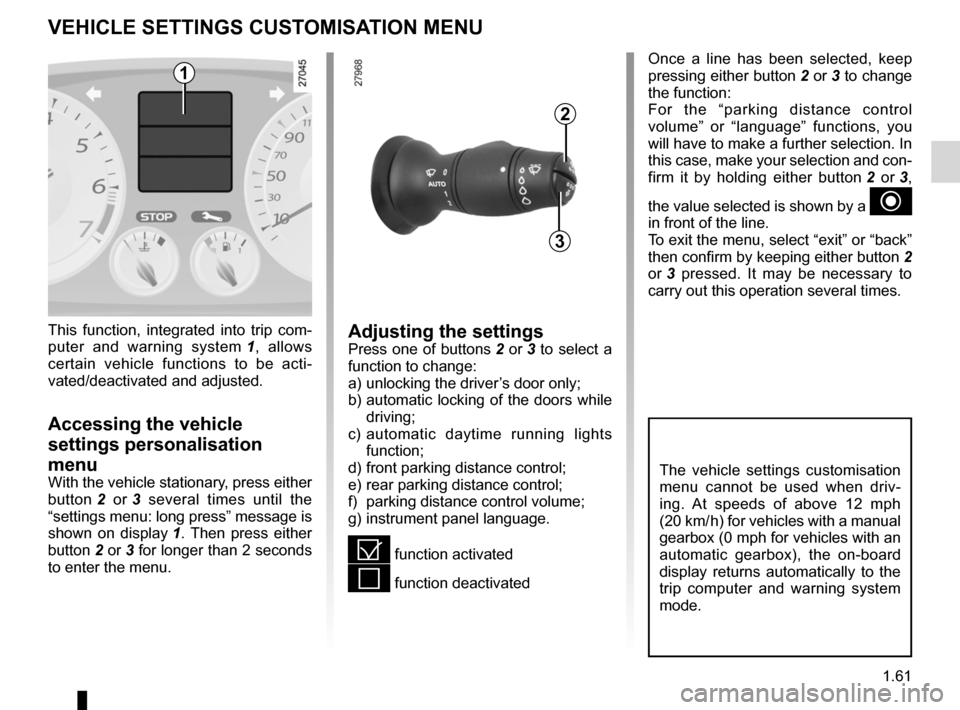
menu for customising the vehicle settings
(up to the end of the DU)
customising the vehicle settings ........... (up to the end of the DU)
customised vehicle settings .................. (up to the end of the DU)
1.61
ENG_UD25100_1
Menu de personnalisation des réglages du véhicule (X91 - D91 - Re\
nault)
ENG_NU_939-3_D91_Renault_1
Once a line has been selected, keep
pressing either button 2 or 3 to change
the function:
For the “parking distance control
volume” or “language” functions, you
will have to make a further selection. In
this case, make your selection and con-
firm it by holding either button 2 or 3 ,
the value selected is shown by a
~
in front of the line.
To exit the menu, select “exit” or “back”
then confirm by keeping either button 2
or 3 pressed. It may be necessary to
carry out this operation several times.
vEHIcLE sETTINgs cUsTOmIsATION mENU
Adjusting the settingsPress one of buttons 2 or 3 to select a
function to change:
a) unlocking the driver’s door only;
b) automatic locking of the doors while
driving;
c) automatic daytime running lights
function;
d) front parking distance control;
e) rear parking distance control;
f) parking distance control volume;
g) instrument panel language.
= function activated
< function deactivated
This function, integrated into trip com
-
puter and warning system 1 , allows
certain vehicle functions to be acti -
vated/deactivated and adjusted.
Accessing the vehicle
settings personalisation
menu
With the vehicle stationary, press either
button 2 or 3 several times until the
“settings menu: long press” message is
shown on display 1 . Then press either
button 2 or 3 for longer than 2 seconds
to enter the menu.
2
3
1
The vehicle settings customisation
menu cannot be used when driv -
ing. At speeds of above 12 mph
(20 km/ h) for vehicles with a manual
gearbox (0 mph for vehicles with an
automatic gearbox), the on-board
display returns automatically to the
trip computer and warning system
mode.
Page 70 of 221

1.64
ENG_UD27731_1
Rétroviseurs (X91 - D91 - Renault)
ENG_NU_939-3_D91_Renault_1
Rear view mirrors which tilt
in reverse gear
For vehicles equipped with the driver’s
seat with position memory, you can tilt
the door mirrors when reversing and
store the position.
setting and storage
With the vehicle stationary and reverse
gear engaged, select the door mirror
using switch 3 then, with button 1 ,
adjust it to the required position. Store
the position (refer to the information on
the “Driver’s seat with position memory”
in Section 1). Recalling the memorised position
With the vehicle stationary and re
-
verse gear engaged, select the door
mirror using switch 3 and then briefly
press the memory button chosen pre -
viously (refer to the information on the
“Driver’s seat with position memory” in
Section 1).
Returning to the driving position
The door mirrors return in one of the fol-
lowing situations:
– 10 seconds after having come out of
reverse gear;
– speed above 6 mph (10 km/h);
– engine switched off;
– switch 3 in the neutral position.
Interior rear view mirror 4
Its position can be adjusted.
The rear view mirror darkens automati-
cally at night if you are being followed
by a vehicle with its lights on.
1
3
dOOR mIRRORs (2/2)
For safety reasons, carry
out any adjustments when
the vehicle is not being
driven.
4