2012 RENAULT LAGUNA COUPE Warning
[x] Cancel search: WarningPage 103 of 221

ENG_NU_939-3_D91_Renault_2
Disabling the aSR function
In som")
JauneNoirNoir texte
2.25
ENG_UD27695_10
Dispositifs de correction et d’assistance à la de conduite (X91 -\
B91 - K91 - D91 - Renault)
ENG_NU_939-3_D91_Renault_2
Disabling the aSR function
In some situations (driving on very wet
ground: snow, mud, etc. or driving with
snow chains fitted), the system may
reduce the engine output to limit wheel -
spin. If this is not required, it is possible
to deactivate the function by pressing
switch 1.
The message “ Traction control off ” is
displayed on the instrument panel to
inform you.
Traction control (ASR) offers additional
safety; it is recommended that you do
not drive with the function disabled.
Correct this as soon as possible by
pressing switch 1 again.
Note: The function is reactivated auto-
matically when the ignition is switched
on or when a speed of approximately
24 mph (40 km/h) is exceeded.
emergency brake assist
This system supplements the ABS
and helps reduce vehicle stopping dis-
tances.
operating principle
The system is for detecting an emer -
gency braking situation. In this case,
the braking assistance immediately de-
velops maximum power and may trig -
ger ABS regulation.
ABS braking is maintained as long as
the brake pedal is applied.
DRIVeR CoRReCtIoN DeVICeS aND aIDS (4/5)
1
hazard warning lights switching on
Depending on the vehicle, these may
light up in the event of sudden decel -
eration.
operating faults
When the system detects an operat -
ing fault the message “ Check brak-
ing system” appears on the instrument
panel along with the
© warning
light.
Consult an approved dealer.
Braking anticipation
Depending on the vehicle, when you
rapidly release the accelerator, the
system anticipates the braking ma -
noeuvre in order to reduce stopping
distances.
Special cases
When using the cruise control:
– if you use the accelerator, when you
release it, the system may be trig -
gered;
– if you do not use the accelerator, the
system will not be triggered.
Page 104 of 221

2.26
ENG_UD27695_10
Dispositifs de correction et d’assistance à la de conduite (X91 -\
B91 - K91 - D91 - Renaul")
rear drive wheels ................................................... (current page)
2.26
ENG_UD27695_10
Dispositifs de correction et d’assistance à la de conduite (X91 -\
B91 - K91 - D91 - Renault)
ENG_NU_939-3_D91_Renault_2
Rear wheel steering
On equipped vehicles, this system,
when the vehicle is being driven, steers
the rear wheels according to driving
conditions: at low speed this system
offers manoeuvrability, at higher speeds
it optimises stability.
When driving at low speeds, the rear
wheels steer in the opposite direction to
the front wheels (figure A ) to increase
the vehicle’s manoeuvrability. This is
used when driving in towns, on winding
roads, during parking manoeuvres, etc.
When driving at speeds above 40 mph
(60 km/h), the rear wheels steer in the
same direction as the front wheels
(figure B) to optimise the vehicle’s sta-
bility. This is useful when changing
lanes or when cornering etc. operating faults
–
If the
© warning light, together
with the message “ Check power
steering ”, is displayed on the instru-
ment panel: please contact an au -
thorised dealer.
– If the warning light
®, together
with the message “ Power steering
fault”, is displayed on the instrument
panel, this indicates a fault in the
system.
DRIVeR CoRReCtIoN DeVICeS aND aIDS (5/5)
aB
® requires you to stop
as soon as traffic conditions
allow. Contact an approved
Dealer.
An impact to the underside of the
vehicle (e.g.: striking a post, raised
kerb or other street furniture) may
result in damage to the vehicle (e.g.:
deformation of an axle).
To avoid any risk of accident, have
your vehicle checked by an ap -
proved Dealer.
Page 114 of 221

2.36
ENG_UD27734_1
Aide au parking (X91 - D91 - Renault)
ENG_NU_939-3_D91_Renault_2
P aRKING DIStaNCe CoNtRoL (3/3)
Special features
Make sure that the ultrasonic sensors
are not obscured (by dirt, mud, snow,
etc.).
operating faults
When the system detects an operating
fault there will be a 5-second continu -
ous beep as a warning. Consult an ap-
proved dealer.
When the vehicle is being driven at
a speed below approximately 6 mph
(10 km/h), certain noises (motorcy -
cle, lorry, pneumatic drill, etc.) may
trigger the beeping sound.
Prolonged deactivation of the
system
You may permanently activate or deac-
tivate the front or rear parking distance
control separately.
From the vehicle settings personalisa -
tion menu (refer to the information on
the “Vehicle settings personalisation
menu” in Section 1), select the line
“front parking distance control” or “rear
parking distance control” then activate
or deactivate the system:
<: function deactivated;
=: function activated.
An impact to the underside
of the vehicle (e.g.: striking
a post, raised kerb or other
street furniture) may result
in damage to the vehicle (e.g.: de -
formation of an axle).
To avoid any risk of accident, have
your vehicle checked by an ap -
proved Dealer.
Page 115 of 221
automatic gearbox (use) ....................... (up to the end of the DU)
automatic gearbox selector lever ..........(up to the end of the DU)
changing gear ....................................... (up to the end of the DU)
reverse gear selecting .......................................... (up to the end of the DU)
driving ................................................... (up to the end of the DU)
2.37
ENG_UD27633_9
Boîte de vitesses automatique (X91 - B91 - K91 - D91 - Renault)
ENG_NU_939-3_D91_Renault_2
Automatic gearbox
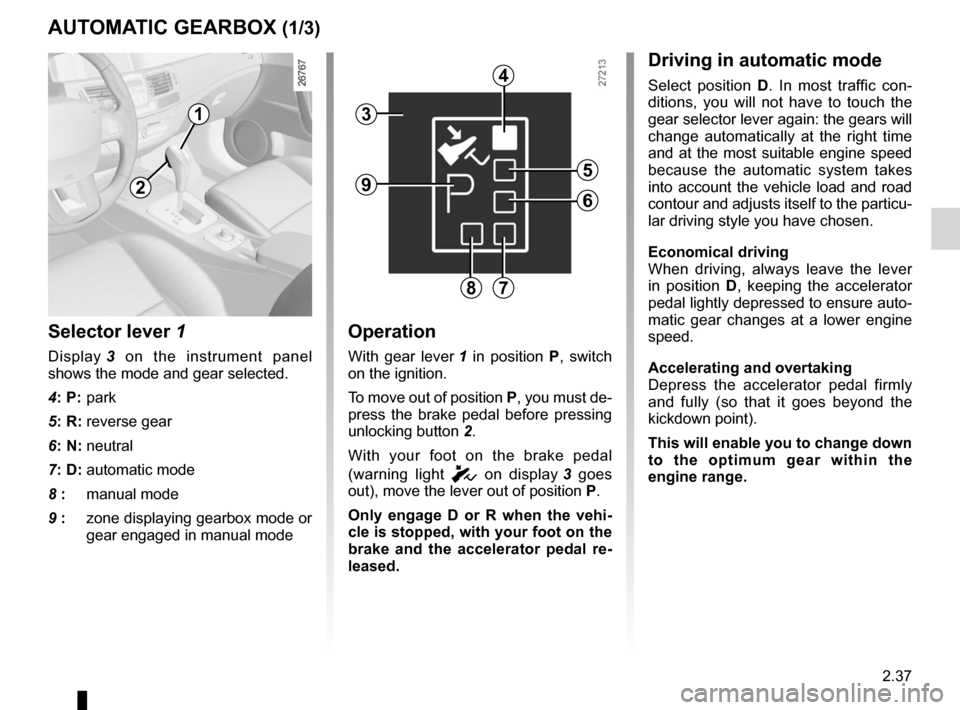
Selector lever 1
Display 3 on the instrument panel
shows the mode and gear selected.
4: P: park
5: R: reverse gear
6: N: neutral
7: D: automatic mode
8 : manual mode
9 : zone displaying gearbox mode or
gear engaged in manual mode
operation
With gear lever 1 in position P, switch
on the ignition.
To move out of position P, you must de-
press the brake pedal before pressing
unlocking button 2.
With your foot on the brake pedal
(warning light
c on display 3 goes
out), move the lever out of position P.
o nly engage D or R when the vehi -
cle is stopped, with your foot on the
brake and the accelerator pedal re -
leased.
aUtoMatIC GeaRBox (1/3)
Driving in automatic mode
Select position D. In most traffic con -
ditions, you will not have to touch the
gear selector lever again: the gears will
change automatically at the right time
and at the most suitable engine speed
because the automatic system takes
into account the vehicle load and road
contour and adjusts itself to the particu-
lar driving style you have chosen.
economical driving
When driving, always leave the lever
in position D, keeping the accelerator
pedal lightly depressed to ensure auto-
matic gear changes at a lower engine
speed.
accelerating and overtaking
Depress the accelerator pedal firmly
and fully (so that it goes beyond the
kickdown point).
this will enable you to change down
to the optimum gear within the
engine range.
3
2
1
4
5
6
78
9
Page 116 of 221
2.38
ENG_UD27633_9
Boîte de vitesses automatique (X91 - B91 - K91 - D91 - Renault)
ENG_NU_939-3_D91_Renault_2
Jaune NoirNoir texte
Parking the vehicle
When the vehicle is stopped, move the
lever to position P while keeping your
foot on the brake pedal: the gearbox is
in neutral and the drive wheels are me-
chanically locked by the driveshaft.
a pply the handbrake or, depending
on the vehicle, ensure that the elec-
tronic parking brake is applied.
Special circumstances
– If the road contours and bends
do not allow you to stay in auto -
matic mode (e.g.: in the mountains),
we recommend that you change to
manual mode.
This will prevent the automatic gear-
box from changing gears repeatedly
when climbing, and permit engine
braking on long descents.
– In cold weather , to prevent the
engine from stalling, wait a few mo-
ments before shifting the selector
lever from position P or N and en -
gaging D or R.
– Vehicles not fitted with traction
control: on a slippery surface or
surface with a low level of adhe -
sion, change to manual mode and
select second gear before starting
the engine to avoid wheelspin when
starting.
Driving in manual mode
With the selector lever in position D,
move the lever to the left. Shifting the
lever repeatedly allows you to change
gears manually:
– To move down through the gears,
push the lever backwards;
– To move up through the gears, push
the lever forwards.
The gear selected is displayed on the
instrument panel.
Special cases
Under certain driving conditions (e.g.
engine protection, electronic stability
program (ESP) operational etc.: ESC),
the “automatic system” may change
gear automatically.
Likewise, to prevent incorrect manoeu -
vres, a gear change may be refused by
the automatic system: in this case the
gear display flashes for a few seconds
as a warning.
aUtoMatIC GeaRBox (2/3)
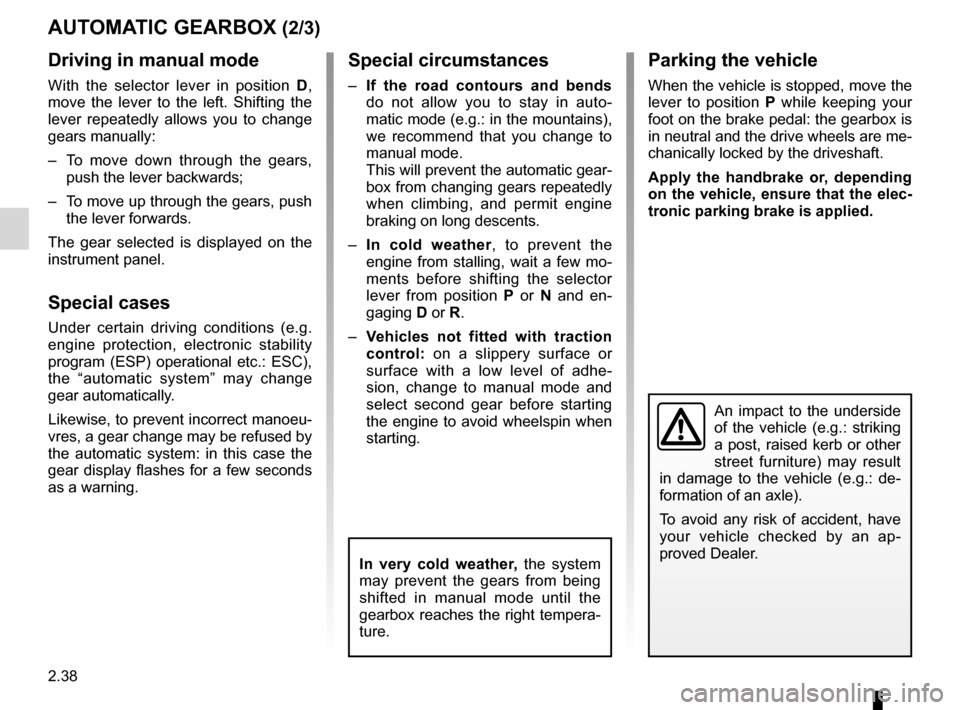
An impact to the underside
of the vehicle (e.g.: striking
a post, raised kerb or other
street furniture) may result
in damage to the vehicle (e.g.: de -
formation of an axle).
To avoid any risk of accident, have
your vehicle checked by an ap -
proved Dealer.
In very cold weather, the system
may prevent the gears from being
shifted in manual mode until the
gearbox reaches the right tempera-
ture.
Page 117 of 221

JauneNoirNoir texte
2.39
ENG_UD27633_9
Boîte de vitesses automatique (X91 - B91 - K91 - D91 - Renault)
ENG_NU_939-3_D91_Renault_2
aUtoMatIC GeaRBox (3/3)
operating faults
– When driving , if the message
“ Check auto gearbox ” and the
© warning light appear on the
instrument panel, this indicates a
fault.
Contact your approved Dealer as
soon as possible.
– When driving, if the message “gear-
box overheating ” accompanied by
© warning light appears on the
instrument panel, stop the vehicle to
allow the gearbox to cool down.
Contact your approved Dealer as
soon as possible.
– If a vehicle with an automatic
gearbox breaks down , refer to the
information on “Towing” in Section 5.
10
When setting off, if the lever is locked
in position P even though you are de -
pressing the brake pedal and pressing
unlocking button 2, the lever can be re-
leased manually. To do this, press the
button by inserting an object into the
hole 10 and simultaneously press un -
locking button 2 located on the lever.
2
Page 140 of 221
storage compartments .......................... (up to the end of the DU)
tailgate .................................................. (up to the end of the DU)
3.22
ENG_UD22221_3
Rangements, aménagements coffre à bagages (X91 - D91 - Renault)
ENG_NU_939-3_D91_Renault_3
Luggage compartment storage space and fittings
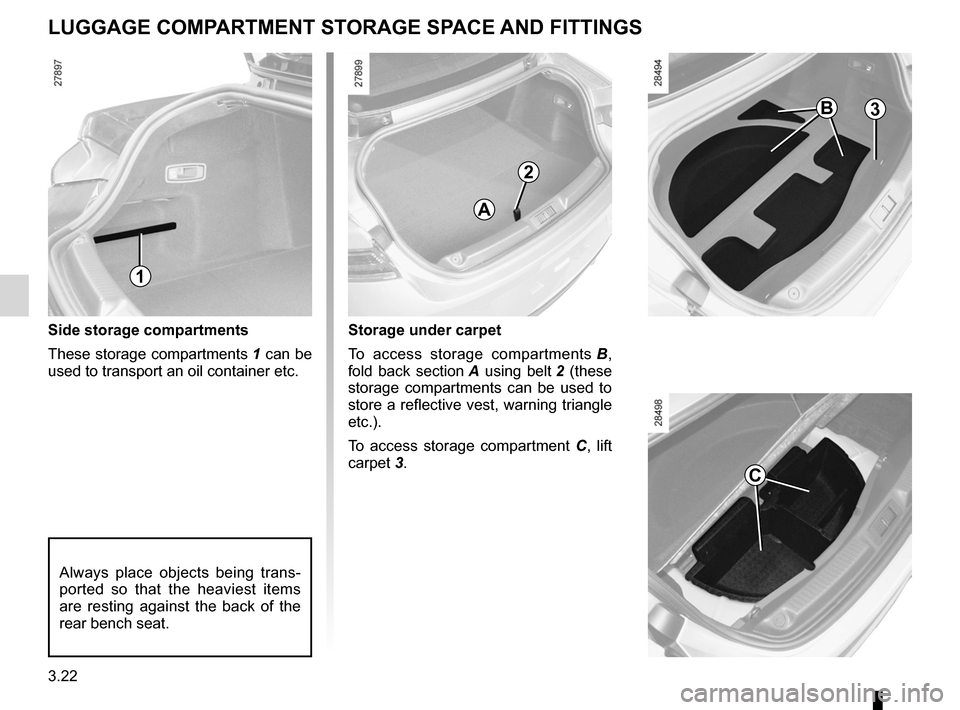
Side storage compartments
These storage compartments 1 can be
used to transport an oil container etc.
luggAgE coMPARTMENT ST oRAgE SPAcE AND FITTINgS
1
Storage under carpet
To access storage compartments B ,
fold back section A using belt 2 (these
storage compartments can be used to
store a reflective vest, warning triangle
etc.).
To access storage compartment C , lift
carpet 3.
A
2
B3
Always place objects being trans -
ported so that the heaviest items
are resting against the back of the
rear bench seat.
c
Page 148 of 221

engine oil ............................................................... (current page)
oil change .............................................................. (current page)
levels: engine oil ......................................................... (current page)
4.4
ENG_UD28951_8
Niveau huile moteur : généralités (X91 - B91 - K91 - D91 - Renault)
ENG_NU_939-3_D91_Renault_4
Jaune NoirNoir texte
Engine oil level:
general information
enGIne OIL LeVeL: general information (1/2)
Minimum oil level warning on
the instrument panel
When the message “test of functions
being checked” appears on the instru -
ment panel, press one of the buttons 3
or 4.
If the level is above the minimum
level : the display shows “oil level cor -
rect accompanied by squares 1 which,
when the level drops, are replaced by
dashes 2.
note: the detailed level cannot be dis-
played if the vehicle was previously
only driven for a short time. If the minimum level has been
reached: the message “Adjust oil level”
and warning light © lights up on
the instrument panel.
It is vital to top up the oil as soon as
possible.
n ote : To advance to trip computer
reading, press button 3 or 4 again.
The display only warns the
driver if the oil level is at the
minimum level. It does not
inform the driver that the oil
level has exceeded the maximum
level as this can only be measured
using a dipstick.
It is normal for an engine to use oil for
lubrication and cooling of moving parts
and it is normal to top up the level be-
tween oil changes.
However, contact your approved
Dealer if more than 0.5 litres is being
consumed every 600 miles (1,000 km)
after the running in period.
Oil change frequency: check the oil
level from time to time and certainly
before any long journey to avoid the
risk of damaging your engine.
Reading the oil level
The oil level should be read with the ve-
hicle on level ground, after the engine
has been switched off for some time.
t he dipstick must be used to read
the exact oil level and make sure
that the maximum level has not been
exceeded (risk of engine damage).
Refer to the following pages.
The instrument panel display only
alerts the driver when the oil level is at
its minimum.
3
4
Oil level
12