2012 NISSAN NOTE Switches
[x] Cancel search: SwitchesPage 11 of 235

LEFT-HAND DRIVE (LHD) MODELS
1) Headlight, dimmer and turn signal switch
(P. 2-16)
2) Steering wheel switches*
Steering wheel
switch* (P. 4-38)
Audio control switch* (P. 2-3
3) Meters, gauges and warning/indicator lights
(P. 2-2, 2-7)
4) Driver air bag/Horn (P. 1-11, 2-19)
5) Steering wheel switches*
Cruise control* (P. 5-18)
Speed limiter* (P. 5-15)
6) Windscreen wiper and washer switch (P. 2-13)
7) Audio system* (P. 4-10)
Navigation system**
Storage area* (P. 2-22)
8) Centre console storage box (P. 2-22)
Audio jack socket (AUX)* (P. 4-34)
Storage area* (P. 2-22)
9) Centre vent (P. 4-2)
10)Front passenger air bag (P. 1-11)
11)Glove box opening (P. 2-21)
12)Side vent (P. 4-2)13)Front passenger air bag deactivate switch
(P. 1-15)
14)Front passenger seat belt warning light/Front
passenger air bag indicator light (P. 1-5, 1-14)
15)Hazard warning flasher switch (P. 2-19)
16)Cup holders (P. 2-22)
17)Power outlet (P. 2-20)
18)Heater and air conditioning control panel (P. 4-2,
4-8)
19)Ignition switch or ignition knob* (P. 5-6, 5-7)
20)Tilting steering wheel lock lever (P. 3-12)
21)Fuse box cover (P. 8-21)
22)ESP OFF switch* (P. 5-30)
23)Bonnet lock release lever (P. 3-10)
24)Fuel filler lid opener lever (P. 3-11)
25)Headlight aiming control switch (P. 2-18)
26)Outside mirror control* (P. 3-12)
See the page indicated in parentheses for oper-
ating details.
* where fitted
** Refer to the separate NISSAN Connect, Audio
with Navigation Owner’s Manual.
Illustrated table of contents0-5
Page 13 of 235

RIGHT-HAND DRIVE (RHD) MODELS
1) Side vent (P. 4-2)
2) Glove box opening (P. 2-21)
3) Front passenger air bag (P. 1-11)
4) Storage area (P. 2-22)
5) Centre vent (P. 4-2)
6) Audio system* (P. 4-10)
Navigation system**
Storage area* (P. 2-22)
7) Centre console storage box (P. 2-22)
Audio jack socket (AUX)* (P. 4-34)
8) Headlight, dimmer and turn signal switch
(P. 2-16)
9) Steering wheel switches*
Steering wheel
switch* (P. 2-3)
Audio control switch* (P. 4-38)
10)Driver air bag/Horn (P. 1-11, 2-19)
11)Meters, gauges and warning/indicator lights
(P. 2-2, 2-7)
12)Ignition switch or ignition knob* (P. 5-6, 5-7)
13)Windscreen wiper and washer switch (P. 2-13)
14)Steering wheel switches*
Cruise control* (P. 5-18)
Speed limiter* (P. 5-15)15)Outside mirror control* (P. 3-12)
16)Fuel filler lid opener lever (P. 3-11)
17)Bonnet lock release lever (P. 3-10)
18)Headlight aiming control switch (P. 2-18)
19)ESP OFF switch* (P. 5-30)
20)Fuse box cover (P. 8-21)
21)Tilting steering wheel lock lever (P. 3-12)
22)Heater and air conditioning control panel (P. 4-2,
4-8)
23)Power outlet (P. 2-20)
24)Cup holders (P. 2-22)
25)Hazard warning flasher switch (P. 2-19)
26)Front passenger seat belt warning light/Front
passenger air bag indicator light (P. 1-5, 1-14)
27)Front passenger air bag deactivate switch
(P. 1-15)
See the page indicated in parentheses for oper-
ating details.
* where fitted
** Refer to the separate NISSAN Connect, Audio
with Navigation Owner’s Manual.
Illustrated table of contents0-7
Page 46 of 235

empty is automatically selected and the digits blink
in order to draw the driver’s attention. Press the
TRIP button/Steering wheel
switch if you wish
to return to the mode that was selected before the
warning occurred.
When the fuel level drops even lower, the distance
to empty will display
along within a
flashing mode.
Average fuel consumption (l/100 km or
mpg)
The average fuel consumption mode shows the av-
erage fuel consumption since the last reset. The dis-
played average fuel consumption can be reset by
pressing the TRIP button/Steering wheel
switch for more than 1 second.
Average speed (km/h or MPH)
The average speed mode shows the average ve-
hicle speed since the last reset. The displayed aver-
age speed can be reset by pressing the TRIP but-
ton/Steering wheel
switch for more than 1
second.
Journey timem
The journey time mode shows the time since the last
reset in minutes and seconds. The displayed time
can be reset by pressing the TRIP button/Steering
wheel
switch for more than 1 second.
Trip computer reset
Pushing the TRIP button/Steering wheelswitch for more than 3 seconds will reset all modes
except Trip A and distance to empty.
OUTSIDE TEMPERATURE DISPLAY
The outside temperature function provides a displayjC of the outside temperature (ºC) when the ignition
switch is in the ON position.
The display of positive temperatures is unsigned
(blank), negative temperatures are prefixed with a
minus sign.
Low temperature warning
Above 4°C the display remains steady.
The display will flash to indicate a low outside air
temperature, and the possibility of icy or slippery
road conditions:
•When the outside temperature drops between
–3°C and 3°C.
•When starting the vehicle below –3°C.
The temperature display will not flash:
•After approximately 20 seconds, when starting
the vehicle and the outside temperature is below
–3°C.
•When the outside temperature rises from below
–3°C into the range between –3°C and 3°C.
•While driving, when the outside temperature
drops below –3°C.CAUTION
Even if the display is not flashing, there is no
guarantee that the road is free of hazards caused
by inclement weather.
NOTE
The outside air temperature sensor is located at
the front of the vehicle. At low speeds the sensor
can be affected by engine heat, heat reflected
from the road surface and exhaust from other
vehicles, these influences can cause the display
to be inaccurate. To compensate, the outside air
temperature display is designed to react slowly
to increasing temperatures, but quickly to falling
temperatures.
ENGINE OIL LEVEL INFORMATION
(where fitted)
When the ignition is turned to the ON position, dis-
tance to oil change informationand oil level sta-
tus are displayed on the LCD displayjE in the fol-
lowing order:
– Distance to oil change (with a wrench symbol
)
– Oil level status (“Oil Good” or “Oil Lo”)
Only for models with HR16DE or K9K engine.
For details, see “HR16DE or K9K engine oil level
status” later in this section.
After the oil level status (where fitted), the LCD dis-
play switches to the last twin trip odometer/trip com-
2-4Instruments and controls
Page 60 of 235
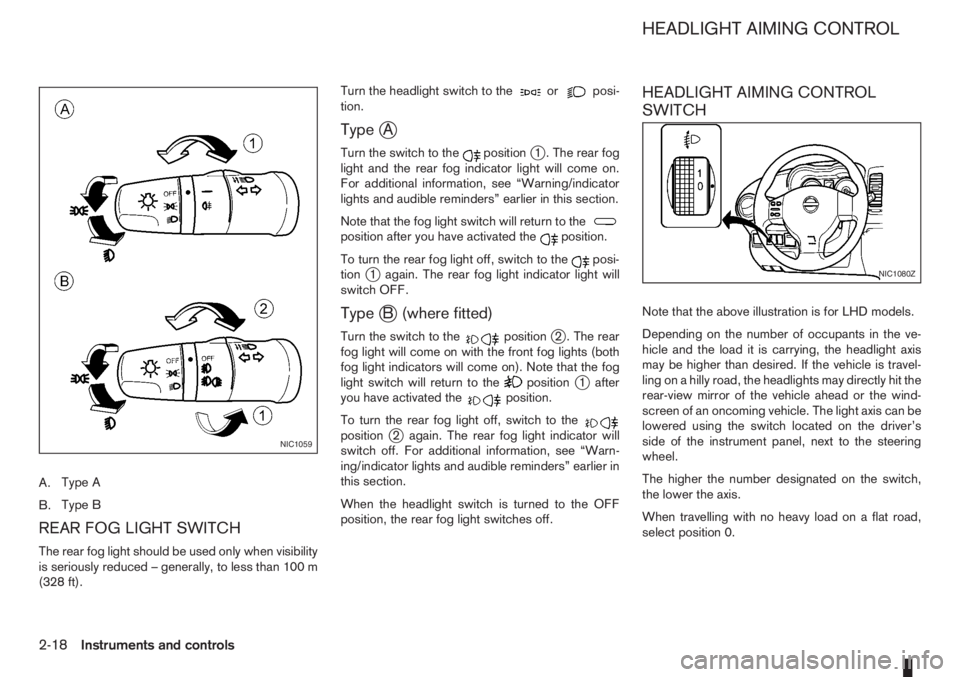
A.Type A
B.Type B
REAR FOG LIGHT SWITCH
The rear fog light should be used only when visibility
is seriously reduced – generally, to less than 100 m
(328 ft).Turn the headlight switch to the
orposi-
tion.
TypejA
Turn the switch to thepositionj1 . The rear fog
light and the rear fog indicator light will come on.
For additional information, see “Warning/indicator
lights and audible reminders” earlier in this section.
Note that the fog light switch will return to the
position after you have activated theposition.
To turn the rear fog light off, switch to the
posi-
tionj1 again. The rear fog light indicator light will
switch OFF.
TypejB (where fitted)
Turn the switch to thepositionj2 . The rear
fog light will come on with the front fog lights (both
fog light indicators will come on). Note that the fog
light switch will return to the
positionj1 after
you have activated theposition.
To turn the rear fog light off, switch to the
positionj2 again. The rear fog light indicator will
switch off. For additional information, see “Warn-
ing/indicator lights and audible reminders” earlier in
this section.
When the headlight switch is turned to the OFF
position, the rear fog light switches off.
HEADLIGHT AIMING CONTROL
SWITCH
Note that the above illustration is for LHD models.
Depending on the number of occupants in the ve-
hicle and the load it is carrying, the headlight axis
may be higher than desired. If the vehicle is travel-
ling on a hilly road, the headlights may directly hit the
rear-view mirror of the vehicle ahead or the wind-
screen of an oncoming vehicle. The light axis can be
lowered using the switch located on the driver’s
side of the instrument panel, next to the steering
wheel.
The higher the number designated on the switch,
the lower the axis.
When travelling with no heavy load on a flat road,
select position 0.
NIC1059
NIC1080Z
HEADLIGHT AIMING CONTROL
2-18Instruments and controls
Page 61 of 235

Push the switch on to warn other drivers when you
must stop or park under emergency conditions. All
direction indicator lights will flash.
The flasher can be actuated with the ignition switch
either in the “OFF” or ON position.To sound the horn, push the centre pad areaj1of
the steering wheel.The front seats are warmed by built-in heaters.
The switches are located on the centre console and
can be operated independently from each other (
jA
for the left-hand side seat,jB for the right-hand side
seat).
1. Turn the ignition switch to the ON position.
NOTE
The seat heater can only be activated when
the ignition switch is in the ON position.
2. Start the engine.
3. Push the
(Low/j1)or(High/j2)po-
sition of the switch, as desired, depending on the
temperature. The indicator light
j3 in the switch
will illuminate.
4. The seat heater is controlled by a thermostat,
automatically turning the heater on and off. The
indicator light
j2 will remain on as long as the
switch is on.
NIC1081ZNIC1074ZNIC1319Z
HAZARD WARNING FLASHER
SWITCHHORN SEAT HEATING (where fitted)
Instruments and controls2-19
Page 67 of 235
WARNING
Always secure cargo with ropes or straps to help
prevent it from sliding or shifting. Do not place
cargo higher than the seatbacks. In a sudden
stop or collision, unsecured cargo could cause
personal injury.
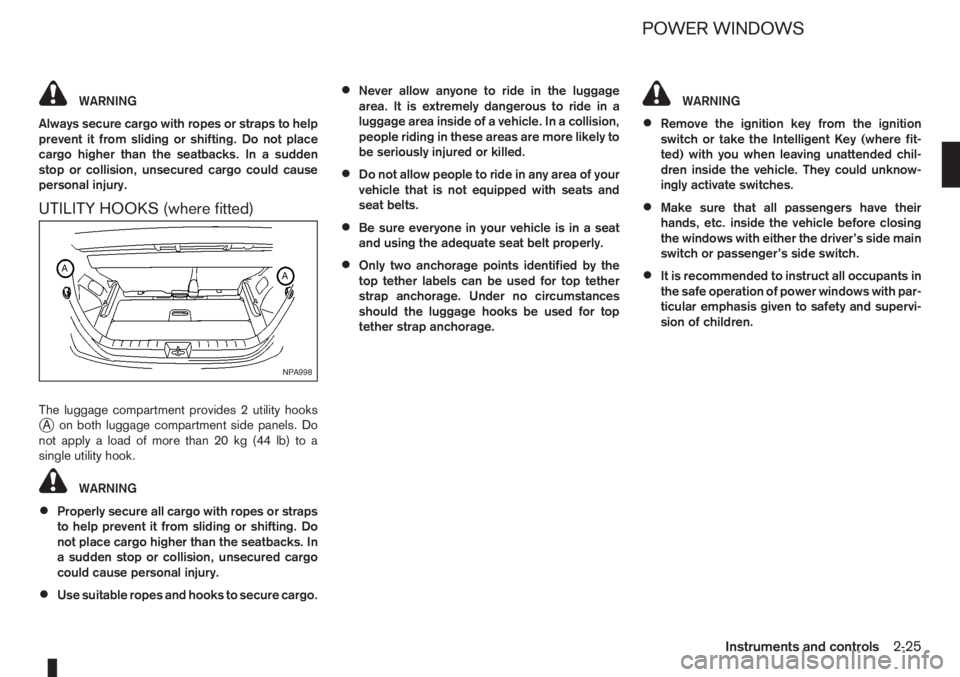
UTILITY HOOKS (where fitted)
The luggage compartment provides 2 utility hooksjA on both luggage compartment side panels. Do
notapplyaloadofmorethan20kg(44lb)toa
single utility hook.
WARNING
•Properly secure all cargo with ropes or straps
to help prevent it from sliding or shifting. Do
not place cargo higher than the seatbacks. In
a sudden stop or collision, unsecured cargo
could cause personal injury.
•Use suitable ropes and hooks to secure cargo.
•Never allow anyone to ride in the luggage
area. It is extremely dangerous to ride in a
luggage area inside of a vehicle. In a collision,
people riding in these areas are more likely to
be seriously injured or killed.
•Do not allow people to ride in any area of your
vehicle that is not equipped with seats and
seat belts.
•Be sure everyone in your vehicle is in a seat
and using the adequate seat belt properly.
•Only two anchorage points identified by the
top tether labels can be used for top tether
strap anchorage. Under no circumstances
should the luggage hooks be used for top
tether strap anchorage.
WARNING
•Remove the ignition key from the ignition
switch or take the Intelligent Key (where fit-
ted) with you when leaving unattended chil-
dren inside the vehicle. They could unknow-
ingly activate switches.
•Make sure that all passengers have their
hands, etc. inside the vehicle before closing
the windows with either the driver’s side main
switch or passenger’s side switch.
•It is recommended to instruct all occupants in
the safe operation of power windows with par-
ticular emphasis given to safety and supervi-
sion of children.
NPA998
POWER WINDOWS
Instruments and controls2-25
Page 68 of 235
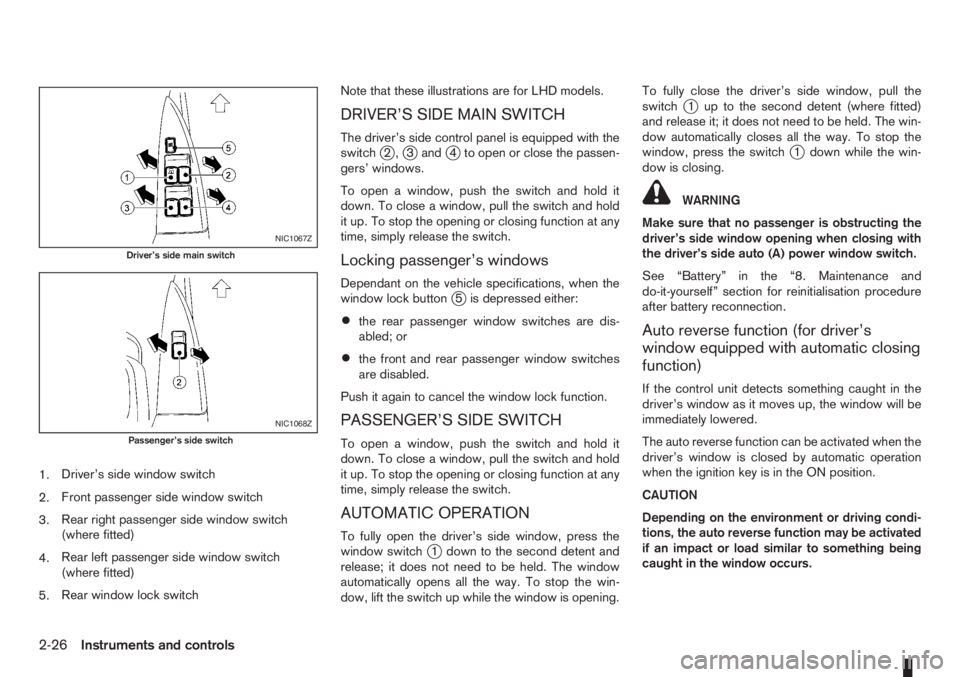
1.Driver’s side window switch
2.Front passenger side window switch
3.Rear right passenger side window switch
(where fitted)
4.Rear left passenger side window switch
(where fitted)
5.Rear window lock switchNote that these illustrations are for LHD models.
DRIVER’S SIDE MAIN SWITCH
The driver’s side control panel is equipped with the
switchj2,j3andj4 to open or close the passen-
gers’ windows.
To open a window, push the switch and hold it
down. To close a window, pull the switch and hold
it up. To stop the opening or closing function at any
time, simply release the switch.
Locking passenger’s windows
Dependant on the vehicle specifications, when the
window lock buttonj5 is depressed either:
•the rear passenger window switches are dis-
abled; or
•the front and rear passenger window switches
are disabled.
Push it again to cancel the window lock function.
PASSENGER’S SIDE SWITCH
To open a window, push the switch and hold it
down. To close a window, pull the switch and hold
it up. To stop the opening or closing function at any
time, simply release the switch.
AUTOMATIC OPERATION
To fully open the driver’s side window, press the
window switchj1 down to the second detent and
release; it does not need to be held. The window
automatically opens all the way. To stop the win-
dow, lift the switch up while the window is opening.To fully close the driver’s side window, pull the
switch
j1 up to the second detent (where fitted)
and release it; it does not need to be held. The win-
dow automatically closes all the way. To stop the
window, press the switch
j1 down while the win-
dow is closing.
WARNING
Make sure that no passenger is obstructing the
driver’s side window opening when closing with
the driver’s side auto (A) power window switch.
See “Battery” in the “8. Maintenance and
do-it-yourself” section for reinitialisation procedure
after battery reconnection.
Auto reverse function (for driver’s
window equipped with automatic closing
function)
If the control unit detects something caught in the
driver’s window as it moves up, the window will be
immediately lowered.
The auto reverse function can be activated when the
driver’s window is closed by automatic operation
when the ignition key is in the ON position.
CAUTION
Depending on the environment or driving condi-
tions, the auto reverse function may be activated
if an impact or load similar to something being
caught in the window occurs.
NIC1067Z
Driver’s side main switch
NIC1068Z
Passenger’s side switch
2-26Instruments and controls
Page 70 of 235
Room light timer
The room light will stay on for approximately 30 sec-
onds when:
•The ignition is switched off.
•The doors are unlocked.
•Any door (except back door) is opened and then
closed.
The timer is cancelled, and the interior light will turn
off when:
•The doors are locked.
•The ignition switch is turned to the ON position.
MAP LIGHT (where fitted)j2
To switch on the map light, press eitherorof
the switchesj2.
LUGGAGE COMPARTMENT LIGHT
The light comes on when the back door is opened.
2-28Instruments and controls