Page 313 of 454
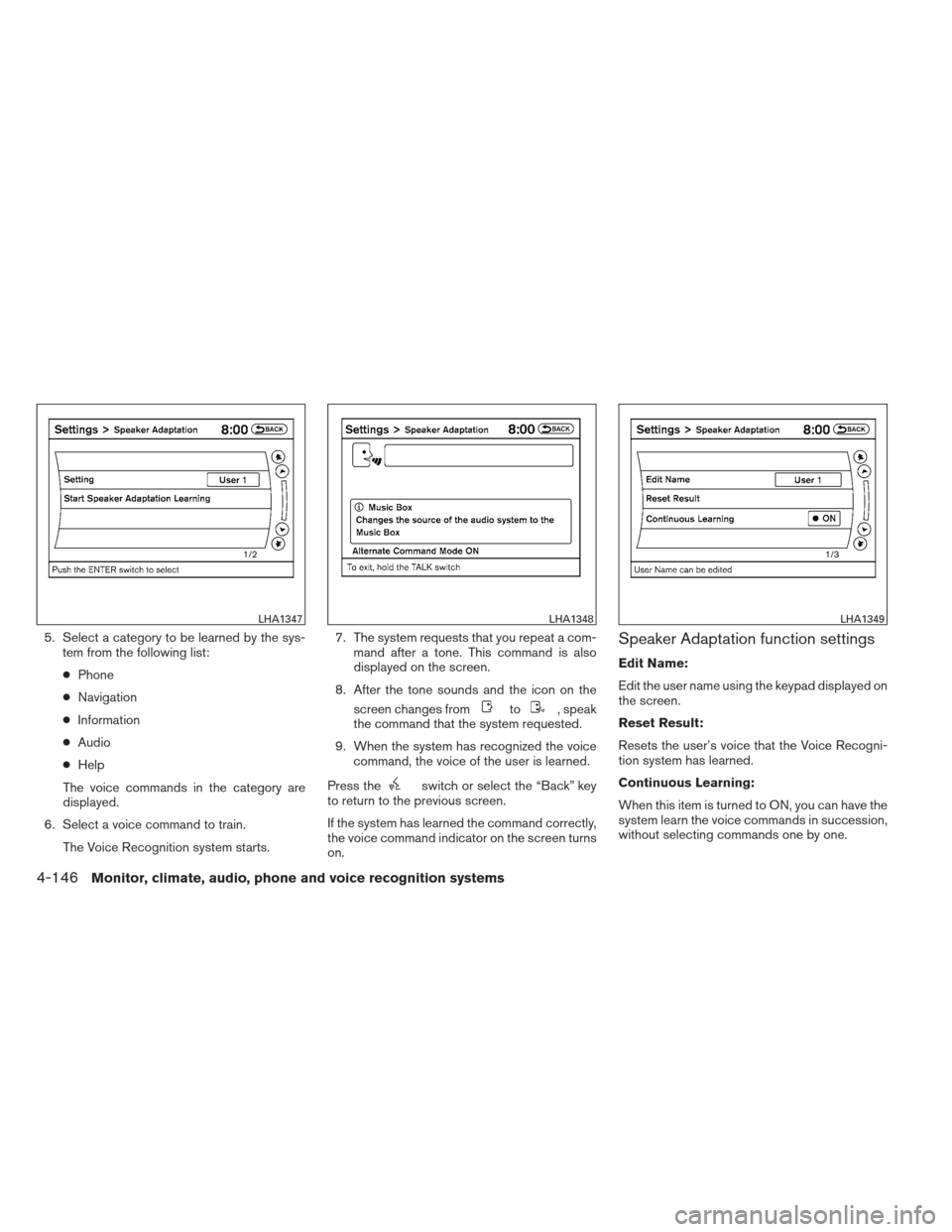
5. Select a category to be learned by the sys-tem from the following list:
● Phone
● Navigation
● Information
● Audio
● Help
The voice commands in the category are
displayed.
6. Select a voice command to train. The Voice Recognition system starts. 7. The system requests that you repeat a com-
mand after a tone. This command is also
displayed on the screen.
8. After the tone sounds and the icon on the screen changes from
to, speak
the command that the system requested.
9. When the system has recognized the voice command, the voice of the user is learned.
Press the
switch or select the “Back” key
to return to the previous screen.
If the system has learned the command correctly,
the voice command indicator on the screen turns
on.
Speaker Adaptation function settings
Edit Name:
Edit the user name using the keypad displayed on
the screen.
Reset Result:
Resets the user’s voice that the Voice Recogni-
tion system has learned.
Continuous Learning:
When this item is turned to ON, you can have the
system learn the voice commands in succession,
without selecting commands one by one.
LHA1347LHA1348LHA1349
4-146Monitor, climate, audio, phone and voice recognition systems
Page 314 of 454
TROUBLESHOOTING GUIDE
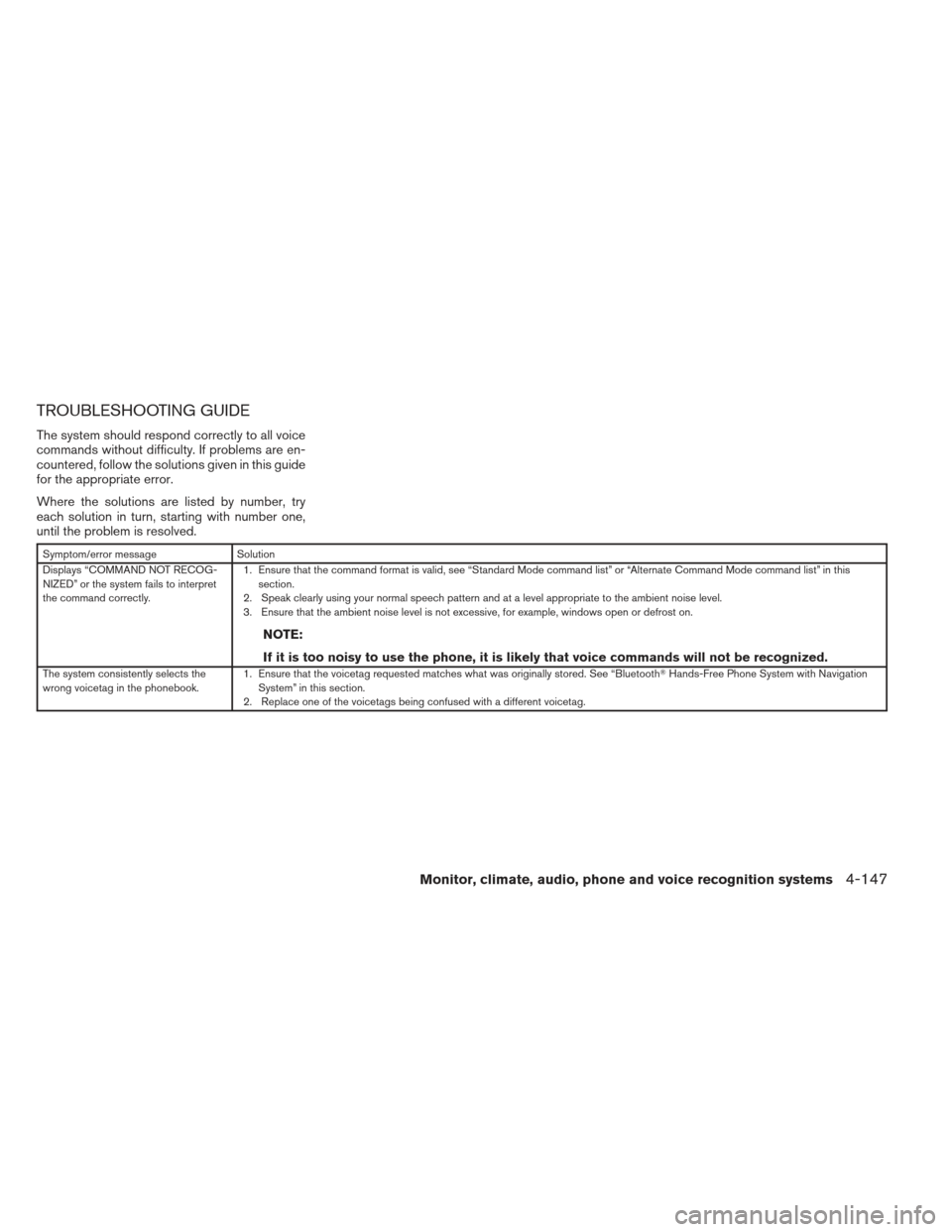
The system should respond correctly to all voice
commands without difficulty. If problems are en-
countered, follow the solutions given in this guide
for the appropriate error.
Where the solutions are listed by number, try
each solution in turn, starting with number one,
until the problem is resolved.
Symptom/error messageSolution
Displays “COMMAND NOT RECOG-
NIZED” or the system fails to interpret
the command correctly. 1. Ensure that the command format is valid, see “Standard Mode command list” or “Alternate Command Mode command list” in this
section.
2. Speak clearly using your normal speech pattern and at a level appropriate to the ambient noise level.
3. Ensure that the ambient noise level is not excessive, for example, windows open or defrost on.
NOTE:
If it is too noisy to use the phone, it is likely that voice commands will not be recognized.
The system consistently selects the
wrong voicetag in the phonebook. 1. Ensure that the voicetag requested matches what was originally stored. See “Bluetooth
�Hands-Free Phone System with Navigation
System” in this section.
2. Replace one of the voicetags being confused with a different voicetag.
Monitor, climate, audio, phone and voice recognition systems4-147
Page 447 of 454
Precautions on child
restraints.........1-22,1-28,1-33,1-37
Top tether strap anchor point locations . .1-26
Child safety rear door lock ............3-6
Chimes, audible reminders ...........2-16
Cleaningexteriorandinterior...........7-2
Clock ...................4-45,4-50 (models with navigation system) .......4-8
(models without navigation system) ....4-45
Clockset..................4-8,4-45
Clutch Clutchfluid..................8-15
C.M.V.S.S. certification label ..........9-10
Cold weather driving ..............5-28
Compact disc (CD) player ........4-46,4-52,
4-63, 4-69
Compass display .................2-6
Console box ...................2-41
Console light ...................2-49
Continuously Variable Transmission (CVT). . .5-12 Continuously Variable Transmission
(CVT) fluid ..................8-13
Driving with Continuously Variable
Transmission (CVT) .............5-12
Transmission shift selector lock release . .5-16
Controlpanelbuttons...............4-2 Brightness/contrast button .........4-12
Enterbutton..................4-2
Setting button .................4-6
Controls Heater and air conditioner
controls ................4-19,4-26
Coolant Capacities and recommended
fuel/lubricants .................9-2
Changing engine coolant ...........8-9 Checking engine coolant level
........8-9
Engine coolant temperature gauge .....2-5
Corrosion protection ...............7-6
Cruisecontrol..................5-20
Cupholders................2-39,2-40
D
Daytime running light system (Canada only) . .2-32
Defroster switch Rear window and outside mirror defroster
switch.....................2-28
Digital Versatile Disc (DVD) player .......4-68
Dimensionsandweights.............9-8
Dimmer switch for instrument panel ......2-33
Display controls (see control panel buttons) . .4-2
Door locks .....................3-4
Drive belt .....................8-18
Driving Cold weather driving ............5-28
Driving with Continuously Variable
Transmission (CVT) .............5-12
Driving with manual transmission ......5-17
Precautions when starting and driving ....5-2
E
Economy - fuel ..................5-22
Emission control information label .......9-11
Emission control system warranty .......9-25
Engine Before starting the engine ..........5-10
Block heater .................5-29 Capacities and recommended
fuel/lubricants
.................9-2
Changingenginecoolant...........8-9
Changingengineoil.............8-11
Changing engine oil filter ..........8-12
Checking engine coolant level ........8-9
Checking engine oil level ..........8-10
Engine compartment check locations ....8-6
Engine coolant temperature gauge .....2-5
Engine cooling system ............8-8
Engine
oil ...................8-10
Engine oil and oil filter recommendation . . .9-5
Engine oil pressure warning light ......2-12
Engine oil viscosity ..............9-5
Engine serial number ............9-10
Engine specifications .............9-7
Starting the engine .............5-11
Enterbutton....................4-2
Eventdatarecorders ..............9-26
Exhaust gas (Carbon monoxide) .........5-2
Extended storage switch ............8-26
Eyeglass case ..................2-38
F
Flashers
(See hazard warning flasher switch) ......2-34
Flat tire .......................6-2
Floor mat positioning aid .............7-5
Fluid Brake fluid ..................8-14
Capacities and recommended
fuel/lubricants .................9-2
Clutch fluid ..................8-15
10-2