2012 NISSAN 370Z COUPE navigation system
[x] Cancel search: navigation systemPage 266 of 427
4-110Center display, heater, air conditioner, audio, phone and voice recognition systems
Voice command examples
To use the NISSAN Voice Recognition function,
speaking one command is sometimes sufficient,
but at other times it is necessary to speak two or
more commands. As examples, some additional
basic operations by voice commands are
described here.
For navigation system commands, see the
separate Navigation System Owner’s Manual.
SAA2167
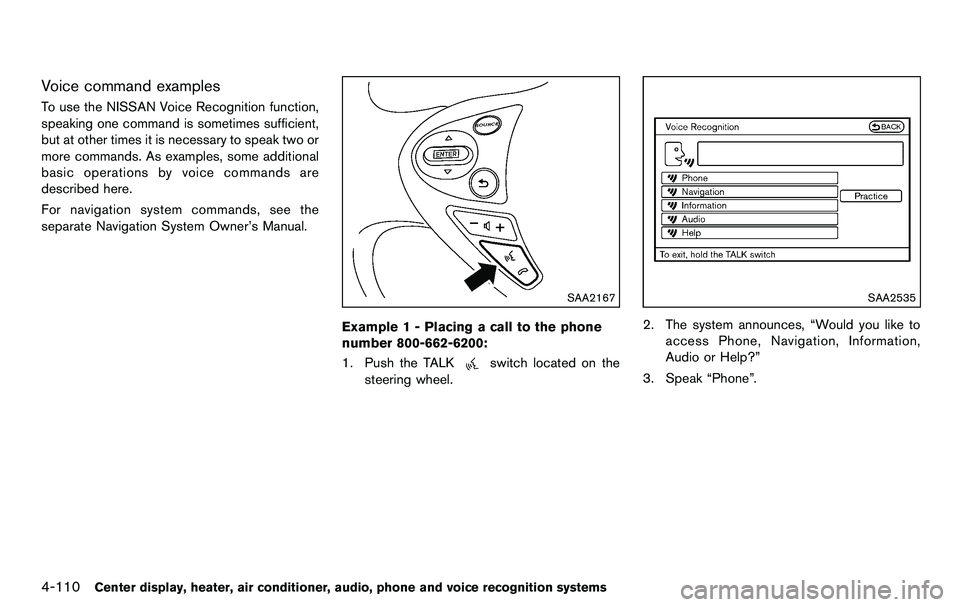
Example 1 - Placing a call to the phone
number 800-662-6200:
1. Push the TALK
switch located on the
steering wheel.
SAA2535
2. The system announces, “Would you like to
access Phone, Navigation, Information,
Audio or Help?”
3. Speak “Phone”.
Page 269 of 427
SAA2167
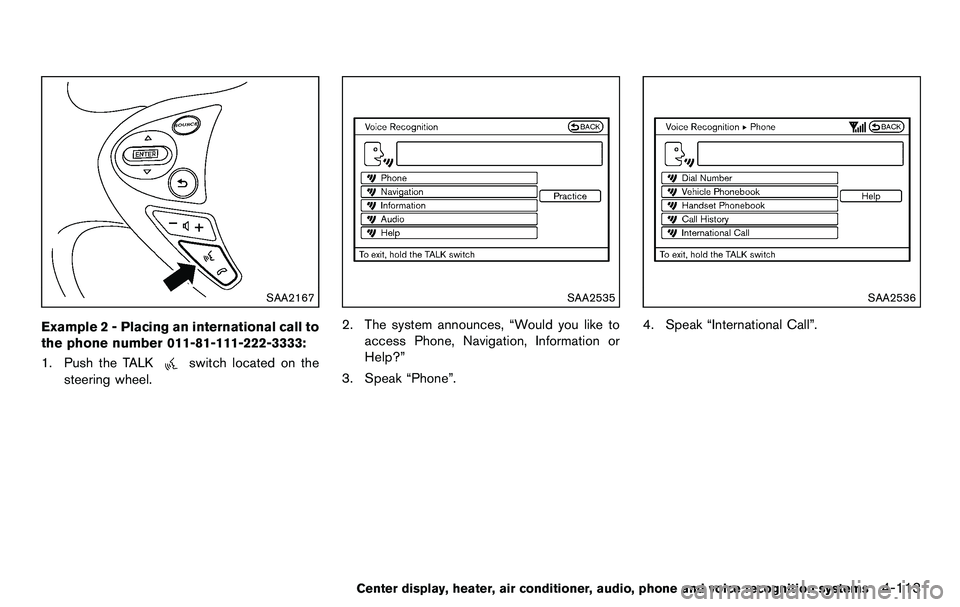
Example 2 - Placing an international call to
the phone number 011-81-111-222-3333:
1. Push the TALK
switch located on the
steering wheel.
SAA2535
2. The system announces, “Would you like to
access Phone, Navigation, Information or
Help?”
3. Speak “Phone”.
SAA2536
4. Speak “International Call”.
Center display, heater, air conditioner, audio, phone and voice recognition systems4-113
Page 274 of 427
4-118Center display, heater, air conditioner, audio, phone and voice recognition systems
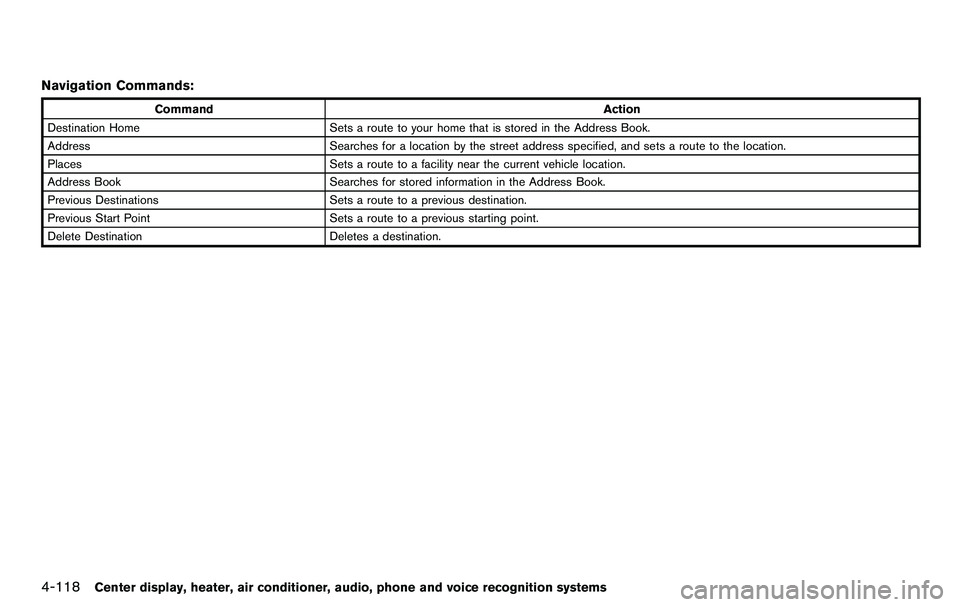
Navigation Commands:
CommandAction
Destination Home Sets a route to your home that is stored in the Address Book.
Address Searches for a location by the street address specified, and sets a route to the location.
Places Sets a route to a facility near the current vehicle location.
Address Book Searches for stored information in the Address Book.
Previous Destinations Sets a route to a previous destination.
Previous Start Point Sets a route to a previous starting point.
Delete Destination Deletes a destination.
Page 277 of 427
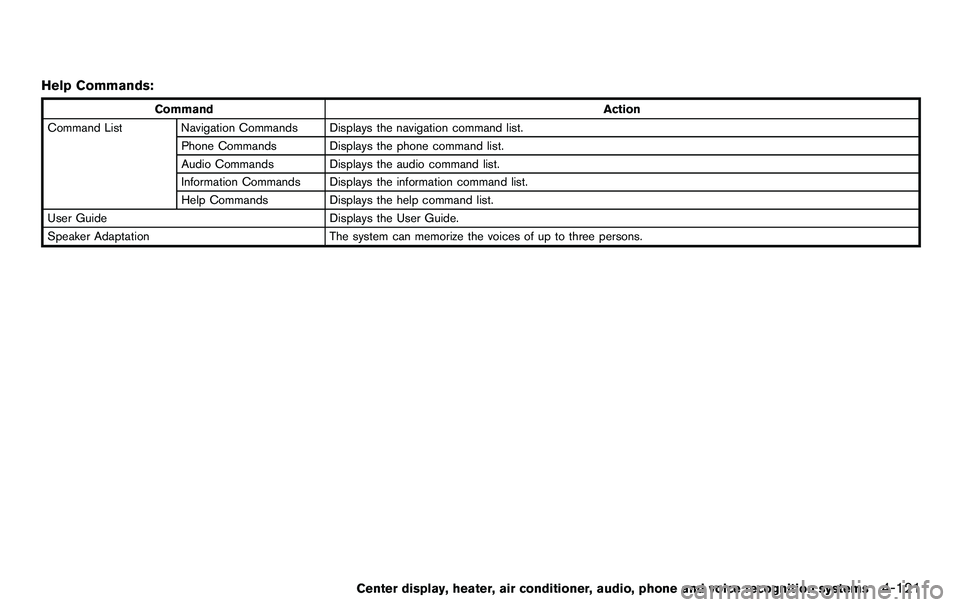
Help Commands:
CommandAction
Command List Navigation Commands Displays the navigation command list. Phone Commands Displays the phone command list.
Audio Commands Displays the audio command list.
Information Commands Displays the information command list.
Help Commands Displays the help command list.
User Guide Displays the User Guide.
Speaker Adaptation The system can memorize the voices of up to three persons.
Center display, heater, air conditioner, audio, phone and voice recognition systems4-121
Page 279 of 427
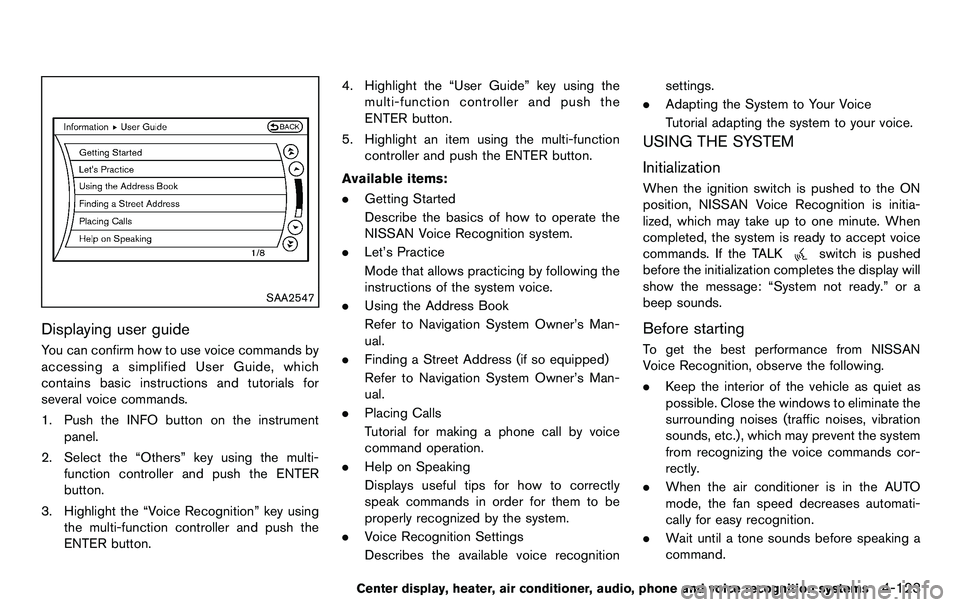
SAA2547
Displaying user guide
You can confirm how to use voice commands by
accessing a simplified User Guide, which
contains basic instructions and tutorials for
several voice commands.
1. Push the INFO button on the instrumentpanel.
2. Select the “Others” key using the multi- function controller and push the ENTER
button.
3. Highlight the “Voice Recognition” key using the multi-function controller and push the
ENTER button. 4. Highlight the “User Guide” key using the
multi-function controller and push the
ENTER button.
5. Highlight an item using the multi-function controller and push the ENTER button.
Available items:
. Getting Started
Describe the basics of how to operate the
NISSAN Voice Recognition system.
. Let’s Practice
Mode that allows practicing by following the
instructions of the system voice.
. Using the Address Book
Refer to Navigation System Owner’s Man-
ual.
. Finding a Street Address (if so equipped)
Refer to Navigation System Owner’s Man-
ual.
. Placing Calls
Tutorial for making a phone call by voice
command operation.
. Help on Speaking
Displays useful tips for how to correctly
speak commands in order for them to be
properly recognized by the system.
. Voice Recognition Settings
Describes the available voice recognition settings.
. Adapting the System to Your Voice
Tutorial adapting the system to your voice.
USING THE SYSTEM
Initialization
When the ignition switch is pushed to the ON
position, NISSAN Voice Recognition is initia-
lized, which may take up to one minute. When
completed, the system is ready to accept voice
commands. If the TALK
switch is pushed
before the initialization completes the display will
show the message: “System not ready.” or a
beep sounds.
Before starting
To get the best performance from NISSAN
Voice Recognition, observe the following.
. Keep the interior of the vehicle as quiet as
possible. Close the windows to eliminate the
surrounding noises (traffic noises, vibration
sounds, etc.), which may prevent the system
from recognizing the voice commands cor-
rectly.
. When the air conditioner is in the AUTO
mode, the fan speed decreases automati-
cally for easy recognition.
. Wait until a tone sounds before speaking a
command.
Center display, heater, air conditioner, audio, phone and voice recognition systems4-123
Page 282 of 427
4-126Center display, heater, air conditioner, audio, phone and voice recognition systems
SAA2550
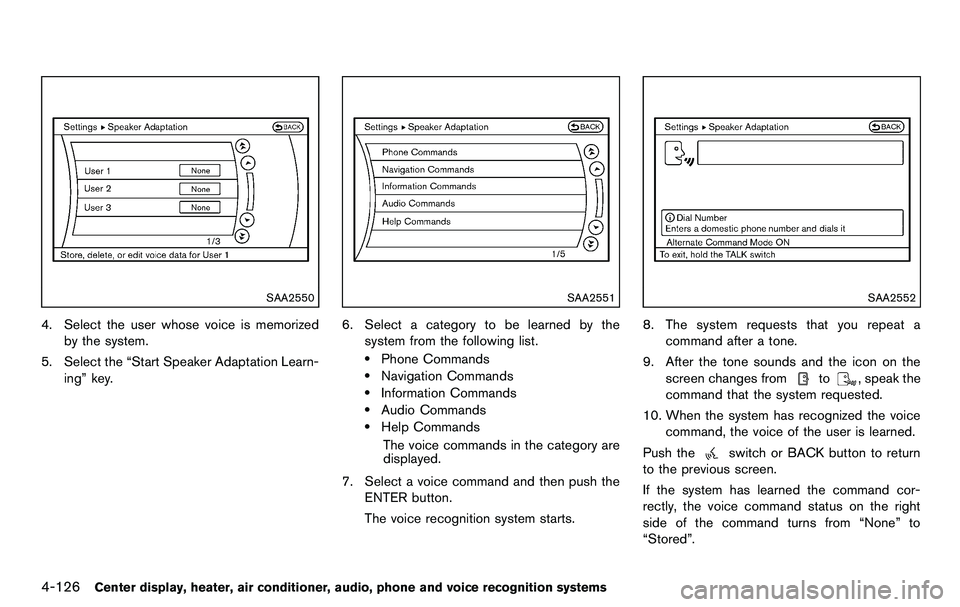
4. Select the user whose voice is memorizedby the system.
5. Select the “Start Speaker Adaptation Learn- ing” key.
SAA2551
6. Select a category to be learned by the
system from the following list.
.Phone Commands.Navigation Commands.Information Commands.Audio Commands.Help Commands
The voice commands in the category are
displayed.
7. Select a voice command and then push the ENTER button.
The voice recognition system starts.
SAA2552
8. The system requests that you repeat a
command after a tone.
9. After the tone sounds and the icon on the screen changes from
to, speak the
command that the system requested.
10. When the system has recognized the voice command, the voice of the user is learned.
Push the
switch or BACK button to return
to the previous screen.
If the system has learned the command cor-
rectly, the voice command status on the right
side of the command turns from “None” to
“Stored”.
Page 284 of 427
4-128Center display, heater, air conditioner, audio, phone and voice recognition systems
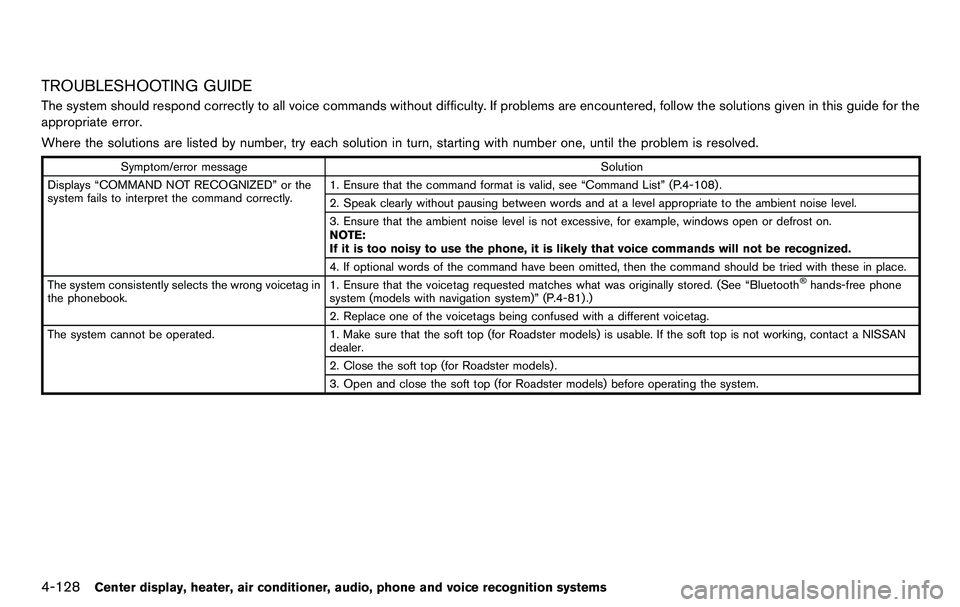
TROUBLESHOOTING GUIDE
The system should respond correctly to all voice commands without difficulty. If problems are encountered, follow the solutions given in this guide for the
appropriate error.
Where the solutions are listed by number, try each solution in turn, starting with number one, until the problem is resolved.
Symptom/error messageSolution
Displays “COMMAND NOT RECOGNIZED” or the
system fails to interpret the command correctly. 1. Ensure that the command format is valid, see “Command List” (P.4-108) .
2. Speak clearly without pausing between words and at a level appropriate to the ambient noise level.
3. Ensure that the ambient noise level is not excessive, for example, windows open or defrost on.
NOTE:
If it is too noisy to use the phone, it is likely that voice commands will not be recognized.
4. If optional words of the command have been omitted, then the command should be tried with these in place.
The system consistently selects the wrong voicetag in
the phonebook. 1. Ensure that the voicetag requested matches what was originally stored. (See “Bluetooth
®hands-free phone
system (models with navigation system)” (P.4-81) .)
2. Replace one of the voicetags being confused with a different voicetag.
The system cannot be operated. 1. Make sure that the soft top (for Roadster models) is usable. If the soft top is not working, contact a NISSAN
dealer.
2. Close the soft top (for Roadster models) .
3. Open and close the soft top (for Roadster models) before operating the system.
Page 419 of 427
10 Index
A
ABS (Anti-lock Braking System) ............................ 5-26
Advanced air bag system ......................................... 1-33
Air bag systemAdvanced air bag system .................................. 1-33
Front passenger air bag and status light....... 1-35
Front-seat mounted side-impact
supplemental air bag system ............................ 1-38
Roof-mounted curtain side-impact
supplemental air bag system ............................ 1-38
Air bag warning labels............................................... 1-40
Air bag warning light...................................... 1-41, 2-13
Air cleaner housing filter ........................................... 8-19
Air conditioner Air conditioner operation.................................... 4-24
Air conditioner service ........................................ 4-30
Air conditioner specification label.................... 9-13
Air conditioning system refrigerant and
lubricant recommendations....................... 4-30, 9-7
In-cabin microfilter ............................................... 4-30
Air deflectors................................................................ 9-16
Alarm, How to stop alarm (see vehicle
security system)........................................................... 2-28
Alcohol, drugs and driving.......................................... 5-7
Antenna.......................................................................... 4-79
Anti-lock Braking System (ABS) ............................ 5-26
Anti-lock braking system (ABS) warning light..... 2-10
Appearance care Exterior appearance care ...................................... 7-2
Interior appearance care ....................................... 7-5
Audible reminders....................................................... 2-16
Audio operation precautions.................................... 4-31
Audio system................................................................ 4-31 Steering wheel audio controls.......................... 4-77 Autochanger
Compact Disc (CD) ............................................ 4-49
Autolight system.......................................................... 2-32
Automatic Air conditioner (Type A) ..................................... 4-25
Air conditioner (Type B) ..................................... 4-28
Automatic adjusting function
(front windows)..................................................... 2-46
Automatic transmission fluid (ATF).................. 8-13
Door locks................................................................. 3-5
Driving with automatic transmission................ 5-12
AUX (Auxiliary) button.................................... 4-46, 4-51
Auxiliary input jacks .................................................... 4-75
Avoiding collision and rollover ................................... 5-6
B
Battery............................................................................ 8-16 Battery saver system........................................... 2-34
Intelligent Key........................................................ 8-25
Variable voltage control system........................ 8-18
Before starting the engine........................................ 5-11
Belts (See drive belts)............................................... 8-18
Bluetooth
®hands-free phone system
(models with navigation system)............................. 4-81
Bluetooth
®hands-free phone system
(models without navigation system) ....................... 4-91
Bluetooth
®streaming audio ..................................... 4-63
Booster seats............................................................... 1-24
Brake Anti-lock Braking System (ABS) ..................... 5-26
Brake and clutch fluid......................................... 8-14
Brake fluid.............................................................. 8-14
Brake system......................................................... 5-25
Parking brake operation ..................................... 5-20
Warning light......................................................... 2-10 Break-in schedule ....................................................... 5-23
Brightness control......................................................... 4-7 Display ON/OFF button ........................................ 4-7
Instrument panel................................................... 2-34
Bulb check/instrument panel ................................... 2-10
Bulb replacement........................................................ 8-27
C
Cabin air filter............................................................... 4-30
Capacities and recommended fuel/lubricants ....... 9-2
Car phone or CB radio ............................................. 4-80
Cargo cover.................................................................. 2-43
Catalytic converter, Three way catalyst................... 5-3
CD/CF/USB memory care and cleaning .............. 4-76
Center multi-function control panel
(models with navigation system)............................... 4-3
Child restraints............................................................. 1-18 Booster seats........................................................ 1-24
Precautions on child restraints......................... 1-18
Top tether strap.................................................... 1-19
Child safety................................................................... 1-15
Chimes Audible reminders................................................ 2-16
Seat belt warning light and chime................... 2-13
Circuit breaker, Fusible link...................................... 8-23
Cleaning exterior and interior............................ 7-2, 7-5
Clock..................................................................... 2-8, 2-25
Clutch fluid.................................................................... 8-14
Cockpit ............................................................................ 2-3
Cold weather driving.................................................. 5-31
Compact Disc (CD) changer (See
audio system)............................................................... 4-49
Compact Disc (CD) player (See
audio system)................................................... 4-45, 4-54
Compact spare tire..................................................... 8-40