Page 426 of 610
Comfort controls
5-49
5
To adjust the tone
N00712100656
1. Press the SOUND switch repeatedly to select the tone or
balance control to change. The order is: SUB PUNCH →
TYPE → FIELD → BASS → MID → TREBLE →
FADER → BALANCE → Audio adjust mode OFFNOTE�SUB PUNCH can be adjusted only on vehicles with a pre-
mium sound system.
On vehicles without a premium sound system, TYPE will
display first (no SUB PUNCH display).
QUICK ACCESS MODE
To access the sound customization features quickly, push
and hold the SOUND switch, then turn the switch clock-
wise or counterclockwise to access your desired sound
customization setting. Release the switch to adjust the set-
ting.2. Turn the SOUND switch either clockwise or counter-
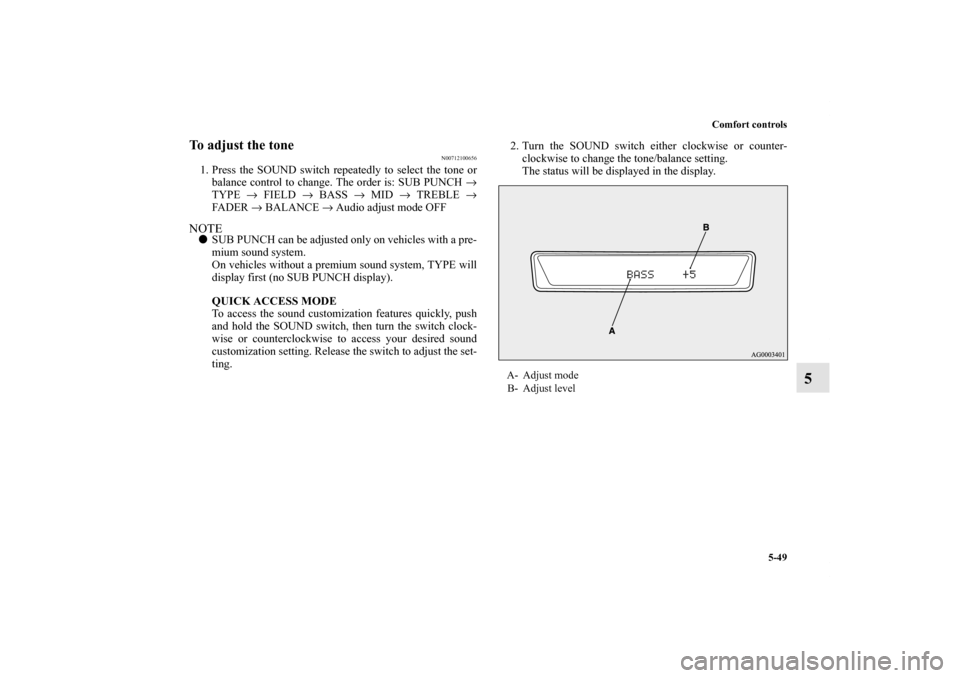
clockwise to change the tone/balance setting.
The status will be displayed in the display.
A- Adjust mode
B- Adjust level
BK0140300US.book 49 ページ 2011年6月28日 火曜日 午後5時18分
Page 427 of 610
5-50 Comfort controls
5
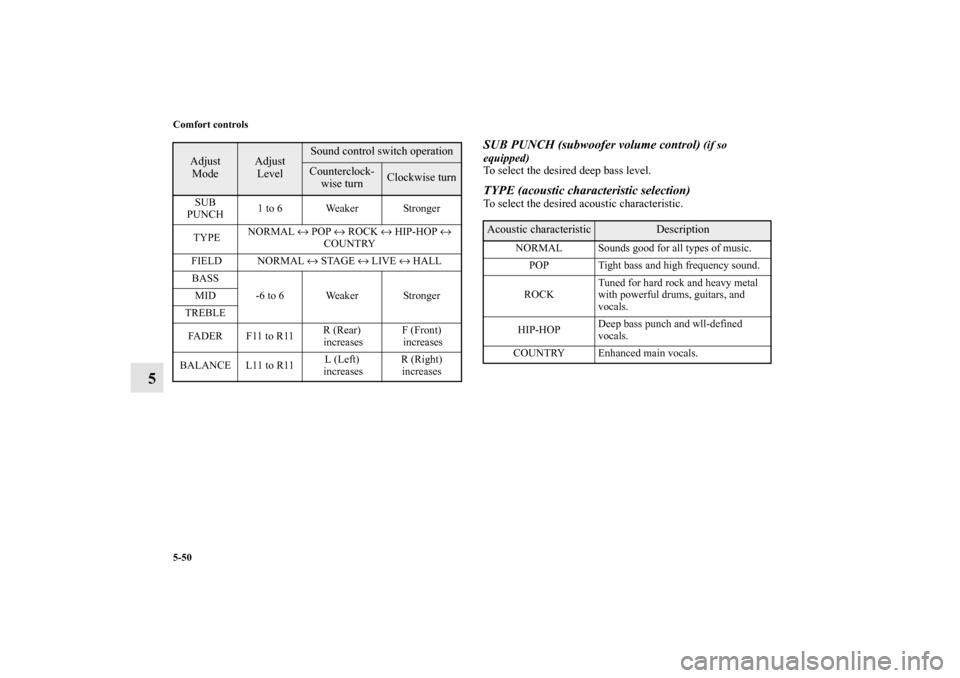
SUB PUNCH (subwoofer volume control)
(if so
equipped)
To select the desired deep bass level.
TYPE (acoustic characteristic selection)To select the desired acoustic characteristic.
Adjust
Mode
Adjust
Level
Sound control switch operationCounterclock-
wise turn
Clockwise turn
SUB
PUNCH1 to 6 Weaker Stronger
TYPENORMAL ↔ POP ↔ ROCK ↔ HIP-HOP ↔
COUNTRY
FIELD NORMAL ↔ STAGE ↔ LIVE ↔ HALL
BASS
-6 to 6 Weaker Stronger MID
TREBLE
FA D E R F 11 t o R 11R (Rear)
increasesF (Front)
increases
BALANCE L11 to R11L (Left)
increasesR (Right)
increases
Acoustic characteristic
Description
NORMAL Sounds good for all types of music.
POP Tight bass and high frequency sound.
ROCKTuned for hard rock and heavy metal
with powerful drums, guitars, and
vocals.
HIP-HOPDeep bass punch and wll-defined
vocals.
COUNTRY Enhanced main vocals.
BK0140300US.book 50 ページ 2011年6月28日 火曜日 午後5時18分
Page 429 of 610
5-52 Comfort controls
5
Speed Compensated Volume function
N00752200268
Speed Compensated Volume function is a feature that automat-
ically adjusts the VOLUME, BASS, MID, and TREBLE set-
tings in accordance with the vehicle speed. It is possible to turn
this function ON-OFF using the following methods:
1. If you are presently pushing the SOUND switch and mak-
ing a tone adjustment, finish making the tone adjustment.
2. Push the SOUND switch for at least about 2 seconds. The
system will switch to MENU mode and the characters
“SCV ON” will be shown on the display.NOTE�When you enter the MENU mode while listening to satel-
lite radio (if so equipped), “SKIP SETTING” will be
shown on the display and you will enter the satellite radio
setting mode. Every time you press the SOUND switch,
the display will change in the following order: “SKIP
SETTING” → “LOCK SETTING” → “SCV ON.” Press
the SOUND switch until “SCV ON” is shown on the dis-
play, to switch to the setting mode for the Speed Compen-
sated Volume function.
3. Turn the SOUND switch clockwise to turn the function
ON. Turn it counterclockwise to turn the function OFF.NOTE�The factory setting for the Speed Compensated Volume
function is ON.
�The MENU mode will automatically shut off when either
the radio or CD is selected or the user does not move any
of the switches for 10 seconds.
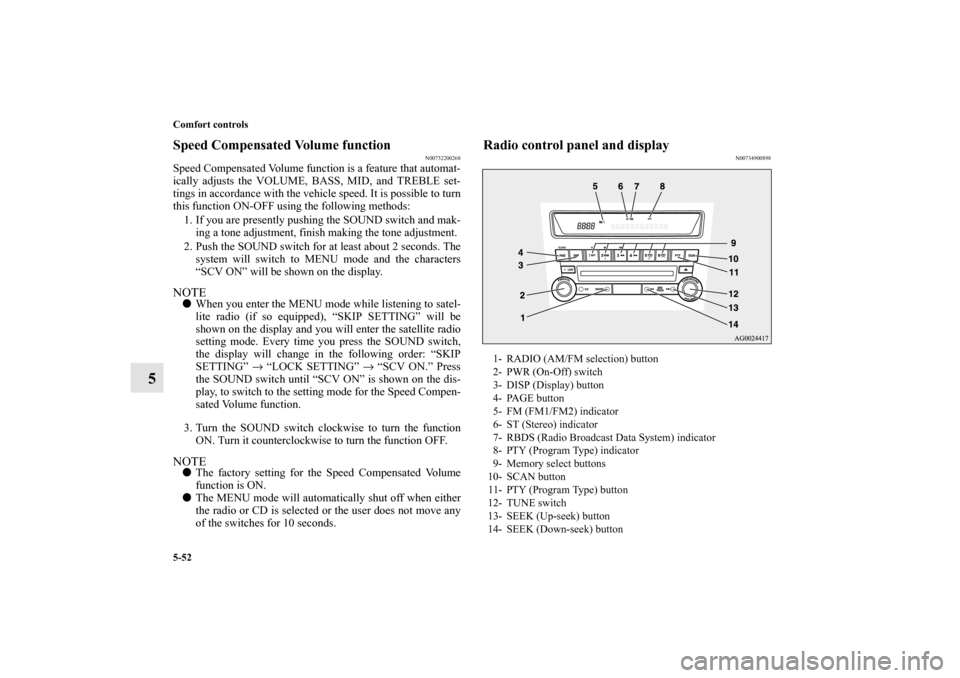
Radio control panel and display
N00734900898
1- RADIO (AM/FM selection) button
2- PWR (On-Off) switch
3- DISP (Display) button
4- PAGE button
5- FM (FM1/FM2) indicator
6- ST (Stereo) indicator
7- RBDS (Radio Broadcast Data System) indicator
8- PTY (Program Type) indicator
9- Memory select buttons
10- SCAN button
11- PTY (Program Type) button
12- TUNE switch
13- SEEK (Up-seek) button
14- SEEK (Down-seek) button
BK0140300US.book 52 ページ 2011年6月28日 火曜日 午後5時18分
Page 445 of 610
5-68 Comfort controls
5
To fast forward/reverse the discTo fast forward or fast reverse the disc, press the fast-forward
button or the fast-reverse button.
Fast forward
You can fast-forward the disc by pressing the fast-forward but-
ton. While the button is kept pressed, the disc will be fast-for-
warded.
Fast reverse
You can fast reverse the disc by pressing the fast-reverse but-
ton. While the button is kept pressed, the disc will be fast-
reversed.
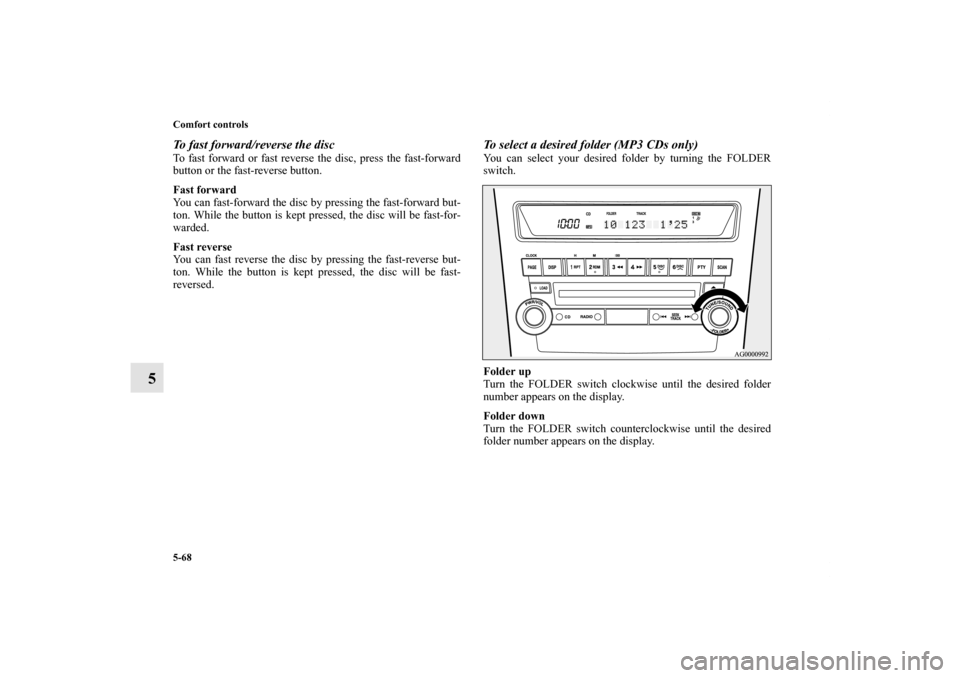
To select a desired folder (MP3 CDs only)You can select your desired folder by turning the FOLDER
switch.
Folder up
Turn the FOLDER switch clockwise until the desired folder
number appears on the display.
Folder down
Turn the FOLDER switch counterclockwise until the desired
folder number appears on the display.
BK0140300US.book 68 ページ 2011年6月28日 火曜日 午後5時18分
Page 479 of 610
5-102 Comfort controls
5
Notes on CD-Rs/RWs
N00751900066
�You may have trouble playing back some CD-R/RW discs
recorded on CD recorders (CD-R/RW drives), either due
to their recording characteristics or dirt, fingerprints,
scratches, etc. on the disc surface.
�CD-R/RW discs are less resistant to high temperatures and
high humidity than ordinary music CDs and can therefore
be damaged and rendered unplayable if left inside your
vehicle for a long time.
�Depending on the combination of the writing software,
the CD recorder (CD-R/RW drive), and the disc used to
create a CD-R/RW, the disc might not play successfully.
�This player cannot play the CD-R/RW discs if the session
is not closed.
�This player cannot play CD-R/RW discs which contain
data other than CD-DA or MP3 data (Video CD, etc.).
�Be sure to observe the handling instructions for the CD-
R/RW disc.
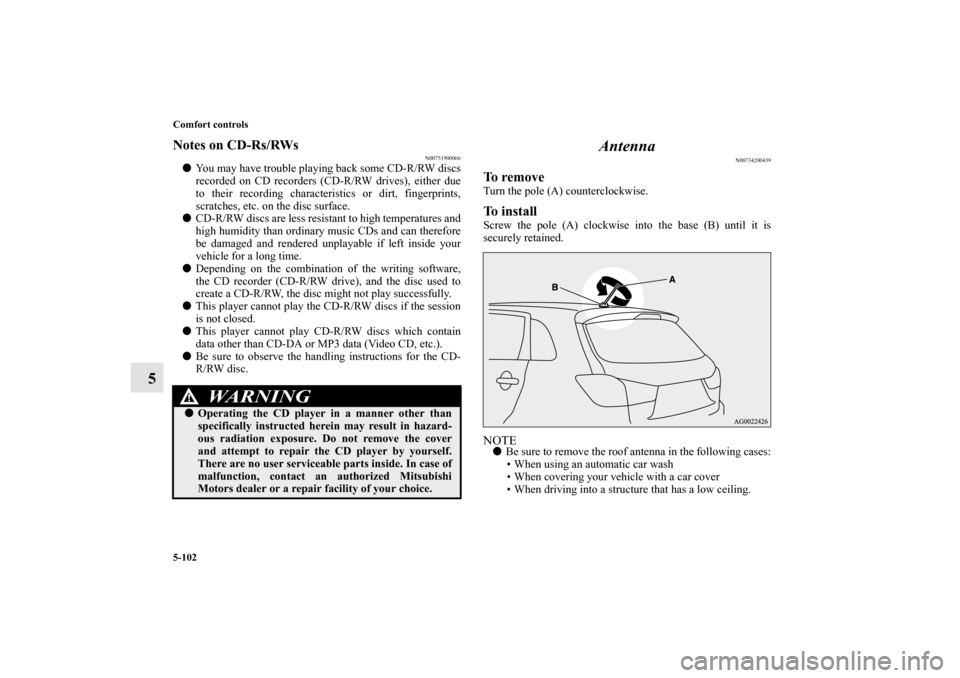
Antenna
N00734200439
To removeTurn the pole (A) counterclockwise.To installScrew the pole (A) clockwise into the base (B) until it is
securely retained.NOTE�Be sure to remove the roof antenna in the following cases:
• When using an automatic car wash
• When covering your vehicle with a car cover
• When driving into a structure that has a low ceiling.
WA R N I N G
!�Operating the CD player in a manner other than
specifically instructed herein may result in hazard-
ous radiation exposure. Do not remove the cover
and attempt to repair the CD player by yourself.
There are no user serviceable parts inside. In case of
malfunction, contact an authorized Mitsubishi
Motors dealer or a repair facility of your choice.
BK0140300US.book 102 ページ 2011年6月28日 火曜日 午後5時18分
Page 480 of 610
Comfort controls
5-103
5 Clock
(if so equipped)
N00755000111
The time is displayed when the ignition switch or the operation
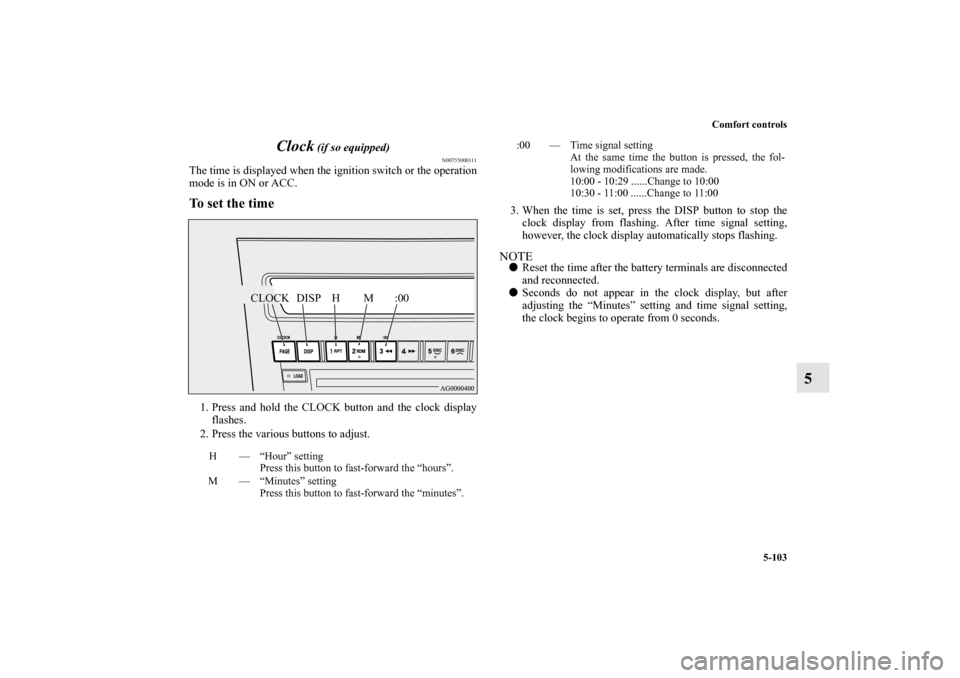
mode is in ON or ACC.To set the time1. Press and hold the CLOCK button and the clock display
flashes.
2. Press the various buttons to adjust.3. When the time is set, press the DISP button to stop the
clock display from flashing. After time signal setting,
however, the clock display automatically stops flashing.
NOTE�Reset the time after the battery terminals are disconnected
and reconnected.
�Seconds do not appear in the clock display, but after
adjusting the “Minutes” setting and time signal setting,
the clock begins to operate from 0 seconds.
H — “Hour” setting
Press this button to fast-forward the “hours”.
M — “Minutes” setting
Press this button to fast-forward the “minutes”.
CLOCK DISP H M :00
:00 — Time signal setting
At the same time the button is pressed, the fol-
lowing modifications are made.
10:00 - 10:29 ......Change to 10:00
10:30 - 11:00 ......Change to 11:00
BK0140300US.book 103 ページ 2011年6月28日 火曜日 午後5時18分
Page 489 of 610
6-6 For emergencies
6
5. If you do not see steam or spray coming from under the
hood, leave the engine on until the bar graph for the
engine coolant temperature warning display on the multi-
information display goes down. When it is in the middle
of the normal zone, you can start driving again. If the bar
graph stays in the red zone, turn off the engine.
6. When you do not see any more steam or spray, open the
hood. Look for obvious leaks, such as a split radiator
hose. Be careful as components will be hot. Any leak
source must be repaired.
7. If there is no obvious leak source, check the coolant level
in the engine coolant reserve tank. If there is none, or if it
is too low, slowly add coolant.8. If the engine coolant reserve tank needs coolant, you will
probably also need to add coolant to the radiator. Do not
loosen or remove the radiator cap until the engine has
cooled down.
9. Start the engine, and slowly add coolant, up to the bottom
of the filler neck. Use plain water if you have to (and
replace it with the right coolant as soon as possible).
10. Replace the radiator cap and tighten it fully. Check the
engine coolant temperature display on the multi-informa-
tion display. You can start driving again when the bar
graph for the engine coolant temperature display returns
to the normal zone.
11. Have the system inspected by your authorized Mitsubishi
Motors dealer or a repair facility of your choice.
WA R N I N G
!�Before raising the engine hood, check to see if there
is steam or spray coming from under the hood.
Steam or spray coming from an overheated engine
could seriously scald you.
Do not open the hood until there is no steam or
spray.
WA R N I N G
!�Removing the radiator cap could scald you with
escaping hot water or steam. When checking the
radiator level, cover the cap with a cloth before try-
ing to remove it. Turn it slowly counterclockwise,
without pressing down, to the first notch. The pres-
sure in the system will then be let out. When the
pressure is COMPLETELY LET OUT, press down
and keep turning the cap counterclockwise until it
comes off.
BK0140300US.book 6 ページ 2011年6月28日 火曜日 午後5時18分
Page 494 of 610
For emergencies
6-11
6
To remove the spare tire
N00849700257
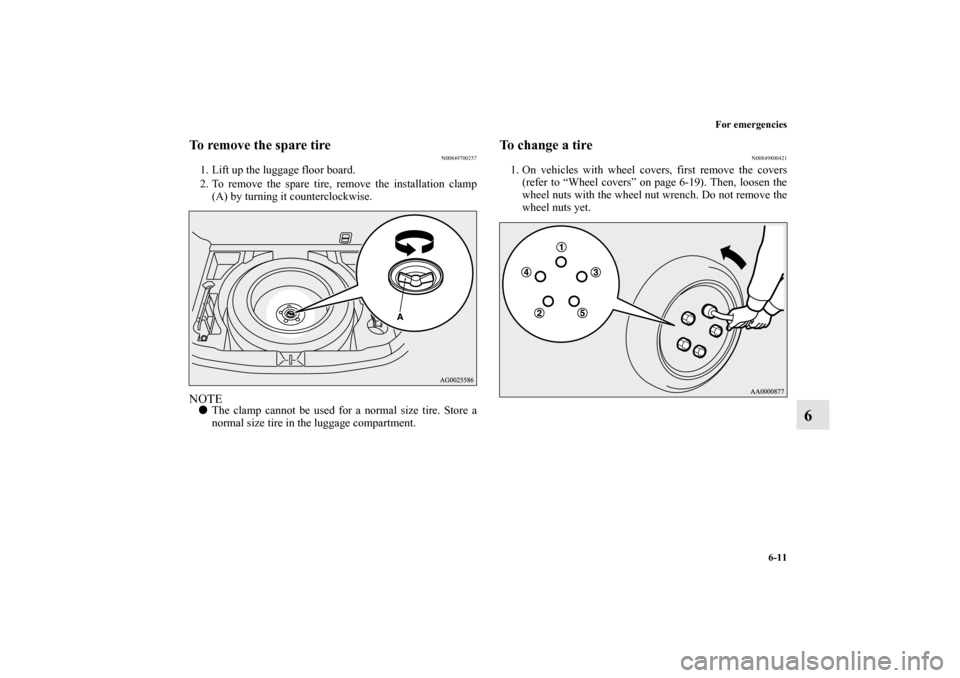
1. Lift up the luggage floor board.
2. To remove the spare tire, remove the installation clamp
(A) by turning it counterclockwise.NOTE�The clamp cannot be used for a normal size tire. Store a
normal size tire in the luggage compartment.
To change a tire
N00849800421
1. On vehicles with wheel covers, first remove the covers
(refer to “Wheel covers” on page 6-19). Then, loosen the
wheel nuts with the wheel nut wrench. Do not remove the
wheel nuts yet.
BK0140300US.book 11 ページ 2011年6月28日 火曜日 午後5時18分