Page 574 of 618
Vehicle care and maintenance
7-61
7
2. While pressing the tab (D), pull out the socket (E).
3. Turn the bulb (F) counterclockwise to remove it.4. To install the bulb, perform the removal steps in reverse.
CAUTION
!�Handle halogen light bulbs with care. The gas inside
a halogen light bulb is highly pressurized, so drop-
ping, knocking, or scratching a halogen light bulb
can cause it to shatter.�Never hold the halogen lights bulb with a bare hand,
dirty glove, etc. The oil from your hand could cause
the bulb to break the next time the fog lights are
used.
If the glass surface is dirty, clean it with alcohol and
let it dry completely before installing the bulb.
BK0142300US.book 61 ページ 2011年8月7日 日曜日 午前10時44分
Page 576 of 618
Vehicle care and maintenance
7-63
7
3. Remove the socket and bulb assemblies by turning them
counterclockwise.4. Remove the bulb by pulling it out.B- Tail and stop light
C- Rear turn signal light
D- Rear side-marker light
Tail and stop light and
Rear turn signal lightRear side-marker light
BK0142300US.book 63 ページ 2011年8月7日 日曜日 午前10時44分
Page 578 of 618
Vehicle care and maintenance
7-65
7
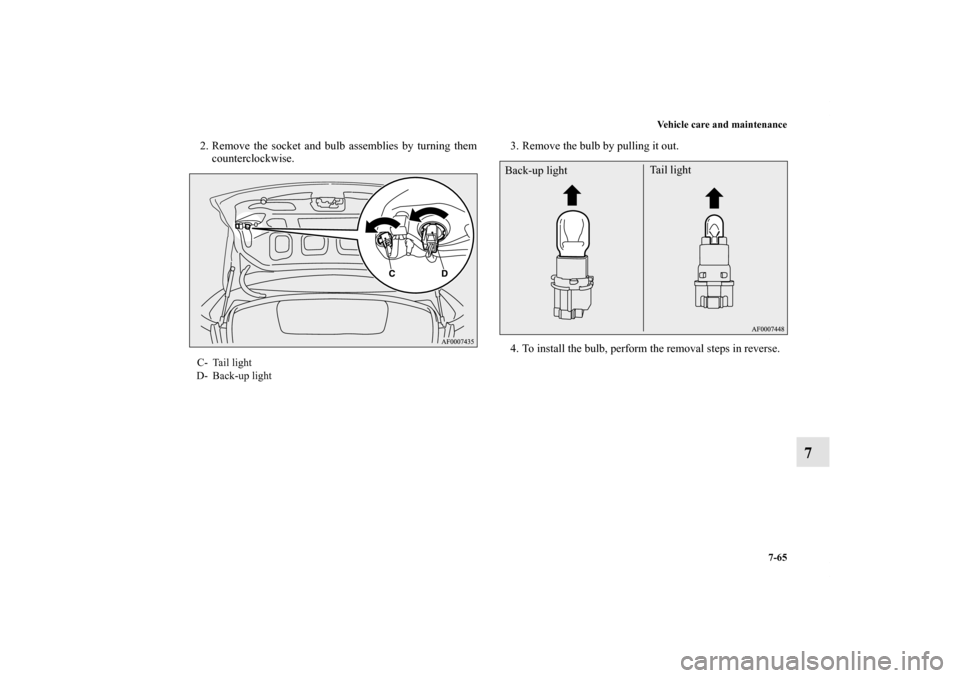
2. Remove the socket and bulb assemblies by turning them
counterclockwise.3. Remove the bulb by pulling it out.
4. To install the bulb, perform the removal steps in reverse.C- Tail light
D- Back-up light
Back-up lightTail light
BK0142300US.book 65 ページ 2011年8月7日 日曜日 午前10時44分
Page 579 of 618
7-66 Vehicle care and maintenance
7
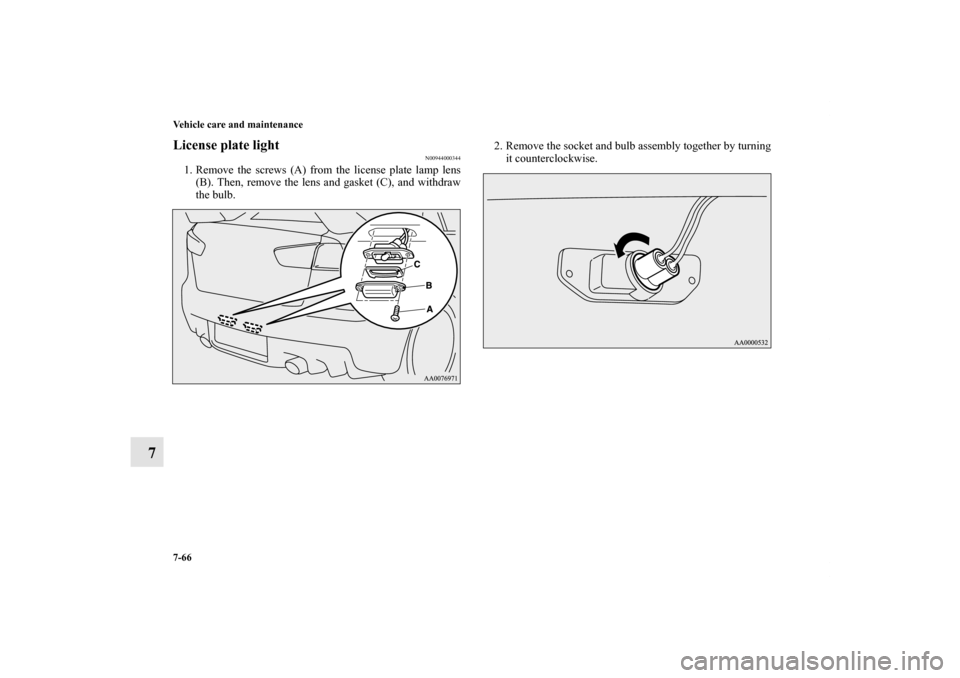
License plate light
N00944000344
1. Remove the screws (A) from the license plate lamp lens
(B). Then, remove the lens and gasket (C), and withdraw
the bulb.2. Remove the socket and bulb assembly together by turning
it counterclockwise.
BK0142300US.book 66 ページ 2011年8月7日 日曜日 午前10時44分
Page 609 of 618

Alphabetical index
2Parking brake lever stroke 7-29
Pedal 3-133
Pedal free play 7-29
Power brakes 3-133
Service brake 3-133
Brake assist 3-134
Braking
Warning lights 3-196
Break-in period 3-2
Bulb capacity 7-46
C
California Perchlorate Materials Requirements 1-9
Capacities 9-9
Card holder 3-255
,3-263
Cargo loads 4-13
Catalytic converter 7-3
Certification label 9-5
Charging system warning light 3-198
Chassis number 9-3
Child restraints 2-22
Child safety locks for rear door 3-57
Cleaning
Inside of your vehicle 7-72
Outside of your vehicle 7-73
Clutch
Clutch pedal operation 3-91
Fluid 7-16
,9-9
Pedal free play 7-28Coat hooks 3-268
Combination headlights and dimmer switch
Headlight reminder buzzer 3-205
Light auto-cutout function 3-204
Consumer information 8-2
Coolant (engine) 7-10
,9-9
Cruise control 3-136
Cup holder 3-266
D
Daytime running lights
Bulb capacity 7-46
Replacement 7-54
Defogger (rear window) 3-220
Defrosting or defogging (windshield, door windows) 5-20
,5-
30
Digital clock 5-119
Dimensions 9-5
Dimmer (high/low beam change) 3-206
Disc brake pads 7-33
Dome light (Rear)
Bulb capacity 7-48
Replacement 7-69
Switch 3-259
Dome light/Reading lights
Bulb capacity 7-48
Replacement 7-67
Switch 3-258
Doors
BK0142300US.book 2 ページ 2011年8月7日 日曜日 午前10時44分