2012 MINI COUPE ROADSTER CONVERTIBLE top
[x] Cancel search: topPage 4 of 283

Contents
The fastest way to find information on a particu-
lar topic or item is by using the index, refer to
page268.
4 Notes
6 Reporting safety defects
AT A GLANCE 9
10Cockpit
17 Onboard computer
22 Letters and numbers
23 Voice activation system
CONTROLS 27
28Opening and closing
50 Adjustments
56 Transporting children safely
60 Driving
70 Controls overview
82 Technology for driving comfort and safety
96 Lamps
101 Climate
107 Practical interior accessories
DRIVING TIPS 113
114Things to remember when driving
NAVIGATION 123
124Navigation system
126 Destination entry
135 Route guidance
143 What to do if…
ENTERTAINMENT 145
146On/off and tone
149 Radio
157 CD player
159 External devices
COMMUNICATIONS 169
170Hands-free device Bluetooth
180 Mobile phone preparation Bluetooth
193 Office
201 MINI Connected
MOBILITY 205
206Refueling
209 Wheels and tires
221 Engine compartment
225 Maintenance
227 Care
231 Replacing components
243 Giving and receiving assistance
REFERENCE 249
250Technical data
260 Short commands for the voice activation
system
268 Everything from A to Z
00320051004F004C00510048000300280047004C0057004C005200510003
Page 5 of 283
Notes
4
Notes
Using this Owner's
Manual
We have tried to make all the information in this
Owner's Manual easy to find. The fastest way to
find specific topics is to refer to the detailed
index at the back of the manual. If you wish to
gain an initial overview of your vehicle, you will
find this in the first chapter.
Should you wish to sell yo ur MINI at some time in
the future, remember to hand over this Owner's
Manual to the new owner; it is an important part
of the vehicle.
Additional sources of information
Should you have any other questions, your MINI
dealer will be glad to advise you at any time.
You can find more information about the MINI,
for example on its technology, on the Internet at
www.MINI.com.
Symbols used
Indicates precautions that must be fol-
lowed precisely in order to avoid the pos-
sibility of personal inju ry and serious damage to
the vehicle.<
Indicates information that will assist you in
gaining the optimum benefit from your
vehicle and enable you to care more effectively
for your vehicle. <
Refers to measures that can be taken to
help protect the environment. <
< Marks the end of a specific item of
information. "..." Identifies Control
Display texts used to
select individual functions.
{ ... } Verbal instructions to use with the voice
activation system.
{{ ...}} Identifies the answers generated by the
voice activation system.
Symbols on vehicle components
Indicates that you should consult the rele-
vant section of this Owner's Manual for
information on a particular part or assembly.
Vehicle equipment
The manufacturer of your MINI is the Bayerische
Motoren Werke Aktien gesellschaft, BMW AG.
This Owner's Manual describes all models as well
as all production, country and special equip-
ment that is offered in the model range. Equip-
ment is also described that is not available
because of, for example, selected options or
country version. This also applies to safety
related functions and systems. For equipment
and models that are not described in this
Owner's Manual, please see the supplementary
Owner's Manuals that are provided.
Status of this Owner's
Manual at time of
printing
The high level of safety and quality of the MINI
vehicles is ensured through continuous develop-
ment. In rare cases, there may be differences
between the description and the vehicle.
00320051004F004C00510048000300280047004C0057004C005200510003
Page 12 of 283

CockpitAT A GLANCE
11
1Adjusting the exterior mirrors, folding them
in and out 54
3 MINI Roadster, MINI Convertible: Always
Open Timer 72
7 Ignition lock 60 8
Buttons on steering wheel,
Right side
Left side
9 Horn: the entire surface
10 Adjusting the steering wheel 55
11 Releasing the hood 222
2
Parking lamps 96
Low beams 96
Automatic headlamp control 96
Adaptive Light Control 97
Turn signals 65
High beams 98
Headlamp flasher 65
Roadside parking lamps 98
Computer 71
4 Tachometer 12
Instrument lighting 99
Resetting the trip odometer 71
5 Wiper system 66
6 Switching the ignition on/off and
starting/stopping the engine
60
Resuming cruise control68
Storing speed and accelerating or
decelerating
or Activating/deactivating cruise
control
68
Increasing or reducing volume
Telephone:
Press: accepting and ending a call,
starting dialing of selected phone
number and redialing if no phone
number is selected
Microphone on steering column
Activating/deactivating voice
activation system 23
Microphone on steering column
Changing the radio station
Selecting a music track
Scrolling through the redial list
00320051004F004C00510048000300280047004C0057004C005200510003
Page 17 of 283
AT A GLANCECockpit
16
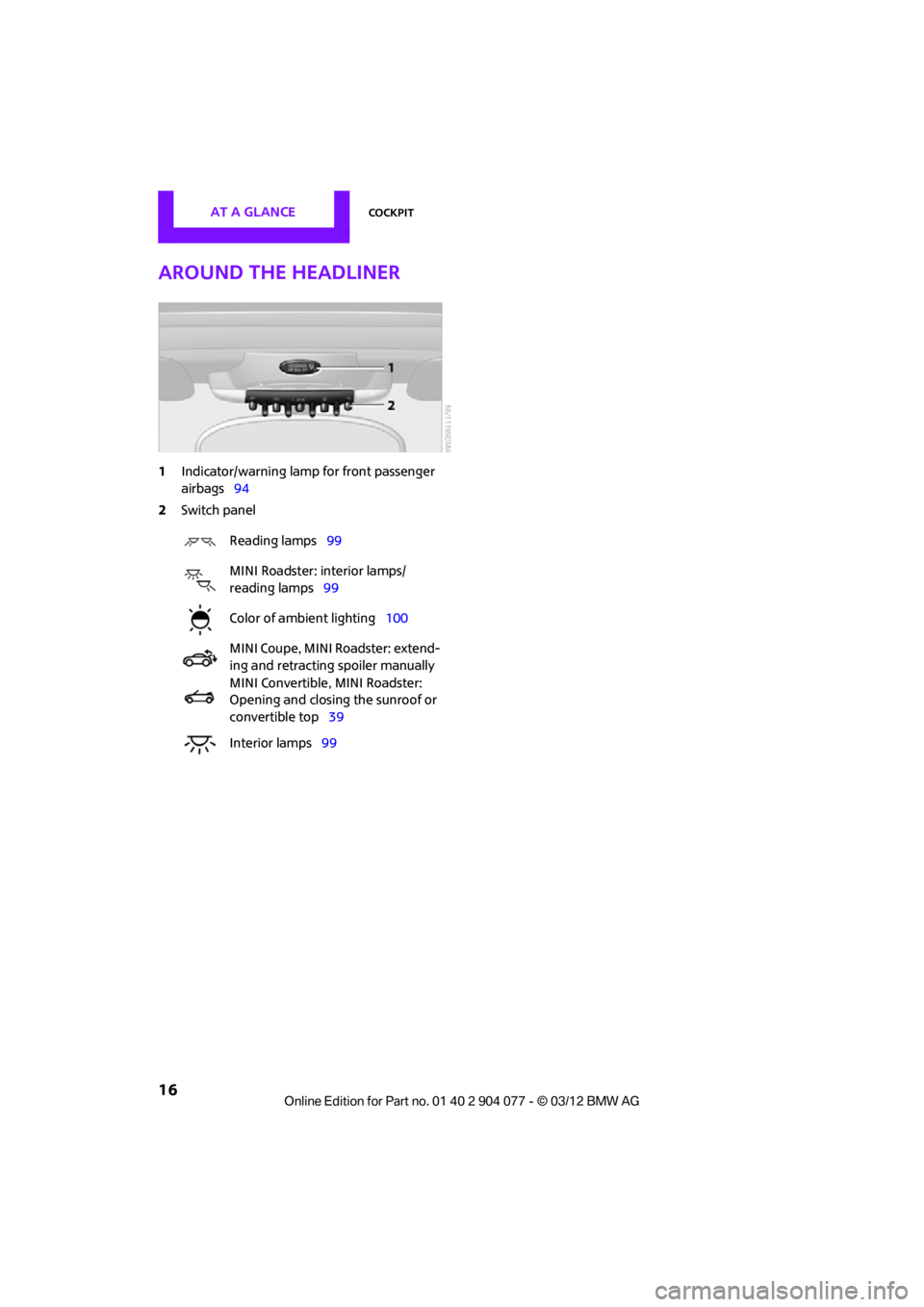
Around the headliner
1Indicator/warning lamp for front passenger
airbags 94
2 Switch panel
Reading lamps 99
MINI Roadster: interior lamps/
reading lamps 99
Color of ambient lighting 100
MINI Coupe, MINI Roadster: extend-
ing and retracting spoiler manually
MINI Convertible, MINI Roadster:
Opening and closing the sunroof or
convertible top 39
Interior lamps 99
00320051004F004C00510048000300280047004C0057004C005200510003
Page 20 of 283
Onboard computerAT A GLANCE
19
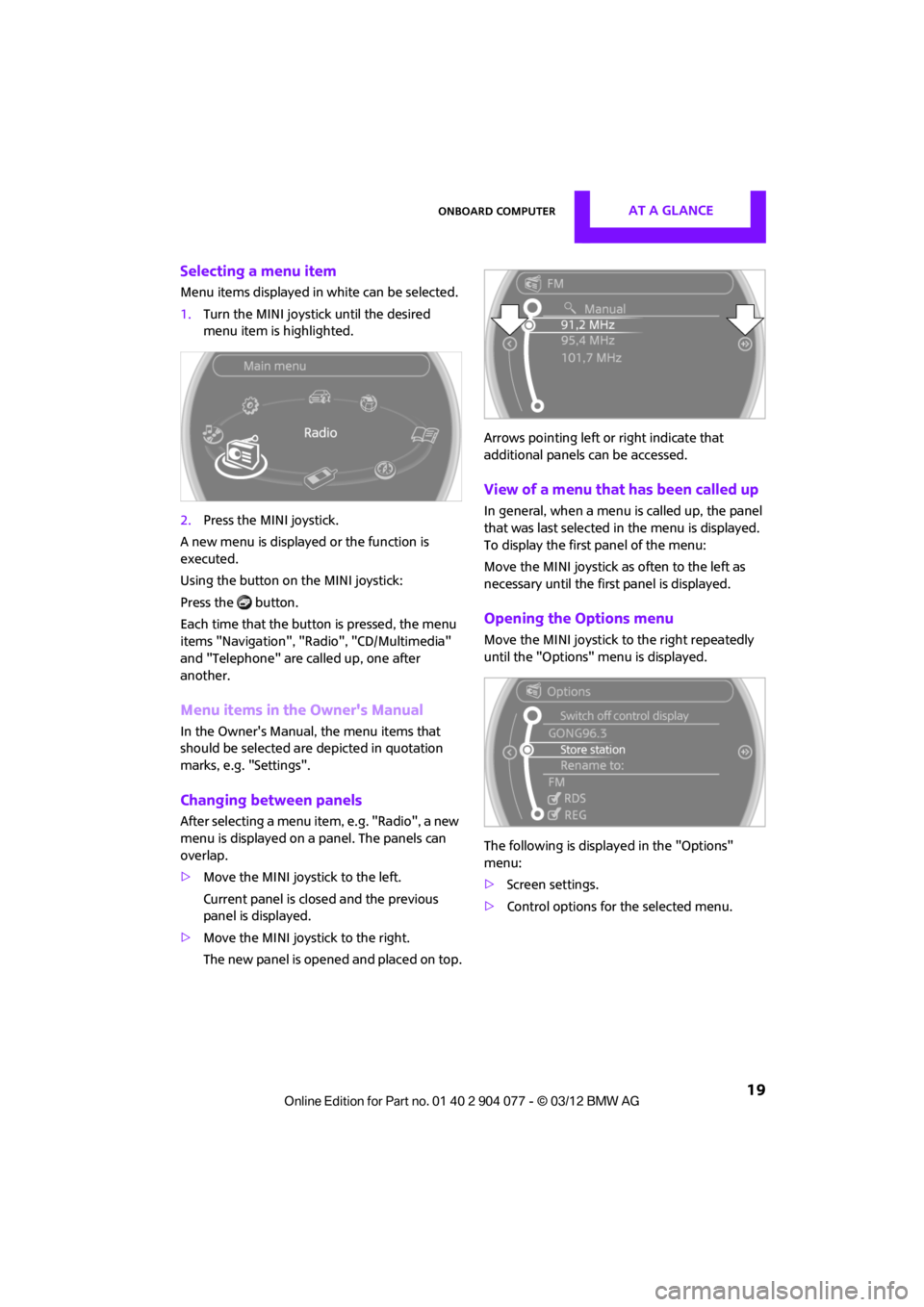
Selecting a menu item
Menu items displayed in white can be selected.
1.Turn the MINI joystick until the desired
menu item is highlighted.
2. Press the MINI joystick.
A new menu is displayed or the function is
executed.
Using the button on the MINI joystick:
Press the button.
Each time that the button is pressed, the menu
items "Navigation", "Rad io", "CD/Multimedia"
and "Telephone" are called up, one after
another.
Menu items in the Owner's Manual
In the Owner's Manual, the menu items that
should be selected are depicted in quotation
marks, e.g. "Settings".
Changing between panels
After selecting a menu item, e.g. "Radio", a new
menu is displayed on a panel. The panels can
overlap.
> Move the MINI joystick to the left.
Current panel is closed and the previous
panel is displayed.
> Move the MINI joystick to the right.
The new panel is opened and placed on top. Arrows pointing left or right indicate that
additional panels can be accessed.
View of a menu that has been called up
In general, when a menu is called up, the panel
that was last selected in
the menu is displayed.
To display the first panel of the menu:
Move the MINI joystick as often to the left as
necessary until the first panel is displayed.
Opening the Options menu
Move the MINI joystick to the right repeatedly
until the "Options" menu is displayed.
The following is displa yed in the "Options"
menu:
> Screen settings.
> Control options for the selected menu.
00320051004F004C00510048000300280047004C0057004C005200510003
Page 31 of 283
CONTROLSOpening and closing
30
Using the remote control
Unlocking
Press the button.
The welcome lamps and interior lamps come on.
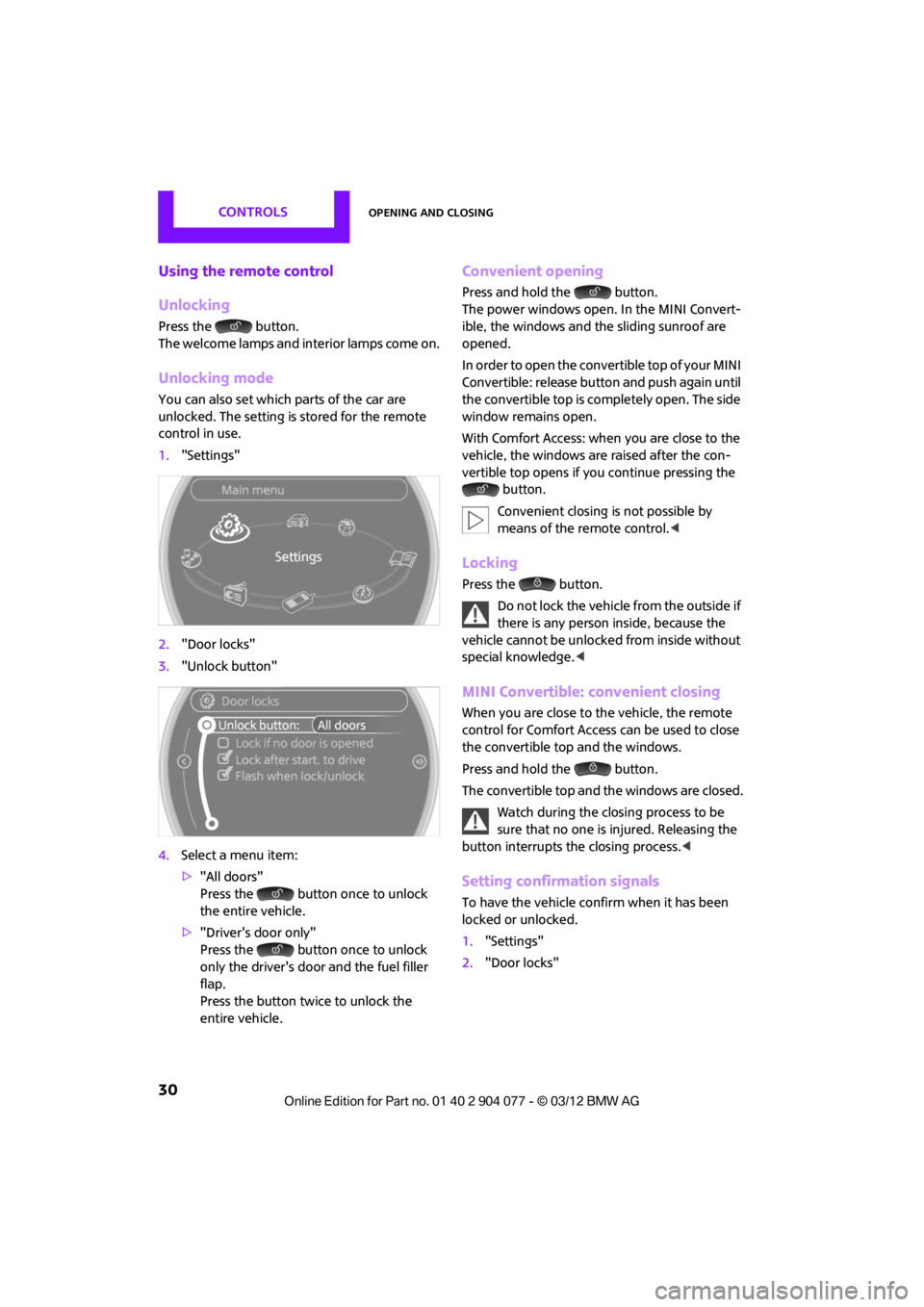
Unlocking mode
You can also set which parts of the car are
unlocked. The setting is stored for the remote
control in use.
1."Settings"
2. "Door locks"
3. "Unlock button"
4. Select a menu item:
>"All doors"
Press the button once to unlock
the entire vehicle.
> "Driver's door only"
Press the button once to unlock
only the driver's door and the fuel filler
flap.
Press the button twice to unlock the
entire vehicle.
Convenient opening
Press and hold the button.
The power windows open. In the MINI Convert-
ible, the windows and the sliding sunroof are
opened.
In order to open the convertible top of your MINI
Convertible: release butt on and push again until
the convertible top is completely open. The side
window remains open.
With Comfort Access: when you are close to the
vehicle, the windows are raised after the con-
vertible top opens if yo u continue pressing the
button.
Convenient closing is not possible by
means of the remote control. <
Locking
Press the button.
Do not lock the vehicle from the outside if
there is any person inside, because the
vehicle cannot be unlocked from inside without
special knowledge. <
MINI Convertible: convenient closing
When you are close to the vehicle, the remote
control for Comfort Access can be used to close
the convertible top and the windows.
Press and hold the button.
The convertible top and the windows are closed.
Watch during the closing process to be
sure that no one is injured. Releasing the
button interrupts the closing process. <
Setting confirmation signals
To have the vehicle confirm when it has been
locked or unlocked.
1."Settings"
2. "Door locks"
00320051004F004C00510048000300280047004C0057004C005200510003
Page 33 of 283
CONTROLSOpening and closing
32
When there is no alarm system or Comfort
Access, only the driver's door is locked
with the door lock. <
To lock all doors, the fuel filler flap, and the
tailgate together:
With the doors closed, press the interior central
locking button, page 32, to lock the vehicle.
Unlocking and opening the driver or passenger
door, page 32.
Lock the vehicle.
>Lock the driver's door with the integrated
key via the door lock, or
> Press the safety lo ck button on the
passenger's door and close the door
from the outside.
Convenience operation
With an alarm system or Comfort Access, the
windows can be operated via the door lock.
Opening/closing
Hold the key in the position for unlocking or
locking.
In the MINI Convertible, the convertible top
closes first, followed by the folding sunroof, and
finally the side windows close.
During the roof closing process (in case of
the convertible top also during the open-
ing process) ensure no one gets pinched.
Releasing the key stops the operation. <
Manual operation
In the event of an electrical malfunction, the
driver's door can be unlocked or locked by turn-
ing the integrated key in the door lock to the end
positions.
Opening and closing:
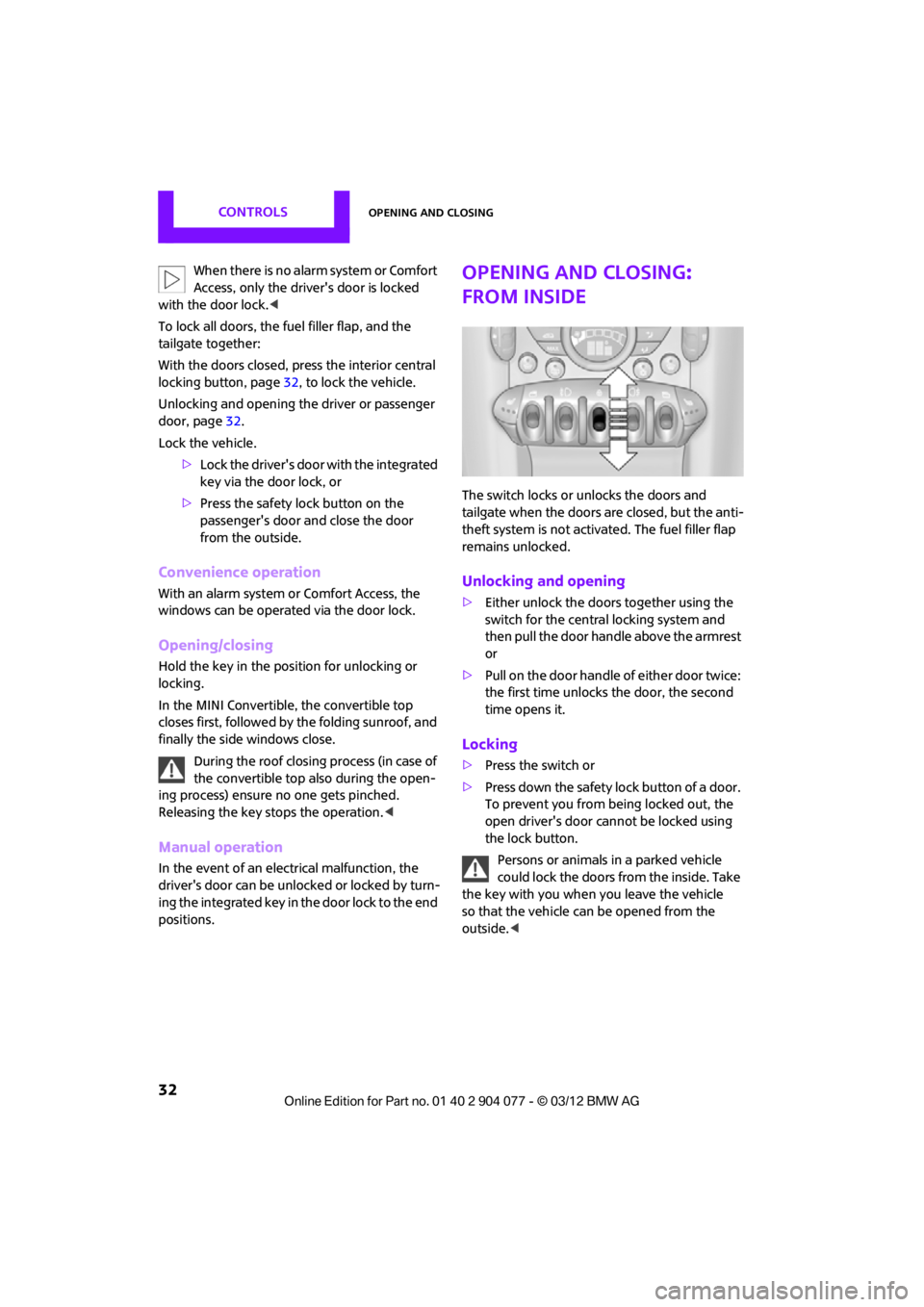
from inside
The switch locks or unlocks the doors and
tailgate when the doors are closed, but the anti-
theft system is not activated. The fuel filler flap
remains unlocked.
Unlocking and opening
>Either unlock the doors together using the
switch for the central locking system and
then pull the door handle above the armrest
or
> Pull on the door handle of either door twice:
the first time unlocks the door, the second
time opens it.
Locking
>Press the switch or
> Press down the safety lo ck button of a door.
To prevent you from being locked out, the
open driver's door cannot be locked using
the lock button.
Persons or animals in a parked vehicle
could lock the doors from the inside. Take
the key with you when you leave the vehicle
so that the vehicle can be opened from the
outside. <
00320051004F004C00510048000300280047004C0057004C005200510003
Page 37 of 283

CONTROLSOpening and closing
36
MINI Convertible, MINI Roadster
The passenger compartment is monitored up to
the height of the seat's surface. This way, the
anti-theft alarm system including the interior
motion sensor are armed, even if the convertible
top is open. Falling objects, e.g. tree leaves, may
trigger a false alarm, refer to Avoiding false
alarms.
Avoiding false alarms
The tilt alarm sensor and the interior movement
detector can be switched off together.
This prevents false alarms, e.g. in the following
situations:
>In duplex garages
> When being transported on car-carrying
trains, ferries or trailers
> If pets are to remain inside the car
Switching off the tilt alarm sensor and
interior movement detector
>Press the button on the remote
control twice in succession.
> Lock the vehicle twice with the integrated
key.
LEDs flash in short succession for approx.
2seconds.
The tilt alarm sensor and the interior movement
detector are switched off until the car is next
unlocked and locked.
Comfort Access
The concept
Access to the vehicle is possible without the use
of the remote control. All you need to do is wear
the remote control close to your body, e.g. in
your jacket pocket. The vehicle automatically
detects the remote control within the immedi-
ate vicinity or in the passenger compartment.
Comfort Access supports the following
functions:
> Unlocking/locking the vehicle
> Unlocking the tailgate separately
> Starting the engine
> MINI Convertible: convenient closing and
soft-top control with the remote control for
Comfort Access
> MINI Coupe, MINI Roadster: closing the side
windows
Functional requirements
>There are no external malfunction sources in
the vicinity.
> For locking, the remo te control must be
outside of the vehicle.
> The vehicle cannot be locked or unlocked
again until after approx. 2 seconds.
> The engine can only be started if the remote
control is in the vehicle.
> The doors and tailgate must be closed to
operate the windows.
Comparison to standard remote controls
The indicated function can be operated by
pressing the buttons or via Comfort Access.
Instructions on opening and closing are found
starting on page 28.
If you notice a brief delay while opening or
closing the windows or cover, the system
is checking whether a re mote control is inside
the vehicle. Repeat the opening or closing
procedure, if necessary. <
00320051004F004C00510048000300280047004C0057004C005200510003