2012 MINI COUPE ROADSTER CONVERTIBLE headlamp
[x] Cancel search: headlampPage 100 of 283

LampsCONTROLS
99
>Turn on rear fog lamps:
Press the switch downward
To switch them off, pre ss the switch upward or
downward again.
Front fog lamps
The parking lamps or low beams must be
switched on for the fog lamps to operate. The
green indicator lamp lights up when the fog
lamps are switched on.
Depending on your vehicle's equipment, the fog
lamps are switched off when you activate the
headlamp flasher or switch on the high beams.
If the automatic headlamp control is acti-
vated, the low beams will come on auto-
matically when you switch on the fog lamps. <
Rear fog lamp
The low beams or parking lamps with fog lamps
must be switched on. The yellow indicator lamp
comes on when the rear fog lamp is switched on.
Instrument lighting
You can adjust the brightness of the instrument
lighting only when the parking lamps or the low
beams are on.
The intensity of the brightness changes up to a
predetermined end point, and then decreases.
Adjusting brightness
>Briefly press button: brightness changes in
stages.
> Press and hold the button. Brightness
changes in a continuous manner.
Interior lamps
The interior lighting, the footwell lamps and the
luggage compartment lighting are automati-
cally controlled.
To reduce the drain on the battery, a short
while after the ignition is switched off,
refer to Start/Stop button on page 60, all lights in
the vehicle's passenger compartment are
switched off. <
Switching interior lamps on/off manually
To switch the interior lamps on/off.
Press the switch.
To switch off the interior lamps permanently,
press the switch for about 3 seconds.
Reading lamps
To switch the readin g lamps on and off.
Press the switch.
00320051004F004C00510048000300280047004C0057004C005200510003
Page 222 of 283
Engine compartmentMOBILITY
221
Engine compartment
Vehicle equipment
In this chapter, all production, country, and
optional equipment that is offered in the model
range is described. Equipment is also described
that is not available because of, for example,
selected options or count ry version. This also
applies to safety related functions and systems.
General information
Never attempt to perform any service or
repair operations on your vehicle without
the required professional technical training. If
you do not know how to follow the specified
instructions, then have the work carried out
by your MINI dealer. If this work is not carried
out properly, there is a danger of subsequent
damage and related safety hazards. <
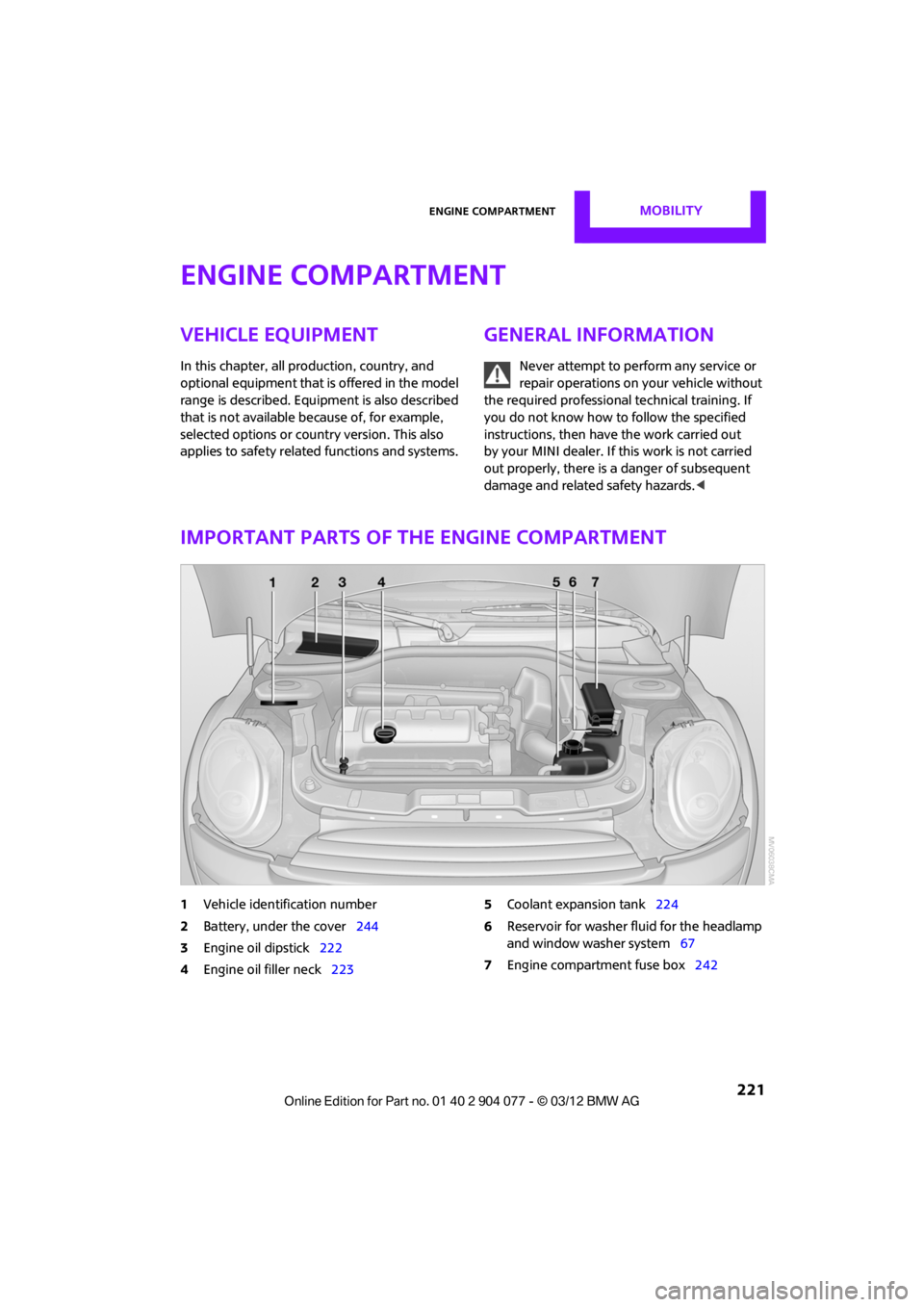
Important parts of the engine compartment
1Vehicle identification number
2 Battery, under the cover 244
3 Engine oil dipstick 222
4 Engine oil filler neck 223 5
Coolant expansion tank 224
6 Reservoir for washer fl uid for the headlamp
and window washer system 67
7 Engine compartment fuse box 242
00320051004F004C00510048000300280047004C0057004C005200510003
Page 223 of 283
MOBILITYEngine compartment
222
Hood
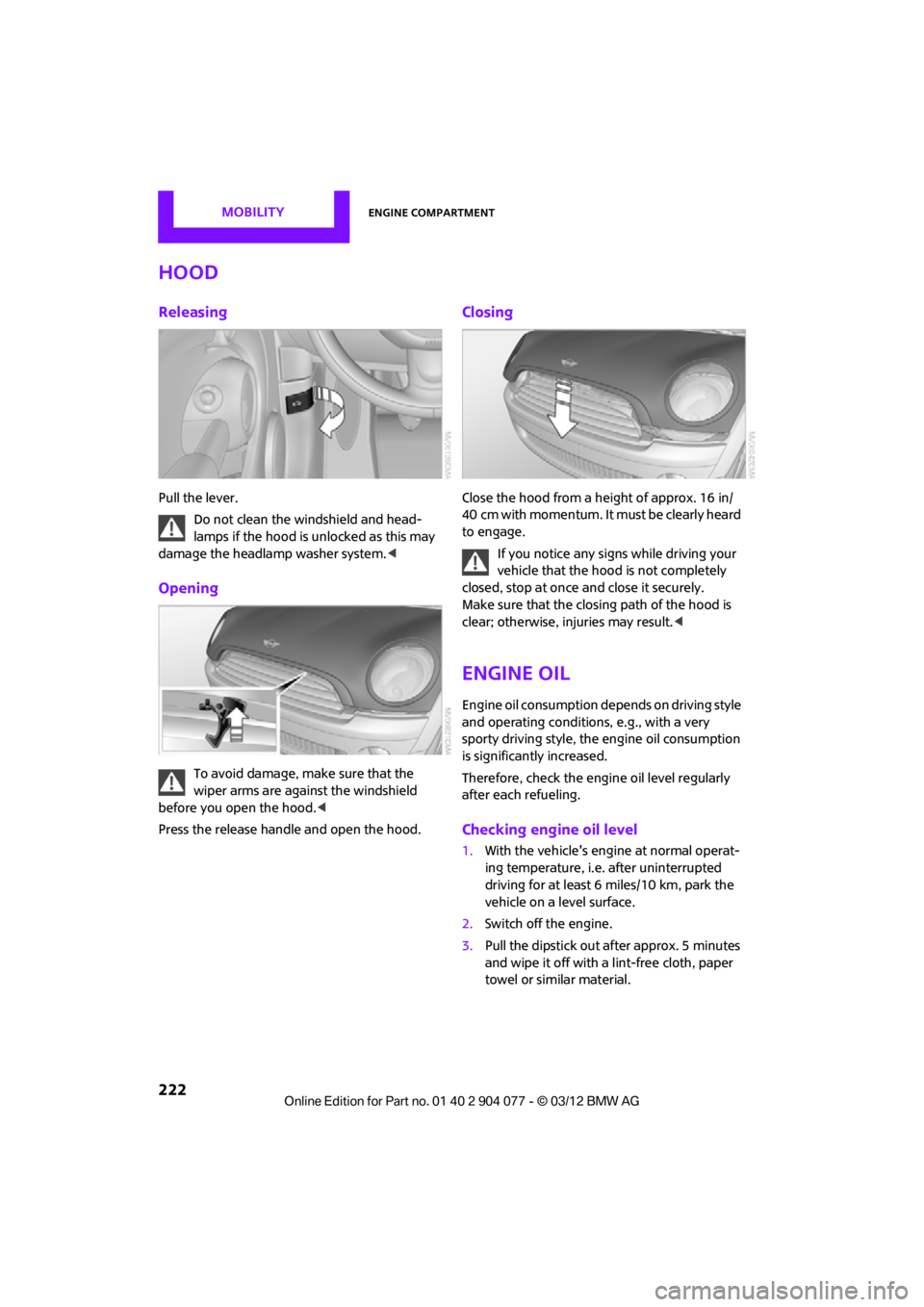
Releasing
Pull the lever.Do not clean the windshield and head-
lamps if the hood is unlocked as this may
damage the headlamp washer system. <
Opening
To avoid damage, make sure that the
wiper arms are against the windshield
before you open the hood. <
Press the release handle and open the hood.
Closing
Close the hood from a height of approx. 16 in/
40 cm with momentum. It must be clearly heard
to engage.
If you notice any signs while driving your
vehicle that the hood is not completely
closed, stop at once and close it securely.
Make sure that the closing path of the hood is
clear; otherwise, injuries may result. <
Engine oil
Engine oil consumption depends on driving style
and operating conditions, e.g., with a very
sporty driving style, the engine oil consumption
is significantly increased.
Therefore, check the engine oil level regularly
after each refueling.
Checking engine oil level
1. With the vehicle's engine at normal operat-
ing temperature, i.e. after uninterrupted
driving for at least 6 miles/10 km, park the
vehicle on a level surface.
2. Switch off the engine.
3. Pull the dipstick out after approx. 5 minutes
and wipe it off with a lint-free cloth, paper
towel or similar material.
00320051004F004C00510048000300280047004C0057004C005200510003
Page 229 of 283

MOBILITYCare
228
Automatic transmission
Before driving into the car wash, make sure that
the vehicle can roll:
1.Place the remote control, even with Comfort
Access, in the ignition lock.
2. Move the selector lever to position N.
3. Release the parking brake.
4. Switch off the engine.
5. Insert the remote control in the ignition lock
so that the vehicle can roll.
Steam jets/high-pressure washers
When using steam jets or high-pressure
washers, make sure that you maintain
sufficient distance from the vehicle and do not
exceed a maximum temperature of 140 7/
60 6 .
If the distance is too close, the pressure too high,
or the temperature too high, parts of the vehicle
can be damaged, or water can penetrate.
Observe the operating instructions for high-
pressure washers. <
Do not spray sensors, such as the Park Dis-
tance Control, with high-pressure washers
for a long time or at a distance of less than 1 ft/
30 cm. <
Manual washing
Use a great deal of water and, if necessary, car
shampoo when washing your car by hand. Clean
the vehicle with a sponge or a washing brush
applying a slight amount of pressure.
Before cleaning the windshield, deacti-
vate the rain sensor or turn off the ignition
to prevent unintentional wiping. <
Observe local regulations regarding wash-
ing vehicles by hand. <
Headlamps
Do not wipe dry and do not use abrasive or
corrosive cleaning agen ts. Remove dirt and
contamination, such as in sects, by soaking with
shampoo and then washing with plenty of
water.
Do not remove accumulated ice and snow with
an ice scraper; use window deicers instead.
Windows
Clean the outside and inside of the windows and
mirrors with a window cleaner.
Do not clean the mirrors with cleaners
containing quartz. <
Wiper blades
Clean with soapy water and change regularly to
prevent the formation of streaks.
Wax, preservatives and dirt on the win-
dows cause streaks wh en the windshield
wipers are on, and can cause premature wear
of the wiper blades and interfere with the rain
sensor. <
Care of the convertible top
The appearance and service life of the convert-
ible top largely depends on its proper care and
operation.
Please follow these instructions:
>Never attempt to fold and stow the convert-
ible top in the convertible compartment
when the top is wet or frozen. Otherwise,
water stains, mildew, and chafe marks may
occur.
> If water spots occur on the inside headliner
despite precautions, remove them using a
microfiber cloth and interior cleaner.
> If the vehicle is parked in an enclosed area
for a longer period of time, make sure that
there is sufficient ventilation.
> Remove any bird droppings immediately,
since they have corrosive properties which
will corrode the conver tible top and damage
the rubber seals.
00320051004F004C00510048000300280047004C0057004C005200510003
Page 233 of 283
MOBILITYReplacing components
232
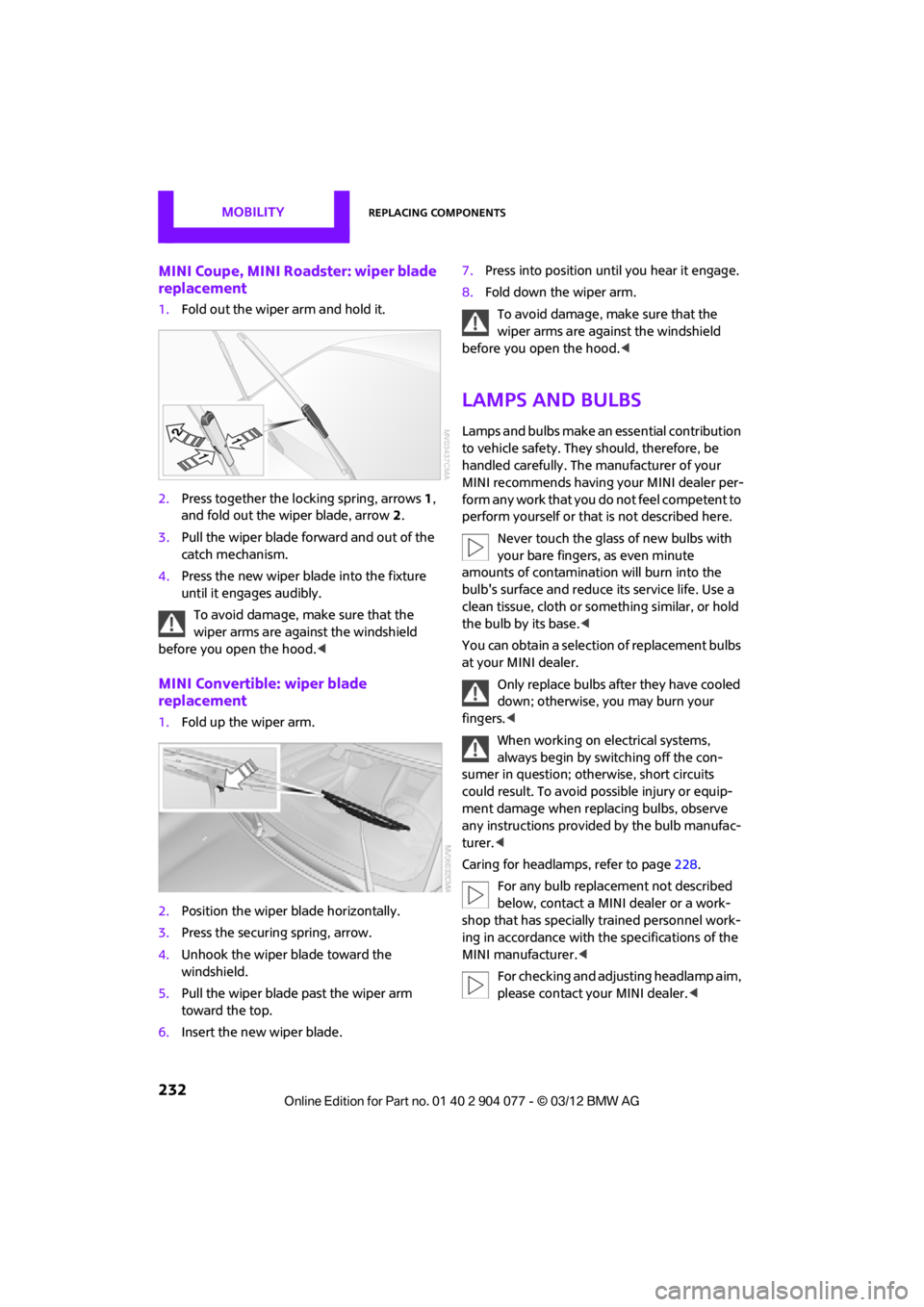
MINI Coupe, MINI Roadster: wiper blade
replacement
1.Fold out the wiper arm and hold it.
2. Press together the lo cking spring, arrows1,
and fold out the wiper blade, arrow 2.
3. Pull the wiper blade forward and out of the
catch mechanism.
4. Press the new wiper blade into the fixture
until it engages audibly.
To avoid damage, make sure that the
wiper arms are against the windshield
before you open the hood. <
MINI Convertible: wiper blade
replacement
1.Fold up the wiper arm.
2. Position the wiper blade horizontally.
3. Press the securing spring, arrow.
4. Unhook the wiper blade toward the
windshield.
5. Pull the wiper blade past the wiper arm
toward the top.
6. Insert the new wiper blade. 7.
Press into position until you hear it engage.
8. Fold down the wiper arm.
To avoid damage, make sure that the
wiper arms are against the windshield
before you open the hood. <
Lamps and bulbs
Lamps and bulbs make an essential contribution
to vehicle safety. They should, therefore, be
handled carefully. The manufacturer of your
MINI recommends having your MINI dealer per-
form any work that you do not feel competent to
perform yourself or that is not described here.
Never touch the glass of new bulbs with
your bare fingers, as even minute
amounts of contaminatio n will burn into the
bulb's surface and reduce its service life. Use a
clean tissue, cloth or some thing similar, or hold
the bulb by its base. <
You can obtain a selectio n of replacement bulbs
at your MINI dealer.
Only replace bulbs after they have cooled
down; otherwise, you may burn your
fingers. <
When working on electrical systems,
always begin by switching off the con-
sumer in question; otherwise, short circuits
could result. To avoid possible injury or equip-
ment damage when replacing bulbs, observe
any instructions provided by the bulb manufac-
turer.<
Caring for headlamp s, refer to page228.
For any bulb replacement not described
below, contact a MINI dealer or a work-
shop that has specially trained personnel work-
ing in accordance with th e specifications of the
MINI manufacturer.<
For checking and adjusting headlamp aim,
please contact your MINI dealer. <
00320051004F004C00510048000300280047004C0057004C005200510003
Page 234 of 283
Replacing componentsMOBILITY
233
Light-emitting diodes LEDs
Light-emitting diodes installed behind translu-
cent lenses serve as the light sources for many of
the controls and displays in your vehicle. These
light-emitting diodes are related to conven-
tional laser diodes, and legislation defines them
as Class 1 light-emitting diodes.
Do not remove the covers or expose the
eyes directly to the unfiltered light source
for several hours; otherw ise, this could cause
irritation of the retina. <
Headlamp glass lens
In cool or humid weather, condensation may
occur on the interiors of the headlamps. The
condensation disappears a short time after the
light is switched on. The headlamps do not need
to be changed.
Do not remove the condensation from head-
lamps, despite driving with lights on, and if
condensation increases, e.g., because of water
droplets, have this checked by your MINI dealer.
Xenon lamps
The service life of these bulbs is very long and
the probability of failure very low, provided that
they are not switched on and off an excessive
number of times. If a xenon lamp fails neverthe-
less, switch on the fog lamps and continue the
journey with great care, provided that local leg-
islation does not prohibit this.
Work on the xenon lighting system,
including lamp replacem ent, is only to be
carried out only by your MINI dealer. Due to high
voltage, there is a risk of fatal injury if work on
the xenon lamps is carried out improperly. <
Halogen low beams and high beams
H13 bulb, 60/5 watts
The H13 bulb is pressurized. Therefore,
wear safety glasses an d protective gloves.
Otherwise, there is a risk of injury if the bulb is
damaged. < Be careful when inst
alling the cover;
otherwise, leaks could occur and cause
damage to the headlamp system. <
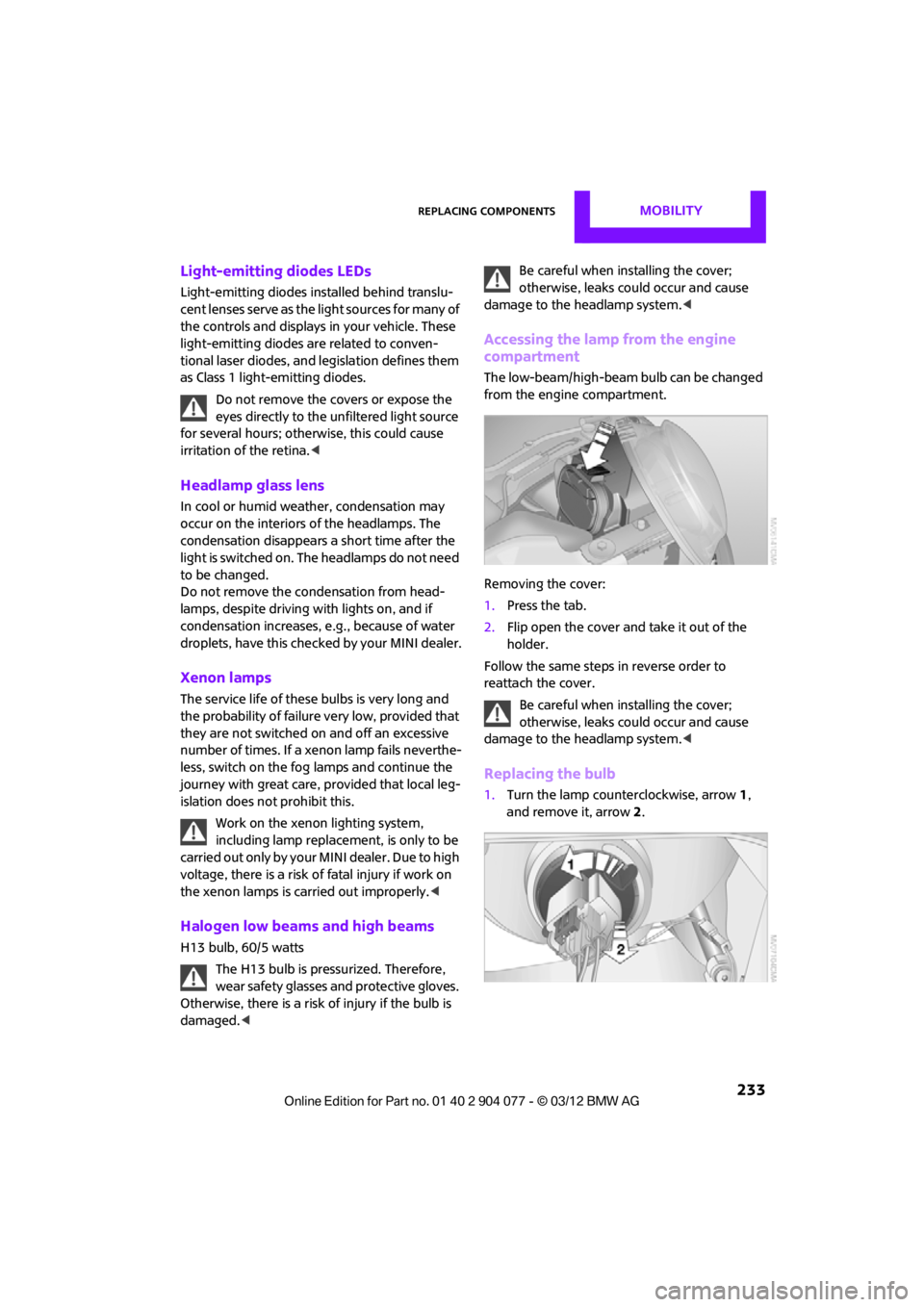
Accessing the lamp from the engine
compartment
The low-beam/high-beam bulb can be changed
from the engine compartment.
Removing the cover:
1.Press the tab.
2. Flip open the cover and take it out of the
holder.
Follow the same steps in reverse order to
reattach the cover.
Be careful when inst alling the cover;
otherwise, leaks could occur and cause
damage to the headlamp system. <
Replacing the bulb
1.Turn the lamp counterclockwise, arrow 1,
and remove it, arrow 2.
00320051004F004C00510048000300280047004C0057004C005200510003
Page 260 of 283

Technical dataREFERENCE
259
MINI Convertible
Capacities
CooperCooper SJohn Cooper Works
Curb weight, ready for travel, with all optional extras
>Manual transmission lbs/kg 2,701/1,225 2,811/1,275 2,811/1,275
> Automatic
transmission lbs/kg 2,778/1,260 2,855/1,295 –
Approved gross weight
> Manual transmission lbs/kg 3,560/1,615 3,671/1,665 3,693/1,675
> Automatic
transmission lbs/kg 3,638/1,650 3,737/1,695 –
Approved front axle load
> Manual transmission
> Automatic
transmission lbs/kg 1,863/845 1,951/885 1,962/890
lbs/kg 1,940/880 2,017/915 –
Approved rear axle load lb s/kg 1,786/810 1,786/810 1,797/815
Cargo area capacity cu ft/ liters6.0-23.3/
170-660 6.0-23.3/
170-660 6.0-23.3/
170-660
US gal/US quartsLitersNotes
Fuel tank 13.2/– approx. 50 Fuel grade: page 207
including reserve of 2.1/– approx. 8
Window washer system incl.
headlamp washer system –/4.8 approx. 4.5 For more details: page 67
00320051004F004C00510048000300280047004C0057004C005200510003
Page 269 of 283

268
REFERENCEEverything from A to Z
Everything from A to Z
Index
A
ABS Antilock Brake System83
Accessories, see Vehicle equipment 4
Acknowledgment signals for
locking/unlocking vehicle 30
Activated-charcoa l filter for
automatic climate
control 105
Adaptive Light Control 97
Adding engine oil 223
Additives
– coolant 224
– engine oil 223
Address, entering 132
Address for navigation
– entering 126,132
Adjusting temperature inside the car, refer to Air
conditioner 102
Adjusting temperature inside the car, refer to Automatic
climate control 103
Adjusting the tone during audio operation, refer to
Tone control 147
Airbags 93
– sitting safely 50
– warning lamp 94
Air conditioner 101
Air conditioning mode
– air conditioner 102
– automatic climate control 103
– ventilation 106
Air distribution
– automatic 104
– individual 103
– manual 103 Air flow rate
102,104
– air conditioning system 102
– automatic climate
control 104
– heating, ventilation 102
Airing, refer to Ventilation106
Air outlets, refer to Air vents 101
Air pressure, checking, refer to
Tire inflation pressure 209
Air recirculation, refer to Recirculated-air
mode 102,104
Air supply
– air conditioner 102
– automatic climate control 103
– ventilation 106
Air vents 101
AKI, refer to Fuel grade 207
Alarm system 34
All-season tires, refer to Winter
tire
s220
Always Open Timer 72
AM, wa
veband 149
Ambient air, refer to
Recirculated-air
mode 102,104
Ambient lighting 100
Antenna, care 227
Antifreeze
– coolant 224
– washer fluid 67
Antilock Brake System ABS 83
Anti-theft alarm system, refer
to Alarm system 34
Anti-theft system 29
Approved axle loads, refer to
Weights 257 Approved engine oils
223
Approved gross vehicle weight, refer to Weights257
Armrest, refer to Center armrest 108
Arrival time
– computer 73
– route guidance 135
Ashtray 109
Assistant systems, refer to
– Dynamic Stability Control DSC 83
Audio 146
– controls 146
– switching on/off 146
– tone control 147
– volume 147
Audio device, external 108
Automatic
– air distribution 104
– air flow rate 104
– cruise control 68
– headlamp control 96
Automatic climate control 101
– automatic air distribution 104
Automatic rear spoiler 85
Automatic transmission with Steptronic 62
– Interlock 63
– overriding selector lever lock 64
– Shiftlock 63
– sport program 64
AUTO program for automatic
climate control 104
Auxiliary phone 182
AUX-In, refer to External audio
device 108
AUX-In connection 159
00320051004F004C00510048000300280047004C0057004C005200510003