2012 MERCEDES-BENZ SLK-CLASS ROADSTER towing
[x] Cancel search: towingPage 7 of 336

Pulling away ................................... 134
Releasing the parking lock
manually ........................................ 146
Selector lever ................................ 140
Shift ranges ................................... 143
Starting the engine ........................133
Steering wheel paddle shifters ......142
Transmission position display ........140
Transmission positions ..................141
Automatic transmission
emergency mode ............................... 146
B
Back support see Lumbar support
Backup lamp
Changing bulbs .............................. 112
Display message ............................ 215
BAS (Brake Assist System) ................. 57
Basic settings see Settings
BAS PLUS (Brake Assist System
PLUS) .................................................... 57
Battery (SmartKey) Checking .......................................... 71
Important safety notes ....................71
Replacing ......................................... 71
Battery (vehicle)
Charging ........................................ 283
Display message ............................ 218
Important safety notes ..................282
Jump starting ................................. 285
Belt
see Seat belts
Bottle holder ...................................... 246
Brake Assist System see BAS (Brake Assist System)
Brake fluid
Display message ............................ 206
Notes ............................................. 327
Brake fluid level ................................ 263
Brake lamps Display message ............................ 214
Brakes
ABS .................................................. 56
BAS .................................................. 57
BAS PLUS ........................................ 57
Brake fluid (notes) .........................327
Display message ............................ 200
Driving tips .................................... 153
High-performance brake system ....154
Important safety notes ..................153
Maintenance .................................. 154
Parking brake ................................ 150
Warning lamp ................................. 229
Breakdown
see Flat tire
see Towing away/tow-starting
Bulbs
see Changing bulbs
C
California Important notice for retail
customers and lessees ....................21
Calling up a malfunction
see Display messages
Capacities
see Technical data
Car
see Vehicle
Care
Carpets .......................................... 271
Car wash ........................................ 265
Display ........................................... 269
Exterior lights ................................ 268
Gear or selector lever ....................270
Interior ........................................... 269
Matte finish ................................... 267
Notes ............................................. 265
Paint .............................................. 267
Plastic trim .................................... 269
Power washer ................................ 266
Roof lining ...................................... 271
Seat belt ........................................ 270
Seat cover ..................................... 270
Sensors ......................................... 269
Steering wheel ............................... 270
Tail pipes ....................................... 269
Trim pieces .................................... 270
Washing by hand ........................... 266
Wheels ........................................... 266
Windows ........................................ 268
Index5
Page 10 of 336
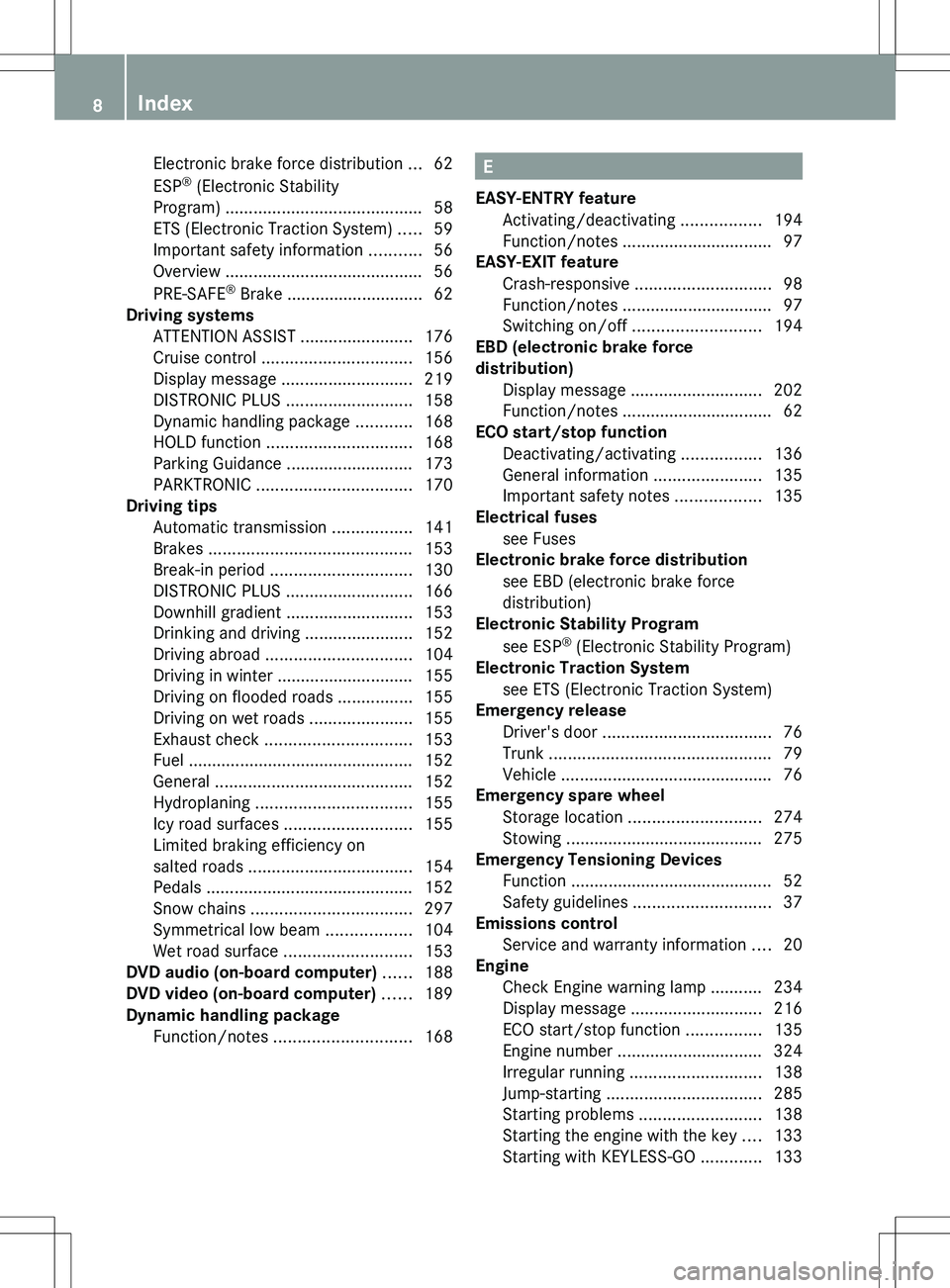
Electronic brake force distribution ...62
ESP ®
(Electronic Stability
Program) .......................................... 58
ETS (Electronic Traction System) .....59
Important safety information ...........56
Overview .......................................... 56
PRE-SAFE ®
Brake ............................. 62
Driving systems
ATTENTION ASSIST ........................176
Cruise control ................................ 156
Display message ............................ 219
DISTRONIC PLUS ........................... 158
Dynamic handling package ............168
HOLD function ............................... 168
Parking Guidance ........................... 173
PARKTRONIC ................................. 170
Driving tips
Automatic transmission .................141
Brakes ........................................... 153
Break-in period .............................. 130
DISTRONIC PLUS ........................... 166
Downhill gradient ........................... 153
Drinking and driving .......................152
Driving abroad ............................... 104
Driving in winter ............................. 155
Driving on flooded roads ................155
Driving on wet roads ......................155
Exhaust check ............................... 153
Fuel ................................................ 152
General .......................................... 152
Hydroplaning ................................. 155
Icy road surfaces ........................... 155
Limited braking efficiency on
salted roads ................................... 154
Pedals ............................................ 152
Snow chains .................................. 297
Symmetrical low beam ..................104
Wet road surface ........................... 153
DVD audio (on-board computer) ...... 188
DVD video (on-board computer) ...... 189
Dynamic handling package Function/notes ............................. 168E
EASY-ENTRY feature Activating/deactivating .................194
Function/notes ................................ 97
EASY-EXIT feature
Crash-responsive ............................. 98
Function/notes ................................ 97
Switching on/off ........................... 194
EBD (electronic brake force
distribution) Display message ............................ 202
Function/notes ................................ 62
ECO start/stop function
Deactivating/activating .................136
General information .......................135
Important safety notes ..................135
Electrical fuses
see Fuses
Electronic brake force distribution
see EBD (electronic brake force
distribution)
Electronic Stability Program
see ESP ®
(Electronic Stability Program)
Electronic Traction System
see ETS (Electronic Traction System)
Emergency release
Driver's door .................................... 76
Trunk ............................................... 79
Vehicle ............................................. 76
Emergency spare wheel
Storage location ............................ 274
Stowing .......................................... 275
Emergency Tensioning Devices
Function ........................................... 52
Safety guidelines ............................. 37
Emissions control
Service and warranty information ....20
Engine
Check Engine warning lamp ........... 234
Display message ............................ 216
ECO start/stop function ................135
Engine number ............................... 324
Irregular running ............................ 138
Jump-starting ................................. 285
Starting problems ..........................138
Starting the engine with the key ....133
Starting with KEYLESS-GO .............1338Index
Page 17 of 336
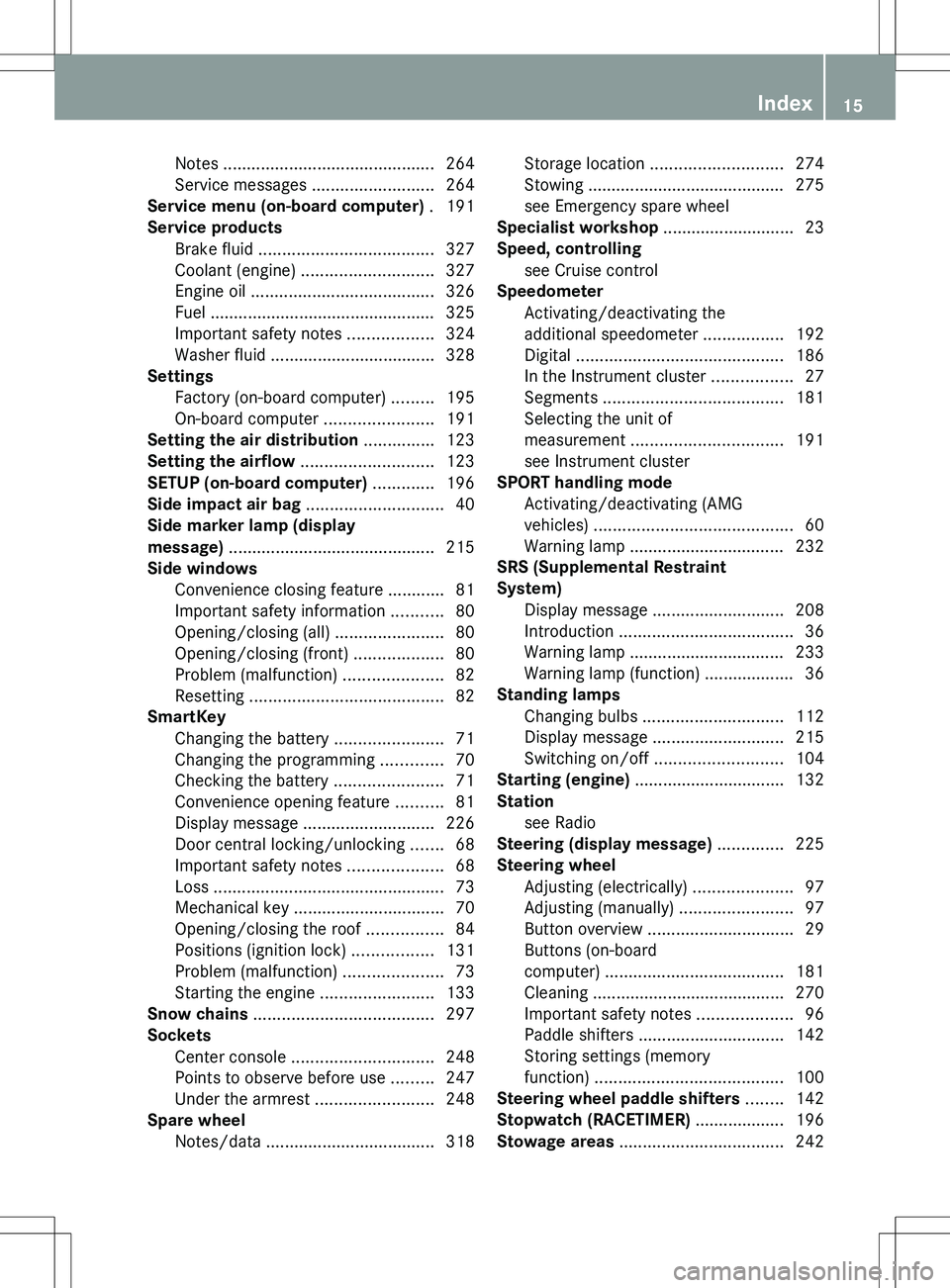
Notes ............................................. 264
Service messages ..........................264
Service menu (on-board computer) . 191
Service products Brake fluid ..................................... 327
Coolant (engine) ............................ 327
Engine oil ....................................... 326
Fuel ................................................ 325
Important safety notes ..................324
Washer fluid ................................... 328
Settings
Factory (on-board computer) .........195
On-board computer .......................191
Setting the air distribution ............... 123
Setting the airflow ............................ 123
SETUP (on-board computer) ............. 196
Side impact air bag ............................. 40
Side marker lamp (display
message) ............................................ 215
Side windows Convenience closing feature ............81
Important safety information ...........80
Opening/closing (all) .......................80
Opening/closing (front) ...................80
Problem (malfunction) .....................82
Resetting ......................................... 82
SmartKey
Changing the battery .......................71
Changing the programming .............70
Checking the battery .......................71
Convenience opening feature ..........81
Display message ............................ 226
Door central locking/unlocking .......68
Important safety notes ....................68
Loss ................................................. 73
Mechanical key ................................ 70
Opening/closing the roof ................84
Positions (ignition lock) .................131
Problem (malfunction) .....................73
Starting the engine ........................133
Snow chains ...................................... 297
Sockets Center console .............................. 248
Points to observe before use .........247
Under the armrest .........................248
Spare wheel
Notes/data .................................... 318Storage location ............................ 274
Stowing .......................................... 275
see Emergency spare wheel
Specialist workshop ............................ 23
Speed, controlling see Cruise control
Speedometer
Activating/deactivating the
additional speedometer .................192
Digital ............................................ 186
In the Instrument cluster .................27
Segments ...................................... 181
Selecting the unit of
measurement ................................ 191
see Instrument cluster
SPORT handling mode
Activating/deactivating (AMG
vehicles) .......................................... 60
Warning lamp ................................. 232
SRS (Supplemental Restraint
System) Display message ............................ 208
Introduction ..................................... 36
Warning lamp ................................. 233
Warning lamp (function) ................... 36
Standing lamps
Changing bulbs .............................. 112
Display message ............................ 215
Switching on/off ........................... 104
Starting (engine) ................................ 132
Station see Radio
Steering (display message) .............. 225
Steering wheel Adjusting (electrically) .....................97
Adjusting (manually) ........................97
Button overview ............................... 29
Buttons (on-board
computer) ...................................... 181
Cleaning ......................................... 270
Important safety notes ....................96
Paddle shifters ............................... 142
Storing settings (memory
function) ........................................ 100
Steering wheel paddle shifters ........ 142
Stopwatch (RACETIMER) ................... 196
Stowage areas ................................... 242Index15
Page 19 of 336
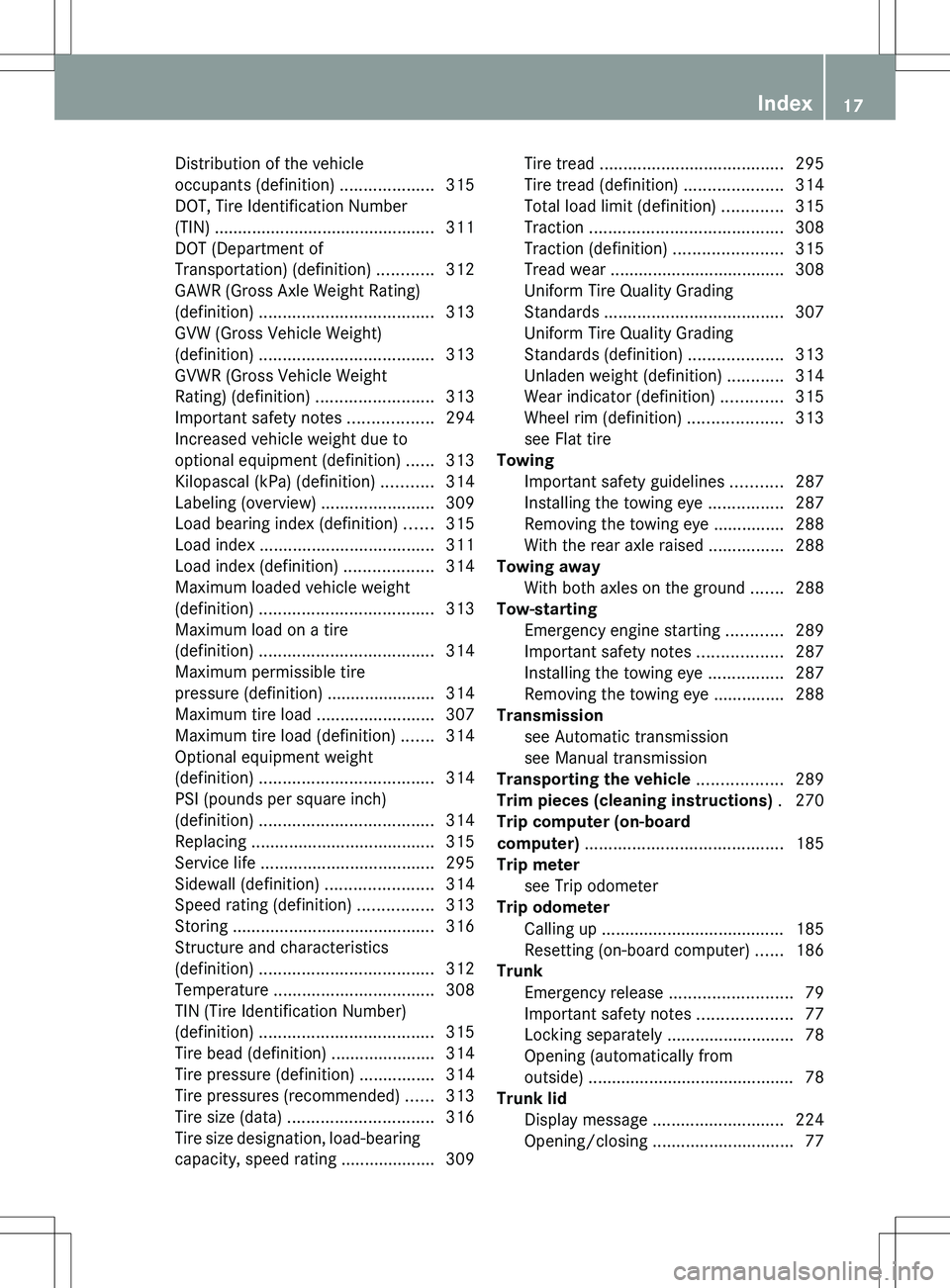
Distribution of the vehicle
occupants (definition) ....................315
DOT, Tire Identification Number
(TIN) ............................................... 311
DOT (Department of
Transportation) (definition) ............312
GAWR (Gross Axle Weight Rating)
(definition) ..................................... 313
GVW (Gross Vehicle Weight)
(definition) ..................................... 313
GVWR (Gross Vehicle Weight
Rating) (definition) .........................313
Important safety notes ..................294
Increased vehicle weight due to
optional equipment (definition) ......313
Kilopascal (kPa) (definition) ...........314
Labeling (overview) ........................309
Load bearing index (definition) ......315
Load index ..................................... 311
Load index (definition) ...................314
Maximum loaded vehicle weight
(definition) ..................................... 313
Maximum load on a tire
(definition) ..................................... 314
Maximum permissible tire
pressure (definition) ....................... 314
Maximum tire load .........................307
Maximum tire load (definition) .......314
Optional equipment weight
(definition) ..................................... 314
PSI (pounds per square inch)
(definition) ..................................... 314
Replacing ....................................... 315
Service life ..................................... 295
Sidewall (definition) .......................314
Speed rating (definition) ................313
Storing ........................................... 316
Structure and characteristics
(definition) ..................................... 312
Temperature .................................. 308
TIN (Tire Identification Number)
(definition) ..................................... 315
Tire bead (definition) ......................314
Tire pressure (definition) ................314
Tire pressures (recommended) ......313
Tire size (data) ............................... 316
Tire size designation, load-bearing
capacity, speed rating .................... 309Tire tread ....................................... 295
Tire tread (definition) .....................314
Total load limit (definition) .............315
Traction ......................................... 308
Traction (definition) .......................315
Tread wear ..................................... 308
Uniform Tire Quality Grading
Standards ...................................... 307
Uniform Tire Quality Grading
Standards (definition) ....................313
Unladen weight (definition) ............314
Wear indicator (definition) .............315
Wheel rim (definition) ....................313
see Flat tire
Towing
Important safety guidelines ...........287
Installing the towing eye ................287
Removing the towing eye ...............288
With the rear axle raised ................288
Towing away
With both axles on the ground .......288
Tow-starting
Emergency engine starting ............289
Important safety notes ..................287
Installing the towing eye ................287
Removing the towing eye ...............288
Transmission
see Automatic transmission
see Manual transmission
Transporting the vehicle .................. 289
Trim pieces (cleaning instructions) . 270
Trip computer (on-board
computer) .......................................... 185
Trip meter see Trip odometer
Trip odometer
Calling up ....................................... 185
Resetting (on-board computer) ......186
Trunk
Emergency release ..........................79
Important safety notes ....................77
Locking separately ...........................78
Opening (automatically from
outside) ............................................ 78
Trunk lid
Display message ............................ 224
Opening/closing .............................. 77Index17
Page 20 of 336
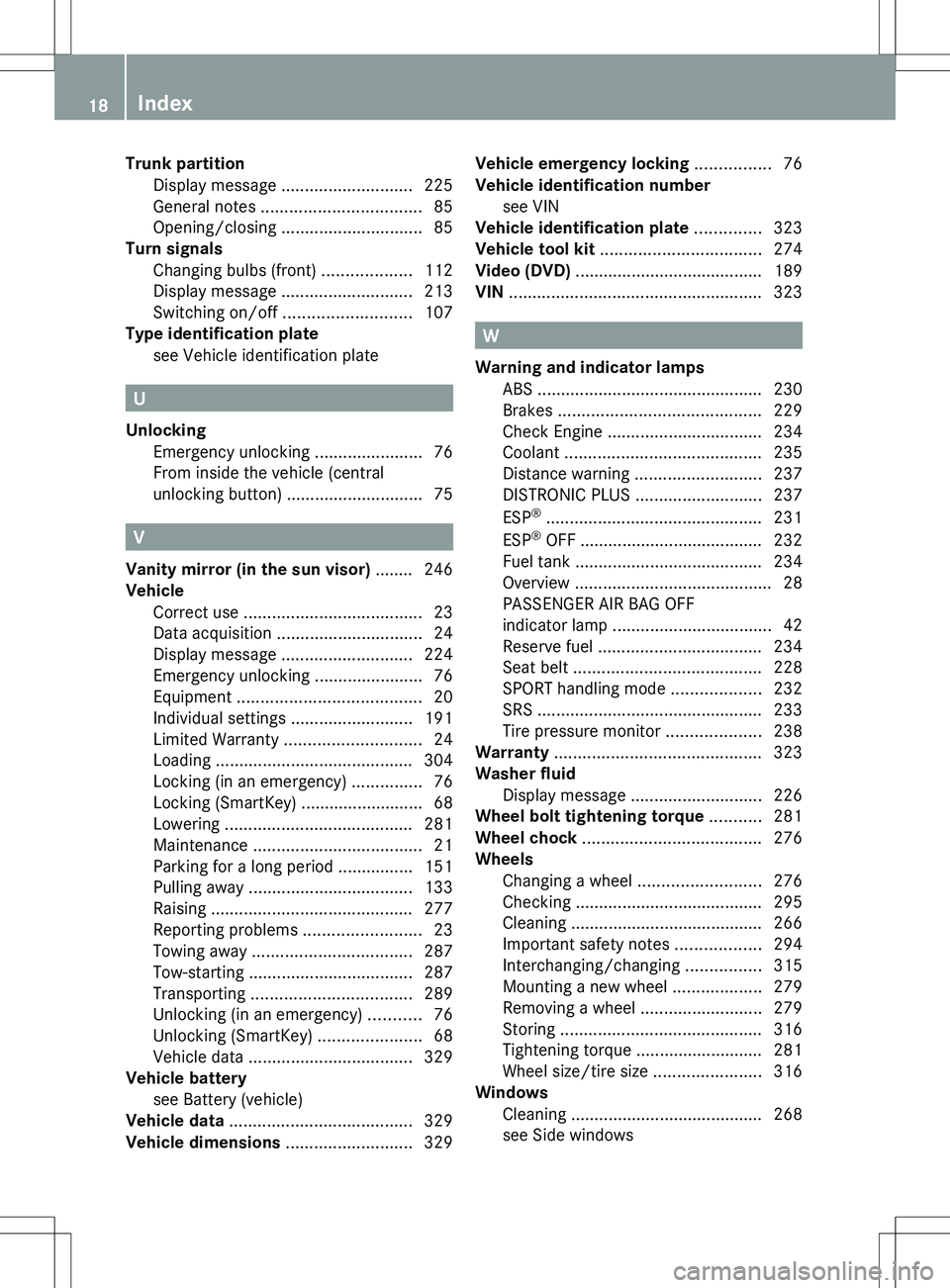
Trunk partitionDisplay message ............................ 225
General notes .................................. 85
Opening/closing .............................. 85
Turn signals
Changing bulbs (front) ...................112
Display message ............................ 213
Switching on/off ........................... 107
Type identification plate
see Vehicle identification plate
U
Unlocking Emergency unlocking .......................76
From inside the vehicle (central
unlocking button) ............................. 75
V
Vanity mirror (in the sun visor) ........ 246
Vehicle Correct use ...................................... 23
Data acquisition ............................... 24
Display message ............................ 224
Emergency unlocking .......................76
Equipment ....................................... 20
Individual settings ..........................191
Limited Warranty ............................. 24
Loading .......................................... 304
Locking (in an emergency) ...............76
Locking (SmartKey) .......................... 68
Lowering ........................................ 281
Maintenance .................................... 21
Parking for a long period ................ 151
Pulling away ................................... 133
Raising ........................................... 277
Reporting problems .........................23
Towing away .................................. 287
Tow-starting ................................... 287
Transporting .................................. 289
Unlocking (in an emergency) ...........76
Unlocking (SmartKey) ......................68
Vehicle data ................................... 329
Vehicle battery
see Battery (vehicle)
Vehicle data ....................................... 329
Vehicle dimensions ........................... 329
Vehicle emergency locking ................ 76
Vehicle identification number see VIN
Vehicle identification plate .............. 323
Vehicle tool kit .................................. 274
Video (DVD) ........................................ 189
VIN ...................................................... 323
W
Warning and indicator lamps ABS ................................................ 230
Brakes ........................................... 229
Check Engine ................................. 234
Coolant .......................................... 235
Distance warning ........................... 237
DISTRONIC PLUS ........................... 237
ESP ®
.............................................. 231
ESP ®
OFF ....................................... 232
Fuel tank ........................................ 234
Overview .......................................... 28
PASSENGER AIR BAG OFF
indicator lamp .................................. 42
Reserve fuel ................................... 234
Seat belt ........................................ 228
SPORT handling mode ...................232
SRS ................................................ 233
Tire pressure monitor ....................238
Warranty ............................................ 323
Washer fluid Display message ............................ 226
Wheel bolt tightening torque ........... 281
Wheel chock ...................................... 276
Wheels Changing a wheel .......................... 276
Checking ........................................ 295
Cleaning ......................................... 266
Important safety notes ..................294
Interchanging/changing ................315
Mounting a new wheel ...................279
Removing a wheel ..........................279
Storing ........................................... 316
Tightening torque ........................... 281
Wheel size/tire size .......................316
Windows
Cleaning ......................................... 268
see Side windows
18Index
Page 163 of 336
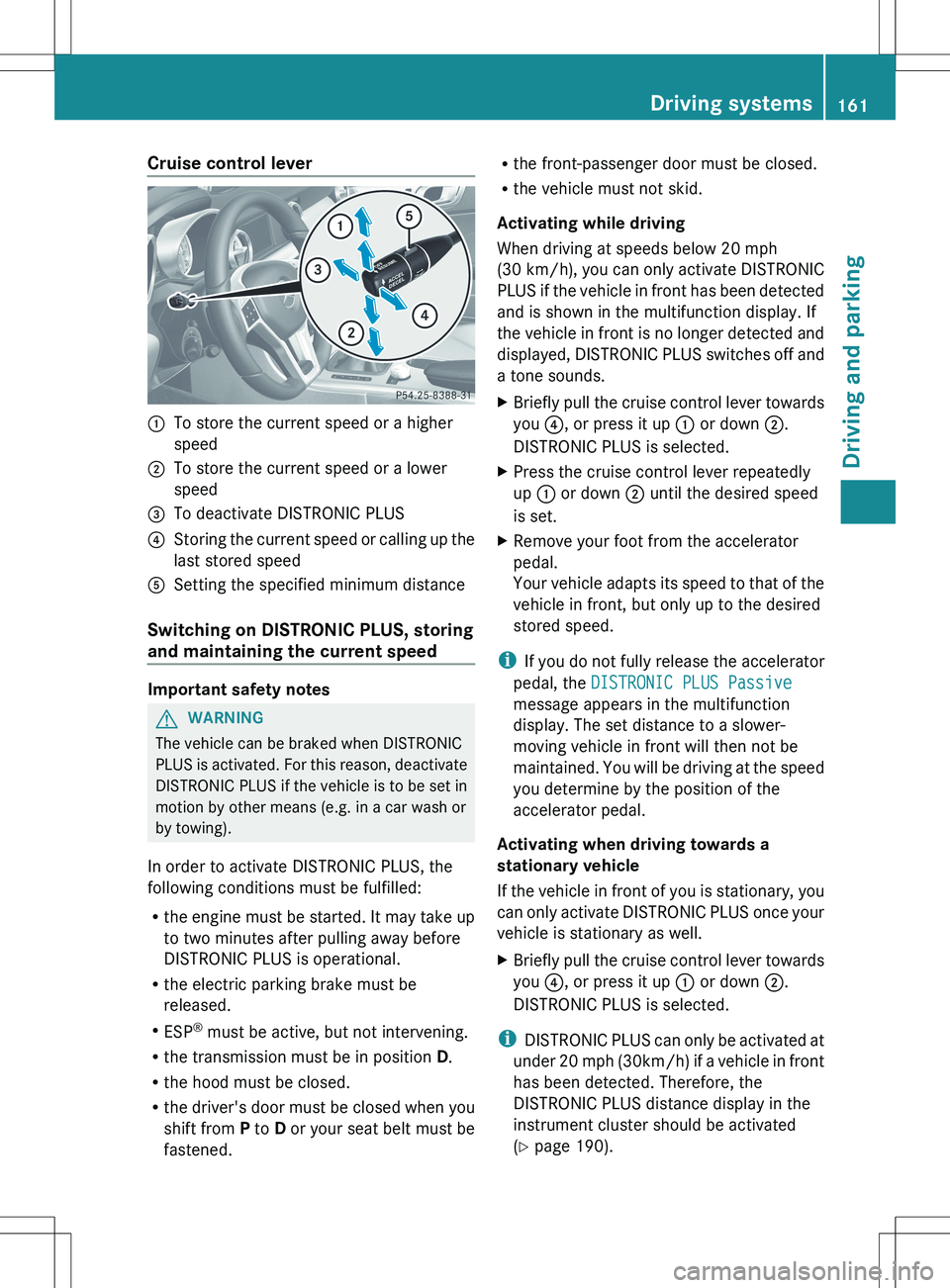
Cruise control lever:To store the current speed or a higher
speed;To store the current speed or a lower
speed=To deactivate DISTRONIC PLUS?Storing the current speed or calling up the
last stored speedASetting the specified minimum distance
Switching on DISTRONIC PLUS, storing
and maintaining the current speed
Important safety notes
GWARNING
The vehicle can be braked when DISTRONIC
PLUS is activated. For this reason, deactivate
DISTRONIC PLUS if the vehicle is to be set in
motion by other means (e.g. in a car wash or
by towing).
In order to activate DISTRONIC PLUS, the
following conditions must be fulfilled:
R the engine must be started. It may take up
to two minutes after pulling away before
DISTRONIC PLUS is operational.
R the electric parking brake must be
released.
R ESP ®
must be active, but not intervening.
R the transmission must be in position D.
R the hood must be closed.
R the driver's door must be closed when you
shift from P to D or your seat belt must be
fastened.
R the front-passenger door must be closed.
R the vehicle must not skid.
Activating while driving
When driving at speeds below 20 mph
(30 km/h ), you can only activate DISTRONIC
PLUS if the vehicle in front has been detected
and is shown in the multifunction display. If
the vehicle in front is no longer detected and
displayed, DISTRONIC PLUS switches off and
a tone sounds.XBriefly pull the cruise control lever towards
you ?, or press it up : or down ;.
DISTRONIC PLUS is selected.XPress the cruise control lever repeatedly
up : or down ; until the desired speed
is set.XRemove your foot from the accelerator
pedal.
Your vehicle adapts its speed to that of the
vehicle in front, but only up to the desired
stored speed.
i If you do not fully release the accelerator
pedal, the DISTRONIC PLUS Passive
message appears in the multifunction
display. The set distance to a slower-
moving vehicle in front will then not be
maintained. You will be driving at the speed
you determine by the position of the
accelerator pedal.
Activating when driving towards a
stationary vehicle
If the vehicle in front of you is stationary, you
can only activate DISTRONIC PLUS once your
vehicle is stationary as well.
XBriefly pull the cruise control lever towards
you ?, or press it up : or down ;.
DISTRONIC PLUS is selected.
i DISTRONIC PLUS can only be activated at
under 20 mph ( 30km/h) if a vehicle in front
has been detected. Therefore, the
DISTRONIC PLUS distance display in the
instrument cluster should be activated
( Y page 190).
Driving systems161Driving and parkingZ
Page 171 of 336
Rthe driver's door is closed or your seat belt
is fastened.
R the electric parking brake is released.
R the hood is closed.
R the selector lever is in position D, R or N on
vehicles with automatic transmission.
R DISTRONIC PLUS is deactivated.
Activating the HOLD functionXMake sure that the activation conditions
are met.XDepress the brake pedal.XQuickly depress the brake pedal further
until ë appears in the multifunction
display.
The HOLD function is activated. You can
release the brake pedal.
i If depressing the brake pedal the first
time does not activate the HOLD function,
wait briefly and then try again.
GWARNING
The vehicle's brakes are applied when the
HOLD function is activated. For this reason,
deactivate the HOLD function if the vehicle is
to be set in motion by other means (e.g. in a
car wash or by towing).
Deactivating the HOLD function
The HOLD function is deactivated
automatically if:
R you accelerate. On vehicles with automatic
transmission: only when the transmission
is in position D or R.
R you shift the transmission to position P on
vehicles with automatic transmission.
R you depress the brake pedal again with a
certain amount of pressure until ë
disappears from the multifunction display.
R you secure the vehicle using the electric
parking brake.
R you activate DISTRONIC PLUS.
i After a time, the electric parking brake
secures the vehicle and relieves the service
brake.GWARNING
Never get out of the vehicle when the HOLD
function is activated.
The HOLD function must never be operated
or deactivated by a passenger or from outside
the vehicle.
The HOLD function does not replace the
electric parking brake and must not be used
for parking.
The braking effect of the HOLD function is
canceled and the vehicle could roll away if:
R the HOLD function is deactivated by
depressing the accelerator pedal or the
brake pedal.
R there is a malfunction in the system or an
interruption in the power supply, e.g.
battery failure.
R the electrical system in the engine
compartment, the battery or the fuses are
tampered with.
R the battery is disconnected.
If you leave the vehicle or park it, deactivate
the HOLD function and secure the vehicle
against rolling away.
The electric parking brake automatically
secures the vehicle if the HOLD function is
activated and:
R the driver's door is open and the driver's
seat belt is unfastened.
R the engine is switched off.
R the hood is opened.
R a system malfunction occurs.
R the power supply is not sufficient.
If there is a malfunction in the vehicle
electronics, a warning message may also
appear in the multifunction display.
Brake Immediately
XImmediately depress the brake pedal firmly
until the warning message in theDriving systems169Driving and parkingZ
Page 253 of 336
Response Center will automatically contact
local emergency officials with the vehicle's
approximate location if they receive an
automatic SOS signal and cannot make voice
contact with the vehicle occupants.
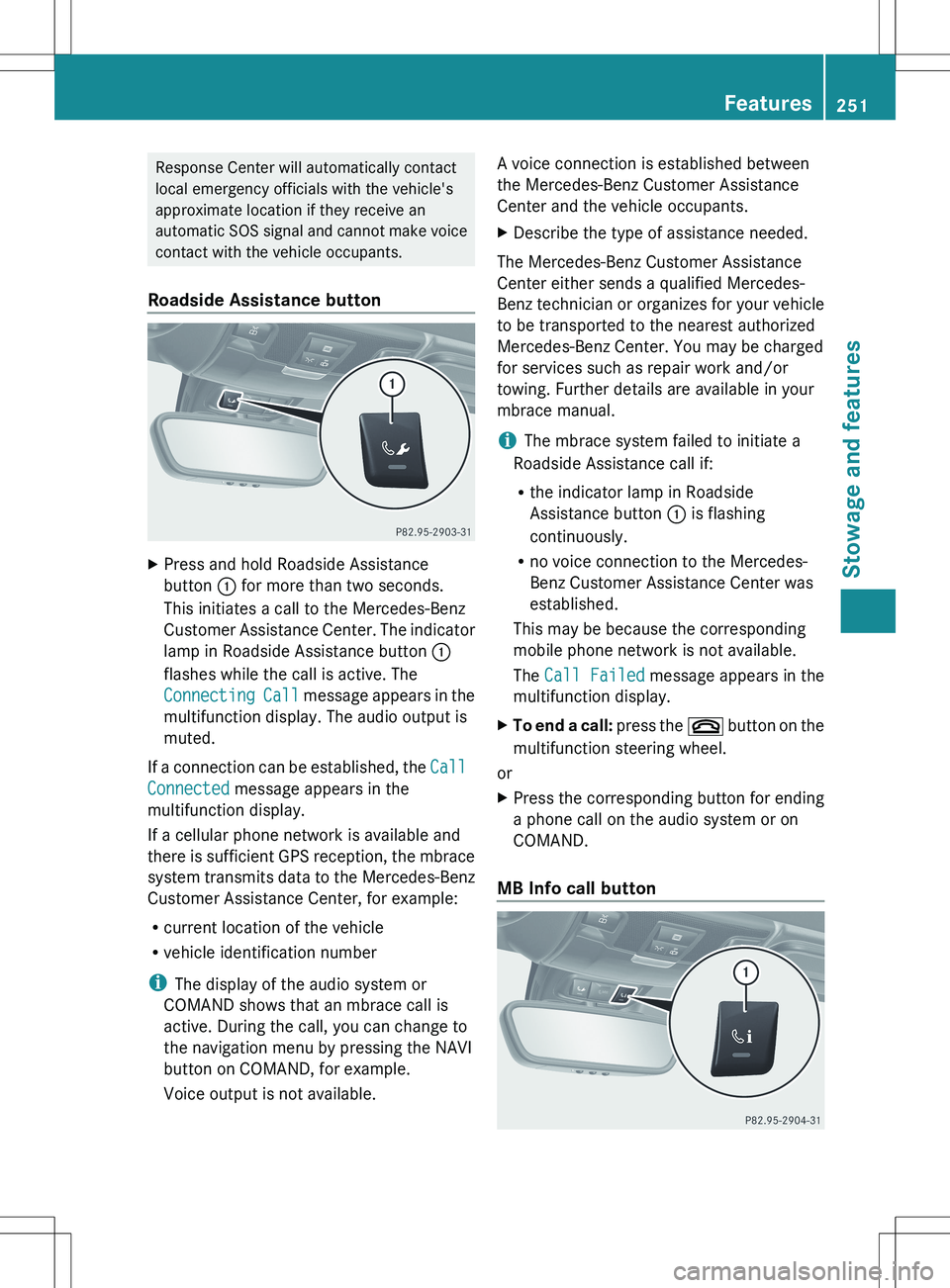
Roadside Assistance buttonXPress and hold Roadside Assistance
button : for more than two seconds.
This initiates a call to the Mercedes-Benz
Customer Assistance Center. The indicator
lamp in Roadside Assistance button :
flashes while the call is active. The
Connecting Call message appears in the
multifunction display. The audio output is
muted.
If a connection can be established, the Call
Connected message appears in the
multifunction display.
If a cellular phone network is available and
there is sufficient GPS reception, the mbrace
system transmits data to the Mercedes-Benz
Customer Assistance Center, for example:
R current location of the vehicle
R vehicle identification number
i The display of the audio system or
COMAND shows that an mbrace call is
active. During the call, you can change to
the navigation menu by pressing the NAVI
button on COMAND, for example.
Voice output is not available.
A voice connection is established between
the Mercedes-Benz Customer Assistance
Center and the vehicle occupants.XDescribe the type of assistance needed.
The Mercedes-Benz Customer Assistance
Center either sends a qualified Mercedes-
Benz technician or organizes for your vehicle
to be transported to the nearest authorized
Mercedes-Benz Center. You may be charged
for services such as repair work and/or
towing. Further details are available in your
mbrace manual.
i The mbrace system failed to initiate a
Roadside Assistance call if:
R the indicator lamp in Roadside
Assistance button : is flashing
continuously.
R no voice connection to the Mercedes-
Benz Customer Assistance Center was
established.
This may be because the corresponding
mobile phone network is not available.
The Call Failed message appears in the
multifunction display.
XTo end a call: press the ~ button on the
multifunction steering wheel.
or
XPress the corresponding button for ending
a phone call on the audio system or on
COMAND.
MB Info call button
Features251Stowage and featuresZ