2012 MERCEDES-BENZ SLK-CLASS ROADSTER clock setting
[x] Cancel search: clock settingPage 78 of 336
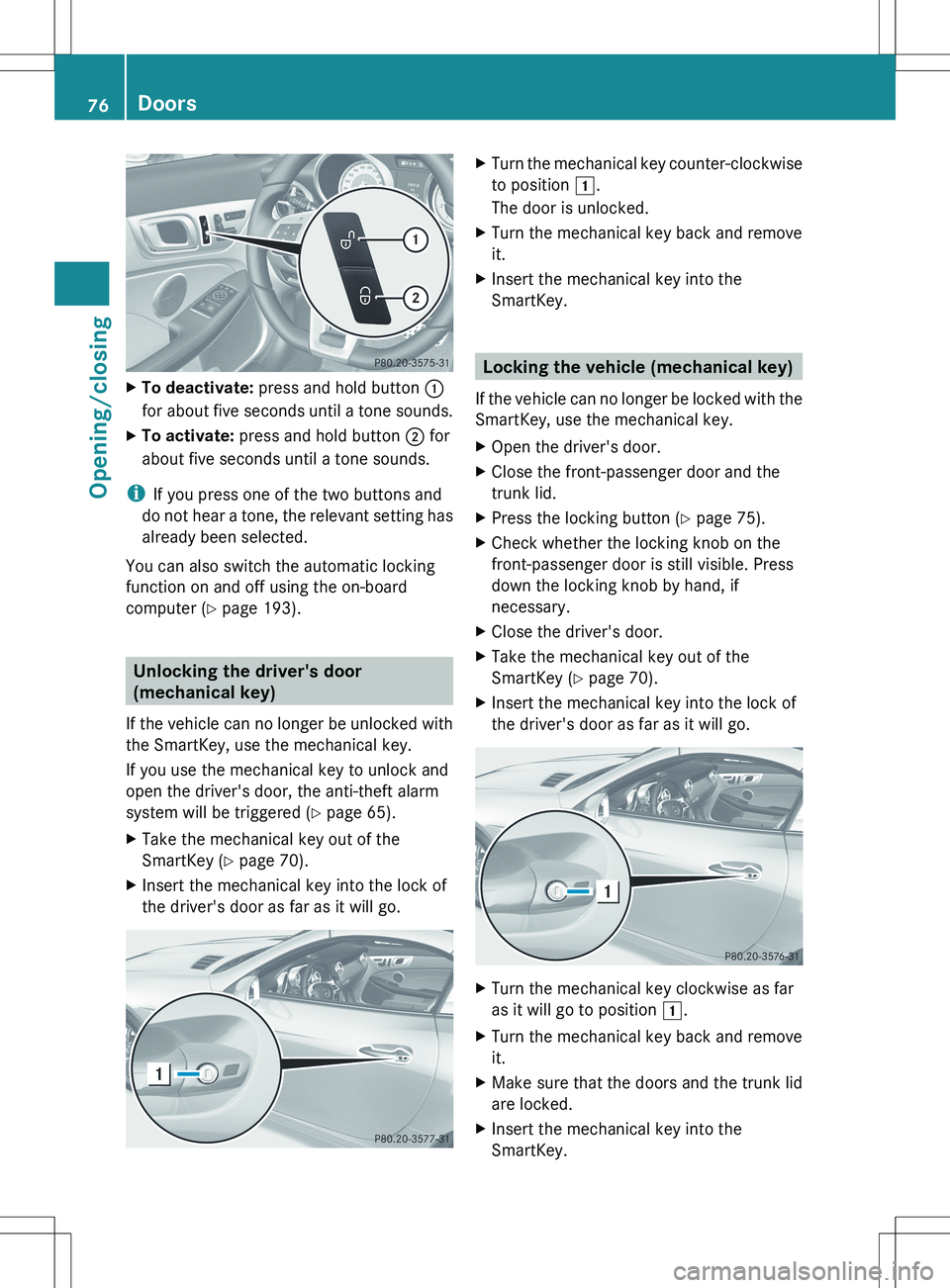
XTo deactivate: press and hold button :
for about five seconds until a tone sounds.XTo activate: press and hold button ; for
about five seconds until a tone sounds.
i If you press one of the two buttons and
do not hear a tone, the relevant setting has
already been selected.
You can also switch the automatic locking
function on and off using the on-board
computer ( Y page 193).
Unlocking the driver's door
(mechanical key)
If the vehicle can no longer be unlocked with
the SmartKey, use the mechanical key.
If you use the mechanical key to unlock and
open the driver's door, the anti-theft alarm
system will be triggered ( Y page 65).
XTake the mechanical key out of the
SmartKey ( Y page 70).XInsert the mechanical key into the lock of
the driver's door as far as it will go.XTurn the mechanical key counter-clockwise
to position 1.
The door is unlocked.XTurn the mechanical key back and remove
it.XInsert the mechanical key into the
SmartKey.
Locking the vehicle (mechanical key)
If the vehicle can no longer be locked with the
SmartKey, use the mechanical key.
XOpen the driver's door.XClose the front-passenger door and the
trunk lid.XPress the locking button ( Y page 75).XCheck whether the locking knob on the
front-passenger door is still visible. Press
down the locking knob by hand, if
necessary.XClose the driver's door.XTake the mechanical key out of the
SmartKey ( Y page 70).XInsert the mechanical key into the lock of
the driver's door as far as it will go.XTurn the mechanical key clockwise as far
as it will go to position 1.XTurn the mechanical key back and remove
it.XMake sure that the doors and the trunk lid
are locked.XInsert the mechanical key into the
SmartKey.76DoorsOpening/closing
Page 123 of 336
compartment as well. The indicator lamp in
the á button goes out.
R Use the residual heat function if you want
to heat or ventilate the vehicle interior
when the ignition is switched off. The
"residual heat" function can only be
activated or deactivated with the ignition
switched off.
Operating the climate control
systems
Activating/deactivating climate
control
Important information
GWARNING
When the climate control system is switched
off, the outside air supply and circulation are
also switched off. Only choose this setting for
a short time when the retractable hardtop
(vario-roof) is closed. Otherwise, the windows
could fog up, impairing visibility and
endangering you and others.
i Activate climate control primarily using
the à button ( Y page 122).
Activating/deactivating
Air-conditioning system
XTo activate: turn airflow control C
( Y page 117) clockwise to the desired
position (except position 0).XTo deactivate: turn airflow control C
( Y page 117) counter-clockwise to position
0 .Dual-zone automatic climate controlXTurn the SmartKey to position 2 in the
ignition lock.X To activate: press the à button.
The indicator lamp in the à button lights
up. Airflow and air distribution are set to
automatic mode.
or
XPress the ^ button.
The indicator lamp in the ^ button goes
out. The previously selected settings come
into effect again.XTo deactivate: press the ^ button.
The indicator lamp in the ^ button lights
up.
Activating/deactivating cooling with
air dehumidification
Important information
The cooling with air dehumidification function
is only available when the engine is running.
The air inside the vehicle is cooled and
dehumidified according to the temperature
selected.
GWARNING
If you switch off the cooling function, the
vehicle will not be cooled when weather
conditions are warm. The windows can fog up
more quickly. Window fogging may impair
visibility and endanger you and others.
Condensation may drip from the underside of
the vehicle when it is in cooling mode. This is
normal and not a sign that there is a
malfunction.
Depending on the equipment level, the
control panel has either the Á button or
¿ button.
i The cooling with air dehumidification
function uses refrigerant R134a. This
coolant does not contain
chlorofluorocarbons, and therefore does
not damage the ozone layer.
Operating the climate control systems121Climate controlZ
Page 124 of 336
Activating/deactivatingXTo switch on: press the ¿ or Á
button.
The indicator lamp in the ¿ or Á
button comes on.XTo deactivate: press the ¿ or Á
button.
The indicator lamp in the ¿ or Á
button goes off. The cooling with air
dehumidification function has a delayed
switch-off feature.
Problems with the cooling with air
dehumidification function
If the ¿ or Á button is pressed, the
indicator lamp in the button flashes three
times or stays off. You can no longer switch
on the cooling with air dehumidification
function.
XConsult a qualified specialist workshop.
Setting climate control to automatic
GWARNING
If you switch off the cooling function, the
vehicle will not be cooled when weather
conditions are warm. The windows can fog up
more quickly. Window fogging may impair
visibility and endanger you and others.
The "automatic climate control" function is
only available in conjunction with automatic
climate control.
In automatic mode, the set temperature is
maintained automatically at a constant level.
The system automatically regulates the
temperature of the dispensed air, the airflow
and the air distribution.
Automatic mode will achieve optimal
operation if cooling with air dehumidification
is also activated. If desired, cooling with air
dehumidification can be deactivated.
XTurn the SmartKey to position 2 in the
ignition lock.XSet the desired temperature.XTo activate: press the à button.
The indicator lamp in the à button lights
up. Automatic air distribution and airflow
are activated.XTo switch off: press the _ button.
or
XPress the I or K button.
The indicator lamp in the à button goes
out.
Setting the temperature
Air-conditioning system
XTurn the SmartKey to position 2 in the
ignition lock.XTo increase/reduce: turn
thumbwheel : clockwise or counter-
clockwise ( Y page 117).
Only change the temperature setting in
small increments. Start at 72 ‡ (22 † ).
Dual-zone automatic climate control
Different temperatures can be set for the
driver's and front-passenger sides.
XTurn the SmartKey to position 2 in the
ignition lock.XTo increase/reduce: turn controls : and
B (Y page 119) clockwise or counter-
clockwise.
Only change the temperature setting in
small increments. Start at 72 ‡ (22 † ).122Operating the climate control systemsClimate control
Page 125 of 336
Setting the air distribution
Air distribution settings
Air-conditioning system
¯Directs the airflow through the
defroster ventsODirects the airflow through the
footwell air ventsPDirects the airflow through the center
and side air vents
i You can also activate several air
distribution settings simultaneously. To do
this, press multiple air distribution buttons.
The air is then directed through various
vents.
Dual-zone automatic climate control
PDirects the airflow through the center
and side air ventsODirects the airflow through the
footwell air ventsSDirects the airflow through the center
and side air vents as well as the
footwell air vents¯Directs the airflow through the
defroster ventsbDirects the airflow through the
defroster, center and side air vents. 10aDirects the airflow through the
footwell and defroster vents_Directs the airflow through the
defroster, center and side air vents as
well as the footwell air vents 10
i
Regardless of the air distribution setting,
airflow is always directed through the side
air vents. You can only close the side air
vents, by fully closing the adjuster on the
side air vents ( Y page 127).
Air-conditioning systemXTurn the SmartKey to position 2 in the
ignition lock.XPress one or more of the P, O ,
¯ buttons.
The corresponding indicator lamp lights up
briefly.
Dual-zone automatic climate control
XTurn the SmartKey to position 2 in the
ignition lock.XPress the _ button repeatedly until the
desired symbol appears in the display.
Setting the airflow
Air-conditioning system
XTurn the SmartKey to position 2 in the
ignition lock.XTo increase/reduce: turn thumbwheel
C clockwise or counter-clockwise
( Y page 117).
Dual-zone automatic climate control
XTurn the SmartKey to position 2 in the
ignition lock.XTo increase/reduce: press the K or
I button.
Switching the ZONE function on/off
This function is only available with automatic
climate control.
XTo switch on: press the á button.
The indicator lamp in the á button lights
up.
The temperature setting for the driver's
side is not adopted for the front-passenger
side.10 Canada only.Operating the climate control systems123Climate controlZ
Page 185 of 336
Back button%Press briefly:
R Back
R Switches off the Voice Control
System; see the separate
operating instructions
R Hides display messages or calls
up the last Trip menu function
used
R Exits the telephone book/redial
memory%Press and hold:
R Calls up the standard display in
the Trip menu
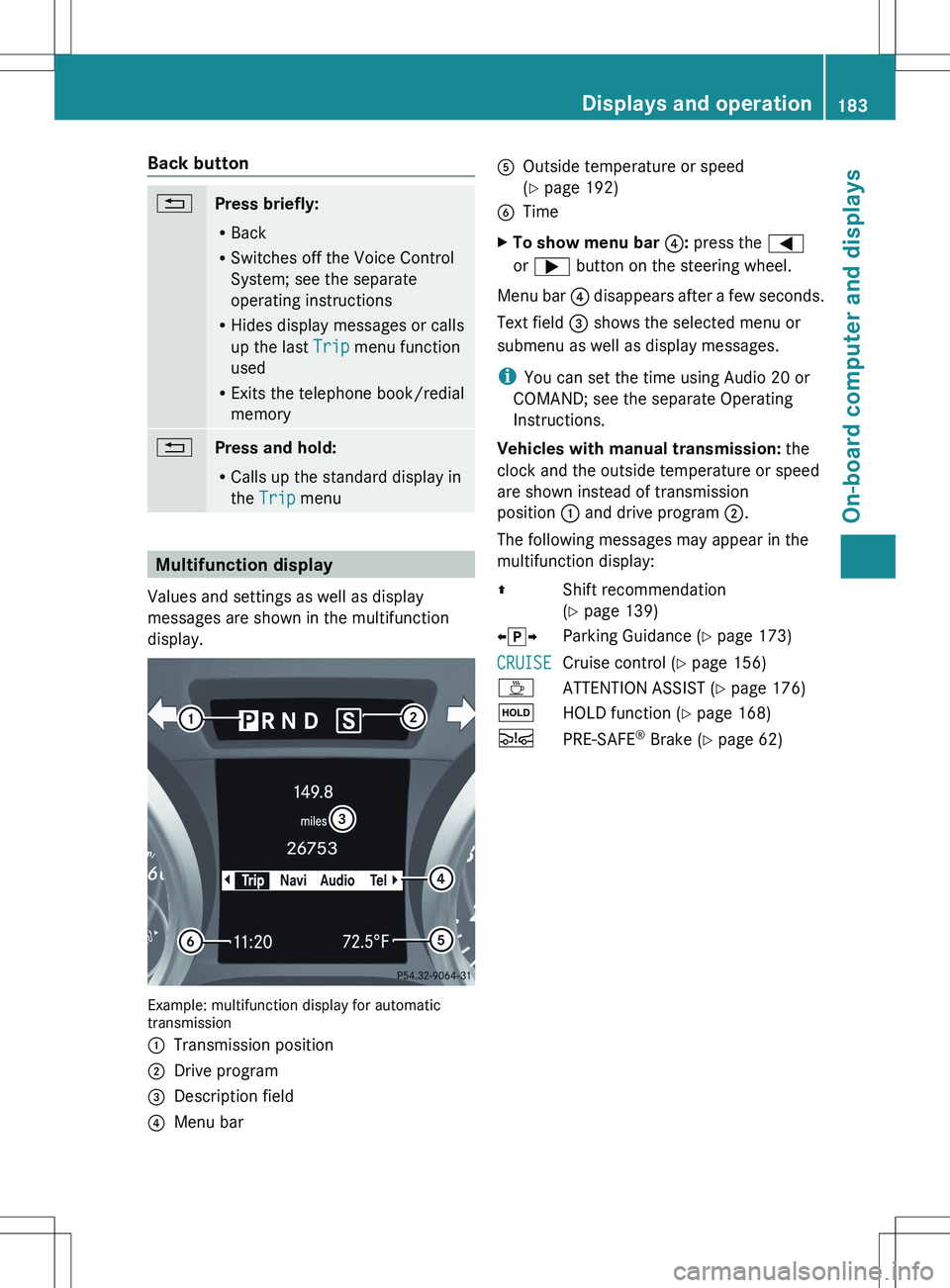
Multifunction display
Values and settings as well as display
messages are shown in the multifunction
display.
Example: multifunction display for automatic
transmission
:Transmission position;Drive program=Description field?Menu barAOutside temperature or speed
( Y page 192)BTimeXTo show menu bar ?: press the =
or ; button on the steering wheel.
Menu bar ? disappears after a few seconds.
Text field = shows the selected menu or
submenu as well as display messages.
i You can set the time using Audio 20 or
COMAND; see the separate Operating
Instructions.
Vehicles with manual transmission: the
clock and the outside temperature or speed
are shown instead of transmission
position : and drive program ;.
The following messages may appear in the
multifunction display:
ZShift recommendation
( Y page 139)Xj YParking Guidance ( Y page 173)CRUISECruise control ( Y page 156)ÀATTENTION ASSIST ( Y page 176)ëHOLD function ( Y page 168)ÄPRE-SAFE ®
Brake ( Y page 62)Displays and operation183On-board computer and displaysZ