If
music filesareavai lable,pla yba ckbegi nsat
the point lastlistened to.
If there arenomusic files,you willsee a
messag eto this effect.
X Confirm themessag eby pressi ngW the
COMAND controller andcopy themusic
files (Ypage 169).
Option 2 X
Select Audio in
the main function barby
slid ing ZV andturning cVdtheCOMAND
controller andpress Wtoconfirm.
If MUSIC REGISTER wasthelast mode
selected, itis now switched on.
If another audiosource isswitched on,you
can now switch onthe MUSIC REGISTER in
the audiomenu.
X Select Audio by
slid ing ZV andturning
cVd theCOMAND controller andpress
W toconfirm.
The audiomenu appears.
X Select Music Register and
press Wto
confirm.
Option 3 X
Press ther number key(DVD changer).
The MUSIC REGISTER isswitched on. Importing
musicfiles
Introductio n You
cancopy music filesinthe fileformats
MP3, WMA andAAC (withthe file
extensions .m4p,.m4a,.m4band.aac) from
the follo wing media :
R discs inthe DVD changer
R memory card
R USB storage device
i CDinformation suchasalb um name, disc
name, artistandtrack isprovide dby the
Gracenote MediaDataba se(Ypage 161). X
Switch onaud ioCD mode (Ypage 157).
X With anaud ioCD inserted, selectREC in
the
CD basi cdisplay byslidin gVÆ andturnin g
cVd theCOMA NDcontroller andpress
W tocon firm .
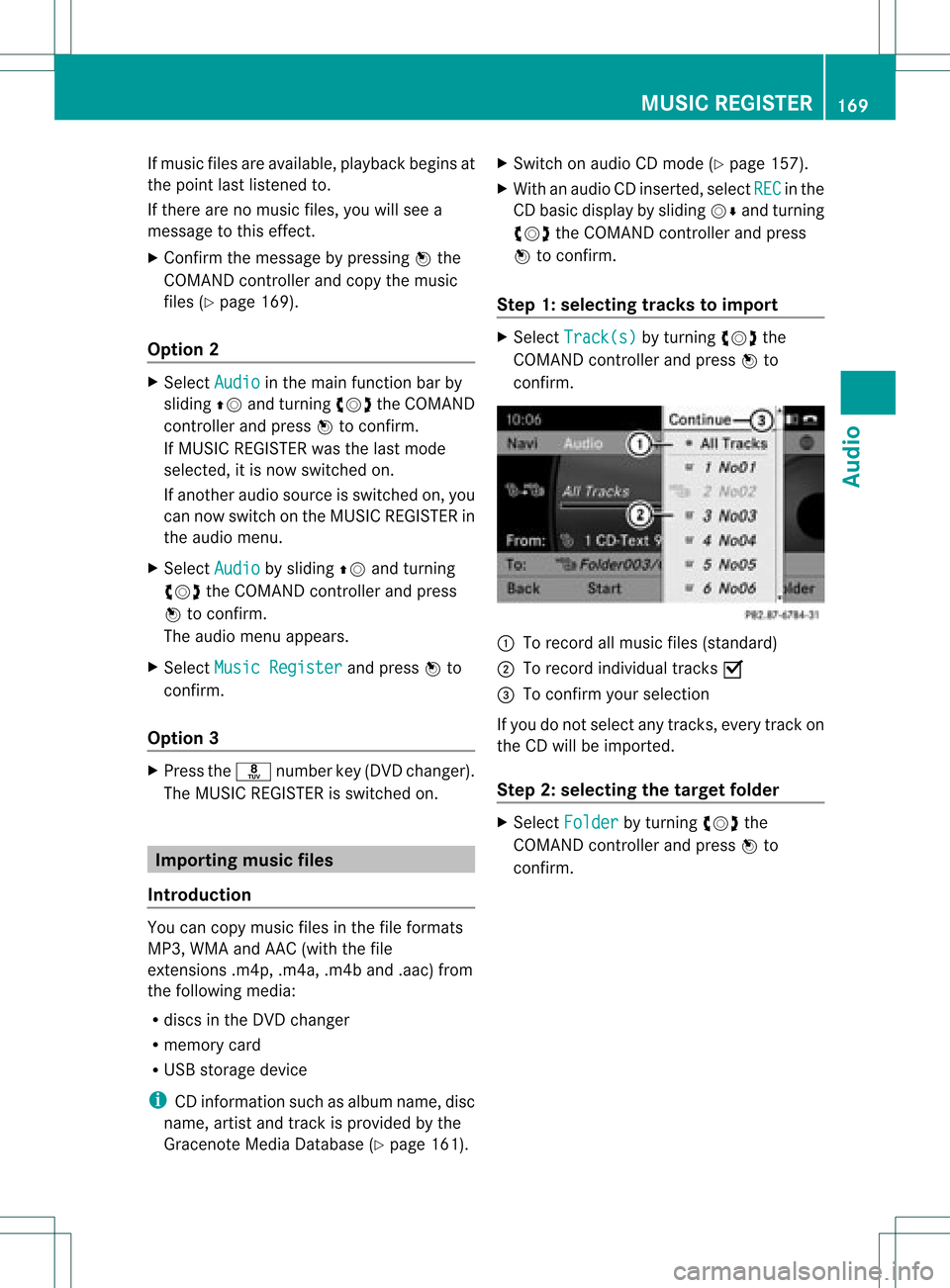
Step 1:selecting tracks toimp ort X
Selec tTrac k(s) by
turnin gcVd the
COMA NDcontroller andpress Wto
con firm . :
Torec ord allmusic files(standard )
; Torec ord indiv idual track sO
= Tocon firm your selec tion
If you donot selec tany trac ks,eve rytrac kon
the CDwillbe impo rted .
Ste p2:selectin gth eta rget folder X
Sele ctFol der by
turnin gcVd the
COMA NDcontroller andpres sW to
con firm. MUSIC
REGISTER
169Audio Z
be
possible toaccess thesettings from the
DVD menu.
X Press the9butt onon the remot econ trol
and show themenu.
X Select DVD-Video and
press the9
butt ononthe remot econ trolto con firm.
X Select DVDFuncti ons and
press the9
butt ontocon firm.
X Select Audio Language and
press the9
butt ontocon firm.
Am enu appears afterashort while. The
# dot infron tof an ent ryindicat esthe
curren tlyselect edlanguage.
X Select alanguage usingthe9:
button sand press the9button tocon firm.
X To exit themenu: pressthe=
or ; button . Subtit
lesand camer aangle
These functionsare not available onallDVD s.
The number ofsubtitle languages andcamera
angles available dependsonthe contentof
the DVD. Itma yal so be possi ble to acc ess
the setting sfro mthe DVD menu .
X Pre ssthe 9button onthe rem otecontr ol
and showthe menu .
X Sel ect DVD-Video and
pressthe 9
bu tton onthe rem otecontr olto conf irm.
X Sel ect DVD Functions and
pressthe 9
bu tton toconf irm.
X Sel ect Subtit les or
Cam era Angle and
pre ssthe 9button toconf irm.
In bo th cas es,a menu appe arsaf ter afew
se cond s.Th e# dotin fro ntofan entry
ind icates the curre ntsetting .
X Sel ect ase tting using the 9:
bu ttons andpressthe 9button toconf irm.
X To exitthe men u:pre ssthe =
or ; button. In
tera ctive conte nt
DVDs canalso conta ininte ractiv econte nt
(e .g. avide oga me) .Inavi deogame ,you may
be ableto influ ence events bysele cting and
triggeri ngactions. Thetype andnumber of
actions dependonthe DVD.
X Select anaction using the
9;:= buttonsonthe
remote controlandpress the9button to
execute it.
A menu appears andthefirst entry,
Select ,
is high lighted.
X Press the9button. Operation
with an active COMAND
sourc e Swi
tching thefunctio non/ offin
COMA ND
You cantransfer anaudio orvide osource
sele cted inCOMAND tothe RearSeat
En tert ainmen tSystem .
i Ifyou then switch modes inCOMAND ,the
new source willnotbetran smitt edtothe
Rear SeatEntert ainmen tSystem .
X To switch onthe function inCOMAND:
switch onthe desired audiomode in
COMAND ,e.g. CDmode (Ypage 157),or
show themenu invideo DVDmode
(Y page 188).
X Select themenu itematthe bott omleft,
e.g. CD in
audio CDmode, bysliding VÆ
and turningcVd theCOMAND controller
and press Wtocon firm.
Am enu appears. Opera
tionwith anactive COMAND source
225RearSeatEntert ainment System Z