2012 MERCEDES-BENZ SLK-Class 157
[x] Cancel search: 157Page 77 of 234
Selec
tingasthe destination
X Insert theSDmemory card(Ypage 157).
X To switch onnavigation mode:pressthe
Ø functionbutton.
X To show themenu: pressWthe COMAND
cont roller.
X Select Destination in
the navigation
system menubarbyturnin gcVd the
COMAND controller andpress Wto
conf irm.
X Select FromPersonal POIs and
press
W toconf irm.
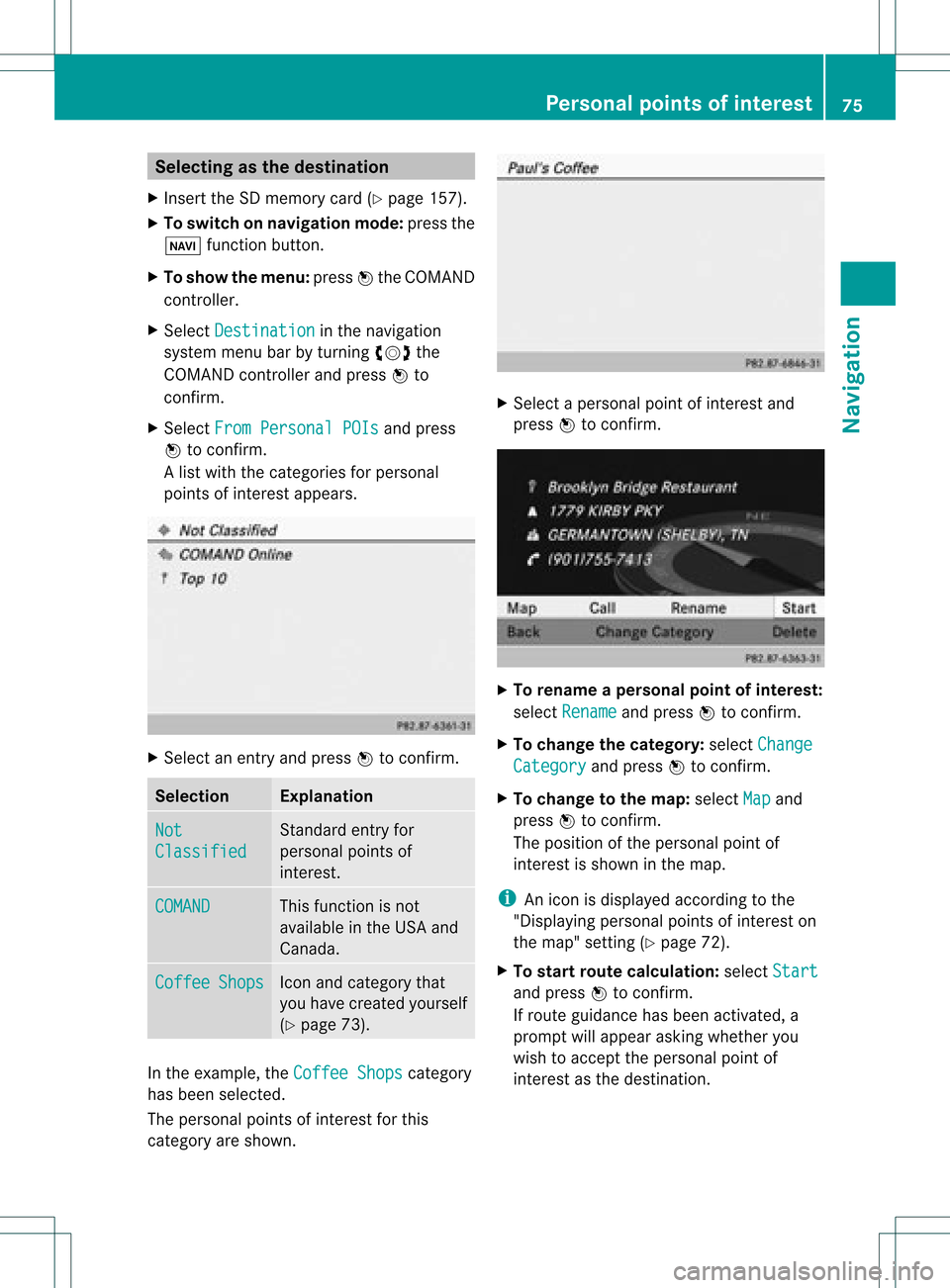
Al ist with thecategorie sfor perso nal
point sof interest appears. X
Selec tan ent ryand press Wtocon firm . Selection Expla
nation Not
Clas
sified St
andard entryfor
perso nalpoint sof
int erest . COMA
ND This
function isnot
available inthe USA and
Canada. Coff
ee Shop
s Ico
nand category that
you have created yourself
(Y page 73). In
the exam ple,theCoff eeShop s cat
egory
has been selected.
The perso nalpoint sof interest forthis
cat egory areshown . X
Selec tapersonal pointofinterest and
press Wtocon firm. X
To renam eapers onal point ofinter est:
select Rename and
press Wtocon firm.
X To change thecategor y:select Change Catego
ry and
press Wtocon firm.
X To change tothe map:select Map and
press Wtocon firm.
The position ofthe person alpoint of
int erest isshown inthe map.
i Anicon isdisplayed accordingtothe
"Displaying personalpoint sof interest on
the map" setting(Ypage 72).
X To star trout ecalculat ion:select Start and
press Wtocon firm.
If route guidance hasbeen activated, a
prompt willappear askingwhether you
wish toaccept theperson alpoint of
int erest asthe destin ation. Personal
pointsofinter est
75Navigat ion Z
Page 87 of 234

Exam
ple: rou tedispl aystop ped
: Road nam eand citydispl aywhen rou te
di spl ayhasbe en stop ped
; Distance ofthe cros shairfrom current
veh iclepo sitio n
X To gettoth ecur rent vehicle position:
pres sW tocon firm thesymbo lfor the
cur ren tvehicle position .
X To change themap scale: selectScale and
press Wtocon firm.
The scale barappears.
X Turn cVd theCOMAND controller and
press Wtocon firm. Recording
therout e
Notes If
you have activated COMAND andtheSD
memory cardhasbeen insert ed,you should
not take itout ofthe slot.
When yourecor daroute, COMAND usesso-
called support pointsand displays theroute
as aseries oflines. Ifthe route isthen
calculated, COMANDattemptstoalign the
recor dedroute withthedigital map.
The support pointsof the route maynotbeon
a digitized road.
This isoften thecase forroutes thathave
been calculated usingmapdata from other
sources. Calling
upthe Rout esmenu X
Inser tthe SDmemory card(Ypage 157).
X To switch onnavigat ionmode: pressthe
Ø function button .
X To show themenu: pressWthe COMAND
con troller .
X Select Destina tion in
the navigation
system menubarbyturn ingcVd the
COMAND controller andpressing Wto
con firm.
X Select Record Routes .
Sta
rting/ending recording X
To star trecord ing:select Start Recordi
ng in
the Routes menubyturn ing
cVd theCOMAND controller andpress
W tocon firm.
Durin gthe recor ding, therecor dedroute is
shown behind thecurren tvehicle position
with gray strokes (symbol fortire tracks). X
To end record ing:select Stop Recordi
ng in
the Routes menubyturn ing Rout
eguida nce
85Navigation Z
Page 88 of 234

cVd
theCOMAND controller andpress
W toconfirm.
Displaying andediting therecorded
route X
Insert theSDmemory card(Ypage 157).
X Select List in
the Routes menubyturning
cVd theCOMAND controller andpress
W toconfirm.
Previousl yrecorded routesaredispla yed. X
Select aroute andpress Wtoconfirm.
The map appea rswith amenu. The
recorded routeisshown inthe map witha
blue dotted line. Tur
ning offfrom theroute onthe map
X Select Demo by
turning cVdtheCOMAND
cont roller andpress Wtoconfirm.
The map withthecrosshair appears.
X Proceed asdescribed inthe "Rou te
demonstration" section(Ypage 84). Start
ingroute calculation
X Select Start in
the menu byturning cVd
the COMAND controller andpress Wto
confirm.
COMAND attemptstoalig nthe recorded
route withthedigital map.
Editing theroute
You canchange theroute name andtheicon.
X Select Edit in
the menu byturning cVd
the COMAND controller andpress Wto
confirm . X
To change theroute name: select
Rename and
press Wtoconfirm .
i The name cannot bechanged whilethe
vehicle isin motion.
X To change theicon: select Change Icon and
press Wtoconfirm .
X Ad escript ionforboth entries canbefound
in the "Personal POIs"sectionunder
"Managing categoriesforperson alPOIs"
(Y page 73).
Changing directionforrout ecalculation
You cansetthe icon forthe route tothe
start ingpoint ortothe destin ation, thereby
changin gthe direct ionforroute calculation .
i Durin groute calculation ,one- way streets
or turn restrictions, forexample, aretaken
int oaccoun t.Therefor e,the outward and
return routes maydiffer fromeach other. 86
Rout
eguida nceNavigation
Page 143 of 234
X
Sea rch foranentry inthe phoneboo kon
the mob ile pho ned (Ypage 126) .
X Sel ect the list symbo lto the right ofthe
entry bysliding VY theCOMAND
control lera nd pre ssW toconfi rm.
X Sel ect SaveEnt ry and
pressW to
confi rm.
The Saving Procedure Successful mes
sage appe ars. The phone book entry is
now saved asan addre ssbook entry .
The diconisreplaced bythe ¥icon. Importing
contacts
Information andrequirem ents You
canimport contacts (vCards) fromthe
memory cardandaUSB device intothe
address book,orreceive vCardsvia
Bluetooth ®
.
i Upto2500 entries canbeimported into
the address book.Amessage notifies you
when themaximum numberisreached.
You now have todelete existingentries
(Y page 137)ino rder toimport newentries.
Dependi ngon the source ofthe contact data,
differe ntrequ ireme ntsapply: Source Con
dition s Memory
card The
SDmemory cardmust
be inserted (Ypag e157)
and must contain
importa blecontact data. USB
device The
USB devicemust be
inserted inthe USB port
and must contain
importa blecontact data. Requiremen
tsfor rece ivingvCards via
Bluetoo th®
You canreceive vCards from devices(e.g.
from aPC) whichsup port thesending of
vCa rds viaBlue tooth ®
. It
is not necessary toauthorize thedevi cein
COMAND todo so.
Plea sebea rthe following inmind:
R Bluetooth ®
must beactivated inCOMAND
and onthe Bluetooth ®
device (see
operating instructionsforthe device).
R the Bluetooth ®
device mustbeable tosend
vCards viaBluetooth ®
(see operating
instruct ionsforthe device).
R the Bluetooth ®
device inthe vehicle must
be switched on.
Import ingfrom thememory cardorUSB
device Ent
ries imported fromthememory cardor
from aUSB device havethe¯ symbol.
The following conditionsmust befulfilled in
order toimport vCards:
R vCards (vcffiles) maybelocated inthe main
directory orinfolders. COMAND allowsfor
a targeted selection ofthe corresponding
directories.
R vCards musthavethefileexten sion".vcf".
i Avcffilecan also contai nseveral vCards.
COMAND supportsvCardsinversion s2.1
and 3.0.
X Select Address Book in
the address book
or, ifthe telephon ebasic menu isshown,
select Phone by
sliding VÆandturning
cVd theCOMAND controller andpress
W tocon firm.
X Select Downloa dContact s and
press W
to con firm.
Am enu appears.
X Select FromTheMemory Card or
From USB
Device in
the menu byturn ingcVd
the COMAND controller andpress Wto
con firm.
X Select Add or
Overwri te and
press Wto
con firm.
Add import
sthe entries from thememory
card orUSB device intothe address book. Using
theadd ress book
141Telephone Z
Page 159 of 234

Inser
ting anSD mem orycard X
Inser tthe memory cardintotheslot until it
engages inplace. Theside with the
cont acts must facedownwards andpoint
towards theslot.
COMAND loadsthememory cardand
shows amessage tothis effect .Ifn oMP3
track scan befound, youwillsee amessage
to this effect .
Ejecting anSD memor ycard X
Press thememory card.
The memory cardiseject ed.
X Take thememory cardoutofthe slot
(Y page 17),position H. Connec
tingaUSBdevice
The USB portislocated inthe stowage
compartmen tin the cent erconsole.
Elect ricalconsumpt ionatthis conn ection
must notexceed acont inuous current of
500 mA.Ifthe electrical consumpt ionis
higher, useaseparate sourcetoprovide
power forthe USB device (e.g.
12 Vp ower supply).
X Connect theUSB device (e.g.USBstick)to
the USB port. Ac
tiv atin gaudi oCD /DVD orMP3
mode
Opti on1 X
Inse rtaC D/DVD (Ypage 154) ,SDmem ory
car d(Y page 157) orconne ctaU SBdevice
(Y page 157) .
CO MAND load sthe med iumi nser tedand
sta rts toplay it.
Opti on2 X
Pre ssthe h functio nbu tton oneormor e
time s. i
Bypre ssing the functio nbutton
rep eatedly, youcan chang eth eoper ating
mod ein thefol lowin gord er:
R audio CD/DVD/vide oDV D/ MP3 CD/
MP3 DVDin theDV Dch ang er(disc
mod e)
R mem orycardmod e
R MUS ICREGI STER
R US Bstorag edev ice
R Medi aIn te rface oraudio AUXmod e
R Blue toot h®
audio mode
X Se lec tana udio mediumfrom themed ialist
(Y page 159).
Op tion 3 X
Se lec tAud io in
themain function bar by
slidi ngZV andturnin gcVd theCOMA ND
co ntrol ler and pressW toconfirm .
The lastactive audio sourceisno w
act ivat ed.
You canactivat eadiff ere ntaudio source
usin gth eaudio menu.
X Se lec tAud io by
slidi ngZV andturnin g
cVd theCOMA NDcontrol ler and press
W toconfirm .
The audio menuappear s.
X Se lec tDis c ,
Mem ory Card ,
Mus ic Reg
ister ,
USB Storage or
Med ia Int
erface and
pressW toconfirm .
This switches tothedesi redaudio source.
X Se lec tana udio mediumfrom themed ialist
(Y page 159). Aud
ioCD/DVD andMP3 mode
157Aud io Z
Page 161 of 234

In
audio DVD modeonly X
To pause playba ck:swit chon audio DVD
mod e(Y page 157).
X Se lec tË byslidi ngVÆ andturnin g
cVd theCOMA NDcontrol ler and press
W toconfirm .
The Ë displaychang estoÌ.
X To cont inuepla yba ck:sele ctÌ and
pre ssW toconfirm .
Playbac kcont inues fromthepoint where it
was inter rupted. TheÌ display changes
to Ë. Stop
function
This funct ionisonly availa bleinaudio DVD
mode.
X Switch onaudio DVDmode (Ypage 157).
X To interr uptplayback: selectÉby
sliding VÆandturnin gcVd theCOMAND
cont roller andpress Wtoconf irm.
The Ë display changes toÌ. É
remains highlighted.
X To continue playback: selectÌand
press Wtoconf irm.
Playba ckcont inues fromthepoint where it
was inter rupted.
X To stop playback: whileplaybackis
inter rupted, selectÉagain andpress
W toconf irm.
or
X Select Éandconf irmbypressing W
twice inrapid succession.
Ì ishighlighted.
X To resta rtplayback: selectÌand
press Wtoconf irm.
Playba ckstart sat the beginning ofthe
DVD . Selecting
audioCD/DVD/MP3 discs
Selecting viathe media list X
In audio CD/DVDand MP3 mode: select
Media by
sliding VÆorturnin gcVd the
COMAND controller andpress Wto
conf irm.
The media listappears. The#dot
indicates thecurrent medium beingplayed. Media
listwhen equipped withaDVD changer
: Todisplay allmagazine trays
The media listshows thediscs current ly
availa ble. Media
list Magazine
trays,positions 1to6: readable
data media areaudio CDs,MP3CDsorMP3
DVD s,audio DVDsand video DVDs. Memory
card,position 7 MUSIC
REGISTER, position8 USB
storage device,position 9 Media
Interface, position 0 Bluetooth
®
audio i
Ifadisc cann otbe read, anentr yappears
next tothe correspon dingmagazine tray.
X To show allmagaz inetrays: press Wthe
COMAND controller when :is
highlighted. Audio
CD/DVD andMP3 mode
159Audio Z
Page 164 of 234
Selec
tingGracenote ®
dat ato be
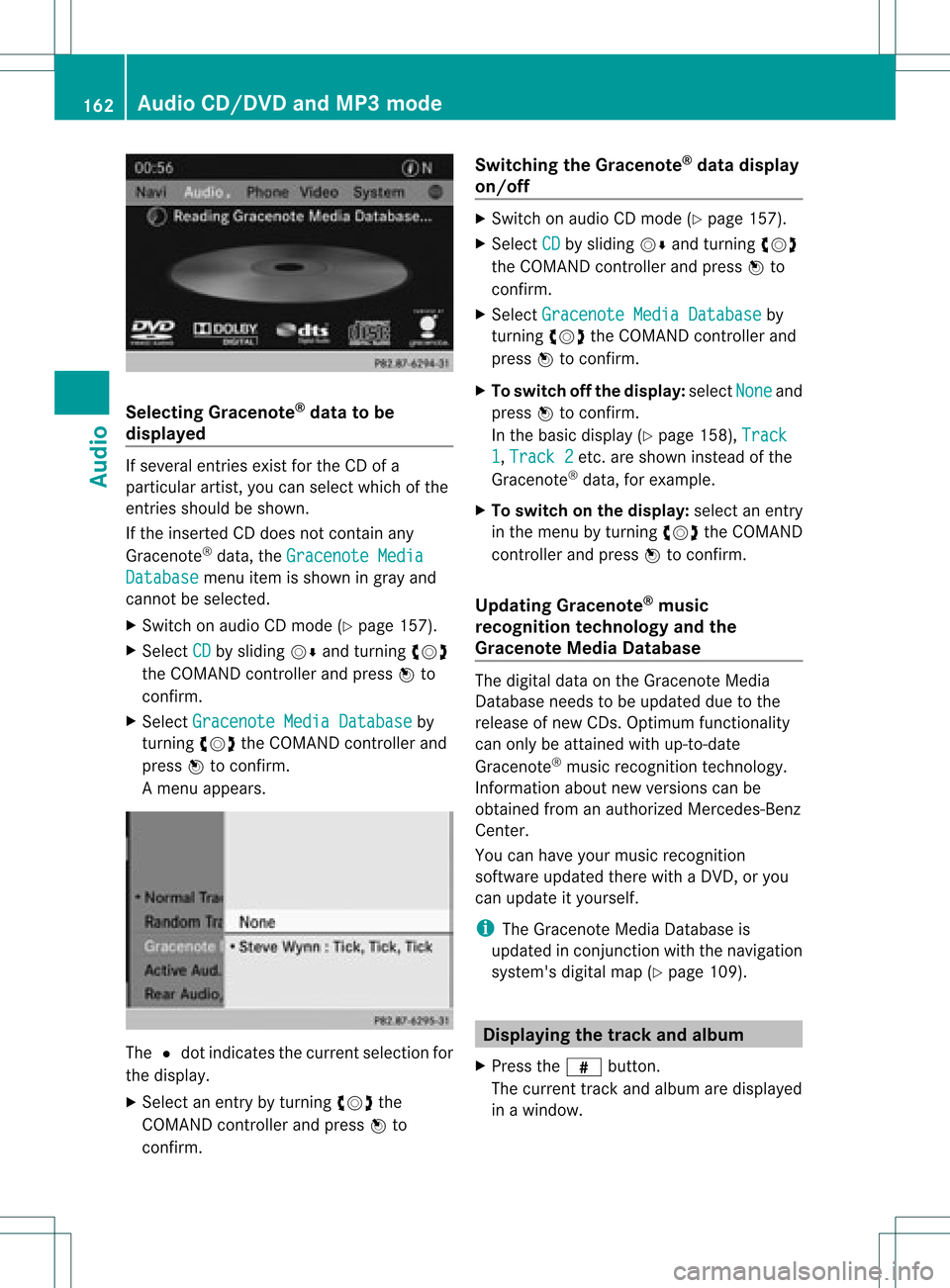
displayed If
several entriesexist forthe CDofa
particular artist,youcan select whichofthe
entr iesshould beshown.
If the inserted CDdoes notcont ainany
Gracenote ®
data, theGracenote Media Database menu
itemisshown ingray and
cannot beselected.
X Switch onaudi oCD mode (Ypage 157).
X Select CD by
sliding VÆandturnin gcVd
the COMAND controller andpress Wto
conf irm.
X Select Gracenote MediaDatabase by
turnin gcVd theCOMAND controller and
press Wtoconf irm.
Am enu appears. The
#dot indicat esthe curren tselection for
the display.
X Select anent ryby turn ingcVd the
COMAND controller andpress Wto
con firm. Switching
theGracenote ®
dat adispla y
on/off X
Switc hon audio CDmode (Y page 157).
X Select CD by
sliding VÆandturningcVd
the COMAND controller andpress Wto
con firm.
X Select Graceno teMedia Databas e by
turn ingcVd theCOMAND controller and
press Wtocon firm.
X To switch offthe displa y:select None and
press Wtocon firm.
In the basic display (Ypage 158),Track 1 ,
Track 2 etc
.are shown instead ofthe
Gracenot e®
data, forexample.
X To switch onthe displa y:select anent ry
in the menu byturn ingcVd theCOMAND
con troller andpress Wtocon firm.
Upda tingGracenote ®
music
recognition technologyandthe
Gra cenote MediaDataba se The
digital dataonthe Gracenot eMedia
Database needstobe updated duetothe
release ofnew CDs. Optimum functionality
can only beattain edwith up-to- date
Gracenot e®
music recogn itiontechnology.
Inf ormat ionabout newversion scan be
obtained fromanauthoriz edMercedes- Benz
Center .
You canhave yourmusic recogn ition
soft ware updated therewith aDVD, oryou
can upda teityou rself.
i The Gracenote MediaDatabase is
upda tedinconjunc tionwith thenavigation
system's digitalmap(Ypage 109). Displayi
ngthe track and album
X Press thez button.
The current trackandalbumaredisp layed
in awindo w. 162
Audio
CD/DVD and MP3 modeAudio
Page 165 of 234

Disp
laying metada ta (MP 3mo de)
COM ANDc analso displ aythea lbum name
and artist (met adata) duringplayback ,if this
inf orm ation hasbeen entered intothe
syst em.
For allmedia thatcontain MP3 data(e.g.MP3
CD, SDmemory card,MUSIC REGISTE R),you
can determin ewhether:
R the metadata contained inthe tags ofthe
encoded musicdatashould bedisplaye d
R the fileand directo rynames should be
displaye dduring playback
X To display thealbum andartist name:
select MP3 or
USB in
the basic display by
sliding VÆandturningcVd theCOMAND
cont roller andpress Wtoconf irm.
X Select Display TrackInformati on and
press Wtoconf irm. Selecting
agrou p
Th econte ntofan audio DVD canbe divide d
into upto9g roup s.The availabil ity and type
of grou pdepe ndsonthe respe ctiveDVD.
Ag roup cancontain musicind iffe ren tsound
quali ties(stereo andmultichann elformats ,
for example), orbonus tracks.
Each group cancont ainupto99 track s.
If an audio DVDonlycontains oneaudio
format, theGroup menu
item(s) cannotbe
selected.
X Switch onaudio DVDmode (Ypage 157).
X Select DVD-A by
sliding VÆandturnin g
cVd theCOMAND controller andpress
W toconf irm.
X Select Group by
turnin gcVd andpress
W toconf irm.
The #dot indicates thegroup current ly
selected.
X Select thedesired groupbyturnin gcVd
and press Wtoconf irm.
X To exit themenu: slideXVY theCOMAND
cont roller orpress the% backbutton . Selecting
anactive partition (USB
mass storagedevices only)
You canselect thisfunct ionforUSB mass
storage devices whenthestorage deviceis
partition ed.Upto9p artition s(pri mar yor
logic al;FATand FAT32 )are suppo rted.
X Sel ect MP3 in
thebasic displayby slidin g
VÆ andturnin gcVd theCOMA ND
co ntroll erand pres sW toconfirm .
X Sel ect Select Active Partition and
pres sW toconfirm . Pla
yba ckopt ions
The followin gopt ionsare availabl eto you:
R Nor mal TrackSequence The
track sare played intheno rm alord er
(e. g.track 1,2,3, etc.).
In MP3 mode,thetrack orderisdet erm ined
by theord erinwhic hth etrack sare writ ten
to theMP3 datacar rier when itis creat ed.
Alp habet icalorderisthemos tcommon.
Once allthe track sin afolder havebeen
playe d,the track sin the next folder are
playe d.
R Random Media All
the track son the medium areplaye din
random order(e.g.track 3,8, 5etc. ).
R Random TrackList (MP3
mode only)
You hear thetrack sof the current tracklist
or the current lyactive folder(including all
sub-folders) inrandom order.
X To select options: switchonaudio CD/
DVD orMP3 mode (Ypage 157).
X Select CD ,
DVD-A or
MP3 by
sliding VÆand
turnin gcVd theCOMAND controller and
press Wtoconf irm.
The options listappears. The#dot
indicates theoption selected.
X Select anoption byturnin gcVd andpress
W toconf irm.
The option isswitched on.For alloptions
except "Normal tracksequence", youwill Audio
CD/DVD andMP3 mode
163Audio Z