2012 MERCEDES-BENZ SL ROADSTER fog light
[x] Cancel search: fog lightPage 19 of 637

Selecting favourites ....................... 455
Selecting/setting access data ....... 434
Internet radio
Calling up ....................................... 454
Searching for stations .................... 454
iPod® ................................. 494, 497, 498
Alphabetic track selection ............. 498
Connecting to Media Interface ...... 494
Selecting a category/playlist ......... 497
ISOFIX child seat securing system .... 64
iTunes® .............................................. 498 J
Jack Storage location ............................ 577
Using ............................................. 607
Jump starting (engine) ...................... 586K
Key Changing the battery ....................... 88
Checking the battery ....................... 87
Convenience opening feature ........ 101
Display message ............................ 272
Door central locking/unlocking ....... 85
Emergency key element ................... 86
Important safety notes .................... 84
Loss ................................................. 89
Modifying the programming ............. 86
Opening/closing the roof .............. 105
Overview .......................................... 84
Positions (ignition lock) ................. 155
Problem (malfunction) ..................... 89
Starting the engine ........................ 157
Key positions
Key ................................................ 155
KEYLESS GO .................................. 155
KEYLESS-GO
Convenience closing ...................... 101
Display message ............................ 272
Locking ............................................ 85
Removing the Start/Stop button ... 156
Start/Stop button .......................... 155
Starting the engine ........................ 157
Unlocking ......................................... 85 Kickdown
Driving tips .................................... 167
Manual drive progra m.................... 171 L
Lamps see Warning and indicator lamps
Lane Keeping Assist
see Active Lane Keeping Assist
Lane recommendations .................... 353
Explanation .................................... 353
Presentation .................................. 353
Lap time (RACETIMER) ...................... 245
Licence plate lamp (display mes-
sage) ................................................... 256
Light sensor (display message) ....... 257
Lights
Activating/deactivating the Intel-
ligent Light System ........................ 240
Activating/deactivating the inte-
rior lighting delayed switch-off ....... 241
Active light function ....................... 131
Automatic headlamp mod e............ 127
Cornering light function ................. 131
Dipped-beam headlamp s............... 127
Driving abroad ............................... 126
Foglamps (extended range) ........... 132
Hazard warning lamps ................... 130
Headlamp flashe r........................... 130
Light switch ................................... 126
Main-beam headlamp s................... 130
Misted up headlamp s.................... 133
Motorway mod e............................. 132
Parking lamps ................................ 129
Rear foglamp ................................. 128
Setting the ambient lighting
brightness (on-board computer) .... 241
Setting the ambient lighting col-
our (on-board computer) ................ 241
Side lamps ..................................... 128
Switching the daytime driving
lights on/off (on-board com-
puter) ............................................. 239
Switching the exterior lighting
delayed switch-off on/off (on-
board computer) ............................ 241
Switching the spotlight on/of f....... 240 16
Index
Page 24 of 637

Phone book
........................................4 02
Adding a number to an address
book entry ..................................... 404
Calling up ....................................... 401
Creating a new entry ..................... 404
Deleting an entry ........................... 403
Entering characters ....................... 303
Searching for an entry ................... 402
Symbol overview ............................ 402
Phone number transmission
Telephone module with Blue-
tooth® (SAP profile) ..................... .423
Picture settings (TV, video) .............. 502
Picture viewer
Displaying pictures ........................ 518
Introduction ................................... 517
Plastic trim (cleaning instruc-
tions) ................................................. .573
Playback options
Audio mode (CD, DVD, MP3) ......... 478
POI (navigation)
Category ........................................ 341
Defining the position for the POI
search ............................................ 340
Entering ......................................... 338
Entering a POI using the map ....... .343
List ................................................. 341
POI icon .............................................. 374
Setting .......................................... .374
POIs (navigation)
see Personal POIs
Power closing ...................................... 93
Power socket
Boot ............................................... 551
Power windows
see Side windows
PRE-SAFE® (anticipatory occupant
protection)
Operation ......................................... 56
PRE-SAFE® (preventive occupant
safety system)
Display message ............................ 254
PRE-SAFE® Brake
Activating/deactivating ................. 238
Display message ............................ 254
Function/notes ................................ 77
Warning lamp ................................. 283 Previous destinations (navigation)
.. 371
Program selector button .................. 167
Protection of the environment
General notes .................................. 31
Pulling away (automatic transmis-
sion) .................................................... 158 Q
Qualified specialist workshop ........... 34 R
RACE START important safety notes ................... 198
RACETIMER (on-board computer) .... 245
Radar sensor system
Activating/deactivating ................. 242
Display message ............................ 262
Radio
Alphabetical browser ..................... 464
Overview ........................................ 462
RDS (Radio Data System) .............. 467
Selecting a station ......................... 234
Setting a statio n............................ 464
Sound settings (balance, bass,
treble) ............................................ 299
Storing stations ............................. 466
Switching on .................................. 462
Switching wavebands .................... 464
Traffic Programme ......................... 467
Radio station ..................................... 466
Storing ........................................... 466
Radio-based vehicle components
Declaration of conformity ................ 33
RDS (Radio Data System)
General notes ................................ 467
Switching on/of f........................... 467
Read-aloud function .......................... 367
Automatic ...................................... 367
Reading lamp ..................................... 134
Rear foglamp
Display message ............................ 256
Switching on/of f........................... 128
Rear lamps
see Lights
Rear Seat Entertainment
Active COMAND source ................. 539 Index
21
Page 129 of 637
Useful information
i This Owner's Manual describes all mod-
els, series and optional equipment for your
vehicle that were available at the time of
going to press. National variations are pos- sible. Note that your vehicle may not be
equipped with all of the functions descri-
bed. This is also the case for systems and
functions relevant to safety.
i Read the information on qualified special-
ist workshops: (Y page 34). Exterior lighting
General notes
For reasons of safety, Mercedes-Benz recom- mends that you drive with the lights switched
on even during the daytime. In some coun-
tries, operation of the headlamps varies due
to legal requirements and self-imposed obli-
gations. Driving abroad
Symmetrical dipped-beam headlamps If your journey takes you to countries where
vehicles are driven on the opposite side of the road to the country in which the vehicle is
registered, your headlamps must be switched
to symmetrical dipped beam. This prevents
oncoming traffic from being dazzled. Sym-
metrical lights do not illuminate as large an
area of the edge of the carriageway.
Convert the headlamps as close to the border as possible before driving in these countries
(Y page 240).
Asymmetrical dipped-beam headlamps Convert the headlamps back to asymmetrical
dipped beam as soon as possible after cross-
ing the border (Y page 240).
If the headlamps are converted to symmetri-
cal dipped beam, the "motorway mode" and "extended range foglamps" functions (Intelli-
gent Light System) are not available. Setting the exterior lighting
Setting options Exterior lighting can be set by:
R using the light switch
R using the combination switch
(Y page 129)
R using the on-board computer
(Y page 239)
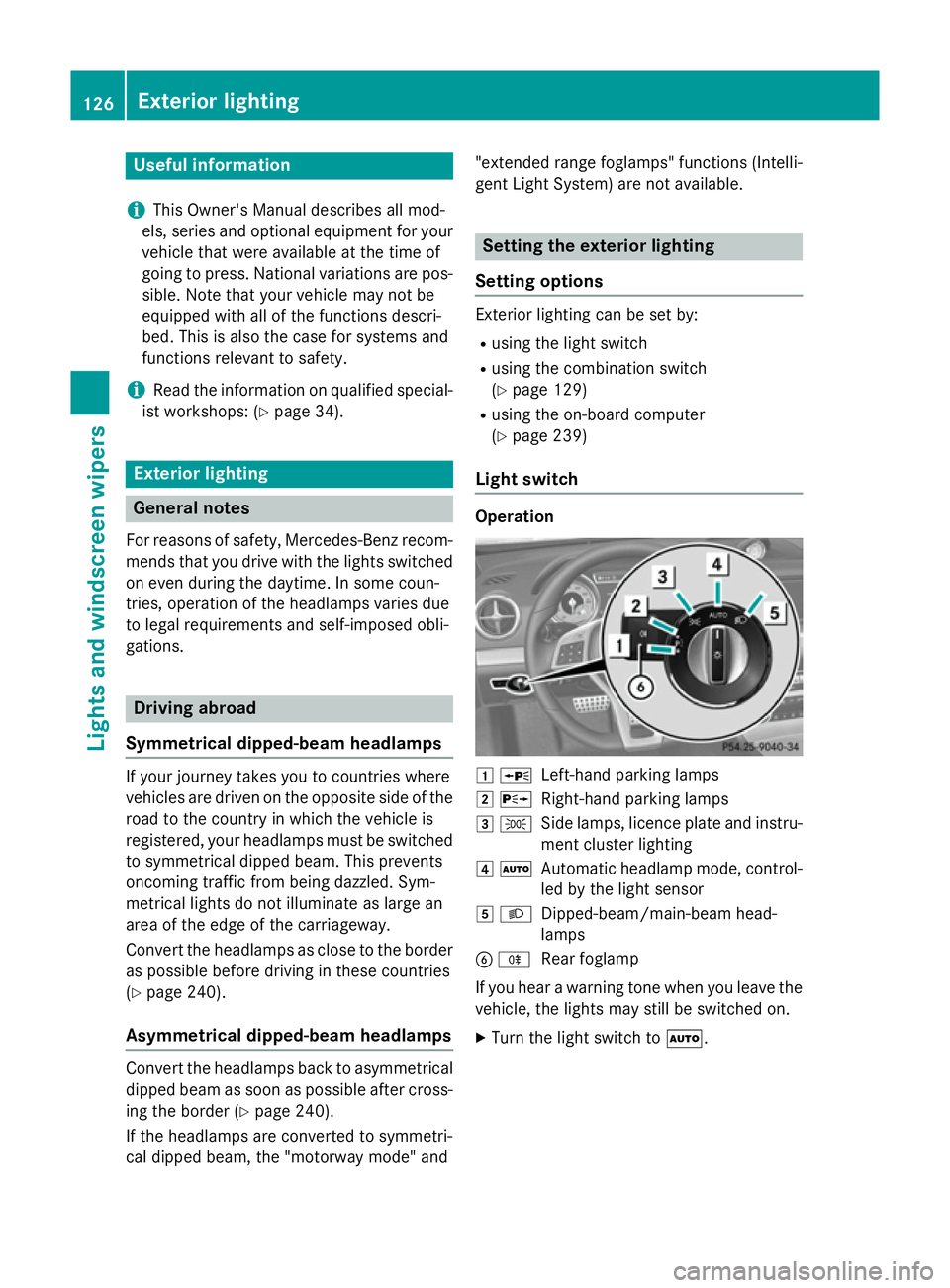
Light switch Operation
1
W
Left-hand parking lamps
2 X
Right-hand parking lamps
3 T
Side lamps, licence plate and instru-
ment cluster lighting
4 Ã
Automatic headlamp mode, control-
led by the light sensor
5 L
Dipped-beam/main-beam head-
lamps
B R
Rear foglamp
If you hear a warning tone when you leave the
vehicle, the lights may still be switched on.
X Turn the light switch to Ã.126
Exterior lightingLights and windscreen wipers
Page 130 of 637
The exterior lighting (except the side lamps/
parking lamps) switches off automatically if
you:
R remove the key from the ignition lock
R open the driver's door with the key in posi-
tion 0
Automatic headlamp mode G
WARNING
When the light switch is set to Ã, the
dipped-beam headlamps may not be switched on automatically if there is fog, snow or othercauses of poor visibility due to the weather
conditions such as spray. There is a risk of an
accident.
In such situations, turn the light switch to
L.
The automatic headlamp feature is only an
aid. The driver is responsible for the vehicle
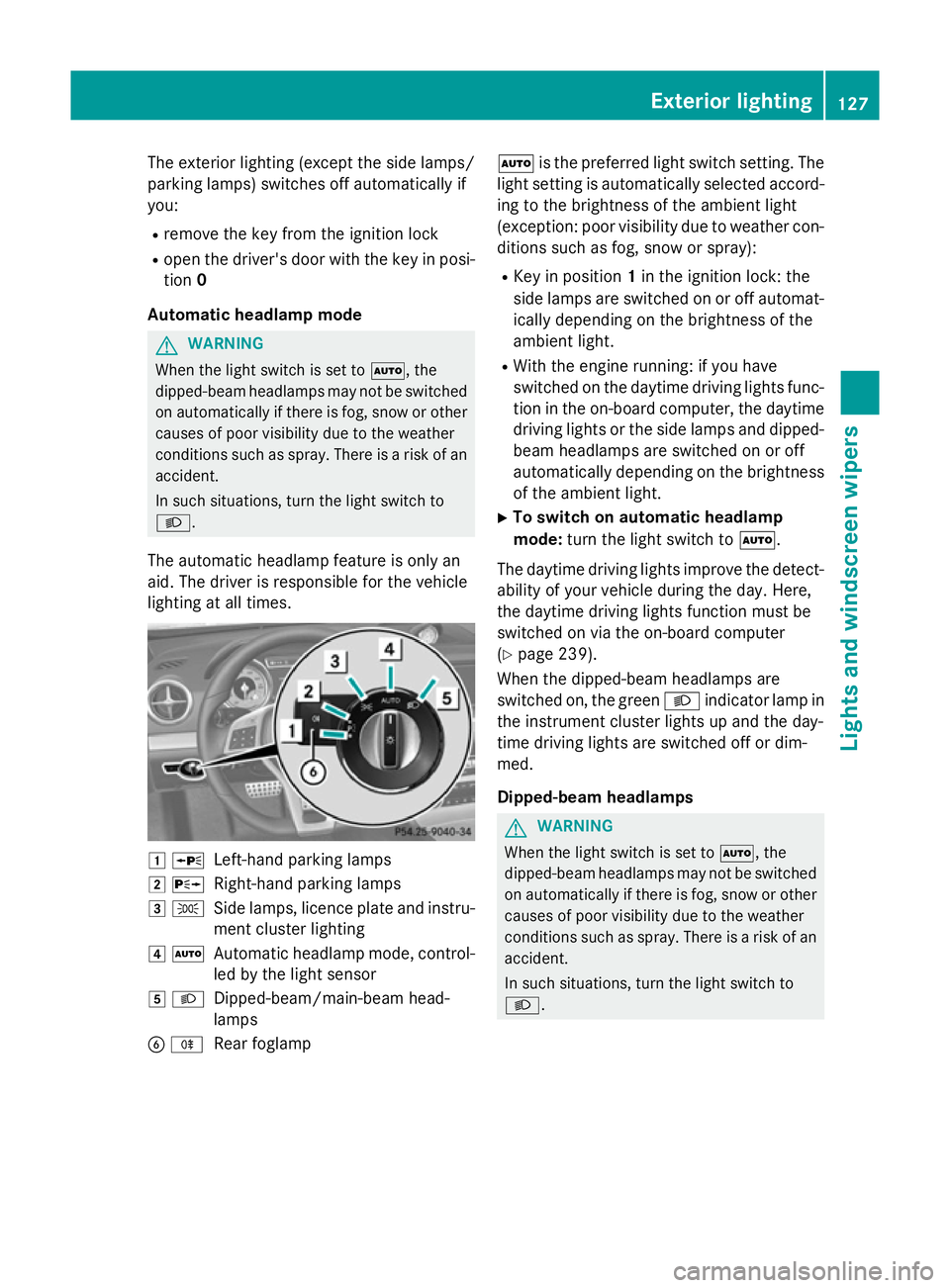
lighting at all times. 1
W
Left-hand parking lamps
2 X
Right-hand parking lamps
3 T
Side lamps, licence plate and instru-
ment cluster lighting
4 Ã
Automatic headlamp mode, control-
led by the light sensor
5 L
Dipped-beam/main-beam head-
lamps
B R
Rear foglamp Ã
is the preferred light switch setting. The
light setting is automatically selected accord- ing to the brightness of the ambient light
(exception: poor visibility due to weather con- ditions such as fog, snow or spray):
R Key in position 1in the ignition lock: the
side lamps are switched on or off automat- ically depending on the brightness of the
ambient light.
R With the engine running: if you have
switched on the daytime driving lights func-
tion in the on-board computer, the daytime
driving lights or the side lamps and dipped- beam headlamps are switched on or off
automatically depending on the brightnessof the ambient light.
X To switch on automatic headlamp
mode: turn the light switch to Ã.
The daytime driving lights improve the detect- ability of your vehicle during the day. Here,
the daytime driving lights function must be
switched on via the on-board computer
(Y page 239).
When the dipped-beam headlamps are
switched on, the green Lindicator lamp in
the instrument cluster lights up and the day-
time driving lights are switched off or dim-
med.
Dipped-beam headlamps G
WARNING
When the light switch is set to Ã, the
dipped-beam headlamps may not be switched on automatically if there is fog, snow or othercauses of poor visibility due to the weather
conditions such as spray. There is a risk of an
accident.
In such situations, turn the light switch to
L. Exterior lighting
127Lights and windscreen wipers Z
Page 131 of 637
1
W
Left-hand parking lamps
2 X
Right-hand parking lamps
3 T
Side lamps, licence plate and instru-
ment cluster lighting
4 Ã
Automatic headlamp mode, control-
led by the light sensor
5 L
Dipped-beam/main-beam head-
lamps
B R
Rear foglamp
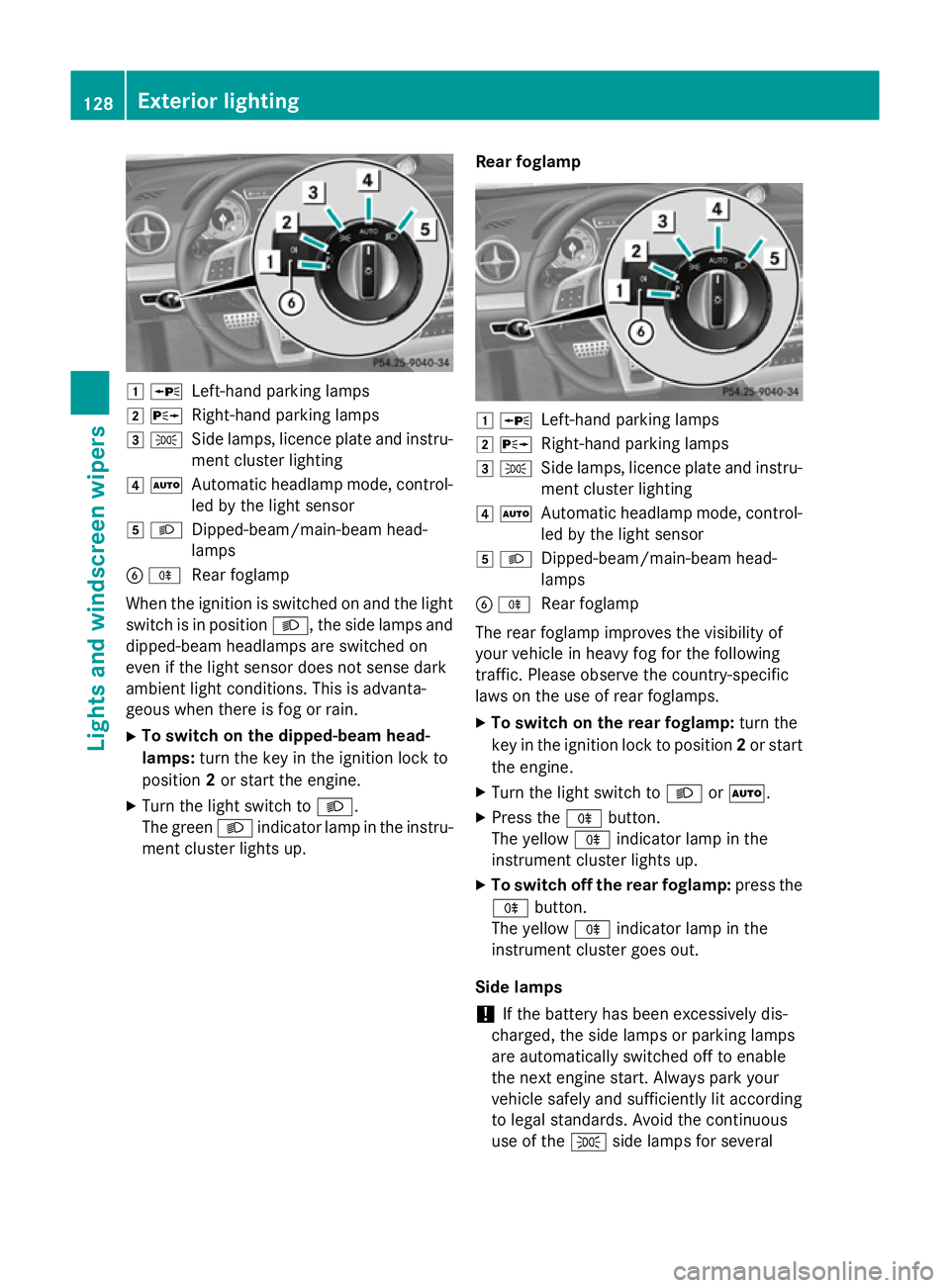
When the ignition is switched on and the light
switch is in position L, the side lamps and
dipped-beam headlamps are switched on
even if the light sensor does not sense dark
ambient light conditions. This is advanta-
geous when there is fog or rain.
X To switch on the dipped-beam head-
lamps: turn the key in the ignition lock to
position 2or start the engine.
X Turn the light switch to L.
The green Lindicator lamp in the instru-
ment cluster lights up. Rear foglamp 1
W
Left-hand parking lamps
2 X
Right-hand parking lamps
3 T
Side lamps, licence plate and instru-
ment cluster lighting
4 Ã
Automatic headlamp mode, control-
led by the light sensor
5 L
Dipped-beam/main-beam head-
lamps
B R
Rear foglamp
The rear foglamp improves the visibility of
your vehicle in heavy fog for the following
traffic. Please observe the country-specific
laws on the use of rear foglamps.
X To switch on the rear foglamp: turn the
key in the ignition lock to position 2or start
the engine.
X Turn the light switch to LorÃ.
X Press the Rbutton.
The yellow Rindicator lamp in the
instrument cluster lights up.
X To switch off the rear foglamp: press the
R button.
The yellow Rindicator lamp in the
instrument cluster goes out.
Side lamps ! If the battery has been excessively dis-
charged, the side lamps or parking lamps
are automatically switched off to enable
the next engine start. Always park your
vehicle safely and sufficiently lit according
to legal standards. Avoid the continuous
use of the Tside lamps for several 128
Exterior lightingLights and windscreen wipers
Page 132 of 637
hours. If possible, switch on the
Xright
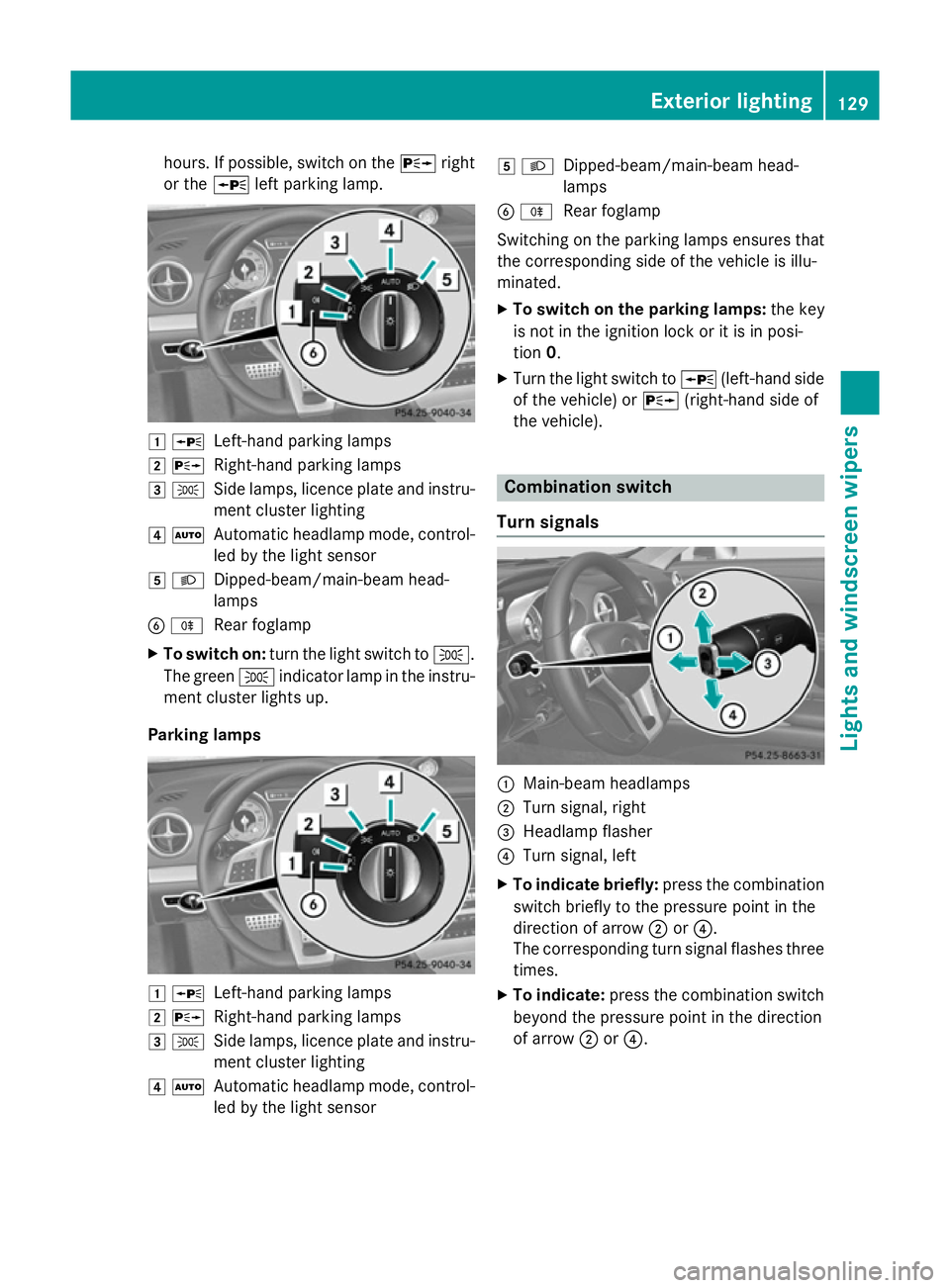
or the Wleft parking lamp. 1
W
Left-hand parking lamps
2 X
Right-hand parking lamps
3 T
Side lamps, licence plate and instru-
ment cluster lighting
4 Ã
Automatic headlamp mode, control-
led by the light sensor
5 L
Dipped-beam/main-beam head-
lamps
B R
Rear foglamp
X To switch on: turn the light switch to T.
The green Tindicator lamp in the instru-
ment cluster lights up.
Parking lamps 1
W
Left-hand parking lamps
2 X
Right-hand parking lamps
3 T
Side lamps, licence plate and instru-
ment cluster lighting
4 Ã
Automatic headlamp mode, control-
led by the light sensor 5
L
Dipped-beam/main-beam head-
lamps
B R
Rear foglamp
Switching on the parking lamps ensures that
the corresponding side of the vehicle is illu-
minated.
X To switch on the parking lamps: the key
is not in the ignition lock or it is in posi-
tion 0.
X Turn the light switch to W(left-hand side
of the vehicle) or X(right-hand side of
the vehicle). Combination switch
Turn signals :
Main-beam headlamps
; Turn signal, right
= Headlamp flasher
? Turn signal, left
X To indicate briefly: press the combination
switch briefly to the pressure point in the
direction of arrow ;or?.
The corresponding turn signal flashes three
times.
X To indicate: press the combination switch
beyond the pressure point in the direction
of arrow ;or?. Exterior lighting
129Lights and windscreen wipers Z
Page 134 of 637
The hazard warning lamps switch on auto-
matically if:
R an airbag is deployed or
R the vehicle decelerates rapidly from a
speed of above 70 km/h and comes to a
standstill
The hazard warning lamps switch off auto-
matically if the vehicle reaches a speed of
above 10 km/ha gain after a full brake appli-
cation.
i The hazard warning lamps continue to
operate even if the ignition is switched off. Headlamp cleaning system
The headlamps are cleaned automatically if
the "Wipe with washer fluid" function is oper-
ated five times (Y page 135) while the lights
are on and the engine is running. When you
switch off the ignition, the automatic head-
lamp cleaning system is reset and counting is
resumed from 0. Intelligent Light System
General notes The Intelligent Light System is a system that
adjusts the headlamps automatically to suit
the prevailing driving and weather conditions. It offers advanced functions for improved illu-
mination of the road surface, e.g. depending
on the vehicle speed or weather conditions.
The system includes the active light function, cornering light function, motorway mode and
extended range foglamps. The system is only
active when it is dark.
You can activate or deactivate the "Intelligent Light System" using the on-board computer
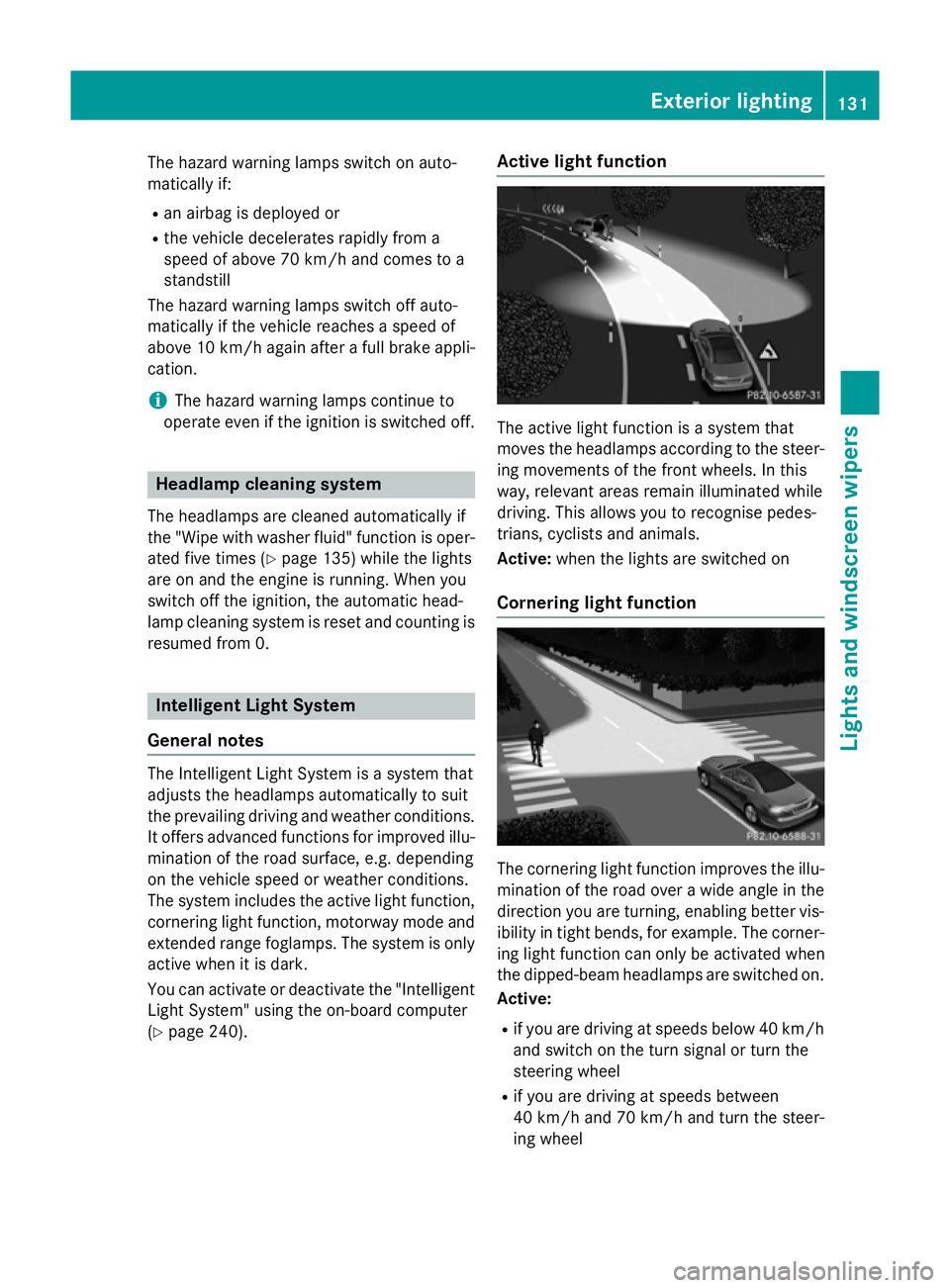
(Y page 240). Active light function
The active light function is a system that
moves the headlamps according to the steer-
ing movements of the front wheels. In this
way, relevant areas remain illuminated while
driving. This allows you to recognise pedes-
trians, cyclists and animals.
Active: when the lights are switched on
Cornering light function The cornering light function improves the illu-
mination of the road over a wide angle in the direction you are turning, enabling better vis-
ibility in tight bends, for example. The corner- ing light function can only be activated when
the dipped-beam headlamps are switched on.
Active:
R if you are driving at speeds below 40 km/h
and switch on the turn signal or turn the
steering wheel
R if you are driving at speeds between
40 km/ha nd 70 km/h and turn the steer-
ing wheel Exterior lighting
131Lights andwindscreen wipers Z
Page 135 of 637
Not active:
if you are driving at speeds above
40 km/h or switch off the turn signal or turn
the steering wheel to the straight-ahead posi- tion
The cornering lamp may remain lit for a short
time, but is automatically switched off after
no more than three minutes.
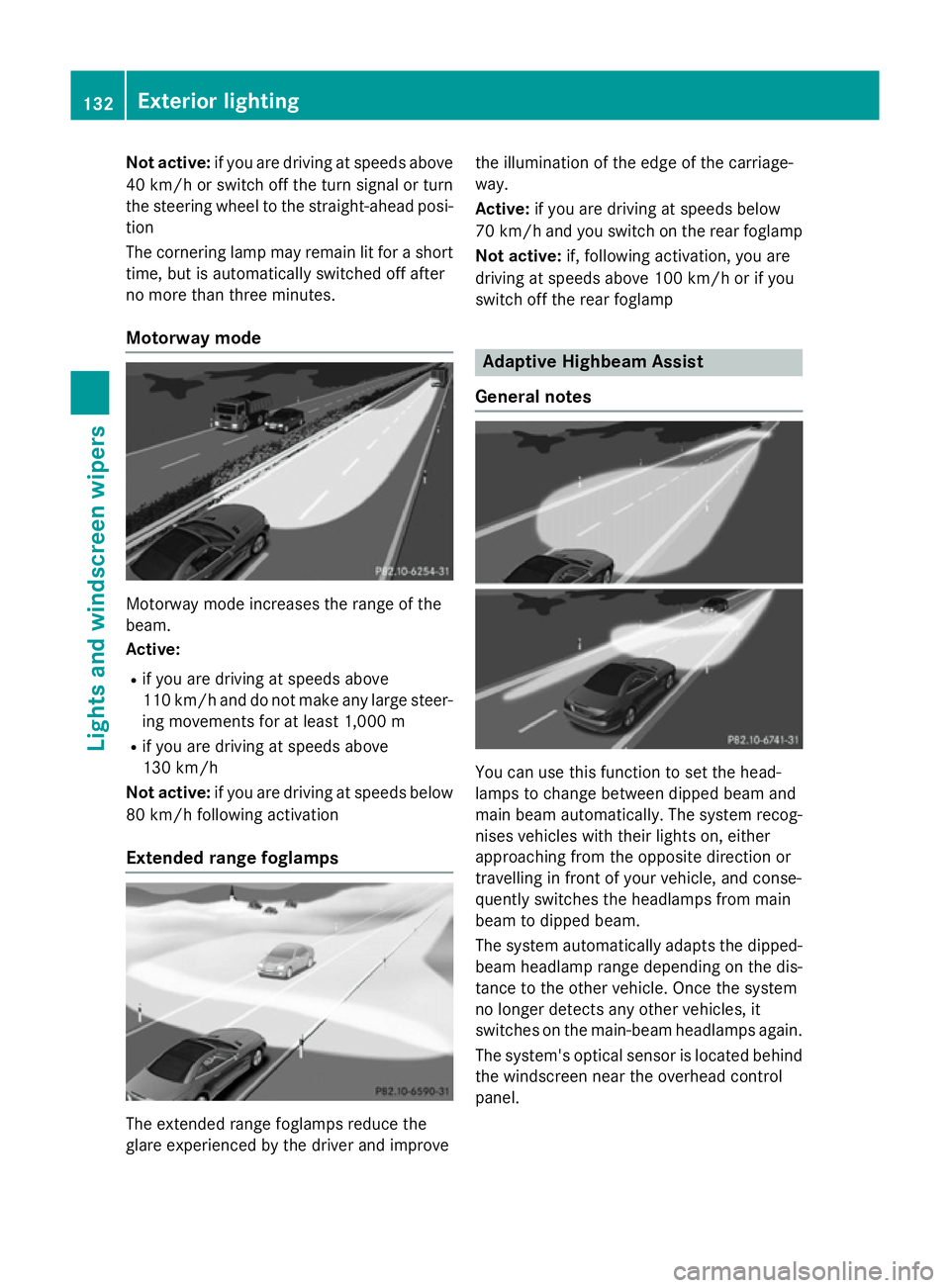
Motorway mode Motorway mode increases the range of the
beam.
Active:
R if you are driving at speeds above
110 km/h and do not make any large steer-
ing movements for at least 1,000 m
R if you are driving at speeds above
130 km/h
Not active: if you are driving at speeds below
80 km/h following activation
Extended range foglamps The extended range foglamps reduce the
glare experienced by the driver and improve the illumination of the edge of the carriage-
way.
Active:
if you are driving at speeds below
70 km/h and you switch on the rear foglamp
Not active: if, following activation, you are
driving at speeds above 100 km/h or if you
switch off the rear foglamp Adaptive Highbeam Assist
General notes You can use this function to set the head-
lamps to change between dipped beam and
main beam automatically. The system recog-
nises vehicles with their lights on, either
approaching from the opposite direction or
travelling in front of your vehicle, and conse-
quently switches the headlamps from main
beam to dipped beam.
The system automatically adapts the dipped-
beam headlamp range depending on the dis-
tance to the other vehicle. Once the system
no longer detects any other vehicles, it
switches on the main-beam headlamps again.
The system's optical sensor is located behind
the windscreen near the overhead control
panel. 132
Exterior lightingLights and
windscreen wipers