2012 MERCEDES-BENZ S-CLASS SEDAN warning lights
[x] Cancel search: warning lightsPage 11 of 536

Cup holderCenter console .............................. 439
Important safety notes ..................439
Rear compartment .........................439
Customer Assistance Center (CAC) ... 32
Customer Relations Department ....... 32
D
Dashboard see Cockpit
Data
see Technical data
Data medium
Audio DVD ..................................... 233
CD/DVD ........................................ 234
MP3 ............................................... 233
MUSIC REGISTER ........................... 234
Date format, setting .......................... 148
Day design, setting ........................... 147
Daytime running lamps Display message ............................ 405
Switching on/off (on-board
computer) ...................................... 387
Switching on/off (switch) ..............281
Dealership
see Qualified specialist workshop
DEF
Adding ........................................... 325
Display message ............................ 409
Delayed switch-off
Exterior lighting (COMAND) ...........267
Interior lighting (COMAND) ............267
Destination (navigation)
Displaying information ...................176
Entering a destination by address .. 157
Entering a destination using the
map ............................................... 164
Entering an intermediate stop .......165
Entering a point of interest ............166
Saving ............................................ 183
Selecting from the destination
memory ......................................... 163
Selecting from the list of last
destinations ................................... 163
Destination memory (navigation)
Deleting an entry ........................... 185
Entering/saving your home
address .......................................... 160
Previous destinations ....................185
Diagnostics connection ...................... 31
Dialing a number (telephone) ........... 204
Diesel .................................................. 526
Digital speedometer ......................... 378
DIRECT SELECT lever see Automatic transmission
Display
Selecting the design ......................147
Settings ......................................... 147
Display (cleaning instructions) ........ 470
Displaying the arrival time ............... 176
Displaying the distance to the
destination ......................................... 176
Display messages Calling up (on-board computer) .....390
Driving systems ............................. 410
Engine ............................................ 406
General notes ................................ 390
Hiding (on-board computer) ...........390
Lights ............................................. 403
Safety systems .............................. 391
Service interval display ..................465
SmartKey ....................................... 421
Tires ............................................... 417
Vehicle ........................................... 419
Distance
see Navigation, route overview
Distance display (on-board
computer) .......................................... 385
Distance recorder ............................. 378
see Odometer
see Trip odometer
Distance warning (warning lamp) .... 430
DISTRONIC PLUS Deactivating ................................... 343
Display message ............................ 415
Displays in the multifunction
display ........................................... 343
Driving tips .................................... 344
Function/notes ............................. 336
Important safety notes ..................336Index9
Page 16 of 536
Manual control ............................... 286
Overview ........................................ 285
Reading lamp ................................. 285
Intermediate stop
Deleting ......................................... 166
Entering ......................................... 165
iPod ®
Alphabetical track selection ..........242
Connecting to the Media
Interface ........................................ 238
Selecting a category/playlist .........241
Supported variants ........................238
J
Jack Storage location ............................ 474
Using ............................................. 476
Jump starting (engine) ...................... 483
K
Key see SmartKey
KEYLESS-GO
Convenience closing feature ............97
Locking ............................................ 83
Start/Stop button .......................... 307
Starting the engine ........................309
Unlocking ......................................... 83
Key positions
KEYLESS-GO .................................. 307
SmartKey ....................................... 307
Kickdown
Driving tips .................................... 317
Manual drive program ....................320
L
Lamps see Warning and indicator lamps
Lane-change assistant
see Blind Spot Assist
Lane detection (automatic)
see Lane Keeping Assist
Lane Keeping Assist
Activating/deactivating .................387
Display message ............................ 413
Function/information ....................365
Lap time (RACETIMER) ...................... 382
LATCH-type (ISOFIX) child seat
anchors ................................................ 68
Letter bar see Character bar
License plate lamp (display
message) ............................................ 404
Light function, active Display message ............................ 405
Lighting
see Lights
Lights
Automatic headlamp mode ............281
Cornering light function .................284
Display message ............................ 403
Driving abroad ............................... 280
Fog lamps ...................................... 282
Hazard warning lamps ...................283
High beam flasher .......................... 283
High-beam headlamps ...................283
Light switch ................................... 280
Low-beam headlamps ....................281
Rear fog lamp ................................ 282
Standing lamps .............................. 280
Switching Adaptive Highbeam
Assist on/off ................................. 388
Switching the daytime running
lamps on/off (on-board
computer) ...................................... 387
Switching the daytime running
lamps on/off (switch) ....................281
Turn signals ................................... 283
see Changing bulbs
see Interior lighting
Light sensor (display message) ....... 405
Loading guidelines ............................ 434
Locator lighting setting (COMAND) . 268
Locking see Central locking
Locking (doors)
Automatic ........................................ 89
Emergency locking ........................... 91
From inside (central locking
button) ............................................. 89
Locking centrally
see Central locking
Locking verification signal (on-
board computer) ............................... 38814Index
Page 50 of 536

Useful information
i This Operator's Manual describes all
models and all standard and optional
equipment of your vehicle available at the
time of publication of the Operator's
Manual. Country-specific differences are
possible. Please note that your vehicle may
not be equipped with all features
described. This also applies to safety-
related systems and functions.
i Please read the information on qualified
specialist workshops ( Y page 31).
Occupant safety
Overview of occupant safety
In this section, you will learn the most
important facts about the restraint system
components of the vehicle.
The restraint system consists of:
R seat belts
R child restraint systems
R LATCH-type (ISOFIX) child seat anchors
Additional protection is provided by:
R SRS (Supplemental Restraint System)
R NECK-PRO head restraints/NECK-PRO
luxury head restraints
R PRE-SAFE ®
R Air bag system components with:
- PASSENGER AIR BAG OFF indicator lamp
- front-passenger seat with Occupant
Classification System (OCS)
The different air bag systems work
independently of each other. The protective
functions of the system work in conjunction
with each other. Not all air bags are deployed
in an accident.
GWARNING
Modifications to or work improperly
conducted on restraint system components
or their wiring, as well as tampering with
interconnected electronic systems, can lead
to the restraint systems no longer functioning
as intended.
Air bags or Emergency Tensioning Devices
(ETDs), for example, could deploy
inadvertently or fail to deploy in accidents
although the deceleration threshold for air
bag deployment is exceeded. Therefore,
never modify the restraint systems. Do not
tamper with electronic components or their
software.
i See "Children in the vehicle"
( Y page 66) for more information on
infants and children traveling with you in
the vehicle and restraints for infants and
children.
SRS (Supplemental Restraint System)
Introduction
SRS consists of:
R the 6 SRS warning lamp
R air bags
R air bag control unit (with crash sensors)
R Emergency Tensioning Devices
R belt force limiters
SRS reduces the risk of occupants coming
into contact with the vehicle's interior in the
event of an accident. It can also reduce the
effect of the forces to which occupants are
subjected during an accident.
SRS warning lamp
SRS functions are checked regularly when
you switch on the ignition and when the
engine is running. Therefore, malfunctions
can be detected in good time.
The 6 SRS warning lamp in the instrument
cluster lights up when the ignition is switched
on. It goes out no later than a few seconds
after the engine is started.
48Occupant safetySafety
Page 56 of 536

Window curtain air bags : are deployed:
R on the side on which an impact occurs
R at the start of an accident with a high rate
of lateral vehicle deceleration or
acceleration, e.g. in a side impact
R regardless of whether the front-passenger
seat is occupied
R independently of seat belt use
R if the vehicle overturns and the system
determines that window curtain air bag
deployment can offer additional protection
to that provided by the seat belt
R independently of the front air bags
Window curtain air bags : will not deploy in
impacts with deceleration rates which do not
exceed the system's preset deployment
thresholds for vehicle deceleration or
acceleration. You will then be protected by
the fastened seat belt.
Occupant Classification System
(OCS)
How the Occupant Classification
System works
The Occupant Classification System (OCS)
categorizes the occupant on the front-
passenger seat by means of a weight sensor.
The front-passenger front air bag is
deactivated automatically for certain weight
categories. The 42 indicator
lamp shows you the current status. If the
42 indicator lamp is illuminated,
the front-passenger front air bag is
deactivated.
The system does not deactivate:
R the side impact air bag
R the window curtain air bag
R the Emergency Tensioning Devices
To be classified correctly, the front passenger
must sit:
R with the seat belt fastened correctly
R in a position that is as upright as possible
with their back against the seat backrest
R with their feet on the floor
If the front-passenger's weight is transferred
to another object in the vehicle (e.g. by
leaning on armrests), OCS may not be able to
approximate the occupant's weight category.
If the front-passenger seat, the seat cover or
the seat cushion are damaged, have the
necessary repair work carried out at an
authorized Mercedes-Benz Center.
For safety reasons, Mercedes-Benz
recommends that you only use seat
accessories that have been approved by
Mercedes-Benz.
Both the driver and the passenger should
always use the 42 indicator
lamp as an indication of whether or not the
passenger is properly positioned.GWARNING
If the 42 indicator lamp lights up
when an adult or someone larger than a small
individual is in the front-passenger seat, have
the front passenger reposition himself or
herself in the seat until the 42
indicator lamp goes out.
In the event of a collision, the air bag control
unit will not allow front-passenger front air
bag deployment when the OCS has classified
the front-passenger seat occupant as
weighing as much as or less than a typical 12-
month-old child in a standard child restraint
or if the front-passenger seat is classified as
being empty.
When the OCS senses that the front-
passenger seat occupant is classified as
being up to or less than the weight of a typical
12-month-old child in a standard child
restraint, the 42 indicator lamp
will illuminate when the engine is started and
remain illuminated, indicating that the front-
passenger front air bag is deactivated.
54Occupant safetySafety
Page 67 of 536

If after six seconds the driver's or front-
passenger seat belt is not fastened and the
doors are closed, the 7 seat belt warning
lamp will remain lit:
R until the driver's or front passenger's seat
belt is fastened
R once the vehicle has exceeded a speed of
15 mph (25 km/h), in addition a warning
tone will sound with increasing intensity for
up to 60 seconds or until the driver's or
front-passenger seat belt is fastened.
If the driver or front passenger unfastens their
seat belt during the journey, the 7 seat
belt warning lamp lights up and the warning
tone sounds again.
The warning tone ceases after 60 seconds
even if the driver or front passenger has still
not fastened their seat belt. The 7 seat
belt warning lamp stops flashing, but remains
lit.
After the vehicle has come to a stop, the
warning tone will be reactivated and the
7 seat belt warning lamp will flash again
once the vehicle has exceeded a speed of
15 mph (25 km/h).
The 7 seat belt warning lamp will not go
out until:
R both the driver and the front passenger
have fastened their seat belts.
or
R the vehicle is stationary and a door is open.
i For more information on the 7 seat
belt warning lamp, see "Warning and
indicator lamps in the instrument cluster,
seat belt" ( Y page 422).
Emergency Tensioning Devices, belt
force limiters
The front seat belts and the outer seat belts
in the rear are equipped with ETDs and seat
belt force limiters.
The ETDs tighten the seat belts in an accident,
pulling them close against the body.
The ETDs do not correct incorrect seat
positions or incorrectly fastened seat belts.
The ETDs do not pull vehicle occupants back
towards the backrest.
Seat belt force limiters, when triggered, help
to reduce the peak force exerted by the seat
belt on the vehicle occupant.
The seat belt force limiters for the front seats
are synchronized with the front air bags.
These take on a part of the deceleration force.
Thus, the force exerted on the occupant is
distributed over a greater area.
The ETDs can only be activated when:
R the ignition is switched on.
R the restraint systems are operational; see
"SRS warning lamp" ( Y page 48).
R the belt tongue is engaged in the buckle on
each of the lap-shoulder belts in the front.
R the front-passenger seat is occupied and
the belt tongue is engaged in the buckle on
the front-passenger side.
The ETDs on the outside seats in the rear
compartment are triggered independently of
the lock status of the seat belts.
The ETDs are triggered depending on the type
and severity of an accident:
R if, in the event of a head-on or rear-end
collision, the vehicle decelerates or
accelerates rapidly in a longitudinal
direction during the initial stages of the
impact
R if, in the event of a side impact, on the side
opposite the impact the vehicle
decelerates or accelerates rapidly in a
lateral direction
R if, in certain situations where the vehicle
overturns, the system determines that it
can provide additional protection
If the air bags are deployed, you will hear a
bang, and a small amount of powder may also
be released. Only in rare cases will the bang
affect your hearing. The powder that is
released generally does not constitute a
health hazard. The 6 SRS warning lamp
lights up.Occupant safety65SafetyZ
Page 75 of 536
RADAPTIVE BRAKE
R PRE-SAFE ®
Brake
Important safety notes
GWARNING
The following factors increase the risk of
accidents:
R Excessive speed, especially in turns
R Wet and slippery road surfaces
R Following another vehicle too closely
The driving safety systems described in this
section cannot reduce these risks or prevent
the natural laws of physics from acting on the
vehicle. They cannot increase braking or
steering efficiency beyond that afforded by
the condition of the vehicle brakes and tires
or the traction afforded.
Only a safe, attentive, and skillful driver can
prevent accidents.
The capabilities of a vehicle equipped with the
driving safety systems described in this
section must never be exploited in a reckless
or dangerous manner which could jeopardize
the user's safety or the safety of others.
Always adjust your driving style to the
prevailing road and weather conditions and
keep a safe distance to other road users and
objects on the street.
If a driving system malfunctions, other driving
safety systems may also switch off. Observe
indicator and warning lamps that may come
on as well as messages in the multifunction
display that may appear.
GWARNING
HYBRID vehicles: It is imperative that you read
the HYBRID Supplemental Operating
Instructions included in your vehicle literature
portfolio. You may otherwise not receive all
necessary safety information and warning for
the operation of your vehicle.
i Please note that the driving safety
systems described only work as effectively
as possible when there is adequate contact
between the tires and the road surface. Pay
particular attention to the information
regarding tires, recommended minimum
tire tread depths etc. in the "Wheels and
tires" section ( Y page 492).
In wintry driving conditions, always use
winter tires (M+S tires) and if necessary,
snow chains. Only in this way will the
driving safety systems described in this
section work as effectively as possible.
ABS (Anti-lock Braking System)
Important safety notes
i Observe the "Important safety notes"
section ( Y page 73).
ABS regulates brake pressure in such a way
that the wheels do not lock when you brake.
This allows you to continue steering the
vehicle when braking.
ABS works from a speed of about 5 mph
( 8 km/h) upwards, regardless of road-surface
conditions. ABS works on slippery surfaces,
even if you only brake gently.
GWARNING
If the ABS malfunctions, other driving systems
such as the BAS or the ESP ®
are also switched
off. Observe indicator and warning lamps that
may come on as well as messages in the
multifunction display that may appear.
If the ABS malfunctions, the wheels may lock
during hard braking, reducing the steering
capability and extending the braking distance.
The ! warning lamp in the instrument
cluster lights up when the ignition is switched
on. It goes out when the engine is running.
Brakes
If ABS intervenes when braking, you will feel
a pulsing in the brake pedal.
Driving safety systems73SafetyZ
Page 79 of 536

Rtraction control is still activated.
R ESP ®
still provides support when you
brake.
If ESP ®
is deactivated and one or more wheels
start to spin, the ÷ ESP®
warning lamp in
the instrument cluster flashes. In such
situations, ESP ®
will not stabilize the vehicle.XTo deactivate: (Y page 386).
The å ESP®
OFF warning lamp in the
instrument cluster lights up.GWARNING
When the å ESP®
OFF warning lamp is lit,
ESP ®
is deactivated.
If the ÷ ESP®
warning lamp and the
å ESP®
OFF warning lamp remain lit,
ESP ®
is not available due to a malfunction.
When ESP ®
is deactivated or not operational,
vehicle stability in standard driving
maneuvers is reduced.
Adapt your speed and driving to the prevailing
road conditions and to the non-operating
status of the ESP ®
.
! Avoid spinning the driven wheels for an
extended period with ESP ®
deactivated.
You could otherwise damage the drivetrain.
XTo activate: (Y page 386).
The å ESP®
OFF warning lamp in the
instrument cluster goes out.
EBD (electronic brake force
distribution)
i Observe the "Important safety notes"
section ( Y page 73).
EBD monitors and controls the brake
pressure on the rear wheels to improve
driving stability while braking.
GWARNING
If EBD has malfunctioned, the braking system
remains available with full brake boosting
effect. However, the rear wheels can still lock,
e.g. under full braking. This could cause you
to lose control of your vehicle and cause an
accident. You should therefore adapt your
driving style to the different handling
characteristics.XObserve the notes on warning and indicator
lamps ( Y page 425) as well as display
messages ( Y page 394).
ADAPTIVE BRAKE
ADAPTIVE BRAKE enhances braking safety
and offers increased braking comfort. In
addition to the braking function, ADAPTIVE
BRAKE also has the HOLD function
( Y page 346) and hill start assist
( Y page 310). For further information, see
Driving tips ( Y page 331).
PRE-SAFE ®
Brake
PRE-SAFE ®
Brake is only available in vehicles
with DISTRONIC PLUS.
i Observe the "Important safety notes"
section ( Y page 73).
PRE-SAFE ®
Brake can help you to minimize
the risk of a frontal collision with a vehicle
ahead or reduce the effects of such a
collision. If PRE-SAFE ®
Brake has detected a
risk of collision, you will be warned visually
and acoustically as well as by automatic
braking. PRE-SAFE ®
Brake cannot prevent a
collision without your intervention.
At speeds above approximately
4 mph (7 km/h), this function warns you
when you are rapidly approaching the vehicle
in front. An intermittent warning tone will
then sound and the · distance warning
lamp in the instrument cluster will light up.
Driving safety systems77SafetyZ
Page 87 of 536
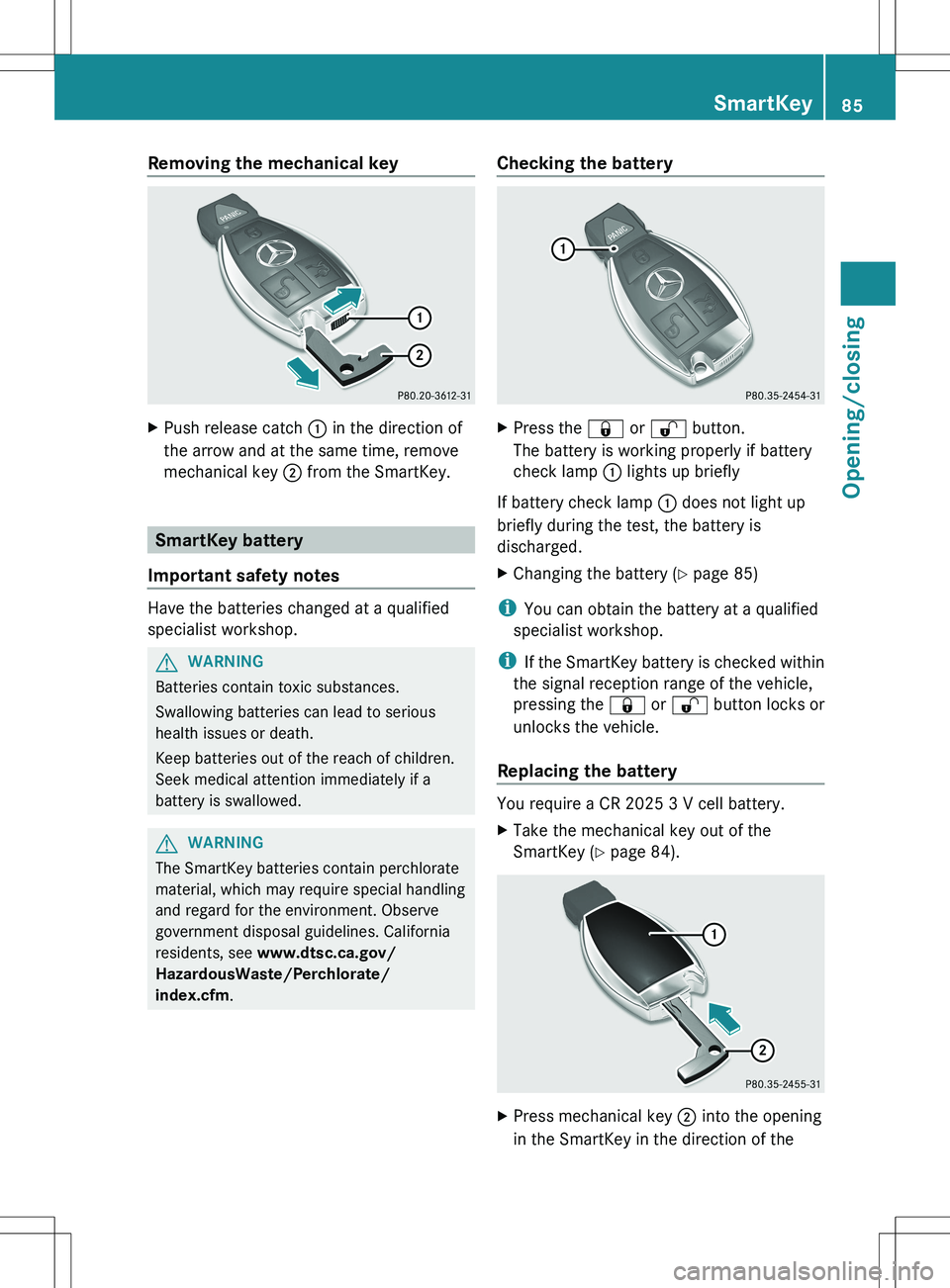
Removing the mechanical keyXPush release catch : in the direction of
the arrow and at the same time, remove
mechanical key ; from the SmartKey.
SmartKey battery
Important safety notes
Have the batteries changed at a qualified
specialist workshop.
GWARNING
Batteries contain toxic substances.
Swallowing batteries can lead to serious
health issues or death.
Keep batteries out of the reach of children.
Seek medical attention immediately if a
battery is swallowed.
GWARNING
The SmartKey batteries contain perchlorate
material, which may require special handling
and regard for the environment. Observe
government disposal guidelines. California
residents, see www.dtsc.ca.gov/
HazardousWaste/Perchlorate/
index.cfm .
Checking the batteryXPress the & or % button.
The battery is working properly if battery
check lamp : lights up briefly
If battery check lamp : does not light up
briefly during the test, the battery is
discharged.
XChanging the battery ( Y page 85)
i
You can obtain the battery at a qualified
specialist workshop.
i If the SmartKey battery is checked within
the signal reception range of the vehicle,
pressing the & or % button locks or
unlocks the vehicle.
Replacing the battery
You require a CR 2025 3 V cell battery.
XTake the mechanical key out of the
SmartKey ( Y page 84).XPress mechanical key ; into the opening
in the SmartKey in the direction of theSmartKey85Opening/closingZ