2012 MERCEDES-BENZ S-CLASS SEDAN sensor
[x] Cancel search: sensorPage 415 of 536
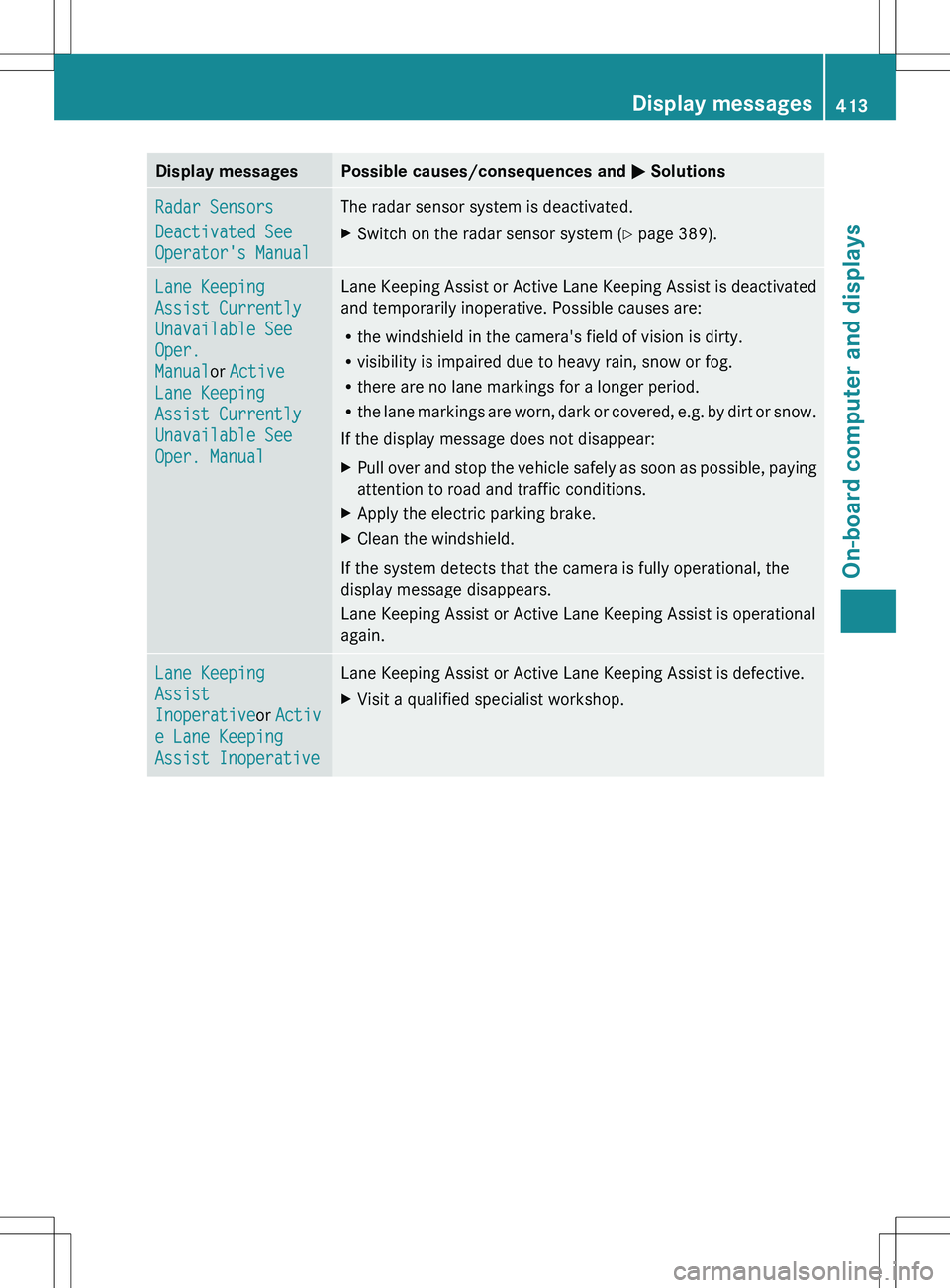
Display messagesPossible causes/consequences and M SolutionsRadar Sensors
Deactivated See
Operator's ManualThe radar sensor system is deactivated.XSwitch on the radar sensor system ( Y page 389).Lane Keeping
Assist Currently
Unavailable See
Oper.
Manual or Active
Lane Keeping
Assist Currently
Unavailable See
Oper. ManualLane Keeping Assist or Active Lane Keeping Assist is deactivated
and temporarily inoperative. Possible causes are:
R the windshield in the camera's field of vision is dirty.
R visibility is impaired due to heavy rain, snow or fog.
R there are no lane markings for a longer period.
R the lane markings are worn, dark or covered, e.g. by dirt or snow.
If the display message does not disappear:XPull over and stop the vehicle safely as soon as possible, paying
attention to road and traffic conditions.XApply the electric parking brake.XClean the windshield.
If the system detects that the camera is fully operational, the
display message disappears.
Lane Keeping Assist or Active Lane Keeping Assist is operational
again.
Lane Keeping
Assist
Inoperative or Activ
e Lane Keeping
Assist InoperativeLane Keeping Assist or Active Lane Keeping Assist is defective.XVisit a qualified specialist workshop.Display messages413On-board computer and displaysZ
Page 416 of 536
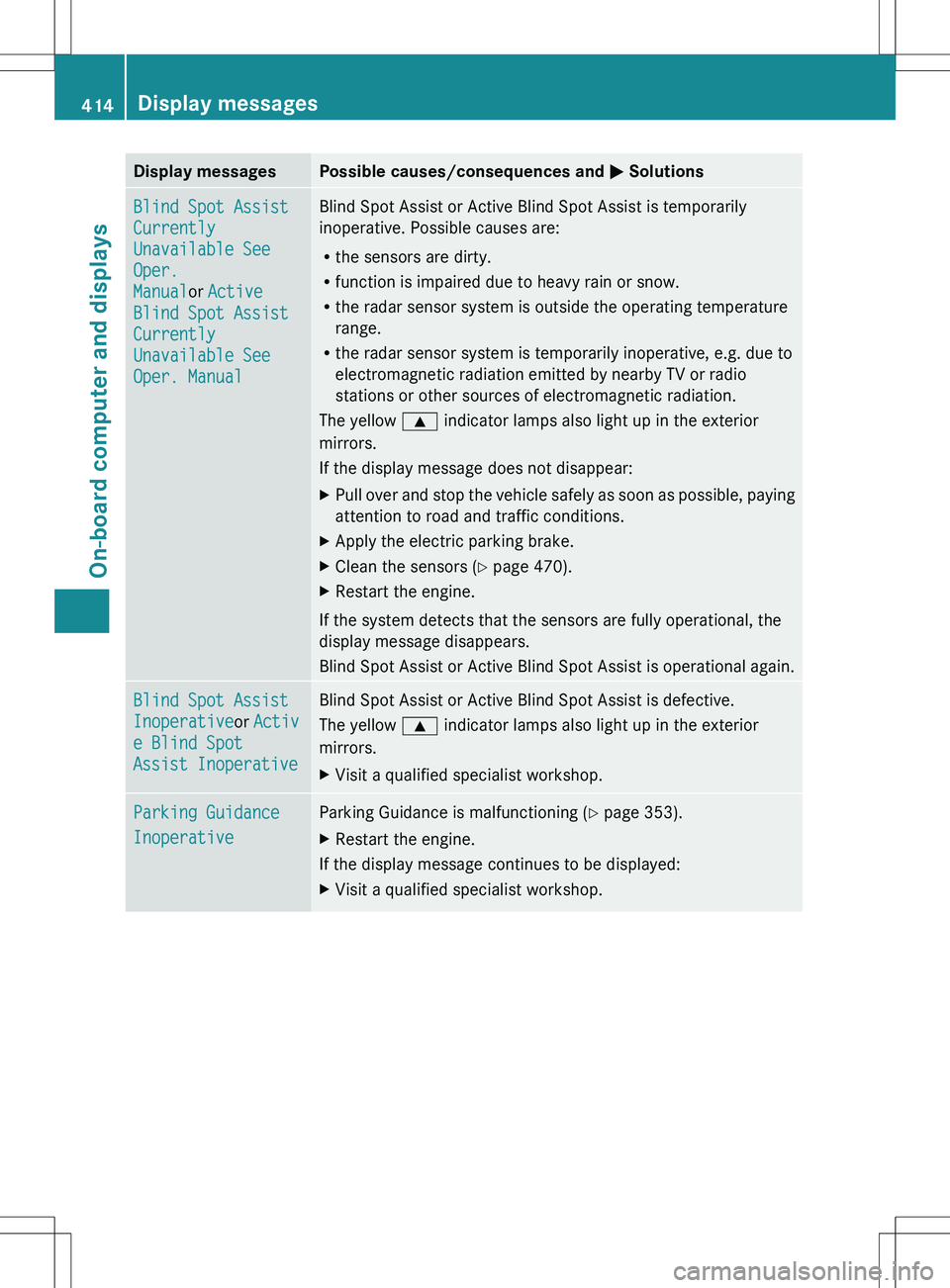
Display messagesPossible causes/consequences and M SolutionsBlind Spot Assist
Currently
Unavailable See
Oper.
Manual or Active
Blind Spot Assist
Currently
Unavailable See
Oper. ManualBlind Spot Assist or Active Blind Spot Assist is temporarily
inoperative. Possible causes are:
R the sensors are dirty.
R function is impaired due to heavy rain or snow.
R the radar sensor system is outside the operating temperature
range.
R the radar sensor system is temporarily inoperative, e.g. due to
electromagnetic radiation emitted by nearby TV or radio
stations or other sources of electromagnetic radiation.
The yellow 9 indicator lamps also light up in the exterior
mirrors.
If the display message does not disappear:XPull over and stop the vehicle safely as soon as possible, paying
attention to road and traffic conditions.XApply the electric parking brake.XClean the sensors ( Y page 470).XRestart the engine.
If the system detects that the sensors are fully operational, the
display message disappears.
Blind Spot Assist or Active Blind Spot Assist is operational again.
Blind Spot Assist
Inoperative or Activ
e Blind Spot
Assist InoperativeBlind Spot Assist or Active Blind Spot Assist is defective.
The yellow 9 indicator lamps also light up in the exterior
mirrors.XVisit a qualified specialist workshop.Parking Guidance
InoperativeParking Guidance is malfunctioning ( Y page 353).XRestart the engine.
If the display message continues to be displayed:
XVisit a qualified specialist workshop.414Display messagesOn-board computer and displays
Page 417 of 536
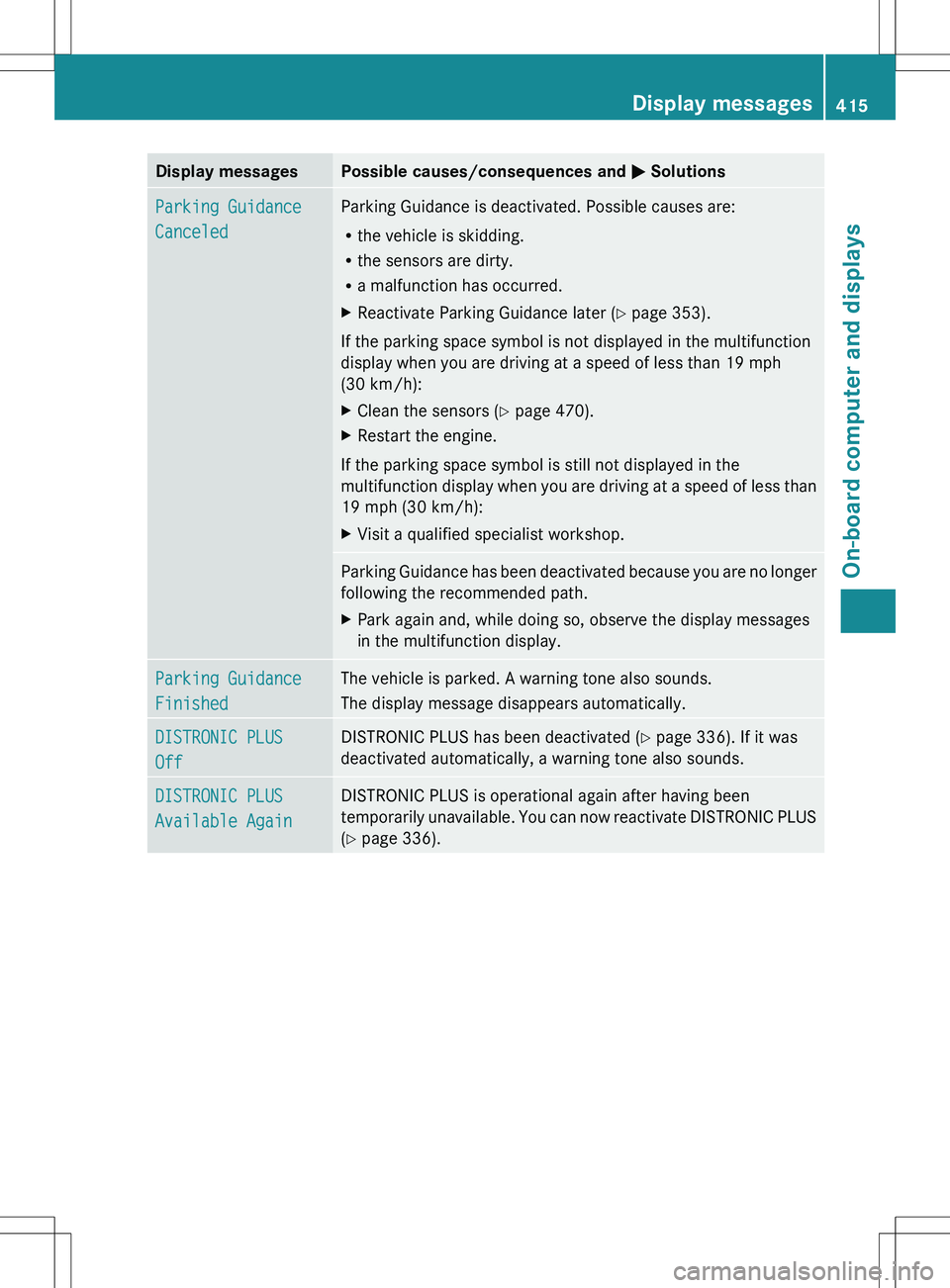
Display messagesPossible causes/consequences and M SolutionsParking Guidance
CanceledParking Guidance is deactivated. Possible causes are:
R the vehicle is skidding.
R the sensors are dirty.
R a malfunction has occurred.XReactivate Parking Guidance later ( Y page 353).
If the parking space symbol is not displayed in the multifunction
display when you are driving at a speed of less than 19 mph
(30 km/h):
XClean the sensors ( Y page 470).XRestart the engine.
If the parking space symbol is still not displayed in the
multifunction display when you are driving at a speed of less than
19 mph (30 km/h):
XVisit a qualified specialist workshop.Parking Guidance has been deactivated because you are no longer
following the recommended path.XPark again and, while doing so, observe the display messages
in the multifunction display.Parking Guidance
FinishedThe vehicle is parked. A warning tone also sounds.
The display message disappears automatically.DISTRONIC PLUS
OffDISTRONIC PLUS has been deactivated ( Y page 336). If it was
deactivated automatically, a warning tone also sounds.DISTRONIC PLUS
Available AgainDISTRONIC PLUS is operational again after having been
temporarily unavailable. You can now reactivate DISTRONIC PLUS
( Y page 336).Display messages415On-board computer and displaysZ
Page 418 of 536
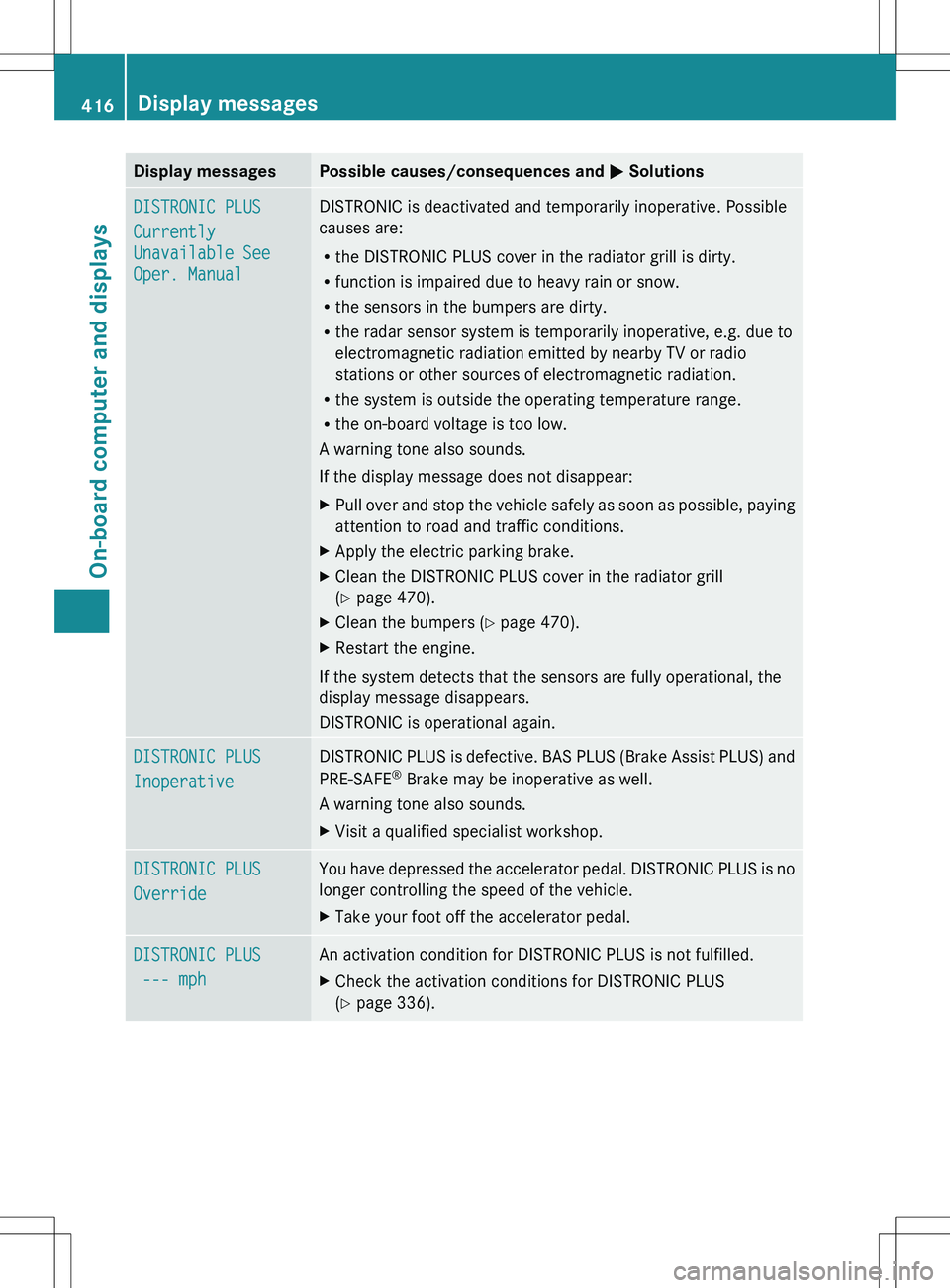
Display messagesPossible causes/consequences and M SolutionsDISTRONIC PLUS
Currently
Unavailable See
Oper. ManualDISTRONIC is deactivated and temporarily inoperative. Possible
causes are:
R the DISTRONIC PLUS cover in the radiator grill is dirty.
R function is impaired due to heavy rain or snow.
R the sensors in the bumpers are dirty.
R the radar sensor system is temporarily inoperative, e.g. due to
electromagnetic radiation emitted by nearby TV or radio
stations or other sources of electromagnetic radiation.
R the system is outside the operating temperature range.
R the on-board voltage is too low.
A warning tone also sounds.
If the display message does not disappear:XPull over and stop the vehicle safely as soon as possible, paying
attention to road and traffic conditions.XApply the electric parking brake.XClean the DISTRONIC PLUS cover in the radiator grill
( Y page 470).XClean the bumpers ( Y page 470).XRestart the engine.
If the system detects that the sensors are fully operational, the
display message disappears.
DISTRONIC is operational again.
DISTRONIC PLUS
InoperativeDISTRONIC PLUS is defective. BAS PLUS (Brake Assist PLUS) and
PRE-SAFE ®
Brake may be inoperative as well.
A warning tone also sounds.XVisit a qualified specialist workshop.DISTRONIC PLUS
OverrideYou have depressed the accelerator pedal. DISTRONIC PLUS is no
longer controlling the speed of the vehicle.XTake your foot off the accelerator pedal.DISTRONIC PLUS
--- mphAn activation condition for DISTRONIC PLUS is not fulfilled.XCheck the activation conditions for DISTRONIC PLUS
( Y page 336).416Display messagesOn-board computer and displays
Page 419 of 536

Display messagesPossible causes/consequences and M SolutionsCruise Control
InoperativeCruise control is defective.
A warning tone also sounds.XVisit a qualified specialist workshop.Cruise Control
--- mphA condition for activating cruise control has not been fulfilled.
You have tried to store a speed below 20 mph (30 km/h), for
example.XIf conditions permit, drive faster than 20 mph (30 km/h) and
store the speed.XCheck the activation conditions for cruise control
( Y page 334).
Tires
GWARNING
Do not drive with a flat tire. A flat tire affects the ability to steer or brake the vehicle. You may
lose control of the vehicle. Continued driving with a flat tire will cause excessive heat build-up
and possibly a fire.
GWARNING
Follow recommended tire inflation pressures.
Do not underinflate tires. Underinflated tires wear excessively and/or unevenly, adversely affect
handling and fuel economy, and are more likely to fail from being overheated.
Do not overinflate tires. Overinflated tires can adversely affect handling and ride comfort, wear
unevenly, increase stopping distance, and result in sudden deflation (blowout) because they are
more likely to become punctured or damaged by road debris, potholes etc.
Display messagesPossible causes/consequences and M SolutionsTire pressures
Displayed After
Driving A Few
MinutesThe tire pressure monitor is measuring the tire pressure.XDrive on.
The tire pressures appear in the multifunction display after you
have been driving for a few minutes.Tire Pressure
Monitor
InoperativeThe tire pressure monitor is faulty.XVisit a qualified specialist workshop.Tire Pressure
Monitor
Inoperative No
Wheel SensorsThe wheels mounted do not have a suitable tire pressure sensor.
The tire pressure monitor is deactivated.XMount wheels with suitable tire pressure sensors.
The tire pressure monitor is activated automatically after driving
for a few minutes.Display messages417On-board computer and displaysZ
Page 420 of 536
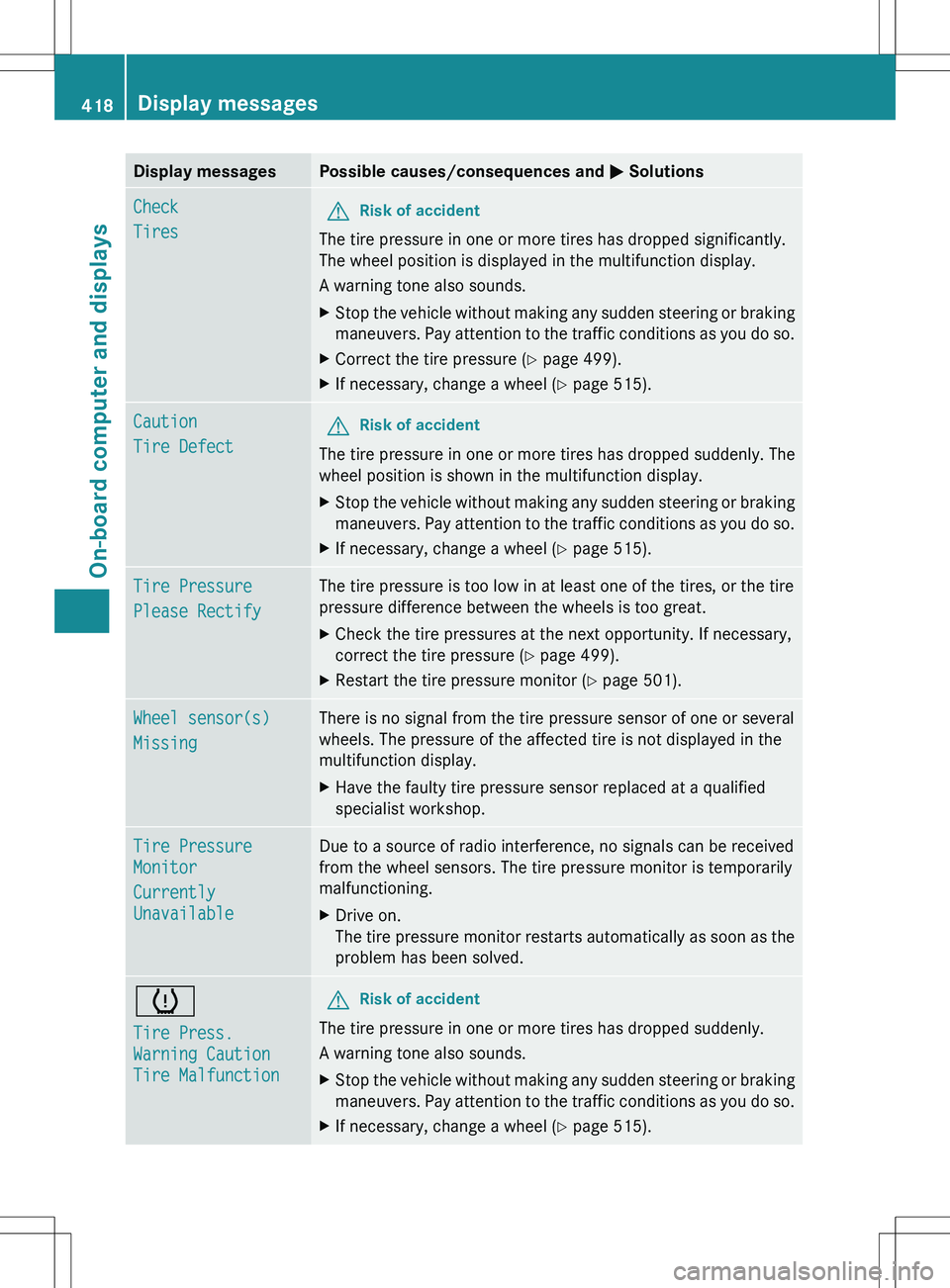
Display messagesPossible causes/consequences and M SolutionsCheck
TiresGRisk of accident
The tire pressure in one or more tires has dropped significantly.
The wheel position is displayed in the multifunction display.
A warning tone also sounds.
XStop the vehicle without making any sudden steering or braking
maneuvers. Pay attention to the traffic conditions as you do so.XCorrect the tire pressure ( Y page 499).XIf necessary, change a wheel ( Y page 515).Caution
Tire DefectGRisk of accident
The tire pressure in one or more tires has dropped suddenly. The
wheel position is shown in the multifunction display.
XStop the vehicle without making any sudden steering or braking
maneuvers. Pay attention to the traffic conditions as you do so.XIf necessary, change a wheel ( Y page 515).Tire Pressure
Please RectifyThe tire pressure is too low in at least one of the tires, or the tire
pressure difference between the wheels is too great.XCheck the tire pressures at the next opportunity. If necessary,
correct the tire pressure ( Y page 499).XRestart the tire pressure monitor ( Y page 501).Wheel sensor(s)
MissingThere is no signal from the tire pressure sensor of one or several
wheels. The pressure of the affected tire is not displayed in the
multifunction display.XHave the faulty tire pressure sensor replaced at a qualified
specialist workshop.Tire Pressure
Monitor
Currently
UnavailableDue to a source of radio interference, no signals can be received
from the wheel sensors. The tire pressure monitor is temporarily
malfunctioning.XDrive on.
The tire pressure monitor restarts automatically as soon as the
problem has been solved.h
Tire Press.
Warning Caution
Tire MalfunctionGRisk of accident
The tire pressure in one or more tires has dropped suddenly.
A warning tone also sounds.
XStop the vehicle without making any sudden steering or braking
maneuvers. Pay attention to the traffic conditions as you do so.XIf necessary, change a wheel ( Y page 515).418Display messagesOn-board computer and displays
Page 458 of 536
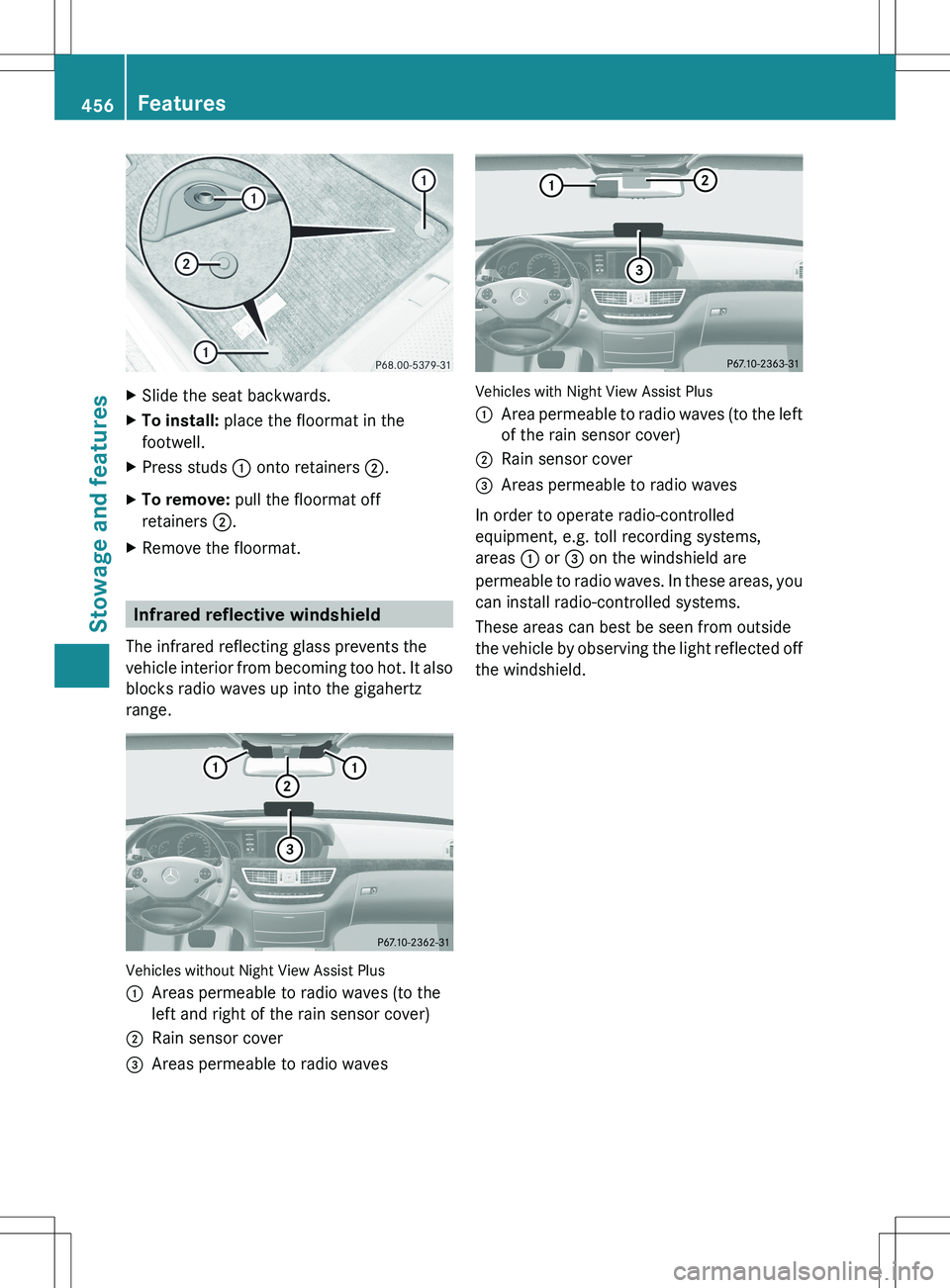
XSlide the seat backwards.XTo install: place the floormat in the
footwell.XPress studs : onto retainers ;.XTo remove: pull the floormat off
retainers ;.XRemove the floormat.
Infrared reflective windshield
The infrared reflecting glass prevents the
vehicle interior from becoming too hot. It also
blocks radio waves up into the gigahertz
range.
Vehicles without Night View Assist Plus
:Areas permeable to radio waves (to the
left and right of the rain sensor cover);Rain sensor cover=Areas permeable to radio waves
Vehicles with Night View Assist Plus
:Area permeable to radio waves (to the left
of the rain sensor cover);Rain sensor cover=Areas permeable to radio waves
In order to operate radio-controlled
equipment, e.g. toll recording systems,
areas : or = on the windshield are
permeable to radio waves. In these areas, you
can install radio-controlled systems.
These areas can best be seen from outside
the vehicle by observing the light reflected off
the windshield.
456FeaturesStowage and features
Page 472 of 536
Cleaning the mirror turn signals
! Only use cleaning agents or cleaning
cloths that are suitable for plastic lenses.
Unsuitable cleaning agents or cleaning
cloths could scratch or damage the plastic
lenses of the mirror turn signals.
XClean the plastic lenses of the mirror turn
signals using a wet sponge and a mild
cleaning agent, e.g. Mercedes-Benz car
shampoo. Cleaning cloths may be used as
well.
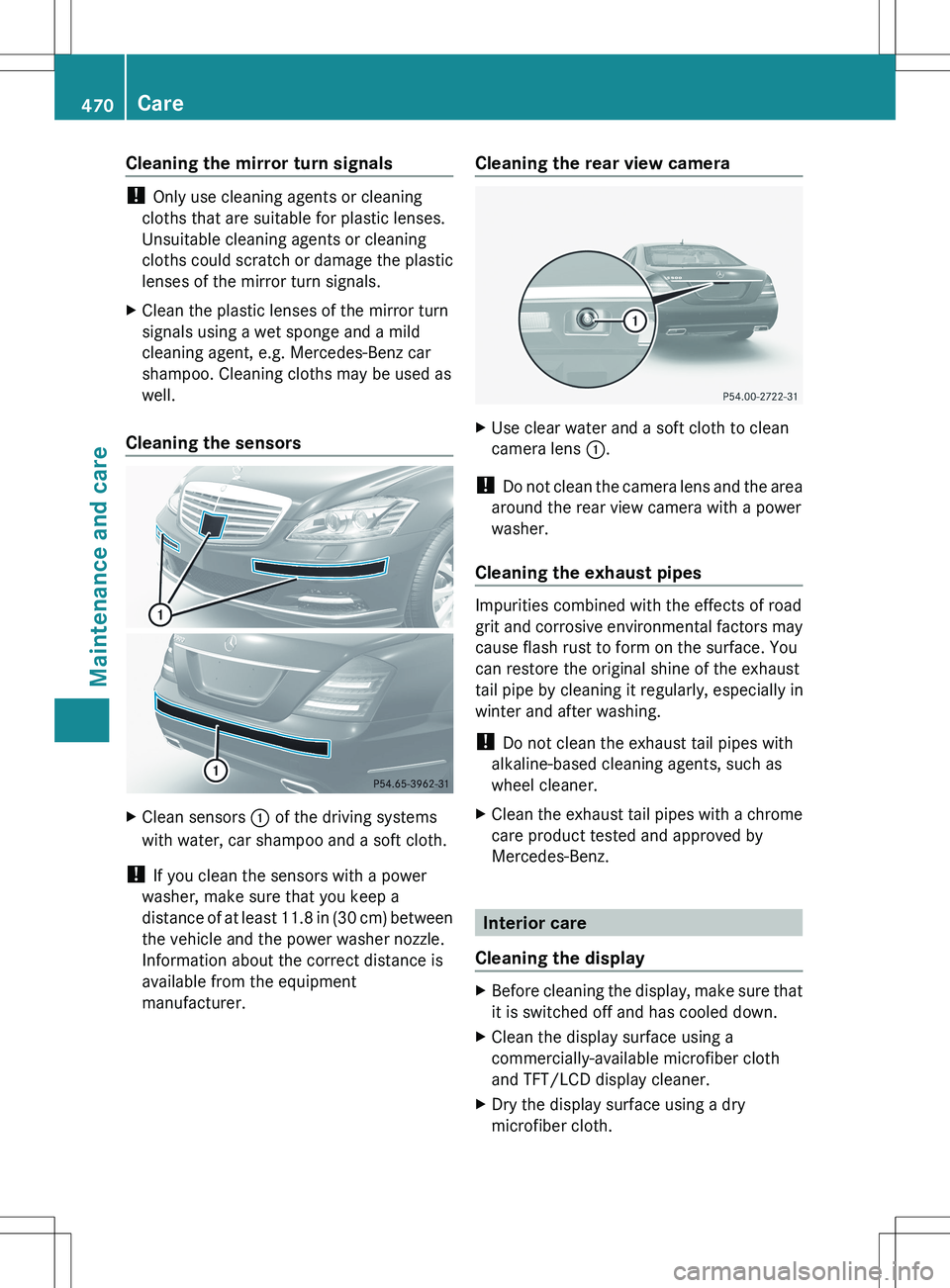
Cleaning the sensors
XClean sensors : of the driving systems
with water, car shampoo and a soft cloth.
! If you clean the sensors with a power
washer, make sure that you keep a
distance of at least 11.8 in (30 cm) between
the vehicle and the power washer nozzle.
Information about the correct distance is
available from the equipment
manufacturer.
Cleaning the rear view cameraXUse clear water and a soft cloth to clean
camera lens :.
!
Do not clean the camera lens and the area
around the rear view camera with a power
washer.
Cleaning the exhaust pipes
Impurities combined with the effects of road
grit and corrosive environmental factors may
cause flash rust to form on the surface. You
can restore the original shine of the exhaust
tail pipe by cleaning it regularly, especially in
winter and after washing.
! Do not clean the exhaust tail pipes with
alkaline-based cleaning agents, such as
wheel cleaner.
XClean the exhaust tail pipes with a chrome
care product tested and approved by
Mercedes-Benz.
Interior care
Cleaning the display
XBefore cleaning the display, make sure that
it is switched off and has cooled down.XClean the display surface using a
commercially-available microfiber cloth
and TFT/LCD display cleaner.XDry the display surface using a dry
microfiber cloth.470CareMaintenance and care