2012 MERCEDES-BENZ S-CLASS SEDAN phone
[x] Cancel search: phonePage 21 of 536

R
RACETIMER (on-board computer) .... 382
Radar sensor system Activating/deactivating .................389
Display message ............................ 413
Radiator cover ................................... 459
Radio HD Radio™ .................................... 219
Selecting a station .........................380
Setting a station ............................ 216
Sound settings (balance, bass,
fader, treble) .................................. 139
Storing stations ............................. 217
Switching on .................................. 215
Switching wavebands ....................216
Radio-controlled devices
(installing) .......................................... 456
Read-aloud function .......................... 178
Reading lamp ..................................... 285
Real-time traffic reports ................... 178
Rear compartment Activating/deactivating climate
control ........................................... 296
Setting the air distribution .............299
Setting the airflow .........................299
Setting the air vents ......................303
Setting the temperature ................298
Rear fog lamp
Display message ............................ 404
Switching on/off ........................... 282
Rear seat
Adjusting ....................................... 108
Rear Seat Entertainment System
Adjusting the sound settings .........253
Audio mode (CD, DVD, MP3) .........255
AUX mode ...................................... 263
Changing batteries (remote
control, headphones) .....................251
Changing the picture format ..........254
Components/overview ..................143
Headphones (cordless) ..................146
Multiple users ................................ 253
Overview of picture settings ..........253
Remote control .............................. 144
Screen ........................................... 144
Setting the audio format ................262
System settings ............................. 254Using headphones .........................252
Using the main loudspeaker ..........252
Video DVD mode ........................... 258
Rear seats
Overview .......................................... 45
Rear view camera
Cleaning instructions .....................470
Function/notes ............................. 357
Rear-view mirror ............................... 117
Rear window blind ............................ 441
see Rear window roller sunblind
see Roller sunblind
Rear window defroster
Problem (malfunction) ...................301
Switching on/off ........................... 301
Redialing (telephone) ........................ 204
Refueling Fuel gauge ....................................... 37
Important safety notes ..................321
Refueling process ..........................322
see Fuel
Remote control
Garage door opener .......................452
Programming (garage door
opener) .......................................... 453
Remote operation
Selecting a screen (Rear Seat
Entertainment System) ..................144
Switching a screen on/off (Rear
Seat Entertainment System) ..........145
Reporting safety defects .................... 32
Reserve (fuel tank) see Fuel
Reserve fuel
Display message ............................ 409
Warning lamp ................................. 430
see Fuel
Reset function ................................... 154
Resetting (factory settings) ............. 154
Residual heat (climate control) ........ 302
Restraint system see SRS (Supplemental Restraint
System)
Reversing lamps (display
message) ............................................ 405
Road map see Map Index19
Page 23 of 536
Important safety notes ..................107
Multicontour seat .......................... 112
Seat heating problem ....................113
Seat ventilation problem ................114
Selecting (COMAND) .....................274
Storing settings (memory
function) ........................................ 118
Switching seat heating on/off .......113
Switching seat ventilation on/off ..113
Selecting stations (radio)
Using station presets .....................216
Using station search ......................216
Sending DTMF tones ......................... 207
Sensors (cleaning instructions) ....... 470
Service Center see Qualified specialist workshop
Service interval display
Displaying service messages .........465
Hiding service messages ...............465
Notes ............................................. 465
Service messages ..........................465
Service menu (on-board computer) . 387
Service products Brake fluid ..................................... 529
Coolant (engine) ............................ 530
DEF special additives .....................527
Engine oil ....................................... 528
Fuel ................................................ 525
Important safety notes ..................524
Washer fluid ................................... 531
Setting a station (radio)
Via manual frequency entry ...........217
Settings
Display ........................................... 147
Menu overview .............................. 125
On-board computer .......................387
Picture (COMAND) .........................244
Picture (Rear Seat Entertainment
System) ......................................... 253
Sound settings ............................... 139
System settings ............................. 147
Setting the language
COMAND ....................................... 153
Rear Seat Entertainment System ...262
Setting the night design ................... 147
Setting the text reader speed .......... 149
Setting the vehicle level ................... 349Setting the volume
Telephone calls .............................. 138
Video AUX ..................................... 250
Side impact air bag ............................. 52
Side marker lamp (display
message) ............................................ 405
Side windows Convenience closing feature ............97
Convenience opening feature ..........96
Important safety information ...........95
Opening/closing .............................. 96
Problem (malfunction) .....................98
Resetting ......................................... 98
Sliding sunroof
Important safety notes ....................98
Opening/closing .............................. 99
Problem (malfunction) ...................103
Resetting ....................................... 100
see Panorama roof with power
tilt/sliding panel
SmartKey
Changing the battery .......................85
Changing the programming .............84
Checking the battery .......................85
Convenience closing feature ............97
Convenience opening feature ..........96
Display message ............................ 421
Door central locking/unlocking .......82
Important safety notes ....................82
Loss ................................................. 87
Mechanical key ................................ 84
Positions (ignition lock) .................307
Problem (malfunction) .....................87
Starting the engine ........................309
SMS message
see Text message
Snow chains ...................................... 495
Socket Glove box ....................................... 444
Sockets
Points to observe before use .........443
Rear compartment .........................444
Trunk ............................................. 444
Sound menu ....................................... 139
Sounds see Sound settings Index21
Page 25 of 536

Switching between picture
formats (TV, video) ............................ 245
Switching between summer time
and standard time ............................. 148
Switching off the alarm (ATA) ............ 79
Switching the hands-free
microphone on/off ............................ 205
Switching wavebands (radio) ........... 216
System settings
Bluetooth ®
..................................... 151
Date ............................................... 148
Language ....................................... 153
Programmable button (COMAND) ..124
Text reader speed ..........................149
Time ............................................... 148
Time zone ...................................... 148
Voice Control System ....................149
T
Tachometer ........................................ 375
Tail lamps Display message ............................ 404
Tank
see Fuel tank
Tank content
Fuel gauge ....................................... 37
Technical data
Notes ............................................. 522
Tires/wheels ................................. 515
Vehicle data ................................... 531
TELEAID
Automatic retrieval of vehicle data
(service due date) ..........................451
Call priority .................................... 449
Display message ............................ 398
Downloading destinations
(COMAND) ..................................... 449
Emergency call .............................. 446
Important safety notes ..................445
Locating a stolen vehicle ...............452
MB info call button ........................448
Remote vehicle locking ..................451
Roadside Assistance button ..........447
Search & Send ............................... 450
Self-test ......................................... 446
System .......................................... 445
Vehicle remote unlocking ..............451
Telephone
Accepting/ending a call ................203
Accepting a call ............................. 384
Adjusting the volume for calls .......138
Basic menu (Bluetooth ®
interface) ....................................... 202
Calling (outgoing call) ....................204
Calling voicemail ............................ 205
Conference connection .................. 205
Connecting a mobile phone
(general information) .....................199
De-authorizing a mobile phone ......202
Ending an active call ......................205
Entering a number .........................204
External authorization
(Bluetooth ®
) ................................... 201
Function restrictions ......................198
General notes ................................ 197
Keypad ........................................... 124
Menu (on-board computer) ............384
Number from the phone book ........ 384
Operating options ..........................198
Overview of functions ....................205
Reception and transmission
volume ........................................... 203
Redialing ........................................ 385
Rejecting/ending a call .................384
Rejecting a call .............................. 203
Rejecting or accepting a waiting
call ................................................. 205
Safety notes .................................. 197
Sending DTMF tones ...................... 207
Switching hands-free microphone
on/off ............................................ 205
Toggling ......................................... 205
Using the telephone ....................... 203
see Bluetooth ®
see Call lists
Telephone mode
Redialing ........................................ 204
Telephone module with
Bluetooth ®
SIM Access Profile
see Separate installation instructions
Temperature
Coolant .......................................... 374
Coolant (on-board computer) ......... 381
Engine oil (on-board computer) ...... 381Index23
Page 28 of 536

Towing away .................................. 485
Transporting .................................. 487
Unlocking (in an emergency) ...........90
Unlocking (SmartKey) ......................82
Vehicle data ................................... 531
Vehicle battery
see Battery (vehicle)
Vehicle data ....................................... 531
Vehicle dimensions ........................... 531
Vehicle emergency locking ................ 91
Vehicle identification number see VIN
Vehicle identification plate .............. 523
Vehicle level Active Body Control (ABC) .............348
AIRMATIC ...................................... 347
Display message ............................ 412
Vehicle level (display message) ....... 411
Vehicle tool kit .................................. 474
Video see Video DVD
Video AUX
Setting the picture .........................244
Video DVD
Automatic picture shutoff ..............244
DVD menu ..................................... 248
Fast forward/rewind ...................... 247
Function restrictions ......................246
Interactive content ........................250
Notes on discs ............................... 245
Operation ....................................... 245
Pause function ............................... 247
Playing conditions .......................... 245
Rear Seat Entertainment System ...258
Safety notes .................................. 245
Selecting ........................................ 247
Selecting a film/title ...................... 248
Selecting a scene/chapter ............247
Setting the audio format ................249
Setting the language ......................249
Setting the picture .........................244
Showing/hiding the control menu . 246
Showing/hiding the menu .............246
Stop function ................................. 247
Subtitles ........................................ 249
Switching to ................................... 246
VIN ...................................................... 523Voice Control System
Settings ......................................... 149
Volume, adjusting
COMAND ....................................... 138
Headphones .................................. 146
Navigation messages .....................138
Using the remote control (Rear
Seat Entertainment System) ..........144
W
Waiting call ........................................ 205
Warning and indicator lamps ABS ................................................ 425
Brakes ........................................... 424
Check Engine ................................. 429
Distance warning ........................... 430
DISTRONIC PLUS ........................... 430
ESP ®
.............................................. 426
ESP ®
OFF ....................................... 427
Fuel tank ........................................ 430
Overview .......................................... 38
PASSENGER AIR BAG OFF
indicator lamp .................................. 54
Reserve fuel ................................... 430
Seat belt ........................................ 422
SRS ................................................ 428
Tire pressure monitor ....................431
Warranty ............................................ 523
Washer fluid Display message ............................ 420
Weather Band
Searching for a channel .................218
Switching on .................................. 218
Wheel bolt tightening torque ........... 479
Wheel chock ...................................... 476
Wheels Changing a wheel .......................... 475
Checking ........................................ 493
Cleaning ......................................... 468
Important safety notes ..................492
Interchanging/changing ................515
Mounting a new wheel ...................478
Removing a wheel ..........................478
Storing ........................................... 515
Tightening torque ........................... 479
Wheel size/tire size .......................515
26Index
Page 41 of 536
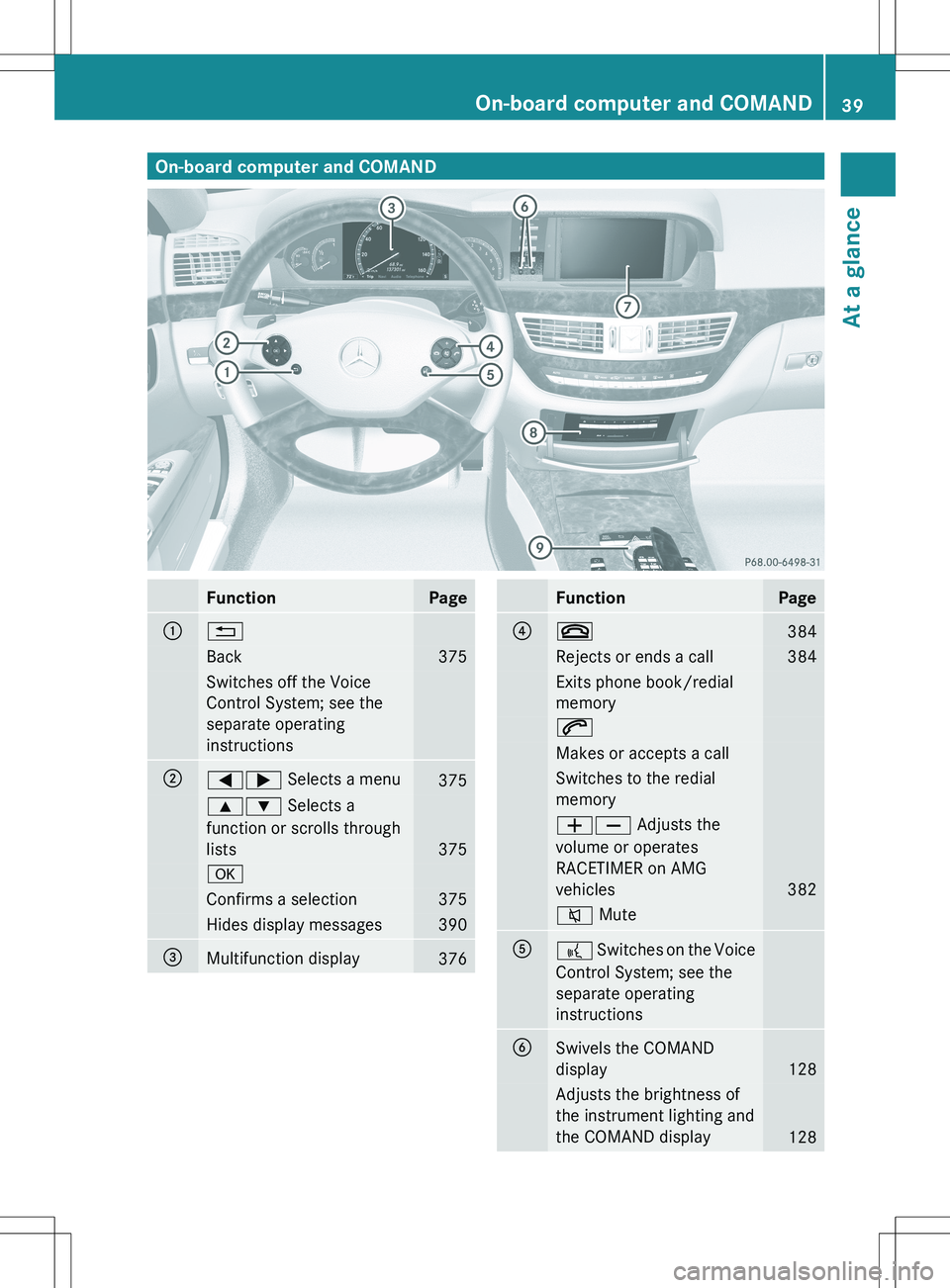
On-board computer and COMANDFunctionPage:%Back375Switches off the Voice
Control System; see the
separate operating
instructions;=; Selects a menu3759: Selects a
function or scrolls through
lists
375
aConfirms a selection375Hides display messages390=Multifunction display376FunctionPage?~384Rejects or ends a call384Exits phone book/redial
memory6Makes or accepts a callSwitches to the redial
memoryWX Adjusts the
volume or operates
RACETIMER on AMG
vehicles
382
8 MuteA? Switches on the Voice
Control System; see the
separate operating
instructionsBSwivels the COMAND
display
128
Adjusts the brightness of
the instrument lighting and
the COMAND display
128
On-board computer and COMAND39At a glance
Page 43 of 536
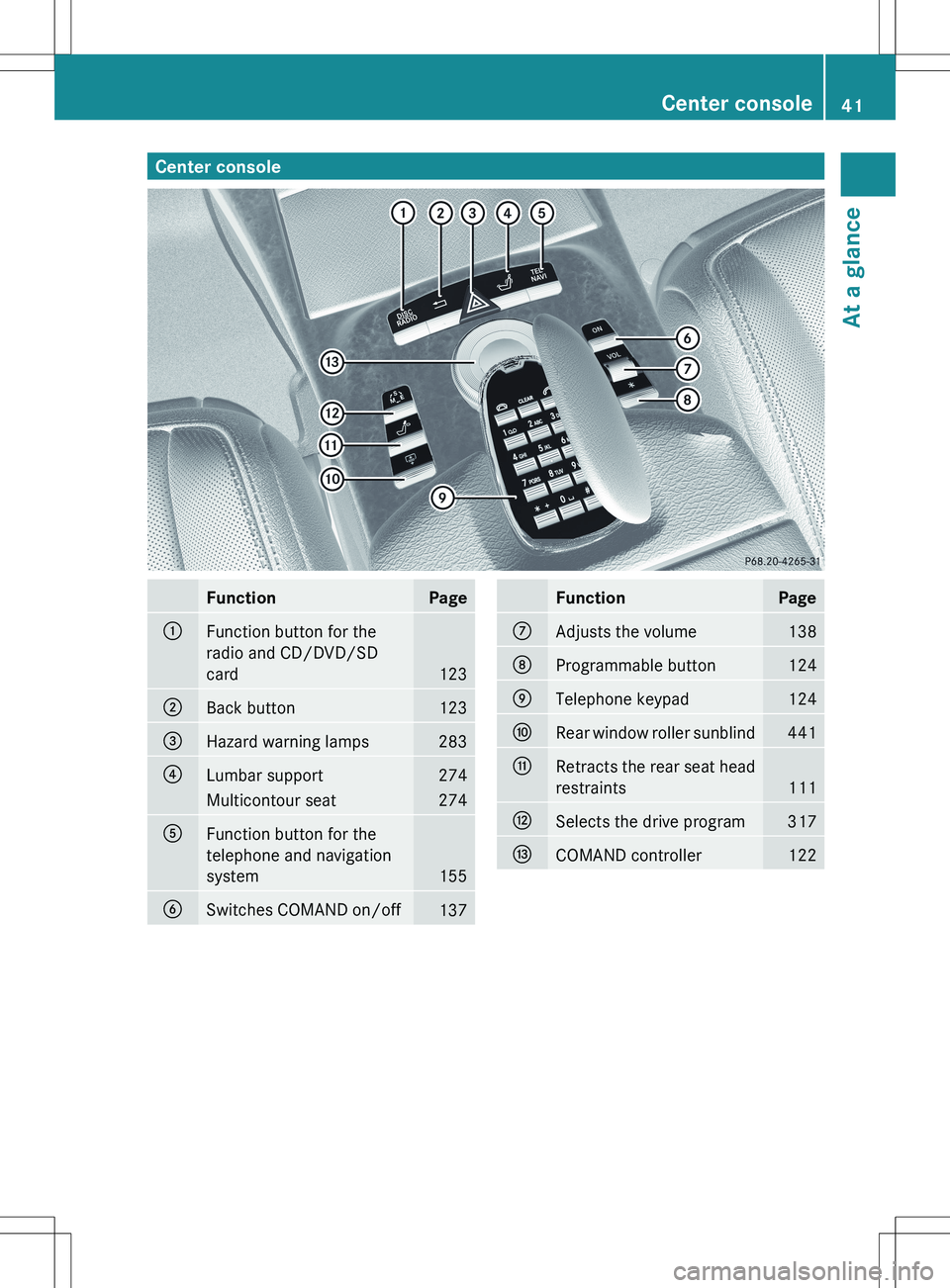
Center consoleFunctionPage:Function button for the
radio and CD/DVD/SD
card
123
;Back button123=Hazard warning lamps283?Lumbar support274Multicontour seat274AFunction button for the
telephone and navigation
system
155
BSwitches COMAND on/off137FunctionPageCAdjusts the volume138DProgrammable button124ETelephone keypad124FRear window roller sunblind441GRetracts the rear seat head
restraints
111
HSelects the drive program317ICOMAND controller122Center console41At a glance
Page 44 of 536
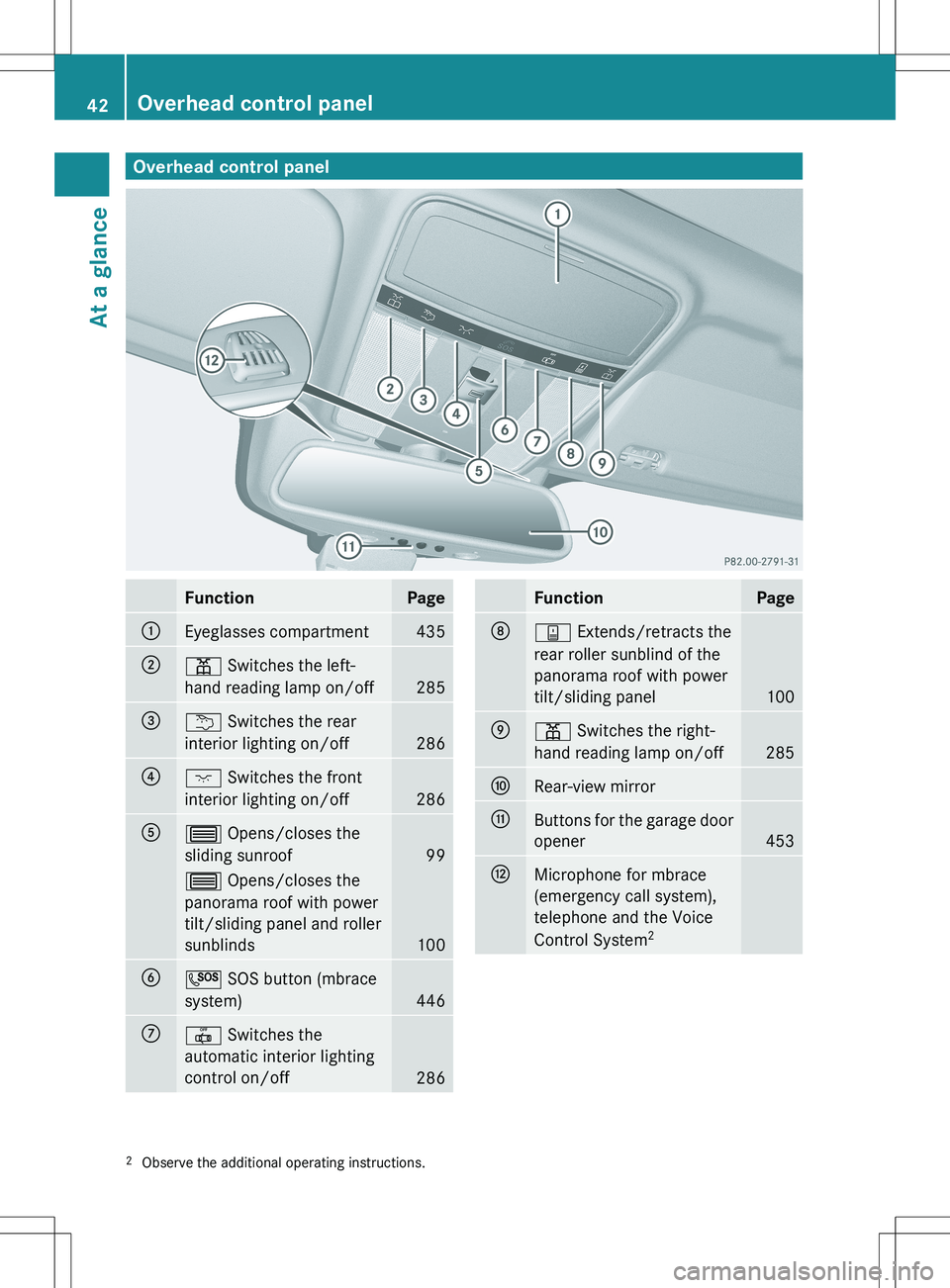
Overhead control panelFunctionPage:Eyeglasses compartment435;p Switches the left-
hand reading lamp on/off
285
=u Switches the rear
interior lighting on/off
286
?c Switches the front
interior lighting on/off
286
A3 Opens/closes the
sliding sunroof
99
3 Opens/closes the
panorama roof with power
tilt/sliding panel and roller
sunblinds
100
BG SOS button (mbrace
system)
446
C| Switches the
automatic interior lighting
control on/off
286
FunctionPageDy Extends/retracts the
rear roller sunblind of the
panorama roof with power
tilt/sliding panel
100
Ep Switches the right-
hand reading lamp on/off
285
FRear-view mirrorGButtons for the garage door
opener
453
HMicrophone for mbrace
(emergency call system),
telephone and the Voice
Control System 22
Observe the additional operating instructions.42Overhead control panelAt a glance
Page 82 of 536

iIf the alarm stays on for more than
30 seconds, the mbrace (USA only) or TELE
AID (Canada only) emergency call system
initiates a call to the Customer Assistance
Center automatically. The emergency call
system initiates the call provided that:
R you have subscribed to the mbrace/
TELE AID service.
R the mbrace/TELE AID service has been
activated properly.
R the required mobile phone, power supply
and GPS are available.XTo arm: lock the vehicle with the SmartKey
or KEYLESS-GO.
Indicator lamp : flashes. The alarm
system is armed after approximately
30 seconds.XTo disarm: unlock the vehicle with the
SmartKey or KEYLESS-GO.XTo stop the alarm using the SmartKey:
insert the SmartKey into the ignition lock.
The alarm is switched off.
or
XPress the % or & button on the
SmartKey.
The alarm is switched off.XTo stop the alarm using KEYLESS-GO:
grasp the outside door handle. The
SmartKey must be outside the vehicle.
The alarm is switched off.
or
XPress the Start/Stop button on the
dashboard. The SmartKey must be inside
the vehicle.
The alarm is switched off.80Theft deterrent locking systemSafety