2012 MERCEDES-BENZ S-CLASS SEDAN engine
[x] Cancel search: enginePage 384 of 536
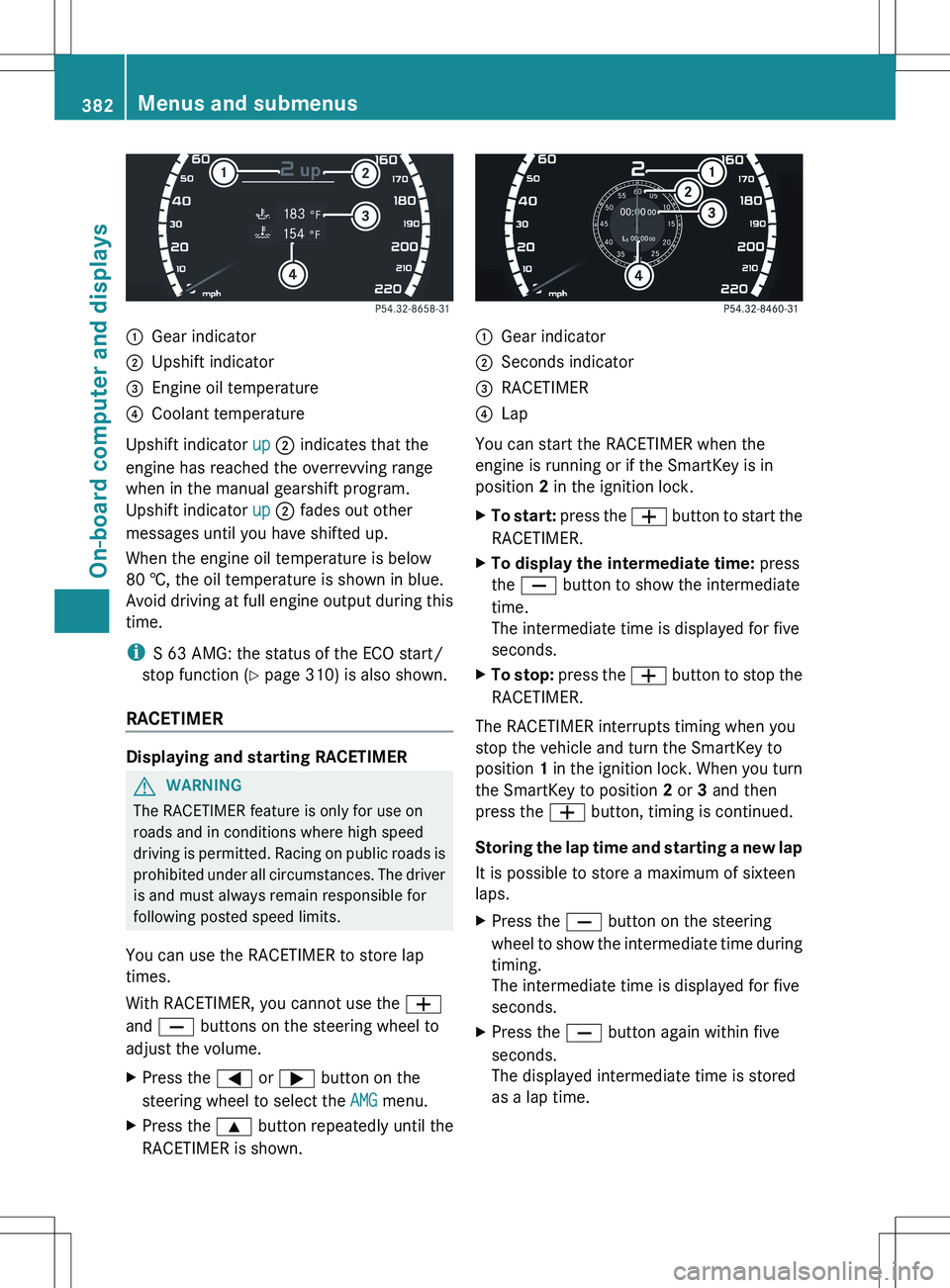
:Gear indicator;Upshift indicator=Engine oil temperature?Coolant temperature
Upshift indicator up ; indicates that the
engine has reached the overrevving range
when in the manual gearshift program.
Upshift indicator up ; fades out other
messages until you have shifted up.
When the engine oil temperature is below
80 †, the oil temperature is shown in blue.
Avoid driving at full engine output during this
time.
i S 63 AMG: the status of the ECO start/
stop function ( Y page 310) is also shown.
RACETIMER
Displaying and starting RACETIMER
GWARNING
The RACETIMER feature is only for use on
roads and in conditions where high speed
driving is permitted. Racing on public roads is
prohibited under all circumstances. The driver
is and must always remain responsible for
following posted speed limits.
You can use the RACETIMER to store lap
times.
With RACETIMER, you cannot use the W
and X buttons on the steering wheel to
adjust the volume.
XPress the = or ; button on the
steering wheel to select the AMG menu.XPress the 9 button repeatedly until the
RACETIMER is shown.:Gear indicator;Seconds indicator=RACETIMER?Lap
You can start the RACETIMER when the
engine is running or if the SmartKey is in
position 2 in the ignition lock.
XTo start: press the W button to start the
RACETIMER.XTo display the intermediate time: press
the X button to show the intermediate
time.
The intermediate time is displayed for five
seconds.XTo stop: press the W button to stop the
RACETIMER.
The RACETIMER interrupts timing when you
stop the vehicle and turn the SmartKey to
position 1 in the ignition lock. When you turn
the SmartKey to position 2 or 3 and then
press the W button, timing is continued.
Storing the lap time and starting a new lap
It is possible to store a maximum of sixteen
laps.
XPress the X button on the steering
wheel to show the intermediate time during
timing.
The intermediate time is displayed for five
seconds.XPress the X button again within five
seconds.
The displayed intermediate time is stored
as a lap time.382Menus and submenusOn-board computer and displays
Page 388 of 536

Deactivating/activating ESP®GWARNING
Under no circumstances should you
deactivate ESP ®
when the ÷ ESP®
warning lamp in the instrument cluster
flashes. Proceed as follows:
R when driving off, apply as little throttle as
possible.
R while driving, ease up on the accelerator
pedal.
R adapt your speed to suit the prevailing road
and weather conditions.
Failure to observe these guidelines could
cause the vehicle to skid. ESP ®
cannot
prevent accidents resulting from excessive
speed.
For further information about ESP ®
, see
( Y page 75).
XStart the engine.XPress = or ; on the steering wheel
to select the Assistance menu.XPress the 9 or : button to select
ESP .XPress the a button.XTo deactivate: press a again.
The å warning lamp in the instrument
cluster comes on.GWARNING
When the å ESP®
OFF warning lamp is lit,
ESP ®
is deactivated.
If the ÷ ESP®
warning lamp and the
å ESP®
OFF warning lamp remain lit,
ESP ®
is not available due to a malfunction.
When ESP ®
is deactivated or not operational,
vehicle stability in standard driving
maneuvers is reduced.
Adapt your speed and driving to the prevailing
road conditions and to the non-operating
status of the ESP ®
.
XTo activate: press a again.
The å warning lamp in the instrument
cluster goes out.
Activating/deactivating PRE-SAFE ®
Brake
PRE-SAFE ®
Brake is only available in vehicles
with DISTRONIC PLUS.
XPress the = or ; button on the
steering wheel to select the DriveAssist
menu.XPress 9 or : to select PRE-SAFE
Brake .XPress a.
The current selection is displayed.XTo activate/deactivate: press a
again.
When PRE-SAFE ®
Brake ( Y page 77) is
activated, the multifunction display shows
the Ä symbol as long as the HOLD
function is not activated ( Y page 346).
Activating/deactivating ATTENTION
ASSIST
This function is not available in HYBRID
vehicles.
XPress the = or ; button on the
steering wheel to select the DriveAssist
menu.XPress the 9 or : button to select
Attention Assist .XPress a.
The current selection is displayed.XTo activate/deactivate: press a
again.
When ATTENTION ASSIST ( Y page 359) is
activated, the À symbol appears in the
multifunction display when the ignition is on.
386Menus and submenusOn-board computer and displays
Page 389 of 536
activating/deactivating Blind Spot
Assist
You can use the Blind Spot Assist
function to activate or deactivate Blind Spot
Assist ( Y page 363) or Active Blind Spot
Assist ( Y page 367).
XPress the = or ; button on the
steering wheel to select the DriveAssist
menu.XPress 9 or : to select Blind Spot
Assist .XPress the a button.
The current selection is displayed.XTo activate/deactivate: press the a
button again.
activating/deactivating Lane Keeping
Assist
You can use the Lane Keeping Assist
function to activate/deactivate Lane Keeping
Assist ( Y page 365) or Active Lane Keeping
Assist ( Y page 369).
XPress the = or ; button on the
steering wheel to select the DriveAssist
menu.XPress 9 or : to select Lane
Keeping Assist .XPress the a button.
The current selection is displayed.XTo activate/deactivate: press the a
button again.
When Lane Keeping Assist or Active Lane
Keeping Assist is activated, the à symbol
appears in the multifunction display when the
ignition is on.
Service menu
In the Service menu, you have the following
options:
R call up display messages ( Y page 390)
R check the tire pressure electronically
( Y page 499)
R
call up the service due date ( Y page 465)
R check the oil level ( Y page 459)
Settings menu
Introduction
The Settings menu can be used for:
R Switching the daytime running lamps on/
off
R switching Adaptive Highbeam Assist on/
off
R showing or hiding the additional
speedometer
R selecting the units for speed and distance
R switching the belt adjustment on/off
R activating/deactivating the radar sensor
system
Switching the daytime running lamps
on/off
This function is not available in Canada.
If you have activated the Daytime running
lights function and the light switch is in the
$ or c position, the daytime running
lamps are automatically switched on when
the engine is running.
Depending on the ambient light, the following
will additionally light up:
R parking lamps
R tail lamps
R license plate lamp
R side marker lamps
If you turn the light switch to a different
position, the corresponding lights are
switched on. If you switch off the daytime
running lamps at night, make sure that the
light switch is set to L or c .
The factory setting is On.
Menus and submenus387On-board computer and displaysZ
Page 398 of 536

Display messagesPossible causes/consequences and M SolutionsThe red F (USA only)/ ! (Canada only) indicator lamp lights
up.
The power supply for the electric parking brake was interrupted.XPull the electric parking brake handle.
or
XPull away carefully.
or
XPull the electric parking brake handle until the display message
disappears.The red F (USA only)/ ! (Canada only) indicator lamp
flashes and the yellow F (USA only)/ ! (Canada only)
warning lamp lights up.
The electric parking brake is malfunctioning.XSwitch off the ignition and turn it back on.XEngage or release the electric parking brake.
or
XPull away carefully.XVisit a qualified specialist workshop.The yellow F (USA only)/ ! (Canada only) warning lamp
lights up. The red F (USA only)/ ! (Canada only) indicator
lamp flashes for approximately ten seconds after the electric
parking brake has been applied or released. It then goes out or
remains lit.
The electric parking brake is malfunctioning, e.g. because of
overvoltage or undervoltage.XPull away carefully.XVisit a qualified specialist workshop.
If there is overvoltage or undervoltage:
XRemove the cause for the overvoltage or undervoltage, e.g. by
charging the battery or restarting the engine.XSwitch the ignition off and on, and then engage or release the
electric parking brake.
If this does not release the electric parking brake:
XDo not drive on.XConsult a qualified specialist workshop.396Display messagesOn-board computer and displays
Page 400 of 536

Display messagesPossible causes/consequences and M Solutions$ (USA only)
J (Canada only)
Service See Oper.
ManualThere is a malfunction in the system. The brake system continues
to operate normally.XDrive on carefully.XVisit a qualified specialist workshop.$ (USA only)
J (Canada only)
Check Brake Fluid
LevelGRisk of accident
There is not enough brake fluid in the brake fluid reservoir.
Additionally, the red $ (USA only)/ J (Canada only)
warning lamp lights up in the instrument cluster and a warning
tone sounds.
XPull over and stop the vehicle safely as soon as possible, paying
attention to road and traffic conditions. Do not continue driving
under any circumstances.XApply the electric parking brake.XConsult a qualified specialist workshop.XDo not add brake fluid. This will not rectify the malfunction.GWARNING
Driving with the message Check Brake Fluid Level displayed can result in an accident. Have
your brake system checked immediately.
Do not add brake fluid before checking the brake system. Overfilling the brake fluid reservoir can
result in spilling brake fluid on hot engine parts and the brake fluid catching fire. You can be
seriously burned.
Display messagesPossible causes/consequences and M SolutionsG
Tele Aid
InoperativeUSA only: one or more of the main functions in the mbrace system
are malfunctioning.
Canada only: one or more of the main functions of the TELEAID
system are malfunctioning.XUSA only: have the mbrace system checked at a qualified
specialist workshop.XCanada only: have the TELEAID system checked at a qualified
specialist workshop.PRE-SAFE
Inoperative See
Oper. ManualGRisk of injury
Important functions of PRE-SAFE ®
have failed. All other occupant
safety systems, e.g. air bags, remain available.
XVisit a qualified specialist workshop immediately.398Display messagesOn-board computer and displays
Page 401 of 536

Display messagesPossible causes/consequences and M SolutionsPRE-SAFE
Functions
Currently Limited
See Operator's
ManualGRisk of accident
PRE-SAFE ®
Brake is temporarily inoperative. Possible causes are:
R the DISTRONIC PLUS cover in the radiator grill is dirty.
R function is impaired due to heavy rain or snow.
R the sensors in the bumpers are dirty.
R the radar sensor system is temporarily inoperative, e.g. due to
electromagnetic radiation emitted by nearby TV or radio
stations or other sources of electromagnetic radiation.
R the system is outside the operating temperature range.
R the on-board voltage is too low.
If the display message does not disappear:
XPull over and stop the vehicle safely as soon as possible, paying
attention to road and traffic conditions.XApply the electric parking brake.XClean the DISTRONIC PLUS cover in the radiator grill
( Y page 470).XClean the bumpers ( Y page 470).XRestart the engine.
If the system detects that the sensors are fully operational, the
display message disappears.
PRE-SAFE ®
Brake is operational again.
PRE-SAFE
Function Limited
See Oper. ManualGRisk of accident
PRE-SAFE ®
Brake is defective. BAS PLUS or the distance warning
signal may also have failed.
XVisit a qualified specialist workshop.6
SRS Malfunction
Service RequiredGRisk of injury
There is a malfunction in the SRS (Supplemental Restraint
System). The 6 warning lamp also lights up in the instrument
cluster.
XVisit a qualified specialist workshop.6
Front Left SRS
Malfunction
Service Required
or Front Right SRS
Malfunction
Service RequiredGRisk of injury
SRS has malfunctioned at the front on the left or right. The 6
warning lamp also lights up in the instrument cluster.
XVisit a qualified specialist workshop.Display messages399On-board computer and displaysZ
Page 408 of 536

Display messagesPossible causes/consequences and M Solutionsb
Please Switch Off
LightsThe lights are still switched on when you leave the vehicle. A
warning tone also sounds.XTurn the light switch to $ or c .
or
XIf the rear fog lamp is switched on: press the light switch in to
the stop.Adaptive High-beam
Assist InoperativeAdaptive Highbeam Assist is faulty.XVisit a qualified specialist workshop.
Engine
Display messagesPossible causes/consequences and M Solutions+
Check Coolant
Level See Oper.
ManualThe coolant level is too low.XAdd coolant, observing the warning notes when doing so
( Y page 463).XIf coolant needs to be added more often than usual, have the
engine coolant system checked at a qualified specialist
workshop.GWARNING
Do not spill antifreeze on hot engine parts. Antifreeze contains ethylene glycol which may burn
if it comes into contact with hot engine parts. You could be seriously burned.
! The coolant level is too low. Avoid making long journeys with too little coolant in the cooling
system. The engine will otherwise be damaged.
The display messages and the corresponding symbol that indicate that the coolant level is
too low must not be ignored.
Display messagesPossible causes/consequences and M Solutions?
Coolant Low Stop
Vehicle Turn
Engine OffThe coolant is too hot.XPull over and stop the vehicle safely and switch off the engine,
paying attention to road and traffic conditions.XMake sure that the air supply to the engine radiator is not
blocked, e.g. by snow, slush or ice.XWait until the display message disappears before restarting the
engine. Otherwise, the engine could be damaged.XPay attention to the coolant temperature display.XIf the temperature increases again, visit a qualified specialist
workshop immediately.406Display messagesOn-board computer and displays
Page 409 of 536
GWARNING
Driving when your engine is overheated can cause some fluids which may have leaked into the
engine compartment to catch fire. You could be seriously burned.
Steam from an overheated engine can cause serious burns which can occur just by opening the
engine hood. Stay away from the engine if you see or hear steam coming from it.
Stop the vehicle in a safe location away from other traffic. Turn off the engine, get out of the
vehicle and do not stand near the vehicle until the engine has cooled down.
! If the coolant temperature is over 248 ‡ (120 †), do not continue driving. The engine will
otherwise be damaged.
Display messagesPossible causes/consequences and M Solutions?The engine fan is defective.XAt coolant temperatures under 248 ‡(120 †), drive to the next
qualified specialist workshop.XAvoid subjecting the engine to heavy loads, e.g. driving in
mountainous terrain, and stop-and-go traffic.#The battery is not being charged.
Possible causes are:
R a defective alternator
R a torn poly-V-belt
R a malfunction in the electronicsXPull over and stop the vehicle safely and switch off the engine,
paying attention to road and traffic conditions.XOpen the hood.XCheck whether the poly-V-belt is torn.
If the poly-V-belt is torn:
! Do not continue driving. The engine could otherwise overheat.
XConsult a qualified specialist workshop.
If the poly-V-belt is not damaged:
XVisit a qualified specialist workshop.Display messages407On-board computer and displaysZ