2012 MERCEDES-BENZ S-Class mmi
[x] Cancel search: mmiPage 14 of 536

Exterior lightingsee Exterior lighting
Exterior mirror parking position
Adjusting (COMAND) .....................262
Exterior mirrors
Adjusting ....................................... 111
Dipping (automatic) .......................112
Folding in/out (automatically) .......112
Folding in/out (electrically) ...........112
Out of position (troubleshooting) ...112
Storing settings (memory
function) ........................................ 113
Storing the parking position ..........113
Eyeglasses compartment ................. 433
F
Factory setting (reset function) ....... 150
Fader, setting .................................... 135
Fast forward Audio mode (CD, DVD, MP3) .........225
Rear Seat Entertainment System ...255
Video DVD ..................................... 242
Fast rewind
Audio mode (CD, DVD, MP3) .........225
Rear Seat Entertainment System ...255
Video DVD ..................................... 242
Favorites (COMAND) ......................... 120
Filler cap see Fuel filler flap
First-aid kit ......................................... 472
Flat tire Changing a wheel/mounting the
spare wheel ................................... 473
MOExtended run-flat system .........477
Preparing the vehicle .....................473
Raising the vehicle .........................474
Floormat ............................................. 453
Freeway information ......................... 187
Front fog lamps ................................. 278
Display message ............................ 402
Switching on/off ........................... 278
Front-passenger seat
Adjusting from the driver's seat ..... 105
Adjusting from the rear
compartment ................................. 105
Front windshield
see Windshield
Fuel
Additives ........................................ 526
Displaying the current
consumption .................................. 376
Displaying the range ......................376
Driving tips .................................... 326
Fuel gauge ....................................... 35
Important safety notes ..................525
Premium-grade unleaded gasoline . 525
Problem (malfunction) ...................320
Refueling ........................................ 317
Specifications ................................ 525
Tank content/reserve fuel .............524
Fuel filler flap, opening/closing ....... 319
Fuel filter (display message) ............ 408
Fuel level Calling up the range (on-board
computer) ...................................... 376
Fuel tank
Capacity ........................................ 524
Problem (malfunction) ...................320
Function buttons (COMAND) ............ 119
Fuses Allocation chart ............................. 486
Before changing ............................. 486
Dashboard fuse box .......................486
Engine emergency stop .................487
Fuse box in the engine
compartment ................................. 487
Fuse box in the rear compartment . 486
Important safety notes ..................485
G
Garage door opener Clearing the memory .....................453
Notes ............................................. 450
Opening/closing the garage door ..453
Programming (button in the rear-
view mirror) ................................... 451
Gasoline ............................................. 318
Gear indicator (on-board
computer) .......................................... 379
Gear or selector lever (cleaning
guidelines) ......................................... 468
Genuine Mercedes-Benz parts ......... 520
Glove box ........................................... 432
GPS reception .................................... 151
12Index
Page 18 of 536

Mirrorssee Exterior mirrors
see Rear-view mirror
see Vanity mirror
Mobile phone
Menu (on-board computer) ............382
Modifying the programming
(SmartKey) ........................................... 81
MOExtended run-flat system ........... 477
MP3 Bit/sampling rates ......................... 229
Copyright ....................................... 229
Data medium ................................. 228
Fast forward/fast rewind ...............225
File systems ................................... 228
Formats ......................................... 229
Mode, switching to ........................221
Notes ............................................. 228
Operating ....................................... 379
Pause function ............................... 223
Playback options ........................... 228
Safety notes .................................. 220
Selecting a media type ..................224
Selecting a track ............................ 224
Sound settings (balance, bass,
fader, treble) .................................. 135
Multicontour seat
Front .............................................. 270
Rear compartment .........................108
Multifunction display
Function/notes ............................. 374
Lane recommendations .................169
Multifunction steering wheel
Adjusting the volume .....................134
Operating the on-board computer . 373
Overview .......................................... 37
Using the telephone ....................... 199
Multisession CD ................................ 228
Music files Recording ...................................... 226
Music Register
Copying music data .......................230
MUSIC REGISTER
Deleting all music files ...................232
Deleting individual music files .......233
Disk space information ..................232
Folder functions ............................. 232
General notes ................................ 230Playback options ........................... 233
Switching to ................................... 230
Music search ..................................... 225
Music storage see MUSIC REGISTER
Mute ................................................... 134
N
Navigation Adjusting the volume of the
navigation announcements ............134
Alternative route ............................ 171
Basic settings ................................ 152
Blocking a route section affected
by a traffic jam ............................... 171
Compass function ..........................188
Destination memory ......................178
Displaying destination
information (arrival time, distance
to destination) ............................... 172
Entering/saving your home
address .......................................... 156
Entering a destination ....................153
Entering a destination by address .. 153
Entering a destination using the
map ............................................... 160
Entering an intermediate stop .......161
Entering a point of interest ............162
Entering characters (character
bar) ................................................ 129
Freeway information ......................187
General notes ................................ 151
GPS reception ................................ 151
Installing map software .................. 188
Lane recommendation ...................167
Off-road/off-map (off-road
destination) .................................... 173
On-board computer .......................377
Previous destinations ....................181
Repeating announcements ............170
Route guidance .............................. 166
Route overview .............................. 172
Safety notes .................................. 150
Selecting a destination from the
destination memory .......................159
Selecting a destination from the
list of last destinations ................... 159
16Index
Page 23 of 536

Servicesee ASSYST PLUS service interval
display
Service interval display
Displaying service messages .........462
Hiding service messages ...............462
Notes ............................................. 462
Service messages ..........................462
Service menu (on-board computer) . 385
Service products Brake fluid ..................................... 528
Capacities ...................................... 524
Coolant (engine) ............................ 529
DEF special additives .....................527
Engine oil ....................................... 527
Fuel ................................................ 525
Important safety notes ..................522
Refrigerant (air-conditioning
system) .......................................... 528
Washer fluid ................................... 529
Setting a station (radio)
Via manual frequency entry ...........212
Settings
Display ........................................... 143
Menu overview .............................. 121
On-board computer .......................385
Picture (COMAND) .........................240
Picture (Rear Seat Entertainment
System) ......................................... 249
Sound settings ............................... 135
System settings ............................. 143
Setting the language
COMAND ....................................... 149
Rear Seat Entertainment System ...258
Setting the night design ................... 143
Setting the text reader speed .......... 145
Setting the vehicle level ................... 345
Setting the volume Telephone calls .............................. 134
Video AUX ..................................... 246
Side impact air bag ............................. 48
Side marker lamp (display
message) ............................................ 403
Side windows Convenience closing feature ............94
Convenience opening feature ..........93
Important safety information ...........92
Opening/closing .............................. 93Problem (malfunction) .....................95
Resetting ......................................... 95
Sliding sunroof
Important safety notes ....................95
Opening/closing .............................. 96
Problem (malfunction) ...................100
Resetting ......................................... 97
see Panorama roof with power
tilt/sliding panel
SmartKey
Changing the battery .......................82
Changing the programming .............81
Checking the battery .......................82
Convenience closing feature ............94
Convenience opening feature ..........93
Display message ............................ 419
Door central locking/unlocking .......78
Important safety notes ....................78
Loss ................................................. 84
Mechanical key ................................ 81
Positions (ignition lock) .................303
Problem (malfunction) .....................84
Starting the engine ........................305
SMS message
see Text message
Snow chains ...................................... 493
Socket Glove box ....................................... 442
Sockets
Points to observe before use .........441
Rear compartment .........................442
Trunk ............................................. 442
Sound menu ....................................... 135
Sounds see Sound settings
Sound settings
Balance and fader ..........................135
Calling up the sound menu ............135
Rear Seat Entertainment System ...248
Surround sound ............................. 136
Treble and bass ............................. 135
Spare wheel
Storage location ............................ 472
see Emergency spare wheel
Specialist workshop ............................ 31
Speech control see Voice Control System Index21
Page 57 of 536

PRE-SAFE®
(preventative occupant
protection)GWARNING
The PRE-SAFE ®
system reduces the impact of
an accident on vehicle occupants, as long as
their seat belts have been fastened correctly.
Although your vehicle is equipped with a PRE-
SAFE ®
system, the possibility of injury in the
event of an accident cannot be ruled out. You
should therefore always drive carefully and
adapt your driving style to the prevailing road,
weather and traffic conditions.
PRE-SAFE ®
takes preemptive measures to
protect occupants in certain hazardous
situations.
PRE-SAFE ®
intervenes:
R in emergency braking situations, e.g. if BAS
is activated or, in vehicles with DISTRONIC
PLUS, BAS PLUS intervenes powerfully
R if the radar sensor system detects an
imminent danger of collision in certain
situations (on vehicles with DISTRONIC
PLUS)
R in critical driving situations, e.g. when
physical limits are exceed and the vehicle
understeers or oversteers severely
PRE-SAFE ®
takes the following measures
depending on the hazardous situation
detected:
R the front seat belts are pre-tensioned.
R it adjusts the seats if the front-passenger
seat or the electrically adjustable outer
seats in the rear are in unfavorable
positions.
R vehicles with a multicontour seat or an
active multicontour seat: the air pressure
in the side bolsters on the seat cushion and
the side bolsters on the backrest is
increased.
R vehicles with multicontour seats in the
rear: the air pressure in the backrest side
bolsters of the outer seats in the rear is
increased.
R if the vehicle skids, the sliding sunroof/
panorama roof with power tilt/sliding
panel and the side windows are closed so
that only a small gap remains.
If the sliding sunroof, panorama roof with
power tilt/sliding panel or a side window is
obstructed during closing, the closing
procedure is stopped. The obstructed sliding
sunroof, panorama roof with power tilt/
sliding panel or side window opens again
slightly.
If the hazardous situation passes without
resulting in an accident, PRE-SAFE ®
slackens
the belt pretensioning. The air pressure in the
side bolsters on the multicontour seat/active
multicontour seat is reduced again. All
settings made by PRE-SAFE ®
can then be
reversed.
If the seat belts are not released:XMove the backrest back slightly, but only
when the vehicle is stationary.
The belt pretensioning is reduced and the
locking mechanism is released.GWARNING
Make sure that nobody can become trapped
as you adjust the seat.
! Make sure that there are no objects in the
footwell or behind the seats when resetting
the seats. There is a risk that the seats
and/or the objects could be damaged.
More information about seat-belt
adjustment, a convenience function
integrated into PRE-SAFE ®
, can be found in
the "Seat-belt adjustment" section
( Y page 60).
NECK-PRO head restraints/NECK-
PRO luxury head restraints
NECK-PRO head restraints/NECK-PRO luxury
head restraints increase protection of the
driver's and front-passenger's head and
Occupant safety55SafetyZ
Page 76 of 536

then sound and the · distance warning
lamp in the instrument cluster will light up.XBrake immediately in order to increase the
distance from the vehicle in front.
or
XTake evasive action provided it is safe to do
so.
If the driver and front passenger have their
seat belt fastened, PRE-SAFE ®
Brake can also
brake the vehicle automatically at speeds
from approximately 4 mph (7 km/h) to
approximately 124 mph (200 km/h).
Due to the nature of the system, particularly
complicated driving conditions may cause
unnecessary warnings or the unnecessary
intervention of PRE-SAFE ®
Brake. To stop the
braking action, you can either depress the
accelerator pedal further, activate kickdown
or release the brake pedal.
The braking action of PRE-SAFE ®
Brake is
ended automatically if:
R you maneuver to avoid the obstacle.
R there is no longer any danger of a rear-end
collision.
R there is no longer an obstacle detected in
front of your vehicle.
i USA only: this device has been approved
by the FCC as a "Vehicular Radar System".
The radar sensor system is intended for use
in an automotive radar system only.
Removing, altering or tampering with the
device will void any warranties, and is not
permitted by the FCC. Do not tamper with,
alter, or use in any non-approved way.
Any unauthorized modification to this
device could void the user's authority to
operate the equipment.
i Canada only: this device complies with
RSS-210 of Industry Canada. Operation is
subject to the following two conditions:
1. This device may not cause interference,
and
2. this device must accept any interference
received, including interference that may
cause undesired operation of the device.
Removal, tampering, or altering of the
device will void any warranties, and is not
permitted. Do not tamper with, alter, or use
in any non-approved way.
Any unauthorized modification to this
device could void the user's authority to
operate the equipment.
With the help of the radar sensor system,
PRE-SAFE ®
Brake can detect obstacles that
are in front of your vehicle for an extended
period of time.
At speeds up to approximately 40 mph
(70 km/h), PRE-SAFE ®
Brake can also react
to stationary obstacles, for example stopped
or parked vehicles.
If you approach an obstacle and PRE-SAFE ®
Brake detects a risk of collision, the system
will initially alert you both visually and
acoustically. If you do not brake or take
evasive action, the system will warn you by
automatically braking the vehicle gently. If
there is an increased risk of collision,
preventative passenger protection measures
(PRE-SAFE ®
) are activated (Y page 55). If the
risk of collision remains at speeds of over
20 mph (30 km/h) and you do not brake, take
evasive action or accelerate significantly, the
vehicle may perform automatic braking up to
emergency braking. Automatic emergency
braking is not performed until immediately
prior to an accident that can no longer be
avoided.GWARNING
Even if PRE-SAFE ®
Brake slows the vehicle
before an imminent rear-end collision, the
system cannot avert a collision without the
intervention of the driver. There is a risk of an
accident. Brake according to the situation or
take evasive action. Delayed intervention by
the driver can lead to an accident.
74Driving safety systemsSafety
Page 168 of 536

Route guidance
General notesGWARNING
COMAND calculates the route to the
destination without taking into account the
following, for example:
R Traffic lights
R Stop and right-of-way signs
R Lane merging
R Parking or stopping prohibited areas
R Other road and traffic rules and regulations
R Narrow bridges
COMAND may give incorrect navigation
commands if the data in the digital map does
not correspond with the actual road/ traffic
situation. For example, if the traffic routing
has been changed or the direction of a one-
way road has been reversed.
For this reason, you must always observe
applicable road and traffic rules and
regulations during your journey. Road and
traffic rules and regulations always have
priority over the navigation commands
generated by the system.
Route guidance begins once a route has been
calculated ( Y page 156).
COMAND guides you to your destination by
means of navigation commands in the form
of audible navigation announcements and
route guidance displays.
The route guidance displays can only be seen
if the display is switched to navigation mode.
If you do not follow the navigation
announcements or if you leave the calculated
route, COMAND automatically calculates a
new route to the destination.
If the digital map contains the corresponding
information, the following applies:
R when selecting a route, COMAND tries to
avoid roads that only have limited access,
e.g. roads closed to through traffic and non-
residents.
R roads that have time restrictions (e.g.
closed on Sundays and public holidays) are
avoided for route guidance.
Change of direction
Introduction
Changes of direction have three phases:
R preparation phase
R announcement phase
R change-of-direction phase
Preparation phase
COMAND prepares you for the upcoming
change of direction. Based on the example
display below, the change of direction is
announced with a message. You see the full-
screen map.
Example display: preparation phase
:Next road;Route=Current vehicle position (the tip of the
triangle indicates the vehicle’s direction
of travel)?Current road
The display in ? depends on the setting
selected under "Text information on the map"
( Y page 185).
Announcement phase
COMAND announces the imminent change of
direction. With reference to the following
example display, the announcement is given
166NavigationCOMAND
Page 169 of 536
before the change of direction with the
request Please turn right in 900 ft .
The announced distance to the next change
of direction depends on the type of road and
its permissible speed limit.
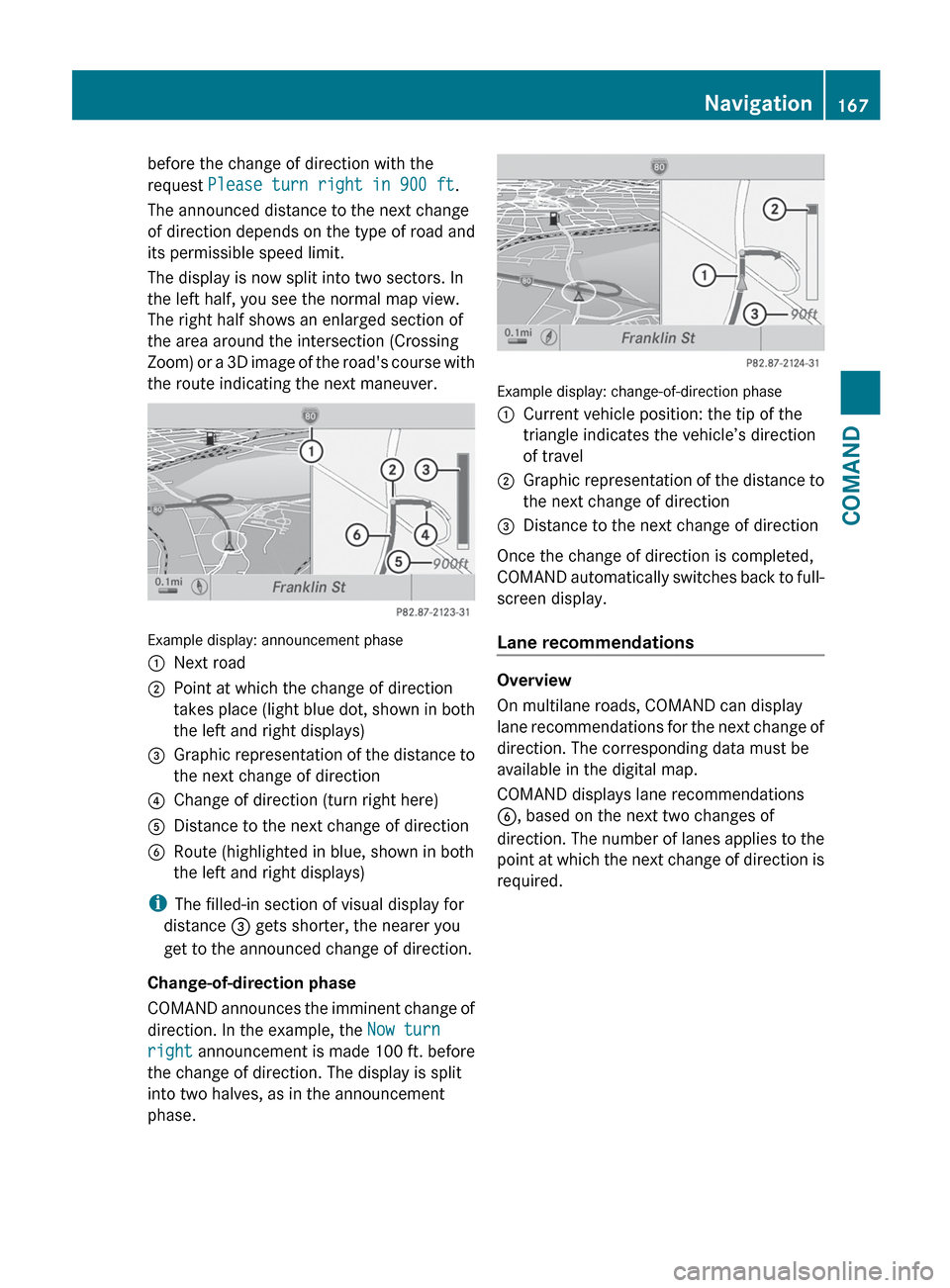
The display is now split into two sectors. In
the left half, you see the normal map view.
The right half shows an enlarged section of
the area around the intersection (Crossing
Zoom) or a 3D image of the road's course with
the route indicating the next maneuver.
Example display: announcement phase
:Next road;Point at which the change of direction
takes place (light blue dot, shown in both
the left and right displays)=Graphic representation of the distance to
the next change of direction?Change of direction (turn right here)ADistance to the next change of directionBRoute (highlighted in blue, shown in both
the left and right displays)
i The filled-in section of visual display for
distance = gets shorter, the nearer you
get to the announced change of direction.
Change-of-direction phase
COMAND announces the imminent change of
direction. In the example, the Now turn
right announcement is made 100 ft. before
the change of direction. The display is split
into two halves, as in the announcement
phase.
Example display: change-of-direction phase
:Current vehicle position: the tip of the
triangle indicates the vehicle’s direction
of travel;Graphic representation of the distance to
the next change of direction=Distance to the next change of direction
Once the change of direction is completed,
COMAND automatically switches back to full-
screen display.
Lane recommendations
Overview
On multilane roads, COMAND can display
lane recommendations for the next change of
direction. The corresponding data must be
available in the digital map.
COMAND displays lane recommendations
B , based on the next two changes of
direction. The number of lanes applies to the
point at which the next change of direction is
required.
Navigation167COMANDZ
Page 452 of 536
happens automatically and does not require
any action from the driver. This function
allows the Mercedes-Benz Center to improve
appointment planning significantly and
ensures that your vehicle receives the best
service possible.
i The "Automatic retrieval of vehicle data
for the service due date" function is only
available if the relevant mobile phone
network is available and a data connection
is possible.
Service for recovering a stolen vehicle
If your vehicle has been stolen:
XNotify the police.
The police will issue a numbered incident
report.XThis number will be forwarded to the
Mercedes-Benz Customer Assistance
Center together with your PIN.
The Mercedes-Benz Customer Assistance
Center then attempts to locate the mbrace
system. The Mercedes-Benz Customer
Assistance Center contacts you and the
local law enforcement agency if the vehicle
is located. However, only the law
enforcement agency is informed of the
location of the vehicle.
i If the anti-theft alarm system is active for
longer than 30 seconds, mbrace
automatically informs the Mercedes-Benz
Customer Assistance Center.
Garage door opener
Important safety notes
The HomeLink ®
garage door opener
integrated in the rear-view mirror allows you
to operate up to three different door and gate
systems.
i Certain garage door drives are
incompatible with the integrated garage
door opener. If you have difficulty
programming the integrated garage door
opener, contact an authorized Mercedes-
Benz Center or call one of the following
telephone hotlines:
R USA: Mercedes-Benz Customer
Assistance Center at
1-800-FOR-MERCedes
R Canada: Customer Service at
1-800-387-0100GWARNING
Before programming the integrated remote
control to a garage door opener or gate
operator, make sure people and objects are
out of the way of the device to prevent
potential harm or damage. When
programming a garage door opener, the door
moves up or down. When programming a gate
operator, the gate opens or closes.
Do not use the integrated remote control with
any garage door opener that lacks safety stop
and reverse features as required by U.S.
federal safety standards (this includes any
garage door opener model manufactured
before April 1, 1982). A garage door that
cannot detect an object - signaling the door
to stop and reverse - does not meet current
U.S. federal safety standards.
When programming a garage door opener,
park vehicle outside the garage.
Do not run the engine while programming the
integrated remote control. Inhalation of
exhaust gas is hazardous to your health. All
exhaust gas contains carbon monoxide (CO),
and inhaling it can cause unconsciousness
and possible death. All exhaust gas contains
carbon monoxide (CO), and inhaling it can
cause unconsciousness and possible death.
i USA only:
This device complies with part 15 of the
FCC Rules. Operation is subject to the
following two conditions:
450FeaturesStowing and features