2012 MERCEDES-BENZ S-Class Distronic
[x] Cancel search: DistronicPage 339 of 536

speed being driven and for braking in good
time.
Changing lanes
If you wish to change to the passing lane (in
left-hand-drive vehicles, the passing lane is
the left-hand lane), DISTRONIC PLUS
supports you if:
R you are driving faster than 40 mph
(60 km/h).
R DISTRONIC PLUS is maintaining the
distance to a vehicle in front.
R you switch on the appropriate turn signals.
R DISTRONIC PLUS does not detect a danger
of collision.
If these conditions are met, your vehicle is
accelerated. Acceleration will be interrupted
if changing lanes takes too long or if the
distance between your vehicle and the
vehicle in front becomes too small.GWARNING
DISTRONIC PLUS and Active Blind Spot Assist
are only aids designed to assist driving.
They do not relieve you of the responsibility
of paying attention. The driver remains fully
responsible for the vehicle's distance from
other vehicles, the vehicle's speed and for
braking in good time. Always pay attention to
traffic conditions and your surroundings.
Otherwise, you may fail to recognize dangers
in time, cause an accident and injure yourself
and others.
Stopping
GWARNING
Never get out of the vehicle when DISTRONIC
PLUS is activated.
DISTRONIC PLUS must also never be
operated, activated or deactivated by a
passenger or from outside the vehicle.
DISTRONIC PLUS does not replace the
electric parking brake and must not be used
for parking.
The DISTRONIC PLUS braking effect is
canceled and the vehicle can start moving if:
R DISTRONIC PLUS is deactivated using the
cruise control lever.
R you accelerate.
R there is a malfunction in the system or an
interruption in the power supply, e.g.
battery failure.
R the electrical system in the engine
compartment, the battery or the fuses are
tampered with.
R the battery is disconnected.
If you wish to leave the vehicle or park it,
deactivate DISTRONIC PLUS and secure the
vehicle against rolling away.
If DISTRONIC PLUS detects that the vehicle
in front is stopping, it brakes your vehicle until
it is stationary.
Once your vehicle is stationary, it remains
stationary and you do not need to depress the
brake.
i After a time, the electric parking brake
secures the vehicle and relieves the service
brake.
i Depending on the specified minimum
distance, your vehicle will come to a
standstill at a sufficient distance behind the
vehicle in front. The specified minimum
distance is set using the control on the
cruise control lever.
Setting a speedGWARNING
Keep in mind that it may take a brief moment
until the vehicle has made the necessary
adjustments.
Increase or decrease the set vehicle speed to
a value that the prevailing road conditions and
legal speed limits permit. Otherwise, sudden
and unexpected acceleration or deceleration
of the vehicle could cause an accident and/
or serious injury to you and others.
Driving systems337Driving and parkingZ
Page 340 of 536
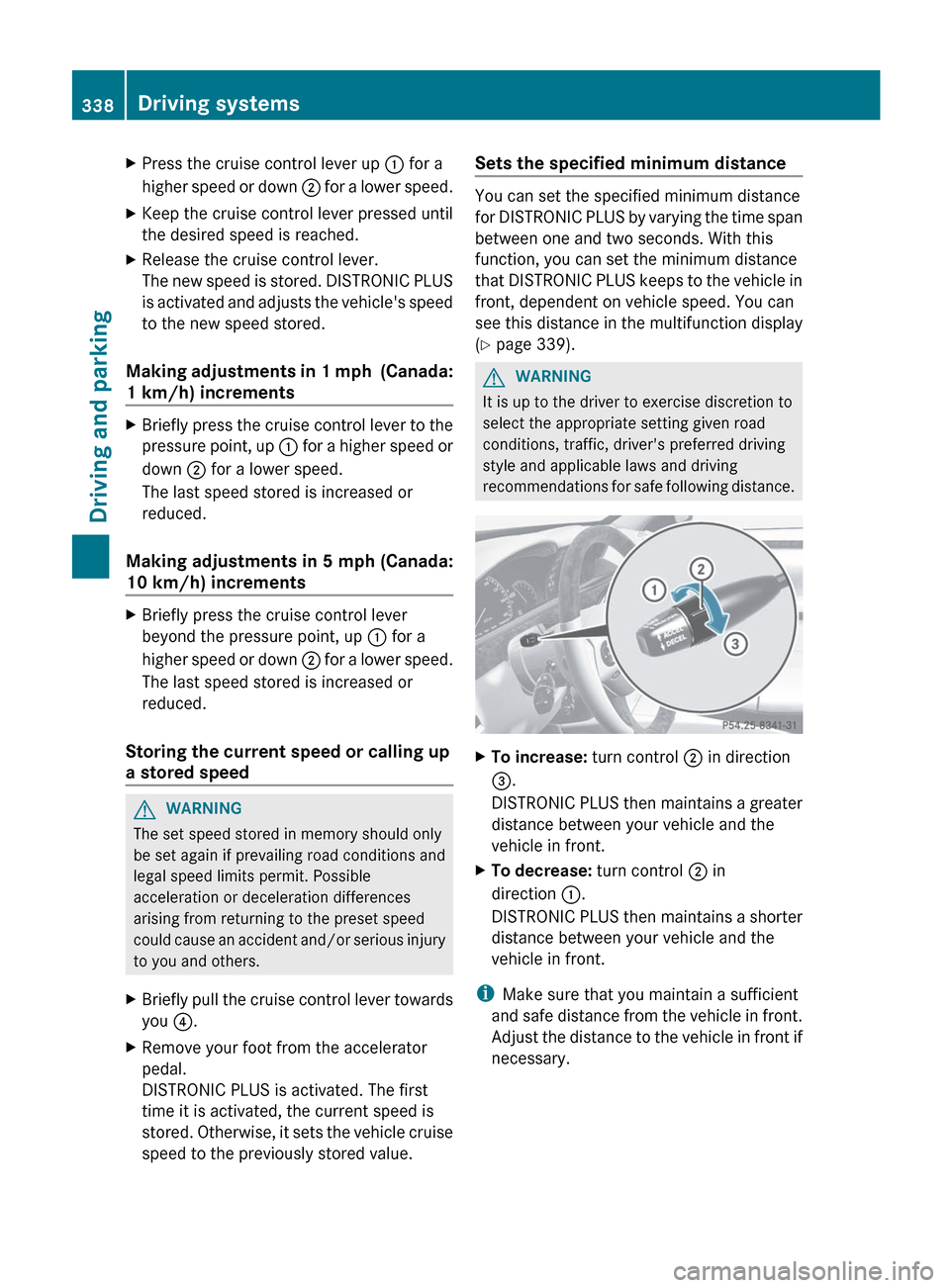
XPress the cruise control lever up : for a
higher speed or down ; for a lower speed.XKeep the cruise control lever pressed until
the desired speed is reached.XRelease the cruise control lever.
The new speed is stored. DISTRONIC PLUS
is activated and adjusts the vehicle's speed
to the new speed stored.
Making adjustments in 1 mph (Canada:
1 km/h) increments
XBriefly press the cruise control lever to the
pressure point, up : for a higher speed or
down ; for a lower speed.
The last speed stored is increased or
reduced.
Making adjustments in 5 mph (Canada:
10 km/h) increments
XBriefly press the cruise control lever
beyond the pressure point, up : for a
higher speed or down ; for a lower speed.
The last speed stored is increased or
reduced.
Storing the current speed or calling up
a stored speed
GWARNING
The set speed stored in memory should only
be set again if prevailing road conditions and
legal speed limits permit. Possible
acceleration or deceleration differences
arising from returning to the preset speed
could cause an accident and/or serious injury
to you and others.
XBriefly pull the cruise control lever towards
you ?.XRemove your foot from the accelerator
pedal.
DISTRONIC PLUS is activated. The first
time it is activated, the current speed is
stored. Otherwise, it sets the vehicle cruise
speed to the previously stored value.Sets the specified minimum distance
You can set the specified minimum distance
for DISTRONIC PLUS by varying the time span
between one and two seconds. With this
function, you can set the minimum distance
that DISTRONIC PLUS keeps to the vehicle in
front, dependent on vehicle speed. You can
see this distance in the multifunction display
( Y page 339).
GWARNING
It is up to the driver to exercise discretion to
select the appropriate setting given road
conditions, traffic, driver's preferred driving
style and applicable laws and driving
recommendations for safe following distance.
XTo increase: turn control ; in direction
= .
DISTRONIC PLUS then maintains a greater
distance between your vehicle and the
vehicle in front.XTo decrease: turn control ; in
direction :.
DISTRONIC PLUS then maintains a shorter
distance between your vehicle and the
vehicle in front.
i Make sure that you maintain a sufficient
and safe distance from the vehicle in front.
Adjust the distance to the vehicle in front if
necessary.
338Driving systemsDriving and parking
Page 341 of 536
DISTRONIC PLUS displays in the
speedometer
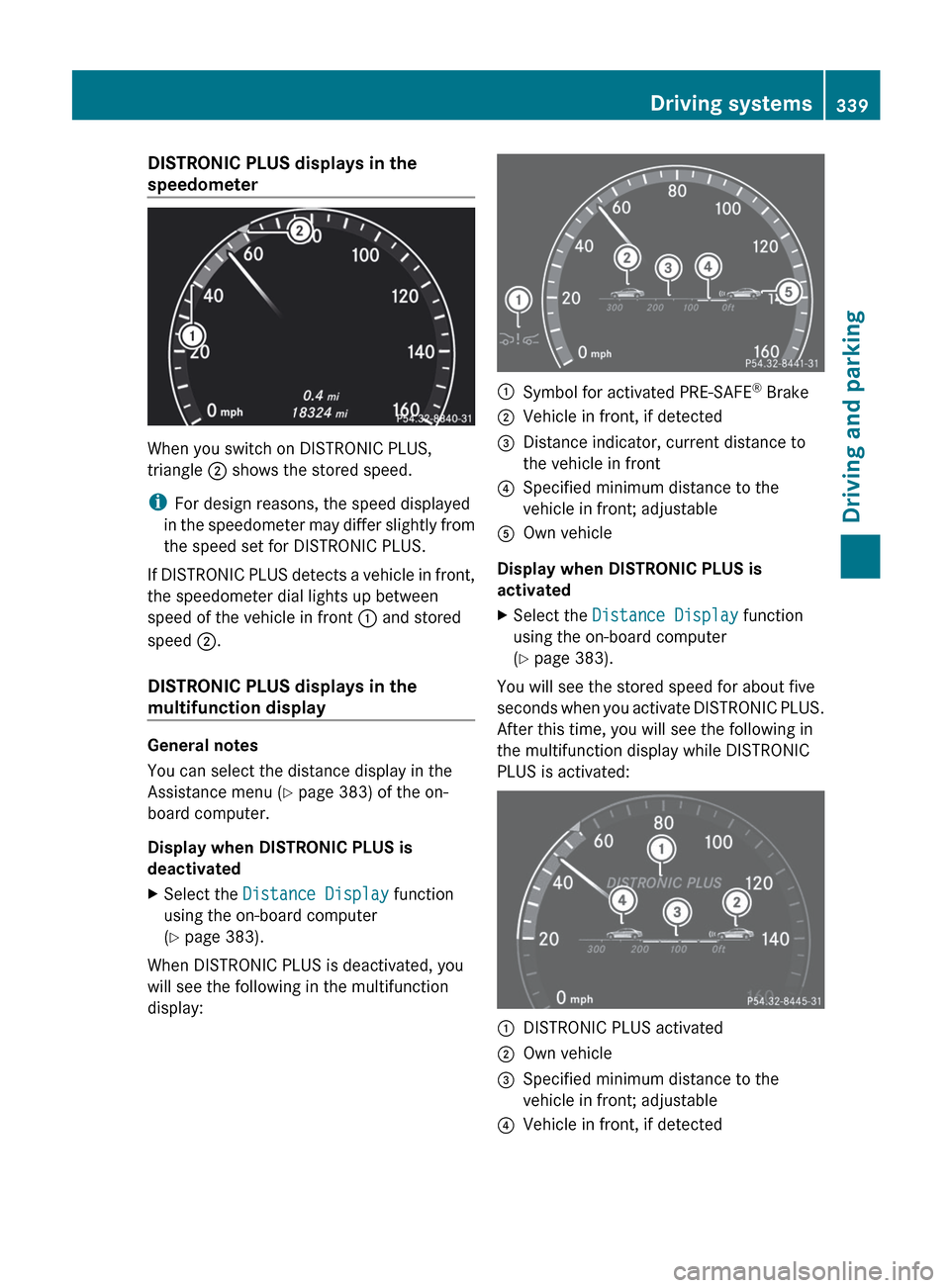
When you switch on DISTRONIC PLUS,
triangle ; shows the stored speed.
i For design reasons, the speed displayed
in the speedometer may differ slightly from
the speed set for DISTRONIC PLUS.
If DISTRONIC PLUS detects a vehicle in front,
the speedometer dial lights up between
speed of the vehicle in front : and stored
speed ;.
DISTRONIC PLUS displays in the
multifunction display
General notes
You can select the distance display in the
Assistance menu ( Y page 383) of the on-
board computer.
Display when DISTRONIC PLUS is
deactivated
XSelect the Distance Display function
using the on-board computer
( Y page 383).
When DISTRONIC PLUS is deactivated, you
will see the following in the multifunction
display:
:Symbol for activated PRE-SAFE ®
Brake;Vehicle in front, if detected=Distance indicator, current distance to
the vehicle in front?Specified minimum distance to the
vehicle in front; adjustableAOwn vehicle
Display when DISTRONIC PLUS is
activated
XSelect the Distance Display function
using the on-board computer
( Y page 383).
You will see the stored speed for about five
seconds when you activate DISTRONIC PLUS.
After this time, you will see the following in
the multifunction display while DISTRONIC
PLUS is activated:
:DISTRONIC PLUS activated;Own vehicle=Specified minimum distance to the
vehicle in front; adjustable?Vehicle in front, if detectedDriving systems339Driving and parkingZ
Page 342 of 536

Deactivating DISTRONIC PLUS
There are several ways to deactivate
DISTRONIC PLUS:
XBriefly press the cruise control lever
forwards :.
or
XBrake, unless the vehicle is stationary.
When you deactivate DISTRONIC PLUS, the
DISTRONIC PLUS Off message is shown in
the multifunction display for approximately
five seconds.
i The last speed stored remains stored until
you switch off the engine.
i DISTRONIC PLUS is not deactivated if you
depress the accelerator pedal. If you
accelerate to overtake, DISTRONIC PLUS
adjusts the vehicle's speed to the last
speed stored after you have finished
overtaking.
DISTRONIC PLUS is automatically
deactivated if:
R you engage the electric parking brake or if
the vehicle is automatically secured with
the electric parking brake.
R you are driving slower than
15 mph (25 km/h) and there is no vehicle
in front, or if the vehicle in front is no longer
detected.
R ESP ®
intervenes or you deactivate ESP ®
.
R the transmission is in the P, R or N position.
R you switch off the radar sensor system
( Y page 387).
R
you pull the cruise control lever towards
you in order to pull away and the front-
passenger door or one of the rear doors is
open.
R the vehicle has skidded.
If DISTRONIC PLUS is deactivated, you will
hear a warning tone. The DISTRONIC PLUS
Off message is shown in the multifunction
display for approximately five seconds.GWARNING
The DISTRONIC PLUS switches off and
releases the brakes when the vehicle
decelerates below the minimum speed of
20 mph (30 km/h) by operation of the system
unless the DISTRONIC PLUS detects a vehicle
directly ahead of you. At that time the driver
must apply the brakes in order to reduce
vehicle speed further or bring it to a stop.
Tips for driving with DISTRONIC PLUS
Important safety notes
The following contains descriptions of certain
road and traffic conditions in which you must
be particularly attentive. In such situations,
brake if necessary. DISTRONIC PLUS is then
deactivated.
GWARNING
The DISTRONIC PLUS works to maintain the
speed selected by the driver unless a moving
obstacle proceeding directly ahead of it in the
same travel direction is detected (e.g.
following another vehicle ahead of you at your
set distance).
This means that:
R Your vehicle can pass another vehicle after
you have changed lanes.
R While in a sharp turn or if the preceding
vehicle is in a sharp turn, the DISTRONIC
PLUS could lose sight of the preceding
vehicle. Your vehicle could then accelerate
to the previously selected speed.
340Driving systemsDriving and parking
Page 343 of 536
The DISTRONIC PLUS regulates only the
distance between your vehicle and those
directly ahead of it. It may not register
stationary objects in the road, e.g.:
R a stopped vehicle in a traffic jam
R a disabled vehicle
R an oncoming vehicle
The driver must always be alert, observe all
traffic and intercede as required by means of
steering or braking the vehicle.GWARNING
The DISTRONIC PLUS should not be used in
snowy or icy road conditions.
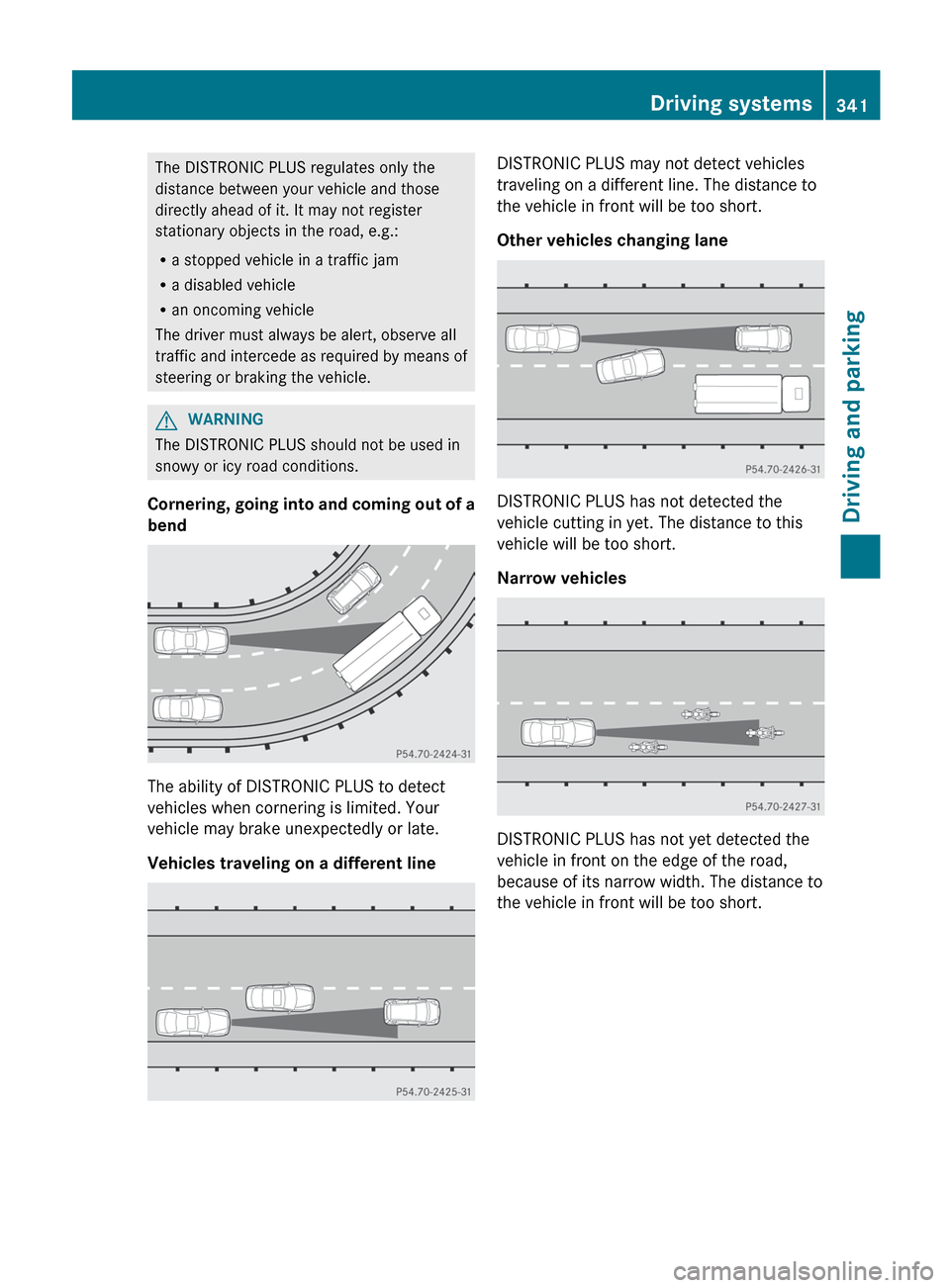
Cornering, going into and coming out of a
bend
The ability of DISTRONIC PLUS to detect
vehicles when cornering is limited. Your
vehicle may brake unexpectedly or late.
Vehicles traveling on a different line
DISTRONIC PLUS may not detect vehicles
traveling on a different line. The distance to
the vehicle in front will be too short.
Other vehicles changing lane
DISTRONIC PLUS has not detected the
vehicle cutting in yet. The distance to this
vehicle will be too short.
Narrow vehicles
DISTRONIC PLUS has not yet detected the
vehicle in front on the edge of the road,
because of its narrow width. The distance to
the vehicle in front will be too short.
Driving systems341Driving and parkingZ
Page 344 of 536
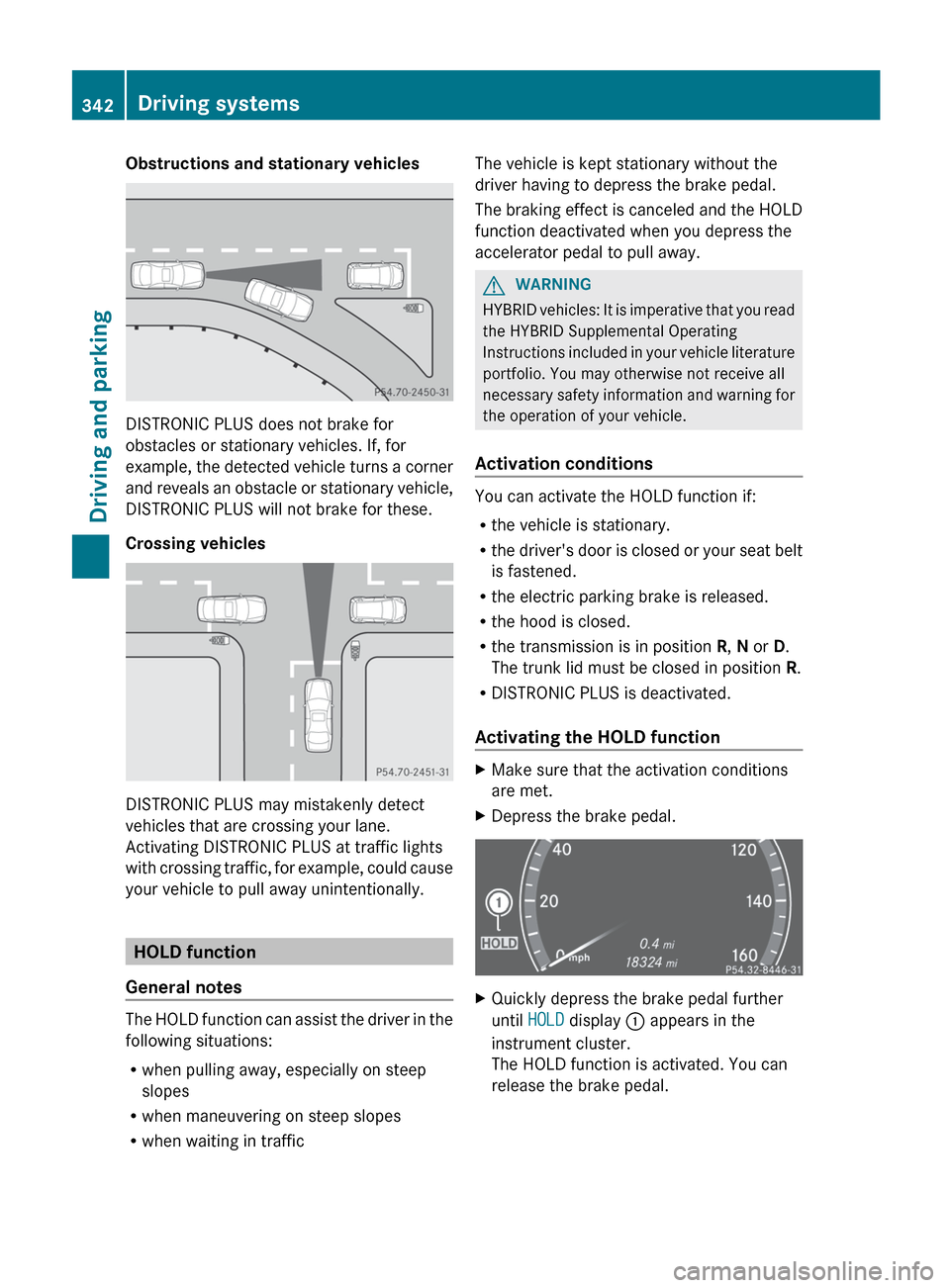
Obstructions and stationary vehicles
DISTRONIC PLUS does not brake for
obstacles or stationary vehicles. If, for
example, the detected vehicle turns a corner
and reveals an obstacle or stationary vehicle,
DISTRONIC PLUS will not brake for these.
Crossing vehicles
DISTRONIC PLUS may mistakenly detect
vehicles that are crossing your lane.
Activating DISTRONIC PLUS at traffic lights
with crossing traffic, for example, could cause
your vehicle to pull away unintentionally.
HOLD function
General notes
The HOLD function can assist the driver in the
following situations:
R when pulling away, especially on steep
slopes
R when maneuvering on steep slopes
R when waiting in traffic
The vehicle is kept stationary without the
driver having to depress the brake pedal.
The braking effect is canceled and the HOLD
function deactivated when you depress the
accelerator pedal to pull away.GWARNING
HYBRID vehicles: It is imperative that you read
the HYBRID Supplemental Operating
Instructions included in your vehicle literature
portfolio. You may otherwise not receive all
necessary safety information and warning for
the operation of your vehicle.
Activation conditions
You can activate the HOLD function if:
R the vehicle is stationary.
R the driver's door is closed or your seat belt
is fastened.
R the electric parking brake is released.
R the hood is closed.
R the transmission is in position R, N or D.
The trunk lid must be closed in position R.
R DISTRONIC PLUS is deactivated.
Activating the HOLD function
XMake sure that the activation conditions
are met.XDepress the brake pedal.XQuickly depress the brake pedal further
until HOLD display : appears in the
instrument cluster.
The HOLD function is activated. You can
release the brake pedal.342Driving systemsDriving and parking
Page 345 of 536

iIf depressing the brake pedal the first
time does not activate the HOLD function,
wait briefly and then try again.GWARNING
The vehicle's brakes are applied when the
HOLD function is activated. For this reason,
deactivate the HOLD function if the vehicle is
to be set in motion by other means (e.g. in a
car wash or by towing).
Deactivating the HOLD function
The HOLD function is deactivated
automatically if:
R you accelerate and the transmission is in
position D or R.
R you shift the transmission to position P.
R you apply the brakes again with a certain
amount of pressure until HOLD disappears
from the instrument cluster.
R you secure the vehicle using the electric
parking brake.
R you activate DISTRONIC PLUS.
i After a time, the electric parking brake
secures the vehicle and relieves the service
brake.
GWARNING
Never get out of the vehicle when the HOLD
function is activated.
The HOLD function must never be operated
or deactivated by a passenger or from outside
the vehicle.
The HOLD function does not replace the
electric parking brake and must not be used
for parking.
The braking effect of the HOLD function is
canceled and the vehicle could roll away if:
R the HOLD function is deactivated by
depressing the accelerator pedal or the
brake pedal.
R there is a malfunction in the system or an
interruption in the power supply, e.g.
battery failure.
R the electrical system in the engine
compartment, the battery or the fuses are
tampered with.
R the battery is disconnected.
AIRMATIC
Vehicle level
Important safety notes
Your vehicle regulates its height
automatically. All-round self-leveling ensures
the best possible suspension and constant
ground clearance, even with a laden vehicle.
When you drive fast, the vehicle is lowered
automatically to improve driving safety and to
reduce fuel consumption.
The following vehicle levels are possible on
vehicles without 4MATIC:
R normal
R raised: the vehicle is raised by about 1.00
in (25 mm) when compared with the normal
level
R lowered: the vehicle is lowered by about
0.60 in (15 mm) when compared with the
normal level
The following vehicle levels are possible on
vehicles with 4MATIC:
R normal: in Comfort mode, the vehicle is
raised by about 0.40 in (10 mm) when
compared with Sport mode
R raised: in Comfort mode, the vehicle is
raised by about 0.60 in (15 mm) and in
Sport mode by about 1.00 in (25 mm) when
compared with normal level
R lowered: the vehicle is lowered by about
0.40 in (10 mm) when compared with the
normal level
The "Normal" and "Raised" vehicle levels can
be set manually.
Driving systems343Driving and parkingZ
Page 362 of 536
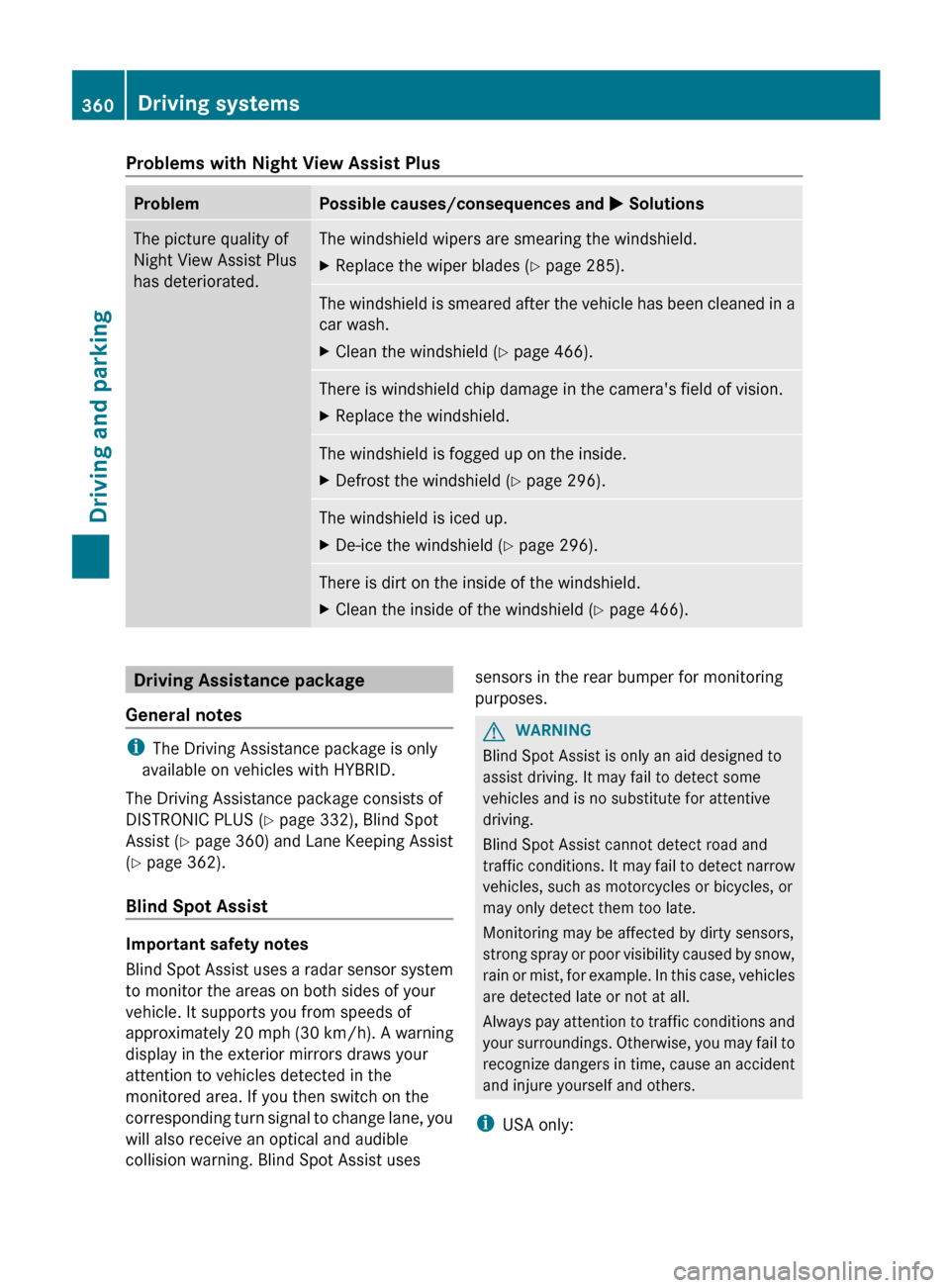
Problems with Night View Assist PlusProblemPossible causes/consequences and M SolutionsThe picture quality of
Night View Assist Plus
has deteriorated.The windshield wipers are smearing the windshield.XReplace the wiper blades ( Y page 285).The windshield is smeared after the vehicle has been cleaned in a
car wash.XClean the windshield ( Y page 466).There is windshield chip damage in the camera's field of vision.XReplace the windshield.The windshield is fogged up on the inside.XDefrost the windshield ( Y page 296).The windshield is iced up.XDe-ice the windshield ( Y page 296).There is dirt on the inside of the windshield.XClean the inside of the windshield ( Y page 466).Driving Assistance package
General notes
i The Driving Assistance package is only
available on vehicles with HYBRID.
The Driving Assistance package consists of
DISTRONIC PLUS ( Y page 332), Blind Spot
Assist ( Y page 360) and Lane Keeping Assist
( Y page 362).
Blind Spot Assist
Important safety notes
Blind Spot Assist uses a radar sensor system
to monitor the areas on both sides of your
vehicle. It supports you from speeds of
approximately 20 mph (30 km/h). A warning
display in the exterior mirrors draws your
attention to vehicles detected in the
monitored area. If you then switch on the
corresponding turn signal to change lane, you
will also receive an optical and audible
collision warning. Blind Spot Assist uses
sensors in the rear bumper for monitoring
purposes.GWARNING
Blind Spot Assist is only an aid designed to
assist driving. It may fail to detect some
vehicles and is no substitute for attentive
driving.
Blind Spot Assist cannot detect road and
traffic conditions. It may fail to detect narrow
vehicles, such as motorcycles or bicycles, or
may only detect them too late.
Monitoring may be affected by dirty sensors,
strong spray or poor visibility caused by snow,
rain or mist, for example. In this case, vehicles
are detected late or not at all.
Always pay attention to traffic conditions and
your surroundings. Otherwise, you may fail to
recognize dangers in time, cause an accident
and injure yourself and others.
i USA only:
360Driving systemsDriving and parking