2012 MERCEDES-BENZ M-Class display
[x] Cancel search: displayPage 197 of 396

ATT
ENTI ONASSIST asses ses your level of
fa tig ue orlaps es inconce ntrationb yta king
th efo llowi ngcriteri ainto acc oun t:
R your person aldri vin gst yle, e.g. steer ing
ch arac teris tics
R dri vin gco nd ition s,e.g. time, drivin gtime
The function alit yof ATTENTI ON ASSIST is
res trict ed and warn ings may bedelaye dor
no toc cur atall:
R ifth ero ad cond ition ispoo r,e.g. ifth e
sur faceis une ven orifth ere arepotholes
R ifth ere isast ro ng side wind
R ifyou haveadop tedaspo rty dri vin gst yle
wit hhig hco rneri ng spe eds orhig hrat es of
acc eler ation
R ifyou predom inant lydri ve atspe eds under
50 mph (80km/h)or over 11 2mph
(18 0km /h)
R ifyou arecurren tly usin gCOMA NDor
mak ing ate leph onecal lwit hit
R ifthe timehas been setincorrect ly
R in act ive drivin gsit uation s,such aswhen
you chan gelanes orchan geyour speed
War ning anddisplaymessa gesinthe
mu ltifunct iondisp lay X
Ac tivate ATTENTION ASSIS Tusing theon-
board computer (Ypage 232).
Symbo l: appears inthe mult ifunc tion
display.
If ATT ENTION ASSIS Tis act ive, you willbe
warne dno soon erthan 20min utes afteryour
jour ney hasbegun. Youwillthenhear an
int ermit tentwarning tonetwice, andthe Att
ention Assist:Dro wsiness Det
ected mess
ageappears inthe
mult ifunction display. X
Ifnec essar y,tak eabreak .
X Pres sa or% tocon firm the
mess age.
On longjo urn eys, takeregular breaksin good
tim eto allow yourse lfto rest prop erly. Ifyou
do not takeabreak andATTENTION ASSIST
st ill det ectstypic alindi cators offat igue or
inc reasin glapses incon centratio n,you willbe
warn edagain after15 min utes attheearlies t.
ATT ENTION ASSIST isrese twhen you
con tinue your journ eyand start sasses sing
your tiredn ess again if:
R you switchoff theeng ine.
R you takeoff your seatbeltandopen the
driv er's door ,e.g .for achange ofdrivers or
to take abreak. Night
ViewAssist Plus
Import antsafety notes In
addition tothe illumination providedbythe
normal headlamps, NightViewAssist Plus
uses infrared lighttoilluminate theroad. The
Night ViewAssist Pluscamera picksupthe
infrared lightanddisplay sag ray scale image
in COMAND. Theimag edisp layed in
COMAND correspondstoaroad litup byhigh -
bea mheadlamps. Thisenables youtosee the
road's course andanyobstac lesingood time.
If pedestrian recognitionisactiv ated,
pedestrian srecogn izedbythe system are
highlighted inthe Night ViewAssist Plus
display. G
WARN
ING Night
ViewAssist Plusisonly anaid designed
to assist driving. Itis not asubstit utefor
atten tivedriving. Donot rely solely onthe
Night ViewAssist Plusdisplay. Continueto
look through thewindshield. Youare
respon sibleforsafety andmust drivein
accor dance withtrafficcon ditions .You could
otherwise putyourself andothers indanger. Driving
systems
195Driving and parking
Z
Page 198 of 396
The
system maybeimpaired orunavailable if:
R there ispoor visibility, e.g.due tosnow,
rain, fogorheavy spray.
R the windshield isdirty, fogged upor
covered, forinstan cebyastick er,inthe
vicinit yof the camera.
R you aredriving onbends, uphillgradients
or downhill gradients.
Light fromtheheadlamps ofoncom ing
vehicles doesnotaffect theNight ViewAssist
Plus display inthe multifunct iondisplay .This
is also thecase ifyou cannot switchonthe
high-beam headlampsduetooncomin g
traffic. G
WARNING The
Night ViewAssist Pluscannot record
object simmediately infront ofor next tothe
vehicle. Whenmaneuvering, continue tolook
through thewindshield. Makesureno
persons oranimals areinthe area inwhich
you aremaneuvering. Youcould otherwise
injure them. i
Infrared
lightisnot visible tothe human
eye and therefore doesnotglare. Night
View Assist Pluscantherefore remain
switched oneven ifthere isoncomin g
traffic. :
Night ViewAssist Pluscamera
Switching onNight ViewAssist Plus Depending
onyour vehicle's dateof
manufacture, thec orà symbol for
the "Automatic drivinglights/daytime running
lamps"position islocated onthe light
switch. You
canonly activate NightViewAssist Plus
if:
R the SmartK eyisin position 2in the ignition
lock.
R itis dark.
R the light switch isset toeither c,
à orL.
R reverse gearhasnotbeen engaged.
X Make surethatCOMAND isswitched on.
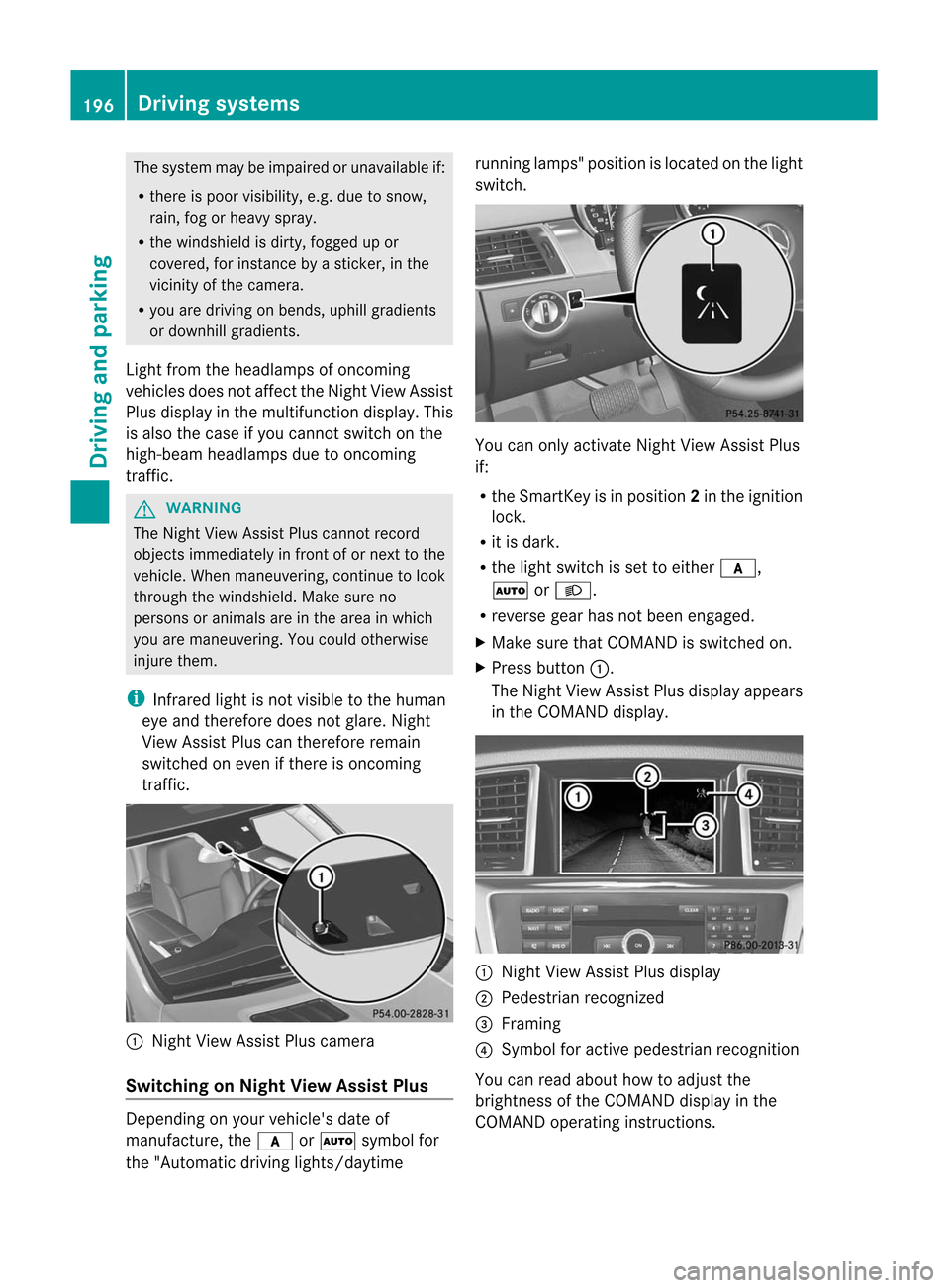
X Press button :.
The Night ViewAssist Plusdispla yappea rs
in the COMAND display. :
Night ViewAssist Plusdispla y
; Pedestrian recognized
= Framing
? Symbol foractive pedestrian recognition
You canread about howtoadjust the
brightness ofthe COMAND displayin the
COMAND operatinginstructions. 196
Driving
systemsDriving and parking
Page 199 of 396

i
The
infrared lampsswitch on
automatically fromaspeed ofabout 6mph
(10 km/ h).This means thatyoudonot have
the fullvisual rangewhilethevehicle is
stat ionary andcann otchec kwhether Night
View Assist Plusisworking.
Pedestrian recognition G
WARNING Pedestrian
recognitionmay beimpaired or
inoperative if:
R pedestrians arepartially orentirely
obscured byobject s,e.g. parked vehicles.
R the silhouette ofthe pedestrian inthe Night
View Assist Plusdisplay isincomplete or
interrupted, e.g.bypowerful light
reflections.
R pedestrians donot cont rast with the
surroundings.
R pedestrians arenot standing upright,for
example, ifthey aresitting, crouching or
lying down. i
Animals
arenot recogniz edbypedestrian
recognit ion.
Night ViewAssist Plusisable torecogniz e
pedestrians bytypical characterist ics,e.g. a
silhouette inthe shape ofap erson .
Pedestr ianrecogn itionisthen switch edon
automatic allyif:
R Night ViewAssist Plusisactivat ed.
R you aredriving fasterthan6mph
(10 km/ h).
R the surroundin gsare dark, e.g.when
driving outside built-up areaswithout
str eet lighting.
If pedestrian recognitionisactive,
symbol ?appears. Ifpedestrian sare
recogn ized,theyareframed =and thereby
highlighted. Ifthe pedestrian recognition
system hasbrought apedestrian toyour
atten tion,look through thewindshield to
evaluate thesituation .The actual distance toobject
sand pedestrians cannotbegauged
accurately bylooking atascreen.
It may bethe case thatobject sare highlighted
as well aspedestrians.
Fogg edup ordirt ywindsh ield If
the windsh ieldinfro ntofthe camer ais
fogge dup ordirt yon the inside oroutsid e,the
Night ViewAssistPlus display isaffec ted. G
WARN
ING Please
donot forg etthat your primar y
respo nsibilit yis to drive thevehic le.Ad river's
attention tothe road must alwaysbe his/he r
prima ryfocus whendriving.For yoursafety
and thesafety ofothers, stopbefore tryingto
remove windowfoggi ngorclea ning the
winds hieldin front ofthe Night ViewAssist
Plu scamera .
Bear inmind thatataspeed ofjust 30mph
(ap proxima tely50km/h), yourvehicle is
cover ingadistanc eof 44 feet
(approximately 14m)every second.
X To defr ost: chec kthe automatic air
con ditionin gsett ings (Ypage 132)and fold
do wn the cam eracove r(Y page 323) .
X To def ros tthe inside ofthe winds hield:
fol ddo wn the cam eracove r(Y page 323)
and clean the windsh ield (Y page 321) . Dri
ving sys tems
197Driving and parking Z
Page 201 of 396

alte
ringof thedevi cewill void any
warr anties, and isno tp ermit tedbythe
FCC. Donot tamper with,alter, oruse in
any non-approved way.
An yunauthoriz edmodificat iontothis
device couldvoidtheuser’s authorit yto
operate theequipment.
For Blind SpotAssist toassist youwhen
driving, theradar sensor system mustbe
activat ed(Ypage 236)and operation al.
Monitoring rangeofthe sensors
Blind SpotAssist monitorsthe area shown in
the figure upto10 ft(3 m) behind and
immediately adjacenttoyour vehicle. G
WARNIN
G Blind
SpotAssist monitorscert ainareas inthe
immediate vicinityof your vehicle. Vehicles
that approach anddrive pastathigh speeds
are not detect ed.There isno display andno
warning.
If the lanes arevery wide, itmay notbe
possible tomonit orthe complete widthofthe
neighboring lane.Forthis reason, vehicles in
the next lanemaynotbedetect ed,especially
if they aredriving inastaggered formation.
This may bethe case ifvehicles aredriving at
that edge oftheir lanewhich isfurthest away
from yourvehicle. Always
payatten tiontotraffic conditionsand
your surroundings. Otherwise,youmay failto
recogn izedangers intime, cause anaccident
and injure yourself andothers.
If the lanes arenarrow, vehicles drivinginthe
lane beyond thelane next toyour vehicle may
be indicated, especially ifthe vehicles arenot
driving inthe middle oftheir lane. Thismay
be the case ifthe vehicles aredriving onthe
inner sideoftheir lane.
Due tothe nature ofthe system:
R warnings maybeissued inerror when
driving closetocrash barriers orsimilar
solid laneborders.
R warnings maybeinterr upted whendriving
alongside longvehicles, suchastruck s,for
a prolonged time.
The two sensors forBlind SpotAssist are
integr atedintothesides ofthe rear bumper.
Make surethatthebumper isfree from dirt,
ice orslush around thesensors. Therear
sensors mustnotbecovered, forexample by
bicycle racksoroverhanging loads.Following
a severe impact orinthe event ofdamage to
the bumpers, havethefunct ionofthe radar
sensors checkedataquali fiedspecialist
workshop, e.g.anauthorized Mercedes-B enz
Center. BlindSpotAssist mayotherwise not
work properly.
Indicator andwarning display :
Yellow indicator lamp/red warninglamp
When BlindSpotAssist isactivated, indicator
lamp :lights upyellow inthe exter ior
mirrors uptoavehicle speedof20 mph Driving
systems
199Driving and parking Z
Page 203 of 396

:
Lane Keepi ngAssist camera
If you have chosen the Display
Unit Speed-/Odom
eter (Y
page 233)function in
the on-board computer andselect km as
the
unit ofmeasu rement, ActiveLaneKeepi ng
Assist isactive fromspeed sof 60 km/h. If
the miles disp
layunit isselected, the
assi stance rangebeginsat40 mph. G
WARNING Lane
Keepi ngAssist doesnotkeep your
vehicle inits lane. Itis only anaid and may
detect thelane markings onthe road
incorrectly ornot atall.
The system maybeimpa iredormay not
function if:
R there ispoor visibility, e.g. due to
insuffici entillumina tionofthe road, ordue
to snow, rain,fogorspray .
R there isgla re, e.g. from oncoming traffic,
the sun, orreflection fromother vehicle s.
R the windshi eldisdirty, fogged upor
covered, forinstance byasticker, inthe
vicinity ofthe camera.
R several orno lane markings forasingle lane
are present.
R the lane markings areworn away,dark or
covered up,e.g. bydirt orsnow.
R the distance tothe vehicle infront istoo
small andthelane markings thuscannot be
detected.
R the lane markings onthe road areunclea r,
e.g. near roadw orks. R
the lane markings changequickly, e.g.
lanes branch off,cross oneanother or
merge.
R the road isnarrow andwindi ng.
Lane Keepi ngAssist cannot detectroadand
traffic conditions. Itis not asubstitu tefor
attentive driving.Youareresponsib lefor the
vehicle 'sspeed ,braking ingood time, and
steering correctly. Alwaysada ptyou rdriving
style tosui tthe prevailing roadandweather
conditions .Always payattent iontotraffic
conditions andyour surroundings. Otherwise,
you may failtorecognize dangersintime,
cause anaccident andinjure yourself and
others.
A warning canbegiven when afront wheel
passes overalane marking. Itwill warn you
by means ofintermit tentvibration inthe
steering wheelforupto1.5 seconds.
Switching onLane Keeping Assist X
Switch onAct iveLane Keeping Assistusing
the on-board computer; todo so, select Standard or Adaptive (Y
page 233).
Symbol :appea rsinthe multifunction
displa y.
If your speed exceeds 40mph (60km/h)
and lane markings aredetected,
symbol :ishighlighted. LaneKeeping
Assist isready foruse.
Standa rd
If Standard is
selected, nowarning vibration
occurs if: Driving
systems
201Driving and parking Z
Page 204 of 396

R
you swit chon thetur nsignals .Int his event,
the warnings aresuppressed foracertain
period oftime.
R adriving safetysystem interven es,such as
ABS ,BAS orESP ®
.
Adapt ive
If Adaptive is
selected, nowarning vibration
occurs if:
R you switch onthe turn signals. Inthis event,
the warnings aresuppressed foracertain
period oftime.
R adriving safetysystem interven es,e.g.
ABS ,BAS orESP ®
.
R you accelerate hard,e.g.kickdown.
R you brake hard.
R you steer actively, e.g.swerve toavoid an
obstacle orchange lanequickly.
R you cutthe corner onasharp bend.
In order thatyouarewarned onlywhen
necessary andingood timeifyou cross the
lane marking, thesystem recogniz escertain
condition sand warns youaccordingly.
The warning vibration occursearlierif:
R you approach theouter lanemarking ona
bend.
R the road hasvery wide lanes, e.g.a
freeway.
R the system recogniz essolid lanemarkings.
The warning vibration occurslaterif:
R the road hasnarrow lanes.
R you cutthe corner onabend. Active
Driving Assistance package
General notes The
Active Driving Assistanc epackage
consist sof DIS TRONIC PLUS(Ypage 169),
Act ive Blind SpotAssist (Ypage 202)and
Act ive Lane Keeping Assist(Ypage 205). Active
BlindSpotAssist Import
antsafety notes
Act ive Blind SpotAssist usesaradar sensor
system tomonitor theside areas ofyour
vehicle whichareinback ofthe driver. A
warning displayin the exterior mirrorsdraws
your attent iontovehicles detectedinthe
monitored area.Ifyou then switch onthe
corresponding turnsignal tochange lane,you
will also receive anoptical andaudible
collision warning. Ifarisk oflateral collision
is detect ed,correct ivebraking mayhelp you
avoid acollision. Tosupport thecourse-
correct ingbrake application, Active Blind
Spot Assist alsouses theforward-facing radar
sensor system. Active Blind SpotAssist
supports youfrom speeds ofapproximately
20 mph (30km/h). G
WARNING Act
ive Blind SpotAssist isonly anaid, and
may detect vehicles/obstacles incorrectlyor
not atall.
The system maybeimpaired ormay not
funct ionif:
R there ispoor visibili ty,e.g. due tosnow,
rain, fogorspray.
R the rear and/or frontsensors aredirty.
Act ive Blind SpotAssist maynotdetect
narrow vehicles, suchasmotorc yclesor
bicycles, ormay onlydetect themtoolate. It
cannot detectvehicles thatareovertaken at
a small distance andthen enter theblind spot
area.
Act ive Blind SpotAssist cannot detectroad
and traffic condition s.Itis not asubstitute for
attent ivedriving. Youareresponsible forthe
vehicle's speed,braking ingood time, and
steering correctly.Always adaptyourdriving
style tosuit theprevailing roadandweather
condition s.Always payattent iontotraffic
condition sand your surroundings. Otherwise,
you may failtorecogniz edangers intime,
cause anaccident andinjure yourself and
others. 202
Driving
systemsDriving and parking
Page 206 of 396

Indi
catorand warning displa y :
Yellow indicat orlamp/ redwarn inglamp
When ActiveBlin dSpo tAssist isactivated,
indicator lamp:lights upyell ow inthe
exterior mirrorsuptoav ehicle speed of
20 mph (30km/ h).When thevehicle speed
exc eeds 20mph (30km/ h),the indicat or
lamp goesoutand Active Blind SpotAssist is
ready foruse.
When yourspeed exceeds approximat ely
20 mph (30km/ h),warning lamp:lights up
red onthe corr espondin gside whenever a
vehicle isdetec tedinthe blind spot
monit oringrange. Thiswarning isalway s
given when avehicle enters the blind spot
monit oringrange frombehind orfrom the
side. When youarepassing anothervehicle,
the warning isemitt edonly ifthe differen ce
in speed isless than 7mph (12km/ h).
The yellow indicatorlamp goesoutifrevers e
gear isengaged. Inthis event ,Ac tive Blind
Spot Assist isno longer active.
The brightn essofthe indicat or/warn ing
lamps isadjusted automatic allyaccor dingto
the ambient light. G
WARN
ING Act
iveBlind SpotAssist isnot active atspeeds
lower than20mph (30km/ h).The indicat or
lamps inthe exterior mirror sare yellow.
Vehicles inthe monit oringrange arethen not
indicat ed.
Always payatten tiontotraff iccon ditions and
your surroundin gs.Other wise,youmay failto recogn
izedangers intime, cause anacciden t
and injur eyourself andother s.
Visua land audible collision warnings
If you switch onthe appropriate turnsignals
and avehicle isdetec tedinthe side
monit oringrange, youwillreceive avisual and
acoustic collisionwarning. Youwillhear a
double warning toneand redwarning
lamp :flashes. Ifthe turn signal remains on,
vehicles detectedareindicat edbythe
flashing ofred warning lamp:.Thereareno
further warning tones.
Course-correcting brakeapplication
If Act ive Blind SpotAssist detectsa risk ofa
lateral collision inthe monitorin grange, a
course-corr ectingbrakeapplication iscarried
out. This ismeant toassist youinavoiding a
collision.
The course-corr ectingbrakeapplication is
availa bleinthe range between 20mph
(30 km/h) and120 mph (200 km/h).
If acourse-corr ectingbrakeapplication
occurs, redwarning lamp:flashes inthe
exterior mirrorandthefollowing isshown in
the multifunction display,for example: G
WARNING Act
ive Blind SpotAssist isonly anaid
designed toassist driving. Itis not asubstitute
for attent ivedriving. Insome cases, the
course-corr ectingbrakeapplication isnot
sufficient toavoid acollision. Insuch acase,
you must steer, brakeoraccelerate.
In very rarecases, thesystem may
erroneously detectadanger ofcollision inthe
area ofcrash barriers orsimilar laneborders
and apply thebrakes. ActiveBlind SpotAssist
does notdetect alltraffic situations androad 204
Driving
systemsDriving and parking
Page 207 of 396

user
s.Alwa ysmak esure that there is
suff icientdist anceon theside forother traff ic
or obst acles.An inap propriat ebrak e
applic ationm aybe interr upte dat any timeif
you steer sligh tlyintheoppos itedire ction or
acc eler ate.
You arerespon sible fordriv ingatappro priate
spee ds,brak ingingood time,and steeri ng
cor rectly. Always adaptyourdrivingstyle to
suit theprev ailingroad andweat her
con dition s.Always payattent ion totraff ic
con dition sand your surroundings. Other wise,
you may failtorec ogn izedang ersintim e,
caus ean acc iden tand inju reyoursel fand
othe rs.
The rewillbe either nooronl ya we ak cou rse-
corr ectingbra keapplica tionif:
R there arevehi cles orobsta cles,e.g.crash
barri ers,locatedonboth sidesof you r
vehi cle.
R avehi cleapp roache syou tooclose lyat the
side .
R you have adopted asporty drivingstyle with
high cornering speeds.
R you clearlybrake oraccel erate.
R adrivi ngsafe tysys tem intervenes, e.g.
ESP ®
or PRE-SAFE ®
Brake.
R ESP ®
is swi tched off.
R the off-road programisswitched on.
R aloss oftire pressure oradefective tireis
detected.
Switching onActive BlindSpotAssist
X Make surethattheradar sensor system
(Y page 236)andActive Blind SpotAssist
(Y page 232)areactivated inthe on-board
computer.
X Turn theSmartKey toposition 2in the
ignition lock.
Warning lamps:light upred inthe
exterior mirrorsforapproximately 1.5
seconds andthen turnyellow. Tra
iler towing
When youattach atrailer, makesureyouhave
correct lyestablished theelectrical
conn ection. Thiscanbeaccomplished by
checkin gthe trailer lighting. ActiveBlind Spot
Assist isthen deactivated. Theindicator lamp
lights upyell owinthe exterior mirrorsandthe Active
BlindSpotAssist Currently Unavailable
SeeOperator's Manual message
appearsinthe multifunction
displa y.
Active LaneKeeping Assis t Importa
ntsafety notes
Act iveLane Keeping Assistmonitors thearea
in front ofyour vehicle bymeans ofacamera
at the top ofthe windshiel d.Act ive Lane
Keeping Assistdetects lanemarkings onthe
road andwarns youbefore youleave your
lane unintent ionally.Ify ou do not react tothe
warning, alane-cor rectingapplication ofthe
brakes canbring thevehicle backintothe
original lane. :
Active Lane Keeping Assistcamera
If you have selected the Display
Unit Speed-/Odome
ter (Y
page 233)functionin
the on-board computer andselect km as
the
unit ofmeasurement, Active Lane Keeping
Assist isactive fromspeeds of60 km/ h.If
the miles display
unitisselected, the
assistance rangebegins at40 mph. G
WARNIN
G Act
ive Lane Keeping Assistdoesnotkeep
your vehicle inits lane. Itis only anaid and Driving
systems
205Driving and parking
Z