2012 MERCEDES-BENZ M-Class Fog
[x] Cancel search: FogPage 172 of 396

or
predict thecurvature andlane layou torthe
movement ofpreceding vehicles.The
DISTRONIC PLUScanonly apply amaximum
of 40% ofthe vehicle's brakingpower.
The DISTRONIC PLUSmaynotdetect narrow
vehicles possibly drivinginfront ofyou, such
as motorc yclesandvehicles drivinginan
offset formation.
It is the driver's responsibility atall times to
be attent ivetothe road, weather andtraffic
conditions .Addition ally,thedriver must
provide thesteer ing,brakin gand other driving
inputs necessary toremain incon trol ofthe
vehicle.
High- frequenc ysources suchastoll stat ions,
speed measuring systemsetc.can caus eth e
DI STRO NICPLUSsyst emtotempor arily
ceas efun ction ing. G
WAR
NING The
DISTRO NICPLUScan nottak eroad and
tr aff iccon dition sint oacc oun t.On lyuse the
DI STRO NICPLUSifth eroad, weatherand
tr aff iccon dition smak eit advis abletotravel
at acon stant spee d. G
WAR
NING Use
oftheDI STRO NICPLUScan be
dang erouson slippe ryroads .Rapid chang es
in tiretract ion can result inwheel spinand
loss ofcon trol.
The DISTRO NICPLUSdoes notfun ction in
adver sesigh tand dista nce cond itions. Donot
us ethe DISTR ONICPLUSdurin gco nd ition sof
fog ,heav yrain ,sn ow orslee t. G
WAR
NING The
DIST RONI CPLU Scan nottak eweat her
co nd ition sint oacc oun t.Swit choff the
DI ST RONI CPLU Sor do notswit chiton if:
R road sare slipp eryorcover edwithsn ow or
ice .The wheels couldlosetractionwhile
braking oraccelerating, andthevehicle
could skid.
R the DISTRONIC PLUSsystem sensorcovers
are dirty orvisibili tyisdiminished dueto snow,
rainorfog, forexample. Thedistance
cont rolsystem functionality couldbe
impaired.
Always payattent iontosurrounding traffic
conditions evenwhile theDISTRONIC PLUSis
switched on.Otherwise, youmay notbeable
to recognize dangerous situationsuntilitis
too late. Thiscould cause anaccident inwhich
you and/or otherscouldbeinjured. G
WARNING The
"Resu me"funct ionshould onlybe
operated ifthe driver isfully aware ofthe
previously setspeed andwishes toresume
this particular presetspeed. G
WARNING Your
undivided attentiontostreet andtraffic
conditions isnecessary atall times whether
DISTRONIC PLUSisactive ornot.
The useofDISTRONIC PLUScanbe
dangerous onwinding roadsorinheavy traffic
because conditions donot allow safedriving
at aconst antspeed.
DISTRONIC PLUSdoesnotreact tostationary
object son the road (forexample, avehicle
stopped intraffic oran abandoned vehicle).
DISTRONIC PLUSlikewise doesnotreact to
oncomin gvehicles.
Deactivate DISTRONIC PLUS:
R when changing tothe right lane, ifthe
vehicles inthe left lane aredriving slower
R when driving intoafilter laneoran
expressway exit
R in complex drivingsituations, forexample
in const ruction sitesonanexpressway
In these situations DISTRONIC PLUSwill
maintain thesetspeed ifit is not deactivated.
DISTRONIC PLUSisintended onlyfor
maintaining aset speed andaset distance
from theobject smoving infront ofthe
vehicle. 170
Driving
systemsDriving and parking
Page 192 of 396

Rear
viewcame ra
Impo rtant safetynotes The
rearview came raisan opt ical park ingand
mane uverin gaid. Itshows thearea behin d
your vehic lewith guide linesinthe COMA ND
display. G
WARN
ING Make
surethatnoperso nsoranimals arein
the mane uverin grang e.Oth erwise, they
could beinjured.
The rear view came raisin the handle onthe
tailgat e. :
Rear viewcame ra
View throu ghthecam era The
area behin dthe vehic leisdisplayed ina
mirr or-inv erted mann er,asinthe rear- view
mirr or. G
WARN
ING The
rear view came raisonly anaid and may
display obstacles
R fro madistort edperspect ive
R inacc urately
R may notdisplay obstaclesatall The
rear view camera doesnotrelieve youof
the respon sibility tobe cautious. Takecare
and paycareful attention. Therear view
camera maynotshow objectswhich are
R very close tothe rear bumper
R under therear bumper
R above thetailgate handle
You arerespon sibleforsafety atall times and
must continue topay attention tothe
immediate surroundingswhen parkin gand
maneuver ing.This includes thearea behind,
in fron tof,and besidethe vehicl e.Otherwi se
you couldendange ryourself and/or others. G
WARNING Under
thefollowing circumstances,therear
view camera willnotfunct ion,orwill funct ion
in alimited manner :
R the tailgate isopen
R in heavy rain,snow orfog
R at night orinvery dark places
R ifthe camera isexposed tovery bright light
R ifthe area islit by fluorescent lightorLED
lighting (thedisplay mayflicker)
R ifthere isasudden changeintemperature,
e.g. when driving intoaheated garagein
winter
R ifthe camera lensisdirty orobstruct ed
R ifthe rear ofyour vehicle isdamaged. Inthis
event ,have thecamera position andsetting
check edataquali fiedspecialist workshop.
Mercedes-B enzrecommen dsthat youuse
an authorized Mercedes-B enzCenter for
this purpose.
Do not use therear view camera inthese
types ofsituation. Youcould otherwise injure
others ordamage objectsand your vehicle
while youareparking. 190
Driving
systemsDriving and parking
Page 198 of 396
The
system maybeimpaired orunavailable if:
R there ispoor visibility, e.g.due tosnow,
rain, fogorheavy spray.
R the windshield isdirty, fogged upor
covered, forinstan cebyastick er,inthe
vicinit yof the camera.
R you aredriving onbends, uphillgradients
or downhill gradients.
Light fromtheheadlamps ofoncom ing
vehicles doesnotaffect theNight ViewAssist
Plus display inthe multifunct iondisplay .This
is also thecase ifyou cannot switchonthe
high-beam headlampsduetooncomin g
traffic. G
WARNING The
Night ViewAssist Pluscannot record
object simmediately infront ofor next tothe
vehicle. Whenmaneuvering, continue tolook
through thewindshield. Makesureno
persons oranimals areinthe area inwhich
you aremaneuvering. Youcould otherwise
injure them. i
Infrared
lightisnot visible tothe human
eye and therefore doesnotglare. Night
View Assist Pluscantherefore remain
switched oneven ifthere isoncomin g
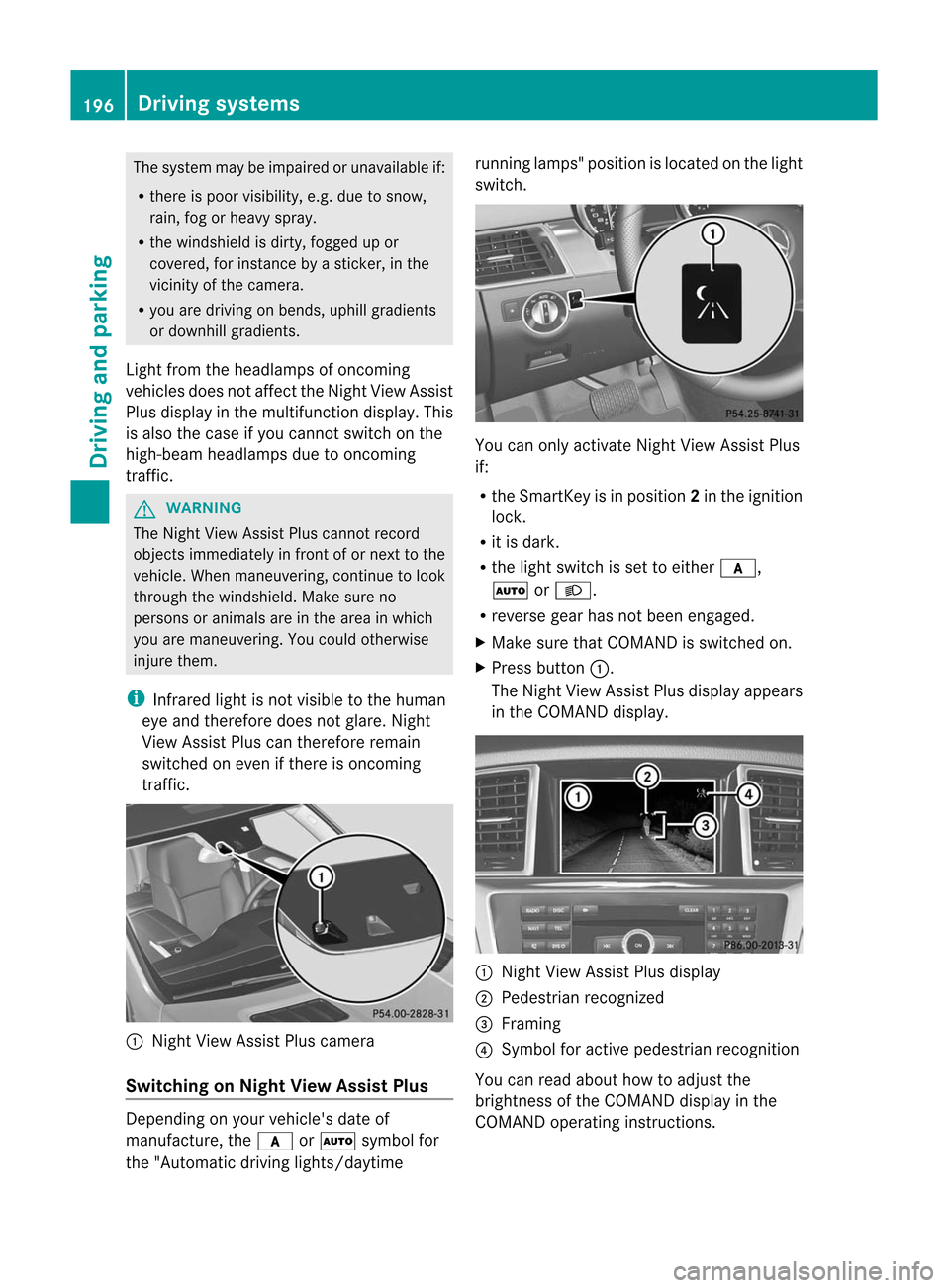
traffic. :
Night ViewAssist Pluscamera
Switching onNight ViewAssist Plus Depending
onyour vehicle's dateof
manufacture, thec orà symbol for
the "Automatic drivinglights/daytime running
lamps"position islocated onthe light
switch. You
canonly activate NightViewAssist Plus
if:
R the SmartK eyisin position 2in the ignition
lock.
R itis dark.
R the light switch isset toeither c,
à orL.
R reverse gearhasnotbeen engaged.
X Make surethatCOMAND isswitched on.
X Press button :.
The Night ViewAssist Plusdispla yappea rs
in the COMAND display. :
Night ViewAssist Plusdispla y
; Pedestrian recognized
= Framing
? Symbol foractive pedestrian recognition
You canread about howtoadjust the
brightness ofthe COMAND displayin the
COMAND operatinginstructions. 196
Driving
systemsDriving and parking
Page 199 of 396

i
The
infrared lampsswitch on
automatically fromaspeed ofabout 6mph
(10 km/ h).This means thatyoudonot have
the fullvisual rangewhilethevehicle is
stat ionary andcann otchec kwhether Night
View Assist Plusisworking.
Pedestrian recognition G
WARNING Pedestrian
recognitionmay beimpaired or
inoperative if:
R pedestrians arepartially orentirely
obscured byobject s,e.g. parked vehicles.
R the silhouette ofthe pedestrian inthe Night
View Assist Plusdisplay isincomplete or
interrupted, e.g.bypowerful light
reflections.
R pedestrians donot cont rast with the
surroundings.
R pedestrians arenot standing upright,for
example, ifthey aresitting, crouching or
lying down. i
Animals
arenot recogniz edbypedestrian
recognit ion.
Night ViewAssist Plusisable torecogniz e
pedestrians bytypical characterist ics,e.g. a
silhouette inthe shape ofap erson .
Pedestr ianrecogn itionisthen switch edon
automatic allyif:
R Night ViewAssist Plusisactivat ed.
R you aredriving fasterthan6mph
(10 km/ h).
R the surroundin gsare dark, e.g.when
driving outside built-up areaswithout
str eet lighting.
If pedestrian recognitionisactive,
symbol ?appears. Ifpedestrian sare
recogn ized,theyareframed =and thereby
highlighted. Ifthe pedestrian recognition
system hasbrought apedestrian toyour
atten tion,look through thewindshield to
evaluate thesituation .The actual distance toobject
sand pedestrians cannotbegauged
accurately bylooking atascreen.
It may bethe case thatobject sare highlighted
as well aspedestrians.
Fogg edup ordirt ywindsh ield If
the windsh ieldinfro ntofthe camer ais
fogge dup ordirt yon the inside oroutsid e,the
Night ViewAssistPlus display isaffec ted. G
WARN
ING Please
donot forg etthat your primar y
respo nsibilit yis to drive thevehic le.Ad river's
attention tothe road must alwaysbe his/he r
prima ryfocus whendriving.For yoursafety
and thesafety ofothers, stopbefore tryingto
remove windowfoggi ngorclea ning the
winds hieldin front ofthe Night ViewAssist
Plu scamera .
Bear inmind thatataspeed ofjust 30mph
(ap proxima tely50km/h), yourvehicle is
cover ingadistanc eof 44 feet
(approximately 14m)every second.
X To defr ost: chec kthe automatic air
con ditionin gsett ings (Ypage 132)and fold
do wn the cam eracove r(Y page 323) .
X To def ros tthe inside ofthe winds hield:
fol ddo wn the cam eracove r(Y page 323)
and clean the windsh ield (Y page 321) . Dri
ving sys tems
197Driving and parking Z
Page 200 of 396

Problems
withNight ViewAssist Plus Problem Possible
causes/co nsequences andM Solutions
The
picture qualityof
Night ViewAssist Plus
has deteriorated. The
windshield wipersaresmearing thewindshield.
X Repla cethe wiper blades (Ypage 119). The
windshield issmeared afterthevehicle hasbeen cleaned ina
car wash.
X Clea nthe windshield (Ypage 321). There
iswindshield chipdamage inthe camera's fieldofvision.
X Repla cethe windshield. The
windshield isfogged upon the inside.
X Defrost thewindshield (Ypage 132). The
windshield isiced up.
X De-ice thewindshield (Ypage 131). There
isdirt onthe inside ofthe windshield.
X Clea nthe inside ofthe windshield (Ypage 321). Lane
Tracking package
General notes The
Lane Tracking packageconsistsof Blind
Spot Assist (Ypage 198)andLane Keeping
Assist (Ypage 200).
Blind SpotAssist Import
antsafety notes
Blind SpotAssist usesaradar sensor system
to monitor theareas onboth sides ofyour
vehicle. Itsupports youfrom speeds of
approximately 20mph (30km/h) .A warning
displa yin the exterior mirrorsdrawsyour
attent iontovehicles detectedinthe
monitored area.Ifyou then switch onthe
corresponding turnsignal tochange lane,you
will also receive anoptical andaudible
collision warning. BlindSpotAssist uses
sensors inthe rear bumper formonitorin g
purposes. G
WARNING Blind
SpotAssist isonly anaid designed to
assist driving. Itmay failtodetect some
vehicles andisno substitute forattent ive
driving.
Blind SpotAssist cannot detectroadand
traffic condition s.Itmay failtodetect narrow
vehicles, suchasmotorc yclesorbicycles, or
may onlydetect themtoolate.
Monitoring maybeaffected bydirty sensors,
stron gspray orpoor visibili tycaused bysnow,
rain ormist, forexample. Inthis case, vehicles
are detected lateornot atall.
Always payattent iontotraffic condition sand
your surroundings. Otherwise,youmay failto
recogniz edangers intime, cause anaccident
and injure yourself andothers. i
USA
only:
This device hasbeen approved bythe FCC
as a“Vehicular RadarSyst em” .The radar
sensor isinten dedforuse inan automotive
radar system only.Removal, tampering, or198
Driving
systemsDriving and parking
Page 203 of 396

:
Lane Keepi ngAssist camera
If you have chosen the Display
Unit Speed-/Odom
eter (Y
page 233)function in
the on-board computer andselect km as
the
unit ofmeasu rement, ActiveLaneKeepi ng
Assist isactive fromspeed sof 60 km/h. If
the miles disp
layunit isselected, the
assi stance rangebeginsat40 mph. G
WARNING Lane
Keepi ngAssist doesnotkeep your
vehicle inits lane. Itis only anaid and may
detect thelane markings onthe road
incorrectly ornot atall.
The system maybeimpa iredormay not
function if:
R there ispoor visibility, e.g. due to
insuffici entillumina tionofthe road, ordue
to snow, rain,fogorspray .
R there isgla re, e.g. from oncoming traffic,
the sun, orreflection fromother vehicle s.
R the windshi eldisdirty, fogged upor
covered, forinstance byasticker, inthe
vicinity ofthe camera.
R several orno lane markings forasingle lane
are present.
R the lane markings areworn away,dark or
covered up,e.g. bydirt orsnow.
R the distance tothe vehicle infront istoo
small andthelane markings thuscannot be
detected.
R the lane markings onthe road areunclea r,
e.g. near roadw orks. R
the lane markings changequickly, e.g.
lanes branch off,cross oneanother or
merge.
R the road isnarrow andwindi ng.
Lane Keepi ngAssist cannot detectroadand
traffic conditions. Itis not asubstitu tefor
attentive driving.Youareresponsib lefor the
vehicle 'sspeed ,braking ingood time, and
steering correctly. Alwaysada ptyou rdriving
style tosui tthe prevailing roadandweather
conditions .Always payattent iontotraffic
conditions andyour surroundings. Otherwise,
you may failtorecognize dangersintime,
cause anaccident andinjure yourself and
others.
A warning canbegiven when afront wheel
passes overalane marking. Itwill warn you
by means ofintermit tentvibration inthe
steering wheelforupto1.5 seconds.
Switching onLane Keeping Assist X
Switch onAct iveLane Keeping Assistusing
the on-board computer; todo so, select Standard or Adaptive (Y
page 233).
Symbol :appea rsinthe multifunction
displa y.
If your speed exceeds 40mph (60km/h)
and lane markings aredetected,
symbol :ishighlighted. LaneKeeping
Assist isready foruse.
Standa rd
If Standard is
selected, nowarning vibration
occurs if: Driving
systems
201Driving and parking Z
Page 204 of 396

R
you swit chon thetur nsignals .Int his event,
the warnings aresuppressed foracertain
period oftime.
R adriving safetysystem interven es,such as
ABS ,BAS orESP ®
.
Adapt ive
If Adaptive is
selected, nowarning vibration
occurs if:
R you switch onthe turn signals. Inthis event,
the warnings aresuppressed foracertain
period oftime.
R adriving safetysystem interven es,e.g.
ABS ,BAS orESP ®
.
R you accelerate hard,e.g.kickdown.
R you brake hard.
R you steer actively, e.g.swerve toavoid an
obstacle orchange lanequickly.
R you cutthe corner onasharp bend.
In order thatyouarewarned onlywhen
necessary andingood timeifyou cross the
lane marking, thesystem recogniz escertain
condition sand warns youaccordingly.
The warning vibration occursearlierif:
R you approach theouter lanemarking ona
bend.
R the road hasvery wide lanes, e.g.a
freeway.
R the system recogniz essolid lanemarkings.
The warning vibration occurslaterif:
R the road hasnarrow lanes.
R you cutthe corner onabend. Active
Driving Assistance package
General notes The
Active Driving Assistanc epackage
consist sof DIS TRONIC PLUS(Ypage 169),
Act ive Blind SpotAssist (Ypage 202)and
Act ive Lane Keeping Assist(Ypage 205). Active
BlindSpotAssist Import
antsafety notes
Act ive Blind SpotAssist usesaradar sensor
system tomonitor theside areas ofyour
vehicle whichareinback ofthe driver. A
warning displayin the exterior mirrorsdraws
your attent iontovehicles detectedinthe
monitored area.Ifyou then switch onthe
corresponding turnsignal tochange lane,you
will also receive anoptical andaudible
collision warning. Ifarisk oflateral collision
is detect ed,correct ivebraking mayhelp you
avoid acollision. Tosupport thecourse-
correct ingbrake application, Active Blind
Spot Assist alsouses theforward-facing radar
sensor system. Active Blind SpotAssist
supports youfrom speeds ofapproximately
20 mph (30km/h). G
WARNING Act
ive Blind SpotAssist isonly anaid, and
may detect vehicles/obstacles incorrectlyor
not atall.
The system maybeimpaired ormay not
funct ionif:
R there ispoor visibili ty,e.g. due tosnow,
rain, fogorspray.
R the rear and/or frontsensors aredirty.
Act ive Blind SpotAssist maynotdetect
narrow vehicles, suchasmotorc yclesor
bicycles, ormay onlydetect themtoolate. It
cannot detectvehicles thatareovertaken at
a small distance andthen enter theblind spot
area.
Act ive Blind SpotAssist cannot detectroad
and traffic condition s.Itis not asubstitute for
attent ivedriving. Youareresponsible forthe
vehicle's speed,braking ingood time, and
steering correctly.Always adaptyourdriving
style tosuit theprevailing roadandweather
condition s.Always payattent iontotraffic
condition sand your surroundings. Otherwise,
you may failtorecogniz edangers intime,
cause anaccident andinjure yourself and
others. 202
Driving
systemsDriving and parking
Page 208 of 396

may
detect thelane markings onthe road
incorrectly ornot atall.
The system maybeimpa iredormay not
function if:
R severa lor no lane markings forasingle lane
are present.
R there ispoor visibility, e.g. due to
insuffi cientillumina tionofthe road, ordue
to snow, rain,fogorspray .
R there isgla re, e.g. from oncoming traffic,
the sun, orreflection fromother vehicles.
R the winds hieldis dirty, fogged upor
covered, forinstance byasticker, inthe
vicinity ofthe camera .
R the lane markings areworn away,dark or
covered up,e.g. bydirt orsnow.
R the dista ncetothe vehicl ein front istoo
smal land thelane markings thuscannot be
detected.
R the lane markings onthe road areunclea r,
e.g. near roadw orks.
R the lane markings changequickly, e.g.
lanes branch off,cross oneanother or
merge.
R the road isnarrow andwindi ng.
Active LaneKeepi ngAssist cannot detect
road andtraffic conditions. Itis not a
subs titute forattentive driving.You are
responsi bleforthe vehicl e'sspeed ,braking in
good time, andsteering correctly. Always
ada ptyou rdriving styletosui tthe prevailing
road andweather conditions .Always pay
att ent ion totraffic condition sand your
surro undin gs.Oth erwise, youmay failto
rec ogn izedanger sin tim e,cause anacc ident
and injure yourself andothers.
War ning vibration inthesteer ingwheel
A warnin gcan begiven when afro ntwheel
passes overalane mark ing.You willbe
warned bymean sof intermit tentvibrat ionin
the steerin gwheel forupto1.5s econ ds.
In order thatyouarewarned onlywhen
nec essary andingood timeifyou cross the lane
markin g,the system recognizescertain
con ditions andwarns youaccor dingly.
The warning vibration occursearlier if:
R you approach theouter lanemarkin gon a
bend.
R the road hasvery wide lanes, e.g.a
freeway.
R the system recognizessolid lanemarkin gs.
The warning vibration occurslater if:
R the road hasnarrow lanes.
R you cutthe corn eron abend.
Lane-corr ectingbrakeapp lication
If you leave yourlaneunder certain
circ umstan cesthevehicle willbrake briefly
on one side. Thisismeant toassist youin
bringin gthe vehicle backtothe original lane.
This functionisavailable inthe range between
40 mph and120 mph (60km/ hto
200 km/h).
A lane-c orrectingbrake application canonly
be made afterdriving overasolid,
recogn izablelanemarkin g.Befor ethis, a
warning mustbegiven bymeans of
int ermit tentvibrat ioninthe steerin gwheel.
In additio n,alane with lanemark ingsonbot h
sides mustberec ogn ized. Thebrak e
applicat ionalso slight lyreduc esvehic le
speed.
If alane- correctingbrak eapplicat ionoccurs,
the followin g,for exam ple,appears inthe
mult ifunc tiondisplay: i
A
furt her lane- correctingbrak e
applicat ioncan only occurafteryour
vehic lehas returne dto the origin allane. 206
Driving
systemsDriving and parking