2012 MERCEDES-BENZ GL SUV start stop button
[x] Cancel search: start stop buttonPage 185 of 441

To ensur
ethat the vehicle is secured against
rolling away unintentionally:
R the electric parkin gbrake mus tbea pplied
R the tra nsmission must be in position Pand
the key must be remove dfrom th eignition
lock
R on steep uphill or downhil lgradients ,turn
the fron twheels towards the kerb
R on steep uphill or downhill gradients, the
front axl eofane mpty vehicl emust be
secured, for example with awheel chock
R on steep uphill or downhill gradients, the
rea raxle of aladen vehicle must be addi-
tionally secured, for example with awheel
choc k. Switching of
fthe engine
Important safety notes G
WARNING
Th ea utomatic transmission switches to neu-
tral position Nwhen you switch off the engine.
The vehicle may roll away .There is arisk of
an accident.
After switching off the engine, always switch
to parking position P.Prevent th eparked vehi-
cle from rolling awa ybyapplying the parking
brake.
Usin gthe key X
Engag ethe electric parkin gbrake.
X Shift th etransmission to position P.
X Turn th ekey to position 0in the igniti on
lock and remov eit.
The immobilise risactivated.
i If you switch the engine off with the trans-
mission in position Ror D,t he automatic
transmission shift stoNautomatically.
If you then open one of the front doors or
remove the key from the ignition, the auto-
matic transmission shifts to P.
If you shift the automatic transmission to
N before switching off the engine, the auto- matic transmission remains in
Neven if a
door is opened.
Usin gKEYLESS-GO X
Engage the electric parking brake.
X Shift the transmission to position P.
X Press the Start/Stop button (Y page 159).
The engine stops and all the indicator
lamps in the instrument cluster go out.
i If you use the Start/Stop button to switch
off the engine, the automatic transmission
shifts to Nautomatically. If you then open
one of the front doors, the automatic trans-
mission shifts to P.
i The engine can be switched off while the
vehicle is in motion by pressing and holding
the Start/Stop button for abou tthree sec-
onds. This func tion operates independently
of the ECO start/stop automatic engine
switch-of ffunction. Electric parking brake
General notes G
WARNING
If you leave children unsupervised in the vehi-
cle, they could set it in motion by, for example:
R releasing the parking brake
R shifting the automatic transmission out of
the parking position P
R startin gthe engine.
They coul dalso operate the vehicle's equip-
ment. There is arisk of an accident and injury.
When leaving the vehicle, always take the key
with you and lock the vehicle. Never leave
children unsupervised in the vehicle.
i The electric parking brake carries out a
func tion chec katregular interval swhen
the engin eisswitched off. Noises that
occur are normal. 182
ParkingDriving and parking
Page 186 of 441

Engaging/releasing manually
X
To engage: push handle :.
When th eelectric parking brak eis
engaged ,the ! redi ndicator lamp lights
up in the instrumen tcluster.
i The electric parking brak ecan also be
applied when the key is removed.
X To release: pull handle:.
The red !indicator lamp in the inst ru-
ment cluster goe sout.
i The electric parking brake can only be
released:
R when the key is in position 1in the igni-
tion lock or
R the ignition was switched on using the
Start/Stop button.
To ensure that you do not roll backwards
when pulling away on an uphill slope, engage
the electric parking brake (Y page 162).
Engagin gautomatically Th
ee lectric parkin gbrake is engaged auto-
matically:
R if DISTRONIC PLUS brings th evehicle to a
standstill or
R if the HOL Dfunction is keeping the vehicle
stationary In addition, at least one of the following con-
ditions must be fulfilled:
R
the engine is switched off.
R the driver' sdoor is open and the seat belt
is not fastened.
R the vehicle is stationar yfor alengthy
period.
The red !indicator lam pint he inst rument
cluster lights up.
i Thee lectric parkin gbrake is not automat-
icall yapplied if the engine is switched off
by the ECO star t/stopfunction.
Releasing automatically The electric parking brake is released auto-
matically when all of the following conditions
are fulfilled:
R
the engine is running.
R the transmissio nisinp osition Dor R.
R the seat belt is fastened.
R you depress the accelerator pedal.
If the transmission is in position R,the boot
lid must be closed.
If your seat belt is not fastened, the following
conditions must be fulfilled to automatically
release the electric parkin gbrake:
R thed river's door is closed
R yo uh ave shifted out of transmission posi-
tion Por you have previously driven faster
than 3km/h
Emergenc ybraking Parking
183Drivingand pa rking Z
Page 212 of 441
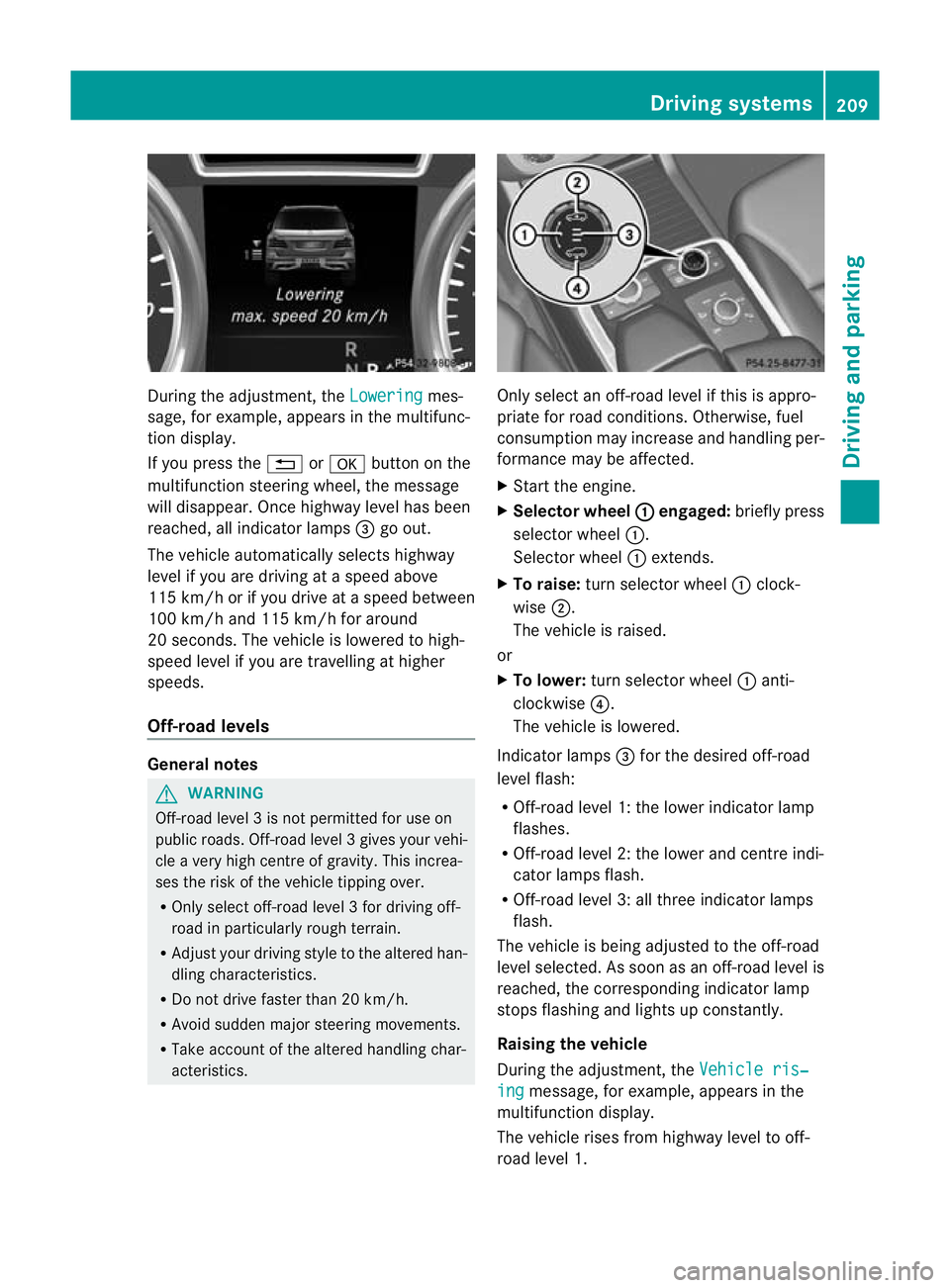
During the adjustment, the
Lowering mes-
sage ,for example, appears in the multifunc-
tion display.
If yo upressthe % ora button on the
multifunction steeri ngwheel, the message
will disappear. Onc ehighway level has been
reached, all indicator lamps =go out.
The vehicle automatically select shighway
level if you are drivin gataspeed above
11 5k m/ horify ou drive at aspeed between
10 0k m/ hand 115 km/h for around
20 seconds. The vehicle is lowered to high-
speed level if you are travelling at higher
speeds.
Off- road levels General notes
G
WARNING
Off-road level 3isn ot permitte dfor use on
public roads. Off -road level 3gives your vehi-
cle avery high centr eofgravity. This increa-
se st he risk of the vehi clet ippin gover.
R Onl yselec toff-road level 3for drivin goff-
road in particularl yrough terrain.
R Adjust your drivin gstyle to the altered han-
dling charac teristics.
R Do not drive faster than 20 km/h.
R Avoid sudden majo rsteering movements.
R Take account of th ealtered handling char-
acteristics. Only select an off-road level if this is appro-
priate for road conditions. Otherwise, fuel
consumption may increase and handling per-
formanc
emay be affected.
X Start the engine.
X Selector wheel : engaged:
briefly press
selector wheel :.
Selector wheel :extends.
X To raise: turn selector wheel :clock-
wise ;.
The vehicle is raised.
or
X To lower: turn selector wheel :anti-
clockwise ?.
The vehicle is lowered.
Indicator lamps =for the desired off-road
level flash:
R Off-road level 1: the lower indicator lamp
flashes.
R Off-road level 2: the lower and centre indi-
cator lamps flash.
R Off-road level 3: all three indicator lamps
flash.
The vehicle is being adjusted to the off-road
level selected .Assoon as an off-road leve lis
reached, th ecorresponding indicator lamp
stops flashing and lights up constantly.
Raising th evehicle
During the adjustment, the Vehicleris‐ ing message
,for example, appear sint he
multifunc tion display.
The vehicle rises from highway leve ltooff-
roa dlevel 1. Driving systems
209Driving and parking Z
Page 215 of 441

R
you depress the brak epedal again wit ha
certain amount of pressure until ëdis-
appears from themultifun ctiondisplay.
R you secur ethe vehi cleu sing the elec tric
parking brake.
R you activat eDISTRONIC PLU S.
i After atime, the electric parking brake
secures the vehicle and relieves the service
brake.
The electric parking brak esecures the vehicle
automatically if the HOL Dfunction is activa-
ted and:
R the driver' sdoor is open and the driver's
seat belt is unfastened.
R the engin eisswitched off, unless it is auto-
matically switched off by the ECO start/
stop function.
R as ystem fault occurs.
R the powe rsupply is not sufficient.
On steep uphill or downhill inclines or if there
is am alfunction, the transmissio nmay also
be automatically shifted int oposition P. AIRMATIC package
Genera lnotes AIRMATI
Cenable sasuspension tuning set-
ting to be selected and regulates the damping
behaviour and level of your vehicle. The sys-
tem comprises aminimum of two compo-
nents. These are AD S(Adaptive Damp ingS ys-
tem) (Y page 212) and level control
(Y page 213) .Your vehicle ma yalso be equip-
ped with the Active Curv eSystem
(Y page 213).
Observe the notes on driving with atrailer
(Y page 257).
ADS (Adaptive Damping System) General notes
ADS adapts th
edamping characteristic sto
the curren toperatin gand driving situation. Thi
sd epends on:
R your drivin gstyle
R the road surface conditions
R the AD Ssetting
R the vehicle level setting
Your selection remains stored even if you
remov ethe key from the igni tion lock.
Sports tuning Example: vehicles wit
hthe ON&OFFROA Dpackage
X Start the engine.
X Press button :.
Indicator lamp ;ligh tsup. You have sele c-
ted "Sport stuning". The vehicle is lowered
by 15 mm.
The firmer suspension tuning in Spor tmode
ensures even bette rcontac twith th eroad.
Select this mode when empl oyingasporty
driving style, e.g .onwindingcountr yroads.
Comfor ttun ing
X Press button :.
Indicator lamp =light sup. You have selec-
ted "Comfor ttuning". The vehicle is raised
by 15 mm.
In com fort mode, the dri ving characteristics
of your vehicl eare more comfortable. There-
fore, select this mode if you prefer amore
comfortable drivin gstyle. Select comfort
mode also when driving fast on straigh troads,
e.g. on straight stretches of motorway. 212
Driving systemsDriving and pa
rking
Page 225 of 441

X
Shift the transmissio ntoposition Dwhile
the vehicle is stationary.
Active Parkin gAssist immediately steer sin
the othe rdirection.
The Park Assist active Accelerate and brake Observe surroundings mes-
sage appears in the multifunction display.
i You will achieve the best results by wait-
ing for the steerin gprocedure to complete
before pulling awa y.
X Drive forwards and be ready to brake at all
times.
X Stop as soo nasPARKTRONIC sounds the
continuous warning tone, if not before.
The ParkAssist active Select R Observe surroundings message appears in
th em ultifunction display.
Further transmissio nshift sm ay be neces-
sary.
As soon as the parking procedure is com-
plete, the Park Assist switched off mes-
sage appears in the multifunc tion display.
PARKTRONIC is still available.
X Manoeuvr eifnecessary.
X Alway sobserv ethe warnin gmessages dis-
played by PARKTRONI C(Ypage 217).
Parking tips:
R on narrow roads, driv easclosely as possi-
ble past the parkin gspace.
R parking spaces that are littered, overgrown
or partially occupied by trailer drawbars
might be identified incor rectly or not at all.
R snowfall or heavy rain may lea dtoap arking
space being measured inaccurately.
R the way your vehicle is positioned in the
parking space after parking is dependent
on various factors. Thes einclude the posi-
tion and shape of the vehicles parked in
front and behind it and the condi tions of the
location .Insome cases, Active Parking
Assist ma yguide you too far into aparking
space, or not far enough into it. In some
cases, it may also lead you across or onto
the kerb. If necessary, you should cancel the parking procedure with Active Parking
Assis
t.
R you can also engag eforward gear prema-
turely. The vehicle redirects and does not
drive as far int othe parkin gspace. Should
ag ear be changed too early, the parking
procedure will be cancelled. Asensible
parkin gposition can no longer be achieved
from this position.
Exiting aparkin gspace G
WARNING
Active Parking Assist doe snot monitor street
traffic .Insome cases, the vehicle will also
tak eyou onto section softhe oncoming lane
when exitin gaparking space.
You are responsible for safety at all times and
must pay attention to any road users
approaching or passing. Stop the vehicle if
necessary or cancel Active Parking Assis t.
Activ eParking Assis tcan only assis tyou with
exitin gaparking space if you have parked the
vehicle using Active Parking Assis t.
X Start the engine.
X Switch on the turn signal on the side facing
the street.
X Shift the transmission to position Dor R.
The Star tPark Assist? Yes: OK No: %
message appears in th emultifunction
display.
X To cancel the procedure: press the
% button on the multifunction steering
wheel or pull away.
or
X To exit aparkin gspace usin gActive
Parking Assist: press theabutton on
the multifunction steering wheel.
The Park Assis tactive Accelerate and brake Observe surroundings mes-
sage appear sinthe multifuncti on display.
X Releas ethe multifunction steeri ngwheel.
X Revers ethe vehi cleo rdrive forwards, being
ready to brake at all times .Donot exceed
am aximum spee dofapproximately 222
Driving systemsDriving and parking
Page 272 of 441

Oper
ating the on-board compu ter
Overview :
Multifunction display
; Swit ches on LINGU ATRONIC; see the sep-
arate operating instructions
= Right control panel
? Left control panel
A Back button
X To activate the on-board computer: turn
the key to position 1in the ignitio nlock.
You can control the multifunction display and
the settings in the on-boar dcompu teru sing
the button sonthe multifunction steering
wheel. Lef
tcontrol panel =
; R
Calls up the menu and menu bar 9
:
Press briefly:
R
Scrolls through lists
R Select sasubmenu or function
R In the Audio menu: select
sa
stored station, an audi otrack or
av ideo scene
R In the Tel (telephone) menu:
switches to th ephon ebook and
selects anam eo rtele phone
number 9
:
Press and hold:
R In the Audio menu: sele
ctst he
previous/next statio norselects
an audio trac koravideoscene
using rapi dscrolling
R In the Tel (Te
lephone) menu:
starts rapid scrolling if the phone
book is open a R
Confirm sselection/display mes-
sage
R In the Tel (telephone) menu:
switches to the telephone book
and starts dialling the selected
number
R In the Audio menu: stops the
station searc hfunction at the
desired station Right control panel
~ R
Rejects or ends acall
R Exits telephone book/redial
memory 6 R
Makes or accepts acall
R Switches to the redial memory Displays and operation
269On-board computer and displays Z
Page 273 of 441

W
X R
Adjusts the volume 8 R
Mute Bac
kbutton %
Press briefly:
R
Back
R Switch esoff LINGUATRONIC;
see the separate operating
instructi ons
R Hides displa ymessages/calls
up the last Trip men
ufunction
used
R Exits the telephone book/redial
memory %
Press and hold:
R
Call supt he standard display in
the Trip menu
Multifunction display
:
Time
; Permanent display: outside tem perature
or spee d(Ypage 280)
= Description field
? Menu bar A
Drive program (Y page 168)
B Transmission position (Y page 168)
X To sho wmenu bar ?:press the =
or ; button on the steerin gwheel.
Men ubar? disappears after afew seconds.
Text field =shows the selected men uor
submen uaswell as display messages.
i You can set the tim eusing the audi osys-
tem or COMAND Online; see the separate
operating instructions.
The followi ngmessage scan appear in the
multifunction display:
Xj Y ActiveParking Assist
(Y page 219)
¯ Cruise control (Y page 193)
LIM SPEEDTRONI
C(Ypage 19 6)
f DSR DSR (Y
page 251)
Ç Off-ro ad program (vehicles with-
out the ON&OFFROAD package)
(Y page 252)
Ç Off-road program (vehicles with
the ON&OFFROAD package)
(Y page 253)
LO WR ANGE LO
WR ANGE off-road gear
(Y page 254)
_ Adaptive Main-beam Assist
(Ypage 125)
À ATTENTION ASSIST
(Ypage 232)
¤ ECO start/stop function
(Ypage 163)
Ä SpeedLimit Assist
(Y page 233)
à Lane KeepingAssist
(Y page 24 0)
à ActiveLane Keepin gAssist
(Y page 24 5)
ë HOLD functio n(Ypage 21 1)
Ä Distancewarnin gfunction
(Y page 63) 270
Display
sand ope rationOn-board computer and displays
Page 279 of 441

You will see one of the followin
gdisplay mes-
sages in the multifunction display:
R Please enter PIN :t
he mobile phone has
been placed in the mobile phone bracket
and the PIN has not yet been entered.
When you enter your PIN via the mobile
phone, LINGUATRONIC ,the audio system
or COMAN DOnline, the mobil ephone
searches for anetwor k.
R Telephone ready or the nam
eofthe net-
wor kprovider: th emobile phone has found
an etwor kand is ready to receive.
R Telephone No Service :t
here is no net-
wor kavail able or the mobile phone is
searching for anetwor k.
i You can obtain further information about
suitable mobile phones and connecting
mobile phones via Bluetooth ®
:
R from any Mercedes Benz Service Centre
R on the Internet at: http://
www.mercedes-benz.com/ connect
Acceptin gacall Examp
le:i ncoming call
If someone call syou when you are in the
Tel menu,
adisplay message appears in the
multifunction display.
X Press the 6button on the steering
wheel to accept an incomin gcall.
You can accept acall even if you are not in
the Tel menu.
Rejecting or ending acall X
Press the ~buttonont he steer ing
wheel. You can end or reject
acall even if you are not
in the Tel menu.
Dialling anumbe rfrom the phone book X
Press the =or; button on the steer-
ing wheel to sel ectthe Tel menu.
X Press the 9,:ora button to
switch to the phone book.
X Press the 9or: button to select the
desired name.
or
X To begin rapid scrolling: press and hold
the 9 or: button for longer than
one second.
Rapid scrolling stops when you release the
button or reach the end of the list.
X If only one telephone number is stored
for aname: press the 6ora button
to start diall ing.
or
X If ther eismore tha none number for a
pa rticula rname: press the 6ora
button to display the numbers.
X Press the 9or: button to select the
number you want to dial.
X Press the 6ora button to start dial-
ling.
or
X To exit the telephon ebook: press the
~ or% button.
Redialling The on-board computer saves the last names
or numbers dialle dinthe redial memory.
X Press the =or; button on the steer-
ing wheel to selec tthe Tel menu.
X Press the 6button to switc htothe
redial memory.
X Press the 9or: button to selec tthe
desired nam eornumber. 276
Menus and submenusOn-board computer and displays