2012 MERCEDES-BENZ GL fuel
[x] Cancel search: fuelPage 167 of 384
use a sponge and cold water to clean it. DEF
residues crystallize after time and
contaminate the affected surfaces.
! DEF is not a fuel additive and must not be
added to the fuel tank. If DEF is added to
the fuel tank, this can lead to engine
damage.
i If you are adding between maintenance
intervals, add approximately 1 gallon (3.8 l)
of DEF to the DEF tank. One gallon (3.8 l)
of DEF is approximately 2 DEF refill bottles.
For further information on DEF, see:
( Y page 374).
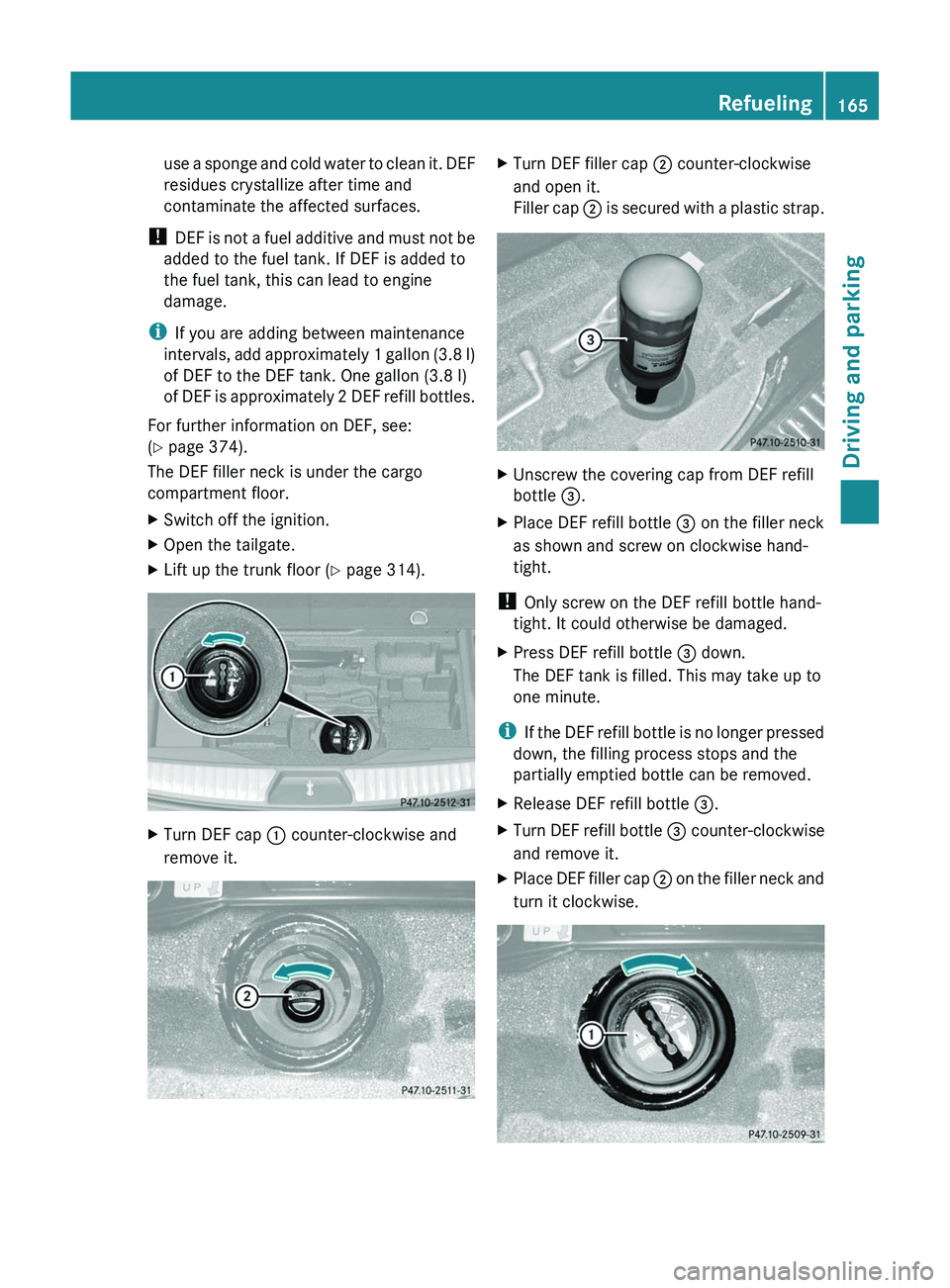
The DEF filler neck is under the cargo
compartment floor.XSwitch off the ignition.XOpen the tailgate.XLift up the trunk floor ( Y page 314).XTurn DEF cap : counter-clockwise and
remove it.XTurn DEF filler cap ; counter-clockwise
and open it.
Filler cap ; is secured with a plastic strap.XUnscrew the covering cap from DEF refill
bottle =.XPlace DEF refill bottle = on the filler neck
as shown and screw on clockwise hand-
tight.
! Only screw on the DEF refill bottle hand-
tight. It could otherwise be damaged.
XPress DEF refill bottle = down.
The DEF tank is filled. This may take up to
one minute.
i If the DEF refill bottle is no longer pressed
down, the filling process stops and the
partially emptied bottle can be removed.
XRelease DEF refill bottle =.XTurn DEF refill bottle = counter-clockwise
and remove it.XPlace DEF filler cap ; on the filler neck and
turn it clockwise.Refueling165Driving and parkingZ
Page 170 of 384
Driving tips
General driving tips
Important safety notes
GWARNING
Always remember that you must concentrate
primarily on driving the vehicle. The driver's
concentration must always be directed
primarily at road traffic. For your own safety
and that of others, we recommend that you
stop the vehicle at a safe place and in
accordance with the traffic conditions before
making or accepting a phone call.
Comply with all legal requirements if you use
the telephone while driving. Use the hands-
free system and only use the telephone when
road, weather and traffic conditions permit. In
some jurisdictions, it is forbidden for drivers
to use mobile phones while driving.
Only operate COMAND (Cockpit Management
and Data System) in compliance with all legal
requirements and when the road, weather and
traffic conditions permit. You may otherwise
not be able to observe the traffic conditions,
endangering yourself and others.
Remember that your vehicle covers a distance
of 44 feet (approximately 14 m) a second
when it is traveling at only 30 mph
(approximately 50 km/h).
Drive sensibly – save fuel
Observe the following tips to save fuel:
XThe tires should always be inflated to the
recommended tire pressure.XRemove unnecessary loads.XRemove roof carriers when they are not
needed.XRemove basic carriers when they are not
needed.XWarm up the engine at low engine speeds.XAvoid frequent acceleration or braking.XHave all maintenance work carried out as
indicated by the service intervals in theService Booklet or by the service interval
display.
Fuel consumption also increases when
driving in cold weather, in stop-and-go traffic
and in mountainous terrain.
Drinking and driving
GWARNING
Drinking and driving and/or taking drugs and
driving are very dangerous combinations.
Even a small amount of alcohol or drugs can
affect your reflexes, perceptions and
judgment.
The possibility of a serious or even fatal
accident are greatly increased when you drink
or take drugs and drive.
Do not drink or take drugs and drive or allow
anyone to drive who has been drinking or
taking drugs.
Pedals
GWARNING
Make sure absolutely no objects are
obstructing the pedals' range of movement.
Keep the driver's footwell clear of all
obstacles. If there are any floormats or
carpets in the footwell, make sure that the
pedals still have sufficient clearance.
During sudden driving or braking maneuvers,
the objects could get caught between the
pedals. You could then no longer brake or
accelerate. This could lead to accidents and
injury.
Rolling with the engine switched off
GWARNING
There is no power assistance for the steering
and the brake when the engine is not running.
Steering and braking requires significantly
more effort and you could lose control of the
vehicle and cause an accident as a result.
Do not turn off the engine while the vehicle is
in motion.
168Driving tipsDriving and parking
Page 178 of 384
wheelbrace, a robust tow cable and a
folding spade in the vehicle.XWheels and tires: check the tire tread
depth and tire pressure. A table with the
recommended tire pressures can be found
on the B-pillar on the driver's side of your
vehicle.XCheck for damage and remove any foreign
objects, e.g. small stones, from the
wheels/tires.XReplace any missing valve caps.XReplace dented or damaged wheels.XRims: dented or bent rims can result in a
loss of tire pressure and damage the tire
bead. Therefore, check your rims before
driving off-road and replace them as
required.
Checklist after driving off-road
GWARNING
If you notice sudden significant vibrations or
unusual handling performance or if you
suspect that damage has occurred to the
vehicle, you should activate the hazard
warning lamps, gently reduce speed and
carefully head for an area that is located at a
safe distance from the road.
Check the tires and the underside of the
vehicle for damage. If the vehicle seems
unsafe, have the vehicle towed away to the
nearest Mercedes-Benz Center or tire dealer
to be repaired.
Driving over rough terrain places greater
demands on your vehicle than driving on
normal roads. After driving off-road, check
the vehicle. This allows you to detect damage
promptly and reduce the risk of an accident
to yourself and other road users.
XDeactivate the off-road drive program
( Y page 206) or the LOW RANGE off-road
gear ( Y page 206).XDeactivate DSR ( Y page 204).XSet the differential lock setting to AUTO on
the selector wheel ( Y page 208).XLower the vehicle level again to a level
suitable to the road conditions, e.g. to the
highway/high-speed level.XClean the headlamps and rear lights and
check for damage.XClean the front and rear license plates.XClean wheels/tires, wheel mounting and
underbody with a water jet, check them for
foreign objects and damage and rectify this
as required.XAfter the trip, examine without fail the
entire undercarriage, wheels, tires, brakes,
bodywork structure, steering, chassis and
exhaust system for damage.XCheck whether twigs or other parts of
plants have become trapped. These
increase the risk of fire and can damage
fuel pipes, brake hoses or the rubber
bellows of the axle joints and propeller
shafts.XAfter driving for extended periods across
sand, mud, gravel, water or in similarly dirty
conditions, have the brake discs, wheels,
brake pads/linings and axle joints checked
and cleaned.XIf you detect strong vibrations after off-road
travel, check for foreign objects in the
wheels and drive train and remove them if
necessary. Foreign objects can disturb the
balance and cause vibrations.XTest the brakes.
Driving on sand
GWARNING
Do not reduce the tire inflation pressure
before driving through sand. However, if you
do so, remember to correct the tire inflation
pressure before continuing your trip. Driving
with reduced tire inflation pressure increases
the risk of losing control of the vehicle and
rolling over.
176Driving tipsDriving and parking
Page 191 of 384
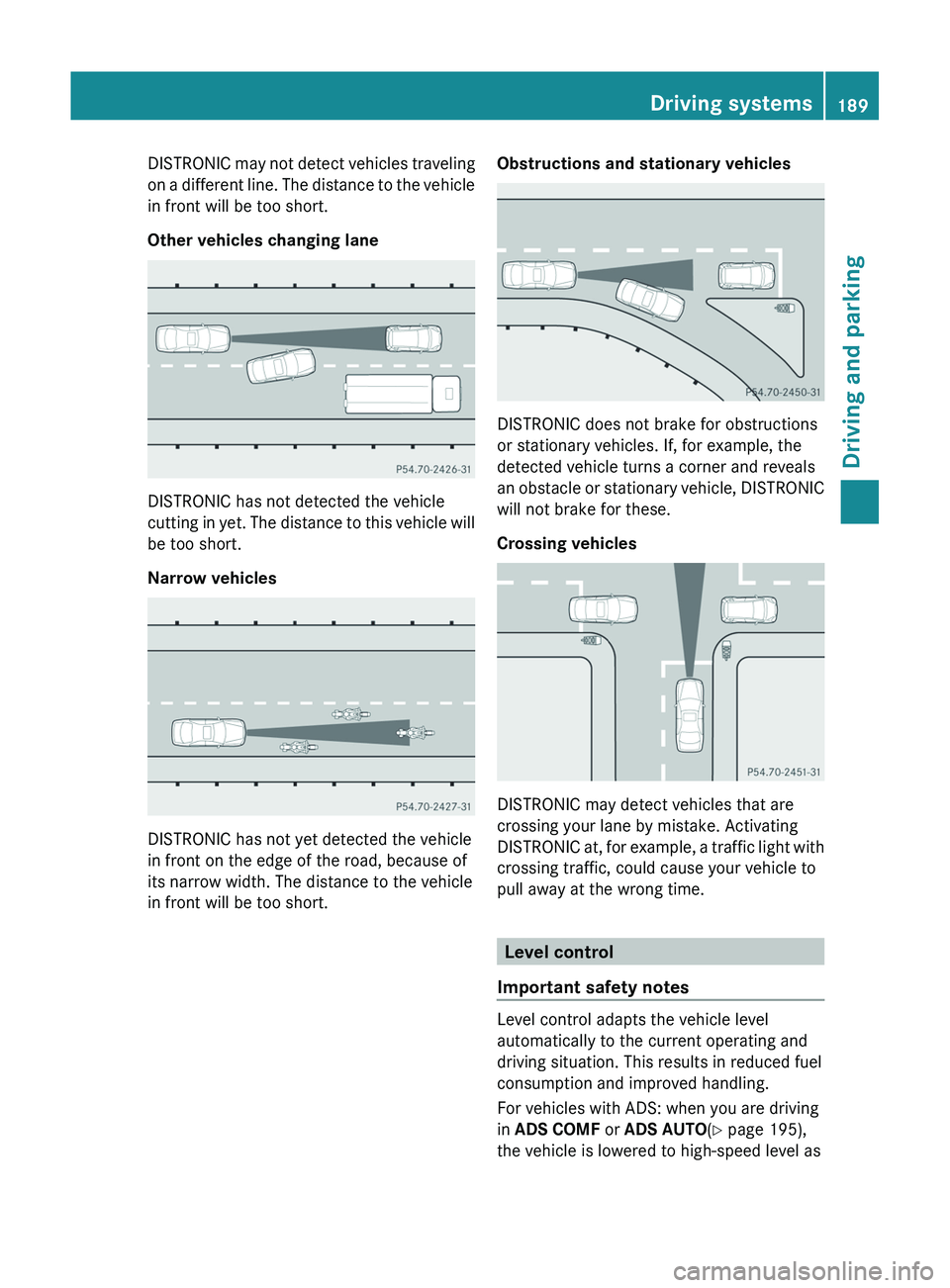
DISTRONIC may not detect vehicles traveling
on a different line. The distance to the vehicle
in front will be too short.
Other vehicles changing lane
DISTRONIC has not detected the vehicle
cutting in yet. The distance to this vehicle will
be too short.
Narrow vehicles
DISTRONIC has not yet detected the vehicle
in front on the edge of the road, because of
its narrow width. The distance to the vehicle
in front will be too short.
Obstructions and stationary vehicles
DISTRONIC does not brake for obstructions
or stationary vehicles. If, for example, the
detected vehicle turns a corner and reveals
an obstacle or stationary vehicle, DISTRONIC
will not brake for these.
Crossing vehicles
DISTRONIC may detect vehicles that are
crossing your lane by mistake. Activating
DISTRONIC at, for example, a traffic light with
crossing traffic, could cause your vehicle to
pull away at the wrong time.
Level control
Important safety notes
Level control adapts the vehicle level
automatically to the current operating and
driving situation. This results in reduced fuel
consumption and improved handling.
For vehicles with ADS: when you are driving
in ADS COMF or ADS AUTO (Y page 195),
the vehicle is lowered to high-speed level as
Driving systems189Driving and parkingZ
Page 192 of 384
the speed increases. As the vehicle
decelerates, the vehicle is raised back up to
highway level. In ADS SPORT(Y page 195),
the vehicle skips highway level and is lowered
directly to high-speed level.
Make changes to the vehicle level while the
vehicle is in motion. This enables the vehicle
to adjust to the new level as quickly as
possible.
The vehicle level may change visibly when you
park the vehicle and the outside temperature
changes. When the temperature drops, the
vehicle level is lower; with an increase in
temperature, the vehicle level rises.
When you unlock the vehicle or open a door,
the vehicle begins to balance the load
discrepancies while still parked. However, for
significant level changes, e.g. after the
vehicle has been stationary for a long period,
the engine must be on. For safety reasons,
the vehicle is only lowered when the doors are
closed. Lowering is interrupted if a door is
opened and continues once the door has
been closed.GWARNING
Make sure that nobody is in the vicinity of the
wheel arch or the underbody when changing
the vehicle level. You could otherwise trap
yourself or others.
GWARNING
Always select as low a vehicle level as
possible. If the vehicle level is high, the vehicle
center of gravity shifts upwards. This
increases the risk of the vehicle tipping over.
Adapt your driving style to suit the vehicle
level. ESP ®
cannot reduce the risk of an
accident if you drive too fast. ESP ®
cannot
override the laws of physics.
! When driving on extremely rough terrain,
select a high vehicle level in good time.
Make sure that there is always sufficient
ground clearance to prevent damage to the
vehicle.
! Remove the key from the ignition before
raising one or more wheels with the
appropriate equipment.
For information about driving off-road, see
( Y page 174).
Vehicles without extended Off-Road Pro
engineering package
Basic setting
The extent to which the vehicle is raised or
lowered depends on the basic setting
selected.
Select:
R Raised level, for driving on normal off-road
terrain
R Highway/high-speed level for normal roads
The individual vehicle levels differ from
highway level as follows:
R +2.3 in (+ 60 mm) at the raised level
R +/–0 in (+/–0 mm) at the highway level 23
R –0.6 in (–15 mm) at the high-speed level
Raised level
Only select raised level when this is
appropriate for the road conditions.
Otherwise, fuel consumption increases and
handling performance may be affected.
Your selection remains stored even if you
remove the SmartKey from the ignition lock.
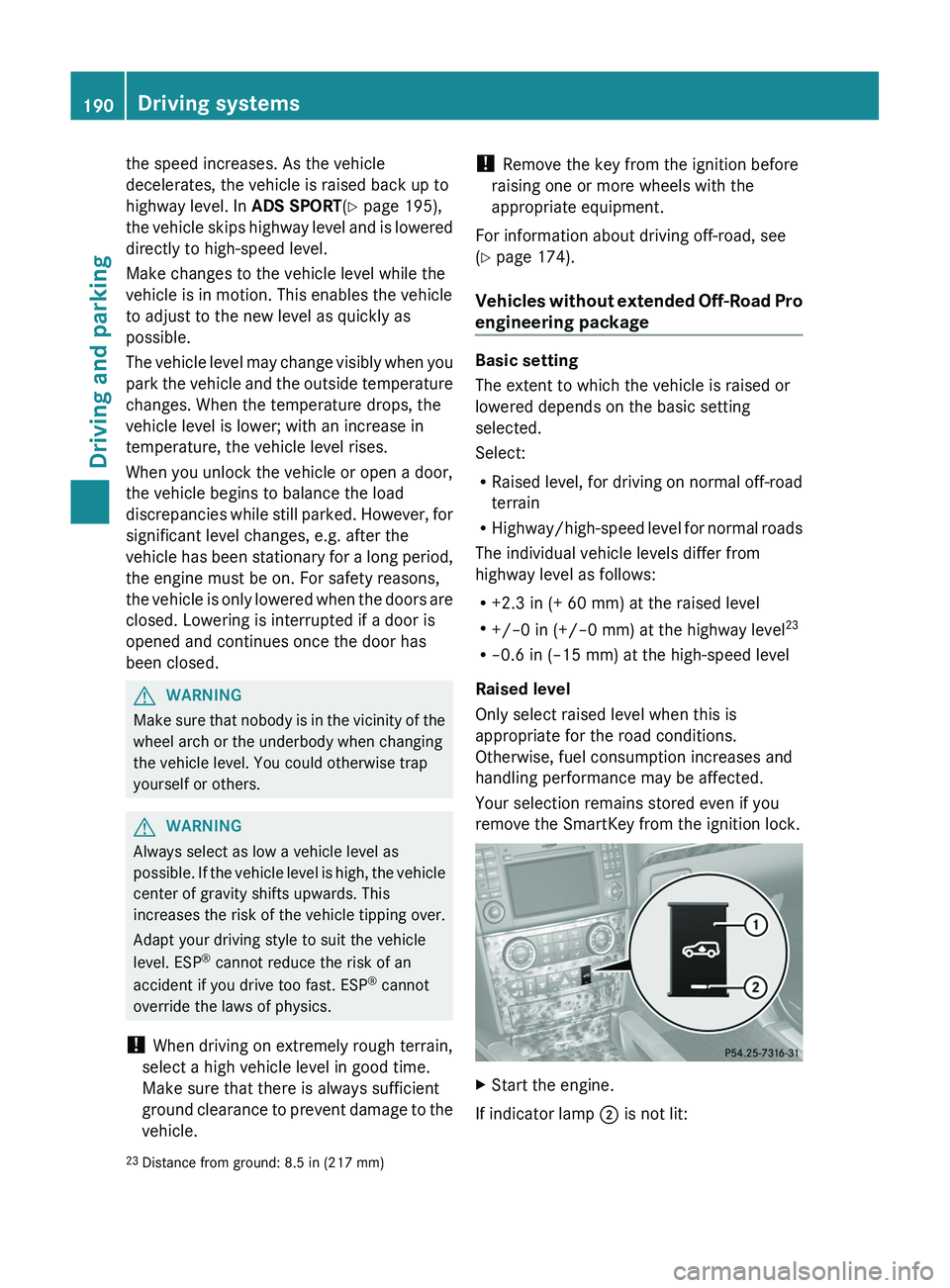
XStart the engine.
If indicator lamp ; is not lit:
23
Distance from ground: 8.5 in (217 mm)190Driving systemsDriving and parking
Page 194 of 384
Vehicles with extended Off-Road Pro
engineering package
Basic settings
The extent to which the vehicle is raised or
lowered depends on the basic setting
selected.
Select:
R Off-road level 3 for freeing the vehicle in
impassable terrain at low speeds only
R Off-road level 2 for driving on normal off-
road terrain
R Off-road level 1 for driving on easily
negotiable off-road terrain
R Highway/high-speed level for normal roads
The individual vehicle levels differ from
highway level as follows:
R +3.5 in (+ 90 mm) at off-road level 3
R +2.3 in (+ 60 mm) at off-road level 2
R +1.2 in (+ 30 mm) at off-road level 1
R +/–0 in (+/–0 mm) at the highway level
R –0.6 in (–15 mm) at the high-speed level
Off-road levels
GWARNING
Vehicle off-road level 3 is not intended for use
on paved roads. This vehicle level is intended
for clearing impracticable situations at low
speed exclusively. The vehicle has a very high
center of gravity in off-road level 3. This
increases the overturning hazard.
R Select off-road level 3 exclusively for
clearing impracticable situations at low
speed.
R Adapt your driving style to the modified
conditions.
R Do not exceed a speed of 12 mph
(20 km/h).
R Avoid extreme, quick steering movements.
R Keep in mind the vehicle's driving
characteristics are modified.
You should therefore drive in off-road level 3
with particular caution as it could otherwise
lead to an accident and/or serious injury to
you or others.
If you drive too fast at off-road level 3, then
the Reduce speed to below 12 mph
( 20 km/h ) message appears in the
multifunction display. You also hear a
warning. The vehicle is lowered.
i You cannot clear these messages.
Only select an off-road level when this is
appropriate for road conditions. Otherwise,
fuel consumption increases and handling
performance may be affected.
Your selection remains stored even if you
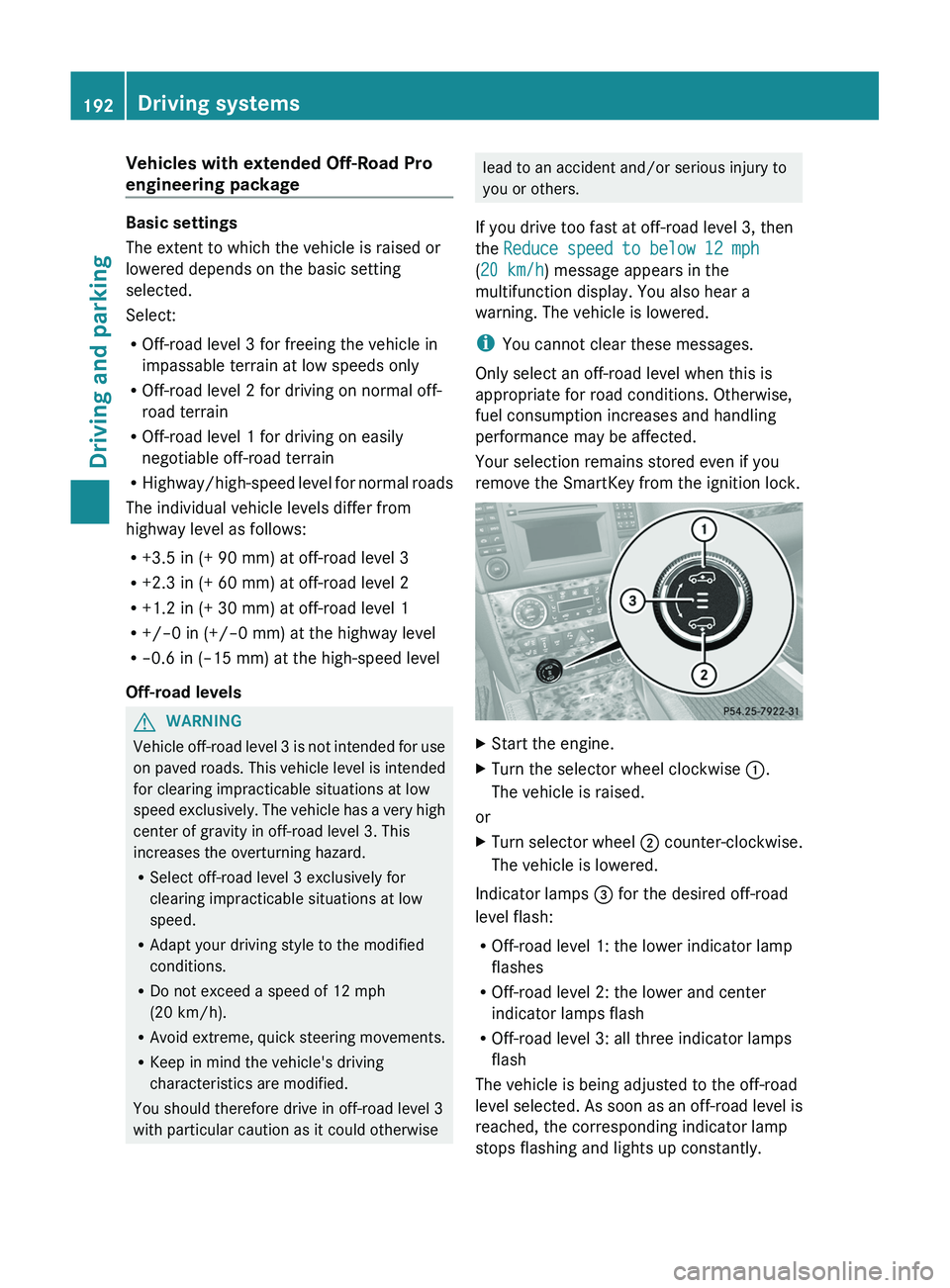
remove the SmartKey from the ignition lock.XStart the engine.XTurn the selector wheel clockwise :.
The vehicle is raised.
or
XTurn selector wheel ; counter-clockwise.
The vehicle is lowered.
Indicator lamps = for the desired off-road
level flash:
R Off-road level 1: the lower indicator lamp
flashes
R Off-road level 2: the lower and center
indicator lamps flash
R Off-road level 3: all three indicator lamps
flash
The vehicle is being adjusted to the off-road
level selected. As soon as an off-road level is
reached, the corresponding indicator lamp
stops flashing and lights up constantly.
192Driving systemsDriving and parking
Page 218 of 384
Useful information
i This Operator's Manual describes all
models and all standard and optional
equipment of your vehicle available at the
time of publication of the Operator's
Manual. Country-specific differences are
possible. Please note that your vehicle may
not be equipped with all features
described. This also applies to safety-
related systems and functions.
i Please read the information on qualified
specialist workshops ( Y page 24).
Important safety notes
You will find an illustration of the instrument
cluster in the "At a glance" section
( Y page 29).
GWARNING
A driver's attention to the road and traffic
conditions must always be his/her primary
focus when driving.
For your safety and the safety of others,
selecting features through the multifunction
steering wheel should only be done by the
driver when traffic and road conditions permit
it to be done safely.
Bear in mind that at a speed of just 30 mph
(approximately 50 km/h ), your vehicle is
covering a distance of 44 feet (approximately
14 m) every second.
GWARNING
No messages will be displayed if either the
instrument cluster or the multifunction
display is inoperative.
As a result, you will not be able to see
information about your driving conditions,
such as
R speed
R outside temperature
R warning/indicator lamps
Rmalfunction/warning messages
R failure of any systems
Driving characteristics may be impaired.
If you must continue to drive, do so with added
caution. Contact an authorized Mercedes-
Benz Center as soon as possible.GWARNING
Malfunction and warning messages are only
indicated for certain systems and are
intentionally not very detailed. The
malfunction and warning messages are
simply a reminder with respect to the
operation of certain systems. They do not
replace the owner's and/or driver's
responsibility to maintain the vehicle's
operating safety. Have all required
maintenance and safety checks performed on
the vehicle. Bring the vehicle to an authorized
Mercedes-Benz Center to address the
malfunction and warning messages.
Displays and operation
Tachometer
The red band in the tachometer indicates the
engine's overrevving range.
! Do not drive in the overrevving range, as
this could damage the engine.
The fuel supply is interrupted to protect the
engine when the red band is reached.
Outside temperature display
The outside temperature display is in the
multifunction display ( Y page 218).
GWARNING
The outside temperature indicator is not
designed to serve as an ice-warning device
and is therefore unsuitable for that purpose.
Indicated temperatures just above the
freezing point do not guarantee that the road
216Displays and operationOn-board computer and displays
Page 231 of 384
(Canada: 4 km/h) and 10 mph (Canada:
18 km/h). The adjustments are made in
1-mph increments (Canada:
2-km/h increments).XPress V or U on the steering wheel
to select the Additional functions menu.XPress the & or * button to select the
DSR Speed function.XPress the W or X button to set the
desired threshold speed.XPress the &, V or U button to
select a different display.
Trip computer menu
Trip computer "From start" or "From
reset"
The values in the From Start submenu refer
to the start of your journey, while those in the
From Reset submenu refer to the last time
you reset ( Y page 229) this submenu.
XPress the V or U button on the
steering wheel to select the trip
computer menu.XPress the & or * button to select
From Start or From Reset .
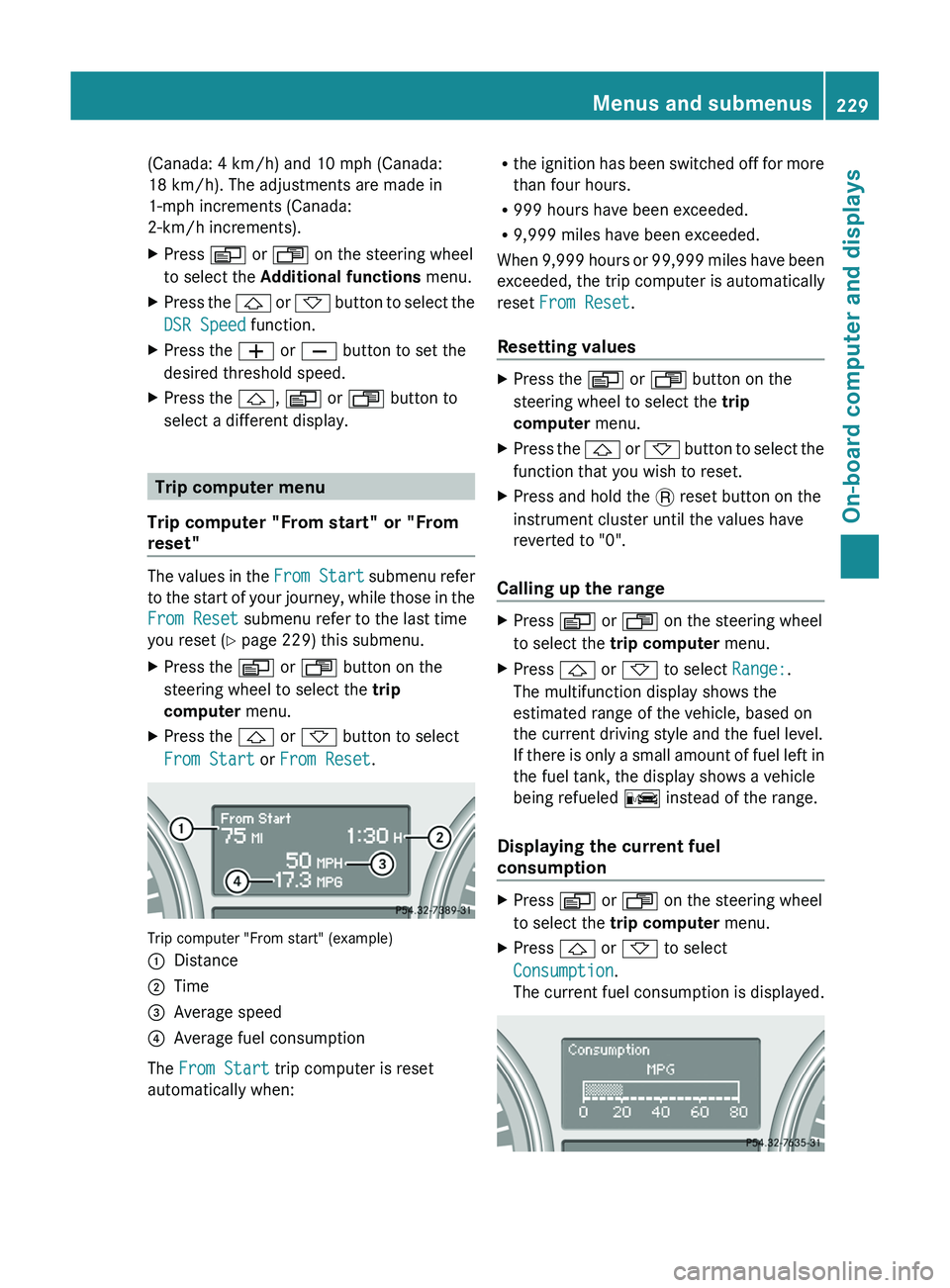
Trip computer "From start" (example)
:Distance;Time=Average speed?Average fuel consumption
The From Start trip computer is reset
automatically when:
R the ignition has been switched off for more
than four hours.
R 999 hours have been exceeded.
R 9,999 miles have been exceeded.
When 9,999 hours or 99,999 miles have been
exceeded, the trip computer is automatically
reset From Reset .
Resetting valuesXPress the V or U button on the
steering wheel to select the trip
computer menu.XPress the & or * button to select the
function that you wish to reset.XPress and hold the . reset button on the
instrument cluster until the values have
reverted to "0".
Calling up the range
XPress V or U on the steering wheel
to select the trip computer menu.XPress & or * to select Range:.
The multifunction display shows the
estimated range of the vehicle, based on
the current driving style and the fuel level.
If there is only a small amount of fuel left in
the fuel tank, the display shows a vehicle
being refueled C instead of the range.
Displaying the current fuel
consumption
XPress V or U on the steering wheel
to select the trip computer menu.XPress & or * to select
Consumption .
The current fuel consumption is displayed.Menus and submenus229On-board computer and displaysZ