2012 MERCEDES-BENZ GL-Class Towing
[x] Cancel search: TowingPage 157 of 384

Engaging park position PXPush the DIRECT SELECT lever in the
direction of arrow P.
i
The automatic transmission shifts
automatically into park position P if you
open the driver's door when the vehicle is
stationary or driving at very low speed, and
the transmission is in position D or R.
! If the engine speed is too high or the
vehicle is moving, do not shift the
automatic transmission directly from D to
R , from R to D or directly to P. The
automatic transmission could otherwise be
damaged.
Engaging reverse gear R
! Only shift the automatic transmission to
R when the vehicle is stationary.
XWhen the vehicle is stationary, depress the
brake pedal.XPush the DIRECT SELECT lever up past the
first point of resistance.
Shifting to neutral N
XWhen the vehicle is stationary, depress the
brake pedal.XPush the DIRECT SELECT lever up or down
to the first point of resistance.
If the engine has been switched off, the
automatic transmission automatically
switches to N.
Remaining in neutral N
If the automatic transmission is to remain in
neutral N, e.g. for washing the vehicle in car
washes with a towing device, please observe
the following instructions:
GWARNING
When leaving the SmartKey in the starter
switch, do not leave children unattended in
the vehicle. It is possible for children to switch
on the ignition which could result in
unsupervised use of vehicle equipment.
Unsupervised use of vehicle equipment could
result in an accident and/or serious personal
injury.
Using the SmartKey:
R make sure that the ignition is switched on.
R when the vehicle is stationary, depress the
brake pedal and keep it depressed.
R shift to neutral N.
R release the brake pedal.
R if applied, release the parking brake.
R switch off the ignition and leave the
SmartKey in the ignition lock.
Using KEYLESS-GO:
R make sure that the ignition is switched on.
R when the vehicle is stationary, depress the
brake pedal and keep it depressed.
R engage park position P.
R release the brake pedal.
R remove the Start/Stop button from the
ignition lock.
R insert the SmartKey into the ignition lock.
R switch on the ignition.
R depress the brake pedal and keep it
depressed.
R shift to neutral N.
R release the brake pedal.
R if applied, release the parking brake.
R switch off the ignition and leave the
SmartKey in the ignition lock.
Shifting to transmission position DXWhen the vehicle is stationary, depress the
brake pedal.XPush the DIRECT SELECT lever down past
the first point of resistance.
Transmission position display
The current transmission position is shown in
the multifunction display.
Automatic transmission155Driving and parkingZ
Page 159 of 384

Driving tips
Kickdown
Use kickdown for maximum acceleration.
XVehicles for USA: fully depress the
accelerator pedal.
The transmission shifts to a lower gear
depending on the engine speed.XVehicles for Canada: depress the
accelerator pedal beyond the pressure
point.
The transmission shifts to a lower gear
depending on the engine speed.
Rocking the vehicle free
Rocking the vehicle free by shifting back and
forth between transmission positions D and
R can help to free a vehicle that has become
stuck in mud or snow. The engine
management system of the vehicle limits
shifting back and forth between transmission
positions D and R to a maximum speed of
5 mph (9 km/h). To shift back and forth
between transmission positions D and R,
move the selector lever up and down beyond
the pressure point.
Working on the vehicle
GWARNING
When working on the vehicle, engage the
parking brake and shift the automatic
transmission into park position P. Otherwise
the vehicle could roll away which could result
in an accident and/or serious personal injury.
Trailer towing
XWhen towing a trailer and driving downhill,
shift to the lower gear if the automatic
transmission constantly shifts between
two gears.XEngaging a lower gear and reducing the
speed reduces the risk of the engine
overheating.Steering wheel paddle shifters:Left-hand steering wheel paddle shifter;Right-hand steering wheel paddle shifter
You can restrict or derestrict the shift range
by using the steering wheel paddle shifters.
Shift ranges
Introduction
When the automatic transmission is in
position D, it is possible to restrict or
derestrict the shift range ( Y page 157).
The shift range selected is shown in the
multifunction display. The automatic
transmission shifts only as far as the selected
gear.
Driving situations=You can use the engine's braking
effect.5To use the braking effect of the
engine on downhill gradients and
for driving:
R on steep mountain roads
R in mountainous terrain
R in arduous conditions4To use the braking effect of the
engine on extremely steep downhill
gradients and on long downhill
stretchesAutomatic transmission157Driving and parkingZ
Page 181 of 384

GWARNING
Never turn the vehicle around on steep inclines. The vehicle might roll over. If the vehicle cannot
complete the attempted climb, back it down in reverse gear.
i Hill start assist will aid you when pulling away on a hill.
For more information, see "Hill start assist" ( Y page 151).
Maximum gradient-climbing capability
For good road surface conditions, the
maximum gradient-climbing capability is
100%, which corresponds to an approach/
departure angle of 45°. Note that the
vehicle's gradient-climbing capability
depends on the off-road conditions.
Accelerate carefully and make sure that the
wheels do not spin when driving on steep
terrain.
i If the load on the front axle is reduced
when pulling away on a steep uphill slope,
the front wheels have a tendency to spin.
4ETS recognizes this and brakes the
wheels accordingly. The rear wheel torque
is increased, making it easier to drive off.
i Vehicles with the Enhanced Off-Road
Package have a differential lock for the
transfer case and a differential lock for the
rear axle to improve vehicle traction.
Brow of hill
When driving up an uphill gradient, slightly
reduce pressure on the accelerator
immediately before reaching the brow of the
hill. Use the vehicle's own impetus to drive
over the top of the hill.
This style of driving prevents:
R the vehicle from lifting off the ground on the
brow of a hill
R loss of traction
R the vehicle from traveling too quickly down
the other side
Driving downhill
R Drive slowly.
R Do not drive at an angle down steep
inclines. Steer into the line of fall and drive
with the front wheels aligned straight.
Otherwise, the vehicle could slip sideways,
tip and rollover.
R Before tackling steep downhill gradients,
select shift range 1.
R Activate DSR. If this is not sufficient, brake
gently. When doing so, make sure that the
vehicle is facing in the direction of the line
of fall.
R Check that the brakes are working normally
after a long downhill stretch.
i The special off-road ABS setting enables
a precise, brief and repeated locking of the
front wheels, causing them to dig into the
loose earth. Be aware that the front wheels
easily skid across the ground surface if
completely braked and therefore lose their
ability to steer.
Driving systems
Cruise control
Important safety notes
Cruise control maintains a constant road
speed for you. It brakes automatically in order
to avoid exceeding the set speed. On long and
steep downhill gradients, especially if the
vehicle is laden or towing a trailer, you must
select shift range 1, 2 or 3 in good time. By
doing so, you will make use of the braking
effect of the engine, which relieves the load
on the brake system and prevents the brakes
from overheating and wearing too quickly.
Driving systems179Driving and parkingZ
Page 184 of 384

DISTRONIC
Important safety notes
DISTRONIC regulates the speed and
automatically helps you maintain the
distance to the vehicle detected in front. It
brakes automatically in order to avoid
exceeding the set speed.
On long and steep downhill gradients,
especially if the vehicle is laden or towing a
trailer, you must select shift range 1, 2 or 3
in good time. By doing so, you will make use
of the braking effect of the engine, which
relieves the load on the brake system and
prevents the brakes from overheating and
wearing too quickly.
If a slower-moving vehicle is detected in front,
DISTRONIC causes your vehicle to brake and
maintain the preset distance to the vehicle in
front.
GWARNING
The Distronic requires familiarity with its
operational characteristics. We strongly
recommend that you review the following
information carefully before operating the
system.
GWARNING
When DISTRONIC brakes, the brake pedal is
pulled back (i.e. operated automatically). The
area around the pedal must not be blocked by
obstacles:
R do not place any objects in the footwell.
R ensure that floormats and carpets are fixed
securely. In particular, do not place several
floormats on top of one another.
R do not place your foot under the brake
pedal, as it could become trapped.
Non-compliance could lead you to cause an
accident in which you and/or others could be
seriously injured.
GWARNING
The Distronic is a convenience system. Its
speed adjustment reduction capability is
intended to make cruise control more
effective and usable when traffic speeds vary.
It is not however, intended to, nor does it,
replace the need for extreme care.
The responsibility for the vehicle's speed,
distance to the preceding vehicle and, most
importantly, brake operation to ensure a safe
stopping distance, always remains with the
driver.
The Distronic cannot take street and traffic
conditions into account. Complex driving
situations are not always fully recognized by
the Distronic. This could result in wrong or
missing distance warnings.
If there is no vehicle driving in front of you,
DISTRONIC functions like cruise control at a
speed range between 20 mph (30 km/h) and
120 mph (200 km/h). If a vehicle is driving in
front of you, it functions at a speed range
between 0 mph (0 km/h) and 120 mph
(200 km/h).
Do not use DISTRONIC while driving on roads
with steep gradients.GWARNING
DISTRONIC distance control is not a
substitute for the driver's active involvement.
It does not react to pedestrians or stationary
objects and cannot detect or predict the
road's course and the movements of the
vehicles in front.
DISTRONIC can only brake using 40% of the
vehicle's maximum possible braking force.
The driver must always pay attention to road,
weather and traffic conditions. He must steer,
brake and drive the vehicle so that he
maintains control over it.
High-frequency sources such as toll stations,
velocity measurement systems, etc. may
cause DISTRONIC to malfunction.
GWARNING
The Distronic cannot take road and traffic
conditions into account. Only use the
Distronic if the road, weather and traffic
182Driving systemsDriving and parking
Page 186 of 384

Cruise control lever:To store the current speed or a higher
speed;To store the current speed or a lower
speed=To deactivate DISTRONIC?To store the current speed or to call up
the last stored speed
Switching on DISTRONIC, storing and
maintaining the current speed
GWARNING
The vehicle can be braked when DISTRONIC
is activated. For this reason, deactivate
DISTRONIC if the vehicle is to be set in motion
by other means (e.g. in a car wash or by
towing).
You can activate DISTRONIC in the following
circumstances:
R if the engine has been started and you have
been driving for up to two minutes
R while driving, except if you brake
R if the parking brake is not applied
R if ESP ®
is activated
R if the transmission is in position D
Activating while driving
When driving at speeds below 20 mph
(30 km/h) , you can only activate DISTRONIC
PLUS if the vehicle in front has been detected
and is shown in the multifunction display. If
the vehicle in front is not shown in the
multifunction display and is no longer being
detected, because it has changed lanes, for
example, DISTRONIC is deactivated and you
hear a warning tone.XBriefly pull the cruise control lever towards
you ? or press it up : or down ; to the
pressure point.
DISTRONIC is activated.XKeep the cruise control lever pressed
up : or down ; until the desired speed
is set.XRemove your foot from the accelerator
pedal.
Your vehicle adapts its speed to that of the
vehicle in front, but only up to the desired
stored speed.
i You can use the cruise control lever to set
the stored speed and the thumbwheel on
the cruise control lever to set the specified
minimum distance ( Y page 186).
i If you do not fully release the accelerator
pedal, the DISTRONIC Override message
appears in the multifunction display. The
set distance to a slower-moving vehicle in
front will then not be maintained. You will
be driving at the speed you determine by
the position of the accelerator pedal.
Driving
If there is no vehicle in front, DISTRONIC
operates in the same way as cruise control.
If a slower-moving vehicle is detected in front,
DISTRONIC causes your vehicle to brake and
maintain the preset distance to the vehicle in
front.
If DISTRONIC detects a faster-moving vehicle
in front, it increases the driving speed, but
only up to the desired speed you have stored.
GWARNING
If you depress the brake pedal, DISTRONIC is
deactivated. DISTRONIC will then no longer
brake your vehicle. In such cases, control the
distance from vehicles traveling in front with
the brake alone. You could otherwise cause
an accident and thereby injure yourself and
others. The driver remains fully responsible
184Driving systemsDriving and parking
Page 200 of 384
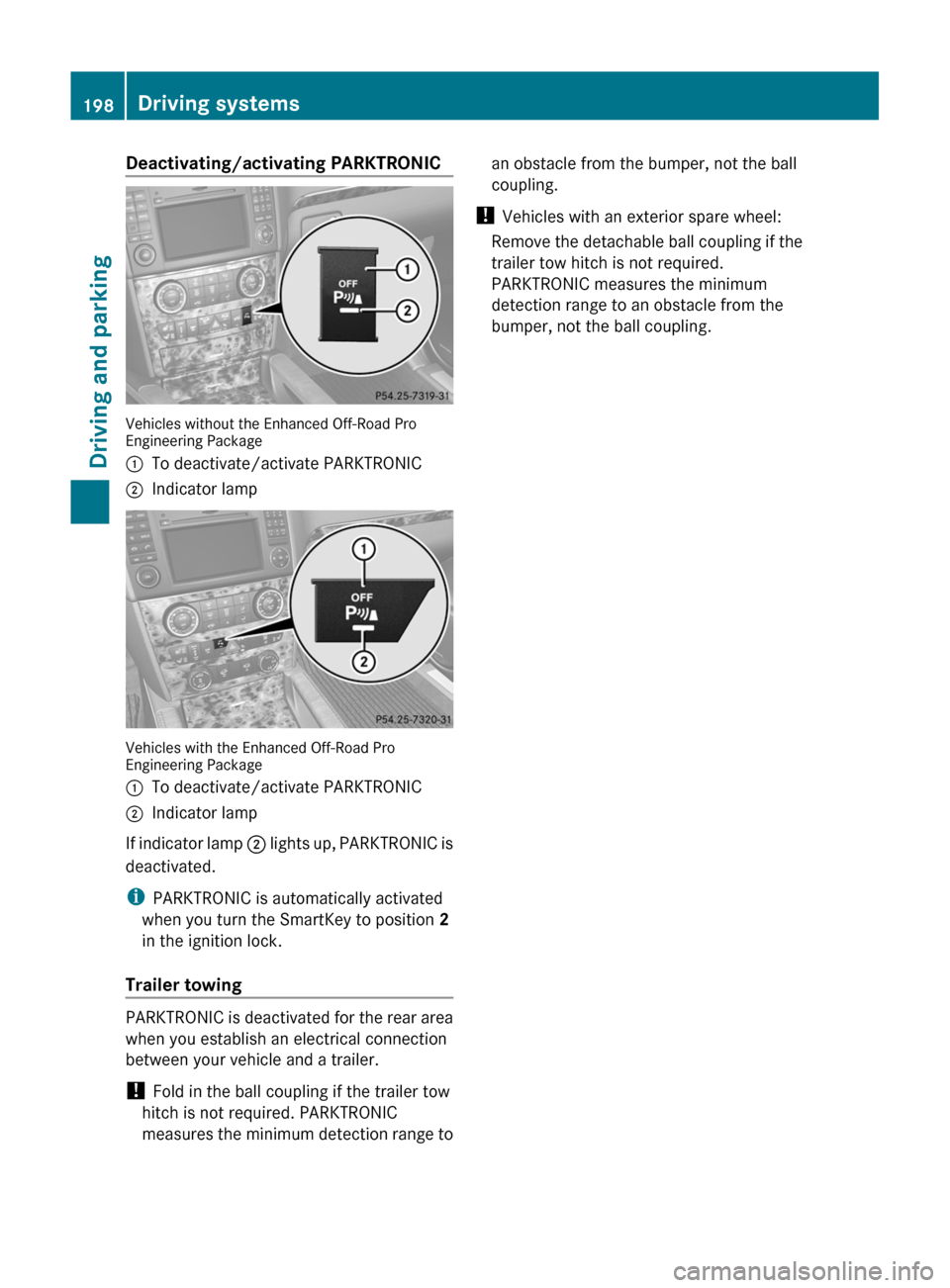
Deactivating/activating PARKTRONIC
Vehicles without the Enhanced Off-Road Pro
Engineering Package
:To deactivate/activate PARKTRONIC;Indicator lamp
Vehicles with the Enhanced Off-Road Pro
Engineering Package
:To deactivate/activate PARKTRONIC;Indicator lamp
If indicator lamp ; lights up, PARKTRONIC is
deactivated.
i PARKTRONIC is automatically activated
when you turn the SmartKey to position 2
in the ignition lock.
Trailer towing
PARKTRONIC is deactivated for the rear area
when you establish an electrical connection
between your vehicle and a trailer.
! Fold in the ball coupling if the trailer tow
hitch is not required. PARKTRONIC
measures the minimum detection range to
an obstacle from the bumper, not the ball
coupling.
! Vehicles with an exterior spare wheel:
Remove the detachable ball coupling if the
trailer tow hitch is not required.
PARKTRONIC measures the minimum
detection range to an obstacle from the
bumper, not the ball coupling.198Driving systemsDriving and parking
Page 205 of 384

side. When you are passing another vehicle,
the warning is emitted only if the difference
in speed is less than 7 mph (12 km/h).
The yellow indicator lamp goes out if the
reverse gear is engaged. In this event, Blind
Spot Assist is no longer active.
The brightness of the indicator/warning
lamps is adjusted automatically according to
the ambient light.GWARNING
Blind Spot Assist is not active at speeds under
approximately 20 mph (30 km/h). The
indicator lamps in the exterior mirrors are
yellow. Vehicles in the monitoring range are
then not indicated.
Always pay attention to traffic conditions and
your surroundings. Otherwise, you may fail to
recognize dangers in time, cause an accident
and injure yourself and others.
Collision warning
If a vehicle is detected in the monitoring range
of Blind Spot Assist and you switch on the turn
signal, a double warning tone sounds. Red
warning lamp : flashes. If the turn signal
remains on, detected vehicles are indicated
by the flashing of red warning lamp :. There
are no further warning tones.
Switching on Blind Spot Assist
XMake sure that the radar sensor system
( Y page 227) and Blind Spot Assist
( Y page 228) are activated in the on-board
computer.XTurn the SmartKey to position 2 in the
ignition lock.
Warning lamps : light up red in the
exterior mirrors for approximately 1.5
seconds and then turn yellow.
Trailer towing
When you attach a trailer, make sure you have
correctly established the electrical
connection. This can be accomplished by
checking the trailer lighting. In this event,
Blind Spot Assist is deactivated. The indicator
lamp in the exterior mirrors lights up yellow
and the Blind Spot Assist Currently
Unavailable See Operator's Manual
message appears in the multifunction
display.
i You can deactivate the indicator lamps in
the exterior mirrors.
To do so, switch off Blind Spot Assist when:
R the SmartKey is in position 2 in the
ignition lock.
R the engine is not running.
R the electrical connection to the trailer
has been established.
Off-road driving systems
4MATIC (permanent four-wheel drive)
4MATIC ensures that all four wheels are
permanently driven. Together with ESP ®
and
4ETS , it improves the traction of your vehicle
whenever a drive wheel spins due to
insufficient grip.
GWARNING
If a drive wheel is spinning due to insufficient
traction:
R While driving off, apply as little throttle as
possible.
R While driving, ease up on the accelerator
pedal.
R Adapt your speed and driving style to the
prevailing road conditions.
Failure to observe these guidelines could
cause the vehicle to skid.
The 4MATIC cannot prevent accidents
resulting from excessive speed.
! Never tow the vehicle with one axle
raised. This may damage the transfer case.
Damage of this sort is not covered by the
Mercedes-Benz Limited Warranty. All
wheels must remain either on the ground
Off-road driving systems203Driving and parkingZ
Page 206 of 384

or be fully raised. Observe the instructions
for towing the vehicle with all wheels in full
contact with the ground.
i In wintry driving conditions, the maximum
effect of 4MATIC can only be achieved if
you use winter tires ( M+S tires), with snow
chains if necessary.
! When testing the parking brake, operate
the vehicle only briefly (for a maximum of
ten seconds) on a brake test dynamometer.
When doing this, turn the key to position
0 or 1 in the ignition. Failure to do this can
cause damage to the drive train or the
brake system.
! Function or performance tests may only
be performed on a 2-axle dynamometer. If
you wish to operate the vehicle on such a
dynamometer, please consult an
authorized Mercedes-Benz Center
beforehand. You could otherwise damage
the drive train or the brake system.
For information about driving off-road, see
( Y page 174).
DSR (Downhill Speed Regulation)
Important safety notes
DSR is an aid to assist you when driving
downhill. It keeps the speed of travel at the
speed selected on the on-board computer.
The steeper the downhill gradient, the greater
the DSR braking effect on the vehicle. When
driving on flat stretches of road or on an uphill
gradient, the DSR braking effect is minimal or
non-existent.
The set speed is set to 4 mph (6 km/h) at the
factory; this can be adjusted using the on-
board computer ( Y page 228).
GWARNING
Downhill Speed Regulation (DSR) is a
convenience system designed to assist the
driver during vehicle operation. The system
setting must be appropriate to the
topographical and weather conditions
encountered, which can change quickly. The
driver is responsible for the vehicle speed and
for safe brake operation at all times.
Depending on the programmed speed, actual
vehicle speed and gradient, switching on DSR
while driving can cause the vehicle to slow
down rapidly, and you may hear a sound,
caused by the activation of the vehicle's brake
system through DSR. Sudden and unexpected
deceleration can result in loss of vehicle
control, causing an accident and/or serious
personal injury to you and others. Do not
switch on DSR in a situation where rapid
deceleration could result in a loss of vehicle
control.
DSR controls the set speed when it is active
and the automatic transmission is in the D,
R or N position. You can drive at a higher or
a lower speed than that set on the on-board
computer at any time by accelerating or
braking.GWARNING
If you depress the accelerator pedal with DSR
activated, the vehicle can drive faster than the
programmed set speed. You should therefore
drive downhill with particular caution as it
could lead to an accident and/or serious
injury to you or others. Keep in mind that as
soon as you remove your foot from the
accelerator pedal with DSR switched on, DSR
will start regulating the vehicle's speed
including use of brakes if required. Depending
on the programmed set speed, actual vehicle
speed and gradient, DSR can cause the
vehicle to slow down rapidly. Sudden and
unexpected deceleration can result in loss of
vehicle control, causing an accident and/or
serious personal injury to you and others.
For information about driving off-road, see
( Y page 174).
204Off-road driving systemsDriving and parking