2012 MERCEDES-BENZ E-CLASS ESTATE lights
[x] Cancel search: lightsPage 168 of 457
General notes
i
Hybrid vehicles: the ECO start/stop
function cannot be deactivated.
The ECO start/stop function switches the
engine off automatically if the vehicle stops
moving.
When pulling away again, the engine starts
automatically. The ECO start/stop function
thereby helps you to reduce the fuel con-
sumptio nand emissions of your vehicle.
Every time you switch on the engine using the
key or the Start/Stop button, the ECO start/
stop functio nis activated.
AMG vehicles: the ECO start/stop function
is only available in drive program C.
The system is operational when the ¤
symbol is shown in green in the multifunction
display.
AMG vehicles: the AMG menu in the multi-
function display additionally shows the Stop/Start active message.
If all conditions for automatic engine switch-
off have not been met (Y page 166), the
¤ symbol is shown in yellow.
AMG vehicles: the AMG menu in the multi-
function display additionally shows the Stop/Start inactive message.
If the ECO start/stop function has been man-
ually deactivated (Y page 165) or a malfunc-
tion has caused the system to be deactivated,
the ¤ symbol is not displayed.
AMG vehicles: in the AMG menu on the mul-
tifunction display, the Stop/Start activeor
Stop/Start inactive display message
disappears.
If the engine is switched off and the ¤
symbol is shown in green in the multifunction
display, the engine has been switched off
automatically. However, all vehicle systems
remain active. Deactivating/activating the ECO start/
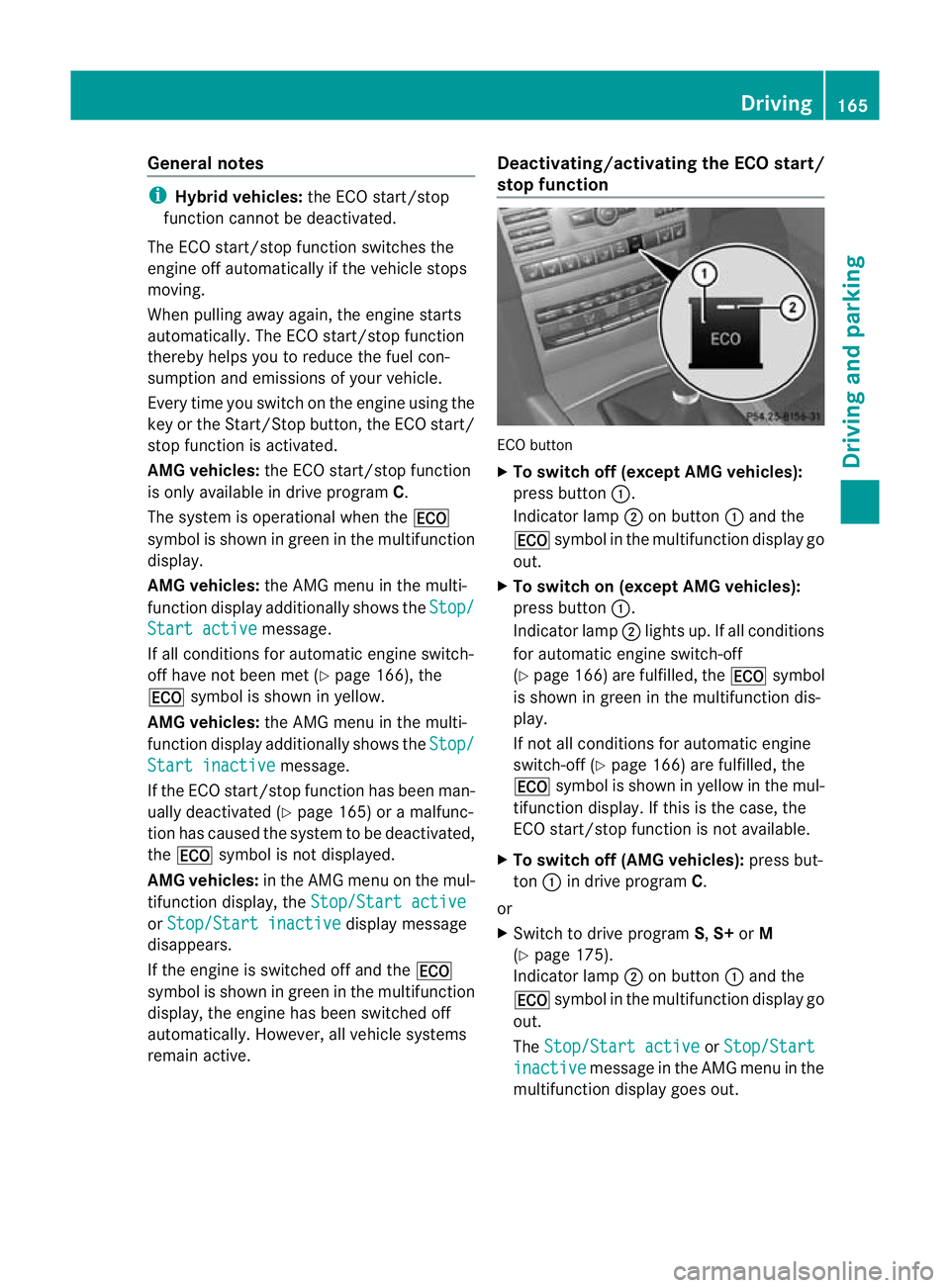
stop function
ECO button
X
To switch off (except AMG vehicles):
press button :.
Indicator lamp ;on button :and the
¤ symbol in the multifunction display go
out.
X To switch on (except AMG vehicles):
press button :.
Indicator lamp ;lights up. If all conditions
for automatic engine switch-off
(Y page 166) are fulfilled, the ¤symbol
is shown in green in the multifunction dis-
play.
If not all conditions for automatic engine
switch-off (Y page 166) are fulfilled, the
¤ symbol is shown in yellow in the mul-
tifunction display. If this is the case, the
ECO start/stop function is not available.
X To switch off (AMG vehicles): press but-
ton :in drive program C.
or
X Switch to drive program S,S+ orM
(Y page 175).
Indicator lamp ;on button :and the
¤ symbol in the multifunction display go
out.
The Stop/Start active or
Stop/Start inactive message in the AMG menu in the
multifunction display goes out. Driving
165Driving and parking Z
Page 169 of 457
X
To switc hon (AMG vehicles): press but-
ton :.
Indicator lamp ;lights up. If drive pro-
gram S,S+ orMis active, the automatic
transmission switches to drive program C.
If all conditions for automatic engine
switch-off (Y page 166) are fulfilled, the
¤ symbol is shown in green in the mul-
tifunction display. In addition, the Stop/Start active message is shown in the
AMG menu in the multifunction display.
If conditions for automatic engine switch-
off have not been fulfilled, the (Y page 166)
¤ symbol will be shown in yellow. If this
is the case, the ECO start/stop function is
not available. In addition, the Stop/Startinactive message is shown in the AMG
menu in the multifunction display.
i If indicator lamp ;is off, the ECO start/
stop function has been deactivated man-
ually or as the result of a malfunction. The
engine will then not be switched off auto-
matically when the vehicle stops.
i Every time you switch on the engine using
the key or the Start/Stop button, the ECO
start/stop function is activated.
Automatic engine switch-off Method of operation
The ECO start/stop function is operational
and the
¤symbol is displayed in green in
the multifunction display, if:
R the indicator lamp in the ECO button is lit
green.
R the vehicle is stationary.
R the outside temperature is within the com-
fort range.
R the engine is at normal operating temper-
ature.
R the set temperature for the vehicle interior
has been reached.
R the battery is sufficiently charged. R
the system detects that the windscreen is
not misted up when the air-conditioning
system is switched on.
R the bonnet is closed.
R the driver's door is closed and the driver's
seat belt is fastened.
If conditions for automatic engine switch-off
have not been fulfilled, the ¤symbol will
be shown in yellow.
AMG vehicles: the AMG menu in the multi-
function display additionally shows the Stop/ Start inactive message.
i If you shift the transmission from Rto D,
the ECO start/stop function is available
again once the ¤symbol reappears in
green in the multifunction display.
i All vehicles (apart from AMG vehi-
cles): Automatic engine switch-off can
take place a maximum of four times con-
secutively (initial stop then repeated three
times). The ¤symbol is shown in yellow
in the multifunction display after the engine
has been started automatically for the
fourth time. The automatic engine stop is
available again once when the ¤symbol
is shown in green in the multifunction dis-
play.
i AMG vehicles: times which the engine
can be automatically switched off.
i During automatic engine switch-off, the
climate control system only operates at a
reduced capacity. If you require full climate
control capacity, the ECO start/stop func-
tion can be deactivated by pressing the
ECO button (Y page 165).166
DrivingDriving and parking
Page 178 of 457
AMG vehicles
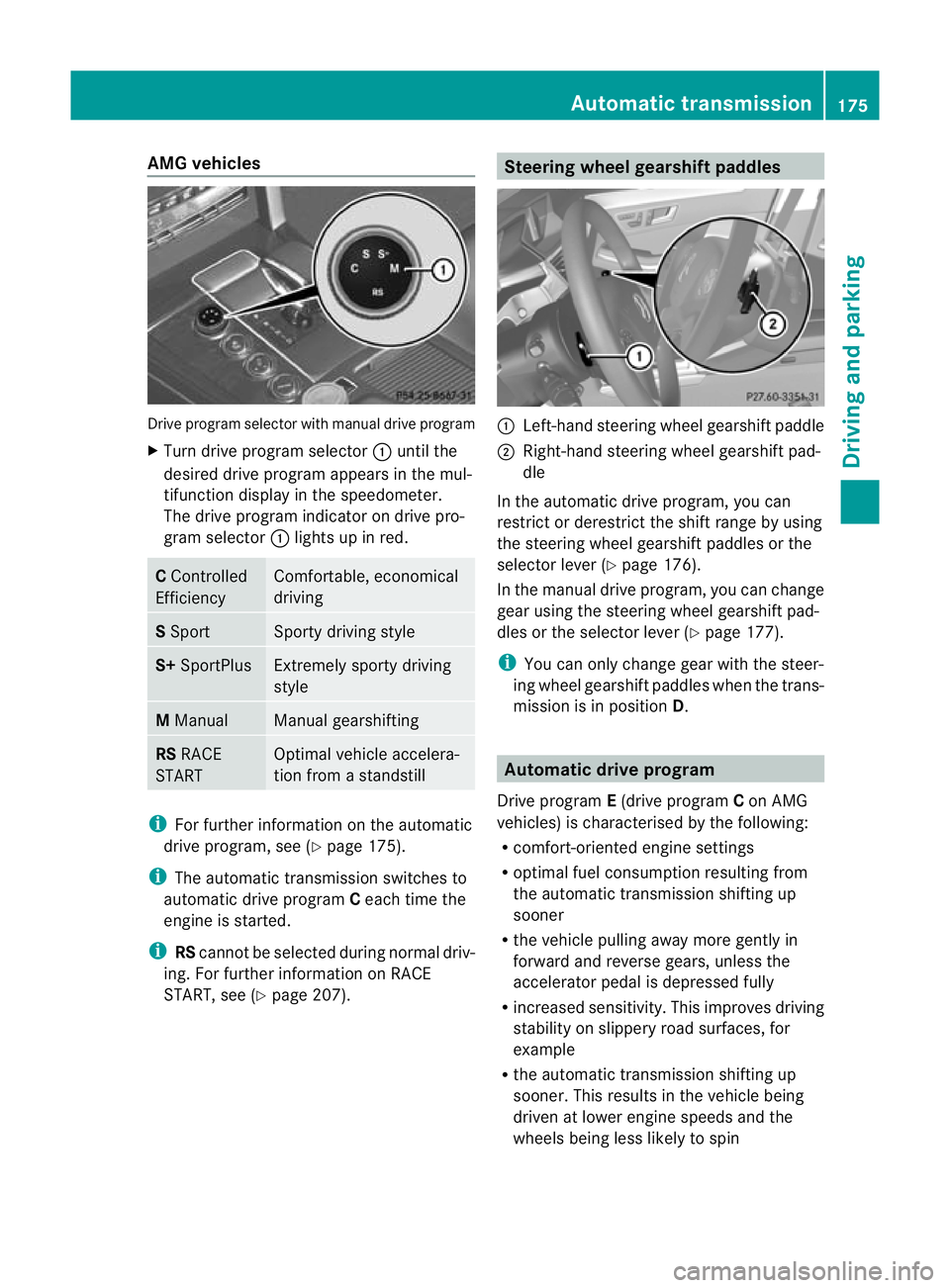
Drive progra
mselector with manual drive program
X Turn drive program selector :until the
desired drive program appears in the mul-
tifunction display in the speedometer.
The drive program indicato rondrive pro-
gram selector :lights up in red. C
Controlled
Efficiency Comfortable, economical
driving
S
Sport Sporty driving style
S+
SportPlus Extremely sporty driving
style
M
Manual Manual gearshifting
RS
RACE
START Optimal vehicle accelera-
tion from a standstill
i
For further information on the automatic
drive program, see (Y page 175).
i The automatic transmission switches to
automatic drive program Ceach time the
engine is started.
i RScannot be selected during normal driv-
ing. For further information on RACE
START, see (Y page 207). Steering wheel gearshift paddles
:
Left-hand steering wheel gearshift paddle
; Right-hand steering wheel gearshift pad-
dle
In the automatic drive program, you can
restrict or derestrict the shift range by using
the steering wheel gearshift paddles or the
selector leve r(Ypage 176).
In the manual drive program, you can change
gear using the steering wheel gearshift pad-
dles or the selector lever (Y page 177).
i You can only change gear with the steer-
ing wheel gearshift paddles when the trans-
mission is in position D. Automatic drive program
Drive program E(drive program Con AMG
vehicles) is characterised by the following:
R comfort-oriented engine settings
R optimal fuel consumption resulting from
the automatic transmission shifting up
sooner
R the vehicle pulling away more gently in
forward and reverse gears, unless the
accelerator pedal is depressed fully
R increased sensitivity. This improves driving
stability on slippery road surfaces, for
example
R the automatic transmission shifting up
sooner .This results in the vehicle being
driven at lower engine speeds and the
wheels being less likely to spin Automatic transmission
175Driving and parking Z
Page 180 of 457
Selecting the ideal shift range
X
Press the selector lever to the left towards
D– and hold it in position.
or
X Pull the left-hand steering wheel gearshift
paddle and hold it in position.
The automatic transmission shifts to the
gear which allows optimum acceleration
and deceleration. To do this, the automatic
transmission shifts down one or more
gears. Manual drive program
Activating the manual drive program X
Press the program selector button
(Y page 174) repeatedly until Mappears in
the multifunction display.
X AMG vehicles: turn the drive program
selector (Y page 175) until Mappears in the
multifunction display.
The indicator Mon the drive program selec-
tor lights up in red.
AMG vehicles and vehicles with aDIRECT
SELECT lever: you can select manual drive
program Musing the program selector or the
drive program selector button. In manual
drive program M, you can change gear using
the steering wheel gearshif tpaddles if the
transmission is in position D.
Standar dvehicles with aselector lever:
you can selec tmanual drive program Musing
the program selector button. If the transmis-
sion is in position D, you can change gear
using the steering wheel gearshif tpaddles or
the selecto rlever in manual drive program
M.
Upshifting !
In manual gearshift program M, the auto-
matic transmission does not shift up auto-
matically even when the engine limiting
speed for the curren tgear is reached.
When the engine limiting speed is reached, the fuel supply is cut to preven
tthe engine
from overrevving. You must make sure that
the engine speed does not reach the red
area of the rev counter. Otherwise, there is
a risk of engine damage.
X Briefly press the selector lever to the right
towards D+.
or
X Pull the right-hand steering wheel gearshift
paddle.
The automatic transmission shifts up to the
next gear.
AMG vehicles
X If the colour in the multifunction display in
the speedometer changes to red and the
UP display message is shown, shift up a
gear.
Downshifting X
Briefly press the selector lever to the left
towards D–.
or
X Pull the left-hand steering wheel gearshift
paddle.
The automatic transmission shifts down to
the next gear.
i If you desire maximum acceleration, push
the selector lever to the left or pull and hold
the left-hand steering wheel gearshift pad-
dle until the transmission shifts to the opti-
mal gear for the current speed.
Kickdown You can also use kickdown for maximum
acceleration in manual drive program
M.
X Depress the accelerator pedal beyond the
pressure point.
The transmission shifts to a lower gear
depending on the engine speed.
i AMG vehicles: it is not possible to use
kickdown in manual drive program M. Automatic transmission
177Driving and parking Z
Page 188 of 457
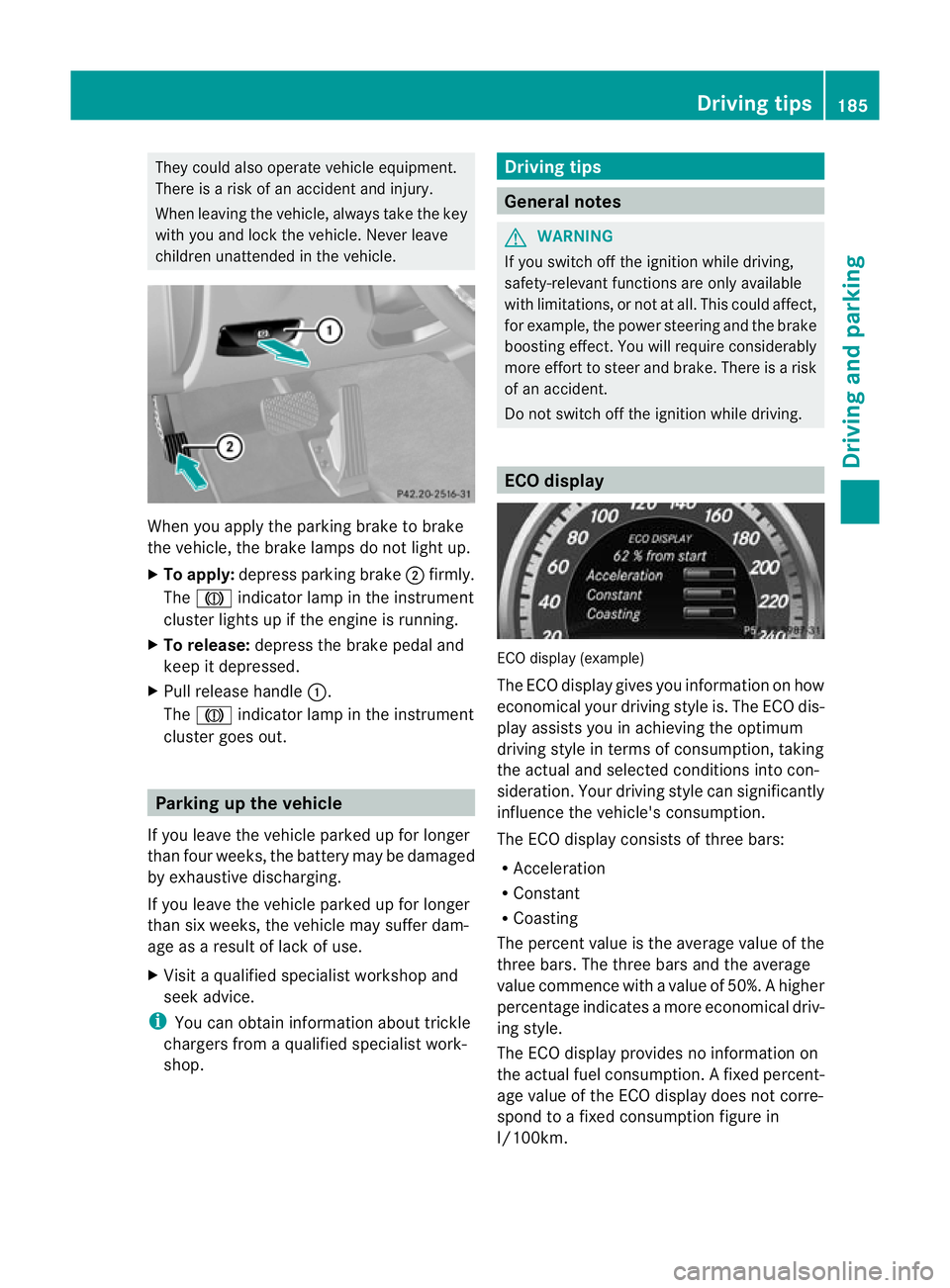
They could also operate vehicle equipment.
There is a risk of an accident and injury.
When leaving the vehicle, always take the key
with you and lock the vehicle. Never leave
children unattended in the vehicle. When you apply the parking brake to brake
the vehicle, the brake lamps do not light up.
X To apply: depress parking brake ;firmly.
The J indicator lamp in the instrument
cluster lights up if the engine is running.
X To release: depress the brake pedal and
keep it depressed.
X Pull release handle :.
The J indicator lamp in the instrument
cluster goes out. Parking up the vehicle
If you leave the vehicle parked up for longer
than four weeks, the battery may be damaged
by exhaustive discharging.
If you leave the vehicle parked up for longer
than six weeks, the vehicle may suffer dam-
age as a result of lack of use.
X Visit a qualified specialist workshop and
seek advice.
i You can obtain information about trickle
chargers from a qualified specialist work-
shop. Driving tips
General notes
G
WARNING
If you switch off the ignition while driving,
safety-relevan tfunctions are only available
with limitations, or no tatall. This could affect,
for example, the power steering and the brake
boosting effect .You will require considerably
more effort to steer and brake. There is a risk
of an accident.
Do not switch off the ignition while driving. ECO display
ECO display (example)
The ECO display gives you information on how
economical your driving style is. The ECO dis-
play assists you in achieving the optimum
driving style in terms of consumption, taking
the actual and selected conditions into con-
sideration. Your driving style can significantly
influence the vehicle's consumption.
The ECO display consists of three bars:
R Acceleration
R Constant
R Coasting
The percent value is the average value of the
three bars. The three bars and the average
value commence with a value of 50%. Ahigher
percentage indicates a mor eeconomical driv-
ing style.
The ECO display provides no information on
the actual fuel consumption. Afixed percent-
age value of the ECO display does not corre-
spond to a fixed consumption figure in
l/100km. Driving tips
185Driving and parking Z
Page 195 of 457
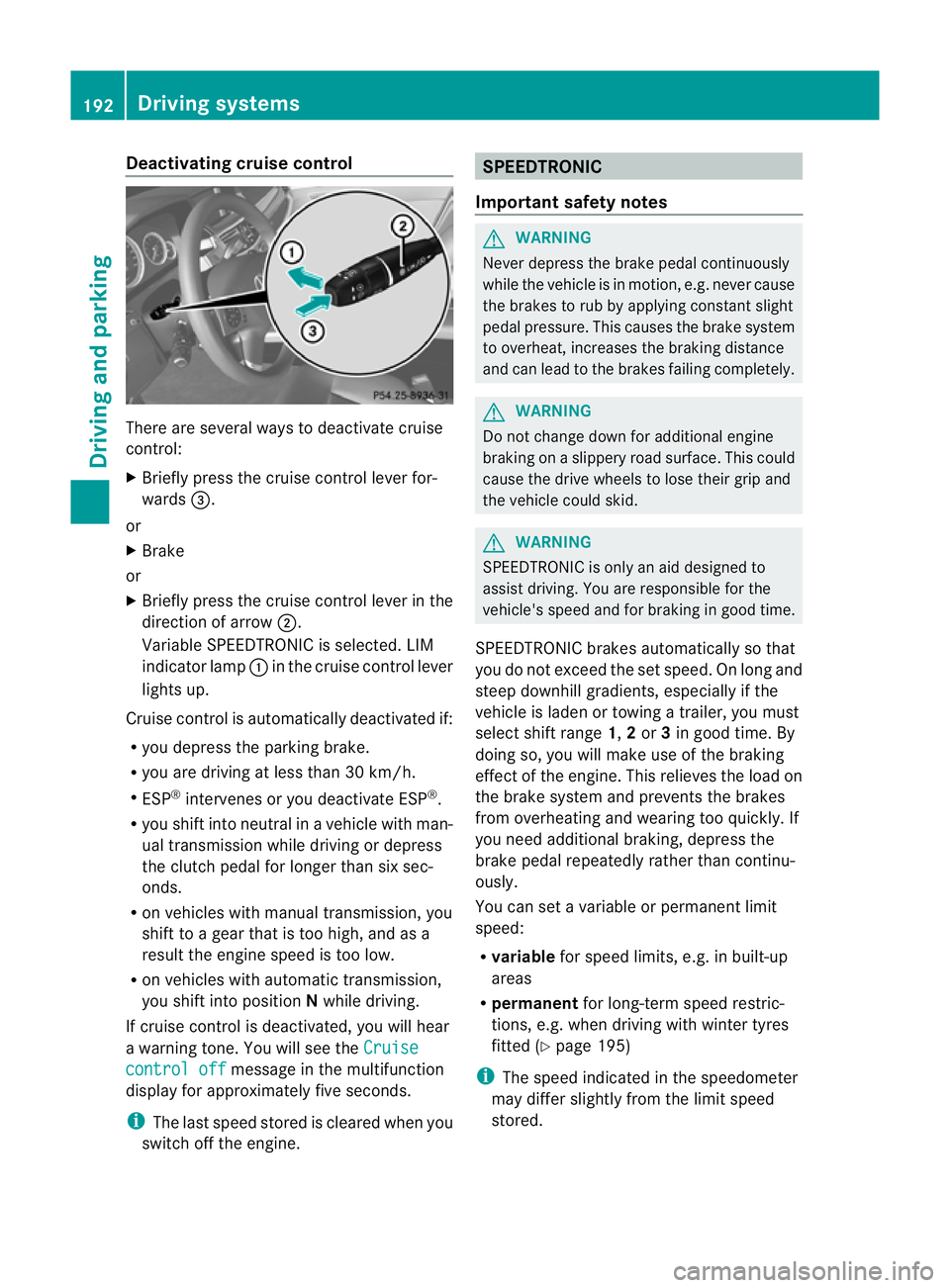
Deactivating cruise control
There are several ways to deactivate cruise
control:
X
Briefly press the cruise control lever for-
wards =.
or
X Brake
or
X Briefly press the cruise control lever in the
direction of arrow ;.
Variable SPEEDTRONIC is selected. LIM
indicator lamp :in the cruise contro llever
lights up.
Cruise control is automatically deactivated if:
R you depress the parking brake.
R you are driving at less than 30 km/h.
R ESP ®
intervenes or you deactivate ESP ®
.
R you shift into neutral in a vehicle with man-
ual transmission while driving or depress
the clutch pedal for longer than six sec-
onds.
R on vehicles with manual transmission, you
shift to a gear that is too high, and as a
result the engine speed is too low.
R on vehicles with automatic transmission,
you shift into position Nwhile driving.
If cruise control is deactivated, you will hear
a warning tone. You will see the Cruisecontrol off message in the multifunction
display for approximately five seconds.
i The last speed stored is cleared when you
switch off the engine. SPEEDTRONIC
Important safety notes G
WARNING
Never depress the brake pedal continuously
while the vehicle is in motion, e.g. never cause
the brakes to rub by applying constan tslight
pedal pressure. This causes the brake system
to overheat, increases the braking distance
and can lead to the brakes failing completely. G
WARNING
Do not change down for additional engine
braking on a slippery road surface. This could
cause the drive wheels to lose their grip and
the vehicle could skid. G
WARNING
SPEEDTRONIC is only an aid designed to
assist driving. You are responsible for the
vehicle's speed and for braking in good time.
SPEEDTRONIC brakes automatically so that
you do not exceed the set speed. On long and
steep downhill gradients, especially if the
vehicle is laden or towing a trailer, you must
selec tshift range 1,2or 3in good time. By
doing so, you will make use of the braking
effect of the engine. This relieves the load on
the brake system and prevents the brakes
from overheating and wearing too quickly. If
you need additional braking, depress the
brake pedal repeatedly rather than continu-
ously.
You can set a variable or permanent limit
speed:
R variable for speed limits, e.g. in built-up
areas
R permanent for long-term speed restric-
tions, e.g. when driving with winter tyres
fitted (Y page 195)
i The speed indicated in the speedometer
may differ slightly from the limit speed
stored. 192
Driving systemsDriving and parking
Page 196 of 457
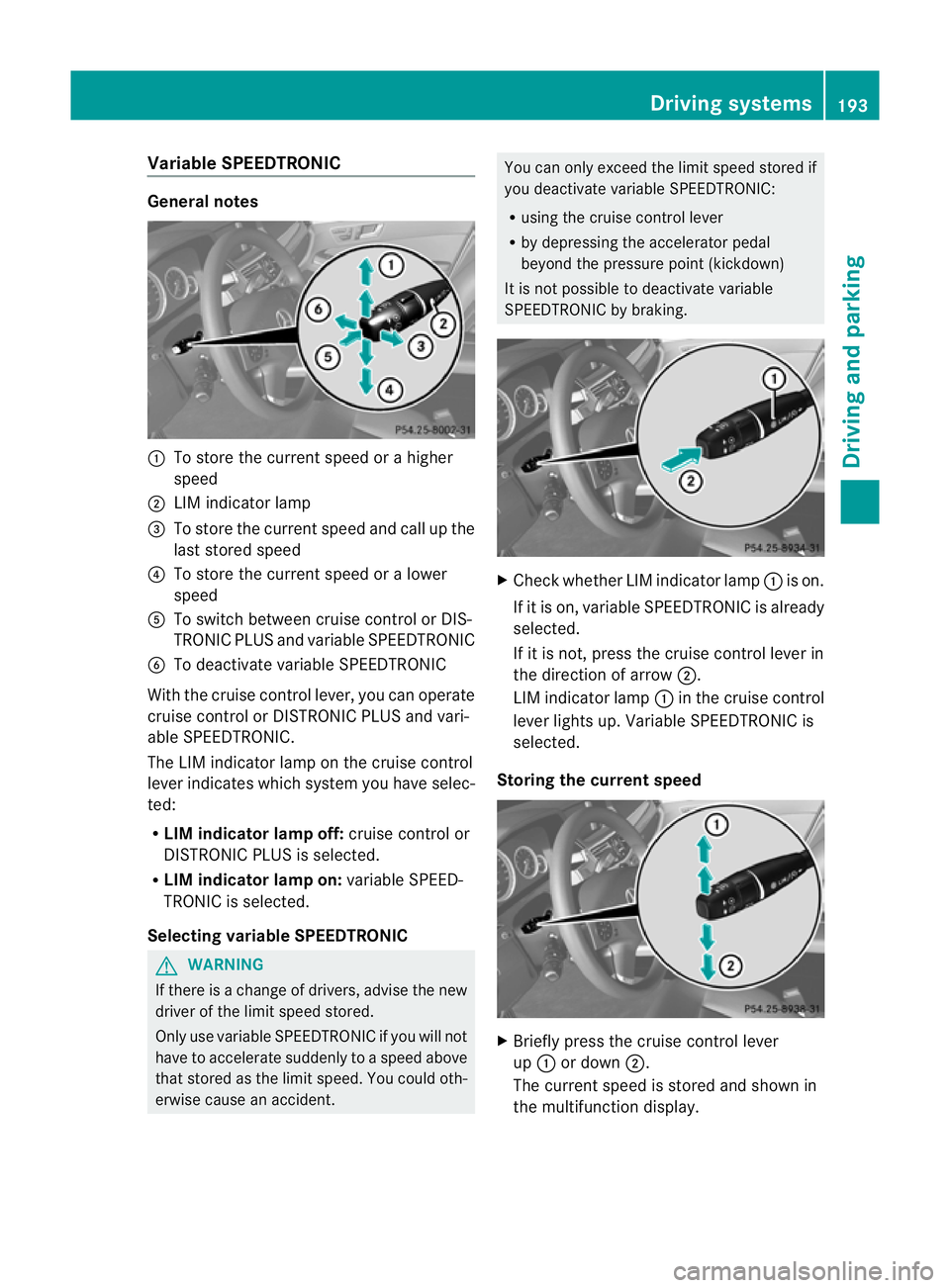
Variable SPEEDTRONIC
General notes
:
To store the current speed or a higher
speed
; LIM indicator lamp
= To store the current speed and call up the
last stored speed
? To store the current speed or a lower
speed
A To switch between cruise control or DIS-
TRONIC PLU Sand variable SPEEDTRONIC
B To deactivate variable SPEEDTRONIC
With the cruise control lever, you can operate
cruise control or DISTRONIC PLUS and vari-
able SPEEDTRONIC.
The LIM indicator lamp on the cruise control
lever indicates which system you have selec-
ted:
R LIM indicator lamp off: cruise control or
DISTRONIC PLU Sis selected.
R LIM indicator lamp on: variable SPEED-
TRONIC is selected.
Selecting variable SPEEDTRONIC G
WARNING
If there is a change of drivers, advise the new
driver of the limit speed stored.
Only use variable SPEEDTRONIC if you will not
have to accelerate suddenly to a speed above
that stored as the limit speed. You could oth-
erwise cause an accident. You can only exceed the limit speed stored if
you deactivate variable SPEEDTRONIC:
R
using the cruise control lever
R by depressing the accelerator pedal
beyond the pressure point (kickdown)
It is not possible to deactivate variable
SPEEDTRONIC by braking. X
Check whether LIM indicator lamp :is on.
If it is on, variable SPEEDTRONIC is already
selected.
If it is not, press the cruise control lever in
the direction of arrow ;.
LIM indicator lamp :in the cruise control
lever lights up. Variable SPEEDTRONIC is
selected.
Storing the current speed X
Briefly press the cruise control lever
up : or down ;.
The current speed is stored and shown in
the multifunction display. Driving systems
193Driving and parking Z
Page 199 of 457
braking or accelerating. The vehicle could
start to skid.
R if the sensors are dirty or there is poor vis-
ibility, e.g. due to snow, rain or fog. Dis-
tance control may be impaired.
Always pay attention to traffic conditions
even when DISTRONIC PLUS is activated.
Otherwise, you may fail to recognise dangers
in time, cause an acciden tand injure yourself
and others. G
WARNING
DISTRONIC PLU Sbrakes yourv ehicle up to a
maximum of 4 m/s 2
depending on its speed.
This corresponds to approximately 40% of
your vehicle's maximum braking power. You
must also apply the brakes yourself if this
braking power is not sufficient.
If DISTRONIC PLUS detects a risk of collision
with avehicle in front, an intermittent warning
tone sounds. In addition, the ·distance
warning lamp in the instrument cluster lights
up. Brake to avoid a collision.
General notes DISTRONIC PLUS regulates the speed and
automatically helps you maintain the dis-
tance to the vehicle detected in front. DIS-
TRONIC PLUS brakes automatically so that
the set speed is not exceeded.
On long and steep downhill gradients, espe-
cially if the vehicle is laden or towing a trailer,
you must select shift range
1,2or 3in good
time. By doing so, you will make use of the
braking effec tofthe engine. This relieves the
load on the brake system and prevents the
brakes from overheating and wearing too
quickly.
If DISTRONIC PLUS detects a slower-moving
vehicle in front, your vehicle is braked in order
to maintain the preset distance to the vehicle
in front.
If you want DISTRONIC PLUS to assist you,
the radar sensor system must be activated
(Y page 262) and operational. The radar sensor system is switched off auto-
matically in the vicinity of radio telescope
facilities (Y
page 451).
If there is no vehicle in front, DISTRONIC
PLUS operates in the same way as cruise
control in the speed range between
30 km/h and 200 km/h. If avehicle is driving
in front of you, DISTRONIC operates in the
speed range between 0km/h and
200 km/h.
Do not use DISTRONIC PLUS on roads with
steep gradients.
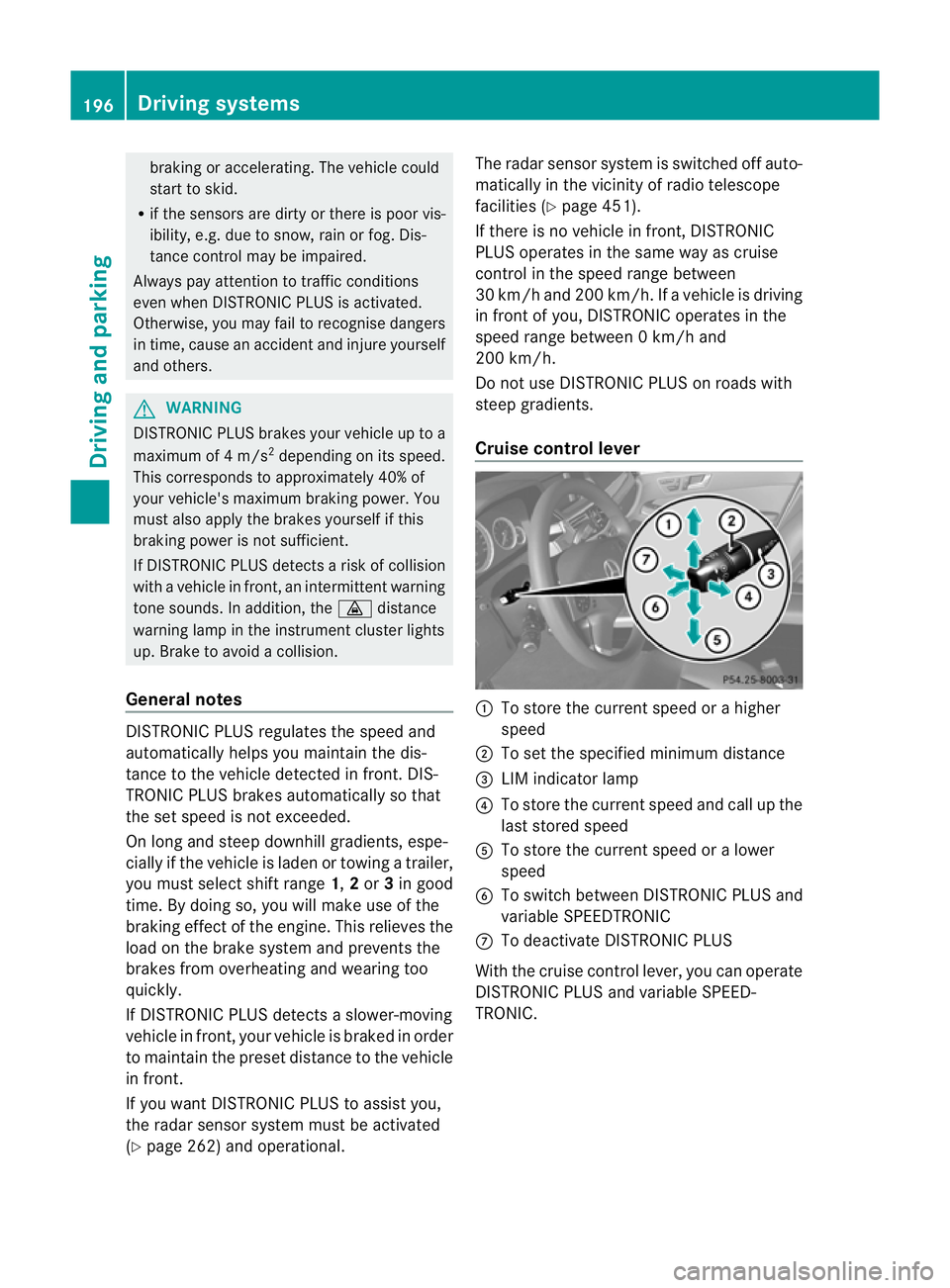
Cruise control lever :
To store the current spee dorahigher
speed
; To set the specified minimum distance
= LIM indicator lamp
? To store the current speed and call up the
last stored speed
A To store the current speed or a lower
speed
B To switch between DISTRONIC PLUS and
variable SPEEDTRONIC
C To deactivate DISTRONIC PLUS
With the cruise control lever, you can operate
DISTRONIC PLUS and variable SPEED-
TRONIC. 196
Driving systemsDriving and parking