2012 MERCEDES-BENZ B-CLASS lights
[x] Cancel search: lightsPage 185 of 340

At speeds above 20 mph (30 km/h) the
indicator lamp
goes
out and Blind Spot Assist
is operational.
If a vehicle is detected within the monitoring
range of Blind Spot Assist at speeds above
20 mph (30 km/h), warning lamp : on the
corresponding side lights up red. This warning
is always emitted when a vehicle enters the
blind spot monitoring range from behind or
from the side. When you overtake a vehicle,
the warning only occurs if the difference in
speed is less than 7 mph (12 km/h).
The yellow indicator lamp goes out if reverse
gear is engaged. In this event, Blind Spot
Assist is no longer active.
The brightness of the indicator/warning
lamps is adjusted automatically according to
the ambient light.
Collision warning
If a vehicle is detected in the monitoring range
of Blind Spot Assist and you switch on the
corresponding turn signal, a double warning
tone sounds. Red warning lamp : flashes. If
the turn signal remains on, vehicles detected
are indicated by the flashing of red warning
lamp :. There are no further warning tones.
Switching on Blind Spot Assist
X Make sure that the radar sensor system
(Y page 199) and Blind Spot Assist
(Y page 195)
are
activated in the on-board
computer.
X Turn the SmartKey to position 2 in the
ignition lock.
Warning lamps : in the exterior mirrors
light up red for approximately
1.5 seconds and then turn yellow.
Lane Keeping Assist General notes
Lane Keeping Assist monitors the area in
front of
your
vehicle by means of a camera at
the top of the windshield. Lane Keeping Assist
detects lane markings on the road and warns you before you leave your lane
unintentionally.
:
Lane Keeping Assist camera
If you select km on the on-board computer in
the Display Unit Speed-/Odometer:
function ( Y page 196), Lane Keeping Assist
is active starting
at a speed of 60 km/h. If the
miles display unit is selected, the assistance
range begins at 40 mph.
Important safety notes G
WARNING
Lane Keeping Assist may not always clearly
recognize lane markings.
In this case, Lane Keeping Assist may:
R give an unnecessary warning
R not give a warning
There is a risk of an accident.
Always pay particular attention to the traffic
situation and stay in lane, in particular if
warned by Lane Keeping Assist. G
WARNING
The Lane Keeping Assist warning does not
return the vehicle to the original lane. There
is a risk of an accident.
You should always steer, brake or accelerate
yourself, in particular if warned by Lane
Keeping Assist.
If you fail to adapt your driving style, Lane
Keeping Assist can
neither reduce the risk of
an accident nor override the laws of physics.
Lane Keeping Assist cannot take into account
the road, traffic and weather conditions. Lane Driving systems
183
Driving and parking Z
ProCarManuals.com
Page 197 of 340
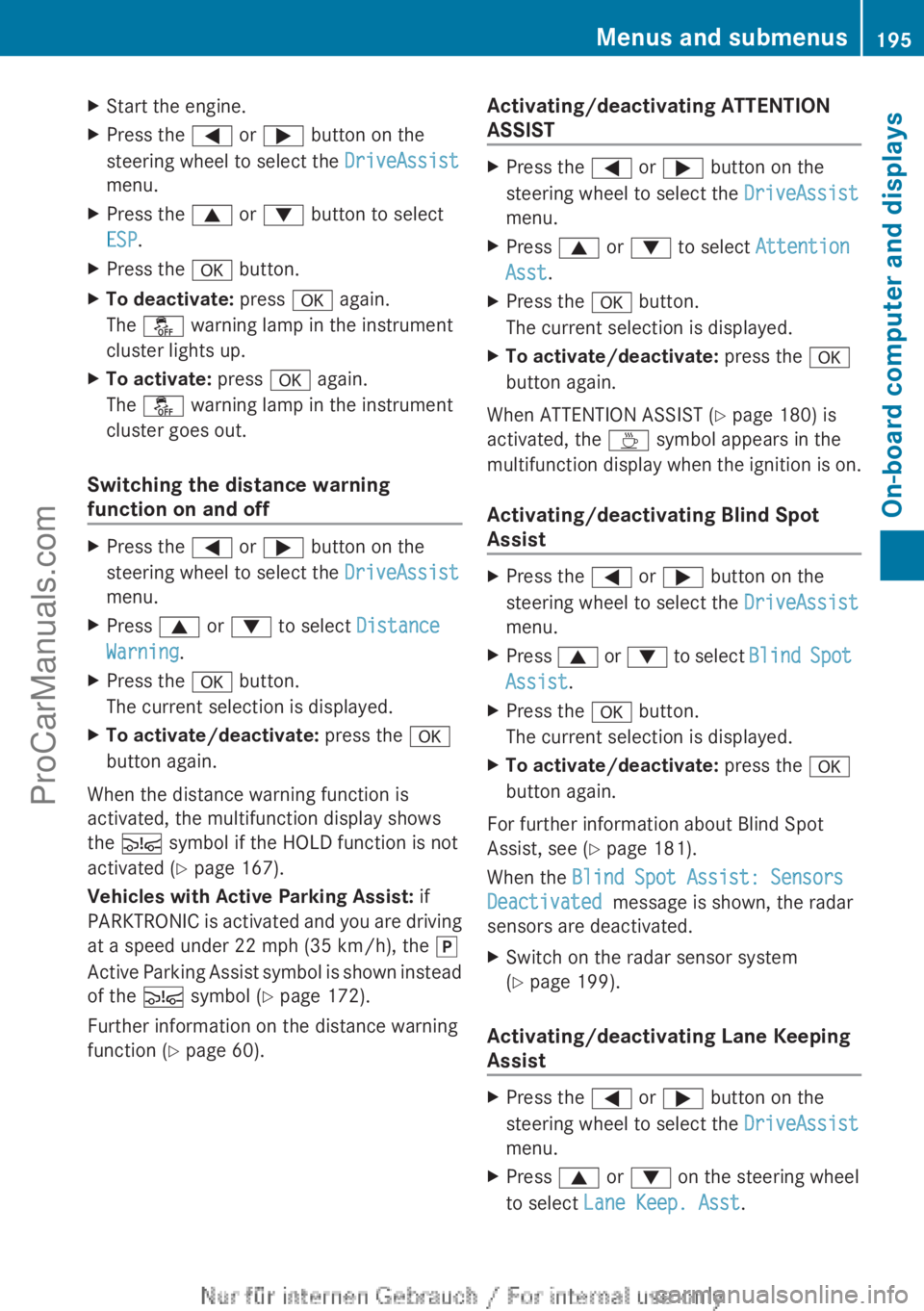
X
Start the engine.
X Press the = or ; button on the
steering wheel to select the DriveAssist
menu.
X Press the 9 or : button to select
ESP.
X Press the a button.
X To deactivate: press a again.
The å warning lamp in the instrument
cluster lights up.
X To activate: press a again.
The å warning lamp in the instrument
cluster goes out.
Switching the distance warning
function on and off X
Press the = or ; button on the
steering wheel to select the DriveAssist
menu.
X Press 9 or : to select Distance
Warning.
X Press the a button.
The current selection is displayed.
X To activate/deactivate: press the a
button again.
When the distance warning function is
activated, the multifunction display shows
the Ä symbol if the HOLD function is not
activated (Y page 167).
Vehicles with Active Parking Assist: if
PARKTRONIC is activated
and you are driving
at a speed under 22 mph (35 km/h), the j
Active Parking Assist symbol is shown instead
of the Ä symbol ( Y page 172).
Further information on the distance warning
function ( Y page 60). Activating/deactivating ATTENTION
ASSIST X
Press the = or ; button on the
steering wheel to select the DriveAssist
menu.
X Press 9 or : to select Attention
Asst.
X Press the a button.
The current selection is displayed.
X To activate/deactivate: press the a
button again.
When ATTENTION ASSIST (Y page 180) is
activated, the À symbol appears in the
multifunction display when
the ignition is on.
Activating/deactivating Blind Spot
Assist X
Press the = or ; button on the
steering wheel to select the DriveAssist
menu.
X Press 9 or :
to select Blind Spot
Assist.
X Press the a button.
The current selection is displayed.
X To activate/deactivate: press the a
button again.
For further information about Blind Spot
Assist, see (Y page 181).
When the Blind Spot Assist: Sensors
Deactivated message is shown, the radar
sensors are deactivated.
X Switch on the radar sensor system
(Y page 199).
Activating/deactivating Lane Keeping
Assist X
Press the = or ; button on the
steering wheel to select the DriveAssist
menu.
X Press 9 or : on the steering wheel
to select Lane Keep. Asst. Menus and submenus
195
On-board computer and displays Z
ProCarManuals.com
Page 199 of 340
![MERCEDES-BENZ B-CLASS 2012 Owners Manual X
Press : or 9 to select the
Speedometer [mph]: function.
You will see the selected setting: On or
Off.
X Press the a button to save the setting.
i Speed is displayed in mph.
The Speedometer [mph]](/manual-img/4/58078/w960_58078-198.png "MERCEDES-BENZ B-CLASS 2012 Owners Manual X
Press : or 9 to select the
Speedometer [mph]: function.
You will see the selected setting: On or
Off.
X Press the a button to save the setting.
i Speed is displayed in mph.
The Speedometer [mph]")
X
Press : or 9 to select the
Speedometer [mph]: function.
You will see the selected setting: On or
Off.
X Press the a button to save the setting.
i Speed is displayed in mph.
The Speedometer [mph] function
allows you
to choose whether the status area in the
multifunction display always shows the speed
in mph instead of the outside temperature.
Selecting the permanent display function
You can determine whether the multifunction
display permanently shows your speed or the
outside temperature.
X Press the = or ; button on the
steering wheel to select the Sett menu.
X Press the : or
9
button to select the
Inst. Cluster submenu.
X Press a to confirm.
X Press the :
or 9
button to select the
Permanent Display: function.
You will see the selected setting Outside
Temperature or Speedometer [km/h]
(USA)/ Speedometer [mph] (Canada).
X Press the a button to save the setting.
i The speed is shown in km/h (USA)/
mph
(Canada).
Lights Switching the daytime running lamps on/
off
Daytime running lamps are required by law
(Canada only). You cannot set the "daytime
running lamps" function via the on-board
computer.
X
Press the = or ; button on the
steering wheel to select the Sett menu.
X Press the : or 9
button to select the
Lights submenu.
X Press a to confirm. X
Press the : or 9
button to select the
Daytime Running Lights function.
You will see the selected setting: Enabled
or Disabled.
X Press the a button to save the setting.
Further information on daytime running
lamps ( Y page 99).
Switching Adaptive Highbeam Assist on/
off
X Press the = or ; button on the
steering wheel to select the Sett menu.
X Press the : or 9
button to select the
Lights submenu.
X Press a to confirm.
X Press the :
or 9
button to select the
Adaptive Highbeam Assist function.
You will see the selected setting: Enabled
or Disabled.
X Press the a button to save the setting.
For further information about Adaptive
Highbeam Assist, see ( Y page 102).
Setting the brightness of the ambient
lighting
X Press the = or ; button on the
steering wheel to select the Sett menu.
X Press the : or 9
button to select the
Lights submenu.
X Press a to confirm.
X Press the :
or 9
button to select the
Amb. Light +/-function.
You will see the selected setting.
X Press a to confirm.
X Press the :
or 9
button to adjust the
brightness to any level from Off to Level
5 (bright).
X Press the a or % button to
save the
setting. Menus and submenus
197
On-board computer and displays Z
ProCarManuals.com
Page 200 of 340

Activating/deactivating surround
lighting and exterior lighting delayed
switch-off
If you have activated the
Locator
Lighting: function
and
the light switch is set
to Ã, the following functions are activated
when it is dark:
R surround lighting: the exterior lighting
remains lit for 40 seconds after unlocking
with the SmartKey. If you start the engine,
the surround lighting is switched off and
automatic headlamp mode is activated
(Y page 99).
R exterior lighting delayed switch-off: the
exterior lighting remains lit for
60 seconds after the engine is switched off.
If you close all the doors and the trunk lid,
the exterior lighting goes off after
15 seconds.
X Press the = or ; button on the
steering wheel to select the Sett. menu.
X Press the :
or 9
button to select the
Lights submenu.
X Press a to confirm.
X Press the : or 9
button to select the
Locator Lighting function.
You will see the selected setting: Enabled
or Disabled.
X Press the a button to save the setting.
Deactivating delayed switch-off of the
exterior lighting temporarily:
X Before leaving the vehicle, turn the
SmartKey to position 0
in the ignition lock.
X Turn the SmartKey to position 2 in the
ignition lock.
The exterior lighting delayed switch-off is
deactivated.
Delayed switch-off of the exterior lighting is
reactivated the next time you start the
engine.
i Depending on your vehicle's equipment,
when the surround lighting and delayed
switch-off exterior lighting are on, the
following light up: R
Parking lamps
R Front fog lamps
R Low-beam headlamps
R Daytime running lamps
R Side marker lamps
R Surround lighting in the exterior mirrors
Activating/deactivating the interior
lighting delayed switch-off
If you activate the Interior Lighting
Delay function, the interior lighting remains
on for 20seconds after you remove the
SmartKey from the ignition lock.
X Press the = or ; button on the
steering wheel to select the Sett. menu.
X Press the : or 9
button to select the
Lights submenu.
X Press a to confirm.
X Press the :
or 9
button to select the
Interior Lighting Delay function.
You will see the selected setting: Enabled
or Disabled.
X Press the a button to save the setting.
Vehicle Activating/deactivating the automatic
door locking mechanism
X
Press the = or ; button on the
steering wheel to select the Sett menu.
X Press the :
or 9
button to select the
Vehicle submenu.
X Press a to confirm.
X Press the :
or 9
button to select the
Automatic Door Lock function.
You will see the selected setting: Enabled
or Disabled.
X Press the a button to save the setting.
If you select the Automatic Door Lock
function, the
vehicle
is centrally locked above
a speed of around 9 mph (15 km/h).
i For further information on the automatic
locking feature, see ( Y page 74).198
Menus and submenus
On-board computer and displays
ProCarManuals.com
Page 201 of 340
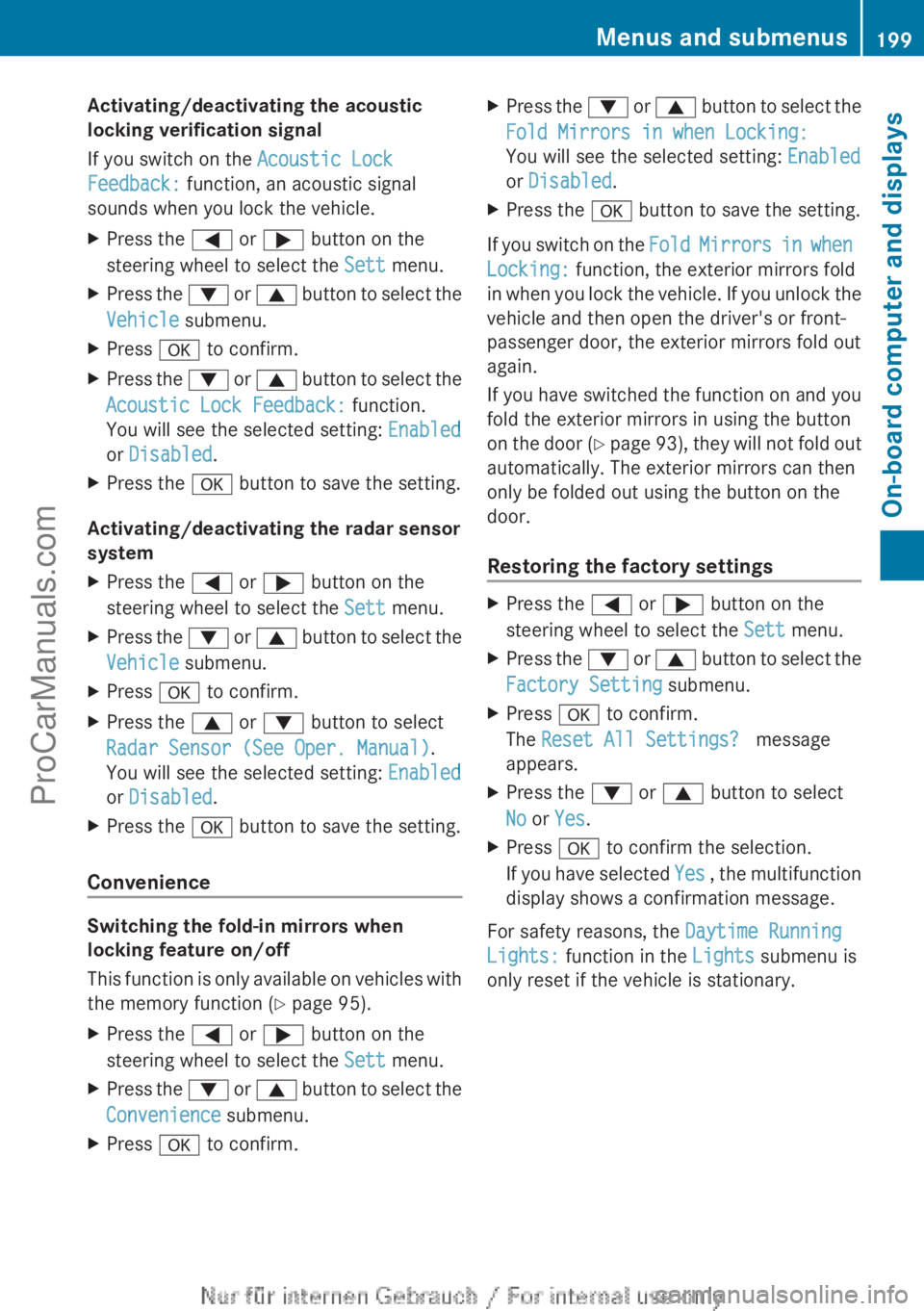
Activating/deactivating the acoustic
locking verification signal
If you switch on the Acoustic Lock
Feedback: function, an acoustic signal
sounds when you lock the vehicle.
X
Press the = or ; button on the
steering wheel to select the Sett menu.
X Press the : or 9 button to select the
Vehicle submenu.
X Press a to confirm.
X Press the :
or 9
button to select the
Acoustic Lock Feedback: function.
You will see the selected setting: Enabled
or Disabled.
X Press the a button to save the setting.
Activating/deactivating the radar sensor
system
X Press the = or ; button on the
steering wheel to select the Sett menu.
X Press the : or 9
button to select the
Vehicle submenu.
X Press a to confirm.
X Press the 9 or : button to select
Radar Sensor (See Oper. Manual).
You will see the selected setting: Enabled
or Disabled.
X Press the a button to save the setting.
Convenience Switching the fold-in mirrors when
locking feature on/off
This function
is
only available on vehicles with
the memory function ( Y page 95).
X Press the = or ; button on the
steering wheel to select the Sett menu.
X Press the : or 9
button to select the
Convenience submenu.
X Press a to confirm. X
Press the : or 9
button to select the
Fold Mirrors in when Locking:
You will see the selected setting: Enabled
or Disabled.
X Press the a button to save the setting.
If you switch on the Fold Mirrors in
when
Locking: function, the exterior mirrors fold
in when you lock the vehicle. If you unlock the
vehicle and then open the driver's or front-
passenger door, the exterior mirrors fold out
again.
If you have switched the function on and you
fold the exterior mirrors in using the button
on the door (Y page 93), they will not fold out
automatically. The exterior mirrors can then
only be folded out using the button on the
door.
Restoring the factory settings X
Press the = or ; button on the
steering wheel to select the Sett menu.
X Press the : or 9
button to select the
Factory Setting submenu.
X Press a to confirm.
The Reset All Settings? message
appears.
X Press the : or 9 button to select
No or Yes.
X Press a to confirm the selection.
If you have
selected Yes , the multifunction
display shows a confirmation message.
For safety reasons, the Daytime Running
Lights: function in the Lights submenu is
only reset if the vehicle is stationary. Menus and submenus
199
On-board computer and displays Z
ProCarManuals.com
Page 206 of 340
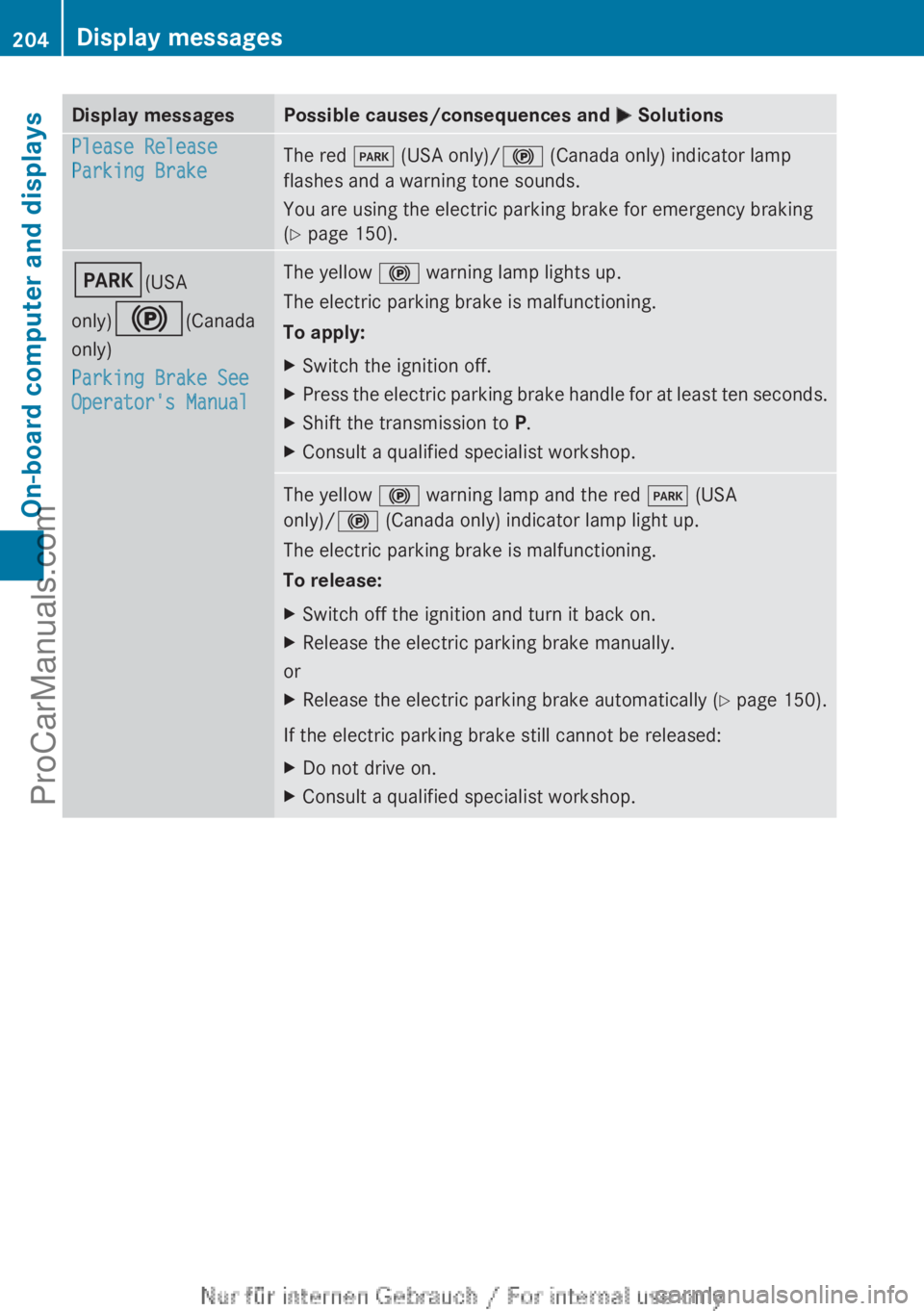
Display messages Possible causes/consequences and
M SolutionsPlease Release
Parking Brake
The red
F (USA only)/! (Canada only) indicator lamp
flashes and a warning tone sounds.
You are using the electric parking brake for emergency braking
(Y page 150). F(USA
only)!(Canada
only)
Parking Brake See
Operator's Manual The yellow
! warning lamp lights up.
The electric parking brake is malfunctioning.
To apply:
X Switch the ignition off.
X Press the electric parking brake handle for at least ten seconds.
X Shift the transmission to P.
X Consult a qualified specialist workshop. The yellow
! warning lamp and the red F (USA
only)/! (Canada only) indicator lamp light up.
The electric parking brake is malfunctioning.
To release:
X Switch off the ignition and turn it back on.
X Release the electric parking brake manually.
or
X Release the electric parking brake automatically ( Y page 150).
If the electric parking brake still cannot be released:
X Do not drive on.
X Consult a qualified specialist workshop.204
Display messagesOn-board computer and displays
ProCarManuals.com
Page 207 of 340
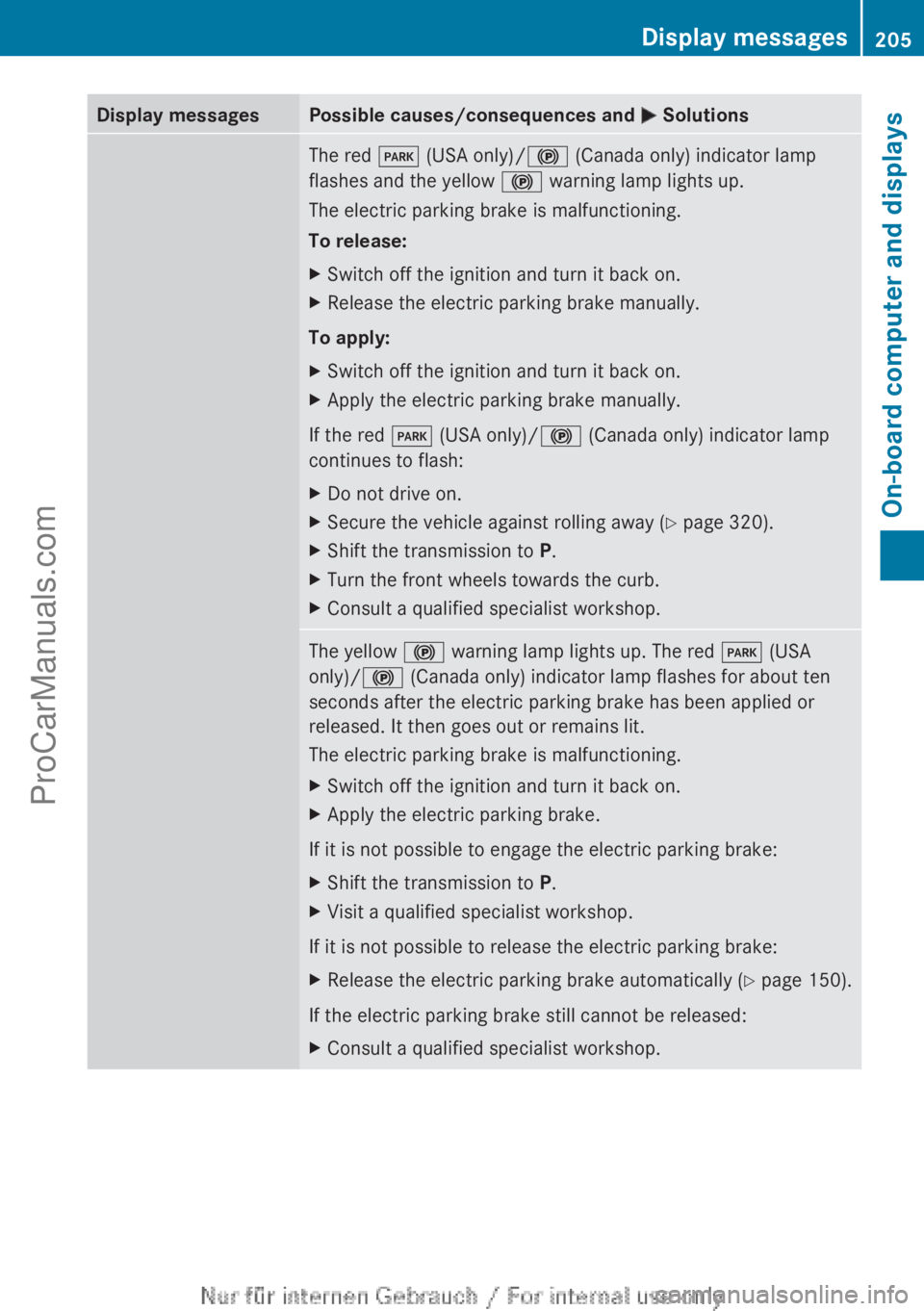
Display messages Possible causes/consequences and
M SolutionsThe red
F (USA only)/! (Canada only) indicator lamp
flashes and the yellow ! warning lamp lights up.
The electric parking brake is malfunctioning.
To release:
X Switch off the ignition and turn it back on.
X Release the electric parking brake manually.
To apply:
X Switch off the ignition and turn it back on.
X Apply the electric parking brake manually.
If the red F (USA only)/! (Canada only) indicator lamp
continues to flash:
X Do not drive on.
X Secure the vehicle against rolling away ( Y page 320).
X Shift the transmission to P.
X Turn the front wheels towards the curb.
X Consult a qualified specialist workshop. The yellow
! warning lamp lights up. The red F (USA
only)/! (Canada only) indicator lamp flashes for about ten
seconds after the electric parking brake has been applied or
released. It then goes out or remains lit.
The electric parking brake is malfunctioning.
X Switch off the ignition and turn it back on.
X Apply the electric parking brake.
If it is not possible to engage the electric parking brake:
X Shift the transmission to P.
X Visit a qualified specialist workshop.
If it is not possible to release the electric parking brake:
X Release the electric parking brake automatically ( Y page 150).
If the electric parking brake still cannot be released:
X Consult a qualified specialist workshop. Display messages
205On-board computer and displays Z
ProCarManuals.com
Page 208 of 340
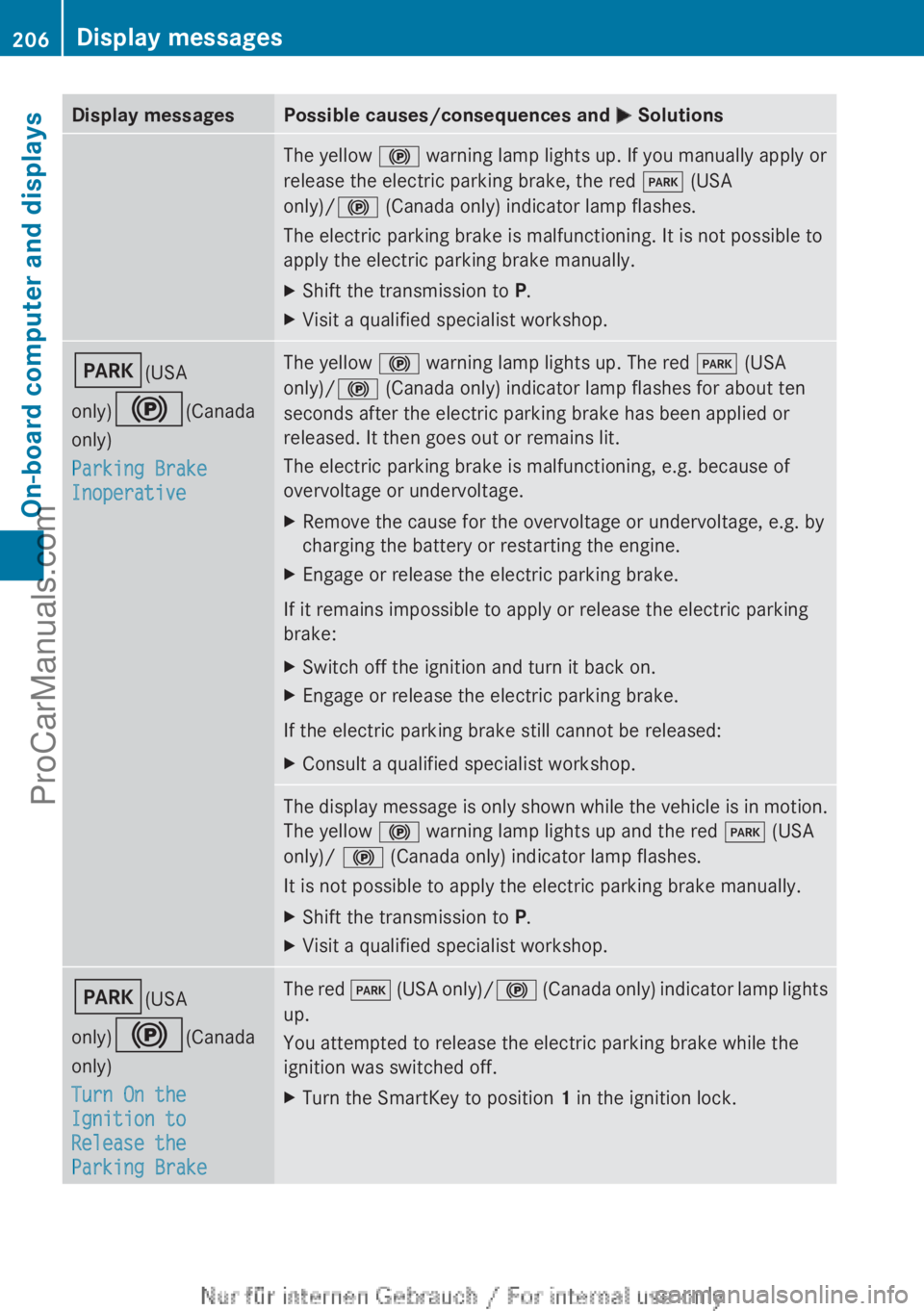
Display messages Possible causes/consequences and
M SolutionsThe yellow
! warning lamp lights up. If you manually apply or
release the electric parking brake, the red F (USA
only)/! (Canada only) indicator lamp flashes.
The electric parking brake is malfunctioning. It is not possible to
apply the electric parking brake manually.
X Shift the transmission to P.
X Visit a qualified specialist workshop. F(USA
only)!(Canada
only)
Parking Brake
Inoperative The yellow
! warning lamp lights up. The red F (USA
only)/! (Canada only) indicator lamp flashes for about ten
seconds after the electric parking brake has been applied or
released. It then goes out or remains lit.
The electric parking brake is malfunctioning, e.g. because of
overvoltage or undervoltage.
X Remove the cause for the overvoltage or undervoltage, e.g. by
charging the battery or restarting the engine.
X Engage or release the electric parking brake.
If it remains impossible to apply or release the electric parking
brake:
X Switch off the ignition and turn it back on.
X Engage or release the electric parking brake.
If the electric parking brake still cannot be released:
X Consult a qualified specialist workshop. The display message is only shown while the vehicle is in motion.
The yellow
! warning lamp lights up and the red F (USA
only)/ ! (Canada only) indicator lamp flashes.
It is not possible to apply the electric parking brake manually.
X Shift the transmission to P.
X Visit a qualified specialist workshop. F(USA
only)!(Canada
only)
Turn On the
Ignition to
Release the
Parking Brake The red
F (USA
only)/ ! (Canada only) indicator lamp lights
up.
You attempted to release the electric parking brake while the
ignition was switched off.
X Turn the SmartKey to position 1 in the ignition lock.206
Display messages
On-board computer and displays
ProCarManuals.com