2012 MERCEDES-BENZ B-CLASS phone
[x] Cancel search: phonePage 154 of 340

Parking the vehicle for a long period
If you leave
the vehicle parked for longer than
four weeks, the battery may be damaged by
exhaustive discharging.
If you leave the vehicle parked for longer than
six weeks, the vehicle may suffer damage as
a result of lack of use.
X Visit a qualified specialist workshop and
seek advice.
i You can obtain information about trickle
chargers from a qualified specialist
workshop. Driving tips
General notes
Important safety notes G
WARNING
If you switch off the ignition while driving,
safety-relevant functions are only available
with limitations, or
not at all. This could affect,
for example, the power steering and the brake
boosting effect. You will require considerably
more effort to steer and brake. There is a risk
of an accident.
Do not switch off the ignition while driving. G
WARNING
If you operate mobile communication
equipment while driving, you will be
distracted from traffic conditions. You could
also lose control
of the vehicle. There is a risk
of an accident.
Only operate this equipment when the vehicle
is stationary.
Observe the legal requirements for the
country in which you are driving. Some
jurisdictions prohibit the driver from using a
mobile phone while driving a vehicle.
If you make a call while driving, always use
hands-free mode. Only operate the telephone
when the traffic situation permits. If you are unsure, pull over to a safe location and stop
before operating the telephone.
Bear in mind that at a speed of only 30 mph
(approximately
50 km/h), the vehicle covers
a distance of 44 feet (approximately
14 m)
per second.
Drive sensibly – save fuel Observe the following tips to save fuel:
R
The tires should always be inflated to the
recommended tire pressure.
R Remove unnecessary loads.
R Remove roof racks when they are not
needed.
R Warm up the
engine at low engine speeds.
R Avoid frequent acceleration or braking.
R Have all maintenance work carried out as
indicated by the service intervals in the
Maintenance Booklet or by the service
interval display.
Fuel consumption also increases when
driving in cold weather, in stop-start traffic
and in hilly terrain.
Drinking and driving G
WARNING
Drinking and driving and/or taking drugs and
driving are very dangerous combinations.
Even a small amount of alcohol or drugs can
affect your reflexes, perceptions and
judgment.
The possibility of a serious or even fatal
accident are greatly
increased when you drink
or take drugs and drive.
Do not drink or take drugs and drive or allow
anyone to drive who has been drinking or
taking drugs.
Emission control G
WARNING
Combustion engines emit poisonous exhaust
gases such as carbon monoxide. Inhaling
these exhaust gases
leads to poisoning. There152
Driving tips
Driving and parking
ProCarManuals.com
Page 182 of 340
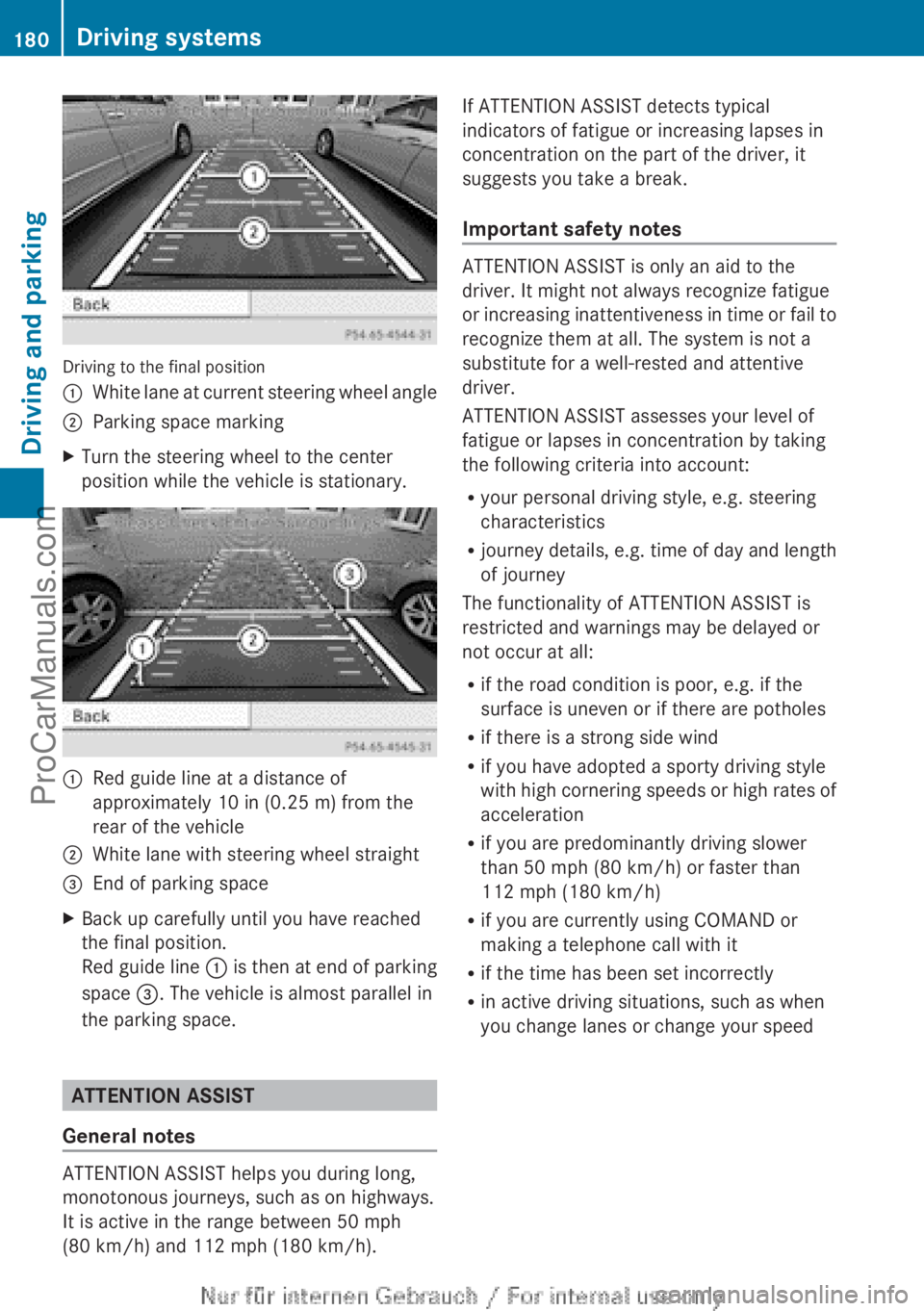
Driving to the final position
:
White lane at current steering wheel angle
; Parking space marking
X Turn the steering wheel to the center
position while the vehicle is stationary. :
Red guide line at a distance of
approximately 10 in (0.25 m
) from the
rear of the vehicle
; White lane with steering wheel straight
= End of parking space
X Back up carefully until you have reached
the final position.
Red guide line :
is
then
at end of parking
space =. The vehicle is almost parallel in
the parking space. ATTENTION ASSIST
General notes ATTENTION ASSIST helps you during long,
monotonous journeys, such as on highways.
It is active in the range between 50 mph
(80 km/h) and 112 mph (180 km/h). If ATTENTION ASSIST detects typical
indicators of fatigue or increasing lapses in
concentration on the part of the driver, it
suggests you take a break.
Important safety notes
ATTENTION ASSIST is only an aid to the
driver. It might not always recognize fatigue
or increasing
inattentiveness
in time or fail to
recognize them at all. The system is not a
substitute for a well-rested and attentive
driver.
ATTENTION ASSIST assesses your level of
fatigue or lapses in concentration by taking
the following criteria into account:
R your personal driving style, e.g. steering
characteristics
R journey details, e.g. time of day and length
of journey
The functionality of ATTENTION ASSIST is
restricted and warnings may be delayed or
not occur at all:
R if the road condition is poor, e.g. if the
surface is uneven or if there are potholes
R if there is a strong side wind
R if you have adopted a sporty driving style
with high cornering speeds or high rates of
acceleration
R if you are predominantly driving slower
than 50 mph (80 km/h) or faster than
112 mph (180 km/h)
R if you are currently using COMAND or
making a telephone call with it
R if the time has been set incorrectly
R in active driving situations, such as when
you change lanes or change your speed180
Driving systems
Driving and parking
ProCarManuals.com
Page 190 of 340

Left control panel
=
; R
Calls up the
menu and menu bar9
:
Press briefly:
R
Scrolls in lists
R Selects a submenu or function
R In the Audio menu: selects a
stored station, an audio track or
a video scene
R In the Tel(telephone) menu:
switches to the phone book and
selects a name or telephone
number 9
:
Press and hold:
R
In the Audio menu: selects the
previous/next station or selects
an audio track or a video scene
using rapid scrolling
R In the Tel (Telephone) menu,
starts rapid
scrolling
through the
phone book a R
Confirms a selection/display
message
R In the Tel (telephone) menu:
switches to the telephone book
and starts dialing the selected
number
R In the Audio menu: stops the
station search function at the
desired station Right control panel
~ R
Rejects or ends a call
R Exits phone book/redial
memory 6 R
Makes or accepts a call
R Switches to the redial memory W
X R
Adjusts the volume 8 R
Mute Back button
%
Press briefly:
R
Back
R Switches off the Voice Control
System; see the separate
operating instructions
R Hides display messages/calls
up the last Trip menu function
used
R Exits the telephone book/redial
memory %
Press and hold:
R
Calls up the standard display in
the Trip menu Multifunction display
:
Time
; Permanent display: outside temperature
or speed ( Y page 197)
= Text field
? Menu bar188
Displays and operationOn-board computer and displays
ProCarManuals.com
Page 191 of 340

A
Drive program (Y page 141)
B Transmission position ( Y page 141)
X To show menu bar ?: press the =
or ; button on the steering wheel.
Menu bar ? disappears after a few seconds.
Text field = shows the selected menu or
submenu as well as display messages.
i You can set the time using the audio
system or COMAND; see the separate
operating instructions.
The following messages may appear in the
multifunction display:
XjY Active Parking Assist (Y page 172)
CRUISE Cruise Control (Y page 157)
è Rear window wiper ( Y page 112)
_ Adaptive Highbeam Assist
(Y page 102)
À ATTENTION ASSIST (Y page 180)
à Lane Keeping Assist (Y page 183)
ë HOLD function ( Y page 167)
Ä Distance warning function
(Y page 233) Menus and submenus
Menu overview
Operating the on-board computer
(Y page 187).
Depending on the equipment installed in the
vehicle, you can call up the following menus:
R Trip menu (Y page 189)
R Navi menu (navigation instructions)
(Y page 191)
R Audio menu (Y page 192)
R Tel (telephone) menu ( Y page 193)
R DriveAssist (Assistance) menu
(Y page 194)
R Serv menu (Y page 196)
R Sett menu (Y page 196) The
Audio, Navi and
Tel
menus differ slightly
in vehicles with Audio 20 and in vehicles with
COMAND. The examples given in this
Operator's Manual apply to vehicles
equipped with COMAND. Trip menu
Standard display X
Press and hold the % button on the
steering wheel until the Trip menu with
trip odometer : and odometer ; is
shown.
Trip computer "From Start" or "From
Reset" Example: trip computer "From Start"
:
Distance
; Time
= Average speed
? Average fuel consumption
X Press the = or ; button on the
steering wheel to select the Trip menu.
X Press the 9 or : button to select
From Start or From Reset.
The values in the From Start submenu are
calculated from the start of a journey, while
the values in the From Reset submenu are
calculated from the last time the submenu
was reset ( Y page 190). Menus and submenus
189
On-board computer and displays Z
ProCarManuals.com
Page 195 of 340

If you press and hold
9 or :, the
rapid scrolling speed is increased. Not all
audio drives or data carriers support this
function.
If track information is stored on the audio
device or medium, the multifunction display
will show the number and title of the track.
The current track does not appear in audio
AUX mode (Auxiliary audio mode: external
audio source connected).
Video DVD operation DVD changer display (example)
:
Current DVD in the DVD changer
; Current scene
X Switch on COMAND and select video DVD;
see the separate operating instructions.
X Press the = or ; button on the
steering wheel to select the Audio menu.
X To select the next/previous scene:
briefly press the 9 or : button.
X To select a scene from the scene list
(rapid scrolling): press and hold the
9 or : button until desired
scene ; has been reached. Telephone menu
Introduction G
WARNING
If you operate information systems and
communication equipment integrated in the
vehicle while driving, you will be distracted
from traffic conditions. You could also lose
control of the vehicle. There is a risk of an
accident. Only operate the equipment when the traffic
situation permits.
If
you are not sure that this
is possible, park the vehicle paying attention
to traffic conditions and operate the
equipment when the vehicle is stationary.
When telephoning, you must observe the
legal requirements for the country in which
you are currently driving.
X Switch on your mobile phone and audio
system or COMAND, see the separate
operating instructions.
X Establish a Bluetooth ®
connection to the
audio system or COMAND; see the
separate operating instructions.
X Press the = or ; button on the
steering wheel to select the Tel menu.
You will see one of the following display
messages in the multifunction display:
R Phone READY or the name of the network
provider: the mobile phone has found a
network and is ready to receive.
R Phone No Service: there is no network
available or the mobile phone is searching
for a network.
Accepting a call Example: incoming call
X
Press the 6 button on the steering
wheel to accept an incoming call.
If someone calls you when you are in the
Tel menu, a display message appears in the
multifunction display.
If you are not in the Tel menu, you can still
accept a call. Menus and submenus
193
On-board computer and displays Z
ProCarManuals.com
Page 196 of 340

Rejecting or ending a call
X
Press the ~ button on the steering
wheel.
If you are not in the Tel menu, you can still
reject or end a call.
Dialing a number from the phone book X
Press the = or ; button on the
steering wheel to select the Tel menu.
X Press the 9, : or a button to
switch to the phone book.
X Press the 9
or : button to select the
desired name.
To start scrolling rapidly, press and hold the
9 or : button for longer than one
second.
Rapid scrolling stops when you release the
button or reach the end of the list.
X If only one telephone number is stored
for a name:
press the 6 or a button
to start dialing.
or
X If there is more than one number for a
particular name: press the 6 or a
button to display the numbers.
X Press the 9
or :
button to select the
number you want to dial.
X Press the 6 or a button to start
dialing.
or
X If you do not want to make a call: press
the ~ or % button.
Redialing The on-board computer saves the last names
or numbers dialed in the redial memory.
X
Press the = or ; button on the
steering wheel to select the Tel menu.
X Press the 6 button to switch to the
redial memory.
X Press the 9 or :
button to select the
desired name or number. X
Press the 6 or a button to start
dialing.
or
X If you do not want to make a call: press
the ~ or % button. Assistance menu
Introduction In the
DriveAssist menu, you have the
following options:
R showing the distance display
R activating/deactivating ESP ®
R activating/deactivating the distance
warning function
R activating/deactivating ATTENTION
ASSIST
R activating/deactivating Blind Spot Assist
R activating/deactivating Lane Keeping
Assist
Showing the distance display X
Press the = or ; button on the
steering wheel to select the DriveAssist
menu.
X Press the 9 or : button to select
Distance Display.
X Press the a button.
The DISTRONIC PLUS distance display
appears in the multifunction display
(Y page 163).
Deactivating/activating ESP ® Further information about ESP
®
(Y page 62). 194
Menus and submenus
On-board computer and displays
ProCarManuals.com
Page 224 of 340
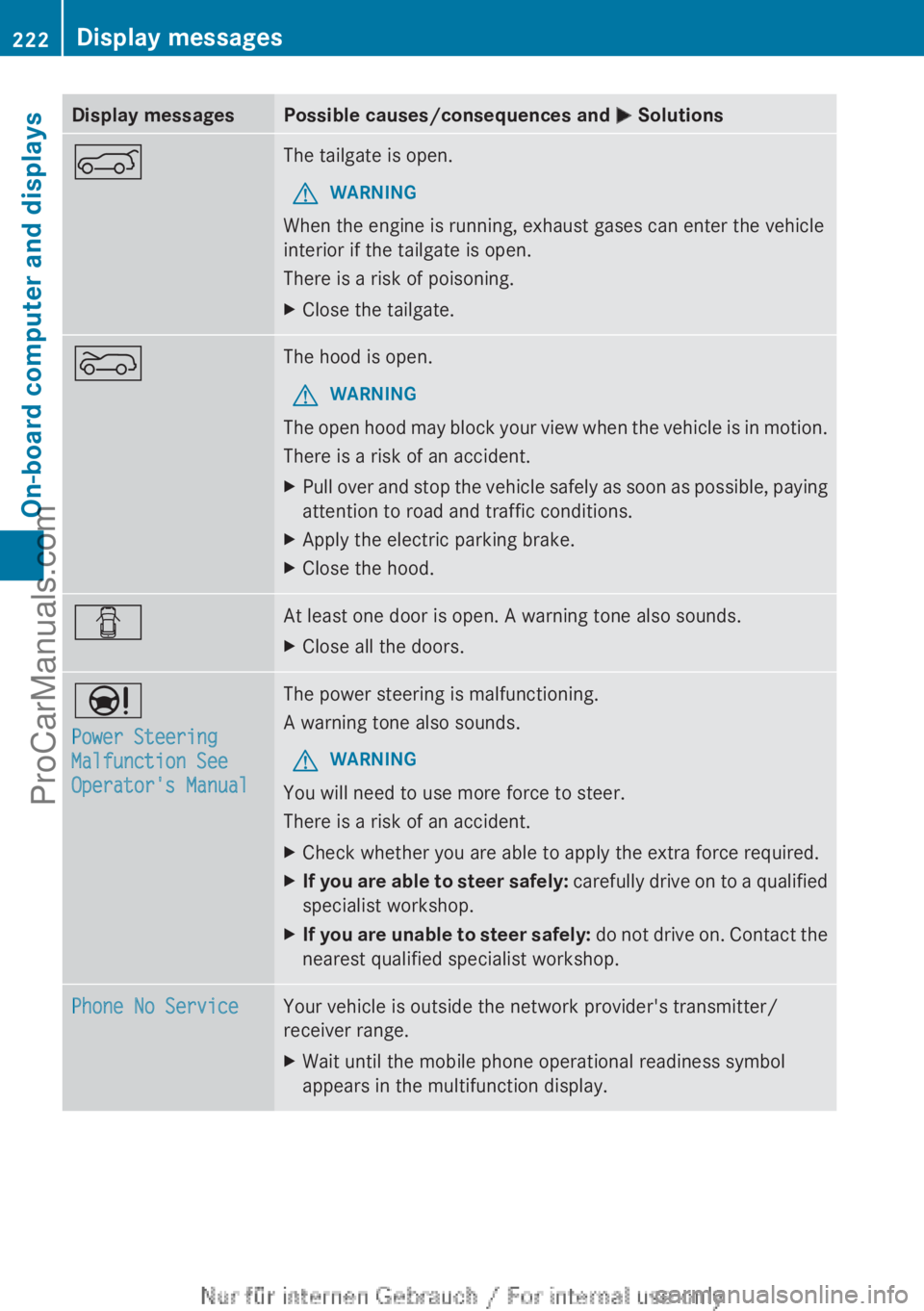
Display messages Possible causes/consequences and
M SolutionsA The tailgate is open.
G WARNING
When the engine is running, exhaust gases can enter the vehicle
interior if the tailgate is open.
There is a risk of poisoning.
X Close the tailgate. ? The hood is open.
G WARNING
The open hood may block your view when the vehicle is in motion.
There is a risk of an accident.
X Pull over and stop the vehicle safely as soon as possible, paying
attention to road and traffic conditions.
X Apply the electric parking brake.
X Close the hood. C At least one door is open. A warning tone also sounds.
X
Close all the doors. Ð
Power Steering
Malfunction See
Operator's Manual The power steering is malfunctioning.
A warning tone also sounds.
G WARNING
You will need to use more force to steer.
There is a risk of an accident.
X Check whether you are able to apply the extra force required.
X If you are able to steer safely:
carefully drive
on to a qualified
specialist workshop.
X If you are unable to steer safely: do not
drive on. Contact the
nearest qualified specialist workshop. Phone No Service Your vehicle is outside the network provider's transmitter/
receiver range.
X
Wait until the mobile phone operational readiness symbol
appears in the multifunction display.222
Display messages
On-board computer and displays
ProCarManuals.com
Page 252 of 340
i
If you remove the ashtray insert, you can
use the resulting compartment for
stowage.
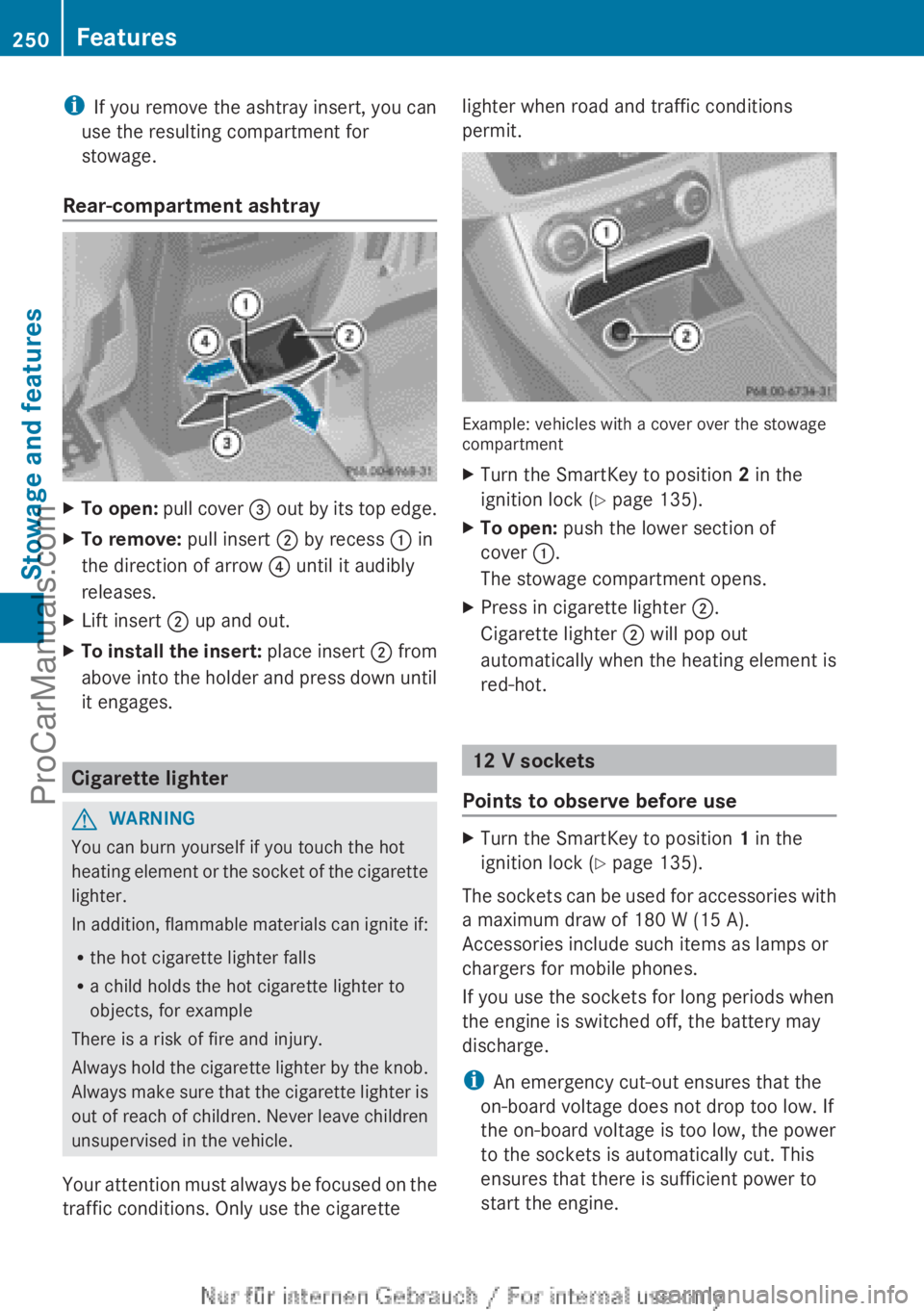
Rear-compartment ashtray X
To open: pull cover = out by its top edge.
X To remove: pull insert ; by recess : in
the direction of arrow ? until it audibly
releases.
X Lift insert ; up and out.
X To install the insert: place
insert ;
from
above into the holder and press down until
it engages. Cigarette lighter
G
WARNING
You can burn yourself if you touch the hot
heating element or
the socket of the cigarette
lighter.
In addition, flammable materials can ignite if:
R the hot cigarette lighter falls
R a child holds the hot cigarette lighter to
objects, for example
There is a risk of fire and injury.
Always hold the cigarette lighter by the knob.
Always make sure that the cigarette lighter is
out of reach of children. Never leave children
unsupervised in the vehicle.
Your attention must always be focused on the
traffic conditions. Only use the cigarette lighter when road and traffic conditions
permit.
Example: vehicles with a cover over the stowage
compartment
X
Turn the SmartKey to position 2 in the
ignition lock (Y page 135).
X To open: push the lower section of
cover :.
The stowage compartment opens.
X Press in cigarette lighter ;.
Cigarette lighter ; will pop out
automatically when the heating element is
red-hot. 12 V sockets
Points to observe before use X
Turn the SmartKey to position 1 in the
ignition lock (Y page 135).
The sockets can be used for accessories with
a maximum draw of 180 W (15 A).
Accessories include such items as lamps or
chargers for mobile phones.
If you use the sockets for long periods when
the engine is switched off, the battery may
discharge.
i An emergency cut-out ensures that the
on-board voltage does not drop too low. If
the on-board voltage is too low, the power
to the sockets is automatically cut. This
ensures that there is sufficient power to
start the engine. 250
Features
Stowage and features
ProCarManuals.com