Page 85 of 630

84
1-4. Adjustable components (seats, mirrors, steering wheel)
HS250h_U_75050U
Auto tilt away (power adjustable type only)
When the “POWER” switch is
turned off, the steering wheel
returns to its stowed position by
moving up and away to enable
easier driver entry and exit.
Turning the “POWER” switch to
ACCESSORY or ON mode will
return the steering wheel to the
original position.
■The steering wheel can be adjusted when (power adjustable type only)
The “POWER” switch is in ACCESSORY or ON mode*.
*: Vehicles with driving position memory: If the driver’s seat belt is fastened, thesteering wheel can be adjusted regardless of “POWER” switch mode.
■Automatic adjustment of the steering position (vehicles with driving position
memory)
A desired steering position can be entered to memory and recalled automatically
by the driving position memory system. ( →P. 7 2 )
CAUTION
■Caution while driving
Do not adjust the steering wheel while driving.
Doing so may cause the driver to mishandle the vehicle and cause an accident,
resulting in death or serious injury.
■After adjusting the steering wheel (manually adjustable type only)
Make sure that the steering wheel is securely locked.
Otherwise, the steering wheel may move suddenly, possibly causing an accident,
and resulting in death or serious injury.
Page 117 of 630

116
1-8. Safety information
HS250h_U_75050U
CAUTION
■SRS airbag precautions
Observe the following precautions regarding the SRS airbags.
Failure to do so may cause death or serious injury.
●The driver and all passengers in the vehicle must wear their seat belts properly.
The SRS airbags are supplemental devices to be used with the seat belts.
●The SRS driver airbag deploys with considerable force, and can cause death or
serious injury especially if the driver is very close to the airbag. The National
Highway Traffic Safety Administration (NHTSA) advises:
Since the risk zone for the driver’s airbag is the first 2 - 3 in. (50 - 75 mm) of infla-
tion, placing yourself 10 in. (250 mm) from your driver airbag provides you with a
clear margin of safety. This distance is measured from the center of the steering
wheel to your breastbone. If you sit less than 10 in. (250 mm) away now, you can
change your driving position in several ways:
• Move your seat to the rear as far as you can while still reaching the pedalscomfortably.
• Slightly recline the back of the seat. Although vehicle designs vary, many drivers can achieve the 10 in. (250 mm)
distance, even with the driver seat all the way forward, simply by reclining the
back of the seat somewhat. If reclining the back of your seat makes it hard to
see the road, raise yourself by using a firm, non-slippery cushion, or raise the
seat if your vehicle has that feature.
• If your steering wheel is adjustable, tilt it downward. This points the airbag toward your chest instead of your head and neck.
The seat should be adjusted as recommended by NHTSA above, while still main-
taining control of the foot pedals, steering wheel, and your view of the instrument
panel controls.
Page 119 of 630
118
1-8. Safety information
HS250h_U_75050U
CAUTION
■SRS airbag precautions
●Do not sit on the edge of the seat or lean
against the dashboard.
●Do not allow a child to stand in front of the
SRS front passenger airbag unit or sit on
the knees of a front passenger.
●Do not allow the front seat occupants to
hold items on their knees.
●Do not lean against the door, the roof side
rail or the front, side and rear pillars.
●Do not allow anyone to kneel on the pas-
senger seats toward the door or put their
head or hands outside the vehicle.
Page 142 of 630
When driving2
141
HS250h_U_75050U
2-1. Driving proceduresDriving the vehicle.................. 142
Power (ignition) switch .......... 152
EV drive mode.......................... 157
Hybrid transmission ............... 160
Turn signal lever ....................... 166
Parking brake ........................... 167
Horn ............................................ 168
2-2. Instrument cluster Gauges and meters ................ 169
Indicators and warning lights ......................................... 173
Multi-information display ..... 177
Head-up display ...................... 183
2-3. Operating the lights and windshield wipers
Headlight switch....................... 191
Automatic High Beam ........... 196
Fog light switch ...................... 202
Windshield wipers and washer ................................... 204
Headlight cleaner switch....... 211 2-4. Using other driving systems
Cruise control.......................... 212
Dynamic radar cruise control ..................................... 216
LKA (Lane-Keeping Assist) ....... 230
Driving assist systems ........... 238
Hill-start assist control ......... 243
Pre-Collision System ............ 245
2-5. Driving information Cargo and luggage ............... 254
Vehicle load limits .................. 257
Winter driving tips ................. 258
Trailer towing ............................ 261
Dinghy towing......................... 262
Page 161 of 630

160
2-1. Driving procedures
HS250h_U_75050U
Hybrid transmission
Select a shift position appropriate for the driving conditions.
■Shifting the shift lever
Shift lever
Operate the shift lever gently
and ensure correct shifting
operation.When shifting to the D
or R positions, move the
shift lever along the shift
gate.
To shift to the N position,
slide the shift lever to the
left and hold it. The shift
position will change to N.
Shifting to B is only pos-
sible when shift position
D is selected.
The shift lever will
always return to this
position after a shifting
operation.
When shifting from P to D or R,
from D to R, or from R to D,
ensure that the brake pedal is
being depressed and the vehicle
is stationary.
Shift position indicator
When selecting the shift posi-
tion, make sure that the shift
position has been changed to
the desired position by checking
the shift position indicator pro-
vided on the instrument panel.
When any shift position other
than D or B is selected, the
arrow toward B and B position
indicator disappear from the
shift position indicator.
Page 194 of 630

193
2-3. Operating the lights and windshield wipers
2
When driving
HS250h_U_75050U
Turning on the high beam headlightsWith the headlights on, push the
lever away from you to turn on
the high beams.
When the light switch is in
position, the Automatic High Beam
system will be activated. (→P. 1 9 6 )
Pull the lever toward you to the
center position to turn the high
beams off.
Pull the lever toward you and
release it to flash the high beams
once.
You can flash the high beams with
the headlights on or off.
AFS (Adaptive Front-lighting System) (if equipped)
AFS (Adaptive Front-lighting System) secures excellent visibility at inter-
sections and on curves by automatically adjusting the direction of the
light axis of the headlights according to vehicle speed and the degree of
the tire’s angle as controlled by steering input.
AFS operates at speeds of 6 mph (10 km/h) or higher.
■ Deactivating AFS
Press the menu switch.
The multi-information display will
change modes to electronic fea-
ture control mode.
Press the “ENTER” switch
upwards or downwards until
AFS appears.
Page 200 of 630

199
2-3. Operating the lights and windshield wipers
2
When driving
HS250h_U_75050U
●The following factors may affect the amount of time taken to turn high beam on
or off:
• The brightness of headlights, fog lights, and tail lights of oncoming and pre-ceding vehicles
• Road conditions (wetness, ice, snow etc.)
• The number of passengers and amount of baggage
●High beam may be turned on or off when unexpected by the driver.
●In the situations below, the system may not be able to correctly detect the sur-
rounding brightness levels, and may flash or expose nearby pedestrians to the
high beam. Therefore, you should consider turning the high beams on or off
manually rather than relying on the Automatic High Beam System.
• In bad weather (rain, snow, fog, sandstorms etc.)
• The windshield is obscured by fog, mist, ice, dirt etc.
• The windshield is cracked or damaged.
• The inside rear view mirror or camera sensor is deformed or dirty.
• Surrounding brightness levels are equal to those of headlights, tail lights or fog lights.
• Vehicles ahead have headlights that are either switched off, dirty, are chang-
ing color, or have are not aimed properly.
• When driving through an area of intermittently changing brightness and darkness
• When frequently and repeatedly driving ascending/descending roads, or roads with rough, bumpy or uneven surfaces (such as stone-paved roads,
gravel tracks etc.)
• When frequently and repeatedly taking curves or driving on a winding road
• There is a highly reflective object ahead of the vehicle, such as a sign or a mir- ror.
• The vehicle’s headlights are damaged or dirty.
• The vehicle is listing or tilting, due to a flat tire, a trailer being towed etc.
• The Automatic High Beam indicator is flashing.
• The high beam and low beam are repeatedly being switched between in an abnormal manner.
• The driver believes that the high beam may be causing problems or distress to other drivers or pedestrians nearby.
Page 215 of 630
214
2-4. Using other driving systems
HS250h_U_75050U
■Cruise control can be set when
●The shift position is in D.
●Vehicle speed is above approximately 25 mph (40 km/h).
■Accelerating after setting the vehicle speed
●The vehicle can be accelerated normally. After acceleration, the set speed
resumes.
●Even without canceling the cruise control, the set speed can be increased by
first accelerating the vehicle to the desired speed and then pushing the lever
down to set the new speed.
■Automatic cruise control cancelation
Cruise control will stop maintaining the vehicle speed in any of the following situa-
tions.
●Actual vehicle speed falls more than approximately 10 mph (16 km/h) below the
preset vehicle speed.
At this time, the memorized set speed is not retained.
●Actual vehicle speed is below approximately 25 mph (40 km/h).
●Enhanced VSC is activated.
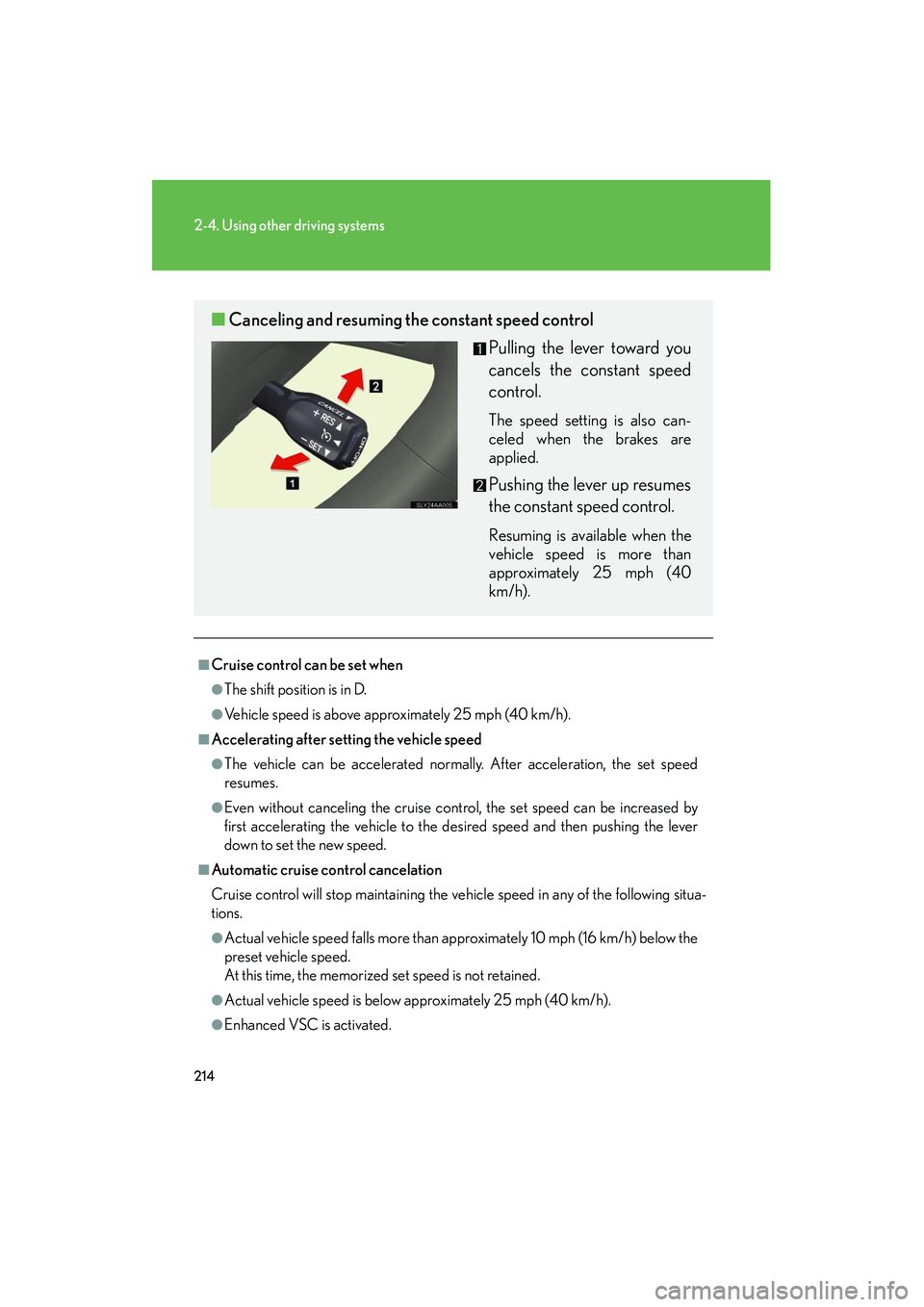
■Canceling and resuming the constant speed control
Pulling the lever toward you
cancels the constant speed
control.
The speed setting is also can-
celed when the brakes are
applied.
Pushing the lever up resumes
the constant speed control.
Resuming is available when the
vehicle speed is more than
approximately 25 mph (40
km/h).
