Page 200 of 914
1964-1. Before driving
GS350/250_EE (OM30C36E)
NOTICE
When driving the vehicle
Do not depress the accelerator and brake pedals at the same time during
driving, as this may restrain driving torque.
Do not use the accelerator pedal or depress the accelerator and brake ped-
als at the same time to hold the vehicle on a hill.
When parking the vehicle
Always shift the shift lever to P. Failure to do so may cause the vehicle to
move or the vehicle may accelerate suddenly if the accelerator pedal is
accidentally depressed.
Avoiding damage to vehicle parts
Do not turn the steering wheel fully in either direction and hold it there for
an extended period of time.
Doing so may damage the power steering motor.
When driving over bumps in the road, drive as slowly as possible to avoid
damaging the wheels, underside of the vehicle, etc.
If you get a flat tire while driving
A flat or damaged tire may cause the following situations. Hold the steering
wheel firmly and gradually depress the brake pedal to slow down the vehi-
cle.
It may be difficult to control your vehicle.
The vehicle will make abnormal sounds or vibrations.
The vehicle will lean abnormally.
Information on what to do in case of a flat tire (P. 782, 797)
Page 212 of 914

2084-1. Before driving
GS350/250_EE (OM30C36E)
If the engine overheats
Towing a loaded trailer up a long, steep incline in temperatures
exceeding 30C (85F) may result in the engine overheating. If
the engine coolant temperature gauge indicates that the engine is
overheating, turn the air conditioning off immediately, leave the
road and stop the vehicle in a safe place. (P. 829)
When parking the vehicle
Always place wheel chocks under the wheels of both the vehicle
and trailer. Firmly set the parking brake and shift the shift lever
to P.
CAUTION
To avoid accident or injury
Do not tow a trailer when the compact spare tire is installed on your vehi-
cle.
Do not tow the vehicle when the tire installed is repaired with the emer-
gency tire puncture repair kit.
Vehicle speed in towing
Observe the legal maximum speeds for trailer towing.
Before descending hills or long declines
Reduce speed and downshift. However, never downshift suddenly while
descending steep or long downhill grades.
Operation of the brake pedal
Do not hold the brake pedal depressed often or for long periods of time.
Doing so may result in the brake overheating or reduce braking effects.
NOTICE
For vehicles with an emergency tire puncture repair kit (if equipped)
Do not tow anything if a tire that has been repaired using the emergency tire
puncture repair kit is installed. The load on the tire may cause unexpected
damage to the tire.
Page 213 of 914
207
4 4-2. Driving procedures
Driving
GS350/250_EE (OM30C36E)
Engine (ignition) switch
Check that the parking brake is set.
Check that the shift lever is set in P.
Firmly depress the brake pedal.
will be displayed on the multi-information display.
If it is not displayed, the engine cannot be started.
Press the engine switch.
The engine will crank until it starts
or for up to 30 seconds, whichever
is less.
Continue depressing the brake
pedal until the engine is com-
pletely started.
The engine can be started from any
engine switch mode.
Performing the following operations when carrying the electronic
key on your person starts the engine or changes engine switch
modes.
Starting the engine
1
2
3
4
Page 214 of 914
2084-2. Driving procedures
GS350/250_EE (OM30C36E)Stop the vehicle.
Shift the shift lever to P.
Set the parking brake. (P. 225)
Press the engine switch.
Release the brake pedal and check that “POWER ON” on the
multi-information display is off.
Modes can be changed by pressing the engine switch with brake
pedal released. (The mode changes each time the switch is
pressed.)
Off*
The emergency flashers can be
used.
The multi-information display will
not be displayed.
ACCESSORY mode
Some electrical components such
as the audio system can be used.
“POWER ON” will be displayed
on the multi-information display.
IGNITION ON mode
All electrical components can be
used.
“POWER ON” will be displayed
on the multi-information display.
*: If the shift lever is in a position
other than P when turning off the
engine, the engine switch will be
Stopping the engine
Changing engine switch modes
1
2
3
4
5
Page 216 of 914
2104-2. Driving procedures
GS350/250_EE (OM30C36E)If the engine is stopped with the shift lever in a position other than
P, the engine switch will not be turned off but instead be turned to
ACCESSORY mode. Perform the following procedure to turn the
switch off:
Check that the parking brake is set.
Shift the shift lever to P.
Check that “POWER ON” and “Turn Power OFF” are displayed
alternately on the multi-information display and then press the
engine switch once.
Check that “POWER ON” and “Turn Power OFF” on the multi-
information display are off.
When stopping the engine with the shift lever in a position
other than P
1
2
3
4
Page 222 of 914
2164-2. Driving procedures
GS350/250_EE (OM30C36E)
*1: To improve fuel efficiency and reduce noises, set the shift lever in D for
normal driving.
*2: Any gear range can be fixed when driving in M mode.
Shift position purpose
Shift positionObjective or function
PParking the vehicle/starting the engine
RReversing
NNeutral
DNormal driving*1
MM mode driving*2 (P. 219)
Page 231 of 914
2254-2. Driving procedures
4
Driving
GS350/250_EE (OM30C36E)
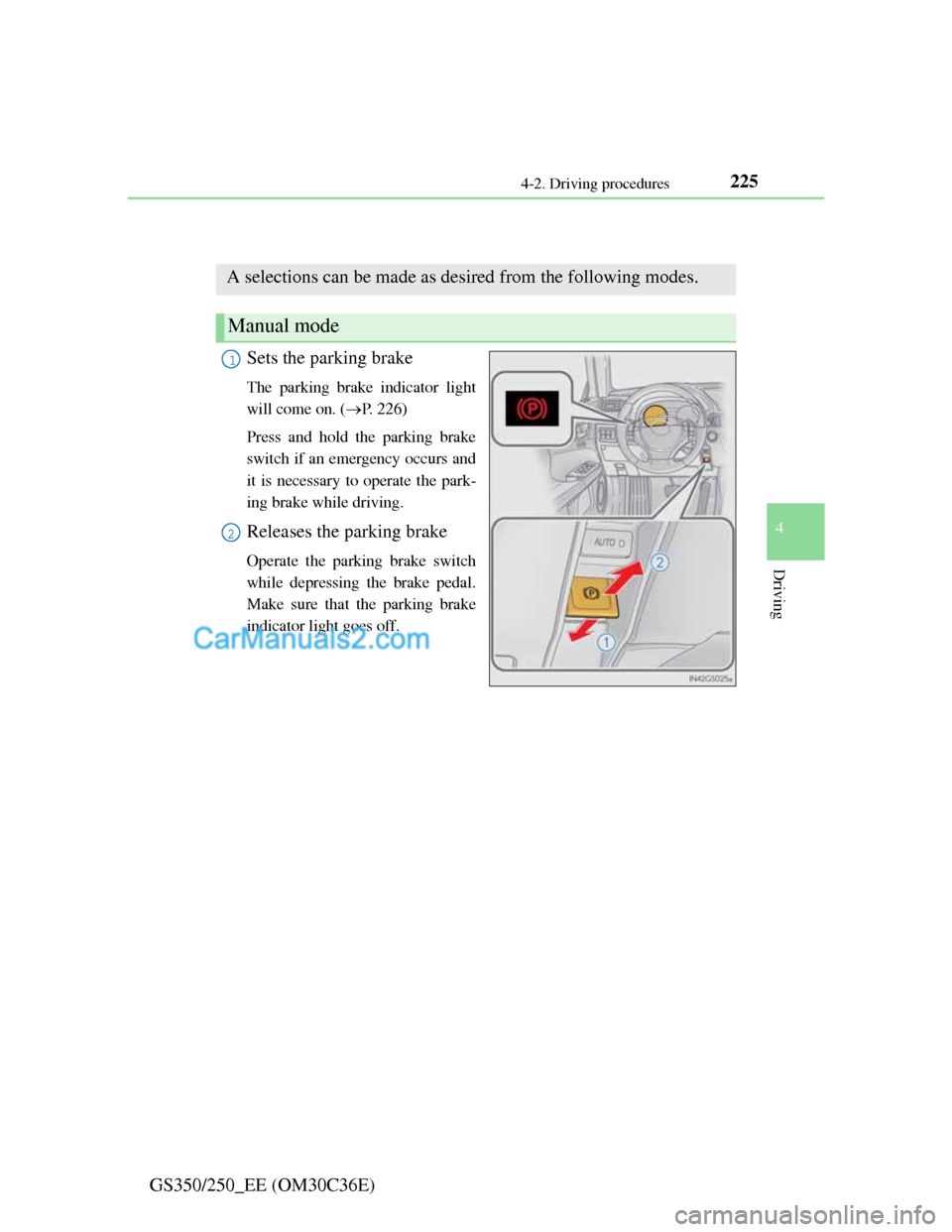
Parking brake
Sets the parking brake
The parking brake indicator light
will come on. (P. 226)
Press and hold the parking brake
switch if an emergency occurs and
it is necessary to operate the park-
ing brake while driving.
Releases the parking brake
Operate the parking brake switch
while depressing the brake pedal.
Make sure that the parking brake
indicator light goes off.
A selections can be made as desired from the following modes.
Manual mode
1
2
Page 232 of 914

2264-2. Driving procedures
GS350/250_EE (OM30C36E)The parking brake is set or released automatically according to shift
lever operation.
Turns automatic mode on/off
When the shift lever is moved
out of P, the parking brake will
be released.
When the shift lever is moved
into P, the parking brake will
be set.
Operate the shift lever with the
brake pedal depressed.
Parking brake operation
When the engine switch is not in IGNITION ON mode, the parking brake
cannot be released using the parking brake switch.
When the engine switch is not in IGNITION ON mode, automatic mode
(automatic brake setting and releasing) is not available.
If the parking brake is operated repeatedly over a short period of time, the
system may restrict operation to prevent overheating. If this happens,
refrain from operating the parking brake. Normal operation will return after
about 1 minute.
Parking brake operation sound
When the parking brake operates, a motor sound (whirring sound) may be
heard. This does not indicate a malfunction.
Parking brake indicator light
Depending on the engine switch mode, the parking brake indicator light
will come on and stay on as described below:
IGNITION ON mode: Comes on until the parking brake is released.
Not in IGNITION ON mode: Stays on for approximately 15 seconds.
When the engine switch is turned off with the parking brake set, the parking
brake indicator light will stay on for about 15 seconds. This does not indi-
cate a malfunction.
Automatic mode