Page 93 of 497

▫Instrument Panel Dimming ............. 151
▫ Map/Reading Lights .................. 152
� Windshield Wipers And Washers .......... 152
▫ Windshield Wiper Operation ............ 154
▫ Intermittent Wiper System .............. 154
▫ Windshield Washers .................. 155
▫ Mist Feature ........................ 155
� Tilt Steering Column ................... 156
� Electronic Speed Control — If Equipped ..... 157
▫ To Activate ......................... 158
▫ To Set A Desired Speed ................ 159
▫ To Deactivate ....................... 159
▫ To Resume Speed .................... 159 ▫
To Vary The Speed Setting .............. 159
▫ To Accelerate For Passing .............. 160
� Garage Door Opener — If Equipped ........ 160
▫ Before You Begin Programming
HomeLink� ........................ 162
▫ Programming A Rolling Code ........... 162
▫ Programming A Non-Rolling Code ........ 164
▫ Canadian/Gate Operator Programming .... 165
▫ Using HomeLink� ................... 167
▫ Security ........................... 167
▫ Troubleshooting Tips .................. 168
▫ General Information .................. 169
3
UNDERSTANDING THE FEATURES OF YOUR VEHICLE 91
Page 116 of 497

Barge In — Overriding Prompts
The “Voice Command” button can be used when you
wish to skip part of a prompt and issue your voice
command immediately. For example, if a prompt is
asking “Would you like to pair a phone, clear a...,” you
could press the
button and say, “Pair a Phone” to
select that option without having to listen to the rest of
the voice prompt.
Turning Confirmation Prompts ON/OFF
Turning confirmation prompts off will stop the system
from confirming your choices (e.g., the Uconnect™
Phone will not repeat a phone number before you dial it).
•Press thebutton to begin.
•After the “Ready” prompt and the following beep, say
one of the following:
“Setup Confirmation Prompts On”
“Setup Confirmation Prompts Off”
Phone And Network Status Indicators
If available on the radio and/or on a premium display
such as the instrument panel cluster, and supported by
your mobile phone, the Uconnect™ Phone will provide
notification to inform you of your phone and network
status when you are attempting to make a phone call
using Uconnect™ Phone. The status is given for network
signal strength, phone battery strength, etc.
Dialing Using The Mobile Phone Keypad
You can dial a phone number with your mobile phone
keypad and still use the Uconnect™ Phone (while dialing
via the mobile phone keypad, the user must exercise
caution and take precautionary safety measures). By
dialing a number with your paired Bluetooth �mobile
phone, the audio will be played through your vehicle’s
audio system. The Uconnect™ Phone will work the same
as if you dial the number using Voice Command.
114 UNDERSTANDING THE FEATURES OF YOUR VEHICLE
Page 137 of 497
Adjusting The Seat Forward Or Rearward
The seat can be adjusted both forward and rearward.
Push the seat switch forward or rearward, the seat will
move in the direction of the switch. Release the switch
when you have reached the desired position.
Adjusting The Seat Up Or Down
The height of the seats can be adjusted up or down. Pull
upward or push downward on the seat switch, the seat
will move in the direction of the switch. Release the
switch when you have reached the desired position.
Tilting The Seat Up Or Down
The angle of the seat cushion can be adjusted in four
directions. Pull upward or push downward on the front
or rear of the seat switch, the front or rear of the seat
cushion will move in the direction of the switch. Release
the switch when you have reached the desired position.
Heated Seats — If Equipped
On some models, the front driver and passenger seats
may be equipped with heaters in both the seat cushions
and seatbacks. The controls for the front heated seats are
located on the center instrument panel area.
You can choose from HIGH, LOW or OFF heat settings.
Amber indicator lights in each switch indicate the level of
heat in use. Two indicator lights will illuminate for
HIGH, one for LOW and none for OFF.Press the switch once to select HIGH-level
heating. Press the switch a second time to select
LOW-level heating. Press the switch a third
time to shut the heating elements OFF.
If HIGH-level heating is selected, the system automati-
cally switches to LOW-level heating and turns one indi-
cator light OFF after a maximum of 60 minutes of
continuous operation. It will turn the heater and the
remaining indicator light OFF after an a maximum of
3
UNDERSTANDING THE FEATURES OF YOUR VEHICLE 135
Page 150 of 497
LIGHTS
Multifunction Lever
The multifunction lever controls the operation of the
headlights, parking lights, turn signals, headlight beam
selection, instrument panel light dimming, interior lights,
the passing lights and the fog lights. The multifunction
lever is located on the left side of the steering column.
Headlights And Parking Lights
Turn the end of the multifunction lever to the first detent
to turn on the parking lights.
Turn the end of the lever to the second detent to turn on
the headlights.
Multifunction Lever
Headlight Control
148 UNDERSTANDING THE FEATURES OF YOUR VEHICLE
Page 153 of 497
NOTE:If the multifunction lever is held in the flash-to-
pass position for more than 20 seconds, the high beams
will shut off. If this occurs, wait 30 seconds for the next
flash-to-pass operation.
Instrument Panel Dimming
Rotate the center portion of the lever to the extreme
bottom position to fully dim the instrument panel lights
and prevent the interior lights from illuminating when a
door is opened.
Rotate the center portion of the lever up to increase the
brightness of the instrument panel lights when the park-
ing lights or headlights are on.
Rotate the center portion of the lever upward to the next
detent position to brighten the odometer and radio when
the parking lights or headlights are on. Rotate the center portion of the lever upward to the last
detent to turn on the interior lighting.
Dimmer Control
3
UNDERSTANDING THE FEATURES OF YOUR VEHICLE 151
Page 174 of 497

Sunshade Operation
The sunshade can be opened manually. However, the
sunshade will open automatically as the sunroof opens.
NOTE:The sunshade cannot be closed if the sunroof is
open.
Wind Buffeting
Wind buffeting can be described as the perception of
pressure on the ears or a helicopter-type sound in the
ears. Your vehicle may exhibit wind buffeting with the
windows down, or the sunroof (if equipped) is in certain
open or partially open positions. This is a normal occur-
rence and can be minimized. If the buffeting occurs with
the rear windows open, open the front and rear windows
together to minimize the buffeting. If the buffeting occurs
with the sunroof open, adjust the sunroof opening to
minimize the buffeting or open any window.
Sunroof Maintenance
Use only a non-abrasive cleaner and a soft cloth to clean
the glass panel.
Ignition Off Operation
For vehicles not equipped with the Electronic Vehicle
Information Center (EVIC), the power sunroof switch
will remain active for 45 seconds after the ignition switch
is turned to the LOCK position. Opening either front
door will cancel this feature.
For vehicles equipped with the EVIC, the power sunroof
switch will remain active for up to approximately ten
minutes after the ignition switch is turned to the LOCK
position. Opening either front door will cancel this
feature. The time is programmable. Refer to “Electronic
Vehicle Information Center (EVIC)/Personal Settings
(Customer-Programmable Features)” in “Understanding
Your Instrument Panel” for further information.
172 UNDERSTANDING THE FEATURES OF YOUR VEHICLE
Page 175 of 497
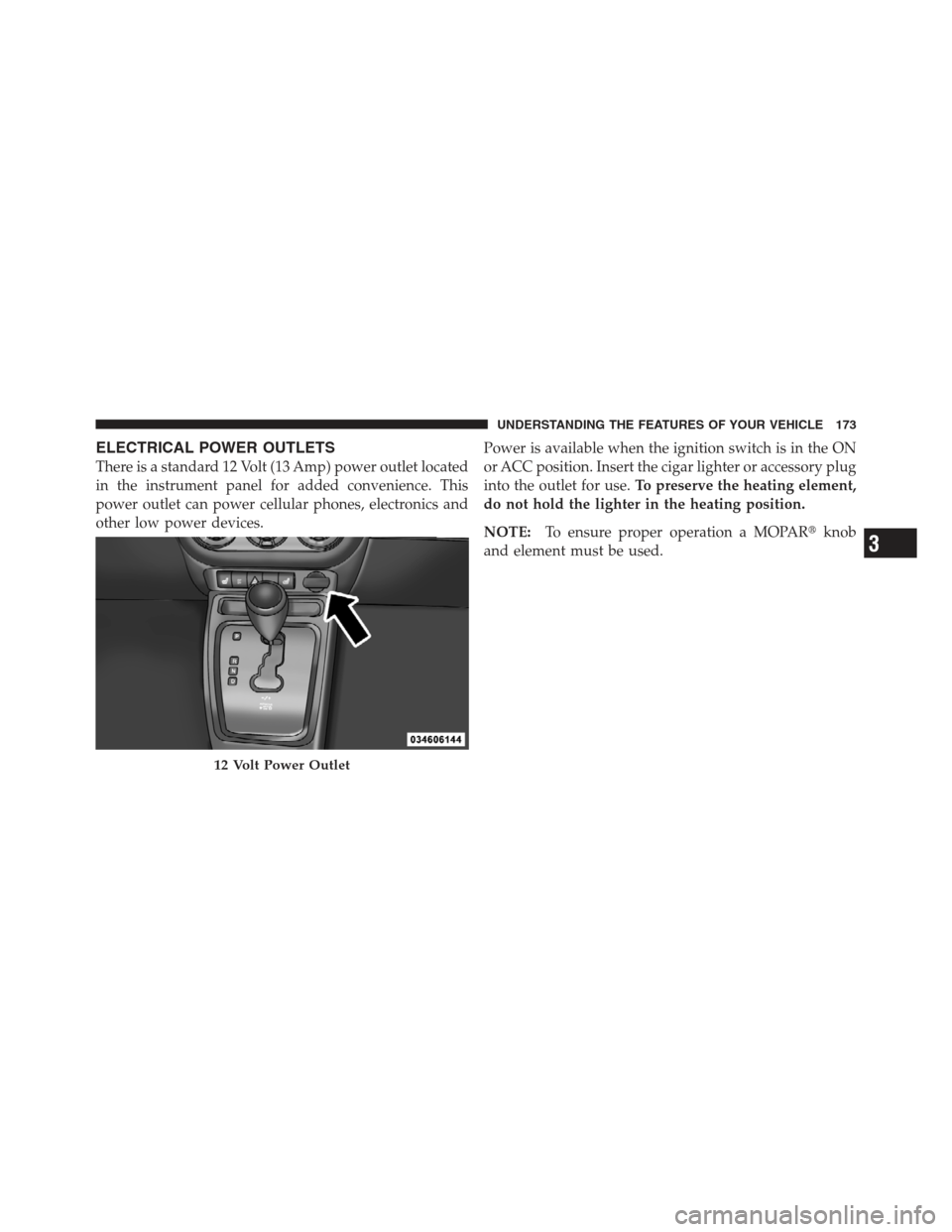
ELECTRICAL POWER OUTLETS
There is a standard 12 Volt (13 Amp) power outlet located
in the instrument panel for added convenience. This
power outlet can power cellular phones, electronics and
other low power devices.Power is available when the ignition switch is in the ON
or ACC position. Insert the cigar lighter or accessory plug
into the outlet for use.
To preserve the heating element,
do not hold the lighter in the heating position.
NOTE: To ensure proper operation a MOPAR� knob
and element must be used.
12 Volt Power Outlet
3
UNDERSTANDING THE FEATURES OF YOUR VEHICLE 173
Page 181 of 497
STORAGE
Glove Compartment And Storage Bin
Located on the passenger side of the instrument panel are
an upper storage bin and a lower glove compartment.To open the lower glove compartment, pull outward on
the release handle.
Storage Compartments
1 — Upper Storage Bin
2 — Lower Glove Compartment
Glove Compartment
3
UNDERSTANDING THE FEATURES OF YOUR VEHICLE 179