2012 INFINITI G-COUPE climate settings
[x] Cancel search: climate settingsPage 217 of 490

4-38Monitor, climate, audio, phone and voice recognition systems
.To cancel the separate temperaturesetting, push the “DUAL”button, the
indicator light turns off, and the
driver’s side temperature setting will
be applied to both the driver’s and
front passenger’s sides.
.Do not set the temperature lower than the outside air temperature.
Doing so may cause the temperature
not to be controlled properly.
.If the windows fog up, use dehumi-dified heating instead of the A/C off
heating.
Dehumidified defrosting/defogging:
1. Push the “
”button. (The indicator
light will illuminate.)
2. Turn the temperature control dial to set the desired temperature.
.To remove frost from the outside
surface of the windshield quickly,
set the temperature control and fan
speed control to their maximum
position.
.After the windshield is cleared, pushthe “AUTO” button to set to the
automatic mode.
.When the “”button is pushed,
the air conditioner will automatically
turn on when the outside air tem- perature is above 238F(
−58C) to
defog the windshield. The air recir-
culation mode will automatically
turn off. The outside air circulation
mode will be selected to improve the
defogging performance.
Manual operation
The manual mode can be used to control
the heater and air conditioner to your
desired settings.
To turn off the heater and air conditioner,
push the “OFF”button.
Fan speed control:
Push the fan speed control button “
”to
increase the fan speed.
Push the fan speed control button “
”to
decrease the fan speed.
Push the “AUTO”button to change the fan
speed to the automatic mode.
Air flow control:
Push the “MODE”button to change the air
flow mode.
: Air flows from the center and side ventilators.
: Air flows from the center and side ventilators, and foot outlets.
: Air flows mainly from the foot outlets.
: Air flows from the defroster and foot outlets.
Temperature control:
Turn the temperature control dial to set the
desired temperature.
. The temperature can be set within the
following range.
— For U.S.: 60 to 908F (16 to 328C)
— For Canada: 64 to 908F (18 to 328C)
Air recirculation:
Push the intake air control button to
recirculate interior air inside the vehicle.
The indicator light on the “
”side will
illuminate.
The air recirculation mode cannot be
activated when the air conditioner is in
the front defrosting mode “
”.
Outside air circulation:
Push the intake air control button to draw
outside air into the passenger compart-
ment.
The indicator light on the “
”side and
“” side will turn off.
Automatic intake air control:
In the AUTO mode, the intake air will be
controlled automatically. To manually con-
trol the intake air, push the intake air
Page 242 of 490
player does not guarantee complete
functionality of all VIDEO-CD formats.
Display settings
To adjust the front display mode, push the
SETTING button while the DVD is being
played, select the“Others”key and then
select the “Display”key.
To adjust the display ON/OFF, brightness,
tint, color and contrast, select the “Display
Adjustment” key and then select each key.
Then you can adjust each item using the
INFINITI controller. After changes have
been made push the BACK button to save
the setting.
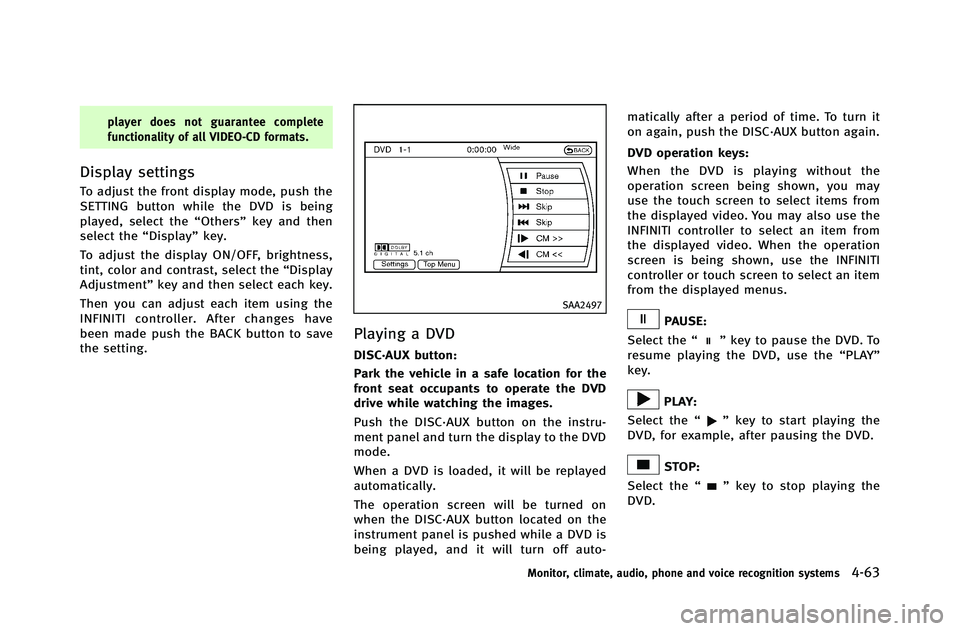
SAA2497
Playing a DVD
DISC·AUX button:
Park the vehicle in a safe location for the
front seat occupants to operate the DVD
drive while watching the images.
Push the DISC·AUX button on the instru-
ment panel and turn the display to the DVD
mode.
When a DVD is loaded, it will be replayed
automatically.
The operation screen will be turned on
when the DISC·AUX button located on the
instrument panel is pushed while a DVD is
being played, and it will turn off auto- matically after a period of time. To turn it
on again, push the DISC·AUX button again.
DVD operation keys:
When the DVD is playing without the
operation screen being shown, you may
use the touch screen to select items from
the displayed video. You may also use the
INFINITI controller to select an item from
the displayed video. When the operation
screen is being shown, use the INFINITI
controller or touch screen to select an item
from the displayed menus.
PAUSE:
Select the “
”key to pause the DVD. To
resume playing the DVD, use the “PLAY”
key.
PLAY:
Select the “
”key to start playing the
DVD, for example, after pausing the DVD.
STOP:
Select the “
”key to stop playing the
DVD.
Monitor, climate, audio, phone and voice recognition systems4-63
Page 243 of 490

4-64Monitor, climate, audio, phone and voice recognition systems
/Next/Previous Chapter:
Select the “
”or “”key to skip the
chapter(s) of the disc forward/backward.
The chapters will advance/go back the
number of times this key is selected.
/Commercial Skip:
This function is only for DVD-VIDEO, DVD-
VR. Select the “
”or “”key to skip
forward or backwards by the set amount as
defined in the DVD Settings menu.
Top Menu:
When the “Top Menu” key is selected in
the screen while a DVD is being played, the
top menu specific to each disc will be
displayed. For details, see the instructions
on the disc.
SAA2498
Example
DVD settings
Select the “Settings”key to adjust the
following settings.
Key (DVD-VIDEO):
Keys for the DVD menu operation are
displayed.
: Move the cursor to select a DVD
menu.
Enter: Enter the selected menu.
Move: Change the display location by
moving the operation key.
Back: Return to the previous screen.
Hide: Hide the operation key.
Title Menu (DVD-VIDEO):
Some menus specific to each disc will be
shown. For details, see the instructions on
the disc.
Title Search (DVD-VIDEO, DVD-VR):
The scene with the specified title will be
displayed each time the “+”side or “−”
side is selected.
Group Search (VIDEO CD):
A scene in the specified group will be
displayed each time the “+”side or “−”
side is selected.
10 Key Search (DVD-VIDEO, VIDEO-CD, CD-
DA, DVD-VR):
Select the “10 Key Search” key to open the
number entry screen. Input the number to
be searched and select the “OK”key. The
specified Title/Chapter or Group/Track will
be played.
Select No. (VIDEO-CD):
Select the “Select No.” key to open the
number entry screen. Input the number to
be searched and select the “OK”key. The
specified scene will be played.
Page 248 of 490

mode.
Operation keys:
To operate the USB memory, select the
desired key displayed on the operation
screen using the INFINITI controller.
Pause
Select the “
”key to pause the movie
file. To resume playing the movie file,
select the “
”key.
Play
Select the “
”key to start playing a
movie file, for example, after pausing a
movie file.
STOP
Select the “
”key to stop playing a
movie file.
Skip (Next chapter)
Select the “
”key to skip the chapter(s)
of the disc forward. The chapters will
advance the number of times the ENTER
button is pushed.
Skip (Previous chapter)
Select the “
”key to skip the chapter(s)
of the disc backward. The chapters will go
back the number of times the “
”key is
selected.
List:
Select the “List”key on the movie file
operation screen to display the file list.
SAA2504
Example
Settings:
Select the “Settings”key to adjust the
following settings.
. Audio File Playback
Switch to the audio playback mode.
This item is displayed only when the
USB memory contains the audio files.
. Play Mode
Select the “Normal”or“1 Track Re-
peat” play mode.
. 10 Key Search
Select the “10 Key Search” key to open
the number entry screen.
Monitor, climate, audio, phone and voice recognition systems4-69
Page 253 of 490

4-74Monitor, climate, audio, phone and voice recognition systems
following items.
.Shuffle
Choose “Shuffle OFF” ,“Shuffle All
Tracks” and“Shuffle Group”.
. Repeat
Choose from “Repeat OFF”, “Repeat 1
Track”, “Repeat All Tracks” and“Repeat
Group”.
SAA2511
Bluetooth®settings
To set up the Bluetooth®device system to
the preferred settings, push the SETTING
button and select the “Bluetooth”key.
Bluetooth:
If this setting is turned off, the connection
between the Bluetooth
®devices and the
in-vehicle Bluetooth®module will be can-
celed.
Connect Bluetooth:
Connects to the Bluetooth
®device. See
“Connecting procedure” (P.4-71). Up to 5
devices can be registered. Connected Devices:
Registered devices are shown on the list.
Select a Bluetooth
®device from the list,
the following options will be available.
. Select
Select “Select” to connect the selected
device to the vehicle. If there is a
different device currently connected,
the selected device will replace the
current device.
. Edit
Rename the selected Bluetooth
®device
using the keypad displayed on the
screen. (See “How to use touch screen
(models with navigation system)” (P.4-
5).)
. Delete
Delete the selected Bluetooth
®device.
Edit Bluetooth Info:
Change the name broadcasted by this
system over Bluetooth
®. Change the PIN
code that is entered when connecting a
hands free device to this system.
Replace Connected Phone:
Replace the Bluetooth
®connection with a
connected Bluetooth®cellular phone. For
details about Hands-Free Phone System,
Page 255 of 490

4-76Monitor, climate, audio, phone and voice recognition systems
.Second generation iPod touch®(version
1.2.3 or later)
. First generation iPod nano
®(version
1.3.1 or later)
. Second generation iPod nano
®(version
1.1.3 or later)
. Third generation iPod nano
®(version
1.1 or later)
. Fourth generation iPod nano
®(version
1.0.2 or later)
Models without navigation system:
. Fifth generation iPod
®(firmware ver-
sion 1.3)
. First generation iPod Classic
®(firmware
version 1.1.2 PC)
. Second generation iPod Classic
®(firm-
ware version 2.0 PC)
. First generation iPod touch
®(firmware
version 2.1)
. Second generation iPod touch
®(firm-
ware version 2.1.1)
. First generation iPod nano
®(firmware
version 1.3.1)
. Second generation iPod nano
®(firm-
ware version 1.1.3)
. Third generation iPod nano
®(firmware
version 1.1 PC) .
Third generation iPhone
®(firmware
version 2.1)
Make sure that the iPod
®version is
updated.
Audio main operation
Push the ignition switch to the ACC or ON
position. Then, push the DISC·AUX or DISC
button repeatedly to switch to the iPod
®
mode.
If the system has been turned off while the
iPod
®was playing, pushing the ON·OFF
button will start the iPod®.
orPLAY:
When the DISC·AUX or AUX button is
pushed with the system off and the iPod
®
connected, the system will turn on. If
another audio source is playing and the
iPod
®is connected, push the DISC·AUX or
AUX button repeatedly until the center
display changes to the iPod
®mode.
Interface:
The interface for iPod
®operation shown on
the vehicle center display is similar to the
iPod
®interface. Use the INFINITI controller
and the ENTER or BACK button to play the
iPod
®with your favorite settings. The following items can be chosen from the
menu list screen. For further information
about each item, see the iPod
®Owner’s
Manual.
. Now Playing
. Playlists
. Artists
. Albums
. Songs
. Podcasts
. Genres
. Composers
. Audiobooks
. Shuffle Songs
The following touch-panel buttons shown
on the screen are also available:
.
: returns to the previous screen.
.
: plays/pauses the music selected.
Next/Previous Track and Fast
Forward/Rewind:
When the
orbutton is pushed for
more than 1.5 seconds while the iPod®is
playing, the iPod®will play while fast
forwarding or rewinding. When the button
is released, the iPod
®will return to the
normal play speed.
Page 258 of 490

If the title information of the track being
recorded is stored either in the hard drive/
flash memory or in the CD, the title is
automatically displayed on the screen. For
title acquisition from the hard drive/flash
memory, music recognition technology and
related data are provided by Gracenote
®.
If a track is not recorded successfully due
to skipping sounds, the
mark is
displayed behind the track number.
The Music Box
®hard drive/flash memory
cannot perform recording under the follow-
ing conditions.
. There is not enough space on the hard
drive
. The number of albums reaches the
maximum of 500.
. The number of tracks reaches the
maximum of 3,000.
Automatic recording:
If the “Automatic Recording” function is
turned to ON, recording starts when a CD is
inserted. (See “Music Box
®settings”(P.4-
83).)
Stopping recording:
To stop the recording, select the “Stop
REC” key button by touching the screen or using the INFINITI controller.
If the CD is ejected, the audio system is
turned off or the ignition switch is pushed
to the OFF position, the recording also
stops.
SAA2515
Models with navigation system
SAA2614
Models without navigation system
Monitor, climate, audio, phone and voice recognition systems4-79
Page 262 of 490

SAA2517
Models with navigation system
SAA2438
Models without navigation system
Music Box®settings
To set the Music box®hard drive/flash
memory to your preferred settings, select
the “Menu” key during playback, and the
“Music Box Settings” key with the INFINITI
controller, and then push the ENTER
button.
Music Box Used/Free Space:
Information about “Saved Album”,“Saved
Track” and“Remaining Time” is displayed.
Automatic Recording:
When this item is turned to ON, the Music
Box
®hard drive/flash memory automati-
cally starts recording when a CD is
inserted.
Delete Songs from Music Box:
Deletes the current song, selected songs or
albums by choosing from the list, or all
songs/albums in the Music Box
®.
Recording Quality:
Set the recording quality of 105 kbps or
132 kbps. The default is set to 105 kbps.
CDDB Version (models with navigation
system)/Gracenote Database Version
(models without navigation system):
The version of the built-in Gracenote Database is displayed.
Gracenote
NOTE:
.
The information contained in the Grace-
note Database is not fully guaranteed.
. The service of the Gracenote Database
on the Internet may be stopped with-
out prior notice for maintenance.
End-User License Agreement
USE OF THIS PRODUCT IMPLIES ACCEP-
TANCE OF THE TERMS BELOW.
Gracenote
®MusicID®Terms of Use
This application or device contains soft-
ware from Gracenote, Inc. of Emeryville,
California (“Gracenote”). The software from
Gracenote (the “Gracenote Software”) en-
ables this application to perform disc and/
or file identification and obtain music-
related information, including name, artist,
track, and title information (“ Gracenote
Data”) from online servers or embedded
databases (collectively, “Gracenote Ser-
vers”) and to perform other functions. You
may use Gracenote Data only by means of
the intended End-User functions of this
application or device. You agree that you
Monitor, climate, audio, phone and voice recognition systems4-83