2012 INFINITI FX turn signal
[x] Cancel search: turn signalPage 241 of 522

4-64Monitor, climate, audio, phone and voice recognition systems
desired setting. For the other setting
methods, see“How to use SETTING button”
(P.4-15).
Switching the display:
. Models with navigation system
Pushing the DISC·AUX button will switch
the displays as follows:
iPod
®/USB ?CD/DVD ?Music Box®(if
so equipped) ?Bluetooth®streaming
audio ?iPod®/USB
. Models without navigation system
Pushing the DISC button will switch the
display as follows:
CD ?Music Box
®(if so equipped) ?CD
Pushing the AUX button will switch the
display as follows:
USB/iPod
®? XM1 ?XM2 ?XM3 ?
USB/iPod®
FM-AM-SAT radio operation
When the radio band select button is
pushed while the ignition switch is in the
ACC or ON position, the radio will come on
at the channel last played.
The last channel played will also come on
when the ON·OFF button is pushed to ON.
The satellite radio is not available in Alaska, Hawaii and Guam.
If another audio source is playing when the
radio or satellite band select button is
turned to ON, the audio source will
automatically be turned off and the last
radio channel played will come on.
When the stereo broadcast signal is weak,
the radio will automatically change from
stereo to monaural reception.
orradio (FM/AM/SAT) band
select:
Pushing the RADIO AM·FM or AM·FM·SAT
band select button will change the band as
follows:
. Models with navigation system
AM ?FM1 ?FM2 ?XM1 ?XM2 ?XM3
? AM
. Models without navigation system
AM ?FM1 ?FM2 ?AM
radio (SAT) band select (models
without navigation system):
Push the satellite band select button to
select the satellite radio mode XM1, XM2
or XM3. TUNE (Tuning):
. For AM and FM radio
Turn the radio TUNE knob for manual
tuning.
. For XM Satellite Radio
Turn the radio TUNE knob to seek
channels from all of the categories
when any category is not selected.
SEEK tuning/CATEGORY (CAT):
. For AM and FM radio
Push the SEEK·CAT or TRACK button
orto tune from low to high or high
to low frequencies and to stop at the
next broadcasting station.
. For XM Satellite Radio
Push the SEEK·CAT or TRACK button
orto tune to the first channel of the
next or previous category.
During satellite radio reception, the follow-
ing notices will be displayed under certain
conditions.
. NO SIGNAL (No signal is received while
the SAT tuner is connected.)
. OFF AIR (Broadcasting signed off)
. CHECK ANTENNA (Antenna connection
error)
Page 348 of 522

SSD0672
Lane departure warning light (orange)
SSD1156
Warning systems switch
LDW system operation
The LDW system provides a lane departure
warning function when the vehicle is driven
at speeds of approximately 45 MPH (70
km/h) and above. When the vehicle
approaches either the left or the right side
of the traveling lane, a warning chime will
sound and the lane departure warning light
(orange) on the instrument panel will blink
to alert the driver.
The warning function will stop when the
vehicle returns inside of the lane markers.
When you operate the lane change signal
and change traveling lanes in the direction
of the signal, the LDW system temporarily
suspends operation. It will become oper-
able again approximately 2 seconds after
the lane change signal is turned off.
When the vehicle speed lowers to less than
approximately 45 MPH (70 km/h), the LDW
system will not provide a warning.
The LDW system has an automatic setting
mode and a manual setting mode. The
setting mode can be changed. In the
automatic setting mode, the LDW system
is automatically turned on when the igni-
tion switch is pushed to the ON position.
When the LDW system is on, the warningsystems ON indicator
*1on the warning
systems switch illuminates. To cancel the
LDW system, push the warning systems
switch. The warning systems ON indicator
will turn off. To turn on the system, push
the warning systems switch again.
When the warning systems switch is
pushed, the FCW system will also turn on
or off simultaneously. See“ FCW system
operation” (P.5-70)
In the manual setting mode, you need to
push the warning systems switch to turn
on the system after the ignition switch is
pushed to the ON position.
The setting mode can be changed using
the warning systems switch. To change the
setting mode, push and hold the warning
systems switch for more than 4 seconds
when the warning systems ON indicator is
off. When the mode is changed, a chime
sounds and the lane departure warning
light (orange) flashes.
Temporary disabled status at high
temperature
If the vehicle is parked in direct sunlight
under high temperature conditions (over
approximately 1048 F (408C) and then
started, the LDW system may be deacti-
Starting and driving5-23
Page 349 of 522

5-24Starting and driving
vated automatically. The warning systems
ON indicator on the switch will flash.
When the interior temperature is reduced,
the LDW system will resume operating
automatically and the warning systems
ON indicator will stop flashing.
LANE DEPARTURE PREVENTION
(LDP) SYSTEM
Precautions on LDP system
WARNING
.The LDP system will not steer the vehicle
or prevent loss of control. It is the
driver’s responsibility to stay alert, drive
safely, keep the vehicle in the traveling
lane, and be in control of vehicle at all
times.
. The LDP system is primarily intended for
use on well-developed freeways or high-
ways. It may not detect the lane markers
in certain roads, weather or driving
conditions.
. Using the LDP system under some
conditions of road, lane marker or
weather, or when you change lanes
without using the lane change signal could lead to an unexpected system
operation. In such conditions, you need
to correct the vehicle’s direction with
your steering operation to avoid acci-
dents.
. When the LDP system is operating, avoid
excessive or sudden steering maneu-
vers. Otherwise, you could lose control
of the vehicle.
. The LDP system will not operate at
speeds below approximately 45 MPH
(70 km/h) or if it cannot detect lane
markers.
. The LDP system may not function
properly under the following conditions,
and do not use the LDP system:
—During bad weather (rain, fog, snow,
wind, etc.).
—When driving on slippery roads,such as on ice or snow, etc.
—When driving on winding or uneven roads.
—When there is a lane closure due toroad repairs.
—When driving in a makeshift lane.
—When driving on roads where thelane width is too narrow.
—When driving without normal tireconditions (for example, tire wear,
low tire pressure, installation of
spare tire, tire chains, non-standard
wheels).
—When the vehicle is equipped withnonoriginal brake parts or suspen-
sion parts.
—When you are towing a trailer.
. If the LDP system malfunctions, it will
cancel automatically. The lane departure
warning light (orange) on the instrument
panel will illuminate.
. If the lane departure warning light
(orange) illuminates, pull off the road
to a safe location and stop the vehicle.
Turn the engine off and restart the
engine. If the warning light (orange)
continues to illuminate, have the LDP
system checked by an INFINITI retailer.
. Excessive noise will interfere with the
warning chime sound, and the chime
may not be heard.
Page 353 of 522

5-28Starting and driving
Automatic deactivation
Condition A:
The warning and assist functions of the
LDP system are not designed to work under
the following conditions:
.When you operate the lane change
signal and change the traveling lanes
in the direction of the signal. (The LDP
system will be deactivated for approxi-
mately 2 seconds after the lane change
signal is turned off.)
. When the vehicle speed lowers to less
than approximately 45 MPH (70 km/h).
After the above conditions have finished
and the necessary operating conditions are
satisfied, the warning and assist functions
will resume.
Condition B:
The assist function of the LDP system is not
designed to work under the following
conditions (warning is still functional):
. When the brake pedal is depressed.
. When the steering wheel is turned as
far as necessary for the vehicle to
change lanes.
. When the accelerator pedal is de-
pressed while the brake control assist is provided.
. When the Intelligent Cruise Control (ICC)
approach warning occurs.
. When the hazard warning flashers are
operated.
. When driving on a curve at high speed.
After the above conditions have finished
and the necessary operating conditions are
satisfied, the LDP brake control assist
function will resume.
Condition C:
Under the following conditions, a beep will
sound and the LDP system will be canceled
automatically. The LDP ON indicator light
will blink in green, and the LDP system
cannot be activated:
. When the VDC system (except TCS
function) or ABS operates.
. When the VDC system is turned off.
. When the SNOW mode switch is turned
on.
Action to take:
When the above conditions no longer exist,
turn off the LDP system. Push the dynamic
driver assistance switch again to turn the
LDP system back on. Temporary disabled status at high tem-
perature:
If the vehicle is parked in direct sunlight
under high temperature conditions (over
approximately 1048F (408C)) and then the
LDP system is turned on, the LDP system
may be deactivated automatically. The LDP
ON indicator (green) will blink.
When the interior temperature is reduced,
the system will resume operating automa-
tically and the LDP ON indicator will stop
blinking.
Page 360 of 522
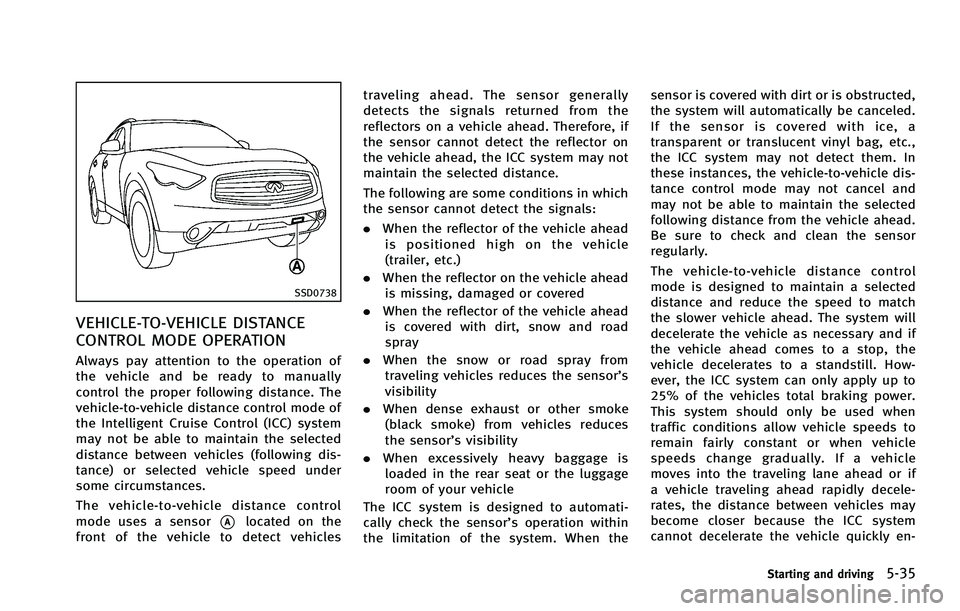
SSD0738
VEHICLE-TO-VEHICLE DISTANCE
CONTROL MODE OPERATION
Always pay attention to the operation of
the vehicle and be ready to manually
control the proper following distance. The
vehicle-to-vehicle distance control mode of
the Intelligent Cruise Control (ICC) system
may not be able to maintain the selected
distance between vehicles (following dis-
tance) or selected vehicle speed under
some circumstances.
The vehicle-to-vehicle distance control
mode uses a sensor
*Alocated on the
front of the vehicle to detect vehicles traveling ahead. The sensor generally
detects the signals returned from the
reflectors on a vehicle ahead. Therefore, if
the sensor cannot detect the reflector on
the vehicle ahead, the ICC system may not
maintain the selected distance.
The following are some conditions in which
the sensor cannot detect the signals:
.
When the reflector of the vehicle ahead
is positioned high on the vehicle
(trailer, etc.)
. When the reflector on the vehicle ahead
is missing, damaged or covered
. When the reflector of the vehicle ahead
is covered with dirt, snow and road
spray
. When the snow or road spray from
traveling vehicles reduces the sensor’s
visibility
. When dense exhaust or other smoke
(black smoke) from vehicles reduces
the sensor’s visibility
. When excessively heavy baggage is
loaded in the rear seat or the luggage
room of your vehicle
The ICC system is designed to automati-
cally check the sensor’s operation within
the limitation of the system. When the sensor is covered with dirt or is obstructed,
the system will automatically be canceled.
If the sensor is covered with ice, a
transparent or translucent vinyl bag, etc.,
the ICC system may not detect them. In
these instances, the vehicle-to-vehicle dis-
tance control mode may not cancel and
may not be able to maintain the selected
following distance from the vehicle ahead.
Be sure to check and clean the sensor
regularly.
The vehicle-to-vehicle distance control
mode is designed to maintain a selected
distance and reduce the speed to match
the slower vehicle ahead. The system will
decelerate the vehicle as necessary and if
the vehicle ahead comes to a stop, the
vehicle decelerates to a standstill. How-
ever, the ICC system can only apply up to
25% of the vehicles total braking power.
This system should only be used when
traffic conditions allow vehicle speeds to
remain fairly constant or when vehicle
speeds change gradually. If a vehicle
moves into the traveling lane ahead or if
a vehicle traveling ahead rapidly decele-
rates, the distance between vehicles may
become closer because the ICC system
cannot decelerate the vehicle quickly en-
Starting and driving5-35
Page 381 of 522

5-56Starting and driving
—When rain, snow or dirt adhere tothe system sensor
—On steep downhill roads (frequentbraking may result in overheating
the brakes)
—On repeated uphill and downhill
roads
. Do not use the Distance Control Assist
system if you are towing a trailer. The
system may not detect a vehicle ahead.
. In some road or traffic conditions, a
vehicle or object can unexpectedly come
into the sensor detection zone and cause
automatic braking. You may need to
control the distance from other vehicles
using the accelerator pedal. Always stay
alert and avoid using the DCA system
when it is not recommended in this
section.
SSD0738
DISTANCE CONTROL ASSIST OP-
ERATION
Always pay attention to the operation of
the vehicle and be ready to manually
decelerate to maintain the proper following
distance. The Distance Control Assist (DCA)
system may not be able to decelerate the
vehicle under some circumstances.
The DCA system uses a sensor
*Alocated
on the front of the vehicle to detect
vehicles traveling ahead. The sensor gen-
erally detects the signals returned from the
reflectors on a vehicle ahead. Therefore, if
the sensor cannot detect the reflector on the vehicle ahead, the DCA system may not
operate.
The following are some conditions in which
the sensor cannot detect the signals:
.
When the reflector of the vehicle ahead
is positioned high on the vehicle
(trailer, etc.)
. When the reflector on the vehicle ahead
is missing, damaged or covered
. When the reflector of the vehicle ahead
is covered with dirt, snow and road
spray
. When the snow or road spray from
traveling vehicles reduces the sensor’s
visibility
. When dense exhaust or other smoke
(black smoke) from vehicles reduces
the sensor’s visibility
. When excessively heavy baggage is
loaded in the rear seat or the luggage
room of your vehicle
The DCA system is designed to automati-
cally check the sensor’s operation. When
the sensor is covered with dirt or is
obstructed, the system will automatically
be canceled. If the sensor is covered with
ice, a transparent or translucent vinyl bag,
etc., the DCA system may not detect them.
Page 393 of 522

5-68Starting and driving
SSD1156
Warning systems switch
The FCW system uses the distance sensor
*Alocated below the front bumper to
measure the distance to the vehicle ahead.
When the system judges that your vehicle
is getting close to the vehicle ahead in the
travel lane, the vehicle ahead detection
indicator light on the instrument panel
blinks and a warning chime sounds.
The FCW system will be turned on/off by
pushing the warning systems switch. The
warning systems ON indicator light
*1on
the switch will illuminate when the system
turns on.
PRECAUTIONS ON FCW SYSTEM
WARNING
. The FCW system is intended to warn you
before a collision but will not avoid a
collision. It is the driver’s responsibility
to stay alert, drive safely and be in
control of the vehicle at all times.
. As there is a performance limit, the
system may not provide a warning in
certain conditions.
. The system will not detect the following
objects:
—Pedestrians, animals or obstacles in
the roadway
—Oncoming vehicles in the same lane
. The system will not detect another
vehicle under the following conditions:
—When the sensor gets dirty and it is
impossible to detect the distance
from the vehicle ahead.
—When driving into a strong light (forexample, sunlight)
. The sensor generally detects the signals
returned from the reflectors on a vehicle ahead. Therefore, the system may not
function properly under the following
conditions:
—When the reflectors of the vehicle
ahead are positioned high or close to
each other (including a small vehicle
such as motorcycles).
—When the sensor gets dirty or it isimpossible to detect the distance
from the vehicle ahead.
—When the reflectors on the vehicleahead are missing, damaged or
covered.
—When the reflectors of the vehicle
ahead are covered with dirt, snow or
road spray.
—When visibility is low (such as rain,fog, snow, etc.).
—When snow or road spray fromtraveling vehicles is splashed.
—When dense exhaust or other smoke (black smoke) from vehicles reduces
the visibility of the sensor.
—When excessively heavy baggage isloaded in the rear seat or the
luggage room of your vehicle.
Page 396 of 522

SSD0738
SSD0749
Vehicle ahead detection indicator lightThe IBA system uses a distance sensor
*Alocated below the front bumper to measure
the distance to the vehicle ahead. When
the system judges that your vehicle is
getting close to the vehicle ahead in the
traveling lane, the vehicle ahead detection
indicator light on the instrument panel
blinks and a warning chime sounds.
The IBA system will be turned on/off by
pushing the IBA OFF switch. The IBA OFF
indicator light display will illuminate when
the system is turned off.
PRECAUTIONS ON IBA SYSTEM
WARNING
.
The IBA system is not a collision
avoidance system. It is the driver’ s
responsibility to stay alert, drive safely
and be in control of the vehicle at all
times.
. As there is a performance limit, the
system may not provide a warning or
braking in certain conditions.
. The system will not detect the following
objects:
—Pedestrians, animals or obstacles in the roadway
—Oncoming vehicles in the same lane
. The system will not detect another
vehicle under the following conditions:
—When the sensor gets dirty and it is
impossible to detect the distance
from the vehicle ahead.
—When driving into a strong light (forexample, sunlight)
. The sensor generally detects the signals
returned from the reflectors on a vehicle
ahead. Therefore, the system may not
function properly under the following
conditions:
—When the reflectors of the vehicle
ahead are positioned high or close to
each other (including a small vehicle
such as motorcycles).
—When the sensor gets dirty and it isimpossible to detect the distance
from the vehicle ahead.
—When the reflectors on the vehicle
ahead are missing, damaged or
covered.
—When the reflectors of the vehicleahead are covered with dirt, snow or
Starting and driving5-71