2012 INFINITI EX brake light
[x] Cancel search: brake lightPage 376 of 506

CAUTION
To avoid accidentally engaging cruise con-
trol, make sure to turn the ON/OFF switch off
when not using the Intelligent Cruise Con-
trol.
SSD0906
To set cruising speed,accelerate your
vehicle to the desired speed, push the
SET/COAST switch and release it. (The SET
indicator will come on in the display.) Take
your foot off the accelerator pedal. Your
vehicle will maintain the set speed.
. To pass another vehicle, depress the
accelerator pedal. When you release
the pedal, the vehicle will return to the
previously set speed.
. The vehicle may not maintain the set
speed when going up or down steep
hills. If this happens, manually main-
tain vehicle speed.
To cancel the preset speed, use any of thefollowing methods:
.
Push the CANCEL button. The SET
indicator will go out.
. Tap the brake pedal. The SET indicator
will go out.
. Turn the MAIN switch off. Both the
CRUISE indicator and SET indicator will
go out.
To reset at a faster cruising speed, use one
of the following three methods:
. Depress the accelerator pedal. When
the vehicle attains the desired speed,
push and release the SET/COAST
switch.
. Push and hold the RESUME/ACCELER-
ATE set switch. When the vehicle attains
the speed you desire, release the
switch.
. Push, then quickly release the RESUME/
ACCELERATE switch. Each time you do
this, the set speed will increase by
about 1 MPH (1.6 km/h).
To reset at a slower cruising speed, use
one of the following three methods:
. Lightly tap the brake pedal. When the
vehicle attains the desired speed, push
the SET/COAST switch and release it.
Starting and driving5-57
Page 379 of 506

5-60Starting and driving
WARNING
.This system is only an aid to assist the
driver and is not a collision warning or
avoidance device. It is the driver’s
responsibility to stay alert, drive safely
and be in control of the vehicle at all
times.
. This system will not adapt automatically
to road conditions. Do not use the
system on roads with sharp curves, or
on icy roads, in heavy rain or in fog.
The distance sensor will not detect the
following objects:
.Stationary and slow moving vehicles
. Pedestrians or objects in the roadway
. Oncoming vehicles in the same lane
. Motorcycles traveling offset in the travel
lane
WARNING
. As there is a performance limit to the
distance control function, never rely
solely on the Distance Control Assist
system. This system does not correct
careless, inattentive or absent-minded
driving, or overcome poor visibility in
rain, fog, or other bad weather. Decele-
rate the vehicle speed by depressing the
brake pedal, depending on the distance
to the vehicle ahead and the surround-
ing circumstances in order to maintain a
safe distance between vehicles.
. The system may not detect the vehicle in
front of you in certain road or weather
conditions. To avoid accidents, never use
the Distance Control Assist system
under the following conditions:
—On roads with sharp curves
—On slippery road surfaces such as
on ice or snow, etc.
—During bad weather (rain, fog, snow,etc.)
—When strong light (for example, atsunrise or sunset) is directly shining
on the front of the vehicle
—When rain, snow or dirt adhere tothe system sensor
—On steep downhill roads (frequentbraking may result in overheating
the brakes)
—On repeated uphill and downhill
roads
. In some road or traffic conditions, a
vehicle or object can unexpectedly come
into the sensor detection zone and cause
automatic braking. You may need to
control the distance from other vehicles
using the accelerator pedal. Always stay
alert and avoid using the DCA system
when it is not recommended in this
section.
Page 387 of 506

5-68Starting and driving
WARNING
.When the vehicle ahead detection in-
dicator light is not illuminated, system
will not control or warn the driver.
. Never place your foot under the brake
pedal. Your foot may be caught when the
system controls the brake.
. Depending on the position of the accel-
erator pedal, the system may not be able
to assist the driver to release the
accelerator pedal appropriately.
. If the vehicle ahead comes to a stand-
still, the vehicle decelerates to a stand-
still within the limitations of the system.
The system will release brake control
with a warning chime once it judges the
vehicle is at a standstill. To prevent the
vehicle from moving, the driver must
depress the brake pedal. (The system
will resume control automatically once
the system reaches 3 MPH (5 km/h)).
Overriding the system:GUID-4D508F5D-FA8E-49D6-A9E2-6F8E76C17033
Page 392 of 506
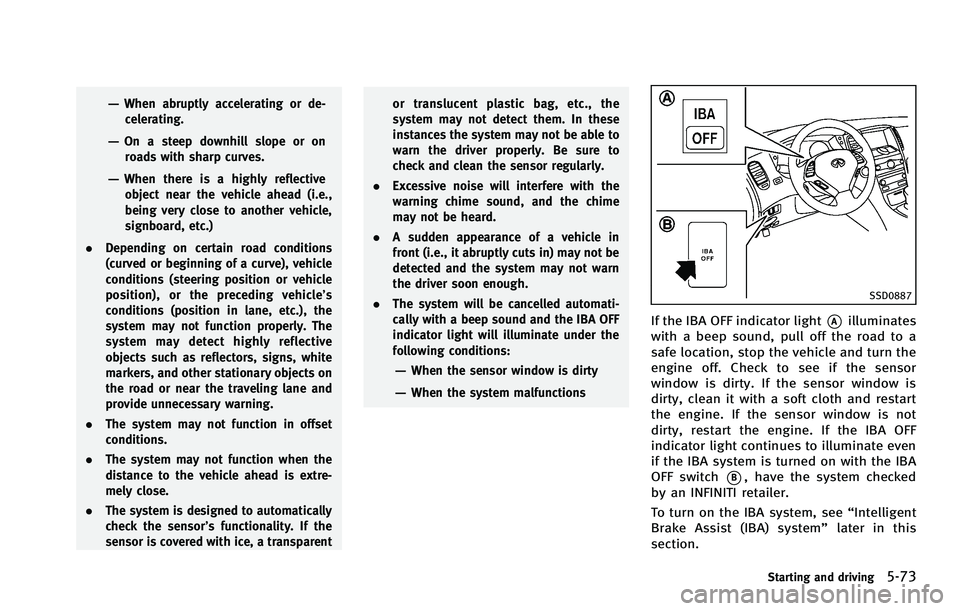
SSD0887
If the IBA OFF indicator light*Ailluminates
with a beep sound, pull off the road to a
safe location, stop the vehicle and turn the
engine off. Check to see if the sensor
window is dirty. If the sensor window is
dirty, clean it with a soft cloth and restart
the engine. If the sensor window is not
dirty, restart the engine. If the IBA OFF
indicator light continues to illuminate even
if the IBA system is turned on with the IBA
OFF switch
*B, have the system checked
by an INFINITI retailer.
To turn on the IBA system, see “Intelligent
Brake Assist (IBA) system” later in this
section.
Starting and driving5-73
Page 402 of 506

SSD0338
.The sensor will not detect:
— Pedestrians or objects in the road-
way
— Oncoming vehicles in the same lane
— Motorcycles traveling offset in the
travel lane as illustrated
WARNING
. This system is only an aid to assist
braking operation and is not a collision
warning or avoidance device. It is the
driver’s responsibility to stay alert, drive
safely and be in control of the vehicle at all times.
. As there is a performance limit to the
Preview Function, never rely solely on
this system. This system does not
correct careless inattentive or absent-
minded driving, or overcome poor visi-
bility in rain, fog, or other bad weather.
Reduce vehicle speed by depressing the
brake pedal, in order to maintain a safe
distance between vehicles.
. The system may not detect the vehicle in
front of you in certain road or weather
conditions. The Preview Function may
not operate properly under the following
conditions. The vehicle is still driveable
under normal conditions and the Brake
Assist will operate.
—When rain, snow or dirt adhere to
the system sensor
—When strong light (for example, atsunrise or sunset) is directly shining
on the front of the vehicle
—Winding or hilly roads may causethe sensor to temporarily not detect
a vehicle in the same lane or may
detect objects or vehicles in other
lanes.
Starting and driving5-83
Page 405 of 506

5-86Starting and driving
Normal operationGUID-1EBEE483-014E-4CF9-8998-795276421AF5
in the instrument panelflashes so note the following:
.
The road may be slippery or the system
may determine some action is required
to help keep the vehicle on the steered
path.
. You may feel a pulsation in the brake
pedal and hear a noise or vibration
from under the hood. This is normal
and indicates that the VDC system is
working properly.
. Adjust your speed and driving to the
road conditions.
See “Vehicle Dynamic Control (VDC) warn-
ing light” in the“2. Instruments and
controls” section.
If a malfunction occurs in the system, the
VDC warning light
illuminates in the
instrument panel. The VDC system auto-
matically turns off.
The VDC OFF switch is used to turn off the
VDC system. The VDC off indicator
illuminates to indicate the VDC system is
off. When the VDC switch is used to turn off
the system, the VDC system still operates
to prevent one drive wheel from slipping by
transferring power to a non slipping drive
wheel. The VDC warning light
flashes if
this occurs. All other VDC functions are off,
and the VDC warning light
will not
VEHICLE DYNAMIC CONTROL (VDC) SYSTEM
Page 406 of 506

WARNING
.The VDC system is designed to help
improve driving stability but does not
prevent accidents due to abrupt steering
operation at high speeds or by careless
or dangerous driving techniques. Reduce
vehicle speed and be especially careful
when driving and cornering on slippery
surfaces and always drive carefully. .
Do not modify the vehicle’s suspension.
If suspension parts such as shock
absorbers, struts, springs, stabilizer
bars, bushings and wheels are not
INFINITI recommended for your vehicle
or are extremely deteriorated, the VDC
system may not operate properly. This
could adversely affect vehicle handling
performance, and the VDC warning light
may illuminate.
. If brake related parts such as brake
pads, rotors and calipers are not INFINITI
recommended or are extremely deterio-
rated, the VDC system may not operate
properly and the VDC warning light
may illuminate.
. If engine control related parts are not
INFINITI recommended or are extremely
deteriorated, the VDC warning light
may illuminate.
. When driving on extremely inclined
surfaces such as higher banked corners,
the VDC system may not operate prop-
erly and the VDC warning light
may
illuminate. Do not drive on these types
of roads.
. When driving on an unstable surface
such as a turntable, ferry, elevator or ramp, the VDC warning light
may
illuminate. This is not a malfunction.
Restart the engine after driving onto a
stable surface.
. If wheels or tires other than the INFINITI
recommended ones are used, the VDC
system may not operate properly and
the VDC warning light
may illumi-
nate.
. The VDC system is not a substitute for
winter tires or tire chains on a snow
covered road.
Starting and driving5-87
Page 418 of 506

SCE0734
WARNING
Always follow the instructions below. Failure
to do so could result in damage to the
charging system and cause personal injury.
1. If the booster battery is in anothervehicle
*A, position the two vehicles
(
*Aand*B) to bring their batteries
into close proximity to each other.
Do not allow the two vehicles to touch.
2. Apply the parking brake. Move the
selector lever to the P (Park) position. Switch off all unnecessary electrical
systems (light, heater, air conditioner,
etc.).
3. Remove vent caps on the battery (if so equipped). Cover the battery with a
firmly wrung out moist cloth
*Cto
reduce explosion hazard.
4. Connect jumper cables in the sequence as illustrated (
*1?*2?*3?*4).
CAUTION
. Always connect positive (+) to positive
(+) and negative (−) to body ground (as illustrated)
—not to the battery.
. Make sure the jumper cables do not
touch moving parts in the engine com-
partment and that clamps do not contact
any other metal.
5. Start the engine of the booster vehicle
*Aand let it run for a few minutes.
6. Keep the engine speed of the booster vehicle
*Aat about 2,000 rpm, and
start the engine of the vehicle being
jump started
*B.
CAUTION
Do not keep the starter motor engaged for
more than 10 seconds. If the engine does
not start right away, push the ignition
switch to the OFF position and wait 10
seconds before trying again.
7. After starting your engine, carefully
disconnect the negative cable and then
the positive cable (
*4?*3?*2?
*1).
8. Replace the vent caps (if so equipped). Be sure to dispose of the cloth used to
cover the vent holes as it may be
In case of emergency6-9