Page 92 of 506

Front passenger air bag status
light
GUID-0B31D06A-1D4F-471E-83D1-57773CD5A0D9
) will be lit and the passenger front air
bag will be OFF depending on how the front
passenger seat is being used.
For front passenger air bag status light
operation, see “INFINITI Advanced Air Bag
System (front seats)” in the“1. Safety —
Seats, seat belts and supplemental re-
straint system” section of this manual.
High beam indicator lightGUID-4BBC61A5-2EA9-48A4-A5A8-54463BB975F3
Intelligent Brake Assist (IBA)
off indicator light (if so equipped)
GUID-9730483B-CC64-4056-AB47-B7EA0F283EA9
Lane Departure Prevention
(LDP) ON indicator light (green; if so
equipped)
GUID-BA44B82A-D62F-466C-AAD7-4EBB944BA532
Low beam indicator lightGUID-FCA6C372-4188-4297-B90E-76732195AC50
Malfunction Indicator Light
(MIL)
GUID-6256237E-853A-4604-8E3D-B884E99E13A6
light
should turn off if no other potential
emission control system malfunction ex-
ists.
If this indicator light remains on for 20
seconds and then blinks for 10 seconds
Instruments and controls2-19
Page 94 of 506
you when leaving the vehicle.
Light reminder chimeGUID-1B22F352-E676-4579-BB46-88A9F17E26A1
orposition and the ignition switch
in the ACC, OFF or LOCK position.
Turn the light switch off when you leave the
vehicle.
Parking brake reminder chimeGUID-963DEE0A-5736-4637-8320-7F5EB75D7F6D
SIC3252
The dot matrix liquid crystal display*1is
located between the tachometer and the
speedometer, and it displays the auto-
matic transmission position indicator, the
Intelligent Cruise Control (ICC) system (if so
equipped), the Distance Control Assist
(DCA) system (if so equipped) information,
the Intelligent Key operation information
and other warnings and information.
For detailed information about each sys-
tem, see the following sections:
. Automatic Transmission (AT)
— “Warning/indicator lights and audi- ble reminders” earlier in this sec-
tion.
Instruments and controls2-21
DOT MATRIX LIQUID CRYSTAL DISPLAY
Page 111 of 506
2-38Instruments and controls
position. Turn the headlight switch to theposition for full illumination when
driving at night.
If the parking brake is applied before the
engine is started, the daytime running
lights do not illuminate. The daytime
running lights illuminate once the parking
brake is released. The daytime running
lights will remain on until the ignition
switch is pushed to the OFF position.
WARNING
When the daytime running light system is
active, tail lights on your vehicle are not on.
It is necessary at dusk to turn on your headlights. Failure to do so could cause an
accident injuring yourself and others.
Adaptive Front lighting System
(AFS) (if so equipped)
GUID-B262714A-208E-426E-A47D-5D395AB017A0
Page 117 of 506

2-44Instruments and controls
GUID-1B76D948-A232-4DD1-85F0-9D8D60470EE3
SIC3602
For driving or starting the vehicle on snowy
roads or slippery areas, turn on the SNOW
mode switch. The indicator light
*1on the
switch will illuminate. When the SNOW
mode is activated, engine output is con-
trolled to avoid wheel spin.
Turn off the SNOW mode for normal
driving.
GUID-7AEE2596-75BE-4DC0-AAD8-3BA40F09793D
SIC3844
The vehicle should be driven with the
Intelligent Brake Assist (IBA) system on
for most driving conditions.
The Intelligent Brake Assist (IBA) system
will sound a warning chime to alert the
driver when the vehicle is traveling too
close to the vehicle ahead and will apply
the brake control if necessary.
To turn off the system, push the IBA OFF
switch. The
indicator will illuminate.
The IBA system will remain in the last ON
or OFF state it was left in until it is
manually changed by pushing the IBA OFF
switch.
GUID-7DA31BFA-F3D3-4D04-8BAF-031A5FF806AF
JVS0033X
The vehicle should be driven with the
Vehicle Dynamic Control (VDC) system on
for most driving conditions.
If the vehicle is stuck in mud or snow, the
VDC system reduces the engine output to
reduce wheel spin. The engine speed will
be reduced even if the accelerator is
depressed to the floor. If maximum engine
power is needed to free a stuck vehicle,
turn the VDC system off.
To turn off the VDC system, push the VDC
OFF switch. The
indicator will illumi-
nate.
Push the VDC OFF switch again or restart
SNOW MODE SWITCH INTELLIGENT BRAKE ASSIST (IBA) OFF
SWITCH (if so equipped)VEHICLE DYNAMIC CONTROL (VDC) OFF
SWITCH
Page 327 of 506

5-8Starting and driving
WARNING
The following actions can increase the
chance of losing control of the vehicle if
there is a sudden loss of tire air pressure.
Losing control of the vehicle may cause a
collision and result in personal injury.
.The vehicle generally moves or pulls in
the direction of the flat tire.
. Do not rapidly apply the brakes.
. Do not rapidly release the accelerator
pedal.
. Do not rapidly turn the steering wheel.
1. Remain calm and do not overreact. 2. Maintain a firm grip on the steering
wheel with both hands and try to hold a
straight course.
3. When appropriate, slowly release the accelerator pedal to gradually slow the
vehicle.
4. Gradually steer the vehicle to a safe location off the road and away from
traffic if possible.
5. Lightly apply the brake pedal to gradu- ally stop the vehicle.
6. Turn on the hazard warning flashers and either contact a roadside emer-
gency service to change the tire or see
“Changing a flat tire” in the“6. In case
of emergency” section of this Owner’s
Manual.
DRINKING ALCOHOL/DRUGS AND
DRIVING
GUID-F9A99588-AB2B-4EA9-BABB-07E4D6E3266B
WARNING
Never drive under the influence of alcohol or
drugs. Alcohol in the bloodstream reduces
coordination, delays reaction time and im-
pairs judgement. Driving after drinking
alcohol increases the likelihood of being involved in an accident injuring yourself and
others. Additionally, if you are injured in an
accident, alcohol can increase the severity
of the injury.
INFINITI is committed to safe driving.
However, you must choose not to drive
under the influence of alcohol. Every year
thousands of people are injured or killed in
alcohol-related accidents. Although the
local laws vary on what is considered to
be legally intoxicated, the fact is that
alcohol affects all people differently and
most people underestimate the effects of
alcohol.
Remember, drinking and driving don’t mix!
And that is true for drugs, too (over-the-
counter, prescription, and illegal drugs).
Don’t drive if your ability to operate your
vehicle is impaired by alcohol, drugs, or
some other physical condition.
Page 338 of 506
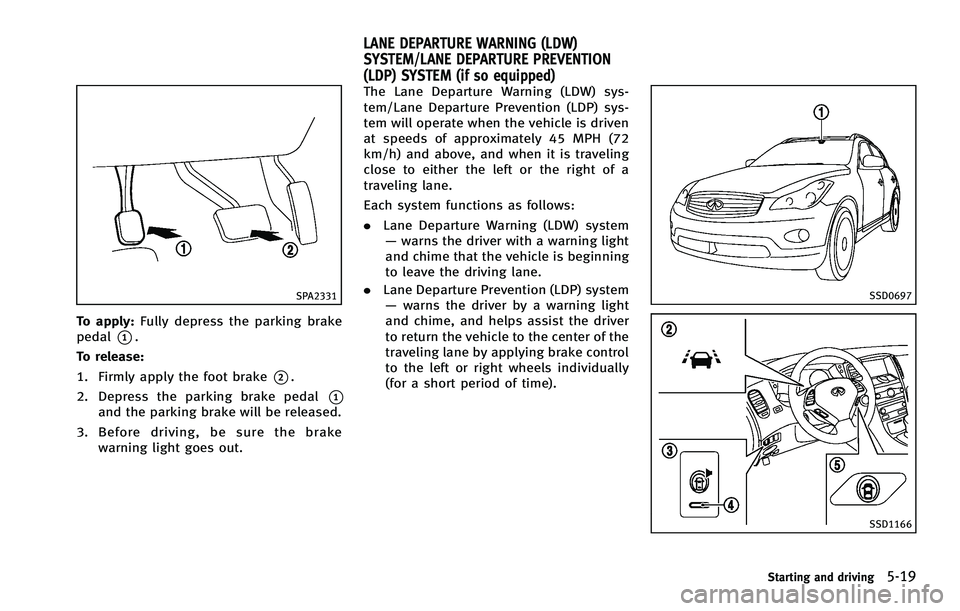
SPA2331
To apply:Fully depress the parking brake
pedal
*1.
To release:
1. Firmly apply the foot brake
*2.
2. Depress the parking brake pedal
*1and the parking brake will be released.
3. Before driving, be sure the brake
warning light goes out.
GUID-468CFE5F-DB32-4212-9F4A-E439631FCEC8
SSD0697
SSD1166
Starting and driving5-19
LANE DEPARTURE WARNING (LDW)
SYSTEM/LANE DEPARTURE PREVENTION
(LDP) SYSTEM (if so equipped)
Page 358 of 506

WARNING
.As there is a performance limit to the
distance control function, never rely
solely on the Intelligent Cruise Control
system. This system does not correct
careless, inattentive or absent-minded
driving, or overcome poor visibility in
rain, fog, or other bad weather. Decele-
rate the vehicle speed by depressing the
brake pedal, depending on the distance
to the vehicle ahead and the surround-
ing circumstances in order to maintain a
safe distance between vehicles.
. If the vehicle ahead comes to a stop, the
vehicle decelerates to a standstill within
the limitations of the system. The
system will cancel once it judges that
the vehicle has come to a standstill and
sound a warning chime. To prevent the
vehicle from moving, the driver must
depress the brake pedal.
. The system may not detect the vehicle in
front of you in certain road or weather conditions. To avoid accidents, never use
the Intelligent Cruise Control system
under the following conditions:
—On roads where the traffic is heavy
or there are sharp curves
—On slippery road surfaces such as
on ice or snow, etc.
—During bad weather (rain, fog, snow,etc.)
When the windshield wiper is oper-
ated at the low speed (LO) or high
speed (HI) position, the Intelligent
Cruise Control system is automati-
cally canceled.
—When strong light (for example, atsunrise or sunset) is directly shining
on the front of the vehicle
—When rain, snow or dirt adhere to
the system sensor
—On steep downhill roads (the vehi-cle may go beyond the set vehicle
speed and frequent braking may
result in overheating the brakes)
—On repeated uphill and downhillroads
—When traffic conditions make itdifficult to keep a proper distance
between vehicles because of fre-
quent acceleration or deceleration
. In some road or traffic conditions, a
vehicle or object can unexpectedly come
into the sensor detection zone and cause
automatic braking. You may need to
control the distance from other vehicles
using the accelerator pedal. Always stay
alert and avoid using the ICC system
when it is not recommended in this
section.
Starting and driving5-39
Page 369 of 506
5-50Starting and driving
To reset at a slower cruising speed,use
one of the following methods:
. Lightly tap the brake pedal. When the
vehicle attains the desired speed, push
the SET/COAST switch and release it.
. Push and hold the SET/COAST switch.
The set vehicle speed will decrease by
approximately 5 MPH (5 km/h for
Canada).
. Push, then quickly release the SET/
COAST switch. Each time you do this,
the set speed will decrease by approxi-
mately 1 MPH (1 km/h for Canada).
To resume the preset speed, push and
release the RESUME/ACCELERATE switch.
The vehicle will resume the last set
cruising speed when the vehicle speed is
over 20 MPH (32 km/h).
SSD0903
How to change the set distance to
the vehicle ahead
GUID-C1D816C2-003C-435C-A882-A6EADCEF9169