2012 HYUNDAI VELOSTER trip computer
[x] Cancel search: trip computerPage 129 of 385

Features of your vehicle
50 4
Trip computer
The trip computer is a microcomputer
controlling the driver information system.
It displays information related to driving
on the LCD screen when the ignition
switch is in the ON position. If the battery
is disconnected, then all stored driving
information (except odometer) is reset.Press the TRIP button for less than 1
second to select any mode as follows:
Tripmeter (mi. or km)
TRIP A : Tripmeter A
TRIP B : Tripmeter B
This mode indicates the distance of indi-
vidual trips selected since the last trip-
meter reset.
The meter's working range is from 0.0 to
999.9 miles (0.0 to 999.9 km).
Pressing the RESET button for more
than 1 second, when the tripmeter (TRIP
A or TRIP B) is being displayed, clears
the tripmeter to zero (0.0).
OFS040045
* if equippedTripmeter B
Instant fuel consumption*
Tripmeter A
Distance to empty*
Average fuel consumption*
Elapsed time*
Average speed*
Distance to service*
Page 131 of 385
Features of your vehicle
52 4
✽
✽
NOTICE
• If the vehicle is not on level ground or
the battery power has been interrupt-
ed, the “Distance to empty” function
may not operate correctly.
The trip computer may not register
additional fuel if less than 6 liters (1.6
gallons) of fuel are added to the vehi-
cle.
• The fuel consumption and distance to
empty may vary significantly based
on driving conditions, driving habits,
and condition of the vehicle.
• The distance to empty value is an esti-
mate of the available driving distance.
This may differ from the actual driv-
ing distance available.
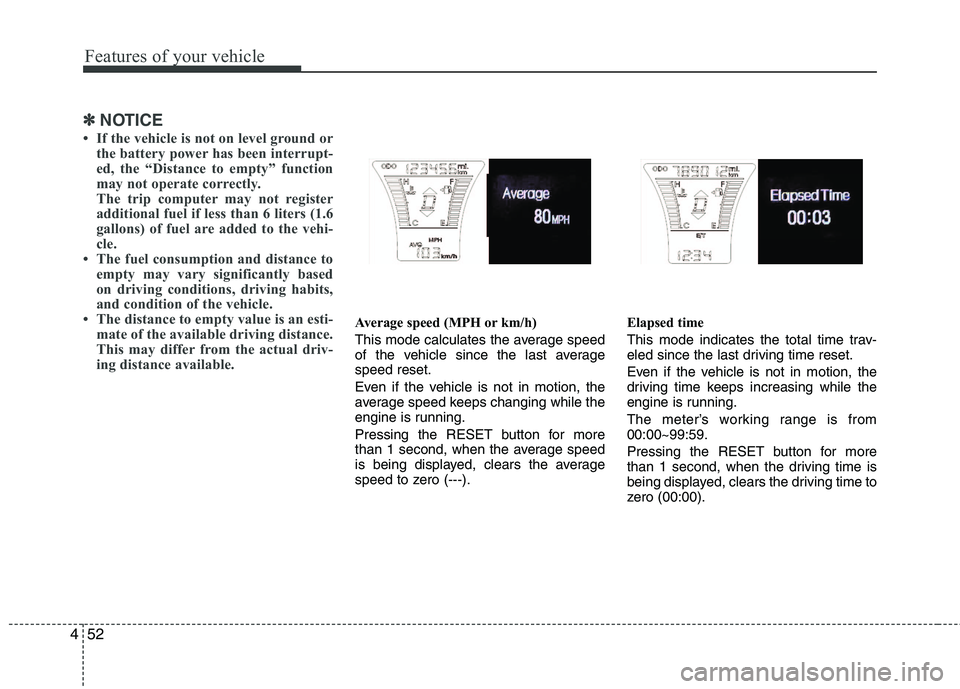
Average speed (MPH or km/h)
This mode calculates the average speed
of the vehicle since the last average
speed reset.
Even if the vehicle is not in motion, the
average speed keeps changing while the
engine is running.
Pressing the RESET button for more
than 1 second, when the average speed
is being displayed, clears the average
speed to zero (---).Elapsed time
This mode indicates the total time trav-
eled since the last driving time reset.
Even if the vehicle is not in motion, the
driving time keeps increasing while the
engine is running.
The meter’s working range is from
00:00~99:59.
Pressing the RESET button for more
than 1 second, when the driving time is
being displayed, clears the driving time to
zero (00:00).
Page 134 of 385
455
Features of your vehicle
Auto door unlock (if equipped)
Off - The auto door unlock operation will
be canceled.
Key Out - All doors will be automatically
unlocked when the ignition key
is removed from ignition switch
(or smart key is removed from
the smart key holder).
Shift Lever - All doors will be automati-
cally unlocked if the shift
lever is shifted to the
P(Park) position.
AVG fuel economy
Auto Reset - The average fuel economy
will reset automatically
when you drive after refuel-
ing.
Manual Reset - The average fuel econo-
my will not reset auto-
matically when you drive
after refueling.
Headlamp escort
On - If you turn the ignition switch to the
ACC or OFF position with the head-
lamp ON, the headlamp remain on
for about 20 minutes. And the head
lamp welcome operation will be
activated. Refer to the [LIGHTING]
in this chapter.
Off - The headlamp escort and head-
lamp welcome operation will be
canceled.✽ ✽
NOTICE
• If the vehicle is not on level ground or
the battery power has been interrupt-
ed, the “Distance to empty” function
may not operate correctly.
The trip computer may not register
additional fuel if less than 1.6 gallons (6
liters) of fuel are added to the vehicle.
• The fuel consumption and distance to
empty values may vary significantly
based on driving conditions, driving
habits, and condition of the vehicle.
• The distance to empty value is an esti-
mate of the available driving distance.
This value may differ from the actual
driving distance available.
Page 328 of 385
Maintenance
34 7
Reset items
Items should be reset after the battery
has been discharged or the battery has
been disconnected.
Auto up/down window (See section 4)
Sunroof (See section 4)
Trip computer (See section 4)
Climate control system
(See section 4)
Clock (See section 4)
Audio (See section 4)WARNING
Before performing maintenance
or recharging the battery, turn off
all accessories and stop the
engine.
The negative battery cable must
be removed first and installed
last when the battery is discon-
nected.
Operation related to the battery
should be done in an authorized
HYUNDAI dealer.
WARNING- Recharging
battery
When recharging the battery,
observe the following precautions:
The battery must be removed
from the vehicle and placed in an
area with good ventilation.
Do not allow cigarettes, sparks,
or flame near the battery.
Watch the battery during charg-
ing, and stop or reduce the charg-
ing rate if the battery cells begin
gassing (boiling) violently or if
the temperature of the electrolyte
of any cell exceeds 120°F (49°C).
Wear eye protection when check-
ing the battery during charging.
Disconnect the battery charger in
the following order.
1. Turn off the battery charger main
switch.
2. Unhook the negative clamp from
the negative battery terminal.
3. Unhook the positive clamp from
the positive battery terminal.
Page 380 of 385

I5
Index
Front seat adjustment ......................................................3-5
Fuel filler lid..................................................................4-31
Fuel gauge ....................................................................4-46
Fuel requirements ............................................................1-3
Fuses ..............................................................................7-49
Fuse/relay panel description ....................................7-53
Instrument panel fuse ..............................................7-50
Main fuse ................................................................7-52
Mode control switch ................................................7-51
Multi fuse ................................................................7-52
Gauge
Engine temperature gauge ......................................4-45
Fuel gauge ..............................................................4-46
Glass antenna ................................................................4-98
Glassroof, see sunroof ..................................................4-34
Glove box ......................................................................4-91
Hazard warning flasher ................................................4-60
Hazardous driving conditions ......................................5-37
Headlight bulb replacement ..........................................7-58
Headrest ..................................................................3-6, 3-9
Highway driving............................................................5-40
Hill-start assist control (HAC) ......................................5-30Hood ..............................................................................4-29
Horn ..............................................................................4-39
How to use this manual ..................................................1-2
Ignition key interlock system ........................................5-19
Immobilizer system ........................................................4-4
Indicator symbols on the instrument cluster ..................1-7
Indicators and warnings ................................................4-50
Inside rearview mirror ..................................................4-40
Instrument cluster ..........................................................4-43
Engine temperature gauge ......................................4-45
Fuel gauge ..............................................................4-46
Instrument panel illumination ................................4-44
Odometer ................................................................4-47
Speedometer ............................................................4-44
Tachometer ..............................................................4-44
Trip computer ..........................................................4-46
Warning and indicators ............................................4-50
Instrument panel fuse ....................................................7-50
Instrument panel illumination ......................................4-44
Instrument panel overview ..............................................2-3
Interior care ..................................................................7-71
Interior features ............................................................4-93
Aux, USB and iPod port..........................................4-97
Clothes hanger ........................................................4-96
Cup holder ..............................................................4-93
G
H
I
Page 384 of 385
I9
Index
Tire chains ....................................................................5-42
Tire pressure monitoring system (TPMS) ......................6-7
Tire specification and pressure label ..............................8-7
Tires and wheels............................................................7-36
Checking tire inflation pressure ..............................7-37
Compact spare tire replacement ..............................7-41
Recommended cold tire inflation pressures ............7-36
Tire care ..................................................................7-36
Tire maintenance ....................................................7-41
Tire replacement ......................................................7-40
Tire rotation ............................................................7-38
Tire sidewall labeling ..............................................7-42
Tire traction ............................................................7-41
Wheel alignment and tire balance ..........................7-39
Wheel replacement ..................................................7-41
Tires and wheels..............................................................8-3
Towing ..........................................................................6-26
Trailer towing ................................................................5-51
Transaxle
Automatic transaxle ................................................5-15
Manual transaxle ....................................................5-12
Trip computer ................................................................4-50
Trunk ............................................................................4-23
Using the tire mobility kit ............................................6-23Vehicle break-in process ................................................1-5
Vehicle certification label................................................8-6
Vehicle data collection and event data recorders (EDR) 1-6
Vehicle identification number (VIN) ..............................8-6
Vehicle load limit ..........................................................5-45
Certification label ....................................................5-48
Vehicle stability management ......................................5-29
Vehicle weight ..............................................................5-50
Base curb weight ....................................................5-50
Cargo weight ..........................................................5-50
GAW (Gross axle weight) ......................................5-50
GAWR (Gross axle weight rating) ..........................5-50
GVW (Gross vehicle weight) ..................................5-50
GVWR (Gross vehicle weight rating) ....................5-50
Warning and indicators ................................................4-50
Washer fluid ..................................................................7-26
Weight ..........................................................................5-50
Base curb weight ....................................................5-50
Cargo weight ..........................................................5-50
GAW (Gross axle weight) ......................................5-50
GAWR (Gross axle weight rating) ..........................5-50
GVW (Gross vehicle weight) ..................................5-50
GVWR (Gross vehicle weight rating) ....................5-50V
U
W