Page 16 of 385
Your vehicle at a glance
2 2
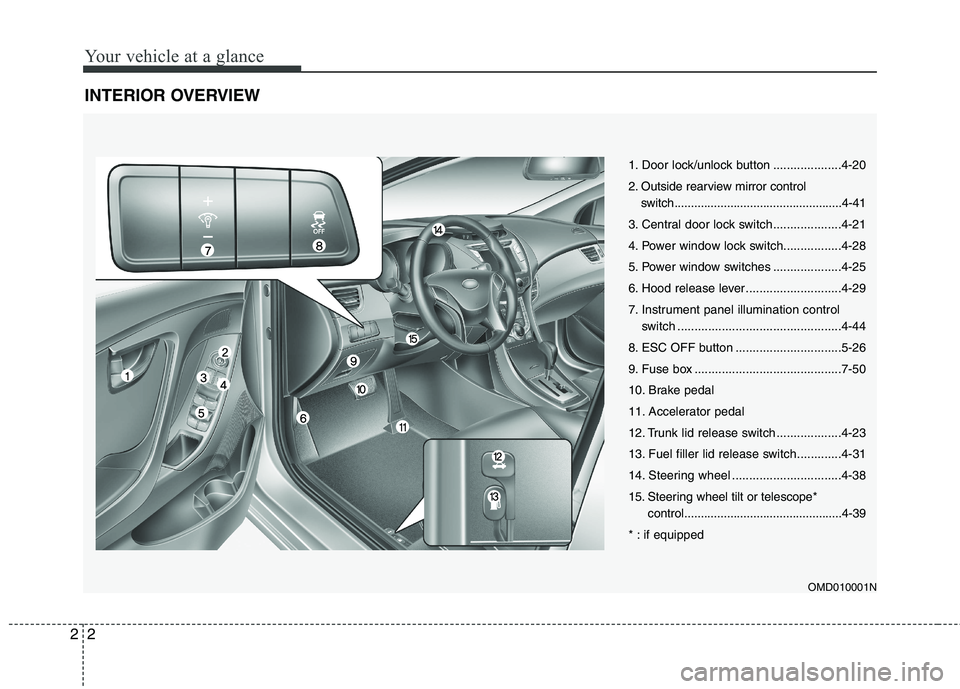
INTERIOR OVERVIEW
OMD010001N
1. Door lock/unlock button ....................4-20
2. Outside rearview mirror control
switch...................................................4-41
3. Central door lock switch....................4-21
4. Power window lock switch.................4-28
5. Power window switches ....................4-25
6. Hood release lever ............................4-29
7. Instrument panel illumination control
switch ................................................4-44
8. ESC OFF button ...............................5-26
9. Fuse box ...........................................7-50
10. Brake pedal
11. Accelerator pedal
12. Trunk lid release switch ...................4-23
13. Fuel filler lid release switch.............4-31
14. Steering wheel ................................4-38
15. Steering wheel tilt or telescope*
control................................................4-39
* : if equipped
Page 18 of 385
Your vehicle at a glance
4 2
ENGINE COMPARTMENT
OMD070047N
* The actual engine room in the vehicle may differ from the illustration.1. Engine oil filler cap ...........................7-21
2. Engine oil dipstick .............................7-21
3. Brake/clutch fluid reservoir ...............7-25
4. Positive battery terminal ...................7-33
5. Negative battery terminal..................7-33
6. Fuse box ...........................................7-50
7. Air cleaner.........................................7-27
8. Radiator cap .....................................7-24
9. Engine coolant reservoir ...................7-23
10. Windshield washer fluid reservoir ...7-26
Page 59 of 385

341
Safety features of your vehicle
WARNING
Do not install or place any acces-
sories (drink holder, CD or discs
holder, sticker, etc.) on the front
passenger's panel above the
glove box in a vehicle with a pas-
senger's air bag. Such objects
may become dangerous projec-
tiles and cause injury if the pas-
senger's air bag inflates.
When installing a container of liq-
uid air freshener inside the vehi-
cle, do not place it near the
instrument cluster nor on the
instrument panel surface.
It may become a dangerous pro-
jectile and cause injury if the pas-
senger's air bag inflates.
B240B05L
Passenger’s front air bag
WARNING
If an air bag deploys, there may
be a loud noise followed by a fine
dust released in the vehicle.
These conditions are normal and
are not hazardous - the air bags
are packed in this fine powder.
The dust generated during air
bag deployment may cause skin
or eye irritation as well as aggra-
vate asthma for some persons.
Always wash all exposed skin
areas thoroughly with lukewarm
water and a mild soap after an
accident in which the air bags
were deployed.
The SRS can function only when
the ignition switch is in the ON
position. If the SRS air bag warn-
ing light " " does not illumi-
nate, or continuously remains on
after illuminating for about 6 sec-
onds when the ignition switch is
turned to the ON position, or after
the engine is started, comes on
while driving, the SRS is not
working properly. If this occurs,
have your vehicle immediately
inspected by an authorized
HYUNDAI dealer.
(Continued)
(Continued)
Before you replace a fuse or dis-
connect a battery terminal, turn
the ignition switch to the LOCK
position and remove the ignition
key for ignition key, and turn the
engine start/stop button to the
OFF position for smart key. Never
remove or replace the air bag
related fuse(s) when the ignition
switch is in the ON position.
Failure to heed this warning will
cause the SRS air bag warning
light to illuminate.
Page 109 of 385
Features of your vehicle
30 4
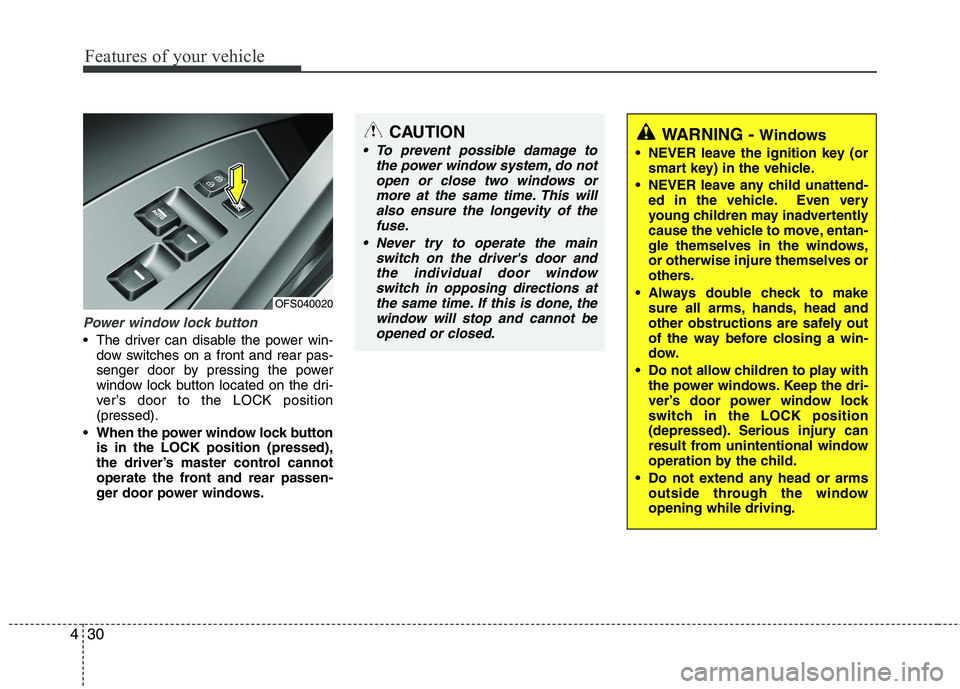
Power window lock button
The driver can disable the power win-
dow switches on a front and rear pas-
senger door by pressing the power
window lock button located on the dri-
ver’s door to the LOCK position
(pressed).
When the power window lock button
is in the LOCK position (pressed),
the driver’s master control cannot
operate the front and rear passen-
ger door power windows.
CAUTION
To prevent possible damage to
the power window system, do not
open or close two windows or
more at the same time. This will
also ensure the longevity of the
fuse.
Never try to operate the main
switch on the driver's door and
the individual door window
switch in opposing directions at
the same time. If this is done, the
window will stop and cannot be
opened or closed.WARNING - Windows
NEVER leave the ignition key (or
smart key) in the vehicle.
NEVER leave any child unattend-
ed in the vehicle. Even very
young children may inadvertently
cause the vehicle to move, entan-
gle themselves in the windows,
or otherwise injure themselves or
others.
Always double check to make
sure all arms, hands, head and
other obstructions are safely out
of the way before closing a win-
dow.
Do not allow children to play with
the power windows. Keep the dri-
ver’s door power window lock
switch in the LOCK position
(depressed). Serious injury can
result from unintentional window
operation by the child.
Do not extend any head or arms
outside through the window
opening while driving.
OFS040020
Page 149 of 385
Features of your vehicle
70 4
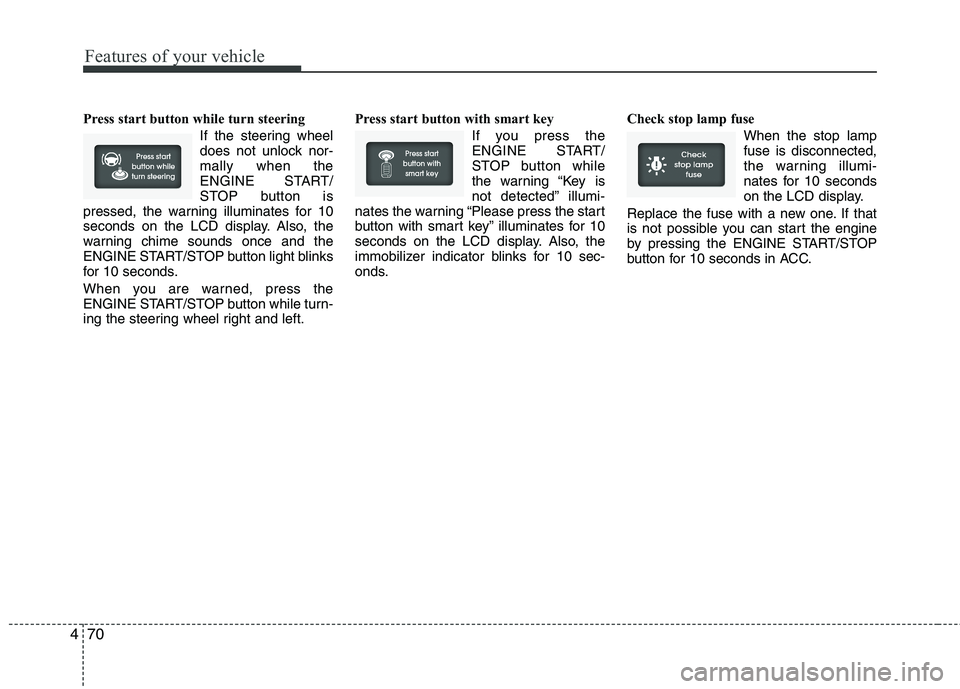
Press start button while turn steering
If the steering wheel
does not unlock nor-
mally when the
ENGINE START/
STOP button is
pressed, the warning illuminates for 10
seconds on the LCD display. Also, the
warning chime sounds once and the
ENGINE START/STOP button light blinks
for 10 seconds.
When you are warned, press the
ENGINE START/STOP button while turn-
ing the steering wheel right and left.Press start button with smart key
If you press the
ENGINE START/
STOP button while
the warning “Key is
not detected” illumi-
nates the warning “Please press the start
button with smart key” illuminates for 10
seconds on the LCD display. Also, the
immobilizer indicator blinks for 10 sec-
onds.Check stop lamp fuse
When the stop lamp
fuse is disconnected,
the warning illumi-
nates for 10 seconds
on the LCD display.
Replace the fuse with a new one. If that
is not possible you can start the engine
by pressing the ENGINE START/STOP
button for 10 seconds in ACC.
Page 224 of 385
511
Driving your vehicle
Even if the smart key is in the vehicle,
but it is not close to the driver’s seat
area, then the engine may not start.
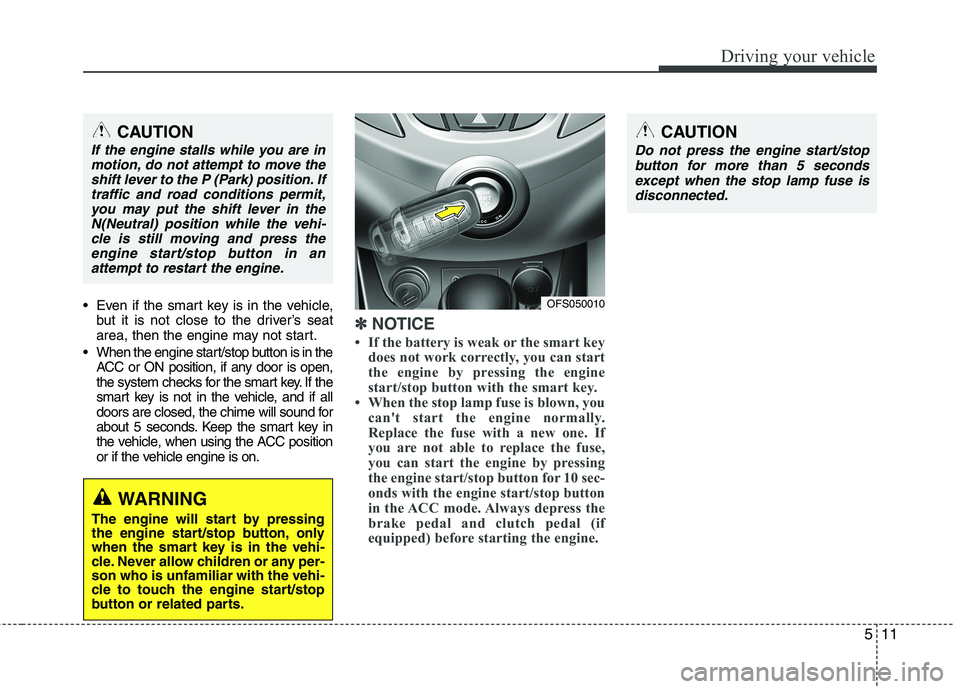
When the engine start/stop button is in the
ACC or ON position, if any door is open,
the system checks for the smart key. If the
smart key is not in the vehicle, and if all
doors are closed, the chime will sound for
about 5 seconds. Keep the smart key in
the vehicle, when using the ACC position
or if the vehicle engine is on.
✽ ✽
NOTICE
• If the battery is weak or the smart key
does not work correctly, you can start
the engine by pressing the engine
start/stop button with the smart key.
• When the stop lamp fuse is blown, you
can't start the engine normally.
Replace the fuse with a new one. If
you are not able to replace the fuse,
you can start the engine by pressing
the engine start/stop button for 10 sec-
onds with the engine start/stop button
in the ACC mode. Always depress the
brake pedal and clutch pedal (if
equipped) before starting the engine.
WARNING
The engine will start by pressing
the engine start/stop button, only
when the smart key is in the vehi-
cle. Never allow children or any per-
son who is unfamiliar with the vehi-
cle to touch the engine start/stop
button or related parts.
CAUTION
If the engine stalls while you are in
motion, do not attempt to move the
shift lever to the P (Park) position. If
traffic and road conditions permit,
you may put the shift lever in the
N(Neutral) position while the vehi-
cle is still moving and press the
engine start/stop button in an
attempt to restart the engine.
OFS050010
CAUTION
Do not press the engine start/stop
button for more than 5 seconds
except when the stop lamp fuse is
disconnected.
Page 295 of 385
7
Engine compartment / 7-2
Maintenance services / 7-3
Owner maintenance / 7-4
Scheduled maintenance service / 7-6
Explanation of scheduled maintenance items / 7-18
Engine oil / 7-21
Engine coolant / 7-22
Brake/clutch fluid / 7-25
Washer fluid / 7-26
Parking brake / 7-26
Air cleaner / 7-27
Climate control air filter / 7-28
Wiper blades / 7-30
Battery / 7-33
Tires and wheels / 7-36
Fuses / 7-49
Light bulbs / 7-58
Appearance care / 7-67
Emission control system / 7-73
California perchlorate notice / 7-76
Maintenance
Page 296 of 385
Maintenance
2 7
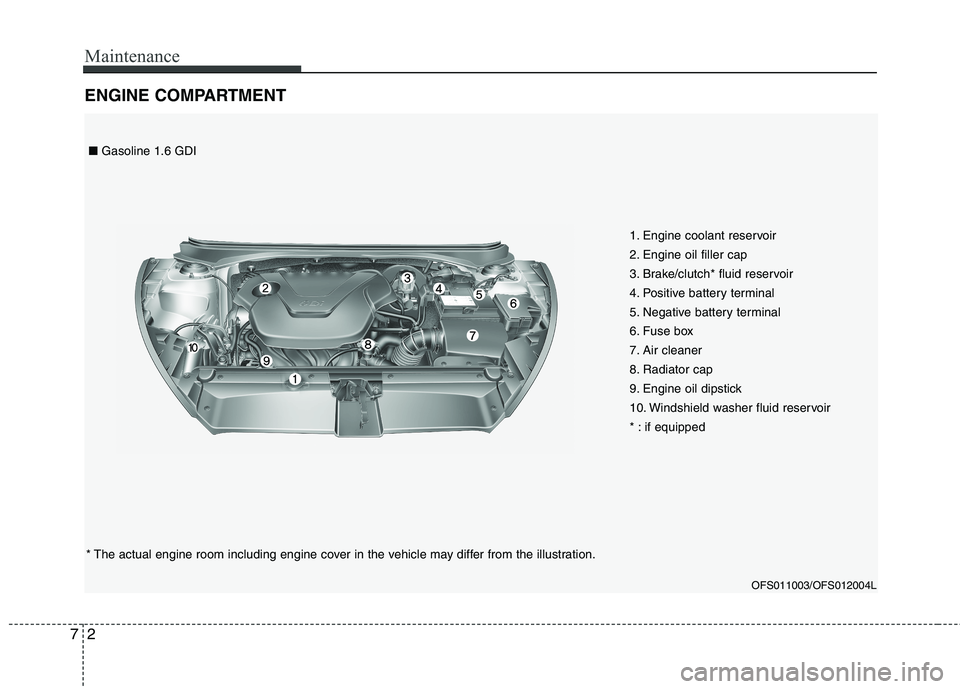
ENGINE COMPARTMENT
1. Engine coolant reservoir
2. Engine oil filler cap
3. Brake/clutch* fluid reservoir
4. Positive battery terminal
5. Negative battery terminal
6. Fuse box
7. Air cleaner
8. Radiator cap
9. Engine oil dipstick
10. Windshield washer fluid reservoir
* : if equipped
OFS011003/OFS012004L
* The actual engine room including engine cover in the vehicle may differ from the illustration.■Gasoline 1.6 GDI