2012 HYUNDAI IX35 lock
[x] Cancel search: lockPage 372 of 560
Maintenance
52
7
Position light
1. Turn off the engine and open the bon-
net.
2. Remove the headlight bulb cover by turning it counterclockwise.
3. Remove the socket from the assembly by pulling it out.
4. Remove the bulb by pulling it straight out.
5. Insert a new bulb into the socket.
6. Install the socket into the assembly by pushing it in.Front fog light bulbs (if equipped)
1. Remove the front bumper under cover.
2. Reach your hand into the back of thefront bumper.
3. Disconnect the power connector from the socket.
4. Remove the bulb-socket from the housing by turning the socket counter
clockwise until the tabs on the socketalign with the slots on the housing.
5. Install the new bulb-socket into the housing by aligning the tabs on the
socket with the slots in the housing.
Push the socket into the housing and
turn the socket clockwise.
6. Connect the power connector to the socket.
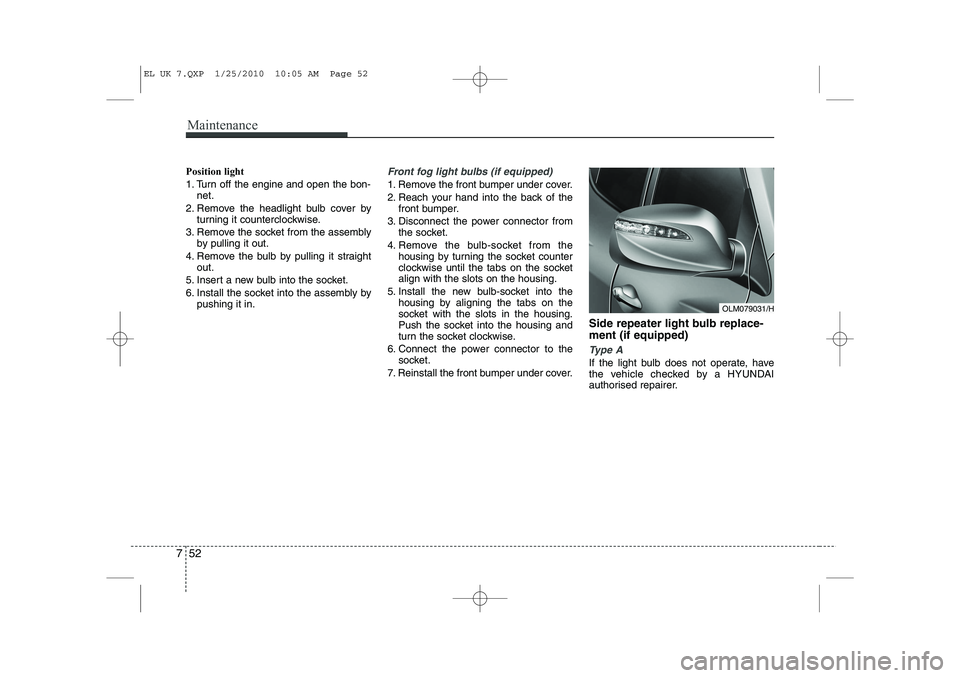
7. Reinstall the front bumper under cover. Side repeater light bulb replace- ment (if equipped)
Type A
If the light bulb does not operate, have
the vehicle checked by a HYUNDAI
authorised repairer.
OLM079031/H
EL UK 7.QXP 1/25/2010 10:05 AM Page 52
Page 374 of 560
Maintenance
54
7
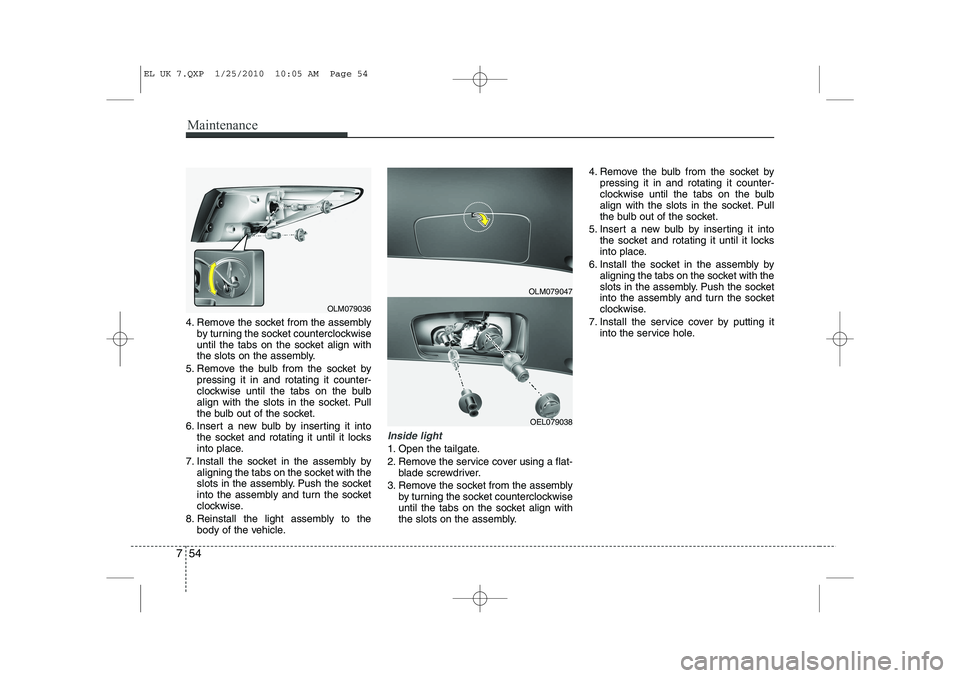
4. Remove the socket from the assembly
by turning the socket counterclockwise
until the tabs on the socket align with
the slots on the assembly.
5. Remove the bulb from the socket by pressing it in and rotating it counter-
clockwise until the tabs on the bulb
align with the slots in the socket. Pull
the bulb out of the socket.
6. Insert a new bulb by inserting it into the socket and rotating it until it locks
into place.
7. Install the socket in the assembly by aligning the tabs on the socket with the
slots in the assembly. Push the socket
into the assembly and turn the socket
clockwise.
8. Reinstall the light assembly to the body of the vehicle.
Inside light
1. Open the tailgate.
2. Remove the service cover using a flat-blade screwdriver.
3. Remove the socket from the assembly by turning the socket counterclockwise
until the tabs on the socket align with
the slots on the assembly. 4. Remove the bulb from the socket by
pressing it in and rotating it counter-
clockwise until the tabs on the bulb
align with the slots in the socket. Pull
the bulb out of the socket.
5. Insert a new bulb by inserting it into the socket and rotating it until it locks
into place.
6. Install the socket in the assembly by aligning the tabs on the socket with the
slots in the assembly. Push the socket
into the assembly and turn the socket
clockwise.
7. Install the service cover by putting it into the service hole.
OLM079047
OEL079038
OLM079036
EL UK 7.QXP 1/25/2010 10:05 AM Page 54
Page 375 of 560
755
Maintenance
Rear Fog Light (if equipped)
1. Remove the socket from the assemblyby turning the socket counterclockwise
until the tabs on the socket align with
the slots on the assembly.
2. Remove the bulb from the socket by pressing it in and rotating it counter-
clockwise until the tabs on the bulb
align with the slots in the socket. Pull
the bulb out of the socket.
3. Insert a new bulb in the socket.
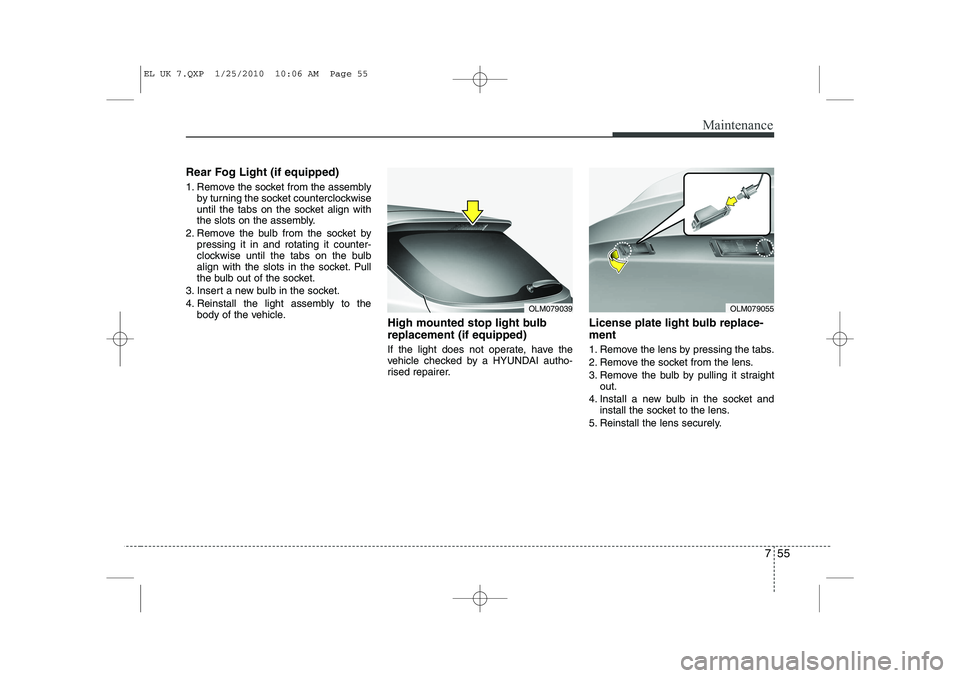
4. Reinstall the light assembly to the body of the vehicle. High mounted stop light bulb replacement (if equipped)
If the light does not operate, have the
vehicle checked by a HYUNDAI autho-
rised repairer. License plate light bulb replace- ment
1. Remove the lens by pressing the tabs.
2. Remove the socket from the lens.
3. Remove the bulb by pulling it straight
out.
4. Install a new bulb in the socket and install the socket to the lens.
5. Reinstall the lens securely.
OLM079039OLM079055
EL UK 7.QXP 1/25/2010 10:06 AM Page 55
Page 394 of 560
Specifications & Consumer information
8
8
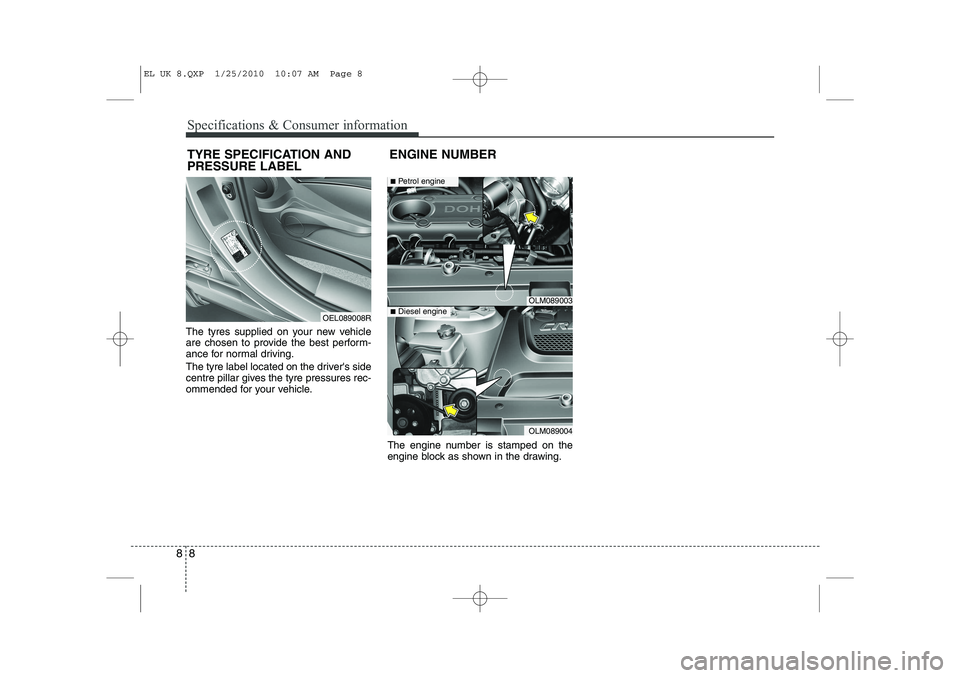
The tyres supplied on your new vehicle
are chosen to provide the best perform-
ance for normal driving.
The tyre label located on the driver's side
centre pillar gives the tyre pressures rec-
ommended for your vehicle.
The engine number is stamped on the
engine block as shown in the drawing.
TYRE SPECIFICATION AND PRESSURE LABEL
ENGINE NUMBER
OEL089008R
OLM089003
OLM089004
■
Petrol engine
■Diesel engine
EL UK 8.QXP 1/25/2010 10:07 AM Page 8
Page 403 of 560
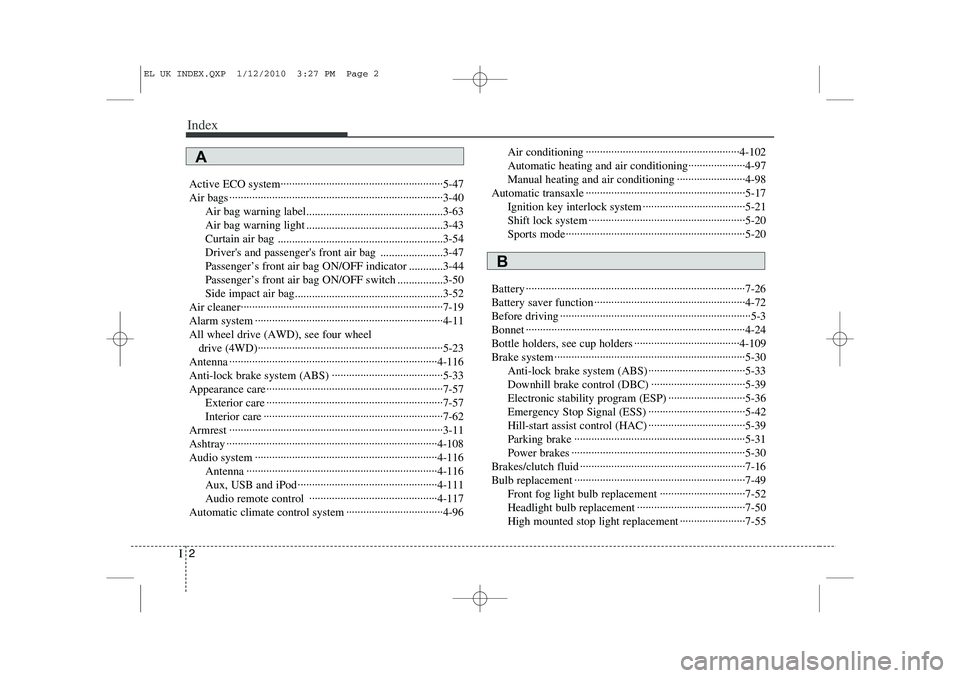
Index
2
I
Active ECO system·························································5-47
Air bags ···········································································3-40
Air bag warning label................................................3-63
Air bag warning light ................................................3-43
Curtain air bag ..........................................................3-54
Driver's and passenger's front air bag ......................3-47
Passenger’s front air bag ON/OFF indicator ............3-44
Passenger’s front air bag ON/OFF switch ................3-50
Side impact air bag....................................................3-52
Air cleaner·······································································7-19
Alarm system ··································································4-11All wheel drive (AWD), see four wheel drive (4WD)·································································5-23
Antenna ·········································································4-116
Anti-lock brake system (ABS) ·······································5-33
Appearance care······························································7-57 Exterior care ······························································7-57
Interior care ·······························································7-62
Armrest ···········································································3-11
Ashtray ··········································································4-108
Audio system ································································4-116 Antenna ···································································4-116
Aux, USB and iPod ·················································4-111
Audio remote control ·············································4-117
Automatic climate control system ··································4-96 Air conditioning ······················································4-102
Automatic heating and air conditioning····················4-97
Manual heating and air conditioning ························4-98
Automatic transaxle ························································5-17 Ignition key interlock system ····································5-21
Shift lock system ·······················································5-20
Sports mode·······························································5-20
Battery ·············································································7-26
Battery saver function ·····················································4-72
Before driving ···································································5-3
Bonnet ·············································································4-24
Bottle holders, see cup holders ·····································4-109
Brake system ···································································5-30 Anti-lock brake system (ABS) ··································5-33
Downhill brake control (DBC) ·································5-39
Electronic stability program (ESP) ···························5-36
Emergency Stop Signal (ESS) ··································5-42
Hill-start assist control (HAC) ··································5-39
Parking brake ····························································5-31
Power brakes ·····························································5-30
Brakes/clutch fluid ··························································7-16
Bulb replacement ····························································7-49 Front fog light bulb replacement ······························7-52
Headlight bulb replacement ······································7-50
High mounted stop light replacement ·······················7-55
A
B
EL UK INDEX.QXP 1/12/2010 3:27 PM Page 2
Page 404 of 560
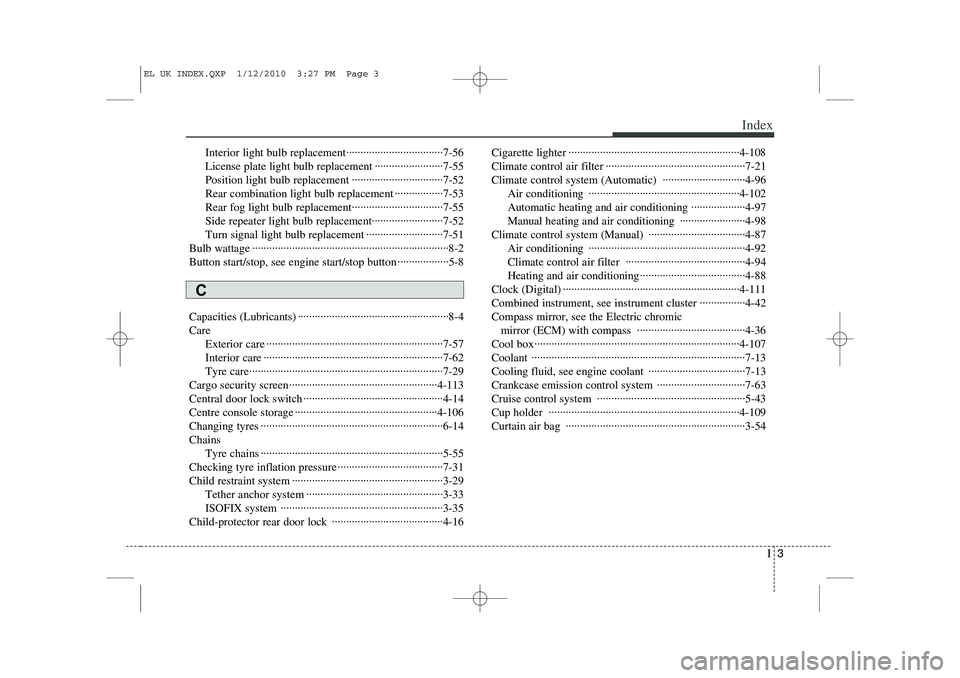
I3
Index
Interior light bulb replacement··································7-56
License plate light bulb replacement ························7-55
Position light bulb replacement ································7-52
Rear combination light bulb replacement ·················7-53
Rear fog light bulb replacement································7-55Side repeater light bulb replacement·························7-52
Turn signal light bulb replacement ···························7-51
Bulb wattage ·····································································8-2
Button start/stop, see engine start/stop button ··················5-8
Capacities (Lubricants) ·····················································8-4 Care Exterior care ······························································7-57
Interior care ·······························································7-62
Tyre care····································································7-29
Cargo security screen····················································4-113
Central door lock switch ·················································4-14
Centre console storage ··················································4-106
Changing tyres ································································6-14Chains Tyre chains ································································5-55
Checking tyre inflation pressure ·····································7-31
Child restraint system ·····················································3-29 Tether anchor system ················································3-33
ISOFIX system ·························································3-35
Child-protector rear door lock ·······································4-16 Cigarette lighter ····························································4-108
Climate control air filter ·················································7-21
Climate control system (Automatic) ·····························4-96
Air conditioning ·····················································4-102Automatic heating and air conditioning ···················4-97
Manual heating and air conditioning ·······················4-98
Climate control system (Manual) ··································4-87 Air conditioning ·······················································4-92
Climate control air filter ··········································4-94
Heating and air conditioning·····································4-88
Clock (Digital) ······························································4-111
Combined instrument, see instrument cluster ················4-42Compass mirror, see the Electric chromic mirror (ECM) with compass ······································4-36
Cool box········································································4-107Coolant ···········································································7-13
Cooling fluid, see engine coolant ··································7-13
Crankcase emission control system ·······························7-63
Cruise control system ····················································5-43
Cup holder ···································································4-109
Curtain air bag ·······························································3-54
C
EL UK INDEX.QXP 1/12/2010 3:27 PM Page 3
Page 405 of 560
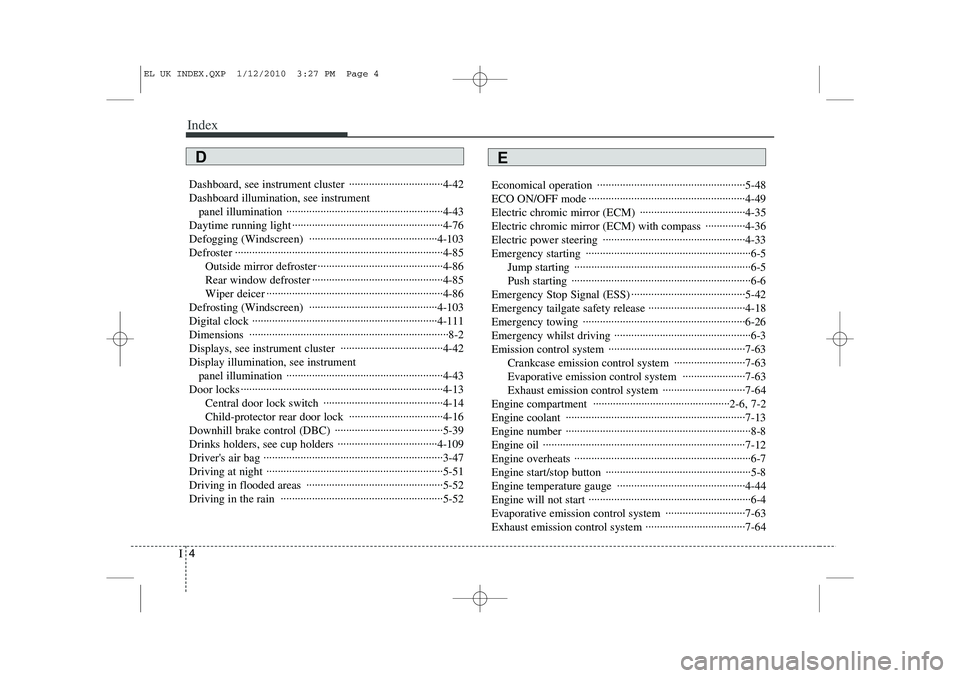
Index
4
I
Dashboard, see instrument cluster ·································4-42 Dashboard illumination, see instrument
panel illumination ·······················································4-43
Daytime running light ·····················································4-76
Defogging (Windscreen) ·············································4-103
Defroster ·········································································4-85 Outside mirror defroster ············································4-86
Rear window defroster ··············································4-85
Wiper deicer ······························································4-86
Defrosting (Windscreen) ·············································4-103
Digital clock ·································································4-111Dimensions ······································································8-2
Displays, see instrument cluster ····································4-42Display illumination, see instrument panel illumination ·······················································4-43
Door locks ·······································································4-13 Central door lock switch ··········································4-14
Child-protector rear door lock ·································4-16
Downhill brake control (DBC) ······································5-39
Drinks holders, see cup holders ···································4-109
Driver's air bag ·······························································3-47
Driving at night ······························································5-51
Driving in flooded areas ················································5-52
Driving in the rain ·························································5-52 Economical operation ····················································5-48
ECO ON/OFF mode ·······················································4-49
Electric chromic mirror (ECM) ·····································4-35
Electric chromic mirror (ECM) with compass ··············4-36
Electric power steering ··················································4-33
Emergency starting ··························································6-5
Jump starting ······························································6-5
Push starting ·······························································6-6
Emergency Stop Signal (ESS) ········································5-42Emergency tailgate safety release ··································4-18
Emergency towing ·························································6-26
Emergency whilst driving ················································6-3
Emission control system ················································7-63 Crankcase emission control system ·························7-63
Evaporative emission control system ······················7-63
Exhaust emission control system ·····························7-64
Engine compartment ················································2-6, 7-2
Engine coolant ·······························································7-13
Engine number ·································································8-8
Engine oil ·······································································7-12
Engine overheats ······························································6-7
Engine start/stop button ···················································5-8
Engine temperature gauge ·············································4-44
Engine will not start ·························································6-4
Evaporative emission control system ····························7-63
Exhaust emission control system ···································7-64
ED
EL UK INDEX.QXP 1/12/2010 3:27 PM Page 4
Page 407 of 560
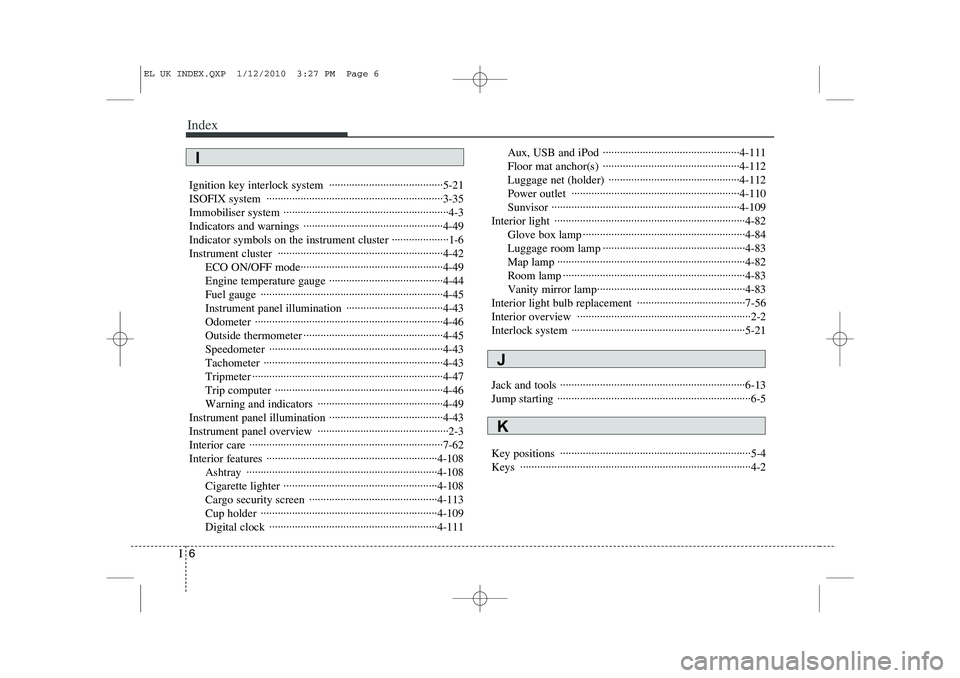
Index
6
I
Ignition key interlock system ········································5-21
ISOFIX system ······························································3-35
Immobiliser system ··························································4-3
Indicators and warnings ·················································4-49Indicator symbols on the instrument cluster ····················1-6
Instrument cluster ··························································4-42
ECO ON/OFF mode··················································4-49
Engine temperature gauge ········································4-44
Fuel gauge ································································4-45
Instrument panel illumination ··································4-43Odometer ··································································4-46
Outside thermometer ·················································4-45Speedometer ·····························································4-43Tachometer ·······························································4-43
Tripmeter ···································································4-47
Trip computer ···························································4-46
Warning and indicators ············································4-49
Instrument panel illumination ········································4-43
Instrument panel overview ··············································2-3
Interior care ····································································7-62
Interior features ····························································4-108 Ashtray ···································································4-108
Cigarette lighter ······················································4-108
Cargo security screen ·············································4-113
Cup holder ······························································4-109
Digital clock ···························································4-111 Aux, USB and iPod ················································4-111
Floor mat anchor(s) ················································4-112
Luggage net (holder) ··············································4-112
Power outlet ···························································4-110Sunvisor ··································································4-109
Interior light ···································································4-82 Glove box lamp ·························································4-84
Luggage room lamp ··················································4-83
Map lamp ··································································4-82
Room lamp ································································4-83
Vanity mirror lamp····················································4-83
Interior light bulb replacement ······································7-56
Interior overview ·····························································2-2
Interlock system ·····························································5-21
Jack and tools ·································································6-13
Jump starting ····································································6-5
Key positions ···································································5-4 Keys ·················································································4-2
K
J
I
EL UK INDEX.QXP 1/12/2010 3:27 PM Page 6