Page 348 of 681

�Î
�´ �µ�´ �µ
�Î
To change a track or tracklist , press
on the Category bar or the Skip bar.
The tracklist has six search
mode categories: album, artist,
track, playlist, genre, and album
record date. Within the selected
category, the tracklist will be
changed with the category bar. To replay the current track
continuously, push the interf ace
selector down during track playback.
Turn the interf ace dial to select
Repeat on the HDD AUDIO MENU,
andpressENTERontheinterface
selector. Turn the interf ace dial to
select the repeat icon, then press
ENTER on the interf ace selector.
To fast forward, press and hold the
side of the SKIP bar. To
rewind, press and hold the side
of the SKIP bar.
:
Category Bar Skip Bar
CONT INUED
The next tracklist is selected.
If youpress duringthelast
tracklist, the first tracklist is
selected.
The previous tracklist is selected.
If youpress duringthefirst
tracklist, the last tracklist is
selected.Returns to the beginning of the
song that is being played.
Otherwise, the previous track is
selected. If you press this bar
during the f irst song, the last song
is selected.
The next song is selected. If you
press this bar during the last song,
the f irst song is selected.
Changing a Track/Tracklist
Repeat Playback
Fast Forwarding and Rewinding
Playing Hard Disc Drive (HDD) Audio (Models with navigation syst em)
Features
341
REPEAT ICON
REPEAT OFF ICON
Main MenuTable of Contents
Page 349 of 681
To turn this feature off, turn the
interf ace dial to select the OFF icon,
then press ENTER on the interf ace
selector.This f unction plays tracks in the
current search mode in random
order. To activate random play, push
the interf ace selector down during
track playback. Turn the interface
dial to select Random on the HDD
AUDIO MENU. Press ENTER on
the interf ace selector. Turn the interface dial to select the
track random icon, and press
ENTER on the interf ace selector.
To turn this feature off, turn the
interf ace dial to select the OFF icon,
then press ENTER on the interf ace
selector.
Random Playback
Playing Hard Disc Drive (HDD) Audio (Models with navigation syst
em)
342
RANDOM ICON
RANDOM OFF ICON
Main MenuTable of Contents
Page 350 of 681

This f unction samples the tracks in
the current search mode in the order
that they were recorded.
To activate scan, push the interface
selector down during track playback.
Turn the interf ace dial to select Scan
on the HDD AUDIO MENU, and
press ENTER on the interf ace
selector.Turn the interface dial to select the
scan icon. Press ENTER on the
interf ace selector. You will hear a 10-
second sampling of each track in the
current search mode.
TheHDDhastwotypesof the
playlists: original playlist and user
playlist. On the original playlist, the
music CD is recorded automatically
when it is played. In addition, you
can create up to six user playlists on
the HDD. In each playlist, you can
store a desired music data f rom the
original playlists or music CDs.
You can also select the scan feature
with the SCAN button on the control
panel. Press and release the SCAN
button.
To turn this feature off, press the
SCAN button again, or turn the
interf ace dial to select the OFF icon,
andpressENTERontheinterface
selector. The system begins to play
the last track sampled.
CONT INUED
Scan Playback
Making a User Playlist
Playing Hard Disc Drive (HDD) Audio (Models with navigation syst em)
Features
343
SCAN OFF ICON
SCAN ICON
Main MenuTable of Contents
Page 351 of 681
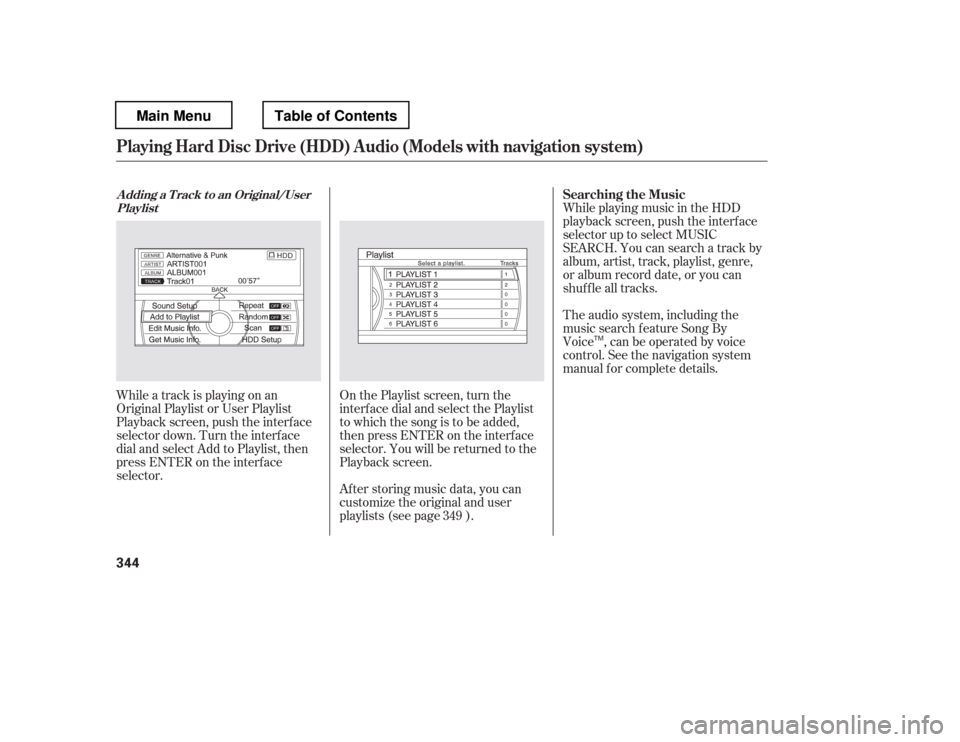
While playing music in the HDD
playback screen, push the interf ace
selector up to select MUSIC
SEARCH. You can search a track by
album, artist, track, playlist, genre,
or album record date, or you can
shuf f le all tracks.
While a track is playing on an
Original Playlist or User Playlist
Playback screen, push the interf ace
selector down. Turn the interf ace
dial and select Add to Playlist, then
press ENTER on the interf ace
selector. After storing music data, you can
customize the original and user
playlists (see page ).
On the Playlist screen, turn the
interf ace dial and select the Playlist
to which the song is to be added,
then press ENTER on the interf ace
selector. You will be returned to the
Playback screen. The audio system, including the
music search f eature Song By
Voice , can be operated by voice
control. See the navigation system
manual f or complete details.
349 Searching the Music
A dding a T rack t o an Original/User
Playlist
Playing Hard Disc Drive (HDD) Audio (Models with navigation syst em)
344
TM
Main MenuTable of Contents
Page 356 of 681
The f irst track on the selected album
begins to play.After storing the data, you can
change some items: name of an artist,
play list name, track title, music
genre, order of the tracks on the
original/user playlist. You can also
delete the track or the album from
the playlist.
You cannot change the artist name,
original play list name (album name),
track name, and music genre unless
you change them on the original play
list. On the HDD audio screen, push
up the interf ace selector to select
MUSIC SEARCH. Select Albums
or Playlists by turning the
interf ace dial, then press ENTER.
Turn the interf ace dial to select
the album list or the playlist, then
press ENTER.
Push the interf ace selector down
to display the AUDIO MENU for
the playlist.
1. 2. 3.
CONT INUED
Customizing Original/User
PlaylistChanging the Order of Tracks of the
Original Playlist or User Playlist
Playing Hard Disc Drive (HDD) Audio (Models with navigation syst em)
Features
349
Main MenuTable of Contents
Page 365 of 681
You can update the Gracenote
Album Inf o (GracenoteMedia
Database) that is included with the
navigation system.
Insert the update disc into the disc
slot, or connect the USB f lash
memory device that includes the
update.
To check the HDD audio capacity,
push the interf ace selector down to
display the AUDIO MENU. Turn the
interf ace dial to select HDD Setup,
then press ENTER.
You can check the HDD Audio
capacity and remaining space as well
as the Gracenote Music Recognition
Service (CDDB) version included
with the navigation system on the
HDD Setup screen.
Push the interf ace selector down
to display the AUDIO MENU.
Turn the interf ace dial and select
Get Music Inf o., then press
ENTER.
On the ‘‘Select an Album
Page 371 of 681

The audio system reads and plays
playable sound f iles on the iPod. The
system cannot operate an iPod as a
mass storage device. The system will
only play songs stored on the iPod
with iTunes.
iPod and iTunes are registered
trademarks owned by Apple Inc.
You can select the AUX mode by
using the voice control buttons.
iPods compatible with your audio
system using the USB adapter cable
are:
The audio system, including the
music search f eature Song By
Voice , can be operated by voice
control. See the navigation system
manual f or complete details.
This audio system can select and
play the audio f iles on the iPod
with
the same controls used f or the in-
dash disc player. To play an iPod,
connect it to the USB adapter cable
in the console compartment by using
your dock connector, then press the
USB/AUX button. The ignition
switch must be in the ACCESSORY
(I) or ON (II) position. The iPod will
also be charged with the ignition
switch in these settings.
Sof tware
Ver. 1.3 or more
Ver. 1.1.2 or more
Ver. 1.3.1 or more
Ver. 1.1.3 or more
Ver. 1.1.3 or more
Ver. 1.0.4 or more
Ver. 1.1.1 or more
Ver. 2.2.1 or more
Ver. 2.1.0 or more
Ver. 2.1.0 or more
Ver. 5.12.1 or more
Model
iPod 5th
generation
iPod classic
iPod nano
1st generation
iPod nano
2nd generation
iPod nano
3rd generation
iPod nano
4th generation
iPod touch
1st generation
iPod touch
2nd generation
iPhone
iPhone 3G
iPhone 3GSTo Play an iPod
Voice Cont rol Syst em
Playing an iPod(Models wit h navigat ion syst em)
364
TM
Main MenuTable of Contents
Page 373 of 681

�µEach time you press and
releasethe sideof theSKIPbar,
the system skips forward to the
beginning of the next track. Press
and release the side of the bar
to skip backward to the beginning of
the current track. Press it again to
skip to the beginning of the previous
track.
Use the SKIP bar while an iPod is
playing to select passages and
change f iles.
To move rapidly within playing track,
press and hold either side ( or
) of the SKIP bar.
If the iPod indicator does not appear
in the audio display, check the
connections, and try to reconnect the
iPod a f ew times.
If the audio system still does not
recognize the iPod, the iPod may
need to be reset. Follow the
instructions that came with your
iPod, or you can f ind reset
instructions online at
You can also select a track from any
category on the list: Playlists, Artists,
Albums, Songs, Genres, Composers
andPodcastsbyusingtheinterface
dial.
Push the interf ace selector up to
display the Music Search screen.
Turn the interf ace dial to select a
desired search method.
The current f ile number and total of
the selected playable f iles are
displayed in the center display.
Pressing the AUDIO button displays
the artist, album and track (f ile)
names on the navigation screen.
If a f ile on your iPod has an album
art, it will be shown in the display.
www.apple.com/ T o Change or Select Files
SK IP
Playing an iPod(Models wit h navigat ion syst em)
366
Main MenuTable of Contents


